



在我们排查网络日志时,经常需要反查日志中的 IP 到底是什么服务器。如果有好几百台服务器,每次查询 IP 都要一个一个核实,是比较麻烦的。
最终想实现的效果是自动替换掉日志中的IP为 "IP [备注]"的形式,比如:
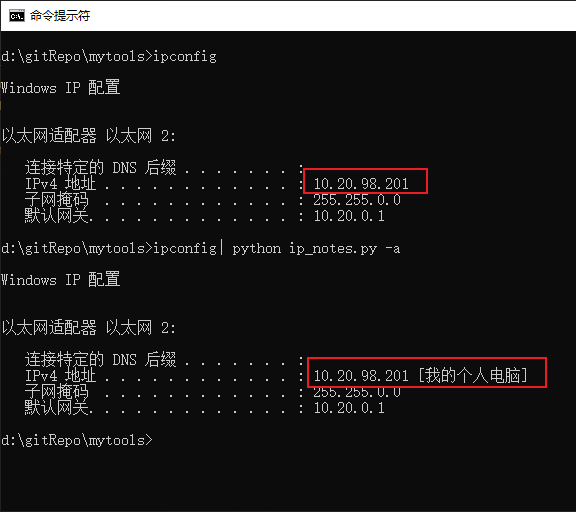
IP 备注信息通过文本文件输入至 Python Pickle 数据文件中作为长期存储,设计了一个 IP 字典用来存 IP 备注,如果备注信息有更新,则将新值写入字典中,旧值作为历史数据保存在集合中。
IP 字典可以用 key:value 的形式对 IP 进行索引,从而提高 IP 检索效率。历史 IP 数据存在集合中,使用集合的特性去重。IP 字典和历史数据集合最终通过 Pickle 实现数据持久化处理。重新运行命令行时不需要从纯文本文件中加载数据,因为数据量不大,最多6万多个IP,不需要上数据库。
命令行的界面为:
$ ./ip_notes.py -husage: ip_notes.py [-h] [--ip_file IP_FILE] [--data_file DATA_FILE][--interactive] [--list] [--erase]IP 备注optional arguments:-h, --help show this help message and exit--ip_file IP_FILE, -i IP_FILEIP 文件路径,文件内容格式:IP 备注--data_file DATA_FILE, -d DATA_FILE数据文件路径,默认数据文件:ip.pkl--interactive, -a 读取管道中的内容,并进行IP替换--list, -l 显示IP字典中的内容--erase, -e 清空数据文件内容
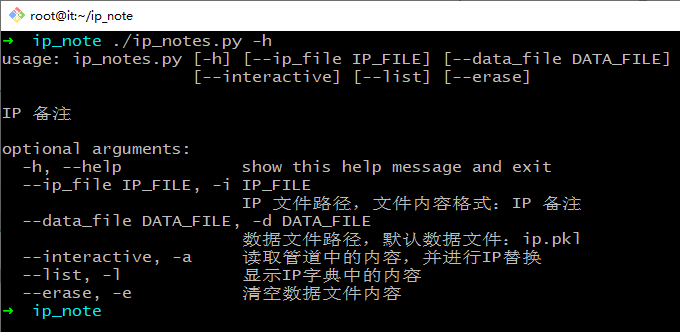
初次使用通过文本文件初始化数据文件,默认会使用 ip.pkl 作为数据文件存 IP 备注信息。
# 数据初始化$ python3 ip_notes.py -i ip.txt# 显示格式化后的字典内容$ python3 ip_notes.py -lIP dict:------------------------------192.168.10.23: ('院内网盘',)192.168.10.200: ('院内系统合集',)10.20.98.201: ('我的个人电脑',)IP history set:==============================(empty)
IP备注的原始数据文件是以 “IP 备注” 格式录入的纯文本文件,使用 txt 格式作为数据装载。数据装载的动作可以多次执行,当字典中 IP 已存在时会自动跳过。
原始数据文件格式为:
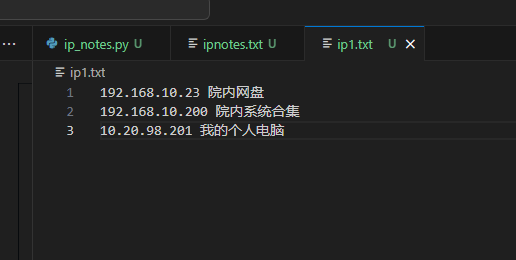
数据装载时会自动跳过空行及只有 IP 没有备注的行。注意文本文件没有行号,截图中的行号为编辑器自动添加的。在数据装载时要注意文本文件编码格式,默认使用的是 UTF-8。如果是在 Windows 上编辑需要处理文件编码的自动识别,晚点会把编码判断的功能加上。文件编码识别要用到 chardet 库,这里先埋个坑,chardet 编码识别示例代码为:
import chardetdef detect_file_encoding(file_path):with open(file_path, 'rb') as file:detector = chardet.universaldetector.UniversalDetector()for line in file:detector.feed(line)if detector.done:breakdetector.close()result = detector.resultprint(f"Detected encoding: {result['encoding']} with confidence {result['confidence']}")# 示例用法file_path = 'path/to/your/file.txt'detect_file_encoding(file_path)
实际使用中可以先查看 IP 字典中已有的备注信息,在执行具体命令时通过管道将内容传递给命令行工具,激活管道解析使用的命令选项是 -a
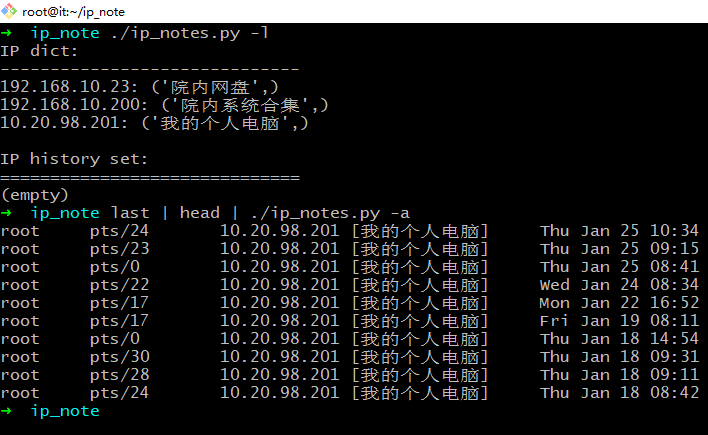
以上命令是替换掉 last 命令中的 IP,将备注信息打在 IP 后面,使用的是正则表达式替换,不会出现部分替换的情况。
再给一个显示 ipset 的例子:
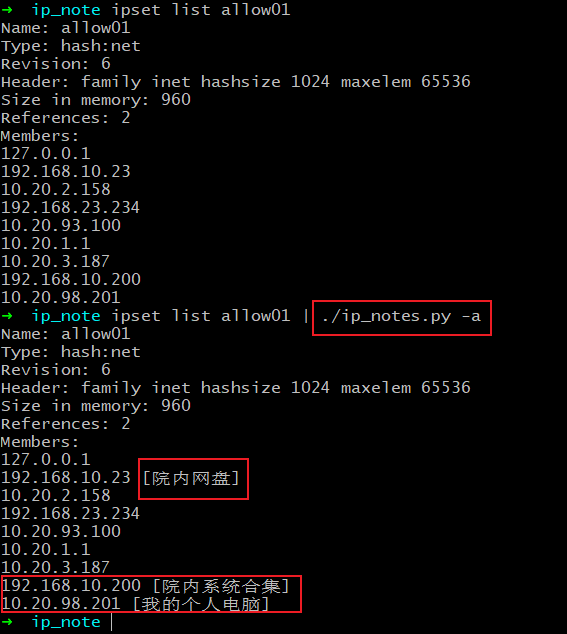
也能处理一行中存在多个 IP 的情况:

当字符串中的IP不在字典中时,不会做替换。同样只有一部分适配时也不会作替换,比如不会把 192.168.10.233 识别成 192.168.10.23
当没有管道输入时,会停留在交互模式,可以手工输入 IP 查询备注:
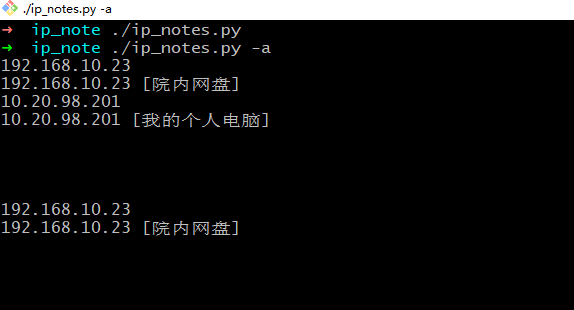
如果要重置数据文件,可以使用 -e 选项:
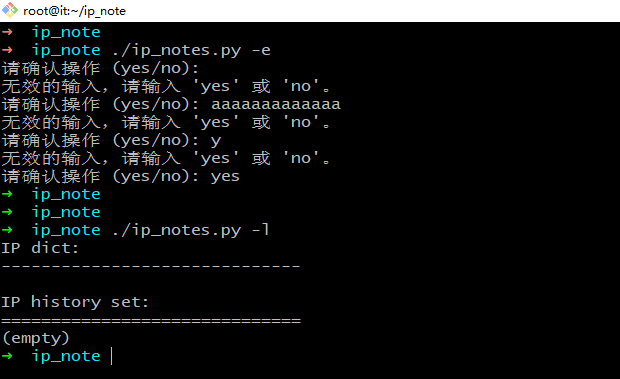
重置后,数据文件为空。使用 -l 选项,IP 字典为空。后续可以重新使用 -i 选项装载数据。
代码还不完善,初始版本将就可用,里面定义了一些多余的函数和类没有删除。
代码如下:
#!env python3import pickleimport osimport argparseimport reimport sysfrom pprint import pprint# IP 字典ip_dict = dict()# IP 备注历史ip_history = set()class MyIP:def __init__(self, value):self.value = valuedef __hash__(self):# 返回对象的哈希值return hash(self.value[0])def __eq__(self, other):# 比较两个对象是否相等if isinstance(other, MyIP):return self.value == other.valuereturn Falsedef __str__(self):return f"{self.value[0]} {' '.join(self.value[0:])}"def __repr__(self):return f"{self.value[0]}\t{self.value[0:]}"def foreach_set(myset):# 创建迭代器iterator = iter(myset)# 使用while循环和next函数遍历集合中的元素while True:try:element = next(iterator)pprint(element)except StopIteration:breakdef foreach_dict(mydict):for key, value in mydict.items():print(f"{key}: {value}")def load_data(file_path):global ip_dict, ip_historyif os.path.exists(file_path):with open(file_path, 'rb') as file:loaded_data = pickle.load(file)ip_dict, ip_history = loaded_data[0], loaded_data[1]def save_data(file_path):global ip_dict, ip_historydata = [ip_dict, ip_history]with open(file_path, 'wb') as file:pickle.dump(data, file)def insert_ip_note(file_path):global ip_dict, ip_history# 检查文件是否存在if not os.path.exists(file_path):print(f"The file at {file_path} does not exist.")with open(file_path, 'r', encoding='utf-8') as f:line = f.readline()while line:#pprint(line)ip_line = line.split()# 过滤空行及无备注的行if len(ip_line) <= 1:line = f.readline()continueip_tmp = tuple(ip_line)k, v = ip_tmp[0], ip_tmp[1:]if k in ip_dict:if v != ip_dict[k]:#pprint(ip_dict[k])old_ip = ip_dict.pop(k)ip_dict.update({k:v})ip_history.add((k,)+old_ip)else:ip_dict.update({k:v})# pprint(line.split())line = f.readline()# 删历史IPdef clean_ip_history():history_ip = '192.168.1.1'list_to_remove = []for item in ip_history:if item[0] == history_ip:list_to_remove.append(item)for item in list_to_remove:ip_history.discard(item)def regex(pattern, line):match = pattern.findall(line)if not match:returnreturn(match)# 返回IP位置def regex_pos(pattern, line):match = pattern.search(line)if not match:return len(line)return(match.end())def search_ip_dict(s):global ip_dictif s in ip_dict:return s + ' [' + ' '.join(ip_dict[s]) +']'else:return s# 替换字符串中的IP为带备注的版本def replace_ip():pattern_ip = re.compile(r'((?:(?:25[0-5]|2[0-4][0-9]|[01]?[0-9][0-9]?)\.){3}(?:25[0-5]|2[0-4][0-9]|[01]?[0-9][0-9]?))')f = sys.stdinline = f.readline()while line:ret = regex(pattern_ip, line)if ret:line_list = []ip_end = len(line)for i in ret:ip1 = search_ip_dict(i)ip_end = regex_pos(pattern_ip, line)line_changed = line[0:ip_end]line_list.append(line_changed.replace(i, ip1))line = line[ip_end:]line_list.append(line)print(''.join(line_list), end='', flush=True)line = f.readline()else:print(line, end='', flush=True)line = f.readline()# 显示 IP 字典内容def show():#pprint(ip_dict)print('IP dict:')print('-'*30)foreach_dict(ip_dict)print()print('IP history set:')print('='*30)foreach_set(ip_history)if not ip_history:print('(empty)')def erase(data_file):global ip_dict, ip_historywhile True:user_input = input("请确认操作 (yes/no): ").lower() # 将输入转换为小写,以便不区分大小写if user_input == 'yes':ip_dict = dict()ip_history = set()save_data(data_file)breakelif user_input == 'no':print("取消操作。")breakelse:print("无效的输入,请输入 'yes' 或 'no'。")if __name__ == '__main__':# 创建 ArgumentParser 对象parser = argparse.ArgumentParser(description='IP 备注')# 添加命令行参数parser.add_argument('--ip_file', '-i', type=str, default='', help='IP 文件路径,文件内容格式:IP 备注')parser.add_argument('--data_file', '-d', type=str, default='ip.pkl', help='数据文件路径,默认数据文件:ip.pkl')parser.add_argument('--interactive', '-a', action='store_true', help='读取管道中的内容,并进行IP替换')parser.add_argument('--list', '-l', action='store_true', help='显示IP字典中的内容')parser.add_argument('--erase', '-e', action='store_true', help='清空数据文件内容')# 解析命令行参数args = parser.parse_args()ip_file = args.ip_filedata_file = args.data_fileinteractive = args.interactiveshow_ip = args.listerase_data = args.eraseload_data(data_file)if os.path.exists(ip_file):insert_ip_note(ip_file)if interactive:replace_ip()if show_ip:show()if erase_data:erase(data_file)# 如果有文件输入,则存盘if ip_file:save_data(data_file)
全文完。
如果转发本文,文末务必注明:“转自微信公众号:生有可恋”。
