



在 windows 和 linux 命令行输出文本文件会遇到编码混乱的问题,默认 windows 命令行的标准输出为 gb2312 编码,linux 及 python 的默认编码为 utf-8。当使用重定向时,会使用系统的默认编码。
举个例子,在 windows cmd 命令执行 ipconfig 将屏幕输出重定向至文件:
C:\> ipconfig > ipconfig.txtC:\> file ipconfig.txtipconfig.txt: ISO-8859 text, with CRLF line terminators
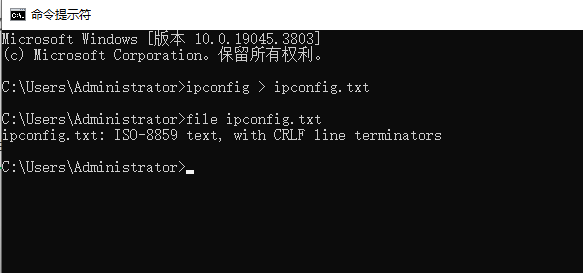
使用 git-bash下带的 linux 工具 file 检查文件编码类型,显示重定向后的文件编码为 ISO-8859
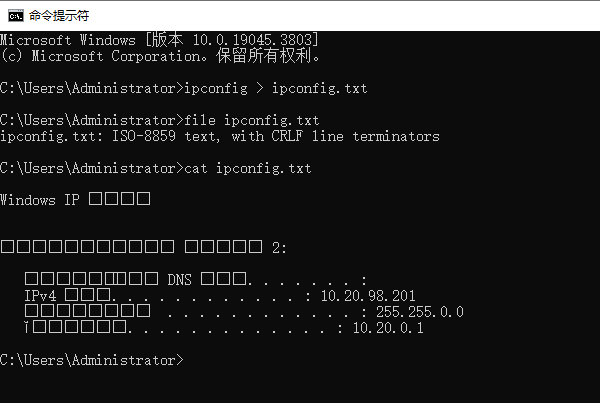
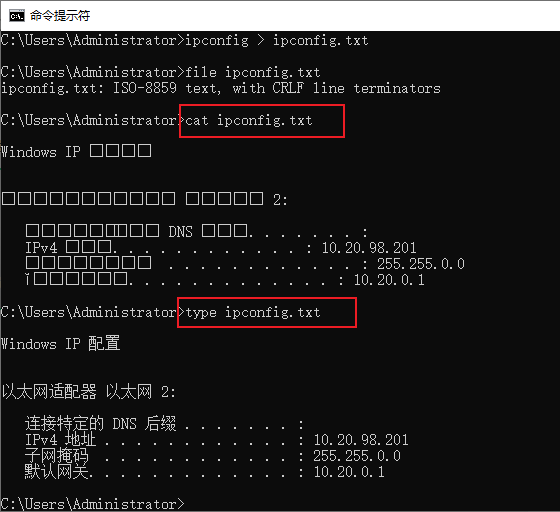
此时如果使用 linux 工具 cat 查看文件内容,会显示乱码:
相反,如果使用 windows 下的命令行工具 type,则可以正常显示文件内容:
这里 file 工具识别的 ISO-8859 实际上是不准确的,使用其它更严格的工具识别后的编码实际上是gb2312。使用 vim 打开 ipconfig.txt 可以查看当前文件的正确编码格式:
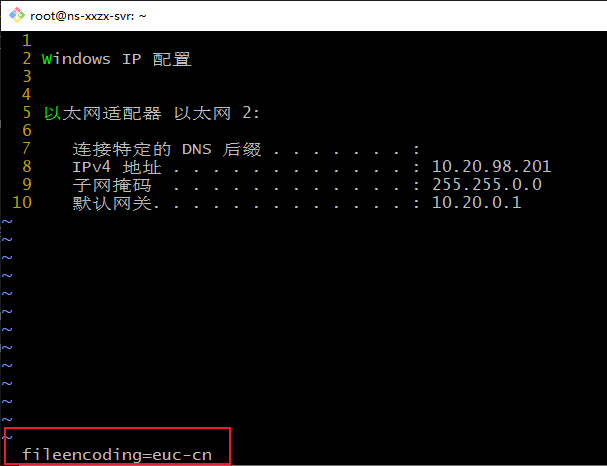
使用 vim 命令 :set fileencoding? 时会显示当前打开的文件编码格式为 euc-cn。
EUC-CN 是 Extended Unix Code for Simplified Chinese 的缩写。EUC-CN 是一种扩展的Unix字符编码方案,也是双字节的编码,但是它不仅可以表示简体中文字符,还可以表示其他语言的字符。EUC-CN 编码范围涵盖了GB2312,并在其基础上进行了扩展。可以说 GB2312 是 EUC-CN 的一个子集,所以这里使用 euc-cn 编码打开文件并不会出现乱码。
当我们使用 python 读文本文件时,如果使用 utf-8 编码格式读取 gb2312 编码的文件,此时会报错,比如:
d:\gitRepo\ip_notes>python ip_notes.py -i ipdata\dns.txtTraceback (most recent call last):File "d:\gitRepo\ip_notes\ip_notes.py", line 311, in <module>insert_ip_note(ip_file)File "d:\gitRepo\ip_notes\ip_notes.py", line 93, in insert_ip_noteline = f.readline()^^^^^^^^^^^^File "<frozen codecs>", line 322, in decodeUnicodeDecodeError: 'utf-8' codec can't decode byte 0xba in position 113: invalid start byte
因为 python 默认打开文件的编码方式是 utf-8,如果不指定编码类型,python 读文本文件时会以 utf-8 的编码打开。此时读到 gb2312 编码的中文字符时就会报错。
我们可以在读文件前先判断文件的编码类型,获取到编码类型后再以正确的编码格式打开。这里会用到 python 的第三方库 chardet,使用前先用 pip 安装 chardet :
C:\> pip install chardetLooking in indexes: https://mirrors.aliyun.com/pypi/simpleRequirement already satisfied: chardet in c:\users\administrator\appdata\local\programs\python\python311\lib\site-packages (5.2.0)
以下是两个处理编码的小工具:
check_file_encoding.py
convert_to_utf8.py
其中 check_file_encoding.py 用于检查文件编码:
d:\> python check_file_encoding.py -husage: check_file_encoding.py [-h] files [files ...]Check file encodingspositional arguments:files File paths to check.You can use * for wildcard expansion.options:-h, --help show this help message and exit
执行时以 * 通配符匹配当前目录下的所有文件,输出为文件的编码类型:
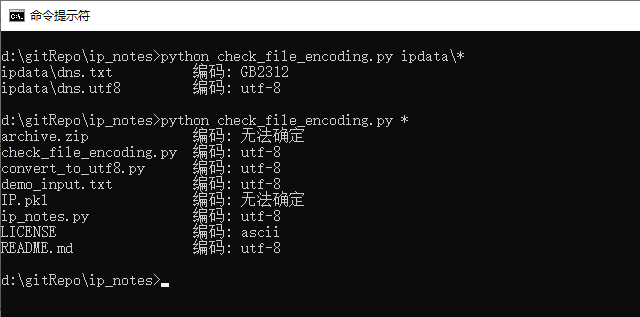
另一个工具 convert_to_utf8.py 是进行编码转换的,将任意编码转换为 utf-8,工具帮助如下:
d:\> python convert_to_utf8.py -husage: convert_to_utf8.py [-h] [-i INPUT] [-o OUTPUT]Convert file encoding to UTF-8options:-h, --help show this help message and exit-i INPUT, --input INPUTInput file path.If not provided, read from standard input.-o OUTPUT, --output OUTPUTOutput file path.If not provided, write to standard output.d:\gitRepo\ip_notes>
使用示例:
d:\> python convert_to_utf8.py -i ipdata\dns.txt -o ipdata\dns_utf8.txt文件已转换: ipdata\dns.txt -> ipdata\dns_utf8.txtd:\> python check_file_encoding.py ipdata\dns.txt ipdata\dns_utf8.txtipdata\dns.txt 编码: GB2312ipdata\dns_utf8.txt 编码: utf-8
在执行编码转换时,会使用 chardet 库检查输入文件的编码类型,确保能以正确的编码打开文件,最终会以 utf-8 格式输出文件。
工具代码可以通过 github 地址下载:
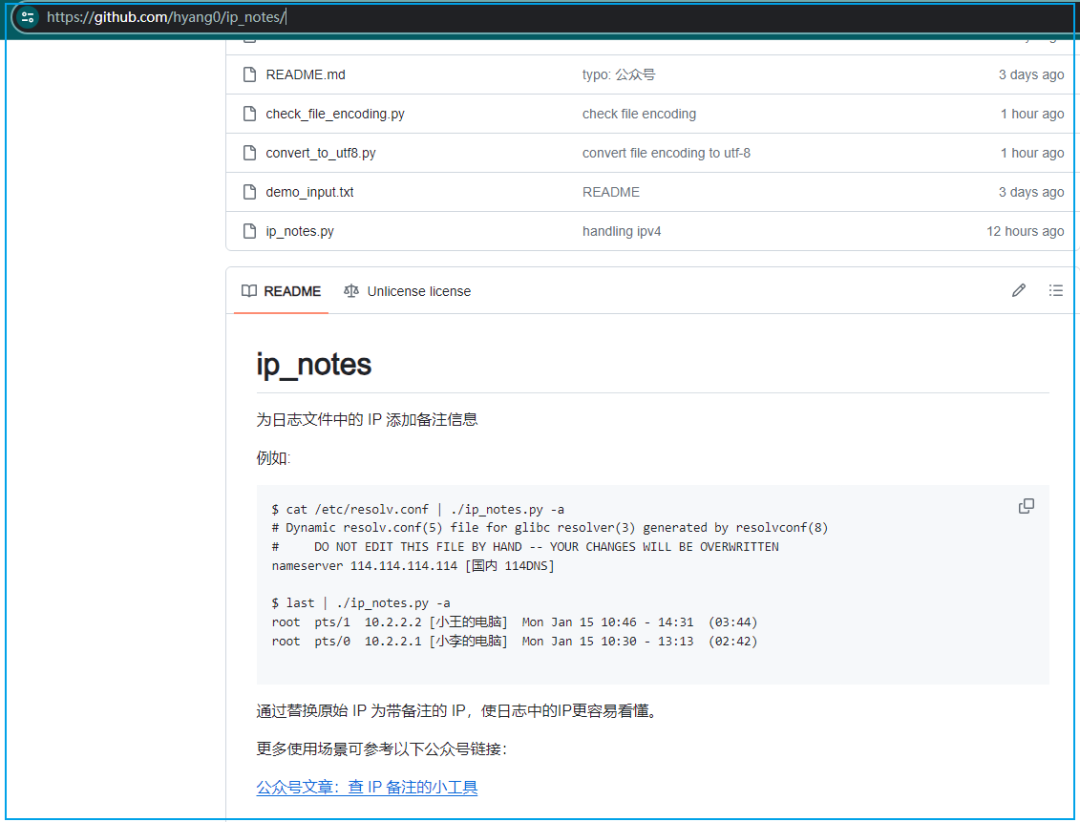
https://github.com/hyang0/ip_notes/
前两天写的查 IP 备注的小工具代码已经提交至 github。因为涉及到编码转换,于是写了两个小工具用来处理编码识别和转换。以上两个小工具与查 IP 备注的工具在同一个项目 ip_notes 中,这里就不再贴代码了:
linux 下 iconv 工具也可以处理编码转换,我一般将其设置为 alias 别名使用:
bash$ type iiconviiconv is aliased to `iconv -f GBK -t UTF-8'bash$
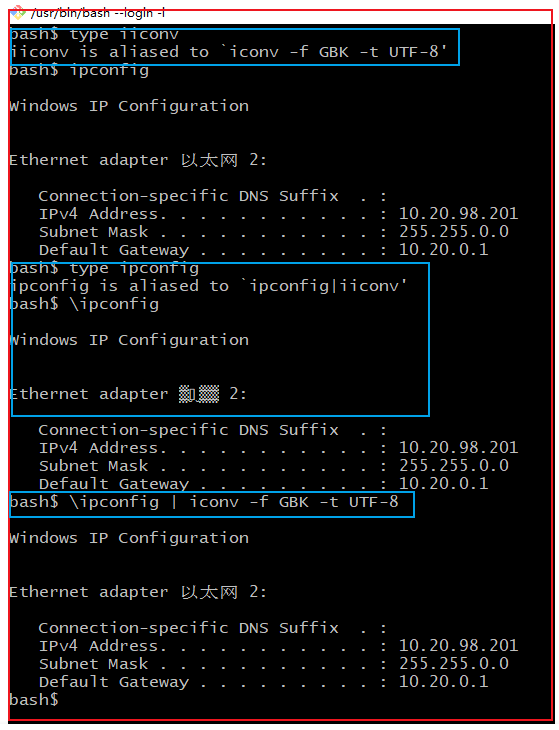
直接在 git-bash 下直接执行 ipconfig 会显示乱码,使用 alias 别名将 ipconfig 包装成 ipconfig | iconv -f GBK -t UTF-8 后再执行就不会出现乱码。
注意:在 linux 环境下,如果命令是 alias 包装下的命令,可以使用 \cmd 直接调用原始命令,比如 \ipconfig 就是调用的原始命令。
全文完。
如果转发本文,文末务必注明:“转自微信公众号:生有可恋”。
