



Windows 下自带的 find 和 findstr 命令可以起到基本的过滤作用,但效果不是很好,也不支持正则表达式。Linux 下的 grep 功能强大,但迁移到 windows 的版本,在 cmd 下会遇到编码问题,无法处理中文。
比如:
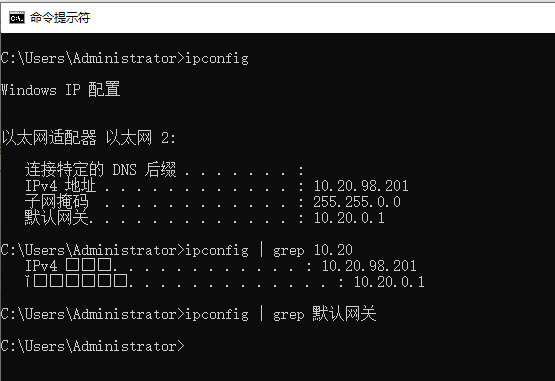
于是打算自己实现一个简版的 grep ,首先要能处理正则表达式和普通字符串,其次支持在 windows cmd 下运行,能够正确处理中文。
最终效果如下:
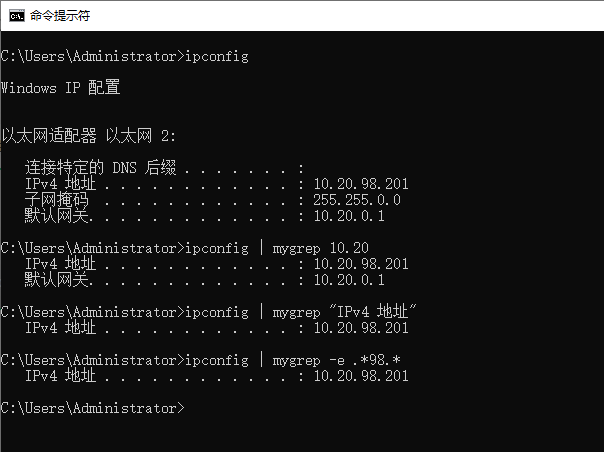
简版的 mygrep 工具支持字符串子串匹配和正则匹配两种模式,不带选项的为子串匹配,带 -e 参数的为正则匹配。mygrep 工具的帮助文档为:
C:\> mygrep -husage: mygrep [-h] [-e] pattern [file]类似于grep的命令行工具,按行进行匹配。positional arguments:pattern 搜索模式,可以是正则表达式或子串file 要搜索的文件,如果未提供则从标准输入读取options:-h, --help show this help message and exit-e, --regex 使用正则表达式进行匹配
为了既能在 Windows cmd 下执行,同时也能在 Windows git-bash 中执行,加了环境变量的判断条件,如果是在 git-bash 环境下执行,则将标准输出编码改为 utf-8 :
import platformdef change_default_encoding():'''判断是否在 windows git-bash 下运行,是则使用 utf-8 编码'''if platform.system() == 'Windows':terminal = os.environ.get('TERM')if terminal and 'xterm' in terminal:sys.stdout.reconfigure(encoding='utf-8')
这里用到了 TERM 环境变量,如果是在 git-bash 环境,该变量值为 xterm。Windows 下的 Python 解析器的默认标准输出编码为 GB2312,git-bash 环境下 Python 程序输出中文会出乱码。将标准输出默认编码改为 utf-8 后,git-bash 下则不会再出现中文乱码。
mygrep 代码如下:
import argparseimport reimport sysimport platformdef change_default_encoding():'''判断是否在 windows git-bash 下运行,是则使用 utf-8 编码'''if platform.system() == 'Windows':terminal = os.environ.get('TERM')if terminal and 'xterm' in terminal:sys.stdout.reconfigure(encoding='utf-8')def grep(pattern, file, use_regex):"""类似于grep的函数,对每一行文本进行匹配,如果匹配则打印相应行,否则跳过。参数:pattern (str): 搜索模式,可以是正则表达式或子串file: 文件对象或标准输入use_regex (bool): 是否使用正则表达式匹配返回:None"""for line in file:if use_regex:# 如果使用正则表达式匹配,使用re.searchmatch = re.search(pattern, line)else:# 否则,使用普通的字符串查找match = pattern in line# 如果匹配成功,打印相应行if match:print(line, end='')def main():change_default_encoding()# 创建命令行解析器parser = argparse.ArgumentParser(description="类似于grep的命令行工具,按行进行匹配。")# 添加命令行参数parser.add_argument("-e", "--regex", action="store_true",help="使用正则表达式进行匹配")parser.add_argument("pattern", help="搜索模式,可以是正则表达式或子串")parser.add_argument("file", nargs='?', type=argparse.FileType('r'), default=sys.stdin,help="要搜索的文件,如果未提供则从标准输入读取")# 解析命令行参数args = parser.parse_args()try:# 调用grep函数,逐行处理文本grep(args.pattern, args.file, args.regex)except Exception as e:print(f"发生错误: {e}")sys.exit(1)if __name__ == "__main__":main()
也可到我的 github 项目中下载源码:
https://github.com/hyang0/ip_notes
如果是在 Windows cmd 下使用,可以使用 pyinstaller 将其编译为 exe 可执行文件。
pyinstaller --onefile mygrep.py
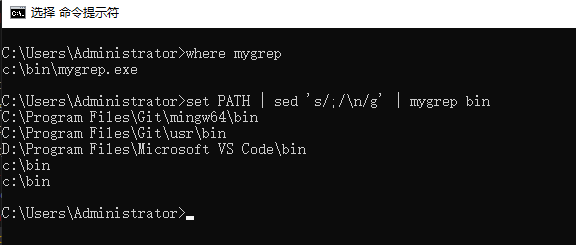
将编译后的可执行文件 mygrep.exe 放至 PATH 环境变量下的目录,这样就可以在 cmd 命令行中调用 mygrep 工具了。
全文完。
如果转发本文,文末务必注明:“转自微信公众号:生有可恋”。
文章转载自生有可恋,如果涉嫌侵权,请发送邮件至:contact@modb.pro进行举报,并提供相关证据,一经查实,墨天轮将立刻删除相关内容。
