今天一个微信群网友私信我有个case,请求帮忙给点意见,说上午业务繁忙,一个数据库节点自动重启了。我们先来看看数据库告警日志。
Thu Feb 01 09:31:20 2024Archived Log entry 1886895 added for thread 2 sequence 1027967 ID 0x436ee63 dest 1:Thu Feb 01 09:32:38 2024***********************************************************************Fatal NI connect error 12170.VERSION INFORMATION:TNS for IBM/AIX RISC System/6000: Version 11.2.0.3.0 - ProductionTCP/IP NT Protocol Adapter for IBM/AIX RISC System/6000: Version 11.2.0.3.0 - ProductionOracle Bequeath NT Protocol Adapter for IBM/AIX RISC System/6000: Version 11.2.0.3.0 - ProductionTime: 01-FEB-2024 09:32:38Tracing not turned on.Tns error struct:ns main err code: 12535TNS-12535: TNS:operation timed outns secondary err code: 12606nt main err code: 0nt secondary err code: 0nt OS err code: 0Client address: (ADDRESS=(PROTOCOL=tcp)(HOST=10.133.210.112)(PORT=56224))WARNING: inbound connection timed out (ORA-3136)Thu Feb 01 09:32:39 2024......***********************************************************************Thu Feb 01 09:32:45 2024Thu Feb 01 09:32:45 2024Fatal NI connect error 12170.Thu Feb 01 09:32:45 2024Thu Feb 01 09:32:45 2024Fatal NI connect error 12170.Fatal NI connect error 12170.Thu Feb 01 09:32:45 2024Thu Feb 01 09:32:45 2024Thu Feb 01 09:32:45 2024Thu Feb 01 09:32:45 2024Thu Feb 01 09:32:45 2024Fatal NI connect error 12170.Thu Feb 01 09:32:45 2024**********************************************************************************************************************************************......Thu Feb 01 10:20:10 2024PMON failed to acquire latch, see PMON dumpThu Feb 01 10:21:10 2024PMON failed to acquire latch, see PMON dumpThu Feb 01 10:21:43 2024Errors in file app/oracle/diag/rdbms/xxxxcogstb/xxxxcog2/trace/xxxxcog2_smco_36831644.trc (incident=2667623):ORA-00445: background process "W004" did not start after 120 secondsThu Feb 01 10:22:01 2024Killing enqueue blocker (pid=2425816) on resource CF-00000000-00000000 by (pid=36569482)Thu Feb 01 10:22:22 2024PMON failed to acquire latch, see PMON dumpThu Feb 01 10:23:05 2024IPC Send timeout detected. Receiver ospid 38601620 [oracle@tystyxr2 (LCK0)]Receiver is waiting for a latch, dumping latch state for ospid 38601620 [oracle@tystyxr2 (LCK0)] 38601620Thu Feb 01 10:23:05 2024Errors in file app/oracle/diag/rdbms/xxxxcogstb/xxxxcog2/trace/xxxxcog2_ora_43189812.trc:Thu Feb 01 10:23:07 2024Errors in file app/oracle/diag/rdbms/xxxxcogstb/xxxxcog2/trace/xxxxcog2_lck0_38601620.trc:Dumping diagnostic data in directory=[cdmp_20240201102307], requested by (instance=2, osid=43189812), summary=[abnormal process termination].Thu Feb 01 10:23:09 2024ORA-00020: maximum number of processes (8000) exceededORA-20 errors will not be written to the alert log forthe next minute. Please look at trace files to see allthe ORA-20 errors.Thu Feb 01 10:23:26 2024Process PZ53 submission failed with error = 20Thu Feb 01 10:24:10 2024ORA-00020: maximum number of processes (8000) exceededORA-20 errors will not be written to the alert log forthe next minute. Please look at trace files to see allthe ORA-20 errors.Thu Feb 01 10:24:14 2024.....WARNING: inbound connection timed out (ORA-3136)Thu Feb 01 10:33:46 2024NOTE: ASMB terminatingErrors in file app/oracle/diag/rdbms/xxxxcogstb/xxxxcog2/trace/xxxxcog2_asmb_2425816.trc:ORA-15064: communication failure with ASM instanceORA-03135: connection lost contactProcess ID:Session ID: 993 Serial number: 44Errors in file app/oracle/diag/rdbms/xxxxcogstb/xxxxcog2/trace/xxxxcog2_asmb_2425816.trc:ORA-15064: communication failure with ASM instanceORA-03135: connection lost contactProcess ID:Session ID: 993 Serial number: 44ASMB (ospid: 2425816): terminating the instance due to error 15064Thu Feb 01 10:33:46 2024System state dump requested by (instance=2, osid=2425816 (ASMB)), summary=[abnormal instance termination].System State dumped to trace file app/oracle/diag/rdbms/xxxxcogstb/xxxxcog2/trace/xxxxcog2_diag_6422788.trcThu Feb 01 10:33:47 2024ORA-1092 : opitsk aborting processThu Feb 01 10:33:47 2024ORA-1092 : opitsk aborting process......Thu Feb 01 10:33:50 2024ORA-1092 : opitsk aborting processInstance terminated by ASMB, pid = 2425816USER (ospid: 13895476): terminating the instanceInstance terminated by USER, pid = 13895476Thu Feb 01 10:34:08 2024Starting ORACLE instance (normal)LICENSE_MAX_SESSION = 0LICENSE_SESSIONS_WARNING = 0Picked latch-free SCN scheme 3Autotune of undo retention is turned on.LICENSE_MAX_USERS = 0SYS auditing is disabledStarting up:Oracle Database 11g Enterprise Edition Release 11.2.0.3.0 - 64bit ProductionWith the Partitioning, Real Application Clusters, OLAP, Data Miningand Real Application Testing options.ORACLE_HOME = app/product/11.2.0/db
看上去大致是数据库连接数撑满了,最后数据库夯死,后面集群脑裂,因为Oracle 11gR2引入的reboot less特性,不会重启整个集群而是重启实例,因此把该节点数据库重启了。(数据库夯死,ipc send timeout了,这是必然)。
那么数据库实例被重启主要是因为核心进程asmb被kill了,而该进程被kill,主要是因为持有了cf锁释放.一旦任何进程持有cf锁,时间超过120秒,如果不释放都将被kill,这是Oracle 11gR2的机制,有如下几个参数来进行控制:
NAME VALUE DESCRIB------------------------------------------------------- -------------------- --------------------------------------------------------------------------------_controlfile_enqueue_timeout 900 control file enqueue timeout in seconds_controlfile_enqueue_holding_time 120 control file enqueue max holding time in seconds_controlfile_enqueue_holding_time_tracking_size 10 control file enqueue holding time tracking size_controlfile_enqueue_dump FALSE dump the system states after controlfile enqueue timeout_kill_controlfile_enqueue_blocker TRUE enable killing controlfile enqueue blocker on timeout
然而这里我认为并不是主要原因,毕竟在10:20之后才出现重启,问题是看alert log在9:30左右就开始出现hang的情况了。当数据库都快夯死了,自然各种操作都会异常,因此我们还是要去进一步分析之前为什么会hang?数据库crash之前有个systemstate dump,我们可以来对这个文件进行一下分析(话说,如果国产数据库也有类似的dump功能该多好)。
*** 2024-02-01 09:42:11.679Process diagnostic dump for oracle@tystyxr2 (ARC9), OS id=42795032,pid: 65, proc_ser: 1, sid: 6111, sess_ser: 1-------------------------------------------------------------------------------os thread scheduling delay history: (sampling every 1.000000 secs)0.000000 secs at [ 09:42:10 ]NOTE: scheduling delay has not been sampled for 0.983271 secs 0.000000 secs from [ 09:42:07 - 09:42:11 ], 5 sec avg0.000000 secs from [ 09:41:12 - 09:42:11 ], 1 min avg0.000000 secs from [ 09:37:12 - 09:42:11 ], 5 min avgloadavg : 9.27 12.95 13.12swap info: free_mem = 249.07M rsv = 100.00Malloc = 539.64M avail = 25600.00M swap_free = 25060.36MF S UID PID PPID C PRI NI ADDR SZ WCHAN STIME TTY TIME CMD240001 A oracle 42795032 1 0 60 20 6566e5590 242412 Dec 08 - 11:47 ora_arc9_xxxxcog2
从dump来看,在9:42:11秒这个时间点,物理内存free_mem只有249M了,基本耗尽了,难道是内存耗尽了?先不着急下结论,进一步看看arch进程在干什么?
*** 2024-02-01 09:42:11.809----------------------------------------SO: 0x700001de22f6b68, type: 2, owner: 0x0, flag: INIT/-/-/0x00 if: 0x3 c: 0x3proc=0x700001de22f6b68, name=process, file=ksu.h LINE:12616 ID:, pg=0(process) Oracle pid:65, ser:1, calls cur/top: 0x700001c2270a3b8/0x700001c22545558flags : (0x2) SYSTEMflags2: (0x0), flags3: (0x10)intr error: 0, call error: 0, sess error: 0, txn error 0intr queue: emptyksudlp FALSE at location: 0(post info) last post received: 0 0 26last post received-location: ksa2.h LINE:285 ID:ksasndlast process to post me: 700001dd22daec0 1 6last post sent: 0 0 47last post sent-location: ksv2.h LINE:1667 ID:ksvpst: sendlast process posted by me: 700001df22ff268 1 2(latch info) wait_event=0 bits=0Process Group: DEFAULT, pseudo proc: 0x700001dd2779610O/S info: user: oracle, term: UNKNOWN, ospid: 42795032OSD pid info: Unix process pid: 42795032, image: oracle@xxxxx2 (ARC9)----------------------------------------SO: 0x700001d832813e0, type: 9, owner: 0x700001de22f6b68, flag: INIT/-/-/0x00 if: 0x3 c: 0x3proc=0x700001de22f6b68, name=FileIdentificatonBlock, file=ksfd2.h LINE:312 ID:, pg=0(FIB) 700001d832813e0 flags=192 reference cnt=0 incno=86462 seqno=1fname=fno=0 lblksz=0 fsiz=0############# kfiofib = 0x700001d83281498 #################File number = 0.0File type = 3Flags = 8Blksize = 0File size = 0 blocksBlk one offset = 0Redundancy = 0Physical blocksz = 0Open name = +xxx_COG/xxxxcogstb/onlinelog/group_8.513.980062059Fully-qualified nm =Mapid = 0Slave ID = 0Connection = 0x0x0。。。。。。SO: 0x700001de3213538, type: 4, owner: 0x700001de22f6b68, flag: INIT/-/-/0x00 if: 0x3 c: 0x3proc=0x700001de22f6b68, name=session, file=ksu.h LINE:12624 ID:, pg=0(session) sid: 6111 ser: 1 trans: 0x0, creator: 0x700001de22f6b68flags: (0x51) USR/- flags_idl: (0x1) BSY/-/-/-/-/-flags2: (0x409) -/-/INCDID: , short-term DID:txn branch: 0x0oct: 0, prv: 0, sql: 0x0, psql: 0x0, user: 0/SYSksuxds FALSE at location: 0service name: SYS$BACKGROUNDCurrent Wait Stack:1: waiting for 'KSV master wait'=0x0, =0x0, =0x0wait_id=2277702 seq_num=62811 snap_id=2wait times: snap=1 min 13 sec, exc=3 min 16 sec, total=3 min 16 secwait times: max=infinite, heur=3 min 16 secwait counts: calls=66 os=66in_wait=1 iflags=0x15200: waiting for 'Disk file operations I/O'FileOperation=0x2, fileno=0x0, filetype=0x3wait_id=2277701 seq_num=62808 snap_id=1wait times: snap=0.000000 sec, exc=0.000133 sec, total=3 min 16 secwait times: max=infinite, heur=3 min 16 secwait counts: calls=0 os=0in_wait=1 iflags=0x15a0There are 299 sessions blocked by this session.Dumping one waiter:inst: 1, sid: 3573, ser: 1wait event: 'enq: CF - contention'p1: 'name|mode'=0x43460005p2: '0'=0x0p3: 'operation'=0x0row_wait_obj#: 4294967295, block#: 0, row#: 0, file# 0min_blocked_time: 146 secs, waiter_cache_ver: 42721Wait State:fixed_waits=0 flags=0x22 boundary=0x0/-1
上面的信息非常的清晰,此时arch进程已经阻塞了299个session,当前应该是正在持有control file latch,所以看到其被阻塞者(waiter)都在等enq:CF- contetnion.
进一步分析可以看到在9:49分的时候,lck0进程阻塞了几千个会话,你说数据库能不夯死吗?
*** 2024-02-01 09:49:59.659----------------------------------------SO: 0x700001e02316b10, type: 2, owner: 0x0, flag: INIT/-/-/0x00 if: 0x3 c: 0x3proc=0x700001e02316b10, name=process, file=ksu.h LINE:12616 ID:, pg=0(process) Oracle pid:48, ser:186, calls cur/top: 0x700001c21ecee40/0x700001c21ecee40flags : (0x6) SYSTEMflags2: (0x0), flags3: (0x10)intr error: 0, call error: 0, sess error: 0, txn error 0intr queue: emptyksudlp FALSE at location: 0(post info) last post received: 0 0 81last post received-location: kji.h LINE:3422 ID:kjatb: wake up enqueue blockerlast process to post me: 700001db22e17d0 2 6last post sent: 0 0 22last post sent-location: ksb2.h LINE:855 ID:ksbrialast process posted by me: 700001e02316b10 186 6(latch info) wait_event=0 bits=0Location from where call was made: kqr.h LINE:2283 ID:kqrbip:waiting for 700001d429d69f0 Child row cache objects level=4 child#=13Location from where latch is held: kgh.h LINE:6541 ID:kghfrunp: clatch: wait:Context saved from call: 0state=busy [holder orapid=2290] wlstate=free [value=0]waiters [orapid (seconds since: put on list, posted, alive check)]:1456 (93, 1706752199, 0)1556 (93, 1706752199, 0)1560 (93, 1706752199, 0)......2645 (3, 1706752199, 0)2634 (3, 1706752199, 0)77 (3, 1706752199, 0)2635 (3, 1706752199, 0)waiter count=2182gotten 500724120 times wait, failed first 130283057 sleeps 135954343gotten 760588 times nowait, failed: 539552515possible holder pid = 2290 ospid=52888000on wait list for 700001d429d69f0Process Group: DEFAULT, pseudo proc: 0x700001dd2779610O/S info: user: oracle, term: UNKNOWN, ospid: 38601620OSD pid info: Unix process pid: 38601620, image: oracle@xxxxx2 (LCK0)
我们可以看到lck0无法获得latch了,被一个2290 会话阻塞了,那么2290在干什么呢?是什么进程呢?
Oracle session identified by:{instance: 2 (xxxx.xxxxcog2)os id: 52888000 (DEAD)process id: 2290, oracle@xxxxx2session id: 10734session serial #: 1}is waiting for 'latch: row cache objects' with wait info:{p1: 'address'=0x700001d429d69f0p2: 'number'=0x118p3: 'tries'=0x0time in wait: 31 min 21 secheur. time in wait: 39 min 41 sectimeout after: neverwait id: 10blocking: 0 sessionswait history:* time between current wait and wait #1: 0.000041 sec1. event: 'latch: row cache objects'time waited: 8 min 19 secwait id: 9 p1: 'address'=0x700001d429d69f0p2: 'number'=0x118p3: 'tries'=0x0* time between wait #1 and #2: 0.017833 sec2. event: 'latch: shared pool'time waited: 0.017542 secwait id: 8 p1: 'address'=0x700000000109158p2: 'number'=0x133p3: 'tries'=0x0* time between wait #2 and #3: 0.000032 sec3. event: 'latch: row cache objects'time waited: 10.802931 secwait id: 7 p1: 'address'=0x700001d429d69f0p2: 'number'=0x118p3: 'tries'=0x0}Chain 8148 Signature: 'latch: row cache objects'Chain 8148 Signature Hash: 0xdbc4bc81
看上去2290 这个会话就是一个普通session,根据等待时间我们可以倒推(2024-02-01 09:49:59.659 这个时间点倒推31分钟),那么大概在09:18左右应该系统就有点问题了。我们先记住这个时间点。
综上,我们要去分析9:32之前数据库为什么出问题,难道是空间满了,导致arch无法归档了?问了下网友,说归档磁盘组空间还很足,显然可以排除。我们前面看到dump 其实已经提示有点问题了,那么还有没有一种可能是数据库等待异常,连接越来越多,把内存耗尽了呢?
此时我们结合listener log和osw 来看看。
[root@xxx tmp]# tail -50000 listener.log |fgrep "01-FEB-2024 09:" |fgrep "establish" |awk '{print $1 " " $2}' |awk -F: '{print $1 ":" $2 }' |sort |uniq -c6 01-FEB-2024 09:00289 01-FEB-2024 09:0117 01-FEB-2024 09:021 01-FEB-2024 09:041 01-FEB-2024 09:069 01-FEB-2024 09:077 01-FEB-2024 09:083 01-FEB-2024 09:094 01-FEB-2024 09:101 01-FEB-2024 09:113 01-FEB-2024 09:14191 01-FEB-2024 09:1620 01-FEB-2024 09:1720 01-FEB-2024 09:182 01-FEB-2024 09:191 01-FEB-2024 09:201 01-FEB-2024 09:213 01-FEB-2024 09:233 01-FEB-2024 09:242 01-FEB-2024 09:252 01-FEB-2024 09:263 01-FEB-2024 09:271 01-FEB-2024 09:281 01-FEB-2024 09:30219 01-FEB-2024 09:3116 01-FEB-2024 09:3223 01-FEB-2024 09:3327 01-FEB-2024 09:341 01-FEB-2024 09:3516 01-FEB-2024 09:3630 01-FEB-2024 09:37459 01-FEB-2024 09:38397 01-FEB-2024 09:39。。。。。。256 01-FEB-2024 09:58274 01-FEB-2024 09:59
从监听日志分析来看,每分钟连接最高459,低的话只有几十个而已,并不算高,但是如果持续时间比较长的话,还是很容易就撑满了。从9:31-10:23 ,大约是52分钟,从监听日志来看每分钟平均200~300个链接,50分钟大概就是会上万。所以网友这里processes =8000,自然很快就爆掉了。不难理解!
我们来看其中几个时间点的osw数据:
zzz ***Thu Feb 1 09:31:21 CST 2024System configuration: lcpu=128 mem=262144MB ent=8.00kthr memory page faults cpu----- ----------- ------------------------ ------------ -----------------------r b avm fre re pi po fr sr cy in sy cs us sy id wa pc ec2 0 44950952 436130 0 0 0 0 0 0 11095 96606 39410 27 10 62 1 5.44 68.00 0 44955637 431359 0 0 0 0 0 0 14971 116316 53392 41 12 46 1 7.81 97.610 0 44952580 434027 0 0 0 0 0 0 17366 81886 42874 34 11 55 1 6.50 81.2zzz ***Thu Feb 1 09:31:41 CST 2024System configuration: lcpu=128 mem=262144MB ent=8.00kthr memory page faults cpu----- ----------- ------------------------ ------------ -----------------------r b avm fre re pi po fr sr cy in sy cs us sy id wa pc ec13 0 45316871 78841 0 0 0 0 0 0 14896 122684 58719 40 14 45 0 8.61 107.67 0 45318075 77057 0 0 0 0 0 0 14918 151949 68454 41 14 44 1 10.19 127.415 0 45321226 73073 0 0 0 0 0 0 14001 157227 56818 41 14 45 0 10.20 127.5zzz ***Thu Feb 1 09:32:01 CST 2024
可以看到9:31 突然free memory从1.6G降低到280M,其实free已经很少很少了,内存突然降低是因为此时连接数突然增加了,从前面监听链接统计可以看出31分一共建立了200多个连接,所以内存下降也是理所当然。
那么9:01的连接数很高,是不是此时free memory更低呢?你猜对了。
zzz ***Thu Feb 1 09:01:30 CST 2024System configuration: lcpu=128 mem=262144MB ent=8.00kthr memory page faults cpu----- ----------- ------------------------ ------------ -----------------------r b avm fre re pi po fr sr cy in sy cs us sy id wa pc ec37 0 45190991 49283 0 0 0 38426 197710 0 15199 253559 73319 42 17 39 1 18.41 230.248 1 45247351 53540 0 0 0 60598 147876 0 12026 249960 68464 44 17 38 1 17.80 222.645 0 45253280 61481 0 0 0 16086 15853 0 12514 291799 82776 45 16 38 1 17.95 224.4zzz ***Thu Feb 1 09:01:50 CST 2024
基本上已经低于200Mb。而物理内存有256G,难道是操作系统参数设置有问题?
果然又是一个遵循AIX最佳实践的客户,这2个参数搞的很大。
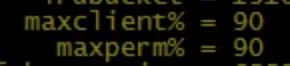
实际上这2个参数默认值有点偏大,不建议这么高,我们以前都是设置为15%-20%。