



通常情况下,vacuum 是由 autovacuum 根据表中删除的行数和新添加的行数自动运行的。理想状态是只由autovacuum自动维护表和索引的死元组,让表的PAGE可以复用,冻结事务标识,收集统计信息等等。并且一般希望尽可能迅速地执行完这个操作。
VACUUM(垃圾回收)时,HEAP PAGE和INDEX PAGE都会被执行垃圾回收,但是索引页的复用和表的复用机制不太一样,索引页的空闲空间被复用,必须是PAGE的边界内的值才允许插入。而HEAP表PAGE的复用机制是只要有空闲空间,就可以插入。因此,索引膨胀之后,除了大面积删除索引key值之外(这种情况索引PAGE被直接释放),很难收缩,vacuum对索引来说几乎起不到降低膨胀的作用。
因此,索引重建的意义远大于vacuum对其的清理。而重建了索引,也就不需要vacuum对索引的清理了。
对于数百GB以及TB级别的大表来说,vacuum可能需要很长时间。而vacuum索引也特别耗时。Index Vacuum 基本上会扫描整个索引来查找垃圾。而且仅从”冻结“的角度来看,其实没有必要对索引进行vacuum处理。这是因为要冻结的目标(XID)是被写入表中的元组,而不是写入索引中的元组。
一、PG-12版本vacuum新增INDEX_CLEANUP选项
从上述来看,vacuum会清理索引的部分垃圾,但是,清理十分有限,几乎很难降低索引膨胀,并且也不需要freeze索引中元组的 XID。因此,PG 12 VACUUM引入了一个新的选项INDEX_CLEANUP,可以跳过索引的垃圾回收。
postgres<16.1>(ConnAs[postgres]:PID[65866] 2024-02-02/11:12:24)=# \h vacuum
Command:     VACUUM
Description: garbage-collect and optionally analyze a database
Syntax:
VACUUM [ ( option [, ...] ) ] [ table_and_columns [, ...] ]
VACUUM [ FULL ] [ FREEZE ] [ VERBOSE ] [ ANALYZE ] [ table_and_columns [, ...] ]

where option can be one of:

    FULL [ boolean ]
    FREEZE [ boolean ]
    VERBOSE [ boolean ]
    ANALYZE [ boolean ]
    DISABLE_PAGE_SKIPPING [ boolean ]
    SKIP_LOCKED [ boolean ]
    INDEX_CLEANUP { AUTO | ON | OFF }
    PROCESS_MAIN [ boolean ]
    PROCESS_TOAST [ boolean ]
    TRUNCATE [ boolean ]
    PARALLEL integer
    SKIP_DATABASE_STATS [ boolean ]
    ONLY_DATABASE_STATS [ boolean ]
    BUFFER_USAGE_LIMIT size

and table_and_columns is:

    table_name [ ( column_name [, ...] ) ]

URL: https://www.postgresql.org/docs/16/sql-vacuum.html
当使用跳过索引回收时, heap 里面的dead tuple行的内容会被回收, 而line point(itemid)会被保留。所以就算索引指向了一个位置,也不会查到任何数据,因为itemid的page offset设置为空。
使用方式如下:
1.不使用INDEX_CLEANUP选项,默认INDEX_CLEANUP是开启的。
postgres<16.1>(ConnAs[postgres]:PID[111691] 2024-02-02/16:07:09)=# CREATE TABLE test_vaccum_index_on (
    id serial PRIMARY KEY,
    x text NOT NULL,
    y int4,
    UNIQUE (x)
);
CREATE TABLE
postgres<16.1>(ConnAs[postgres]:PID[111691] 2024-02-02/16:07:12)=# insert into test_vaccum_index_on(x,y) select random(),(random()*10)::int from generate_series(1,10);
INSERT 0 10
postgres<16.1>(ConnAs[postgres]:PID[111691] 2024-02-02/16:07:19)=# select * from test_vaccum_index_on;
+----+----------------------+---+
| id |          x           | y |
+----+----------------------+---+
|  1 | 0.5887373525696944   | 4 |
|  2 | 0.4416013060891528   | 7 |
|  3 | 0.3065732722348975   | 6 |
|  4 | 0.05128362400318398  | 4 |
|  5 | 0.9225423149644967   | 7 |
|  6 | 0.016158686977065573 | 9 |
|  7 | 0.227488435926126    | 9 |
|  8 | 0.23520865134443114  | 9 |
|  9 | 0.6606906871963953   | 1 |
| 10 | 0.392538304893187    | 6 |
+----+----------------------+---+
(10 rows)

postgres<16.1>(ConnAs[postgres]:PID[111691] 2024-02-02/16:07:28)=# CREATE INDEX z ON test_vaccum_index_on (y);
CREATE INDEX
postgres<16.1>(ConnAs[postgres]:PID[111691] 2024-02-02/16:07:34)=# delete  from test_vaccum_index_on where id >5;
DELETE 5
postgres<16.1>(ConnAs[postgres]:PID[111691] 2024-02-02/16:07:39)=# \q
postgres@ubuntu-linux-22-04-desktop:~$ psql -Xc "vacuum (verbose true) test_vaccum_index_on" 2>&1 | grep INFO
INFO:  vacuuming "postgres.public.test_vaccum_index_on"
INFO:  finished vacuuming "postgres.public.test_vaccum_index_on": index scans: 1
INFO:  vacuuming "postgres.pg_toast.pg_toast_66028"
INFO:  finished vacuuming "postgres.pg_toast.pg_toast_66028": index scans: 0
2.使用INDEX_CLEANUP选项,设置INDEX_CLEANUP为false
postgres<16.1>(ConnAs[postgres]:PID[112063] 2024-02-02/16:08:26)=# CREATE TABLE test_vaccum_index_off (
    id serial PRIMARY KEY,
    x text NOT NULL,
    y int4,
    UNIQUE (x)
);
CREATE TABLE
postgres<16.1>(ConnAs[postgres]:PID[112063] 2024-02-02/16:08:31)=# insert into test_vaccum_index_off(x,y) select random(),(random()*10)::int from generate_series(1,10);
INSERT 0 10
postgres<16.1>(ConnAs[postgres]:PID[112063] 2024-02-02/16:08:35)=# select * from test_vaccum_index_off;
+----+---------------------+---+
| id |          x          | y |
+----+---------------------+---+
|  1 | 0.32382669372803985 | 9 |
|  2 | 0.31795626009358013 | 7 |
|  3 | 0.611471640150864   | 7 |
|  4 | 0.10686971594767591 | 8 |
|  5 | 0.06183263154258567 | 1 |
|  6 | 0.5686804271481543  | 5 |
|  7 | 0.6839897408143529  | 8 |
|  8 | 0.7347566953795339  | 9 |
|  9 | 0.12350619747191494 | 6 |
| 10 | 0.7155670465894499  | 0 |
+----+---------------------+---+
(10 rows)

postgres<16.1>(ConnAs[postgres]:PID[112063] 2024-02-02/16:08:42)=# CREATE INDEX z2 ON test_vaccum_index_off (y);
CREATE INDEX
postgres<16.1>(ConnAs[postgres]:PID[112063] 2024-02-02/16:08:47)=# delete  from test_vaccum_index_on where id >5;
DELETE 0
postgres<16.1>(ConnAs[postgres]:PID[112063] 2024-02-02/16:08:50)=# \q
postgres@ubuntu-linux-22-04-desktop:~$ psql -Xc "vacuum (index_cleanup false, verbose true) test_vaccum_index_off" 2>&1 | grep INFO
INFO:  vacuuming "postgres.public.test_vaccum_index_off"
INFO:  finished vacuuming "postgres.public.test_vaccum_index_off": index scans: 0
INFO:  vacuuming "postgres.pg_toast.pg_toast_66040"
INFO:  finished vacuuming "postgres.pg_toast.pg_toast_66040": index scans: 0


同样的表,可以看到,vacuum带有index_cleanup为false的操作,没有扫描索引。
二、PG-12版本增加的存储参数vacuum_index_cleanup
12版本也增加了vacuum_index_cleanup存储参数,可以在创建表的时候设置,也可以alter table设置。参数可以控制VACUUM在是否禁用索引清理的情况下运行,默认值为true。
Storage parameters(也称为 relopts /reloptions/关系选项)是特定于关系的参数,用于修改 PostgreSQL 与该关系的交互方式,例如fillfactor,它确定表页面上留空的空间以供将来更新,或者定义自定义autovacuum参数设置。
如果有一个表,它永远不需要索引被autovacuum处理(除非指定),可以更改这个表上vacuum_index_cleanup的值。禁用索引清理可以显著加快VACUUM,但如果表修改很频繁,也可能导致索引严重膨胀。 如果指定VACUUM的INDEX_CLEANUP参数,则会覆盖此选项的值,相当于vacuum带有的INDEX_CLEANUP参数比表上的vacuum_index_cleanup优先级更高。
Storage parameters设置后可以使用\d+通过Options选项查看表上的存储参数。
postgres<16.1>(ConnAs[postgres]:PID[113761] 2024-02-02/16:18:46)=# alter table tab_xmaster_ysl set ( vacuum_index_cleanup = FALSE );
ALTER TABLE
postgres<16.1>(ConnAs[postgres]:PID[113761] 2024-02-02/16:19:06)=# \d+ tab_xmaster_ysl
                                     Table "public.tab_xmaster_ysl"
+---------+------+-----------+----------+---------+----------+-------------+--------------+-------------+
| Column  | Type | Collation | Nullable | Default | Storage  | Compression | Stats target | Description |
+---------+------+-----------+----------+---------+----------+-------------+--------------+-------------+
| column1 | text |           |          |         | extended |             |              |             |
| column2 | text |           |          |         | extended |             |              |             |
+---------+------+-----------+----------+---------+----------+-------------+--------------+-------------+
Access method: heap
Options: vacuum_index_cleanup=false
三、可能带来的问题
就像表一样,索引也会积累垃圾。跳过索引上的vacuum可能会导致索引膨胀。但是,索引通常只包含某些列的数据,因此索引元组通常小于表元组。积累的垃圾不仅仅存在于索引中。未被删除的索引中的(垃圾)元组所引用的表中的元组可以被删除,但这些元组的ItemID仍处于 Dead 状态以防止它们被重用。
一个 PostgreSQL 的PAGE可以存储的 ItemId 的最大数量(8kB)是确定的,所以关闭vacuum_index_cleanup或者vacuum操作带有INDEX_CLEANUP=false虽然可以减小vacuum的执行时间,但如果死 ItemId 的数量增加太多,页面上有空闲空间但没有空闲的 ItemId,就无法存储新的元组。
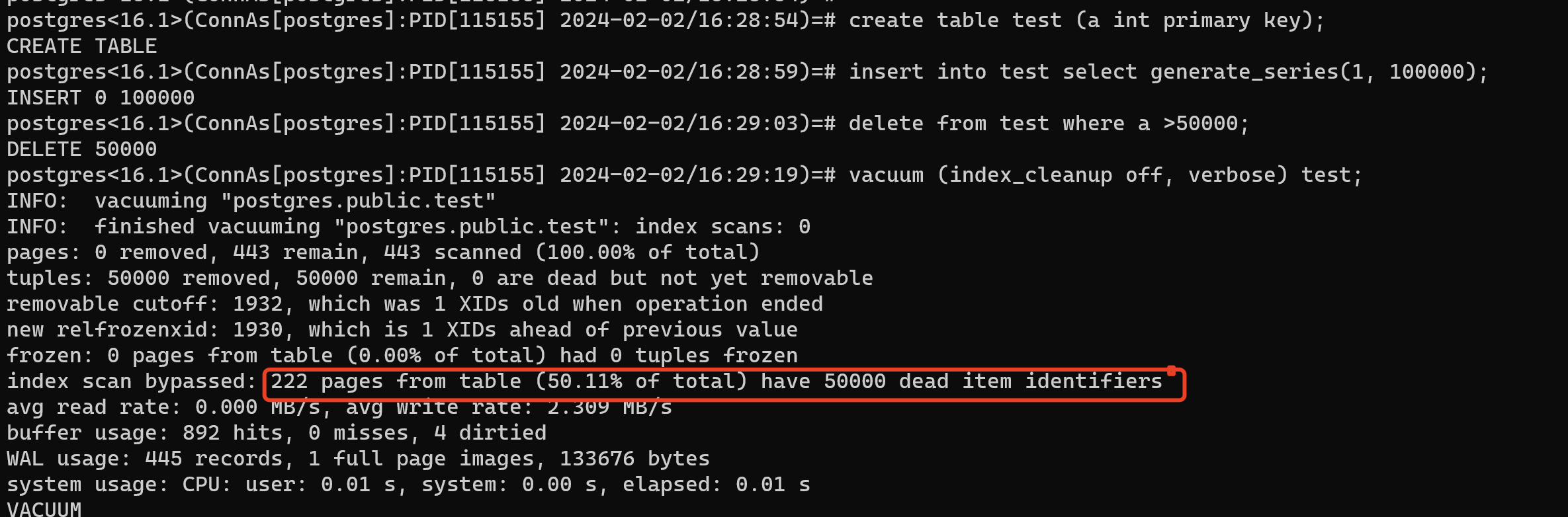
通过下面的测试,vacuum的打印里,可以看出还剩下 50000 个失效 ItemId(50000 个失效项目标识符)。这种失效的ItemId可以用INDEX_CLEANUP=on去清理掉。
postgres<16.1>(ConnAs[postgres]:PID[115155] 2024-02-02/16:28:54)=# create table test (a int primary key);
CREATE TABLE
postgres<16.1>(ConnAs[postgres]:PID[115155] 2024-02-02/16:28:59)=# insert into test select generate_series(1, 100000);
INSERT 0 100000
postgres<16.1>(ConnAs[postgres]:PID[115155] 2024-02-02/16:29:03)=# delete from test where a >50000;
DELETE 50000
postgres<16.1>(ConnAs[postgres]:PID[115155] 2024-02-02/16:29:19)=# vacuum (index_cleanup off, verbose) test;
INFO:  vacuuming "postgres.public.test"
INFO:  finished vacuuming "postgres.public.test": index scans: 0
pages: 0 removed, 443 remain, 443 scanned (100.00% of total)
tuples: 50000 removed, 50000 remain, 0 are dead but not yet removable
removable cutoff: 1932, which was 1 XIDs old when operation ended
new relfrozenxid: 1930, which is 1 XIDs ahead of previous value
frozen: 0 pages from table (0.00% of total) had 0 tuples frozen
index scan bypassed: 222 pages from table (50.11% of total) have 50000 dead item identifiers
avg read rate: 0.000 MB/s, avg write rate: 2.309 MB/s
buffer usage: 892 hits, 0 misses, 4 dirtied
WAL usage: 445 records, 1 full page images, 133676 bytes
system usage: CPU: user: 0.01 s, system: 0.00 s, elapsed: 0.01 s
VACUUM

四、索引的空间回收的较优方案
上文说到了,vacuum可以回收索引的空间,但是十分有限,释放的空间也很有限。并且如果表很巨大,vacuum过程扫描索引的时间就会很长。所以可以设置vacuum_index_cleanup=false,去让vacuum过程忽略索引的扫描。但是索引的膨胀问题也需要一个好的解决方法。
这个时候定期重建索引是一个好的选择。重建索引一般分普通的create index操作,reindex操作,以及CIC(即create index concurrently)和 reindex concurrently。
(1)create index操作:
但是创建新的索引,然后删除掉原来索引这种方法一般不建议。因为用普通的create index创建索引会获取ShareLock,是5级锁,会阻塞DML操作,这个就算做的话也基本要在停业务的时候做,否则就可能阻塞我们的业务了。
(2)reindex操作:
而reindex要申请AccessExclusiveLock,是8级锁,基本上所有的操作都会阻塞,这个更加不建议线上业务去做。(依旧是就算做也要停业务做)
(3)CIC和reindex concurrently操作:
而 CIC和reindex concurrently申请ShareUpdateExclusiveLock,ShareUpdateExclusiveLock级别的锁和RowExclusiveLock不冲突,不会阻塞表上的DML操作。这个锁的级别比较低,适合线上业务。
但是这两个带有concurrently的操作执行的速率很慢,它需要两次扫描表。所以不考虑锁阻塞的情况下它的执行时间可能会比正常创建索引慢很多。除此之外,执行失败后可能存在INVALID索引,并且这两个操作在索引所在的表上申请的是ShareUpdateExclusiveLock锁,四级锁,自斥,所以不能同时多个session同时执行,否则命令执行失败后可能存在INVALID索引,之后影响表的写入性能。
当然,除了上述这几种的操作,也可以考虑使用相关工具,例如pg_repack,使用pg_repack去在线处理索引的膨胀,它会在数据库中创建一个和需要清理的目标表一样的临时表,将目标表中的数据COPY到临时表并在临时表上建立和目标表一样的索引,然后通过重命名的方式用临时表替换目标表。这样对原表影响的时间就会很小,而且相比CLUSTER或VACUUM FULL,pg_repack更加轻量化。
需要注意的是,pg_repack需要额外的存储空间。全表repack时,剩余存储空间大小需要至少是待repack表大小的2倍。 pg_repack运行时无法对repack操作中的表执行DDL。pg_repack会持有ACCESS SHARE锁,禁止DDL执行,以及无法处理临时表等等。
