



本教程是在windows10(本地)+centos7(远程)下进行的
最近开始调研Doris,所谓工欲善其事,必先利其器,笔者花了一些时间配置了doris远程debug。其中fe的开发环境配置比较简单可以直接参考官网,be的稍微麻烦些。由于按照网上的方式配置be clion debug出现了各种奇怪的问题,为此笔者这里记录下Apache doris be + clion远程Debug的配置,让屏幕前的你少踩坑。
源码下载
在windows10以及centos7下载 doris 源代码
下载地址为:https://github.com/apache/doris
git clone https://github.com/apache/doris.git
cd doris
git submodule update --init --recursive
远程机器编译第三方库
LDB toolchain 下载
LDB工具链生成器提供了一个使用cmake 3.22的gcc-11和clang-16的工作环境。它帮助编译现代c++项目,如ClickHouse和Doris在几乎任何Linux发行版。
可以从 这里 下载最新的 ldb_toolchain_gen.sh
。该脚本用于生成 ldb toolchain。更多信息,可访问 https://github.com/amosbird/ldb_toolchain_gen
生成 ldb toolchain
执行以下命令生成 ldb toolchain
sh ldb_toolchain_gen.sh /path/to/ldb_toolchain/
其中 /path/to/ldb_toolchain/
为安装 toolchain 目录。
执行成功后会有如下提示:
hadoop@olap-test2:~/xingying01$ bash ./ldb_toolchain_gen.sh /home/hadoop/xingying01/ldb_toolchain/
Congratulations! LDB toolchain is setup at /home/hadoop/xingying01/ldb_toolchain/. export PATH="/home/hadoop/xingying01/ldb_toolchain//bin":$PATH to take full advantage.
NOTE: LDB toolchain cannot be relocated to other directories manually. Instead, generate it again using ./ldb_toolchain_gen.sh
会在 /path/to/ldb_toolchain/
下生成如下目录结构:
.
├── bin
├── include
├── lib
├── share
├── test
└── usr
编译第三方库
 # 指定环境变量
 export PATH="/path/to/ldb_toolchain/bin":$PATH
 # 进入代码目录
 cd /path/to/doris/thirdparty
 # 进行编译安装
 sh build-thirdparty.sh
sh build-thirdparty.sh十分耗时,主要分为两步:
1)下载第三方源码包
• 如果觉得脚本中的下载方式太慢,可以直接下载doris-thirdparty-source.tgz获得。
2)将源码包解压并进行编译
• 编译过程中strip lib过程可能会coredump,如果空间够用可以将脚本中的strip_lib直接返回
• 自己编译需要花费非常多的时间,可以从 Github 上下载已编译好的版本,拷贝到 Doris 目录下的
thirdparty
文件夹。
git clone git@github.com:apache/doris.git ${YOUR_DORIS_DIR}
wget https://github.com/apache/doris-thirdparty/releases/download/automation/doris-thirdparty-prebuilt-linux-x86_64.tar.xz
tar -xf doris-thirdparty-prebuilt-linux-x86_64.tar.xz
mv installed ${YOUR_DORIS_DIR}/thirdparty
笔者的做法:
1. 笔者刚开始尝试着使用网上的预编译包:doris-thirdparty-prebuilt-linux-x86_64.tar.xz,但是遇到一系列问题。如缺少了roaring的一些文件导致后文的cmake失败;libarrow.a版本不兼容导致make失败
2. 由于直接执行编译脚本
sh build-thirdparty.sh
会遇到很多基础库不兼容的问题,如llvm-ar。3. 为此笔者的做法为:按照官网的方式先在docker中进行编译,然后将编译出的安装包拷贝到宿主机。
docker cp CONTAINER:/var/local/thirdparty/installed /home/hadoop/xingying01/doris/thirdparty/
clion配置
Toolchains配置
在Setting->Build,Execution,Deployment->Toolchains
新建一个Remote Host
1. Environment File:这里填写远程机器代码中env.sh的位置,需要在第一行增加
DORIS_HOME
的配置,export DORIS_HOME=/home/hadoop/xingying01/doris2. Credentials:这里填写windows和远程linux机器的网络连接方式。如果需要使用跳板机,可以在
C:\Users\xingying01\.ssh\config
进行配置。比如想通过Jumpmachine_olap2
跳到olap2_test
,可以这么配置:Host Jumpmachine_olap2
HostName 60.**.**.194
User you_name
Port 1046
IdentityFile C:\Users\xingying01\.ssh\id_rsa
Host olap2_test
HostName 60.**.**.193
User you_name
Port 1046
IdentityFile C:\Users\xingying01\.ssh\id_rsa
ProxyCommand ssh -W %h:%p Jumpmachine_olap23. CMake 、C/C++ Compiler、gdb:都使用ldb_toolchain生成目录下的二进制。需要主要的是C/C++ Compiler推荐选择clang/clang++,因为gcc编译很慢并且内存消耗较大
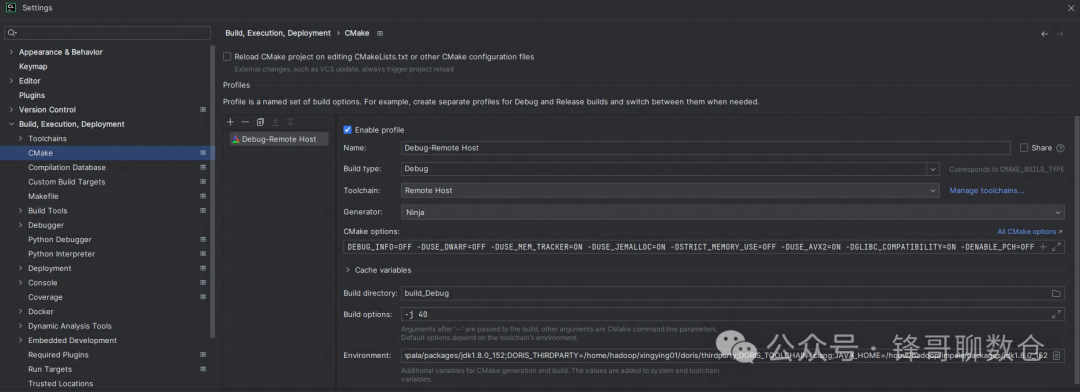
Cmake配置
在Setting->Build,Execution,Deployment->CMake
新建一个Remote Host
1. Build type:根据需求选择Debug或者Release
2. Toolchain:选择Remote Host
3. Generator:选择Nija
4. CMake options:为编译选项,可以从build.sh中获取。笔者的内容如下,需要根据实际使用情况修改:
-G Ninja -DCMAKE_MAKE_PROGRAM=/home/hadoop/xingying01/ldb_toolchain/bin/ninja -DCMAKE_EXPORT_COMPILE_COMMANDS=ON -DCMAKE_BUILD_TYPE=Debug -DMAKE_TEST=OFF -DCMAKE_CXX_COMPILER_LAUNCHER=ccache -DWITH_MYSQL=OFF -DWITH_LZO=OFF -DUSE_LIBCPP=OFF -DBUILD_META_TOOL=OFF -DSTRIP_DEBUG_INFO=OFF -DUSE_DWARF=OFF -DUSE_MEM_TRACKER=ON -DUSE_JEMALLOC=ON -DSTRICT_MEMORY_USE=OFF -DUSE_AVX2=ON -DGLIBC_COMPATIBILITY=ON -DENABLE_PCH=OFF5. Environment:为环境变量,其中DORIS_TOOLCHAIN就是clang或者gcc
DORIS_HOME=/home/hadoop/xingying01/doris;DORIS_JAVA_HOME=/home/hadoop/impala/packages/jdk1.8.0_152;DORIS_THIRDPARTY=/home/hadoop/xingying01/doris/thirdparty;DORIS_TOOLCHAIN=clang;JAVA_HOME=/home/hadoop/impala/packages/jdk1.8.0_152
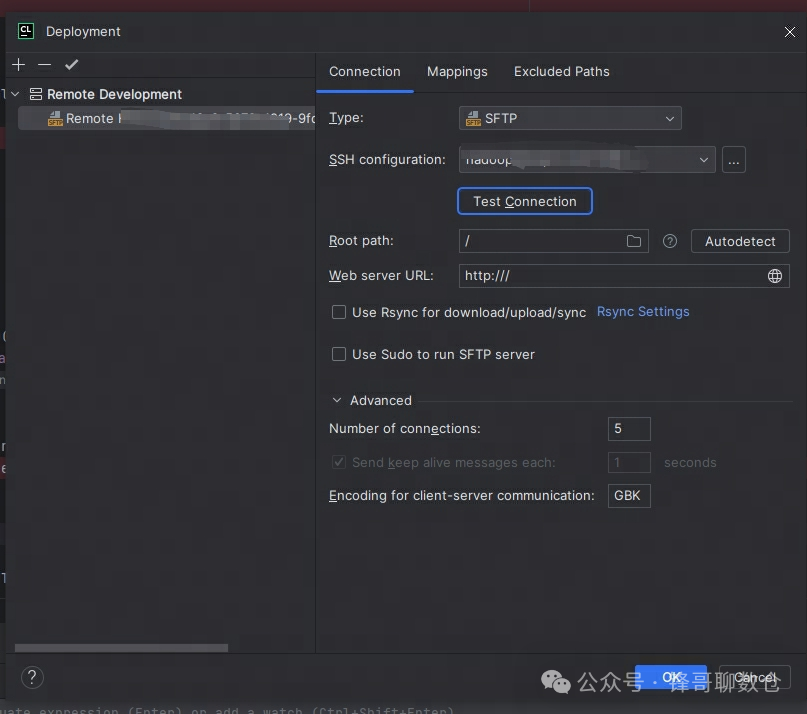
Deployment配置
Deployment配置网上有很多教程,这里不赘述。
Debug配置
这里最中要的是设置start_be.sh
遇到的环境变量,笔者这里的配置为:
AWS_EC2_METADATA_DISABLED=true;AWS_MAX_ATTEMPTS=1;DORIS_HOME=/home/hadoop/xingying01/doris;DORIS_JAVA_HOME=/home/hadoop/impala/packages/jdk1.8.0_152;DORIS_LOG_TO_STDERR=1;JAVA_HOME=/home/hadoop/impala/packages/jdk1.8.0_152;LOG_DIR=/home/hadoop/xingying01/apache-doris-2.0-beta-bin-x64/be/log;LSAN_OPTIONS=suppressions=/home/hadoop/xingying01/apache-doris-2.0-beta-bin-x64/be/conf/lsan_suppr.conf;NLS_LANG=AMERICAN_AMERICA.AL32UTF8;ODBCSYSINI=/home/hadoop/xingying01/apache-doris-2.0-beta-bin-x64/be/conf;PID_DIR=/home/hadoop/xingying01/apache-doris-2.0-beta-bin-x64/be/bin;UBSAN_OPTIONS=print_stacktrace=1
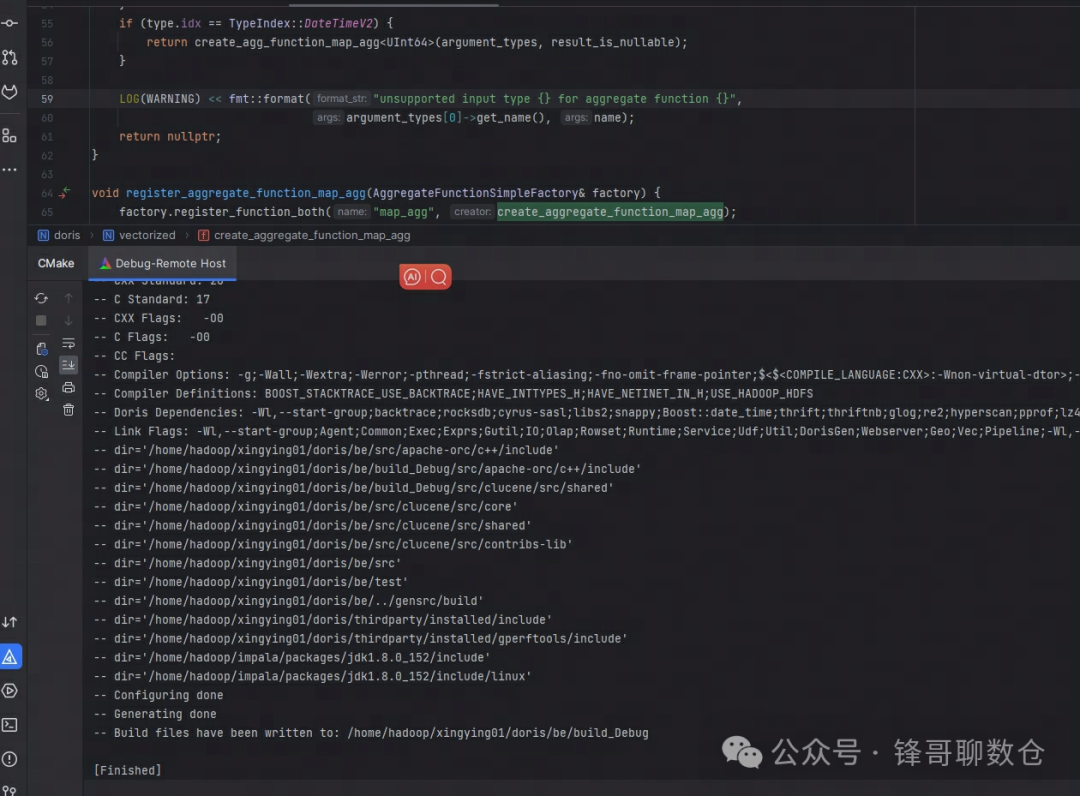

编译及运行
1. 点击clion的
Reload CMake Project
,执行cmake操作,执行成功以后会出现Finished
提示:2. 点击
Build->Build Project
进行make,最终生成doris_be
二进制3. 点击运行或者调试 BE。其中点击 Run 可以编译运行 BE,而点击 Debug 可以编译调试 BE。
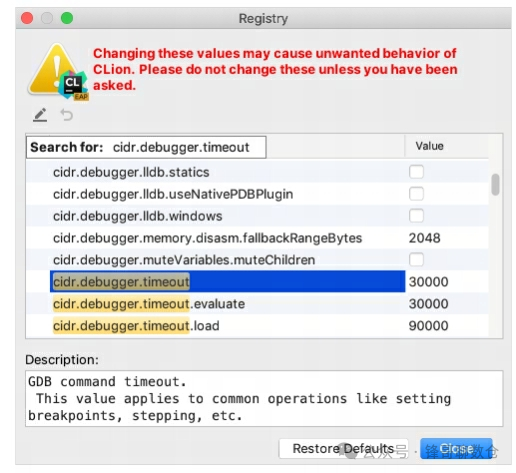
超时配置
在debug过程可能遇到超时的错误:
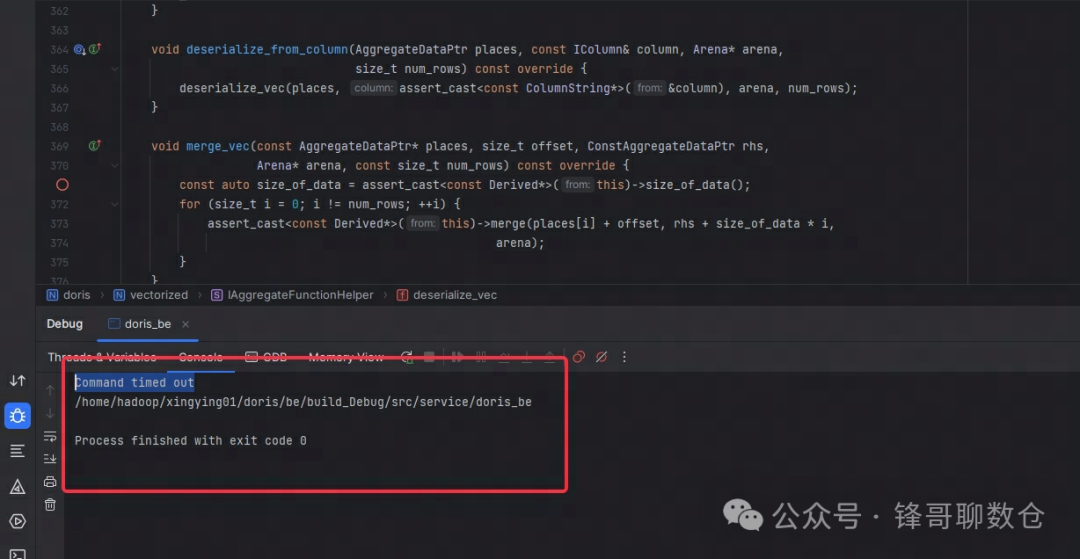
可以配置超时时间:
• https://www.jetbrains.com/help/clion/configuring-debugger-options.html#gdb-startup
• https://doris.apache.org/zh-CN/community/developer-guide/be-clion-dev/
• https://doris.apache.org/zh-CN/docs/dev/install/source-install/compilation-general/
• https://doris.apache.org/zh-CN/docs/1.2/install/source-install/compilation-with-ldb-toolchain
关于作者
隐形(邢颖) 网易资深数据库内核工程师,毕业至今一直从事数据库内核开发工作,目前主要参与 MySQL 与 Apache Doris 的开发维护和业务支持工作。
作为 MySQL 内核贡献者,为 MySQL 上报了 60 多个 Bugfix 及优化patch,多个提交被合入 MySQL 8.0 版本。从 2023 年起加入 Apache Doris 社区,Apache Doris Active Contributor,已为社区提交并合入数十个 Commits。
