



一、前期准备
生产环境级别的数据库安装考虑的问题比较多,考虑的方面如下:
首先是安全问题,能不能用root安装?防火墙策略怎么设置?数据库打开文件以及连接数会不会超过linux默认打开文件句柄数的限制?
其次是合理规划,数据放在哪个目录?这个目录是否是全公司统一的?linux发行版不一样,软件安装目录是否一致?数据目录是否是单独挂载磁盘?单独挂载的磁盘是否做了RAID数据冗余或者LVM?
然后是运维方便的考虑,是否配置了合理的环境变量,如果不配置你是不是每次执行命令都要敲全路径?是否PostgreSQL具备开机自启动功能?
数据库用户是否经过合理规划,你的数据操作(增删改查)用户是否能新建表,truncat表,删除表?具备这些功能的数据操作用户是否会导致人为误操作风险增加?
数据库安装之后,是否具备企业级的统一管理、故障监控?流程上如何申请?
二、安装包下载
生产环境的postgresql安装一般会使用源码编译的方式进行安装,使用源码编译的安装方式有如下好处:
公司的服务器什么型号,什么操作系统版本的都有。如果使用yum或者apt-get安装,很难统一版本,不同的操作系统发行版带的postgreSQL源是不一样的。即使搞成统一的,不同的操作系统之间也无法统一安装目录的位置、lib存放位置等。
postgresql源码编译的方式进行安装,可以灵活的选择需要安装的版本,需要哪一个版本就下载哪一个版本。而使用yum或者apt-get进行安装只能源库指定的若干版本。源码安装,想指定什么目录就指定什么目录,全公司所有的PostgreSQL都在这个目录,这也是规范的一种。
所以为了适应更多的场景,为了达到公司内运维统一的标准,一般生产环境会使用postgresql源码编译的方式进行安装。
PostgreSql官方源码安装包的下载地址是:www.postgresql.org/download/
x86:
arm:
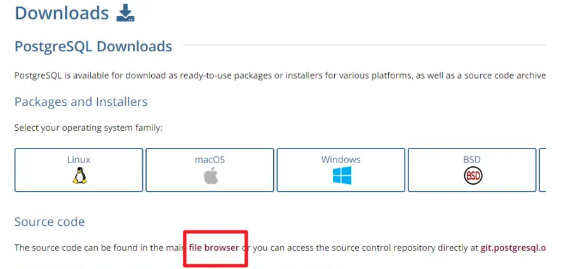
找到如上图所示的“file browser”,点击进入file browser页面,下载以“tar.gz”结尾的安装包即可。
目前单位用的有pg10和pg14两个版本,如下:
postgresql-10.22.tar.gz
postgresql-14.2.tar.gz
三、环境准备
环境准备需要使用root用户进行操作。本文档以CentOS7.9发行版操作系统为例,命令如下。如若是其他的linux发行版,准备工作这一块内容操作步骤是差不多的,linux命令需要调整。
3.1、安装必要的编译环境
3.1.1.配置本地yum源
--上传操作系统镜像到/opt目录
[root@localhost ~]# ls -l /opt | grep Cen*
-rw-r--r--.  1 root root 4712300544 Aug  8 05:27 CentOS-7-x86_64-DVD-2009.iso
--挂载镜像
[root@localhost ~]# mount /opt/CentOS-7-x86_64-DVD-2009.iso /mnt/
[root@localhost ~]# df -h | grep mnt
/dev/loop0      4.4G  4.4G     0 100% /mnt
--设置开机挂载
cat << EOF >> /etc/fstab
/dev/loop0    /mnt        iso9660 loop            0 0
EOF
--配置本地yum源文件
mkdir -p /etc/yum.repos.d/bak
mv /etc/yum.repos.d/*.repo /etc/yum.repos.d/bak
cat >> /etc/yum.repos.d/os.repo <<"EOF"
[OS1]
name=OS
baseurl=file:///mnt
enabled=1
gpgcheck=0
EOF
3.1.2.安装依赖包
首先需要安装一些必要的依赖,PostgreSQL安装的过程需要使用到这些linux包。
yum install -y zlib zlib-devel libaio cmake make gcc gcc-c++ readline readline-devel perl \
bison flex libyaml  net-tools expect  openssh-clients tcl openssl  openssl-devel \
ncurses-devel  python python-devel openldap pam systemtap-sdt-devel perl-ExtUtils-Embed \
libxml2 libxml2-devel libxslt libxslt-devel lz4 uuid  uuid-devel
如果显示无可用的lz4 uuid uuid-devel,执行3.1.3.步骤
3.1.3.安装uuid和lz4的组件
分别上传📎lz4-1.8.3-1.el7.x86_64.rpm📎uuid-1.6.2-26.el7.x86_64.rpm📎uuid-devel-1.6.2-26.el7.x86_64.rpm至/opt目录下
su - root
cd /opt
#归档压缩需要的lz4组件(必须)
rpm -ivh lz4-1.8.3-1.el7.x86_64.rpm

#PG库uuid函数依赖的组件(可选,需要用到uuid函数安装,不然跳过)
rpm -ivh uuid-1.6.2-26.el7.x86_64.rpm
rpm -ivh uuid-devel-1.6.2-26.el7.x86_64.rpm
3.2、创建postgre用户
groupadd -g 5001 postgres
useradd -G postgres -g 5001 postgres
echo "postgres"|passwd --stdin  postgres

--修改操作系统用户oracle用户永不过期
chage -M 99999 postgres
3.3、关闭防火墙
禁用和启用二选一
--禁用防火墙
systemctl stop firewalld.service
systemctl disable firewalld.service
--启用防火墙
firewall-cmd --zone=public --add-port=15400/tcp --permanent
firewall-cmd --zone=public --add-port=22/tcp --permanent
firewall-cmd --reload
--禁用防火墙区域偏移
sed -i 's/^AllowZoneDrifting=yes/AllowZoneDrifting=no/' /etc/firewalld/firewalld.conf
3.4、关闭selinux
sed -i "s/SELINUX=enforcing/SELINUX=disabled/g" /etc/selinux/config
setenforce 0
3.5、修改操作系统打开最大文件句柄数
cat >> /etc/security/limits.conf << "EOF"
#add by postgres
postgres    soft    nproc    65536
postgres    hard    nproc    65536
postgres    soft    nofile   65536
postgres    hard    nofile   65536
postgres    soft    stack    1024000
postgres    hard    stack    1024000
EOF
该配置在关闭linux访问终端session重新登录之后生效,ulimit -n的值会变成65535 。进行这一步操作的目的是防止linux操作系统内打开文件句柄数量的限制,避免不必要的故障。
3.6、修改磁盘调度
echo deadline > /sys/block/sda/queue/scheduler
3.7、修改磁盘预读
/sbin/blockdev --setra 8192 /dev/sda
3.8、查看磁盘预读
/sbin/blockdev --getra /dev/sda
3.9、设置系统内核参数
cp /etc/sysctl.conf /etc/sysctl.confbak
cat >> /etc/sysctl.conf <<EOF
#add by postgres
#关闭sysrq功能
kernel.sysrq = 0
#关闭路由转发
net.ipv4.conf.all.send_redirects = 0
net.ipv4.conf.default.send_redirects = 0
#处理无源路由的包
net.ipv4.conf.all.accept_source_route = 0
net.ipv4.conf.default.accept_source_route = 0
# 确保无人能修改路由表
net.ipv4.conf.all.accept_redirects = 0
net.ipv4.conf.default.accept_redirects = 0
net.ipv4.conf.all.secure_redirects = 0
net.ipv4.conf.default.secure_redirects = 0
#关闭ipv6
net.ipv6.conf.all.disable_ipv6 = 1
net.ipv6.conf.default.disable_ipv6 = 1
#内核放弃建立连接之前发送SYN 包的数量
net.ipv4.tcp_syn_retries = 2
#内核放弃建立连接之前发送SYNACK 包的数量
net.ipv4.tcp_synack_retries = 2
#当keepalive 起用的时候,TCP 发送keepalive 消息的频度。缺省是2 小时
net.ipv4.tcp_keepalive_time = 600
net.ipv4.tcp_keepalive_probes = 3
net.ipv4.tcp_keepalive_intvl =15
net.ipv4.tcp_retries1 = 3
net.ipv4.tcp_retries2 = 5
net.ipv4.tcp_fin_timeout = 10
net.ipv4.tcp_max_tw_buckets = 6000
#启用timewait 快速回收
net.ipv4.tcp_tw_recycle = 1
#开启重用。允许将TIME-WAIT sockets 重新用于新的TCP 连接
net.ipv4.tcp_tw_reuse = 1
net.ipv4.tcp_mem = 94500000 915000000 927000000
net.ipv4.tcp_fin_timeout = 10
# 开启SYN洪水攻击保护
net.ipv4.tcp_syncookies = 1
#限制仅仅是为了防止简单的DoS 攻击
net.ipv4.tcp_max_orphans = 3276800
#未收到客户端确认信息的连接请求的最大值
net.ipv4.tcp_max_syn_backlog = 16384
#限制仅仅是为了防止简单的DoS 攻击
net.ipv4.tcp_max_orphans = 3276800
net.ipv4.tcp_syncookies=1
net.ipv4.tcp_window_scaling = 1
net.ipv4.tcp_rmem = 4096 87380 4194304
net.ipv4.tcp_wmem = 4096 16384 4194304
net.core.wmem_default = 8388608
net.core.rmem_default = 8388608
net.core.rmem_max = 16777216
net.core.wmem_max = 16777216
fs.file-max = 1024000
#允许系统打开的端口范围
net.ipv4.ip_local_port_range = 1024 65000
net.ipv4.route.gc_timeout = 100
#系统中每一个端口最大的监听队列的长度,这是个全局的参数,默认值为128
net.core.somaxconn=1024
#每个网络接口接收数据包的速率比内核处理这些包的速率快时,允许送到队列的数据包的最大数目
net.core.netdev_max_backlog = 262144
EOF
3.10、关闭进程间通信
#CentOS openEuler操作系统默认为关闭,可以跳过该步骤
sed -i 's/#RemoveIPC=no/RemoveIPC=no/g' /etc/systemd/logind.conf
systemctl daemon-reload
systemctl restart systemd-logind
3.11、创建必要的目录
--安装目录(该后面解压步骤生成不用手动创建)
/pgdb/pgsql
--数据目录
/pgdb/data
--归档目录
/pgdb/pg_archive
--逻辑备份目录
/pgdb/pg_logicalbackups
--物理备份目录
/pgdb/pg_physicalbackups
--临时目录(用于存放导入导出文件)
/pgdb/tmp
--脚本目录
/pgdb/scripts
mkdir -p /pgdb/{data,pg_archive,pg_logicalbackups,pg_physicalbackups,scripts,tmp}
生产环境建议,postgresql安装和数据存放目录是服务器单独挂载的一块磁盘,。这样做的好处:一是方便数据备份(硬件层面或软件层面),二是操作系统出现的问题,不影响数据安全。
3.12、解压安装介质
--上传安装介质至/opt
[root@localhost opt]# ls -l /opt | grep pos*
-rw-r--r--. 1 root root   28794023 Aug 19 14:03 postgresql-14.2.tar.gz
--解压
[root@localhost opt]# tar -zxf /opt/post*.gz -C /pgdb
[root@localhost opt]# mv /pgdb/post* /pgdb/pgsql
[root@localhost opt]# chown -R postgres:postgres /pgdb
四、编译并安装
cd /pgdb/pgsql

./configure --prefix=/pgdb/pgsql --with-pgport=5785 --with-openssl --with-perl \
--with-python --with-blocksize=128 --with-wal-blocksize=128 --with-wal-segsize=100 \
--with-readline --with-libxml --with-libxslt --with-uuid=ossp

gmake world -j2
gmake install-world -j2
--with-blocksize 设置块尺寸,以 K 字节计。这是表内存储和I/O的单位。默认值(8K字节)适合于大多数情况,但是在特殊情况下可能其他值更有用。这个值必须是2的幂并且在 1 和 32 (K字节)之间。注意修改这个值需要一次 initdb。
--with-wal-blocksize=128 设置WAL 块尺寸,以 K 字节计。这是 WAL 日志存储和I/O的单位。默认值(8K 字节)适合于大多数情况,但是在特殊情况下其他值更好有用。这个值必须是2的幂并且在 1 到 64(K字节)之间。注意修改这个值需要一次 initdb。
--with-wal-segsize=100--with-perl --with-python:使用Perl和Python语法的过程语言来编写自定义函数。
gmake一次性将文档及附加模块全部进行编译和安装,保证所有数据库软件的一致性,避免给后期维护操作带来麻烦
--当前块大小blocksize  对应--with-blocksize
postgres=# SELECT current_setting('block_size');
 current_setting
-----------------
 8192
(1 row)

--当前wal-blocksize   对应 --with-wal-segsize
postgres=# SELECT current_setting('wal_segment_size');
 current_setting
-----------------
 16MB
(1 row)

--当前wal-segsize  对应 --with-wal-blocksize
postgres=# SELECT current_setting('wal_block_size');
 current_setting
-----------------
 8192
(1 row)
五、配置环境变量
echo "##postgres user env configuration" >> /home/postgres/.bash_profile
cp /home/postgres/.bash_profile  /home/postgres/.bash_profilebak
sed -i 's/^export PATH/#export PATH/'  /home/postgres/.bash_profile
echo "#add by postgres" >>  /home/postgres/.bash_profile
echo 'export PGHOME=/pgdb/pgsql' >>  /home/postgres/.bash_profile
echo 'export PGDATA=/pgdb/data' >>  /home/postgres/.bash_profile
echo 'export PGPORT=5432' >>  /home/postgres/.bash_profile
echo 'export PATH=$PGHOME/bin:$PATH' >>  /home/postgres/.bash_profile
echo 'export MANPATH=$PGHOME/share/man:$MANPATH' >>  /home/postgres/.bash_profile
echo 'export LD_LIBRARY_PATH=$PGHOME/lib:$LD_LIBRARY_PATH' >>  /home/postgres/.bash_profile
echo 'export LANG="en_US.UTF-8"' >>  /home/postgres/.bash_profile
echo 'export DATE=`date +"%Y%m%d%H%M"`' >>  /home/postgres/.bash_profile
source /home/postgres/.bash_profile
六、数据库初始化
su - postgres
echo "top@123" > /home/postgres/.pgpass
chmod 0600 /home/postgres/.pgpass
/pgdb/pgsql/bin/initdb  --username=postgres --pwfile=/home/postgres/.pgpass \
-D /pgdb/data \
--encoding=UTF8 \
--lc-collate=en_US.UTF-8 --lc-ctype=en_US.UTF-8

参数说明:
--lc-collate: 字符串排序的顺序
--lc-ctype:字符分类
配置文件:
位置:数据目录PGDATA目录
/pgdb/data/postgresql.conf --数据库参数
/pgdb/data/pg_hba.conf --用户访问权限文件
七、参数配置
7.1、数据库参数配置
--更改配置文件
cp /pgdb/data/postgresql.conf /pgdb/data/postgresql.confbak
sed -i "/^#listen_addresses = 'localhost'/s/#listen_addresses = 'localhost'/listen_addresses = '*'/" /pgdb/data/postgresql.conf
sed -i "s/^#port = 5432/port = 5432/" /pgdb/data/postgresql.conf
sed -i 's/max_connections = 100/max_connections = 500/' /pgdb/data/postgresql.conf
sed -i "/^#wal_level/s/^#//" /pgdb/data/postgresql.conf #去掉注释
sed -i 's/#archive_mode = off/archive_mode = on/' /pgdb/data/postgresql.conf
sed -i "/^#archive_command = ''/s/#archive_command = ''/archive_command ='\/usr\/bin\/lz4 -q -z %p \/pgdb\/pg_archive\/%f.lz4'/" /pgdb/data/postgresql.conf  #-q取消警告-z强制压缩
sed -i "/^#log_destination = 'stderr'/s/#log_destination = 'stderr'/log_destination = 'csvlog'/" /pgdb/data/postgresql.conf
sed -i "/^#logging_collector = off/s/#logging_collector = off/logging_collector = on/" /pgdb/data/postgresql.conf
sed -i "/^#log_directory = 'log'/s/^#//" /pgdb/data/postgresql.conf #去掉注释
sed -i "/^#log_filename/s/^#//" /pgdb/data/postgresql.conf #去掉注释
sed -i "/^#log_file_mode/s/^#//" /pgdb/data/postgresql.conf #去掉注释
sed -i "/^#log_rotation_age/s/^#//" /pgdb/data/postgresql.conf #去掉注释
sed -i "/^#log_rotation_size/s/^#//" /pgdb/data/postgresql.conf #去掉注释
sed -i "/^shared_buffers = 128MB/s/shared_buffers = 128MB/shared_buffers = 1024MB/" /pgdb/data/postgresql.conf #物理内存25~40%
sed -i "/^#work_mem = 4MB/s/#work_mem = 4MB/work_mem = 30MB/" /pgdb/data/postgresql.conf
sed -i "/^#maintenance_work_mem = 64MB/s/#maintenance_work_mem = 64MB/maintenance_work_mem = 256MB/" /pgdb/data/postgresql.conf
sed -i "/^#temp_buffers = 8MB/s/#temp_buffers = 8MB/temp_buffers = 256MB/" /pgdb/data/postgresql.conf
# 数据库能够接受的最大请求连接并发数
max_connections = 100
# 数据库服务器将使用的共享内存缓冲区量。建议值:数据库独立服务器的1/4内存。
shared_buffers =1GB
7.2、用户访问权限配置
cat > /pgdb/data/pg_hba.conf << EOF
# TYPE DATABASE USER ADDRESS METHOD
local all all trust
host all all 0.0.0.0/0 md5
EOF
第一行的内容表示local本机,all所有用户可以访问postgre的所有数据库,并且密码发送方式不需要加密(trust)。
第二行的内容用于远程访问,指定了可以访问postgreSql数据库的远程用户的ip范围, 0.0.0.0/0 表示所有ip都可以。如果你希望指定ip段,可以像这样去配置192.168.3.1/24(表示的ip范围是:192.168.3.1到192.168.3.255)。md5表示数据库访问密码使用md5的加密方式发送。
七、创建数据库和用户
--初始化postgres用户密码
alter user postgres with password '你设置的密码';
--创建新用户
create user top_sjjs with encrypted password 'top_sjjs';
alter user top_sjjs with superuser;
--创建数据库
create database mix_db owner top_sjjs;
grant all privileges on database mix_db to top_sjjs;
grant all privileges on all tables in schema public to top_sjjs; --(可选)
--创建程序用户,用于操作数据库表里面的数据,完成增删改查
create user top_sjjs with encrypted password 'top_sjjs';
GRANT  update,delete,insert,select  ON  ALL TABLES IN SCHEMA public TO top_sjjs;
八、启停数据库
--启动命令
pg_ctl start -D /pgdb/data
--重启命令
pg_ctl restart  -D /pgdb/data
--查看数据库运行状态
pg_ctl status  -D /pgdb/data
--停止数据库
pg_ctl stop  -D /pgdb/data
九、开机自启动
为了让PostgreSQL在以后每次服务器重启之后,都能够自动启动,写一个自启动配置文件。下面的命令需要使用root用户执行
cat > /usr/lib/systemd/system/postgres.service << "EOF"
[Unit]
Description=PostgreSQL database server
After=network.target
[Service]
Type=forking
User=postgres
Group=postgres
Environment=PGPORT=5432
Environment=PGDATA=/pgdb/data
OOMScoreAdjust=-1000
ExecStart=/pgdb/pgsql/bin/pg_ctl start -D $PGDATA
ExecStop=/pgdb/pgsql/pg_ctl stop -D $PGDATA -s -m fast
ExecReload=/pgdb/pgsql/bin/pg_ctl reload -D $PGDATA -s
TimeoutSec=300
[Install]
WantedBy=multi-user.target
EOF
chmod +x /usr/lib/systemd/system/postgres.service
systemctl daemon-reload
systemctl start postgres.service
systemctl enable postgres.service
ps -ef | grep postgres
十、参数优化(默认启用归档)
10.1.参数配置
--更改配置文件
cp /pgdb/data/postgresql.conf /pgdb/data/postgresql.confbak
sed -i "/^#listen_addresses = 'localhost'/s/#listen_addresses = 'localhost'/listen_addresses = '*'/" /pgdb/data/postgresql.conf
sed -i "s/^#port = 5432/port = 5432/" /pgdb/data/postgresql.conf
sed -i 's/max_connections = 100/max_connections = 500/' /pgdb/data/postgresql.conf
sed -i "/^#wal_level/s/^#//" /pgdb/data/postgresql.conf #去掉注释
sed -i 's/#archive_mode = off/archive_mode = on/' /pgdb/data/postgresql.conf
sed -i "/^#archive_command = ''/s/#archive_command = ''/archive_command ='\/usr\/bin\/lz4 -q -z %p \/pgdb\/pg_archive\/%f.lz4'/" /pgdb/data/postgresql.conf  #-q取消警告-z强制压缩
sed -i "/^#log_destination = 'stderr'/s/#log_destination = 'stderr'/log_destination = 'csvlog'/" /pgdb/data/postgresql.conf
sed -i "/^#logging_collector = off/s/#logging_collector = off/logging_collector = on/" /pgdb/data/postgresql.conf
sed -i "/^#log_directory = 'log'/s/^#//" /pgdb/data/postgresql.conf #去掉注释
sed -i "/^#log_filename/s/^#//" /pgdb/data/postgresql.conf #去掉注释
sed -i "/^#log_file_mode/s/^#//" /pgdb/data/postgresql.conf #去掉注释
sed -i "/^#log_rotation_age/s/^#//" /pgdb/data/postgresql.conf #去掉注释
sed -i "/^#log_rotation_size/s/^#//" /pgdb/data/postgresql.conf #去掉注释
sed -i "/^shared_buffers = 128MB/s/shared_buffers = 128MB/shared_buffers = 1024MB/" /pgdb/data/postgresql.conf #物理内存25~40%
sed -i "/^#work_mem = 4MB/s/#work_mem = 4MB/work_mem = 30MB/" /pgdb/data/postgresql.conf
sed -i "/^#maintenance_work_mem = 64MB/s/#maintenance_work_mem = 64MB/maintenance_work_mem = 256MB/" /pgdb/data/postgresql.conf
sed -i "/^#temp_buffers = 8MB/s/#temp_buffers = 8MB/temp_buffers = 256MB/" /pgdb/data/postgresql.conf
--重启数据库
systemctl restart postgres.service
10.2.手动切归档
/pgdb/pgsql/bin/psql -Upostgres -W -d postgres -h127.0.0.1 -p5432 -c "select pg_switch_wal();"10.3.归档定期删除策略
cat >> /var/spool/cron/postgres << "EOF"
# PostgresBegin
#设置归档策略:每晚零点10分删除7天前归档文件,视情况更改成1个月
10 00 * * * find /server/data/pgdb/pg_archive -type f -name "0000000*" -mtime +7 -exec rm {} \; > /dev/null 2>&1
#设置日志保留2天,视情况更改成半年或3个月
00 01 * * * find /server/data/pgdb/data/log -type f -name "postgresql*.log" -mtime +7 -exec rm {} \; > /dev/null 2>&1
00 01 * * * find /server/data/pgdb/data/log -type f -name "postgresql*.csv" -mtime +7 -exec rm {} \; > /dev/null 2>&1
EOF
十一、安装uuid-ossp
检查是否已安装扩展uuid-ossp
select * from pg_extension;
或
\dx

--输出结果如下:
postgres=# \dx
                 List of installed extensions
  Name   | Version |   Schema   |         Description
---------+---------+------------+------------------------------
 plpgsql | 1.0     | pg_catalog | PL/pgSQL procedural language
(1 row)

postgres=# select * from pg_extension;
  oid  | extname | extowner | extnamespace | extrelocatable | extversion | extconfig | extcondition
-------+---------+----------+--------------+----------------+------------+-----------+--------------
 13876 | plpgsql |       10 |           11 | f              | 1.0        |           |
(1 row)
可以看到postgresql目前没有安装uuid-ossp扩展。
检查是否有可用来安装的扩展uuid-ossp
--查看当前可用的扩展
postgres=# select * from pg_available_extensions;
        name        | default_version | installed_version |                                comment
--------------------+-----------------+-------------------+------------------------------------------------------------------------
 plpgsql            | 1.0             | 1.0               | PL/pgSQL procedural language
 plperl             | 1.0             |                   | PL/Perl procedural language
 plperlu            | 1.0             |                   | PL/PerlU untrusted procedural language
 plpython2u         | 1.0             |                   | PL/Python2U untrusted procedural language
 plpythonu          | 1.0             |                   | PL/PythonU untrusted procedural language
 adminpack          | 2.1             |                   | administrative functions for PostgreSQL
 amcheck            | 1.3             |                   | functions for verifying relation integrity
 bloom              | 1.0             |                   | bloom access method - signature file based index
 btree_gin          | 1.3             |                   | support for indexing common datatypes in GIN
 btree_gist         | 1.6             |                   | support for indexing common datatypes in GiST
 citext             | 1.6             |                   | data type for case-insensitive character strings
 cube               | 1.5             |                   | data type for multidimensional cubes
 dblink             | 1.2             |                   | connect to other PostgreSQL databases from within a database
 dict_int           | 1.0             |                   | text search dictionary template for integers
 dict_xsyn          | 1.0             |                   | text search dictionary template for extended synonym processing
 earthdistance      | 1.1             |                   | calculate great-circle distances on the surface of the Earth
 file_fdw           | 1.0             |                   | foreign-data wrapper for flat file access
 fuzzystrmatch      | 1.1             |                   | determine similarities and distance between strings
 hstore             | 1.8             |                   | data type for storing sets of (key, value) pairs
 intagg             | 1.1             |                   | integer aggregator and enumerator (obsolete)
 intarray           | 1.5             |                   | functions, operators, and index support for 1-D arrays of integers
 isn                | 1.2             |                   | data types for international product numbering standards
 lo                 | 1.1             |                   | Large Object maintenance
 ltree              | 1.2             |                   | data type for hierarchical tree-like structures
 old_snapshot       | 1.0             |                   | utilities in support of old_snapshot_threshold
 pageinspect        | 1.9             |                   | inspect the contents of database pages at a low level
 pg_buffercache     | 1.3             |                   | examine the shared buffer cache
 pg_freespacemap    | 1.2             |                   | examine the free space map (FSM)
 seg                | 1.4             |                   | data type for representing line segments or floating-point intervals
 pg_prewarm         | 1.2             |                   | prewarm relation data
 pg_stat_statements | 1.9             |                   | track planning and execution statistics of all SQL statements executed
 pg_surgery         | 1.0             |                   | extension to perform surgery on a damaged relation
 pg_trgm            | 1.6             |                   | text similarity measurement and index searching based on trigrams
 pgcrypto           | 1.3             |                   | cryptographic functions
 pgrowlocks         | 1.2             |                   | show row-level locking information
 pgstattuple        | 1.5             |                   | show tuple-level statistics
 pg_visibility      | 1.2             |                   | examine the visibility map (VM) and page-level visibility info
 postgres_fdw       | 1.1             |                   | foreign-data wrapper for remote PostgreSQL servers
 autoinc            | 1.0             |                   | functions for autoincrementing fields
 insert_username    | 1.0             |                   | functions for tracking who changed a table
 moddatetime        | 1.0             |                   | functions for tracking last modification time
 refint             | 1.0             |                   | functions for implementing referential integrity (obsolete)
 tablefunc          | 1.0             |                   | functions that manipulate whole tables, including crosstab
 tcn                | 1.0             |                   | Triggered change notifications
 tsm_system_rows    | 1.0             |                   | TABLESAMPLE method which accepts number of rows as a limit
 tsm_system_time    | 1.0             |                   | TABLESAMPLE method which accepts time in milliseconds as a limit
 unaccent           | 1.1             |                   | text search dictionary that removes accents
 sslinfo            | 1.2             |                   | information about SSL certificates
 xml2               | 1.1             |                   | XPath querying and XSLT
 bool_plperlu       | 1.0             |                   | transform between bool and plperlu
 bool_plperl        | 1.0             |                   | transform between bool and plperl
 hstore_plperl      | 1.0             |                   | transform between hstore and plperl
 hstore_plperlu     | 1.0             |                   | transform between hstore and plperlu
 jsonb_plperlu      | 1.0             |                   | transform between jsonb and plperlu
 jsonb_plperl       | 1.0             |                   | transform between jsonb and plperl
 hstore_plpythonu   | 1.0             |                   | transform between hstore and plpythonu
 hstore_plpython2u  | 1.0             |                   | transform between hstore and plpython2u
 hstore_plpython3u  | 1.0             |                   | transform between hstore and plpython3u
 jsonb_plpythonu    | 1.0             |                   | transform between jsonb and plpythonu
 jsonb_plpython2u   | 1.0             |                   | transform between jsonb and plpython2u
 jsonb_plpython3u   | 1.0             |                   | transform between jsonb and plpython3u
 ltree_plpythonu    | 1.0             |                   | transform between ltree and plpythonu
 ltree_plpython2u   | 1.0             |                   | transform between ltree and plpython2u
 ltree_plpython3u   | 1.0             |                   | transform between ltree and plpython3u
(64 rows)
可以看到postgres目前并没有可用的uuid-ossp扩展。
此时,直接创建uuid-ossp会报错,如:
postgres=# create extension "uuid-ossp";
ERROR:  could not open extension control file "/data/pgdb/pgsql/share/extension/uuid-ossp.control": No such file or directory
postgres=#
注意:
要用双引号将uuid-ossp引起来,因为有个中划线“-”。
PG源码文件下编译安装扩展
安装uuid依赖包
rpm方式安装uuid
不联网场景下, uuid-devel需下载上传安装,iso中没有
uuid-devel-1.6.2-26.el7.x86_64.rpm 下载地址:http://rpmfind.net/linux/centos/7.9.2009/os/x86_64/Packages/uuid-devel-1.6.2-26.el7.x86_64.rpm
su - root
yum -y install e2fsprogs-devel uuid uuid-devel libuuid-devel
rpm -ivh uuid-1.6.2-26.el7.x86_64.rpm
rpm -ivh uuid-devel-1.6.2-26.el7.x86_64.rpm
源码方式安装uuid
上传至/opt
tar -xvf /opt/uuid-1-6-2-tar.gz
./configure
make
make install
执行编译配置
该操作只是在已安装完PG后,把uuid-ossp编译安装进了PG,不影响现有库。
操作系统版本低的场景下需要单独安装uuid。若上面已经按照过uuid组件则跳过rpm -ivh步骤,若上面编译时包含--with-uuid=ossp 则跳过./configure --prefix=/data/pgdb/pgsql --with-uuid=ossp 步骤。
cd /data/pgdb/pgsql
./configure --prefix=/data/pgdb/pgsql --with-uuid=ossp   #prefix 安装目录
若编译时已经包含--with-uuid=ossp 则跳过该步骤。
#进入扩展目录
cd /data/pgdb/pgsql/contrib/uuid-ossp
#编译安装
make && make install
创建扩展
查看可用扩展
postgres=# select * from pg_available_extensions;
...
uuid-ossp          | 1.1             |                   | generate universally unique identifiers (UUIDs)
可以看到已经有扩展uuid-ossp了。下面可以创建了。
创建扩展
postgres=# create extension "uuid-ossp";
CREATE EXTENSION
使用扩展
安装扩展成功以后,就可以使用函数uuid_generate_v4()来生产uuid了。
postgres=# select uuid_generate_v4();
           uuid_generate_v4
--------------------------------------
 c05ad6c7-ea34-4d36-8d09-4097cd7bae65
(1 row)
十二.常见问题
12.1.登录提示连接socket失败
[postgres@localhost data]$ psql
psql: error: connection to server on socket "/tmp/.s.PGSQL.5432" failed: No such file or directory
	Is the server running locally and accepting connections on that socket?
解决办法:
1.psql 后面加上端口号  psql -p 5439
2.在环境变量/home/postgres/.bash_profile中加上一句,添加完source下
echo 'export PGPORT=54328 #自己添加的环境变量' >> /home/postgres/.bash_profile
source /home/postgres/.bash_profile
12.2.编译报错
问题1:
configure: error: could not determine flags for linking embedded Perl.
This probably means that ExtUtils::Embed or ExtUtils::MakeMaker is not
installed.
安装:yum install perl-ExtUtils-Embed

问题2:
configure: error: OpenSSL Crypto library not found
安装:yum -y install openssl-devel


问题3:
configure: error: could not determine flags for linking embedded Perl.
This probably means that ExtUtils::Embed or ExtUtils::MakeMaker is not
installed.
解决方法:
yum install perl-ExtUtils-Embed

问题4:
configure: error: readline library not found
If you have readline already installed, see config.log for details on the
failure. It is possible the compiler isn't looking in the proper directory.
Use --without-readline to disable readline support.
解决方法:
yum install readline readline-devel
问题5:
checking for inflate in -lz... no
configure: error: zlib library not found
If you have zlib already installed, see config.log for details on the
failure. It is possible the compiler isn't looking in the proper directory.
Use --without-zlib to disable zlib support.
解决方法:
yum install zlib zlib-devel


问题6:
checking for CRYPTO_new_ex_data in -lcrypto... no
configure: error: library 'crypto' is required for OpenSSL
解决方法:
yum install openssl openssl-devel

问题7:
checking for pam_start in -lpam... no
configure: error: library 'pam' is required for PAM
解决方法:
yum install pam pam-devel

问题8:
checking for xmlSaveToBuffer in -lxml2... no
configure: error: library 'xml2' (version >= 2.6.23) is required for XML support
解决方法:
yum install libxml2 libxml2-devel

问题9:
checking for xsltCleanupGlobals in -lxslt... no
configure: error: library 'xslt' is required for XSLT support
解决方法:
yum install libxslt libxslt-devel


问题10:
configure: error: Tcl shell not found
解决方法:
yum install tcl tcl-devel


问题11:
checking for ldap.h... no
configure: error: header file is required for LDAP
解决方法:
yum install openldap openldap-devel

问题12:
checking for Python.h... no
configure: error: header file <Python.h> is required for Python
解决方法:
yum install python python-devel

问题13:
Error when bootstrapping CMake:
Cannot find appropriate C++ compiler on this system.
Please specify one using environment variable CXX.
See cmake_bootstrap.log for compilers attempted.
解决方法:
yum install gcc-c++
12.3.启动报错"max_stack_depth" must not exceed 7680kB
--问题描述:启库报错:
[root@top132:/pgdb/data]$ systemctl start postgres
Job for postgres.service failed because the control process exited with error code. See "systemctl status postgres.service" and "journalctl -xe" for details.
[root@top132:/pgdb/data]$ journalctl -xe
Oct 09 04:12:48 top132 systemd[1]: Configuration file /usr/lib/systemd/system/postgres.service is marked executable. Please remove executable permission bits. Proceeding anyway.
Oct 09 04:12:56 top132 oracledb_exporter[29984]: ts=2023-10-09T08:12:56.802Z caller=collector.go:262 level=error Errorpingingoracle:="missing port in address"
Oct 09 04:13:11 top132 oracledb_exporter[29984]: ts=2023-10-09T08:13:11.805Z caller=collector.go:262 level=error Errorpingingoracle:="missing port in address"
Oct 09 04:13:26 top132 oracledb_exporter[29984]: ts=2023-10-09T08:13:26.803Z caller=collector.go:262 level=error Errorpingingoracle:="missing port in address"
Oct 09 04:13:41 top132 oracledb_exporter[29984]: ts=2023-10-09T08:13:41.806Z caller=collector.go:262 level=error Errorpingingoracle:="missing port in address"
Oct 09 04:13:56 top132 oracledb_exporter[29984]: ts=2023-10-09T08:13:56.802Z caller=collector.go:262 level=error Errorpingingoracle:="missing port in address"
Oct 09 04:14:04 top132 polkitd[727]: Registered Authentication Agent for unix-process:9141:161465164 (system bus name :1.6876 [/usr/bin/pkttyagent --notify-fd 5 --fallback], object path /org/freedesktop/PolicyKit1/AuthenticationAgent, loca
Oct 09 04:14:04 top132 systemd[1]: Starting PostgreSQL database server...
-- Subject: Unit postgres.service has begun start-up
-- Defined-By: systemd
-- Support: http://lists.freedesktop.org/mailman/listinfo/systemd-devel
--
-- Unit postgres.service has begun starting up.
Oct 09 04:14:04 top132 pg_ctl[9147]: waiting for server to start....2023-10-09 08:14:04.952 GMT [9151] LOG:  invalid value for parameter "max_stack_depth": 8192
Oct 09 04:14:04 top132 pg_ctl[9147]: 2023-10-09 08:14:04.952 GMT [9151] DETAIL:  "max_stack_depth" must not exceed 7680kB.
Oct 09 04:14:04 top132 pg_ctl[9147]: 2023-10-09 08:14:04.952 GMT [9151] HINT:  Increase the platform's stack depth limit via "ulimit -s" or local equivalent.
Oct 09 04:14:04 top132 pg_ctl[9147]: 2023-10-09 04:14:04.953 EDT [9151] FATAL:  configuration file "/pgdb/data/postgresql.conf" contains errors
Oct 09 04:14:05 top132 pg_ctl[9147]: stopped waiting
Oct 09 04:14:05 top132 pg_ctl[9147]: pg_ctl: could not start server
Oct 09 04:14:05 top132 pg_ctl[9147]: Examine the log output.
Oct 09 04:14:05 top132 systemd[1]: postgres.service: control process exited, code=exited status=1

--问题原因
查看磁盘预读
[root@localhost ~]# /sbin/blockdev --getra  /dev/sda
8192

--解决办法
max_stack_depth修改小于7680kB 启动成功

https://blog.csdn.net/javastart/article/details/72476747