



此文档建议先整体的看一遍然后在进行安装。
整体大概介绍一下smokeping
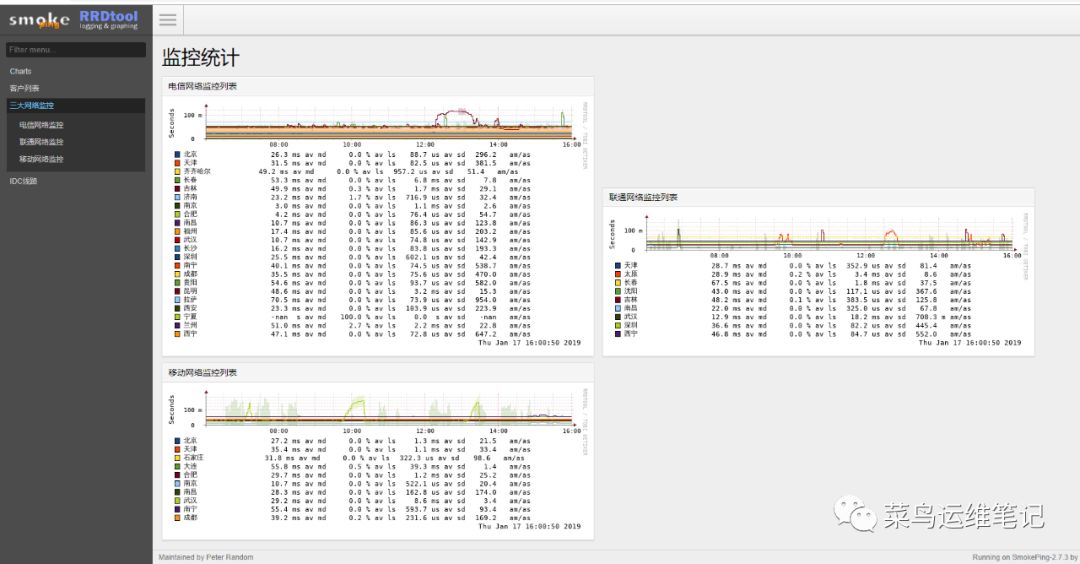
smokeping是一款监控网络状态和稳定性的开源软件(它是rrdtool的作者开发的),通过它可以监控到公司IDC的网络状况,如延时,丢包率,是否BGP多线等;
smokeping会向目标设备和系统发送各种类型的测试数据包,测量、记录,并通过rrdtool制图方式,图形化地展示网络的时延情况,进而能够清楚的判断出网络的即时通信情况;
通过smokeping来监控IDC机房网络质量情况,可以从监控图上的延时与丢包情况分辨出机房的网络是否稳定,是否为多线,是否为BGP机房以及到各城市的三个运行商网络各是什么情况。如果出现问题,可以有针对性的去处理;如果选择新机房的时候,还可以根据smokeping的监控结果来判断这个机房是否适合。
需要注意的是:smokeping监控的是网络稳定性,而cacti或zabbix监控的是带宽使用情况(即进出口流量)
环境介绍
fping-4.1echoping-6.0.2smokeping 2.7.3CentOS Linux release 7.5.1804 (Core)localhost.localdomain3.10.0-862.11.6.el7.x86_64
下面就smokeping网络监控环境部署过程做一记录:
centos 6版本和7版本都有测试
centos 6版本不要完全按照此文档操作 会遇到N多的报错
参考文档时一定要注意批注
1.安装apache
2.安装rrdtool
a.安装依赖的库
b.安装rrdrool
3.安装smokeping依赖的软件
4. 本地安装
a.安装依赖包:
b.解压、编译安装fping
c.解压、编译安装echoping
d.解压、编译安装smokeping
5. 以下开始配置 smokeping
6、编辑apache配置文件
7、图像浏览界面的中文支持
a.安装字体
b.编辑smokeping的配置文件
c.编辑Grapsh.pm
8、测试数据可自定义
9 smokeping的默认配置文件110行的fping安装目录与此次安装目录不相符需修改!
10 apache访问没有权限
a.在Apache安装目录下找到/etc/httpd/conf/httpd.conf文件
11 启动apache服务和smokeping服务
a.启动apache
b.启动smokeping
12 设置密码
13 设置环境变量
14 启动http和smokeping
15 设置开机启动
1.安装apache
yum -y install httpd httpd-devel gcc make curl wget
2.安装rrdtool
a.安装依赖的库
yum -y install libxml2-devel libpng-devel glib pango pango-devel freetype freetype-devel fontconfig cairo cairo-devel libart_lgpl libart_lgpl-devel
b.安装rrdrool
yum -y install perl perl-Net-Telnet perl-Net-DNS perl-LDAP perl-libwww-perl perl-RadiusPerl perl-IO-Socket-SSL perl-Socket6 perl-CGI-SpeedyCGI perl-FCGI perl-CGI-SpeedCGI perl-Time-HiRes perl-ExtUtils-MakeMaker perl-RRD-Simple rrdtool rrdtool-per
3.安装smokeping依赖的软件
yum install mod_fcgid bind-utils -y
4. 本地安装
wget wget https://github.com/schweikert/fping/releases/download/v4.1/fping-4.1.tar.gzwget https://fossies.org/linux/misc/old/echoping-6.0.2.tar.gzwget https://oss.oetiker.ch/smokeping/pub/smokeping-2.7.3.tar.gz
4.1、安装依赖包:
yum install perl perl-Net-Telnet perl-Net-DNS perl-LDAP perl-libwww-perl perl-IO-Socket-SSL perl-Socket6 perl-Time-HiRes perl-ExtUtils-MakeMaker rrdtool rrdtool-perl curl httpd httpd-devel gcc make wget libxml2-devel libpng-devel glib pango pango-devel freetype freetype-devel fontconfig cairo cairo-devel libart_lgpl libart_lgpl-devel popt popt-devel libidn libidn-devel -y
4.2、解压、编译安装fping
tar xf fping-4.1.tar.gzcd fping-4.1./configuremake && make install
4.3、解压、编译安装echopingtar xf echoping-6.0.2.tar.gzcd echoping-6.0.2./configuremake && make install
出现错误
checking for poptGetContext... nochecking for poptGetContext in -lpopt... noconfigure: error: Missing popt library, get it from ftp://ftp.rpm.org/pub/rpm/dist/rpm-x.y.z
解决办法:
yum install -y popt-devel
出现错误
configure: error: Get the GNU libidn library http://www.josefsson.org/libidn/) in order to use Unicode - multi-script - domain names or use --without-libidn to disable it
解决办法:
./configure --prefix=/usr/local/echoping --with-ssl --without-libidn
最后重新安装
make && make install
4.4、解压、编译安装smokeping
##centos 7 最好用2.7.x 的版本##centos 6 最好用2.6.x 的版本tar xf smokeping-2.7.3.tar.gzcd smokeping-2.7.3./setup/build-perl-modules.sh /usr/local/smokeping/thirdparty ##2.6.9 版本的需要执行2.7.3 测试不执行也可以./configure --prefix=/usr/local/smokeping/usr/bin/gmake install
出现错误
Can't locate Sys/Syslog.pm in @INC (@INC contains: /usr/local/smokeing/thirdparty/lib/perl5/x86_64-linux-thread-multi /usr/local/smokeing/thirdparty/lib/perl5 ../lib /usr/local/lib64/perl5 /usr/local/share/perl5 /usr/lib64/perl5/vendor_perl /usr/share/perl5/vendor_perl /usr/lib64/perl5 /usr/share/perl5 .) at ../lib/Smokeping.pm line 16.
解决方法:
缺包了,安装这个就OKyum -y install perl-Sys-Syslogyum install perl-core -y出现编码错误 修改/usr/local/smokeping/etc/config配置文件vim /usr/local/smokeping/lib/Smokeping.pm$ENV{LC_NUMERIC}='C';if (POSIX::setlocale(&POSIX::LC_NUMERIC,"") ne "C") {die("Resetting LC_NUMERIC failed - try removing LC_ALL from the environment");}为:$ENV{LC_ALL}='zh_CN.UTF-8';if (POSIX::setlocale(&POSIX::LC_ALL,"") ne "zh_CN.UTF-8") {die("Resetting LC_NUMERIC failed - try removing LC_ALL from the environment");}
5. 以下开始配置 smokeping
cd /usr/local/smokeping/mkdir cache data vartouch /var/log/smokeping.logchown apache:apache cache data varchown apache:apache /var/log/smokeping.logchmod 600 /usr/local/smokeping/etc/smokeping_secrets.distcd /usr/local/smokeping/htdocsmv smokeping.fcgi.dist smokeping.fcgicd /usr/local/smokeping/etcmv config.dist configvim config修改如下内容:cgiurl=http://你的ip/smokeping.cgi*** Database ***step = 300 此处建议改为 120
6、编辑apache配置文件
vim /etc/httpd/conf/httpd.conf#在结尾添加如下代码:Alias /cache "/usr/local/smokeping/cache/"#Alias /cropper "/usr/local/smokeping/htdocs/cropper/"Alias /css "/usr/local/smokeping/htdocs/css"Alias /smokeping "/usr/local/smokeping/htdocs/smokeping.fcgi"Alias /js "/usr/local/smokeping/htdocs/js/"<Directory "/usr/local/smokeping">AllowOverride NoneOptions AllAddHandler cgi-script .fcgi .cgiOrder allow,denyAllow from allDirectoryIndex smokeping.fcgi</Directory>
7、图像浏览界面的中文支持
a、安装字体
yum -y install wqy-zenhei-fonts.noarch
b、编辑smokeping的配置文件
vim /usr/local/smokeping/etc/config*** Presentation ***charset = UTF-8 #添加这行,解决出图乱码问题template = /usr/local/smokeping/etc/basepage.html.dist
c、编辑Grapsh.pm
vim /usr/local/smokeping/lib/Smokeping/Graphs.pm#在第160行,下边插入这一行代码'--font TITLE:20:"WenQuanYi Zen Hei Mono"',if ($mode =~ /[anc]/){my $val = 0;for my $host (@hosts){my ($graphret,$xs,$ys) = RRDs::graph("dummy",'--start', $tasks[0][1],'--end', $tasks[0][2],"DEF:maxping=$cfg->{General}{datadir}${host}.rrd:median:AVERAGE",'--font TITLE:20:"WenQuanYi Zen Hei Mono"',#加在这里'PRINT:maxping:MAX:%le' );my $ERROR = RRDs::error();return "<div>RRDtool did not understand your input: $ERROR.</div>" if $ERROR;$val = $graphret->[0] if $val < $graphret->[0];}$val = 1e-6 if $val =~ /nan/i;$max = { $tasks[0][1] => $val * 1.5 };}
8、测试数据可自定义
在后边加入自己的数据
看配置文件
9 smokeping的默认配置文件110行的fping安装目录与此次安装目录不相符需修改!
vi /usr/local/smokeping/etc/config#第110更改fping的目录为binary = /usr/local/sbin/fping
10 apache访问没有权限
a、在Apache安装目录下找到/etc/httpd/conf/httpd.conf文件
vim /etc/httpd/conf/httpd.conf# 如果是没有修改过此项配置,那默认的配置如下:<Directory />AllowOverride noneRequire all denied</Directory># 将默认设置改成如下配置:<Directory />Options Indexes FollowSymLinksAllowOverride NoneOrder allow,denyAllow from all</Directory>
11 启动apache服务和smokeping服务
a、启动apache
/usr/sbin/httpd -k start/restart
启动失败报错
root@localhost ~]# /usr/sbin/httpd -k restartAH00548: NameVirtualHost has no effect and will be removed in the next release /etc/httpd/conf.d/nbox.conf:1AH00558: httpd: Could not reliably determine the server's fully qualified domain name, using localhost.localdomain. Set the 'ServerName' directive globally to suppress this messagehttpd not running, trying to start(98)Address already in use: AH00072: make_sock: could not bind to address [::]:443
1.AH00548
vim /etc/httpd/conf.d/nbox.conf#NameVirtualHost *:80注释掉
2.AH00558
编辑httpd.conf文件,搜索"#ServerName",添加ServerName localhost:80[root@server conf]# lsextra httpd.conf magic mime.types original[root@server conf]# vi httpd.conf#ServerName www.example.com:80ServerName localhost:80再重新启动apache 即可。
3.(98)
进入Apache的安装目录,搜索httpd-ssl.conf,右击文本打开。寻找443替换成其他不常用的端口号,比如442。接下来就可以正常启动Apache了
b、启动smokeping
/usr/local/smokeping/bin/smokeping
12 设置密码
a.配置密码
htpasswd -c /usr/local/smokeping/htdocs/htpasswd smokepingNew password:Re-type new password:##账号是smokeping,密码自行设置
b. 配置文件
vim /etc/http/conf/httpd.conf##修改下边内容Alias /cache "/opt/smokeping/htdocs/cache/"Alias /css "/opt/smokeping/htdocs/css/"Alias /smokeping "/opt/smokeping/htdocs/smokeping.fcgi"Alias /js "/opt/smokeping/htdocs/js/"<Directory "/opt/smokeping">AllowOverride NoneOptions AllAddHandler cgi-script .fcgi .cgiOrder allow,denyAllow from allDirectoryIndex smokeping.fcgi</Directory>##改为以下内容<Directory "/opt/smokeping">AllowOverride NoneOptions AllAddHandler cgi-script .fcgi .cgiOrder allow,denyAllow from allAuthName "Smokeping" ##新加内容AuthType Basic ##新加内容AuthUserFile /opt/smokeping/htdocs/htpasswd ##新加内容Require valid-user ##新加内容DirectoryIndex smokeping.fcgi</Directory>
13 设置环境变量
echo 'export PATH=/usr/local/smokeping/bin/:$PATH' >> /etc/profile
14 启动http和smokeping
systemctl restart httpd/usr/local/smokeping/bin/smokeping
出现错误
Error: RRD parameter mismatch ('Wrong value of step: /usr/local/smokeping/data/user/taishan/smokeping.rrd has 300, create string has 120'). You must delete /usr/local/smokeping/data/user/taishan/smokeping.rrd or fix the configuration parameters.
解决办法
rm -rf /usr/local/smokeping/data/user/taishan/smokeping.rrd
15 设置开机启动
echo "/usr/local/smokeping/bin/smokeping --logfile=/var/log/smokeping.log 2>&;1 &;" >> /etc/rc.local
config 配置文件公众号回复 100 可获得。
