



简介
GreenPlum 7.0.0于2023-09-28发布,大约半年后,GreenPlum 7.1.0于2024-02-09发布。
在本文中,麦老师就其中一些比较实用的新特性做一些简单说明。
GreenPlum 7.1.0环境准备
 1docker rm -f gpdb7
 2docker run -itd --name gpdb7 -h gpdb7 \
 3  -p 5437:5432 -p 28087:28080  \
 4  -v /sys/fs/cgroup:/sys/fs/cgroup \
 5  --privileged=true lhrbest/greenplum:7.1.0 \
 6  /usr/sbin/init
 7
 8docker exec -it gpdb7 bash
 9su - gpadmin
10gpstart -a
11gpcc start
12
13gpcc status
14gpstate
此docker包括1个master,1个standby master,2个segment,2个mirror实例;还包括gpcc 7.0.0
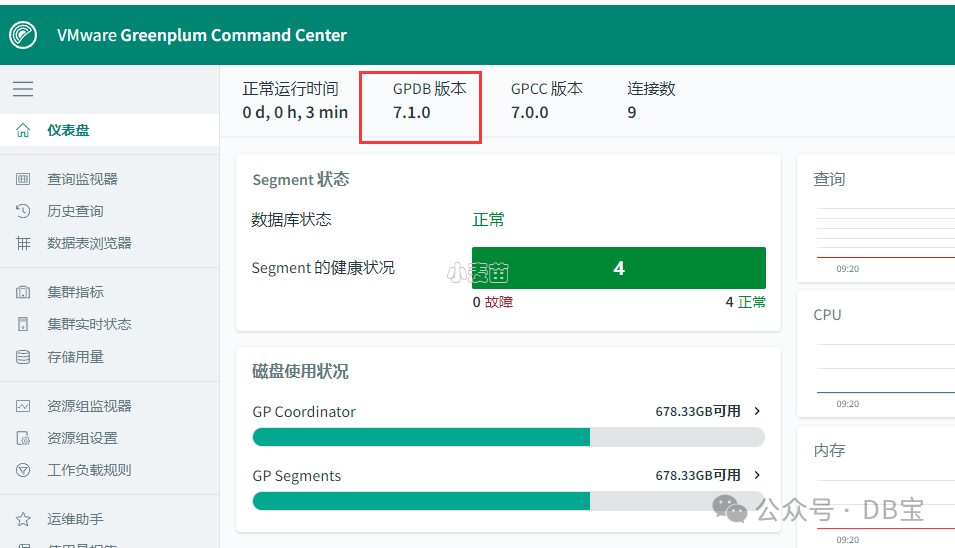
新特性实验
VMware Greenplum 7.1.0引入了tablefunc模块,提供了各种返回表的函数示例,包括行转列等功能
tablefunc
模块包括多个返回表(也就是多行)的函数。这些函数都很有用,并且也可以作为如何编写返回多行的 C 函数的例子。
示例可以参考:https://www.postgresql.org/docs/12/tablefunc.html
http://postgres.cn/docs/12/tablefunc.html
| 函数 | 返回 | 描述 |
|---|---|---|
normal_rand(int numvals, float8 mean, float8 stddev) | setof float8 | 产生一个正态分布的随机值集合 |
crosstab(text sql) | setof record | 产生一个包含行名称外加N个值列的“数据透视表”,其中 N由调用查询中指定的行类型决定 |
crosstab*N *(text sql) | setof table_crosstab_*N * | 产生一个包含行名称外加N个值列的“数据透视表”。 crosstab2、 crosstab3和 crosstab4是被预定义的,但你可以按照下文所述创建额外的 crosstab*N *函数 |
crosstab(text source_sql, text category_sql) | setof record | 产生一个“数据透视表”,其值列由第二个查询指定 |
crosstab(text sql, int N) | setof record | crosstab(text)的废弃版本。参数 N现在被忽略,因为值列的数量总是由调用查询所决定 |
connectby(text relname, text keyid_fld, text parent_keyid_fld [, text orderby_fld ], text start_with, int max_depth [, text branch_delim ]) | setof record | 产生一个层次树结构的表达 |
  1db1=# CREATE EXTENSION tablefunc;
  2CREATE EXTENSION
  3db1=# SELECT * FROM normal_rand(1000, 5, 3);
  4     normal_rand
  5----------------------
  6   2.3210274434791187
  7    1.231076402857033
  8  -0.8117263529261152
  9  -1.2934824713330597
 10    8.292221876591267
 11    3.804515144372151
 12   1.9176029752768766
 13    7.146218652634886
 14    3.551605912228543
 15    5.575493201208664
 16    6.666709079414525
 17   2.5228426084040176
 18    6.407538689302069
 19   5.8016036456658995
 20    4.277014091604118
 21    5.780894470091546
 22    5.750904724932745
 23    5.753381245096707
 24   2.4427467584795792
 25     6.81576512005292
 26    8.192744936276732
 27    6.614708709243898
 28     8.77794265411034
 29    5.791113475048419
 30     5.70369412214234
 31    4.327753473864319
 32    7.570550167961118
 33   3.5597661002608407
 34    8.046435727461073
 35    9.658108512543121
 36    6.470092796527577
 37    7.666408022086054
 38db1=#
 39db1=#
 40db1=#
 41db1=# CREATE TABLE ct(id SERIAL, rowid TEXT, attribute TEXT, value TEXT);
 42NOTICE:  Table doesn't have 'DISTRIBUTED BY' clause -- Using column named 'id' as the Greenplum Database data distribution key for this table.
 43HINT:  The 'DISTRIBUTED BY' clause determines the distribution of data. Make sure column(s) chosen are the optimal data distribution key to minimize skew.
 44INSERT INTO ct(rowid, attribute, value) VALUES('test1','att1','val1');
 45CREATE TABLE
 46db1=# INSERT INTO ct(rowid, attribute, value) VALUES('test1','att1','val1');
 47INSERT 0 1
 48db1=# INSERT INTO ct(rowid, attribute, value) VALUES('test1','att2','val2');
 49INSERT 0 1
 50db1=# INSERT INTO ct(rowid, attribute, value) VALUES('test1','att3','val3');
 51INSERT 0 1
 52db1=# INSERT INTO ct(rowid, attribute, value) VALUES('test1','att4','val4');
 53INSERT 0 1
 54db1=# INSERT INTO ct(rowid, attribute, value) VALUES('test2','att1','val5');
 55INSERT 0 1
 56db1=# INSERT INTO ct(rowid, attribute, value) VALUES('test2','att2','val6');
 57INSERT 0 1
 58db1=# INSERT INTO ct(rowid, attribute, value) VALUES('test2','att3','val7');
 59INSERT 0 1
 60db1=# INSERT INTO ct(rowid, attribute, value) VALUES('test2','att4','val8');
 61INSERT 0 1
 62db1=#
 63db1=# SELECT *
 64db1-# FROM crosstab(
 65db1(#   'select rowid, attribute, value
 66db1'#    from ct
 67db1'#    where attribute = ''att2'' or attribute = ''att3''
 68db1'#    order by 1,2')
 69db1-# AS ct(row_name text, category_1 text, category_2 text, category_3 text);
 70 row_name | category_1 | category_2 | category_3
 71----------+------------+------------+------------
 72 test1    | val2       | val3       |
 73 test2    | val6       | val7       |
 74(2 rows)
 75
 76db1=# create table sales(year int, month int, qty int);
 77NOTICE:  Table doesn't have 'DISTRIBUTED BY' clause -- Using column named 'year' as the Greenplum Database data distribution key for this table.
 78HINT:  The 'DISTRIBUTED BY' clause determines the distribution of data. Make sure column(s) chosen are the optimal data distribution key to minimize skew.
 79CREATE TABLE
 80db1=# insert into sales values(2007, 1, 1000);
 81INSERT 0 1
 82db1=# insert into sales values(2007, 2, 1500);
 83INSERT 0 1
 84db1=# insert into sales values(2007, 7, 500);
 85INSERT 0 1
 86db1=# insert into sales values(2007, 11, 1500);
 87INSERT 0 1
 88db1=# insert into sales values(2007, 12, 2000);
 89INSERT 0 1
 90db1=# insert into sales values(2008, 1, 1000);
 91INSERT 0 1
 92db1=#
 93db1=# select * from crosstab(
 94db1(#   'select year, month, qty from sales order by 1',
 95db1(#   'select m from generate_series(1,12) m'
 96db1(# ) as (
 97db1(#   year int,
 98db1(#   "Jan" int,
 99db1(#   "Feb" int,
100db1(#   "Mar" int,
101db1(#   "Apr" int,
102db1(#   "May" int,
103db1(#   "Jun" int,
104db1(#   "Jul" int,
105db1(#   "Aug" int,
106db1(#   "Sep" int,
107db1(#   "Oct" int,
108db1(#   "Nov" int,
109db1(#   "Dec" int
110db1(# );
111 year | Jan  | Feb  | Mar | Apr | May | Jun | Jul | Aug | Sep | Oct | Nov  | Dec
112------+------+------+-----+-----+-----+-----+-----+-----+-----+-----+------+------
113 2007 | 1000 | 1500 |     |     |     |     | 500 |     |     |     | 1500 | 2000
114 2008 | 1000 |      |     |     |     |     |     |     |     |     |      |
115(2 rows)
116
117db1=# CREATE TABLE cth(rowid text, rowdt timestamp, attribute text, val text);
118NOTICE:  Table doesn't have 'DISTRIBUTED BY' clause -- Using column named 'rowid' as the Greenplum Database data distribution key for this table.
119HINT:  The 'DISTRIBUTED BY' clause determines the distribution of data. Make sure column(s) chosen are the optimal data distribution key to minimize skew.
120CREATE TABLE
121db1=# INSERT INTO cth VALUES('test1','01 March 2003','temperature','42');
122INSERT 0 1
123db1=# INSERT INTO cth VALUES('test1','01 March 2003','test_result','PASS');
124INSERT 0 1
125db1=# INSERT INTO cth VALUES('test1','01 March 2003','volts','2.6987');
126INSERT 0 1
127db1=# INSERT INTO cth VALUES('test2','02 March 2003','temperature','53');
128INSERT 0 1
129db1=# INSERT INTO cth VALUES('test2','02 March 2003','test_result','FAIL');
130INSERT 0 1
131db1=# INSERT INTO cth VALUES('test2','02 March 2003','test_startdate','01 March 2003');
132INSERT 0 1
133db1=# INSERT INTO cth VALUES('test2','02 March 2003','volts','3.1234');
134INSERT 0 1
135db1=#
136db1=# SELECT * FROM crosstab
137db1-# (
138db1(#   'SELECT rowid, rowdt, attribute, val FROM cth ORDER BY 1',
139db1(#   'SELECT DISTINCT attribute FROM cth ORDER BY 1'
140db1(# )
141db1-# AS
142db1-# (
143db1(#        rowid text,
144db1(#        rowdt timestamp,
145db1(#        temperature int4,
146db1(#        test_result text,
147db1(#        test_startdate timestamp,
148db1(#        volts float8
149db1(# );
150 rowid |        rowdt        | temperature | test_result |   test_startdate    | volts
151-------+---------------------+-------------+-------------+---------------------+--------
152 test1 | 2003-03-01 00:00:00 |          42 | PASS        |                     | 2.6987
153 test2 | 2003-03-02 00:00:00 |          53 | FAIL        | 2003-03-01 00:00:00 | 3.1234
154(2 rows)
155
156db1=#
新增pg_buffercache和gp_buffercache视图
VMware Greenplum包括一个新的扩展程序 - pg_buffercache -,允许用户访问五个视图以获取集群范围的共享缓冲区指标:gp_buffercache、gp_buffercache_summary、gp_buffercache_usage_counts、gp_buffercache_summary_aggregated和gp_buffercache_usage_counts_aggregated。
该特性在GreenPlum 6.26.2中已提供,不过提供的视图较少。可以参考:https://www.xmmup.com/greenplum-6262banbenxintexingshuoming.html
  1[gpadmin@gpdb7 ~]$ psql
  2psql (12.12)
  3Type "help" for help.
  4
  5postgres=#  select version();
  6                                                                                                                version
  7----------------------------------------------------------------------------------------------------------------------------------------------------------------------------------------------------------------------------------------
  8 PostgreSQL 12.12 (Greenplum Database 7.1.0 build commit:e7c2b1f14bb42a1018ac57d14f4436880e0a0515) on x86_64-pc-linux-gnu, compiled by gcc (GCC) 8.5.0 20210514 (Red Hat 8.5.0-18), 64-bit compiled on Jan 19 2024 06:39:45 Bhuvnesh C.
  9(1 row)
 10
 11postgres=# create database db1;
 12CREATE DATABASE
 13postgres=# \c db1
 14You are now connected to database "db1" as user "gpadmin".
 15db1=# create extension pg_buffercache;
 16CREATE EXTENSION
 17db1=#  select count(*) from gp_buffercache;
 18 count
 19-------
 20 12000
 21(1 row)
 22
 23db1=#  select count(*) from pg_buffercache;
 24 count
 25-------
 26  4000
 27(1 row)
 28
 29db1=# select * from gp_buffercache limit 6;
 30 gp_segment_id | bufferid | relfilenode | reltablespace | reldatabase | relforknumber | relblocknumber | isdirty | usagecount | pinning_backends
 31---------------+----------+-------------+---------------+-------------+---------------+----------------+---------+------------+------------------
 32            -1 |        1 |       13721 |          1664 |           0 |             0 |              0 | f       |          5 |                0
 33            -1 |        2 |        1259 |          1663 |       13720 |             0 |              0 | f       |          5 |                0
 34            -1 |        3 |        1259 |          1663 |       13720 |             0 |              1 | f       |          5 |                0
 35            -1 |        4 |        1249 |          1663 |       13720 |             0 |              0 | f       |          5 |                0
 36            -1 |        5 |        1249 |          1663 |       13720 |             0 |              1 | f       |          5 |                0
 37            -1 |        6 |        1249 |          1663 |       13720 |             0 |              2 | f       |          5 |                0
 38(6 rows)
 39
 40db1=#
 41db1=# SELECT n.nspname, c.relname, count(*) AS buffers
 42db1-#              FROM pg_buffercache b JOIN pg_class c
 43db1-#              ON b.relfilenode = pg_relation_filenode(c.oid) AND
 44db1-#                 b.reldatabase IN (0, (SELECT oid FROM pg_database
 45db1(#                                       WHERE datname = current_database()))
 46db1-#              JOIN pg_namespace n ON n.oid = c.relnamespace
 47db1-#              GROUP BY n.nspname, c.relname
 48db1-#              ORDER BY 3 DESC
 49db1-#              LIMIT 10;
 50  nspname   |            relname             | buffers
 51------------+--------------------------------+---------
 52 pg_catalog | pg_proc                        |      14
 53 pg_catalog | pg_depend_reference_index      |      13
 54 pg_catalog | pg_attribute                   |      12
 55 pg_catalog | pg_depend                      |      11
 56 pg_catalog | pg_class                       |      11
 57 pg_catalog | pg_rewrite                     |       7
 58 pg_catalog | pg_type                        |       7
 59 pg_catalog | pg_proc_proname_args_nsp_index |       7
 60 pg_catalog | pg_init_privs                  |       6
 61 pg_catalog | pg_authid                      |       5
 62(10 rows)
 63
 64db1=# select count(*) from gp_buffercache_summary;
 65 count
 66-------
 67     3
 68(1 row)
 69
 70db1=# select * from gp_buffercache_summary;
 71 gp_segment_id | buffers_used | buffers_unused | buffers_dirty | buffers_pinned |   usagecount_avg
 72---------------+--------------+----------------+---------------+----------------+--------------------
 73            -1 |         1562 |           2438 |           120 |              0 |  3.881562099871959
 74             0 |         1489 |           2511 |           117 |              0 | 3.4976494291470788
 75             1 |         1493 |           2507 |           119 |              0 |  3.495646349631614
 76(3 rows)
 77
 78db1=# select * from gp_buffercache_usage_counts;
 79 gp_segment_id | usage_count | buffers | dirty | pinned
 80---------------+-------------+---------+-------+--------
 81            -1 |           0 |    2438 |     0 |      0
 82            -1 |           1 |     228 |     5 |      0
 83            -1 |           2 |     240 |     8 |      0
 84            -1 |           3 |      49 |     8 |      0
 85            -1 |           4 |      17 |     1 |      0
 86            -1 |           5 |    1028 |    98 |      0
 87             0 |           0 |    2509 |     0 |      0
 88             0 |           1 |     444 |     6 |      0
 89             0 |           2 |     123 |     6 |      0
 90             0 |           3 |      39 |     7 |      0
 91             0 |           4 |      17 |     2 |      0
 92             0 |           5 |     868 |    97 |      0
 93             1 |           0 |    2505 |     0 |      0
 94             1 |           1 |     446 |     6 |      0
 95             1 |           2 |     123 |     6 |      0
 96             1 |           3 |      39 |     7 |      0
 97             1 |           4 |      18 |     2 |      0
 98             1 |           5 |     869 |   100 |      0
 99(18 rows)
100
101db1=# select * from gp_buffercache_summary_aggregated;
102 buffers_used | buffers_unused | buffers_dirty | buffers_pinned |  usagecount_avg
103--------------+----------------+---------------+----------------+-------------------
104         4550 |           7450 |           359 |              0 | 3.625432361146132
105(1 row)
106
107db1=# select * from gp_buffercache_usage_counts_aggregated;
108 usage_count | buffers | dirty | pinned
109-------------+---------+-------+--------
110          45 |   12000 |   359 |      0
111(1 row)
112
113db1=#
114
孤儿文件相关
gp_toolkit模式中的gp_check_orphaned_files视图包含一个新列 - filepath -,用于打印孤立文件的相对/绝对路径。
VMware Greenplum 7.1.0在gp_toolkit管理模式中添加了gp_move_orphaned_files用户定义函数(UDF),该函数将gp_check_orphaned_files视图找到的孤立文件移动到您指定的文件系统位置。
参考:https://docs.vmware.com/en/VMware-Greenplum/7/greenplum-database/ref_guide-gp_toolkit.html#moveorphanfiles
分区表相关
gp_toolkit管理模式现在包括一些用于辅助分区维护的对象:一个新视图 - gp_partitions,以及几个新的用户定义函数,包括:pg_partition_rank()、pg_partition_range_from()、pg_partition_range_to()、pg_partition_bound_value()、pg_partition_isdefault()、pg_partition_lowest_child()和pg_partition_highest_child()。有关详细信息,请参阅gp_toolkit管理模式主题。
可以参考:https://docs.vmware.com/en/VMware-Greenplum/7/greenplum-database/ref_guide-gp_toolkit.html
pg_filedump程序
参考:https://docs.vmware.com/en/VMware-Greenplum/7/greenplum-database/utility_guide-ref-pg_filedump.html?hWord=N4IghgNiBcIA4HMD6AzAlhApgEwK4Fs4QBfIA
VMware Greenplum引入了一个新实用程序 - pg_filedump -,允许您读取格式化内容的VMware Greenplum数据文件,包括表、索引和控制文件。
The pg_filedump
utility formats VMware Greenplum data files -- including table, index and control files -- into a human-readable format.
To use pg_filedump
, you must have:
gpsupport
1.0.3 or higher installeda search path that includes the
gpsupport
executable path
NOTE
pg_filedump
is currently only supported for Greenplum 7 data files.
 1[gpadmin@gpdb7 18444]$ pg_filedump 9926
 2
 3*******************************************************************
 4* PostgreSQL File/Block Formatted Dump Utility
 5*
 6* File: 9926
 7* Options used: None
 8*******************************************************************
 9
10Block    0 ********************************************************
11<Header> -----
12 Block Offset: 0x00000000         Offsets: Lower      64 (0x0040)
13 Block: Size 32768  Version   14            Upper    32752 (0x7ff0)
14 LSN:  logid      0 recoff 0x046f5240      Special  32752 (0x7ff0)
15 Items:   10                      Free Space: 32688
16 Checksum: 0x0496  Prune XID: 0x00000000  Flags: 0x0000 ()
17 Length (including item array): 64
18
19 BTree Meta Data:  Magic (0x00053162)   Version (4)
20                   Root:     Block (0)  Level (0)
21                   FastRoot: Block (0)  Level (0)
22
23<Special Section> -----
24 BTree Index Section:
25  Flags: 0x0008 (META)
26  Blocks: Previous (0)  Next (0)  Level (0)  CycleId (0)
27
28
29*** End of File Encountered. Last Block Read: 0 ***
30
31[gpadmin@gpdb7 mirror]$ find ./ -name pg_control
32./gpseg0/global/pg_control
33./gpseg1/global/pg_control
34
35[gpadmin@gpdb7 mirror]$ pg_filedump -c ./gpseg0/global/pg_control
36
37*******************************************************************
38* PostgreSQL File/Block Formatted Dump Utility
39*
40* File: ./gpseg0/global/pg_control
41* Options used: -c
42*******************************************************************
43
44<pg_control Contents> *********************************************
45
46                          CRC: Correct
47           pg_control Version: 12010700
48              Catalog Version: 302307241
49            System Identifier: 7287791898375007577
50                        State: IN ARCHIVE RECOVERY
51                Last Mod Time: Sun Feb 18 11:11:48 2024
52       Last Checkpoint Record: Log File (0) Offset (0x0cf18ca8)
53  Last Checkpoint Record Redo: Log File (0) Offset (0x0cf18b50)
54          |-       TimeLineID: 1
55          |-         Next XID: 0/2060
56          |-         Next OID: 26549
57          |- Next Relfilenode: 25699
58          |-       Next Multi: 1
59          |-    Next MultiOff: 0
60          |-             Time: Sun Feb 18 11:11:48 2024
61       Minimum Recovery Point: Log File (0) Offset (0x0cfa18c0)
62          Backup Start Record: Log File (0) Offset (0x00000000)
63            Backup End Record: Log File (0) Offset (0x00000000)
64End-of-Backup Record Required: no
65       Maximum Data Alignment: 8
66        Floating-Point Sample: 1234567
67          Database Block Size: 32768
68           Blocks Per Segment: 32768
69              XLOG Block Size: 32768
70            XLOG Segment Size: 67108864
71    Maximum Identifier Length: 64
72           Maximum Index Keys: 32
73             TOAST Chunk Size: 8140
故障恢复gprecoverseg
当使用输入配置文件(gprecoverseg -i)时,VMware Greenplum现在支持差异段恢复。此外,您现在可以在传递给gprecoverseg -i的recover_config_file中的条目之前添加I、D或F来指示段恢复的类型。在 GreenPlum 6.25.0中也提供了差异化恢复
1recoveryType field supports below values:
2    I/i for incremental recovery
3    D/d for differential recovery
4    F/f for full recovery
EXPLAIN ANALYZE增强
当使用BUFFERS关键字时,EXPLAIN ANALYZE现在显示缓冲区使用情况和I/O时间。
 1postgres=# \h explain analyze
 2Command:     EXPLAIN
 3Description: show the execution plan of a statement
 4Syntax:
 5EXPLAIN [ ( option [, ...] ) ] statement
 6EXPLAIN [ ANALYZE ] [ VERBOSE ] statement
 7
 8where option can be one of:
 9
10    ANALYZE [ boolean ]
11    VERBOSE [ boolean ]
12    COSTS [ boolean ]
13    SETTINGS [ boolean ]
14    BUFFERS [ boolean ]
15    TIMING [ boolean ]
16    SUMMARY [ boolean ]
17    FORMAT { TEXT | XML | JSON | YAML }
18
19URL: https://www.postgresql.org/docs/12/sql-explain.html
20
21
22postgres=#  EXPLAIN (ANALYZE) select * from pg_tables;
23                                                        QUERY PLAN
24---------------------------------------------------------------------------------------------------------------------------
25 Hash Left Join  (cost=2.25..19.63 rows=91 width=260) (actual time=0.181..0.407 rows=91 loops=1)
26   Hash Cond: (c.reltablespace = t.oid)
27   Extra Text: Hash chain length 1.0 avg, 1 max, using 2 of 65536 buckets.
28   ->  Hash Left Join  (cost=1.20..17.15 rows=91 width=140) (actual time=0.114..0.280 rows=91 loops=1)
29         Hash Cond: (c.relnamespace = n.oid)
30         Extra Text: Hash chain length 1.0 avg, 1 max, using 9 of 65536 buckets.
31         ->  Seq Scan on pg_class c  (cost=0.00..14.80 rows=91 width=80) (actual time=0.043..0.125 rows=91 loops=1)
32               Filter: (relkind = ANY ('{r,p}'::"char"[]))
33               Rows Removed by Filter: 533
34         ->  Hash  (cost=1.09..1.09 rows=9 width=68) (actual time=0.009..0.010 rows=9 loops=1)
35               Buckets: 65536  Batches: 1  Memory Usage: 513kB
36               ->  Seq Scan on pg_namespace n  (cost=0.00..1.09 rows=9 width=68) (actual time=0.004..0.005 rows=9 loops=1)
37   ->  Hash  (cost=1.02..1.02 rows=2 width=68) (actual time=0.004..0.004 rows=2 loops=1)
38         Buckets: 65536  Batches: 1  Memory Usage: 513kB
39         ->  Seq Scan on pg_tablespace t  (cost=0.00..1.02 rows=2 width=68) (actual time=0.002..0.003 rows=2 loops=1)
40 Optimizer: Postgres-based planner
41 Planning Time: 0.783 ms
42   (slice0)    Executor memory: 1131K bytes.  Work_mem: 513K bytes max.
43 Memory used:  128000kB
44 Execution Time: 0.462 ms
45(20 rows)
46
47
48
49postgres=# EXPLAIN (ANALYZE, BUFFERS) select * from pg_tables;
50                                                        QUERY PLAN
51---------------------------------------------------------------------------------------------------------------------------
52 Hash Left Join  (cost=2.25..19.63 rows=91 width=260) (actual time=0.438..0.726 rows=91 loops=1)
53   Hash Cond: (c.reltablespace = t.oid)
54   Extra Text: Hash chain length 1.0 avg, 1 max, using 2 of 65536 buckets.
55   Buffers: shared hit=9
56   ->  Hash Left Join  (cost=1.20..17.15 rows=91 width=140) (actual time=0.149..0.341 rows=91 loops=1)
57         Hash Cond: (c.relnamespace = n.oid)
58         Extra Text: Hash chain length 1.0 avg, 1 max, using 9 of 65536 buckets.
59         Buffers: shared hit=8
60         ->  Seq Scan on pg_class c  (cost=0.00..14.80 rows=91 width=80) (actual time=0.060..0.140 rows=91 loops=1)
61               Filter: (relkind = ANY ('{r,p}'::"char"[]))
62               Rows Removed by Filter: 533
63               Buffers: shared hit=7
64         ->  Hash  (cost=1.09..1.09 rows=9 width=68) (actual time=0.012..0.013 rows=9 loops=1)
65               Buckets: 65536  Batches: 1  Memory Usage: 513kB
66               Buffers: shared hit=1
67               ->  Seq Scan on pg_namespace n  (cost=0.00..1.09 rows=9 width=68) (actual time=0.005..0.006 rows=9 loops=1)
68                     Buffers: shared hit=1
69   ->  Hash  (cost=1.02..1.02 rows=2 width=68) (actual time=0.006..0.006 rows=2 loops=1)
70         Buckets: 65536  Batches: 1  Memory Usage: 513kB
71         Buffers: shared hit=1
72         ->  Seq Scan on pg_tablespace t  (cost=0.00..1.02 rows=2 width=68) (actual time=0.003..0.004 rows=2 loops=1)
73               Buffers: shared hit=1
74 Optimizer: Postgres-based planner
75 Planning Time: 0.878 ms
76   (slice0)    Executor memory: 1131K bytes.  Work_mem: 513K bytes max.
77 Memory used:  128000kB
78 Execution Time: 0.811 ms
79(27 rows)
gppkg增强
gppkg实用程序选项 -f 现在可帮助删除具有不完整或缺失文件的软件包。
 1[gpadmin@gpdb7 gppkg]$ gppkg install MetricsCollector-7.0.0_gp_7.0.0-rocky8-x86_64.gppkg
 2Detecting network topology:    [==============================================================] [OK]
 32 coordinators and 4 segment instances are detected on 1 unique host.
 4Distributing package:          [==============================================================] [OK]
 5Decoding package:              [==============================================================] [OK]
 6Verifying package installation:[==============================================================] [OK]
 7Verifying package integrity:   [==============================================================] [OK]
 8You are going to install the following packages:
 9        Install 'MetricsCollector@7.0.0_gp_7.0.0'
10Continue? [y/N] y
11Allocating disk space:         [================X                                          ] [ERROR]
12Cleanup:                       [==============================================================] [OK]
13Error: from gpdb7: IoError(file '/usr/local/greenplum-db-7.1.0/lib/postgresql/metrics_collector.so' exists in the filesystem
14
15Caused by:
16    entity already exists)
17
18
19[gpadmin@gpdb7 gppkg]$ ll /usr/local/greenplum-db-7.1.0/lib/postgresql/metrics_collector.so
20-rwxr-xr-x 1 gpadmin gpadmin 3570904 Jan 31 14:51 /usr/local/greenplum-db-7.1.0/lib/postgresql/metrics_collector.so
21
22
23[gpadmin@gpdb7 gppkg]$ gppkg install MetricsCollector-7.0.0_gp_7.0.0-rocky8-x86_64.gppkg  -f
24Detecting network topology:    [==============================================================] [OK]
252 coordinators and 4 segment instances are detected on 1 unique host.
26Distributing package:          [==============================================================] [OK]
27Decoding package:              [==============================================================] [OK]
28Verifying package installation:[==============================================================] [OK]
29Verifying package integrity:   [==============================================================] [OK]
30You are going to install the following packages:
31        Install 'MetricsCollector@7.0.0_gp_7.0.0'
32Continue? [y/N] y
33Allocating disk space:         [==============================================================] [OK]
34Install 'MetricsCollector':    [==============================================================] [OK]
35The stdout from the script of the post-install:                                                ] 0.0
36-
37==========================================================================
38Metrics Collector installation is complete!
39==========================================================================
40
41
42Running post-install hook:     [==============================================================] [OK]
43Result:
44        MetricsCollector has been successfully installed
45Clean Up:                      [==============================================================] [OK]
系统视图gp_stat_progress_dtx_recovery
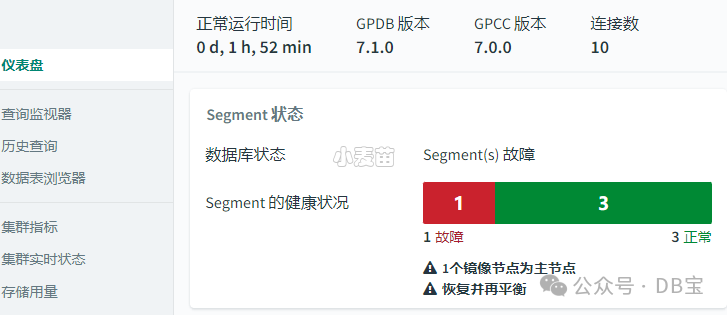
系统视图gp_stat_progress_dtx_recovery显示了分布式事务(DTX)恢复过程的进度,这可能对监视协调器崩溃后的恢复状态很有用。
 1[gpadmin@gpdb7 ~]$ ps -ef|grep post | grep bin
 2gpadmin     1204       1  0 10:15 ?        00:00:01 /usr/local/greenplum-db-7.1.0/bin/postgres -D /opt/greenplum/data/primary/gpseg0 -c gp_role=execute
 3gpadmin     1209       1  0 10:15 ?        00:00:01 /usr/local/greenplum-db-7.1.0/bin/postgres -D /opt/greenplum/data/primary/gpseg1 -c gp_role=execute
 4gpadmin     1243       0  0 10:15 ?        00:00:01 /usr/local/greenplum-db-7.1.0/bin/postgres -D /opt/greenplum/data/master/gpseg-1 -c gp_role=dispatch
 5gpadmin     1393       1  0 10:15 ?        00:00:00 /usr/local/greenplum-db-7.1.0/bin/postgres -D /opt/greenplum/data/master_standby/gpseg-1 -c gp_role=dispatch
 6gpadmin     4525       1  0 10:16 ?        00:00:00 /usr/local/greenplum-db-7.1.0/bin/postgres -D /opt/greenplum/data/mirror/gpseg0 -c gp_role=execute
 7gpadmin     4526       1  0 10:16 ?        00:00:00 /usr/local/greenplum-db-7.1.0/bin/postgres -D /opt/greenplum/data/mirror/gpseg1 -c gp_role=execute
 8[gpadmin@gpdb7 ~]$ kill -9 1209
 9[gpadmin@gpdb7 ~]$ psql
10psql (12.12)
11Type "help" for help.
12
13postgres=# select * from gp_stat_progress_dtx_recovery;
14 phase | recover_commited_dtx_total | recover_commited_dtx_completed | in_doubt_tx_total | in_doubt_tx_in_progress | in_doubt_tx_aborted
15-------+----------------------------+--------------------------------+-------------------+-------------------------+---------------------
16(0 rows)
17
18postgres=# select * from gp_stat_progress_dtx_recovery;
19                  phase                   | recover_commited_dtx_total | recover_commited_dtx_completed | in_doubt_tx_total | in_doubt_tx_in_progress | in_doubt_tx_aborted
20------------------------------------------+----------------------------+--------------------------------+-------------------+-------------------------+---------------------
21 gathering in-doubt orphaned transactions |                          0 |                              0 |                 0 |                       0 |                   0
22(1 row)
23
24postgres=# select * from gp_stat_progress_dtx_recovery;
25 phase | recover_commited_dtx_total | recover_commited_dtx_completed | in_doubt_tx_total | in_doubt_tx_in_progress | in_doubt_tx_aborted
26-------+----------------------------+--------------------------------+-------------------+-------------------------+---------------------
27(0 rows)
28postgres=# select * from gp_segment_configuration ;
29 dbid | content | role | preferred_role | mode | status | port | hostname | address |                  datadir
30------+---------+------+----------------+------+--------+------+----------+---------+--------------------------------------------
31    1 |      -1 | p    | p              | n    | u      | 5432 | gpdb7    | gpdb7   | /opt/greenplum/data/master/gpseg-1
32    3 |       1 | m    | p              | n    | d      | 6001 | gpdb7    | gpdb7   | /opt/greenplum/data/primary/gpseg1
33    5 |       1 | p    | m              | n    | u      | 7001 | gpdb7    | gpdb7   | /opt/greenplum/data/mirror/gpseg1
34    6 |      -1 | m    | m              | s    | u      | 5433 | gpdb7    | gpdb7   | /opt/greenplum/data/master_standby/gpseg-1
35    2 |       0 | p    | p              | s    | u      | 6000 | gpdb7    | gpdb7   | /opt/greenplum/data/primary/gpseg0
36    4 |       0 | m    | m              | s    | u      | 7000 | gpdb7    | gpdb7   | /opt/greenplum/data/mirror/gpseg0
37(6 rows)
38
39postgres=#
log_directory配置日志位置
您现在可以使用服务器配置参数log_directory手动配置VMware Greenplum日志的位置。gpsupport实用程序还支持从由此服务器配置参数设置的目录中收集日志。
 1-- GPDB 7.1.0 ,日志默认位于log目录,/opt/greenplum/data/master/gpseg-1/log/
 2[gpadmin@gpdb7 ~]$ gpconfig -s log_directory
 3Values on all segments are consistent
 4GUC              : log_directory
 5Coordinator value: log
 6Segment     value: log
 7
 8-- GPDB 6.26,日志默认位于pg_log目录
 9[gpadmin@gpdb6261 ~]$ gpconfig -s log_directory
10Values on all segments are consistent
11GUC          : log_directory
12Master  value: pg_log
13Segment value: pg_log
14[gpadmin@gpdb6261 ~]$
新增optimizer_enable_right_outer_join服务器配置参数
新的optimizer_enable_right_outer_join服务器配置参数允许您控制GPORCA是否生成右外连接。在观察到与右外连接相关的性能不佳的情况下,您可以选择禁止使用它们。 该特性在GreenPlum 6.26.2中已提供。可以参考:https://www.xmmup.com/greenplum-6262banbenxintexingshuoming.html
1[gpadmin@gpdb7 ~]$ gpconfig -s optimizer_enable_right_outer_join
2Values on all segments are consistent
3GUC              : optimizer_enable_right_outer_join
4Coordinator value: on
5Segment     value: on
6[gpadmin@gpdb7 ~]$
VACUUM命令现在包含了SKIP_DATABASE_STATS和ONLY_DATABASE_STATS子句
 1postgres=# \h vacuum
 2Command:     VACUUM
 3Description: garbage-collect and optionally analyze a database
 4Syntax:
 5VACUUM [ ( option [, ...] ) ] [ table_and_columns [, ...] ]
 6VACUUM [ FULL ] [ FREEZE ] [ VERBOSE ] [ AO_AUX_ONLY ]  [ ANALYZE ] [ table_and_columns [, ...] ]
 7
 8where option can be one of:
 9
10    FULL [ boolean ]
11    FREEZE [ boolean ]
12    VERBOSE [ boolean ]
13    AO_AUX_ONLY [ boolean ]
14    ANALYZE [ boolean ]
15    DISABLE_PAGE_SKIPPING [ boolean ]
16    SKIP_LOCKED [ boolean ]
17    INDEX_CLEANUP [ boolean ]
18    TRUNCATE [ boolean ]
19    SKIP_DATABASE_STATS [ boolean ]
20    ONLY_DATABASE_STATS [ boolean ]
21
22and table_and_columns is:
23
24    table_name [ ( column_name [, ...] ) ]
25
26URL: https://www.postgresql.org/docs/12/sql-vacuum.html
pg_config命令的输出现在包括了Greenplum版本信息。
 1[gpadmin@gpdb7 ~]$ which pg_config
 2/usr/local/greenplum-db-7.1.0/bin/pg_config
 3[gpadmin@gpdb7 ~]$ pg_config
 4BINDIR = /usr/local/greenplum-db-7.1.0/bin
 5DOCDIR = /usr/local/greenplum-db-7.1.0/share/doc/postgresql
 6HTMLDIR = /usr/local/greenplum-db-7.1.0/share/doc/postgresql
 7INCLUDEDIR = /usr/local/greenplum-db-7.1.0/include
 8PKGINCLUDEDIR = /usr/local/greenplum-db-7.1.0/include/postgresql
 9INCLUDEDIR-SERVER = /usr/local/greenplum-db-7.1.0/include/postgresql/server
10LIBDIR = /usr/local/greenplum-db-7.1.0/lib
11PKGLIBDIR = /usr/local/greenplum-db-7.1.0/lib/postgresql
12LOCALEDIR = /usr/local/greenplum-db-7.1.0/share/locale
13MANDIR = /usr/local/greenplum-db-7.1.0/man
14SHAREDIR = /usr/local/greenplum-db-7.1.0/share/postgresql
15SYSCONFDIR = /usr/local/greenplum-db-7.1.0/etc/postgresql
16PGXS = /usr/local/greenplum-db-7.1.0/lib/postgresql/pgxs/src/makefiles/pgxs.mk
17CONFIGURE = '--with-gssapi' '--enable-orafce' '--enable-orca' '--enable-gpcloud' '--with-libxml' '--with-openssl' '--with-pam' '--with-ldap' '--with-uuid=e2fs' '--with-llvm' '--with-pgport=5432' '--disable-debug-extensions' '--disable-tap-tests' '--enable-ic-proxy' '--with-perl' '--with-python' 'PYTHON=python3.9' '--with-includes=/tmp/build/60664f00/gpdb_src/gpAux/ext/rocky8_x86_64/include /tmp/build/60664f00/gpdb_src/gpAux/ext/rocky8_x86_64/include/libxml2' '--with-libraries=/tmp/build/60664f00/gpdb_src/gpAux/ext/rocky8_x86_64/lib' '--disable-rpath' 'LDFLAGS=-Wl,--enable-new-dtags -Wl,-rpath,$ORIGIN/../lib' '--prefix=/usr/local/greenplum-db-devel' '--mandir=/usr/local/greenplum-db-devel/man' 'CFLAGS=-O3 -fargument-noalias-global -fno-omit-frame-pointer -g' 'PKG_CONFIG_PATH=/usr/local/lib64/pkgconfig'
18CC = gcc
19CPPFLAGS = -D_GNU_SOURCE -I/usr/include/libxml2
20CFLAGS = -Wall -Wmissing-prototypes -Wpointer-arith -Werror=vla -Wendif-labels -Wmissing-format-attribute -Wformat-security -fno-strict-aliasing -fwrapv -fexcess-precision=standard -Wno-unused-but-set-variable -Werror=implicit-fallthrough=3 -Wno-format-truncation -Wno-stringop-truncation -O3 -fargument-noalias-global -fno-omit-frame-pointer -g  -Werror=uninitialized -Werror=implicit-function-declaration
21CFLAGS_SL = -fPIC
22LDFLAGS = -Wl,--enable-new-dtags -Wl,-rpath,$ORIGIN/../lib -L/usr/lib64 -Wl,--as-needed
23LDFLAGS_EX =
24LDFLAGS_SL =
25LIBS = -lpgcommon -lpgport -lpthread -lxerces-c -lbz2 -lxml2 -lpam -lrt -lssl -lcrypto -lgssapi_krb5 -luv -lz -lreadline -lrt -lcrypt -ldl -lm  -lcurl -L/usr/lib -lzstd
26VERSION = PostgreSQL 12.12
27GP_VERSION = Greenplum 7.1.0 build commit:e7c2b1f14bb42a1018ac57d14f4436880e0a0515
28[gpadmin@gpdb7 ~]$
全部新特性原文
Release 7.1.0
Release Date: 2024-02-09
VMware Greenplum 7.1.0 is a minor release that includes new and changed features and resolves several issues.
New and Changed Features
VMware Greenplum 7.1.0 includes these new and changed features:
The
pgvector
module was updated to version 0.5.1. Refer to pgvector for module and upgrade information.The
ip4r
module was updated to version 2.4.2. See ip4r.VMware Greenplum 7.1.0 introduces the tablefunc module, which provides various examples of functions that return tables.
VMWware Greenplum includes a new extension -
pg_buffercache
-- which gives users access to five views to obtain clusterwide shared buffer metrics:gp_buffercache
,gp_buffercache_summary
,gp_buffercache_usage_counts
,gp_buffercache_summary_aggregated
, andgp_buffercache_usage_counts_aggregated
.VMware Greenplum 7.1.0 adds the gp_move_orphaned_files user-defined function (UDF) to the
gp_toolkit
administrative schema, which moves orphaned files found by thegp_check_orphaned_files
view into a file system location that you specify.The
gp_check_orphaned_files
view in thegp_toolkit
schema contains a new column -filepath
-- which prints relative/absolute path of the orphaned file.Greenplum package utility, gppkg, introduces a new option to specify the name of the package to migrate to another minor version of VMware Greenplum, instead of migrating all packages.
The
gp_toolkit
administrative schema now includes some objects to aid in partition maintenance: a new view --gp_partitions
, and several new user-defined functions, including:pg_partition_rank()
,pg_partition_range_from()
,pg_partition_range_to()
,pg_partition_bound_value()
,pg_partition_isdefault()
,pg_partition_lowest_child(),
andpg_partition_highest_child()
. See The gp_toolkit Administrative Schema topic for details.VMware Greenplum introduces a new utility --
pg_filedump
-- which allows you to read formatted content of VMware Greenplum data files, including table, index and control files.Query optimization has been fine tuned to enhance performance for queries containing multiple DQA (Distinct Qualified Aggregate) and standard aggregates. This refinement leads to substantial IO savings, resulting in improved processing speed. This optimization may not be applicable for certain specialized queries, such as scenarios in which there are multiple columns from different DQA sources within a standard aggregate, or when filters are present within the DQA.
The new
gp_postmaster_address_family
server configuration parameter tells a node which type of IP address to use when initializing a cluster.Greenplum's Data Science Package for Python now includes the
catboost
library, a high-performance open source library for gradient boosting on decision trees.VMware Greenplum now supports differential segment recovery when using input configuration files (
gprecoverseg -i
). In addition, you may now prepend anI
,D
, orF
to an entry in the recover_config_file you pass togprecoverseg -i
to indicate the type of segment recovery.EXPLAIN ANALYZE
now shows buffer usage and I/O timings when using theBUFFERS
keyword.The
gpstate
utility now tracks data synchronization for a differential recovery with the-e
option.VMware Greenplum now supports the
TABLESAMPLE
clause for append-optimized tables, in addition to heap tables. BothBERNOULLI
andSYSTEM
sampling methods are now supported.VMware Greenplum now supports the
SYSTEM_ROWS
andSYSTEM_TIME
sampling methods for all tables, made available through the newtsm_system_rows
andtsm_system_time
modules, respectively.The
gppkg
utility option-f
now helps remove packages which have incomplete or missing files.The PgBouncer connection pooler 1.21.0 is now distributed with VMware Greenplum 7.1.0, which includes support for encrypted LDAP passwords. Refer to Using the PgBouncer Connection Pooler for more details.
The new
gprecoverseg
optionmax-rate
allows you to limit the maximum transfer bandwidth rate for a full segment recovery.The
gpmovemirrors
utility has a new disk space check, so the utility will fail if the target host does not have enough space to accommodate the new mirrors.Autovacuum now drops any orphaned temporary tables not dropped by the backends they were created on.
You may manually configure the location of your VMware Greenplum logs with the server configuration parameter log_directory. The
gpsupport
utility also supports collecting the logs from the directory set by this server configuration parameter.The system view gp_stat_progress_dtx_recovery displays the progress of the Distributed Transaction (DTX) Recovery process, which may be useful to monitor the status of a coordinator recovery after a crash.
The new
gp_autotstats_lock_wait
server configuration parameter allows you to control whetherANALYZE
commands triggered by automatic statistics collection will block if they cannot acquire the table lock.The new
optimizer_enable_right_outer_join
server configuration parameter allows you to control whether GPORCA generates right outer joins. In situations in which you are observing poor performance related to right outer joins you may choose to suppress their use.VMware Greenplum 7.1 now supports the VMware Greenplum Virtual Appliance. The virtual machine appliance contains everything you may need for an easy deploying of VMware Greenplum on vSphere. See VMware Greenplum on vSphere for more details.
The PostgresML extension now includes the
pgml.train
andpgml.predict
functions for supervised learning.You may configure one or more hosts outside your Greenplum cluster to use as a remote container host for your PL/Container workload, reducing the computing overload of the Greenplum hosts. See Configuring a Remote PL/Container for more details.
You can now use resource groups to manage and limit the total CPU resources for a PL/Container runtime. See PL/Container Resource Management for more details.
You can now download a VMware Greenplum 7 PL/Container image for R from VMware Tanzu Network.
The
VACUUM
command now includes theSKIP_DATABASE_STATS
andONLY_DATABASE_STATS
clauses.The output of the
pg_config
command now includes the Greenplum version.
参考
https://docs.vmware.com/en/VMware-Greenplum/7/greenplum-database/relnotes-release-notes.html
