



如下内容使用session_exec插件结合自定函数实现。类似于触发器的原理。
功能需要严格在测试环境测试后,才可在正式环境使用。没有相关要求,还是建议直接查询pg_roles/pg_authid/pg_user;
一、判断是否需要修改用户密码和有效期的检查SQL
首先是涉及到的判断是否需要修改密码和有效期的查询SQL,这里根据距离过期前7天为标准作为是否需要修改密码的提示。
select rolname as user,(rolvaliduntil - now()::timestamp(0)) as "can be used times" ,(rolvaliduntil - now()::timestamp(0)) < '7 day' as "Need change password and expiration date?" from pg_roles where rolvaliduntil is not null;

二、session_exec插件安装配置
session_exec的地址
https://github.com/okbob/session_exec
unzip session_exec-master.zip
cd session_exec-master/
make pg_config=$PGHOME/bin/pg_config
make pg_config=$PGHOME/bin/pg_config install
更改配置文件
logging_collector = on
log_destination = 'csvlog'
session_preload_libraries='session_exec'

##定义建立session连接时候触发的函数名
session_exec.login_name='login_xmaster'
更改完之后重启数据库
pg_ctl restart
三、结合自定义函数实现登陆时候的密码有效期提示
我这里写了两种,一种是只显示查看自己登陆的用户的有效期剩余时间,一种是一并显示数据库里所有的设置了有效期的用户的剩余可使用天数,以及打印出剩余时间小于七天甚至已经过期的用户。(其实直接查看pg_roles系统视图就可以,这里是为了直接在登陆的时候有一个提示)
函数需要在所有的数据库中创建,否则psql登陆会有如下的warning,但不影响使用。
pg13@ubuntu-linux-22-04-desktop:~/data$ psql -U test10 -d l1
WARNING:  function "login_xmaster()" does not exist
psql (13.11)
Type "help" for help.

l1=>
1.只显示查看自己登陆的用户的有效期剩余时间
create or replace function public.login_xmaster() returns void as $$
declare
current_user_info varchar = null;
days varchar = null;
begin
select current_user into current_user_info;
select  (rolvaliduntil - now()::timestamp(0))  from pg_roles where rolname=current_user into days;
raise info 'current user is: %!  current password can be used: %!',current_user_info,days;
end;
$$ language plpgsql set search_path to 'public';

//psql连接验证

pg13@ubuntu-linux-22-04-desktop:~/data$ psql -U test10 -d postgres
INFO:  current user is: test10!  current password can be used: 178 days 20:45:17!
psql (13.11)
Type "help" for help.

postgres=>

2.一并显示数据库里所有的设置了有效期的用户的剩余可使用天数,以及打印出剩余时间小于七天甚至已经过期的用户
create  function login2_xmaster() returns void AS
$$
DECLARE
v_rec  text[];
v_recfull text[];
BEGIN

CREATE TEMP TABLE temp_logtimes_tab  as (select rolname as user,(rolvaliduntil - now()::timestamp(0)) as "can be used times" ,(rolvaliduntil - now()::timestamp(0)) < '7 day' as "Need change password and expiration date?" from pg_roles where rolvaliduntil is not null);

v_rec:=ARRAY(select temp_logtimes_tab.user::text From temp_logtimes_tab where "Need change password and expiration date?"='t' )::text;
v_recfull:=ARRAY(select row(temp_logtimes_tab.user::text,temp_logtimes_tab."can be used times"::text) From temp_logtimes_tab)::text;
raise info '------------------------------------------------------------------------------------------------------------';
raise notice 'list info: username, password can be used times';
raise info 'info: %! ',v_recfull;
raise info '------------------------------------------------------------------------------------------------------------';
raise notice 'The following users need to modify their passwords and expiration dates:';
raise info 'user: %! ',v_rec;

END;
$$
LANGUAGE plpgsql;

//psql连接验证

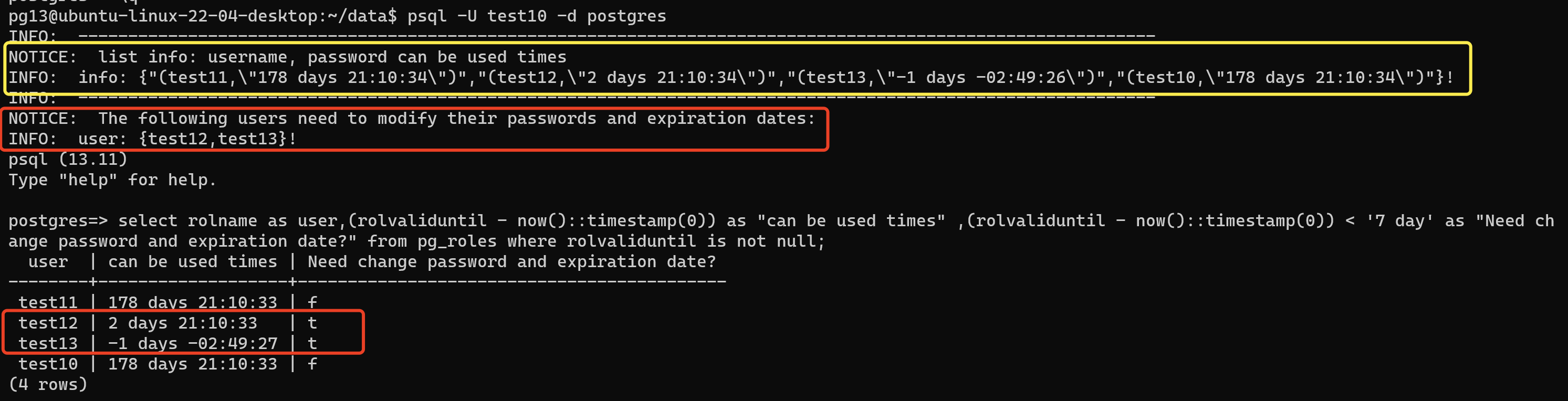
pg13@ubuntu-linux-22-04-desktop:~/data$ psql -U test10 -d postgres
INFO:  ------------------------------------------------------------------------------------------------------------
NOTICE:  list info: username, password can be used times
INFO:  info: {"(test11,\"178 days 21:13:24\")","(test12,\"2 days 21:13:24\")","(test13,\"-1 days -02:46:36\")","(test10,\"178 days 21:13:24\")"}!
INFO:  ------------------------------------------------------------------------------------------------------------
NOTICE:  The following users need to modify their passwords and expiration dates:
INFO:  user: {test12,test13}!
psql (13.11)
Type "help" for help.

postgres=>
最后修改时间:2024-02-21 09:42:08
「喜欢这篇文章,您的关注和赞赏是给作者最好的鼓励」
关注作者
【版权声明】本文为墨天轮用户原创内容,转载时必须标注文章的来源(墨天轮),文章链接,文章作者等基本信息,否则作者和墨天轮有权追究责任。如果您发现墨天轮中有涉嫌抄袭或者侵权的内容,欢迎发送邮件至:contact@modb.pro进行举报,并提供相关证据,一经查实,墨天轮将立刻删除相关内容。
