



postgresql自带指令命令系列三
目录
目录
简介
在安装postgresql数据库的时候会需要设置一个关于postgresql数据库的PATH变量
export PATH=/home/postgres/pg/bin:$PATH,该变量会指向postgresql安装路径下的bin目录。这个安装目录和我们在进行编译的时候./configure --prefix= [指定安装目录] 中的prefix参数设置相关。--bindir=DIR 参数可以指定bin目录的具体存放路径。postgresql对应的PATH变量没有设置正确,会导致执行文件对应的命令无法使用
本文使用postgresql-15.2版本进行讲解
在安装postgresql数据库的时候会需要设置一个关于postgresql数据库的PATH变量
export PATH=/home/postgres/pg/bin:$PATH,该变量会指向postgresql安装路径下的bin目录。这个安装目录和我们在进行编译的时候./configure --prefix= [指定安装目录] 中的prefix参数设置相关。--bindir=DIR 参数可以指定bin目录的具体存放路径。postgresql对应的PATH变量没有设置正确,会导致执行文件对应的命令无法使用
本文使用postgresql-15.2版本进行讲解
bin目录
进入到对应的bin目录中去,可以看到有以下的执行文件,本博主将进行一一讲解
clusterdb
createdb
createuser
dropdb
dropuser
ecpg
initdb
oid2name
pg_amcheck
pg_archivecleanup
pg_basebackup
pgbench
pg_checksums
pg_config
pg_controldata
pg_ctl
pg_dump
pg_dumpall
pg_isready
pg_receivewal
pg_recvlogical
pg_resetwal
pg_restore
pg_rewind
pg_test_fsync
pg_test_timing
pg_upgrade
pg_verifybackup
pg_waldump
postgres
postmaster -> postgres
psql
reindexdb
vacuumdb
vacuumlo
接上文
28.pg_verifybackup
pg_verifybackup — 验证PostgreSQL集群的基础备份的完整性,当我们做完备份之后,可以只用该工具对备份进行验证
[postgres@vm03 ~]$ pg_basebackup -Fp -P -v -D backup/
pg_basebackup: initiating base backup, waiting for checkpoint to complete
pg_basebackup: checkpoint completed
pg_basebackup: write-ahead log start point: 0/18000060 on timeline 1
pg_basebackup: starting background WAL receiver
pg_basebackup: created temporary replication slot "pg_basebackup_2554"
41785/41785 kB (100%), 1/1 tablespace
pg_basebackup: write-ahead log end point: 0/18000138
pg_basebackup: waiting for background process to finish streaming ...
pg_basebackup: syncing data to disk ...
pg_basebackup: renaming backup_manifest.tmp to backup_manifest
pg_basebackup: base backup completed
[postgres@vm03 ~]$ pg_verifybackup backup/
backup successfully verified
在实际完成数据库备份的时候,会生成backup_label,backup_manifest信息文件, pg_verifybackup会先读取backup_manifest文件的信息,然后验证备份文件目录的完整性,再接着基于读取backup_manifest文件的信息对备份文件下所有信息文件的效验。
[postgres@vm03 ~]$ cd backup/
[postgres@vm03 backup]$ ll
-rw------- 1 postgres postgres 227 Dec 9 18:34 backup_label
-rw------- 1 postgres postgres 141510 Dec 9 18:34 backup_manifest
drwx------ 5 postgres postgres 33 Dec 9 18:34 base
-rw------- 1 postgres postgres 44 Dec 9 18:34 current_logfiles
drwx------ 2 postgres postgres 4096 Dec 9 18:34 global
drwx------ 2 postgres postgres 246 Dec 9 18:34 log
drwx------ 2 postgres postgres 6 Dec 9 18:34 pg_commit_ts
drwx------ 2 postgres postgres 6 Dec 9 18:34 pg_dynshmem
-rw------- 1 postgres postgres 4774 Dec 9 18:34 pg_hba.conf
-rw------- 1 postgres postgres 1636 Dec 9 18:34 pg_ident.conf
drwx------ 4 postgres postgres 68 Dec 9 18:34 pg_logical
drwx------ 4 postgres postgres 36 Dec 9 18:34 pg_multixact
drwx------ 2 postgres postgres 6 Dec 9 18:34 pg_notify
drwx------ 2 postgres postgres 6 Dec 9 18:34 pg_replslot
drwx------ 2 postgres postgres 6 Dec 9 18:34 pg_serial
drwx------ 2 postgres postgres 6 Dec 9 18:34 pg_snapshots
drwx------ 2 postgres postgres 6 Dec 9 18:34 pg_stat
drwx------ 2 postgres postgres 6 Dec 9 18:34 pg_stat_tmp
drwx------ 2 postgres postgres 6 Dec 9 18:34 pg_subtrans
drwx------ 2 postgres postgres 6 Dec 9 18:34 pg_tblspc
drwx------ 2 postgres postgres 6 Dec 9 18:34 pg_twophase
-rw------- 1 postgres postgres 3 Dec 9 18:34 PG_VERSION
drwx------ 3 postgres postgres 60 Dec 9 18:34 pg_wal
drwx------ 2 postgres postgres 18 Dec 9 18:34 pg_xact
-rw------- 1 postgres postgres 88 Dec 9 18:34 postgresql.auto.conf
-rw------- 1 postgres postgres 29516 Dec 9 18:34 postgresql.conf
[postgres@vm03 backup]$ cat backup_label
START WAL LOCATION: 0/18000060 (file 000000010000000000000018)
CHECKPOINT LOCATION: 0/18000098
START TIME: 2023-12-09 18:34:47 CST
LABEL: pg_basebackup base backup
START TIMELINE: 1
pg_verifybackup — 验证PostgreSQL集群的基础备份的完整性,当我们做完备份之后,可以只用该工具对备份进行验证
[postgres@vm03 ~]$ pg_basebackup -Fp -P -v -D backup/
pg_basebackup: initiating base backup, waiting for checkpoint to complete
pg_basebackup: checkpoint completed
pg_basebackup: write-ahead log start point: 0/18000060 on timeline 1
pg_basebackup: starting background WAL receiver
pg_basebackup: created temporary replication slot "pg_basebackup_2554"
41785/41785 kB (100%), 1/1 tablespace
pg_basebackup: write-ahead log end point: 0/18000138
pg_basebackup: waiting for background process to finish streaming ...
pg_basebackup: syncing data to disk ...
pg_basebackup: renaming backup_manifest.tmp to backup_manifest
pg_basebackup: base backup completed
[postgres@vm03 ~]$ pg_verifybackup backup/
backup successfully verified
在实际完成数据库备份的时候,会生成backup_label,backup_manifest信息文件, pg_verifybackup会先读取backup_manifest文件的信息,然后验证备份文件目录的完整性,再接着基于读取backup_manifest文件的信息对备份文件下所有信息文件的效验。
[postgres@vm03 ~]$ cd backup/
[postgres@vm03 backup]$ ll
-rw------- 1 postgres postgres 227 Dec 9 18:34 backup_label
-rw------- 1 postgres postgres 141510 Dec 9 18:34 backup_manifest
drwx------ 5 postgres postgres 33 Dec 9 18:34 base
-rw------- 1 postgres postgres 44 Dec 9 18:34 current_logfiles
drwx------ 2 postgres postgres 4096 Dec 9 18:34 global
drwx------ 2 postgres postgres 246 Dec 9 18:34 log
drwx------ 2 postgres postgres 6 Dec 9 18:34 pg_commit_ts
drwx------ 2 postgres postgres 6 Dec 9 18:34 pg_dynshmem
-rw------- 1 postgres postgres 4774 Dec 9 18:34 pg_hba.conf
-rw------- 1 postgres postgres 1636 Dec 9 18:34 pg_ident.conf
drwx------ 4 postgres postgres 68 Dec 9 18:34 pg_logical
drwx------ 4 postgres postgres 36 Dec 9 18:34 pg_multixact
drwx------ 2 postgres postgres 6 Dec 9 18:34 pg_notify
drwx------ 2 postgres postgres 6 Dec 9 18:34 pg_replslot
drwx------ 2 postgres postgres 6 Dec 9 18:34 pg_serial
drwx------ 2 postgres postgres 6 Dec 9 18:34 pg_snapshots
drwx------ 2 postgres postgres 6 Dec 9 18:34 pg_stat
drwx------ 2 postgres postgres 6 Dec 9 18:34 pg_stat_tmp
drwx------ 2 postgres postgres 6 Dec 9 18:34 pg_subtrans
drwx------ 2 postgres postgres 6 Dec 9 18:34 pg_tblspc
drwx------ 2 postgres postgres 6 Dec 9 18:34 pg_twophase
-rw------- 1 postgres postgres 3 Dec 9 18:34 PG_VERSION
drwx------ 3 postgres postgres 60 Dec 9 18:34 pg_wal
drwx------ 2 postgres postgres 18 Dec 9 18:34 pg_xact
-rw------- 1 postgres postgres 88 Dec 9 18:34 postgresql.auto.conf
-rw------- 1 postgres postgres 29516 Dec 9 18:34 postgresql.conf
[postgres@vm03 backup]$ cat backup_label
START WAL LOCATION: 0/18000060 (file 000000010000000000000018)
CHECKPOINT LOCATION: 0/18000098
START TIME: 2023-12-09 18:34:47 CST
LABEL: pg_basebackup base backup
START TIMELINE: 1
29.pg_waldump
pg_waldump 是一个查看PostgreSQL 预写式日志的工具,常常用与PITR去读取对应时间点的LSN以进行PITR恢复
[postgres@vm03 backup]$ cd pg_wal/
[postgres@vm03 pg_wal]$ ll
-rw------- 1 postgres postgres 16777216 Dec 9 18:34 000000010000000000000018
drwx------ 2 postgres postgres 6 Dec 9 18:34 archive_status
[postgres@vm03 pg_wal]$ pg_waldump 000000010000000000000018
rmgr: Standby len (rec/tot): 50/ 50, tx: 0, lsn: 0/18000028, prev 0/170001C0, desc: RUNNING_XACTS nextXid 91773 latestCompletedXid 91772 oldestRunningXid 91773
rmgr: Standby len (rec/tot): 50/ 50, tx: 0, lsn: 0/18000060, prev 0/18000028, desc: RUNNING_XACTS nextXid 91773 latestCompletedXid 91772 oldestRunningXid 91773
rmgr: XLOG len (rec/tot): 114/ 114, tx: 0, lsn: 0/18000098, prev 0/18000060, desc: CHECKPOINT_ONLINE redo 0/18000060; tli 1; prev tli 1; fpw true; xid 0:91773; oid 24610; multi 1; offset 0; oldest xid 716 in DB 1; oldest multi 1 in DB 1; oldest/newest commit timestamp xid: 0/0; oldest running xid 91773; online
rmgr: XLOG len (rec/tot): 34/ 34, tx: 0, lsn: 0/18000110, prev 0/18000098, desc: BACKUP_END 0/18000060
rmgr: XLOG len (rec/tot): 24/ 24, tx: 0, lsn: 0/18000138, prev 0/18000110, desc: SWITCH
pg_waldump 是一个查看PostgreSQL 预写式日志的工具,常常用与PITR去读取对应时间点的LSN以进行PITR恢复
[postgres@vm03 backup]$ cd pg_wal/
[postgres@vm03 pg_wal]$ ll
-rw------- 1 postgres postgres 16777216 Dec 9 18:34 000000010000000000000018
drwx------ 2 postgres postgres 6 Dec 9 18:34 archive_status
[postgres@vm03 pg_wal]$ pg_waldump 000000010000000000000018
rmgr: Standby len (rec/tot): 50/ 50, tx: 0, lsn: 0/18000028, prev 0/170001C0, desc: RUNNING_XACTS nextXid 91773 latestCompletedXid 91772 oldestRunningXid 91773
rmgr: Standby len (rec/tot): 50/ 50, tx: 0, lsn: 0/18000060, prev 0/18000028, desc: RUNNING_XACTS nextXid 91773 latestCompletedXid 91772 oldestRunningXid 91773
rmgr: XLOG len (rec/tot): 114/ 114, tx: 0, lsn: 0/18000098, prev 0/18000060, desc: CHECKPOINT_ONLINE redo 0/18000060; tli 1; prev tli 1; fpw true; xid 0:91773; oid 24610; multi 1; offset 0; oldest xid 716 in DB 1; oldest multi 1 in DB 1; oldest/newest commit timestamp xid: 0/0; oldest running xid 91773; online
rmgr: XLOG len (rec/tot): 34/ 34, tx: 0, lsn: 0/18000110, prev 0/18000098, desc: BACKUP_END 0/18000060
rmgr: XLOG len (rec/tot): 24/ 24, tx: 0, lsn: 0/18000138, prev 0/18000110, desc: SWITCH
30.postgres
这是一个非常重要的指令,常常再因为数据库运行故障时,会使用单用户模式进入数据库中进行排查。
[postgres@vm03 ~]$ postgres --single
PostgreSQL stand-alone backend 15.3
backend>
使用CTRL+D退出单用户模式
该指令也可以启动数据库,实现后台运行
nohup postgres > nohup.out 2>&1 &
postgres 2893 2361 1 19:05 pts/0 00:00:00 postgres
postgres 2894 2893 0 19:05 ? 00:00:00 postgres: logger
postgres 2895 2893 0 19:05 ? 00:00:00 postgres: checkpointer
postgres 2896 2893 0 19:05 ? 00:00:00 postgres: background writer
postgres 2898 2893 0 19:05 ? 00:00:00 postgres: walwriter
postgres 2899 2893 0 19:05 ? 00:00:00 postgres: autovacuum launcher
postgres 2901 2893 0 19:05 ? 00:00:00 postgres: logical replication launcher
postgres 2905 2788 0 19:05 pts/3 00:00:00 ps -ef
postgres 2906 2788 0 19:05 pts/3 00:00:00 grep --color=auto postgres
无论你使用pg_ctl start 还是postgres 启动数据库,都会拉起一个postgres进程。在使用pg_ctl start启动数据库的时候,其实也就是去调用postgres进行启动数据库。
这是一个非常重要的指令,常常再因为数据库运行故障时,会使用单用户模式进入数据库中进行排查。
[postgres@vm03 ~]$ postgres --single
PostgreSQL stand-alone backend 15.3
backend>
使用CTRL+D退出单用户模式
该指令也可以启动数据库,实现后台运行
nohup postgres > nohup.out 2>&1 &postgres 2893 2361 1 19:05 pts/0 00:00:00 postgres
postgres 2894 2893 0 19:05 ? 00:00:00 postgres: logger
postgres 2895 2893 0 19:05 ? 00:00:00 postgres: checkpointer
postgres 2896 2893 0 19:05 ? 00:00:00 postgres: background writer
postgres 2898 2893 0 19:05 ? 00:00:00 postgres: walwriter
postgres 2899 2893 0 19:05 ? 00:00:00 postgres: autovacuum launcher
postgres 2901 2893 0 19:05 ? 00:00:00 postgres: logical replication launcher
postgres 2905 2788 0 19:05 pts/3 00:00:00 ps -ef
postgres 2906 2788 0 19:05 pts/3 00:00:00 grep --color=auto postgres
无论你使用pg_ctl start 还是postgres 启动数据库,都会拉起一个postgres进程。在使用pg_ctl start启动数据库的时候,其实也就是去调用postgres进行启动数据库。
31.postmaster -> postgres
postmaster是postgres的一个废弃的别名,一直使用软连接挂载到postgres上。
postmaster是postgres的一个废弃的别名,一直使用软连接挂载到postgres上。
32.psql
这是一个进入postgresql数据库,在学习postgresql数据库非常常见的一个指令工具。
这是一个进入postgresql数据库,在学习postgresql数据库非常常见的一个指令工具。
33.reindexdb
这是一个重建数据库或者数据库表的指令工具。数据库在使用的时候常常由于位置情况导致,表的索引损坏的情况,此时可以使用该指令,对表的索引进行重建。
创建测试数据。
CREATE TABLE test_table (
id SERIAL PRIMARY KEY,
name VARCHAR(200)
- );
CREATE INDEX idx_test_table_name ON test_table(name);
INSERT INTO test_table (id ,name ) select id , md5(id::text) from generate_series(2,80000) as id ;
查看索引所在地址,
postgres=# select pg_relation_filepath('idx_test_table_name');
pg_relation_filepath
----------------------
base/5/25105
(1 row)
删掉索引文件
rm -rf $PGDATA/base/5/25105
此时查询该表便会报错,提示索引文件缺失
postgres=# select * from test_table;
ERROR: could not open file "base/5/25105": No such file or directory
使用 reindexdb对其进行修复
[postgres@vm03 ~]$ reindexdb -t test_table -i idx_test_table_name
[postgres@vm03 ~]$
此时再次查看文件变可以查看了
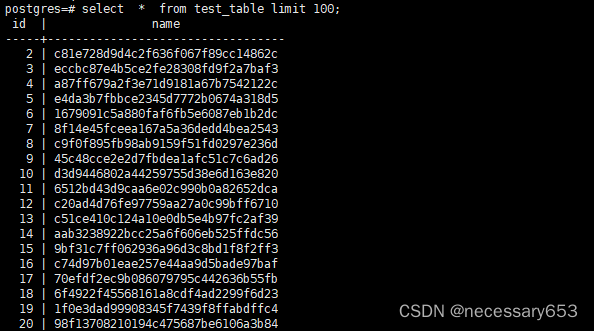
这是一个重建数据库或者数据库表的指令工具。数据库在使用的时候常常由于位置情况导致,表的索引损坏的情况,此时可以使用该指令,对表的索引进行重建。
创建测试数据。
CREATE TABLE test_table (
id SERIAL PRIMARY KEY,
name VARCHAR(200)
- );
CREATE INDEX idx_test_table_name ON test_table(name);
INSERT INTO test_table (id ,name ) select id , md5(id::text) from generate_series(2,80000) as id ;
查看索引所在地址,
postgres=# select pg_relation_filepath('idx_test_table_name'); pg_relation_filepath ---------------------- base/5/25105 (1 row)
删掉索引文件
rm -rf $PGDATA/base/5/25105
此时查询该表便会报错,提示索引文件缺失
postgres=# select * from test_table;
ERROR: could not open file "base/5/25105": No such file or directory
使用 reindexdb对其进行修复
[postgres@vm03 ~]$ reindexdb -t test_table -i idx_test_table_name [postgres@vm03 ~]$
此时再次查看文件变可以查看了
34.vacuumdb
清理数据库中的死元组,并回收存储空间的工具,往往数据库正常启动状态下,会有autovacuum launcher 进程,会自动清理数据库的死元组信息,并更新统计信息,优化器会根据新的统计信息对数据的相关优化判断重新定义。
vacuumdb简单理解,也就时vacuum的SQL命令的一个封装工具
[postgres@vm03 ~]$ vacuumdb -z
vacuumdb: vacuuming database "postgre
清理数据库中的死元组,并回收存储空间的工具,往往数据库正常启动状态下,会有autovacuum launcher 进程,会自动清理数据库的死元组信息,并更新统计信息,优化器会根据新的统计信息对数据的相关优化判断重新定义。
vacuumdb简单理解,也就时vacuum的SQL命令的一个封装工具
[postgres@vm03 ~]$ vacuumdb -z
vacuumdb: vacuuming database "postgre
35.vacuumlo
vacuumlo 是一个 "会" 从 PostgreSQL 数据库移除所有孤立的大对象的简单程序。
vacuumlo 是一个 "会" 从 PostgreSQL 数据库移除所有孤立的大对象的简单程序。
总结:
本博主,根据在实际工作使用的频率,以及对于数据库故障处理,日常维护的重要性进行评星(满星五颗星)。
重要性 指令 作用 ***** clusterdb 重组或重新排序数据库表,以优化性能。 ** createdb 创建新的数据库。 **** createuser 创建新的数据库用户。 ** dropdb 删除数据库。 **** dropuser 删除数据库用户。 ** ecpg 处理嵌入式 SQL。 ** initdb 初始化新的 PostgreSQL 数据库实例。 ***** oid2name 转换 OID(对象标识符)为名称。 *** pg_amcheck 检查 PostgreSQL 索引的一致性。 ** pg_archivecleanup 从归档目录中删除不再需要的 WAL 日志文件。 ***** pg_basebackup 创建 PostgreSQL 数据库的基础备份。 ***** pgbench 进行 PostgreSQL 数据库基准测试。 **** pg_checksums 校验和控制和修复数据文件。 **** pg_config 显示 PostgreSQL 的编译配置。 ** pg_controldata 显示 PostgreSQL 数据库控制信息。 **** pg_ctl 启动、停止、或重新加载 PostgreSQL 服务器。 ***** pg_dump 备份 PostgreSQL 数据库 ***** pg_dumpall 备份所有 PostgreSQL 数据库和角色 * pg_isready 检查 PostgreSQL 服务器是否准备好接收连接。 ** pg_receivewal 接收 WAL 日志流并将其写入文件。 * pg_recvlogical 接收逻辑复制流。 ***** pg_resetwal 重置 PostgreSQL 数据库的日志文件。 ***** pg_restore 恢复 PostgreSQL 数据库备份。 **** pg_rewind 数据库增量、全量备份工具,可用与PITR相关技术点 *** pg_test_fsync 测试文件同步方法的性能。 *** pg_test_timing 测试 PostgreSQL 服务器的计时器。 **** pg_upgrade 升级 PostgreSQL 数据库到新版本。 ** pg_verifybackup 验证 PostgreSQL 数据库备份的一致性。 **** pg_waldump 显示 PostgreSQL WAL 文件的内容。 *** postgres PostgreSQL 服务器进程。 * postmaster PostgreSQL 主进程。 **** psql PostgreSQL 的交互式终端。 ***** reindexdb 重新建立 PostgreSQL 数据库中的索引。 ***** vacuumdb 释放未使用的存储空间并优化数据库。 * vacuumlo 释放未使用的大对象存储空间。
本博主,根据在实际工作使用的频率,以及对于数据库故障处理,日常维护的重要性进行评星(满星五颗星)。
| 重要性 | 指令 | 作用 |
| ***** | clusterdb | 重组或重新排序数据库表,以优化性能。 |
| ** | createdb | 创建新的数据库。 |
| **** | createuser | 创建新的数据库用户。 |
| ** | dropdb | 删除数据库。 |
| **** | dropuser | 删除数据库用户。 |
| ** | ecpg | 处理嵌入式 SQL。 |
| ** | initdb | 初始化新的 PostgreSQL 数据库实例。 |
| ***** | oid2name | 转换 OID(对象标识符)为名称。 |
| *** | pg_amcheck | 检查 PostgreSQL 索引的一致性。 |
| ** | pg_archivecleanup | 从归档目录中删除不再需要的 WAL 日志文件。 |
| ***** | pg_basebackup | 创建 PostgreSQL 数据库的基础备份。 |
| ***** | pgbench | 进行 PostgreSQL 数据库基准测试。 |
| **** | pg_checksums | 校验和控制和修复数据文件。 |
| **** | pg_config | 显示 PostgreSQL 的编译配置。 |
| ** | pg_controldata | 显示 PostgreSQL 数据库控制信息。 |
| **** | pg_ctl | 启动、停止、或重新加载 PostgreSQL 服务器。 |
| ***** | pg_dump | 备份 PostgreSQL 数据库 |
| ***** | pg_dumpall | 备份所有 PostgreSQL 数据库和角色 |
| * | pg_isready | 检查 PostgreSQL 服务器是否准备好接收连接。 |
| ** | pg_receivewal | 接收 WAL 日志流并将其写入文件。 |
| * | pg_recvlogical | 接收逻辑复制流。 |
| ***** | pg_resetwal | 重置 PostgreSQL 数据库的日志文件。 |
| ***** | pg_restore | 恢复 PostgreSQL 数据库备份。 |
| **** | pg_rewind | 数据库增量、全量备份工具,可用与PITR相关技术点 |
| *** | pg_test_fsync | 测试文件同步方法的性能。 |
| *** | pg_test_timing | 测试 PostgreSQL 服务器的计时器。 |
| **** | pg_upgrade | 升级 PostgreSQL 数据库到新版本。 |
| ** | pg_verifybackup | 验证 PostgreSQL 数据库备份的一致性。 |
| **** | pg_waldump | 显示 PostgreSQL WAL 文件的内容。 |
| *** | postgres | PostgreSQL 服务器进程。 |
| * | postmaster | PostgreSQL 主进程。 |
| **** | psql | PostgreSQL 的交互式终端。 |
| ***** | reindexdb | 重新建立 PostgreSQL 数据库中的索引。 |
| ***** | vacuumdb | 释放未使用的存储空间并优化数据库。 |
| * | vacuumlo | 释放未使用的大对象存储空间。 |
