



实现New
- 首先创建一个新的空对象
- 设置原型,将对象的原型设置为函数的prototype对象
- 让函数的this指向这个对象,执行构造函数的代码
- 判断函数的返回值类型,如果是值类型,返回创建的对象。如果是引用类型,就返回这个引用类型的对象
function myNew(constructor, ...args) {
  // 如果不是一个函数,就报错
  if (typeof constructor !== "function") {
    throw "myNew function the first param must be a function";
  }
  // 基于原型链 创建一个新对象,继承构造函数constructor的原型对象上的属性
  let newObj = Object.create(constructor.prototype);
  // 将newObj作为this,执行 constructor ,传入参数
  let res = constructor.apply(newObj, args);
  // 判断函数的执行结果是否是对象,typeof null 也是'object'所以要排除null
  let isObject = typeof res === "newObject" && res !== null;
  // 判断函数的执行结果是否是函数
  let isFunction = typeof res === "function";
  // 如果函数的执行结果是一个对象或函数, 则返回执行的结果, 否则, 返回新创建的对象
  return isObject || isFunction ? res : newObj;
}

// 用法
function Person(name, age) {
  this.name = name;
  this.age = age;
 // 如果构造函数内部,return 一个引用类型的对象,则整个构造函数失效,而是返回这个引用类型的对象
}
Person.prototype.say = function() {
  console.log(this.age);
};
let p1 = myNew(Person, "poety", 18);
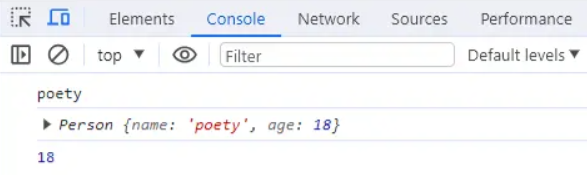
console.log(p1.name);	//poety
console.log(p1);	//Person {name: 'poety', age: 18}
p1.say();	//18
测试结果:
call、apply、bind
实现call
思路:接受传入的context上下文,如果不传默认为window,将被调用的方法设置为上下文的属性,使用上下文对象来调用这个方法,删除新增属性,返回结果。
//写在函数的原型上
Function.prototype.myCall = function (context) {
  // 如果要调用的方法不是一个函数,则报错
  if (typeof this !== "function") {
    throw new Error("Type error");
  }
  // 判断 context 是否传入,如果没有传就设置为 window
  context = context || window;
  // 获取参数,[...arguments]把类数组转为数组
  let args = [...arguments].slice(1);
  let result = null;
  // 将被调用的方法设置为context的属性,this即为要调用的方法
  context.fn = this;
  // 执行要被调用的方法
  result = context.fn(...args);
  // 删除手动增加的属性方法
  delete context.fn;
  // 将执行结果返回
  return result;
};

//测试
function f(a, b) {
  console.log(a + b);
  console.log(this.name);
}
let obj = {
  name: 1,
};
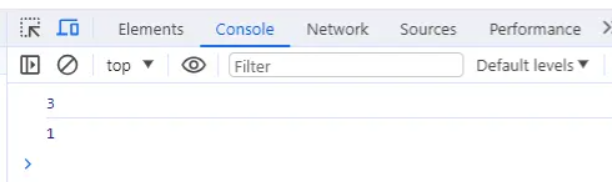
f.myCall(obj, 1, 2); // 3,1
测试结果:
实现apply
思路:除了传参方式是数组,其它与call没区别
Function.prototype.myApply = function (context) {
  if (typeof this !== "function") {
    throw new Error("Type error");
  }
  let result = null;
  context = context || window;
  // 与上面代码相比,我们使用 Symbol 来保证属性唯一,也就是保证不会重写用户自己原来定义在 context 中的同名属性
  const fnSymbol = Symbol();
  context[fnSymbol] = this;
  // 执行要被调用的方法,处理参数和 call 有区别,判断是否传了参数数组
  if (arguments[1]) {
    //传了参数数组
    result = context[fnSymbol](...arguments[1]);
  } else {
    //没传参数数组
    result = context[fnSymbol]();
  }
  delete context[fnSymbol];
  return result;
};

//测试
function f(a, b) {
  console.log(a, b);
  console.log(this.name);
}
let obj = {
  name: "张三",
};
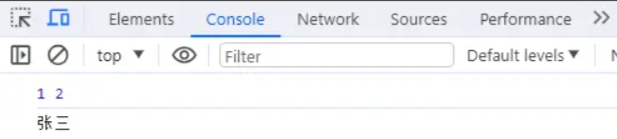
f.myApply(obj, [1, 2]); //1 2,张三
测试结果:
实现bind
思路:bind返回的是一个函数,需要判断函数作为构造函数的情况,当作为构造函数时,this指向实例,不会被任何方式改变this,所以要忽略传入的context上下文。
bind可以分开传递参数,所以需要将参数拼接。如果绑定的是构造函数,还需要继承构造函数原型上的属性和方法,保证不丢失。
Function.prototype.myBind = function (context) {
  // 判断调用对象是否为函数
  if (typeof this !== "function") {
    throw new Error("Type error");
  }
  // 获取参数
  const args = [...arguments].slice(1);
  const fn = this; // 保存this的值,代表调用bind的函数
  //返回一个函数,此函数可以被作为构造函数调用,也可以作为普通函数调用
  const Fn = function () {
    // 根据调用方式,传入不同绑定值
    // 当作为构造函数时,this 指向实例,不会被任何方式改变 this,要忽略传入的context上下文
    return fn.apply(
      this instanceof Fn ? this : context,
      // bind可以分开传递参数(如f.bind(obj, 1)(2)),所以需要将参数拼接,这里使用apply,参数拼接成一个数组
      args.concat(...arguments)//当前的这个 arguments 是指 Fn 的参数,也可以用剩余参数的方式
    );
  };
  //对于构造函数,要保证原函数的原型对象上的属性不能丢失
  Fn.prototype = Object.create(fn.prototype);
  return Fn;
};

// 1.先测试作为构造函数调用
function Person(name, age) {
  console.log(name);
  console.log(age);
  console.log(this); //构造函数this指向实例对象
}
// 构造函数原型的方法
Person.prototype.say = function () {
  console.log("say");
};
var obj = {
  name: "cc",
  age: 18,
};
var bindFun = Person.myBind(obj, "cxx");
var a = new bindFun(10);
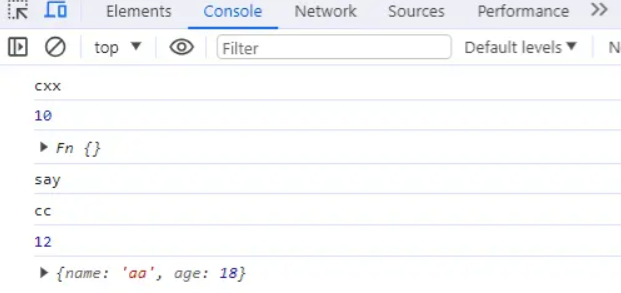
// cxx
// 10
// Person {}
a.say(); // say

// 2.再测试作为普通函数调用
function normalFun(name, age) {
  console.log(name);
  console.log(age);
  console.log(this); // 普通函数this指向绑定bind的第一个参数 也就是例子中的obj
}
var obj = {
  name: "aa",
  age: 18,
};
var bindNormalFun = normalFun.myBind(obj, "cc");
bindNormalFun(12);
// cc
// 12
// { name: 'aa', age: 18 }
测试结果:
防抖和节流
防抖
防抖是指在事件被触发n秒后在执行回调,如果在这n秒内时间又被触发,则重新计时。
可以使用在一些点击请求的事件上,避免因为用户的多次点击向后端发送多次请求。
//fn是需要防抖的函数,delay是等待时间
function debounce(fn, delay = 500) {
    let timer = null;
    // 这里返回的函数是每次用户实际调用的防抖函数
    return function(...args) {	//...args是es6的剩余参数语法,将多余的参数放入数组,用来代替arguments对象
    	// 如果已经设定过定时器了就清空上一次的定时器
    	if(timer) {
        	clearTimeout(timer);
        }
        // 开始一个新的定时器,延迟执行用户传入的方法;注:定时器的返回值是一个数值,作为定时器的编号,可以传入clearTimeout来取消定时器
        timer = setTimeout(() => {  //这里必须是箭头函数,不然this指向window,要让this就指向fn的调用者
        	fn.apply(this, args);
        }, delay)
    }
}
节流
节流就是一定时间内执行一次事件,即使重复触发,也只有一次生效。
可以使用在监听滚动scroll事件上,通过事件节流来降低事件调用的频率。
定时器版本
throttle(fn, delay = 500) {
    let timer = null;
    return function(...args) {
    	// 当前有任务了,直接返回
        if(timer) {
        	return;
        }
        timer = setTimeout(() => {
            fn.apply(this, args);
            //执行完后,需重置定时器,不然timer一直有值,无法开启下一个定时器
            timer = null;
        }, delay)
    }
}
时间戳版本
// 节流
function throttle(fn, delay = 500) {
  let prev = Date.now();// 上一次执行该函数的时间
  return function(...args) {
    let now = Date.now();//返回从UTC到当前时间的毫秒数
    // 如果差值大于等于设置的等待时间就执行函数
    if (now - prev >= delay) {
      fn.apply(this, args);
      prev = Date.now();
    }
  };
}
实现instanceof
instanceof用于检测构造函数的prototype属性是否出现在某个实例对象的原型链上。
myInstanceof(instance, constructor) {
    //如果不是对象,或者是null,直接返回false
    if (typeof instance !== "object" || instance === null) {
    	return false;
    }
    // 获取对象的原型
    let proto = Object.getPrototypeOf(instance);
    // 获取构造函数的 prototype 对象
    let prototype = constructor.prototype;
    // 判断构造函数的 prototype对象是否在对象的原型链上
    while (true) {
        // 到达原型链终点null,说明没找到
        if (!proto) {
        	return false;
        }
        if (proto === prototype) {
        	return true;
        }
        // 如果没有找到,就继续从其原型上找
        proto = Object.getPrototypeOf(proto);
    }
}

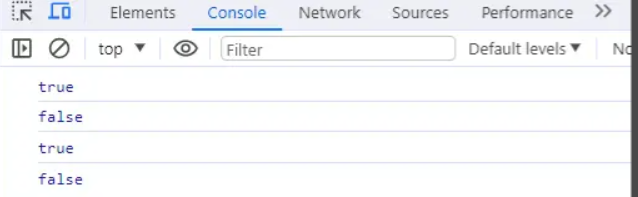
//测试
let Fn = function () { }
let p1 = new Fn()
console.log(myInstanceof(p1, Fn));//true
console.log(myInstanceof([], Fn));//false
console.log(myInstanceof([], Array)) // true
console.log(myInstanceof(function(){}, Function)) // true
测试结果:
实现Ajax
创建一个XMLHttpRequest对象
在这个对象上使用open方法创建一个HTTP请求(参数为请求方法、请求地址、是否异步和用户的认证信息)
通过send方法来向服务器发起请求(post请求可以入参作为发送的数据体)
监听请求成功后的状态变化:根据状态码进行相应的出来。onreadystatechange设置监听函数,当对象的readyState变为4的时候,代表服务器返回的数据接收完成,这个时候可以通过判断请求的状态,如果状态是200则为成功,404或500为失败。
function ajax(url) {
    //1.创建XMLHttpRequest对象
    const xhr = new XMLHttpRequest();
    //2.使用open方法创建一个GET请求
    xhr.open('GET',url);
    //xhr.open('GET',url,true);//true代表异步,已完成事务的通知可供事件监听器使用;如果为false,send() 方法直到收到答复前不会返回
    //3.发送请求
    xhr.send();
    //4.监听请求成功后的状态变化(readyState改变时触发):根据状态码(0~5)进行相应的处理
    xhr.onreadystatechange = function () {
        //readyState为4代表服务器返回的数据接收完成
        if (xhr.readyState == 4) {
            //请求的状态为200或304代表成功
            if(xhr.status == 200 || xhr.status == 304) {
                 //this.response代表返回的数据
                handle(this.response);
            } else {
                //this.statusText代表返回的文本信息
                console.error(this.statusText);
            }
        }
    };
}
使用Promise封装Ajax:
function ajax(url) {
    return new Promise((resolve, reject) => {
        let xhr = new XMLHttpRequest()
        xhr.open('get', url)
        xhr.send()
        xhr.onreadystatechange = () => {
          if (xhr.readyState == 4) {
            if (xhr.status == 200 || xhr.status == 304) {
              resolve(this.response)
            } else {
              reject(new Error(this.statusText));
            }
          }
        }
  	})
}
//使用
let url = '/data.json'
ajax(url).then(res => console.log(res))
  .catch(reason => console.log(reason))
最后修改时间:2024-02-21 11:19:22
「喜欢这篇文章,您的关注和赞赏是给作者最好的鼓励」
关注作者
【版权声明】本文为墨天轮用户原创内容,转载时必须标注文章的来源(墨天轮),文章链接,文章作者等基本信息,否则作者和墨天轮有权追究责任。如果您发现墨天轮中有涉嫌抄袭或者侵权的内容,欢迎发送邮件至:contact@modb.pro进行举报,并提供相关证据,一经查实,墨天轮将立刻删除相关内容。
