



需求
mysql在导入数据的时候, 想看下进度, 但是mysql命令行是没得相关进度的, 只能去数据库看下insert到哪张表了, 即使看了 也不知道还要多久…
mysql < xxx.sql
分析
/proc/PID/io 文件的rchar有记录 该进程读取了多少数据.
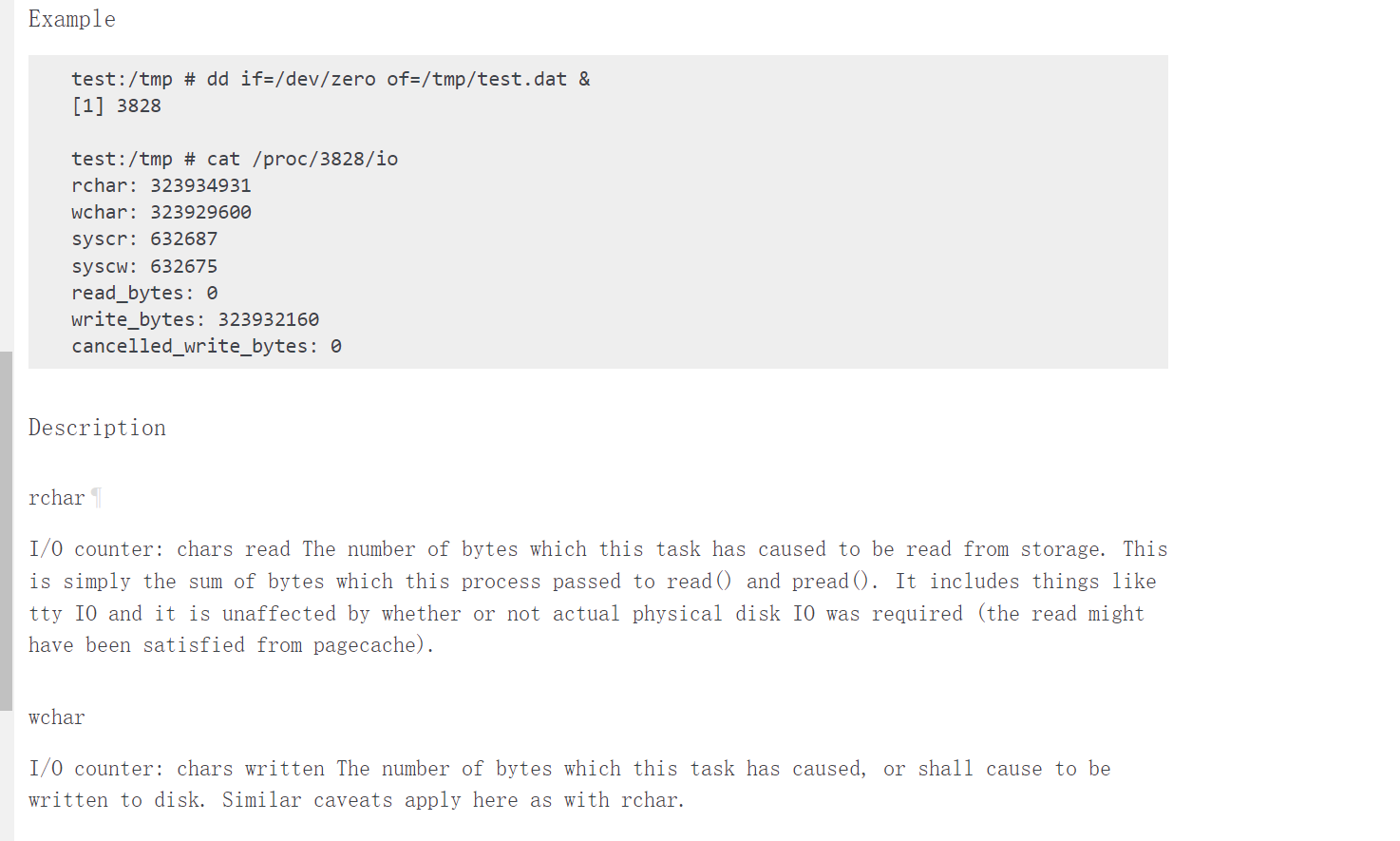
详情请看官网: https://www.kernel.org/doc/html/latest/filesystems/proc.html
那我们使用rchar的值除以 文件总大小 就是 导入进度了.
查看 /proc/PID/fd 就可以看到导入文件名字了. 然后使用 stat -c '%s' /root/t20230612_db2.sql 查看其大小
演示
在知道了上述信息后, 就可以使用shell脚本来查看进度了
sh MysqlImportRate.sh `pidof mysql`



就动态的显示进度了.
Time Remaining: 1 seconds 表示剩余时间
Rate: 32 MB/s 表示当前速度
注意: 如果存在多个导入进程, 或者多个mysql进程, 就需要指定具体的mysql进程的PID
sh MysqlImportRate.sh PID
以后就不用傻傻的等数据导入了. 至少我们有个预估剩余时间. 可以去吃个饭了再来 -_-
附脚本
墨天轮: https://www.modb.pro/doc/125462
github: https://github.com/ddcw/ddcw/blob/master/shells/MysqlImportRate.sh
或者如下:
#!/usr/bin/env bash
#write by ddcw @https://github.com/ddcw
#跟进mysql导入进程打印其进度
# $1 = `pidof mysqld`
export LANG="en_US.UTF-8"

jindutiao(){
	percentage=$1
	msg=$2
	filled_length=$[ ${percentage} / 2 ]
	bar=$(printf "%-50s" "$(printf '#%.0s' $(seq 1 $filled_length))")
	echo -ne "\r[$bar] $percentage% ${msg}"
}

MYSQL_PID=$1
FILENAME=""
#检查mysql进程号是否存在
if [ "$1" == "" ];then
	MYSQL_PID=`pidof mysql | awk '{print $1}'`
	if [ "${MYSQL_PID}" == "" ];then
		echo -e "no mysql pid\n sh $0 mysql_pid"
		exit 3
	fi
elif [ ! -f "/proc/$1/io" ];then
	echo "${PID} is not exists. Please check by yourself"
	exit 1
fi
FILENAME=`ls -l /proc/${MYSQL_PID}/fd/0 | awk '{print $NF}'`

#检查文件是否存在
if [ ! -f ${FILENAME} ];then
	echo "${FILENAME} is not exists. Please check by yourself!"
	exit 2
fi

SLEEP_INTER=1
LAST_SIZE=1
TOTAL_SIZE=`stat -c '%s' ${FILENAME}`
IS_RUN=0
while [ 1 -eq 1 ];do
	CURRENT_SIZE=`awk '{ if ($1=="rchar:") print $2}' /proc/${MYSQL_PID}/io 2>/dev/null`
	if [ "${CURRENT_SIZE}" == "" ];then
		#不存在了. 也就是导完了
		if [ ${IS_RUN} -eq 1 ];then
			jindutiao "100"
		fi
		break 1
	elif [ ${CURRENT_SIZE} -lt ${TOTAL_SIZE} ];then
		#打印进度
		REST_SIZE=$[ ${TOTAL_SIZE} - ${CURRENT_SIZE} ]
		RATE=$[ (${CURRENT_SIZE} - ${LAST_SIZE}) / ${SLEEP_INTER} ]
		if [ ${RATE} -gt 0 ];then #如果速度大于0, 就计算剩余的时间
			REST_TIME=$[ ${REST_SIZE} / ${RATE} ]
			#时间格式化
			if [ $[ ${REST_TIME} / 60 / 60 / 24 ] -ge 1 ];then
				REST_TIME=$[ ${REST_TIME} / 60 / 60 / 24 ]" days"
			elif [ $[ ${REST_TIME} / 60 / 60 ] -ge 1 ];then
				REST_TIME=$[ ${REST_TIME} / 60 / 60 ]" hours"
			elif [ $[ ${REST_TIME} / 60 ] -ge 1 ];then
				REST_TIME=$[ ${REST_TIME} / 60 ]" minutes"
			else
				REST_TIME="${REST_TIME} seconds"
			fi

			#速度格式化
			if [ $[ ${RATE} / 1024 / 1024 / 1024 ] -ge 1 ];then
				RATEH=$[ ${RATE} / 1024 / 1024 / 1024 ]" GB/s"
			elif [ $[ ${RATE} / 1024 / 1024 ] -ge 1 ];then
				RATEH=$[ ${RATE} / 1024 / 1024 ]" MB/s"
			elif [ $[ ${RATE} / 1024 ] -ge 1 ];then
				RATEH=$[ ${RATE} / 1024 ]" KB/s"
			else
				RATEH="{RATE} B/s"
			fi
		else
			REST_TIME=""
			RATEH=${RATE}
		fi
		jindutiao "$[ ${CURRENT_SIZE} * 100 / ${TOTAL_SIZE} ]" "Time Remaining: ${REST_TIME} Rate: ${RATEH}"
	elif [ ${CURRENT_SIZE} -ge ${TOTAL_SIZE} ];then
		jindutiao "100"
		break
	fi
	LAST_SIZE=${CURRENT_SIZE}
	IS_RUN=1
	sleep ${SLEEP_INTER}
done
echo ""
「喜欢这篇文章,您的关注和赞赏是给作者最好的鼓励」
关注作者
【版权声明】本文为墨天轮用户原创内容,转载时必须标注文章的来源(墨天轮),文章链接,文章作者等基本信息,否则作者和墨天轮有权追究责任。如果您发现墨天轮中有涉嫌抄袭或者侵权的内容,欢迎发送邮件至:contact@modb.pro进行举报,并提供相关证据,一经查实,墨天轮将立刻删除相关内容。
