暂无图片
暂无图片
暂无图片
暂无图片
暂无图片

经验分享 | 如何通过SQL获取MySQL对象的DDL、统计信息、查询的执行计划

PawSQL 2024-02-26
1232

说明:PawSQL项目开发的过程中,收集了一些对数据库元数据采集的SQL语句,可能对开发人员有某些帮助,在此分享出来,供大家参考,本次分享的是针对MySQL数据库的操作。

目录

获取对象定义的SQL语句

表的DDL语句

索引的DDL语句

视图的DDL语句

物化视图的DDL语句

获取对象统计信息的SQL语句

表级统计信息

索引统计信息

列级统计信息

获取执行计划的Explain语句

Explain

Explain Json (5.7及以上)

Explain Tree (8.0.16及以上)

Explain Analyze (8.0.18及以上)

JDBC驱动
关于PawSQL

1. 获取对象定义的SQL语句

  • 获取表和视图的列表

    select table_name, table_type from information_schema.tables 
    where table_schema = '$dbname'

    table_type

      • 'BASE TABLE' - 表

      • 'VIEW'           - 视图

    1.1 获取表的DDL语句

    • 查询语句

      SHOW CREATE TABLE tpch.customer
      • 查询结果

        CREATE TABLE `customer` (
        `C_CUSTKEY` int NOT NULL,
        `C_NAME` varchar(25) NOT NULL,
        `C_ADDRESS` varchar(40) NOT NULL,
        `C_NATIONKEY` int NOT NULL,
        `C_PHONE` char(15) NOT NULL,
        `C_ACCTBAL` decimal(15,2) NOT NULL,
        `C_MKTSEGMENT` char(10) NOT NULL,
        `C_COMMENT` varchar(117) NOT NULL,
        PRIMARY KEY `PK_IDX1614428511` (`C_CUSTKEY`)
        ENGINE=InnoDB DEFAULT CHARSET=utf8mb4 COLLATE=utf8mb4_bin;

        1.2 获取索引的DDL语句

        对于MySQL数据库,索引信息可以从建表语句中获取,无需单独获取。

        1.3 获取视图的DDL语句

        • 查询语句

          SHOW CREATE TABLE tpch.customer_v
          • 查询结果

            create view `customer_v` as select
            `customer`.`C_CUSTKEY` as `C_CUSTKEY`,
            `customer`.`C_NAME` as `C_NAME`,
            `customer`.`C_ADDRESS` as `C_ADDRESS`,
            `customer`.`C_NATIONKEY` as `C_NATIONKEY`,
            `customer`.`C_PHONE` as `C_PHONE`,
            `customer`.`C_ACCTBAL` as `C_ACCTBAL`,
            `customer`.`C_MKTSEGMENT` as `C_MKTSEGMENT`,
            `customer`.`C_COMMENT` as `C_COMMENT`
            from `customer`
            where (`customer`.`C_CUSTKEY` < 100)

            1.4 物化视图的DDL语句

            MySQL不支持物化视图

            2. 获取对象统计信息的SQL语句

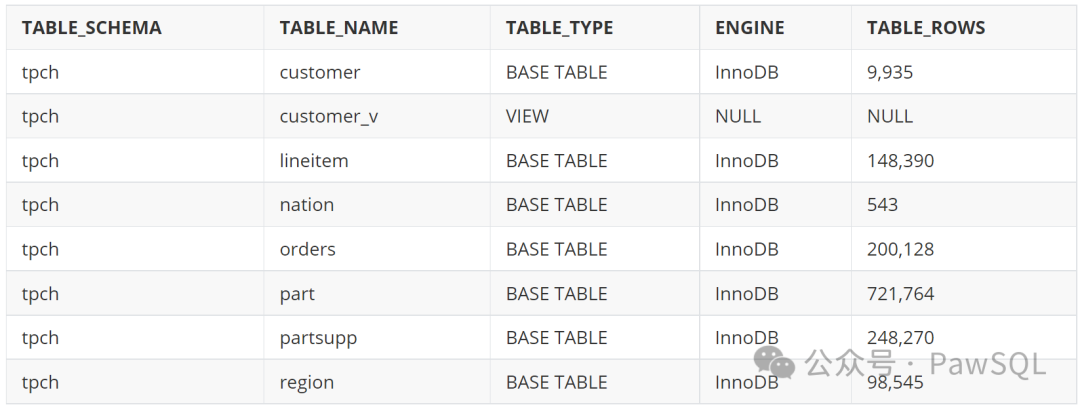
            2.1 表级统计信息

            • 查询语句

              select
              table_schema,
              table_name,
              table_type,
              engine,
              table_rows
              from information_schema.tables
              where table_schema = $dbname
              • 查询结果

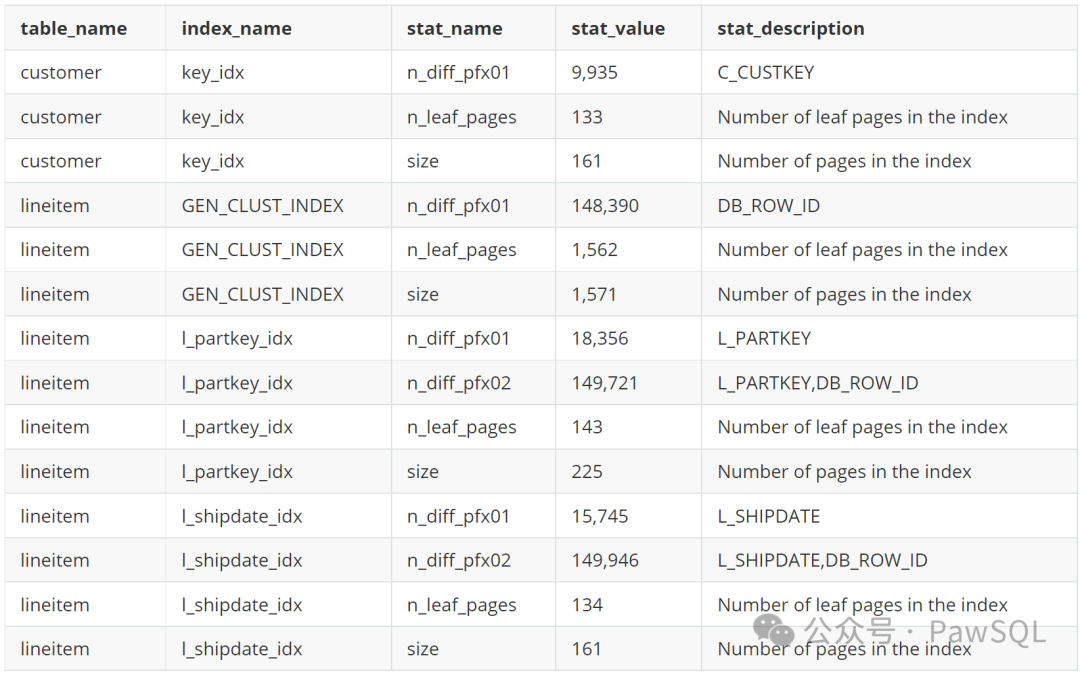
              2.2 索引统计信息

              • 收集索引统计信息的命令

                analyze table customer;
                1. analyze table 会统计索引分布信息。
                2. 支持 InnoDB、NDB、MyISAM 等存储引擎
                3. 对于 MyISAM 表,相当于执行了一次 myisamchk --analyze
                4. 执行 analyze table 时,会对表加上读锁
                5. 该操作会记录binlog
                6. 不支持视图
                • 查询统计信息的SQL语句

                  select
                  table_name,
                  index_name,
                  stat_name,
                  stat_value,
                  stat_description
                  from mysql.innodb_index_stats
                  where database_name = 'tpch'
                  • 查询结果

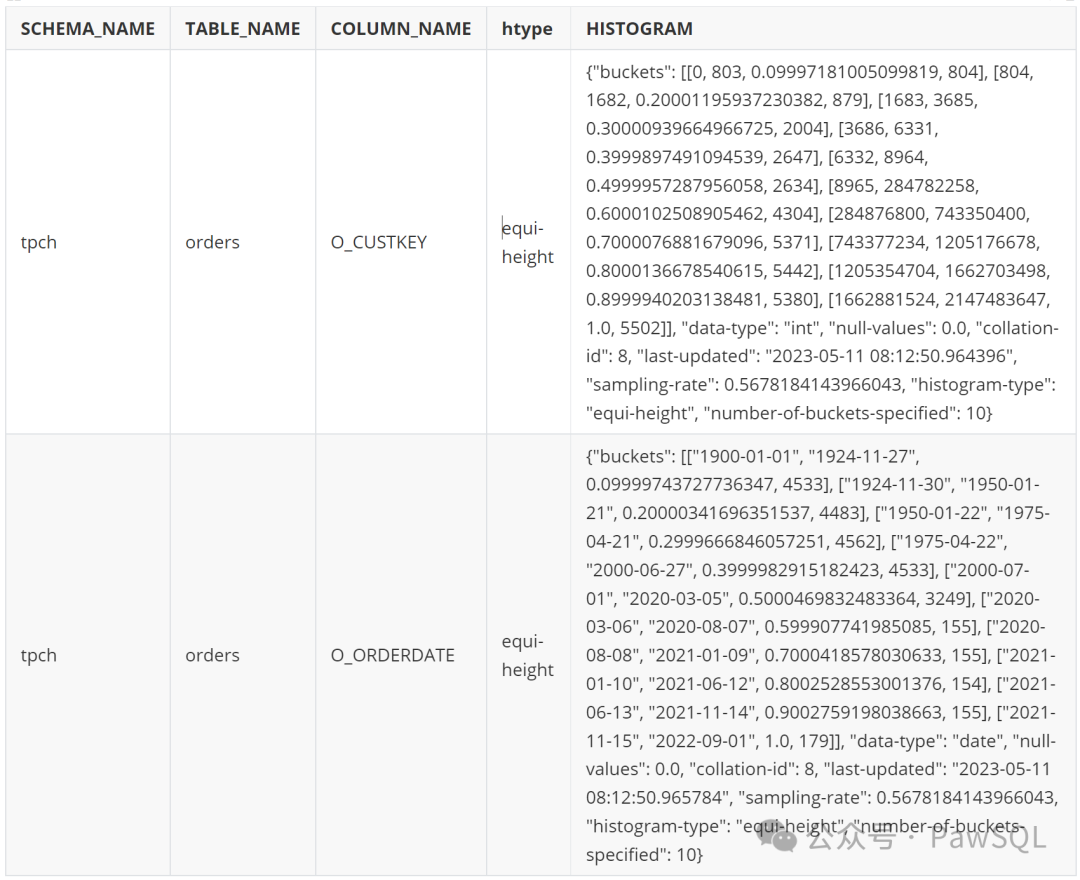
                  2.3 列级统计信息

                  • 收集列上的统计信息

                    analyze table orders update histogram on o_custkey, o_orderdate 
                    with 100 buckets;
                    • 查询语句

                      select schema_name, table_name, column_name,
                      histogram->>'$."histogram-type"' htype, histogram
                      from information_schema.column_statistics
                      where schema_name = 'tpch'
                      • 查询结果

                      3. 获取执行计划的Explain语句

                      3.1 Explain

                      • 输入

                        explain select c_name, c_address 
                        from customer c
                        where c.c_custkey < 100
                        • 输出

                        3.2 Explain Json (5.7及以上)

                        • 输入

                          explain format = json select c_name, c_address 
                          from customer c
                          where c.c_custkey < 100
                          • 输出


                            {
                            "query_block": {
                            "select_id": 1,
                            "cost_info": {
                            "query_cost": "20.30"
                            },
                            "table": {
                            "table_name": "c",
                            "access_type": "range",
                            "possible_keys": [
                            "key_idx"
                            ],
                            "key": "key_idx",
                            "used_key_parts": [
                            "C_CUSTKEY"
                            ],
                            "key_length": "4",
                            "rows_examined_per_scan": 100,
                            "rows_produced_per_join": 100,
                            "filtered": "100.00",
                            "cost_info": {
                            "read_cost": "10.30",
                            "eval_cost": "10.00",
                            "prefix_cost": "20.30",
                            "data_read_per_join": "89K"
                            },
                            "used_columns": [
                            "C_CUSTKEY",
                            "C_NAME",
                            "C_ADDRESS"
                            ],
                            "attached_condition": "(`tpch`.`c`.`C_CUSTKEY` < 100)"
                            }
                            }
                            }

                            3.3 Explain Tree (8.0.16及以上)

                            • 输入

                              explain format = tree select c_name, c_address 
                              from customer c
                              where c.c_custkey < 100
                              • 输出

                                -> Filter: (c.C_CUSTKEY < 100)  (cost=20.30 rows=100)
                                -> Index range scan on c using key_idx over (C_CUSTKEY < 100) (cost=20.30 rows=100)

                                3.4 Explain Analyze (8.0.18及以上)

                                • 输入

                                  explain format = json select c_name, c_address 
                                  from customer c
                                  where c.c_custkey < 100
                                  • 输出

                                    -> Filter: (c.C_CUSTKEY < 100)  (cost=20.30 rows=100) (actual time=0.254..0.312 rows=100 loops=1)
                                    -> Index range scan on c using key_idx over (C_CUSTKEY < 100) (cost=20.30 rows=100) (actual time=0.017..0.069 rows=100 loops=1)

                                    4. JDBC驱动

                                             <dependency>
                                      <groupId>mysql</groupId>
                                      <artifactId>mysql-connector-java</artifactId>
                                      <version>8.0.22</version>
                                      </dependency>

                                      关于PawSQL

                                      PawSQL专注数据库性能优化的自动化和智能化,支持MySQL,PostgreSQL,Opengauss,Oracle等,提供的SQL优化产品包括

                                      • PawSQL Cloud,在线自动化SQL优化工具,支持SQL审查,智能查询重写、基于代价的索引推荐,适用于数据库管理员及数据应用开发人员,

                                      • PawSQL Advisor,IntelliJ 插件, 适用于数据应用开发人员,可以IDEA/DataGrip应用市场通过名称搜索“PawSQL Advisor”安装。

                                      • PawSQL Engine, 是PawSQL系列产品的后端优化引擎,可以以docker镜像的方式独立安装部署,并通过http/json的接口提供SQL优化服务。

                                      往期精选

                                      PawSQL 常见问题解答(FAQs)
                                      EverSQL向左,PawSQL向右
                                      高级SQL优化 | 查询折叠
                                      SQL优化神器PawSQL Advisor使用手册(最新版)
                                      SQL优化从未如此简单,PawSQL Cloud实践指南
                                      欢迎关注PawSQ公众号,

                                      文章转载自PawSQL,如果涉嫌侵权,请发送邮件至:contact@modb.pro进行举报,并提供相关证据,一经查实,墨天轮将立刻删除相关内容。

                                      评论