



opengauss5.0软件安装:
postgis安装:
postgis安装参考:(几个大坑注意)
https://docs-opengauss.osinfra.cn/zh/docs/5.0.0/docs/ExtensionReference/PostGIS%E5%AE%89%E8%A3%85.html
坑1:
编译报内存不够分配
as: error while loading shared libraries: libopcodes-2.27-44.base.el7_9.1.so: failed to map segment from shared object: Cannot allocate memory
处理办法:物理内存务必给32G
坑2:

坑3:
/gauss/include/postgresql/server/access/xlog_basic.h:37:10: fatal error: storage/file/fio_device_com.h: 没有那个文件或目录
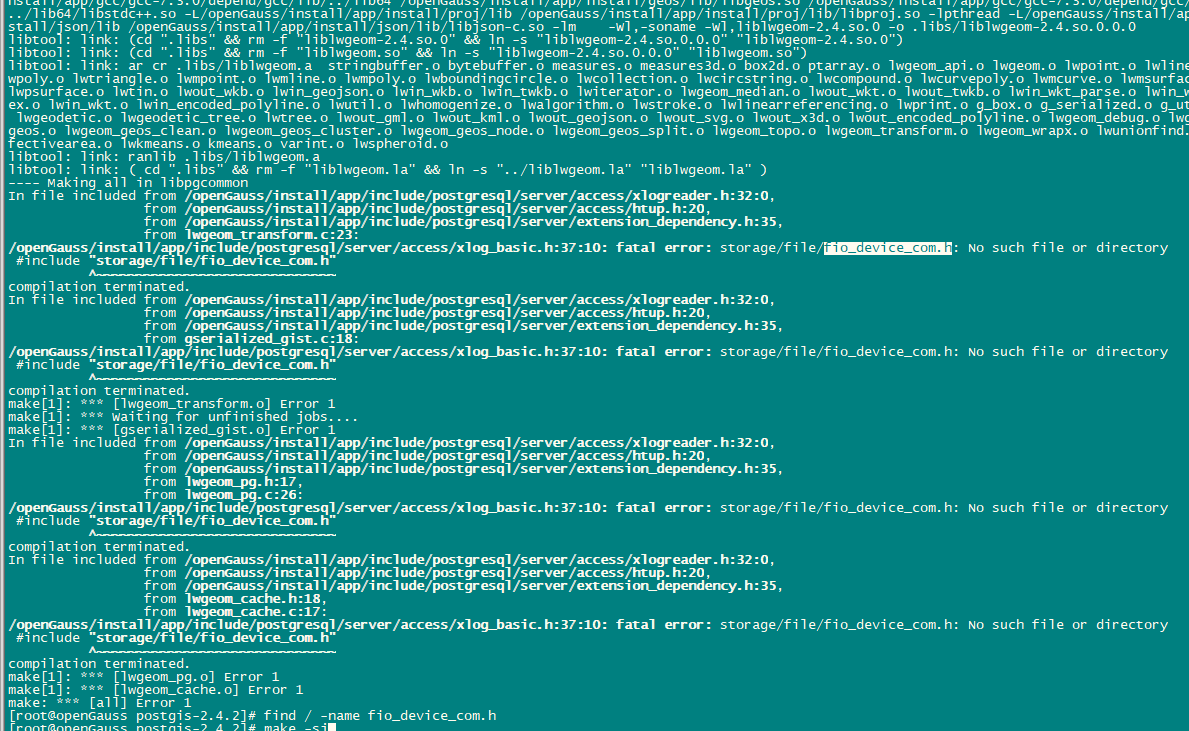
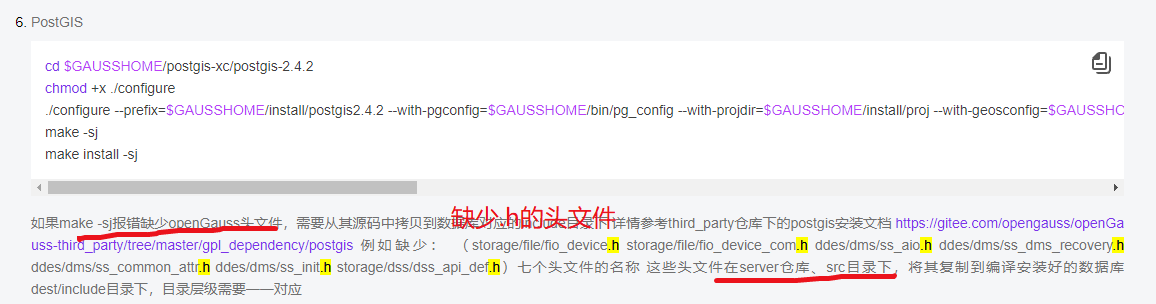
处理:在https://gitee.com/opengauss/openGauss-server
搜索缺少的文件,不到10个文件。
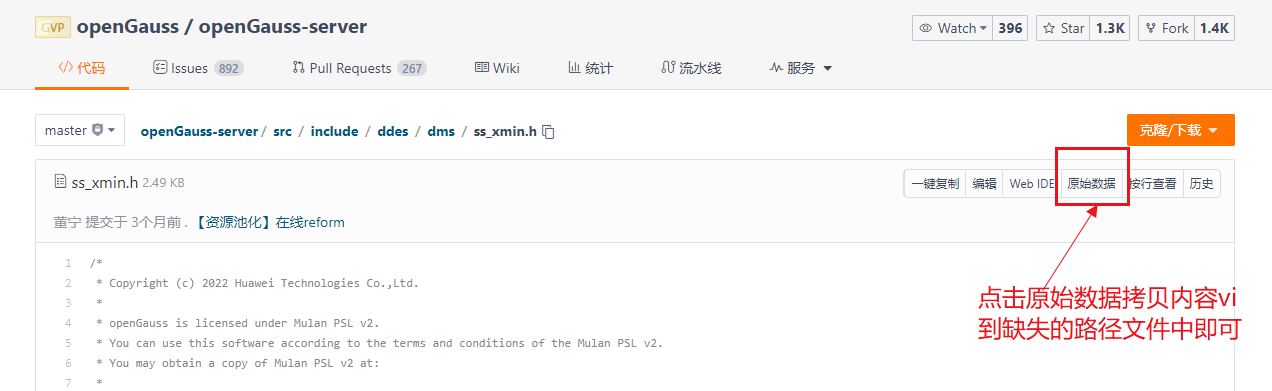
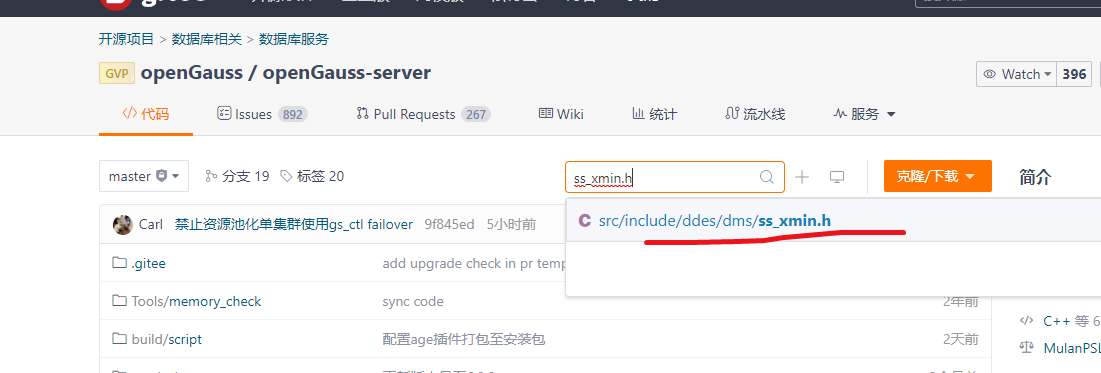 然后拷贝导指定的报错位置,重复make -sj可以看到报错路径,添加相应文件即可。
数据库安装:
opengauss的创建postgis扩展和数据库用户:
[omm@openGauss ~]$ gsql -d postgres -p 15400 -W xxxxxx
gsql ((openGauss 5.0.1 build 33b035fd) compiled at 2023-12-15 20:19:06 commit 0 last mr  )
Non-SSL connection (SSL connection is recommended when requiring high-security)
Type "help" for help.

openGauss=# create database tjyd encoding='UTF-8' LC_COLLATE='zh_CN.UTF-8' LC_CTYPE='zh_CN.UTF-8' DBCOMPATIBILITY='A';
CREATE DATABASE
openGauss=# create user gistar identified by 'xxxxxx';
CREATE ROLE
openGauss=# grant all privileges to gistar;
ALTER ROLE
openGauss=# \du
                                                              List of roles
Role name |                                                    Attributes                                                    | Member of
-----------+------------------------------------------------------------------------------------------------------------------+-----------
gistar    | Sysadmin                                                                                                         | {}
omm       | Sysadmin, Create role, Create DB, Replication, Administer audit, Monitoradmin, Operatoradmin, Policyadmin, UseFT | {}

openGauss=# \q
[omm@openGauss ~]$ gsql -d tjyd -p 15400 -U gistar -W xxxxxx -r
gsql ((openGauss 5.0.1 build 33b035fd) compiled at 2023-12-15 20:19:06 commit 0 last mr  )
Non-SSL connection (SSL connection is recommended when requiring high-security)
Type "help" for help.

tjyd=> create table test(id int);
CREATE TABLE
tjyd=> insert into test values(1);
INSERT 0 1
tjyd=> select * from test;
id
----
  1
(1 row)

tjyd=> \dt
                         List of relations
Schema | Name | Type  | Owner  |             Storage
--------+------+-------+--------+----------------------------------
public | test | table | gistar | {orientation=row,compression=no}
(1 row)

vi /opt/huawei/install/data/dn/pg_hba.conf

# "local" is for Unix domain socket connections only
local   all             all                                     trust
host    all    omm    192.168.207.194/32    trust
#host all all 0.0.0.0/0 trust
# IPv4 local connections:
#host    all             all             127.0.0.1/32            trust
#host    all    all    192.168.207.194/16    sha256
host all all 0.0.0.0/0 sha256


# IPv6 local connections:
host    all             all             ::1/128                 trust
host all all 0.0.0.0/0 sha256
# Allow replication connections from localhost, by a user with the
# replication privilege.
#local   replication     omm                                trust
#host    replication     omm        127.0.0.1/32            trust
#host    replication     omm        ::1/128                 trust
"/opt/huawei/install/data/dn/pg_hba.conf" 105L, 4681C written
[omm@openGauss ~]$ gsql -h 192.168.207.194 -d tjyd -p 15400 -U gistar -W xxxxxx -r
gsql: FATAL:  Forbid remote connection with trust method!
FATAL:  Forbid remote connection with trust method!
[omm@openGauss ~]$ gs_om -t restart
Stopping cluster.
=========================================
Successfully stopped cluster.
=========================================
End stop cluster.
Starting cluster.
=========================================
[SUCCESS] openGauss
2024-02-29 15:59:49.225 65e03975.1 [unknown] 140064104145216 [unknown] 0 dn_6001 01000  0 [BACKEND] WARNING:  could not create any HA TCP/IP sockets
2024-02-29 15:59:49.225 65e03975.1 [unknown] 140064104145216 [unknown] 0 dn_6001 01000  0 [BACKEND] WARNING:  could not create any HA TCP/IP sockets
2024-02-29 15:59:49.226 65e03975.1 [unknown] 140064104145216 [unknown] 0 dn_6001 01000  0 [BACKEND] WARNING:  Failed to initialize the memory protect for g_instance.attr.attr_storage.cstore_buffers (1024 Mbytes) or shared memory (4476 Mbytes) is larger.
=========================================
Successfully started.
[omm@openGauss ~]$ gsql -h 192.168.207.194 -d tjyd -p 15400 -U gistar -W xxxxxx -r
gsql ((openGauss 5.0.1 build 33b035fd) compiled at 2023-12-15 20:19:06 commit 0 last mr  )
SSL connection (cipher: ECDHE-RSA-AES128-GCM-SHA256, bits: 128)
Type "help" for help.

tjyd=>
[omm@openGauss ~]$ gsql -d tjyd -p 15400 -W xxxxxx -r
gsql ((openGauss 5.0.1 build 33b035fd) compiled at 2023-12-15 20:19:06 commit 0 last mr  )
Non-SSL connection (SSL connection is recommended when requiring high-security)
Type "help" for help.

tjyd=# \dx
                              List of installed extensions
      Name       | Version |   Schema   |                   Description
-----------------+---------+------------+--------------------------------------------------
dist_fdw        | 1.0     | pg_catalog | foreign-data wrapper for distfs access
file_fdw        | 1.0     | pg_catalog | foreign-data wrapper for flat file access
hstore          | 1.1     | pg_catalog | data type for storing sets of (key, value) pairs
log_fdw         | 1.0     | pg_catalog | Foreign Data Wrapper for accessing logging data
mot_fdw         | 1.0     | pg_catalog | foreign-data wrapper for MOT access
plpgsql         | 1.0     | pg_catalog | PL/pgSQL procedural language
security_plugin | 1.0     | pg_catalog | provides security functionality
(7 rows)

tjyd=# create extension postgis;
CREATE EXTENSION
tjyd=# \dx
                                         List of installed extensions
      Name       | Version |   Schema   |                             Description
-----------------+---------+------------+---------------------------------------------------------------------
dist_fdw        | 1.0     | pg_catalog | foreign-data wrapper for distfs access
file_fdw        | 1.0     | pg_catalog | foreign-data wrapper for flat file access
hstore          | 1.1     | pg_catalog | data type for storing sets of (key, value) pairs
log_fdw         | 1.0     | pg_catalog | Foreign Data Wrapper for accessing logging data
mot_fdw         | 1.0     | pg_catalog | foreign-data wrapper for MOT access
plpgsql         | 1.0     | pg_catalog | PL/pgSQL procedural language
postgis         | 2.4.2   | public     | PostGIS geometry, geography, and raster spatial types and functions
security_plugin | 1.0     | pg_catalog | provides security functionality
(8 rows)

tjyd=# \c
Non-SSL connection (SSL connection is recommended when requiring high-security)
You are now connected to database "tjyd" as user "omm".
tjyd=#
tjyd=# \q
[omm@openGauss ~]$ df -hT
Filesystem              Type      Size  Used Avail Use% Mounted on
devtmpfs                devtmpfs   16G     0   16G   0% /dev
tmpfs                   tmpfs      16G   12K   16G   1% /dev/shm
tmpfs                   tmpfs      16G  8.9M   16G   1% /run
tmpfs                   tmpfs      16G     0   16G   0% /sys/fs/cgroup
/dev/mapper/centos-root xfs        81G   13G   69G  16% /
/dev/sda1               xfs      1014M  168M  847M  17% /boot
/dev/mapper/centos-home xfs        10G   33M   10G   1% /home
tmpfs                   tmpfs     3.2G     0  3.2G   0% /run/user/0
创建postgis扩展错误处理:
openGauss=# create extension postgis;
ERROR:  could not open extension control file: Permission denied
目录权限问题:
chown -R omm:dbgrp /openGauss/install/app_33b035fd

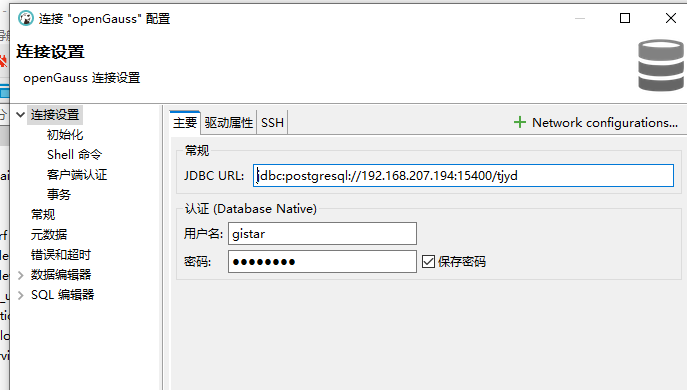
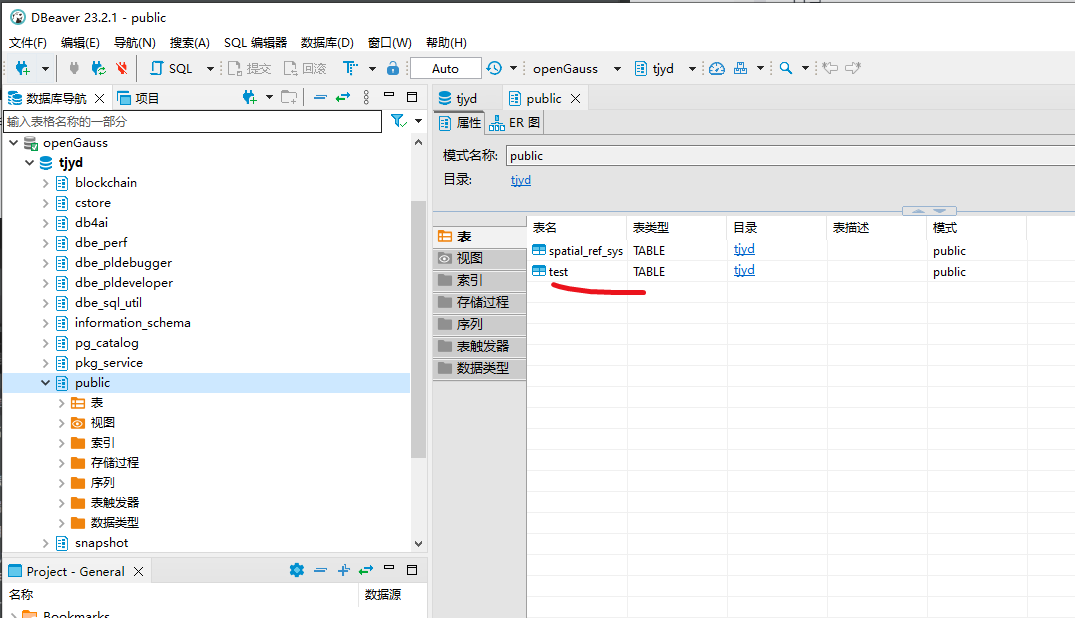
dbeaver工具连接配置参考:
最后修改时间:2024-02-29 16:39:35
「喜欢这篇文章,您的关注和赞赏是给作者最好的鼓励」
关注作者
【版权声明】本文为墨天轮用户原创内容,转载时必须标注文章的来源(墨天轮),文章链接,文章作者等基本信息,否则作者和墨天轮有权追究责任。如果您发现墨天轮中有涉嫌抄袭或者侵权的内容,欢迎发送邮件至:contact@modb.pro进行举报,并提供相关证据,一经查实,墨天轮将立刻删除相关内容。
