



新搭的opengauss连接报错:
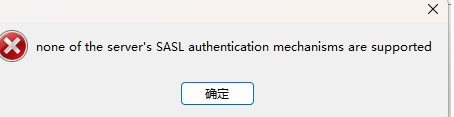
处理办法:
1.postgresql.conf修改
password_encryption_type = 1
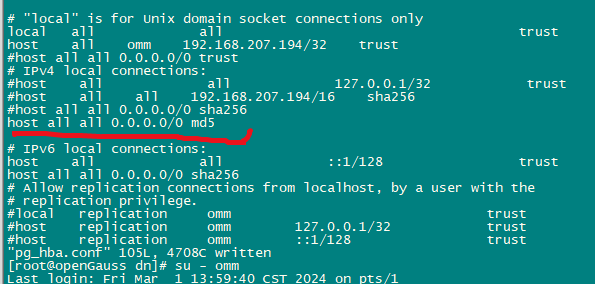
2.pg_hba.conf修改sha256改成md5
host all all 0.0.0.0/0 md5
3.重启openguass
su - omm
gs_om -t restart
没改密码的话,连接报错!
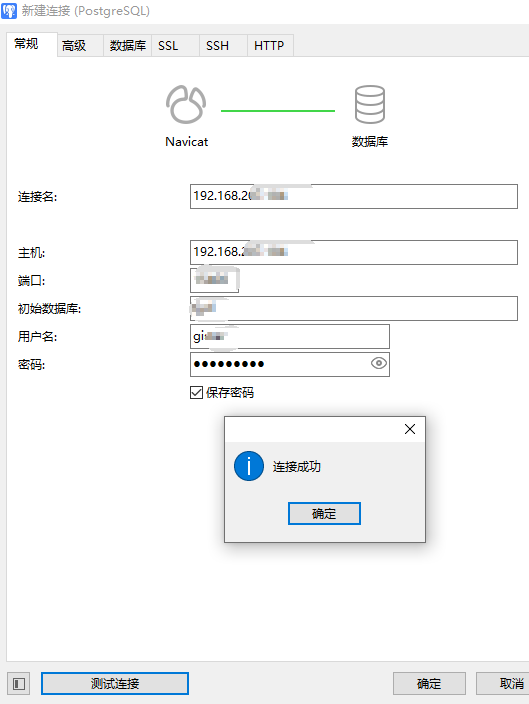
4.修改密码:
[omm@openGauss ~]$ gsql -d postgres -p 15400 -W xxx@ -r
gsql ((openGauss 5.0.1 build 33b035fd) compiled at 2023-12-15 20:19:06 commit 0 last mr  )
Non-SSL connection (SSL connection is recommended when requiring high-security)
Type "help" for help.

openGauss=# alter user gistar identified by 'xxx@';
ERROR:  New password should not equal to the old ones.
openGauss=# alter user gistar identified by 'xxx@1';
NOTICE:  The encrypted password contains MD5 ciphertext, which is not secure.
ALTER ROLE
openGauss=# alter user gistar identified by 'xxx@';
ERROR:  The password cannot be reused.
相关参考:
https://blog.csdn.net/mm8413/article/details/125826973
操作日志如下:
[root@openGauss dn]# pwd
/opt/huawei/install/data/dn
[root@openGauss dn]# vi postgresql.conf
[root@openGauss dn]# grep password_encryption_type postgresql.conf
password_encryption_type = 1            #Password storage type, 0 is md5 for PG, 1 is sha256 + md5, 2 is sha256 only
[root@openGauss dn]# vi pg_hba.conf
#
# When you configure this file, please configure it from top to bottom,
# higher priority needs to be configured in front.

# CAUTION: Configuring the system for local "trust" authentication
# allows any local user to connect as any PostgreSQL user, including
# the database sysadmin.  If you do not trust all your local users,
# use another authentication method.


# TYPE  DATABASE        USER            ADDRESS                 METHOD

# "local" is for Unix domain socket connections only
local   all             all                                     trust
host    all    omm    192.168.207.194/32    trust
#host all all 0.0.0.0/0 trust
# IPv4 local connections:
#host    all             all             127.0.0.1/32            trust
#host    all    all    192.168.207.194/16    sha256
#host all all 0.0.0.0/0 sha256
host all all 0.0.0.0/0 md5

# IPv6 local connections:
host    all             all             ::1/128                 trust
host all all 0.0.0.0/0 sha256
# Allow replication connections from localhost, by a user with the
# replication privilege.
#local   replication     omm                                trust
#host    replication     omm        127.0.0.1/32            trust
#host    replication     omm        ::1/128                 trust


[root@openGauss dn]# su - omm
Last login: Fri Mar  1 13:59:40 CST 2024 on pts/1
[omm@openGauss ~]$ gs_om -t restart
Stopping cluster.
=========================================
Successfully stopped cluster.
=========================================
End stop cluster.
Starting cluster.
=========================================
[SUCCESS] openGauss
2024-03-01 14:02:23.572 65e16f6f.1 [unknown] 140382251831616 [unknown] 0 dn_6001 01000  0 [BACKEND] WARNING:  could not create any HA TCP/IP sockets
2024-03-01 14:02:23.572 65e16f6f.1 [unknown] 140382251831616 [unknown] 0 dn_6001 01000  0 [BACKEND] WARNING:  could not create any HA TCP/IP sockets
2024-03-01 14:02:23.573 65e16f6f.1 [unknown] 140382251831616 [unknown] 0 dn_6001 01000  0 [BACKEND] WARNING:  Failed to initialize the memory protect for g_instance.attr.attr_storage.cstore_buffers (1024 Mbytes) or shared memory (4990 Mbytes) is larger.
=========================================
Successfully started.
[omm@openGauss ~]$ gsql -d postgres -p 15400 -W xxx@ -r
gsql ((openGauss 5.0.1 build 33b035fd) compiled at 2023-12-15 20:19:06 commit 0 last mr  )
Non-SSL connection (SSL connection is recommended when requiring high-security)
Type "help" for help.

openGauss=# alter user gistar identified by 'xxx@';
ERROR:  New password should not equal to the old ones.
openGauss=# alter user gistar identified by 'xxx@1';
NOTICE:  The encrypted password contains MD5 ciphertext, which is not secure.
ALTER ROLE
openGauss=# alter user gistar identified by 'xxx@';
ERROR:  The password cannot be reused.
openGauss=# \q
[omm@openGauss ~]$
[omm@openGauss ~]$ exit
logout
「喜欢这篇文章,您的关注和赞赏是给作者最好的鼓励」
关注作者
【版权声明】本文为墨天轮用户原创内容,转载时必须标注文章的来源(墨天轮),文章链接,文章作者等基本信息,否则作者和墨天轮有权追究责任。如果您发现墨天轮中有涉嫌抄袭或者侵权的内容,欢迎发送邮件至:contact@modb.pro进行举报,并提供相关证据,一经查实,墨天轮将立刻删除相关内容。
