



一、报错信息
ERROR: database is not accepting commands to avoid wraparound data loss in database "testdb"
建议:Stop the postmaster and vacuum that database in single-user mode.
You might also need to commit or roll back old prepared transactions, or drop stale replication slots
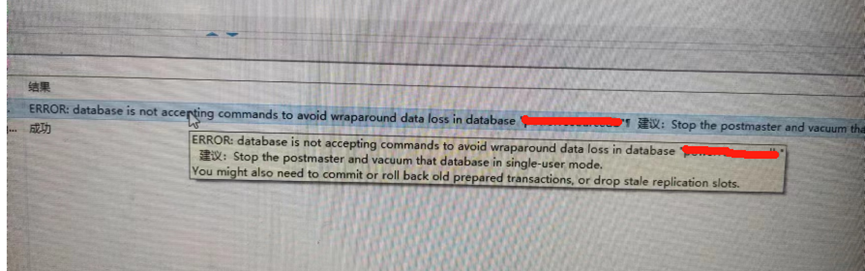
报错信息信息显示,数据库发生事务回卷问题(即年龄过大),业务已经无法写入数据,只能做查询操作。
二、问题处理
2.1 查询所有数据库的年龄
select datname,age(datfrozenxid) from pg_database;
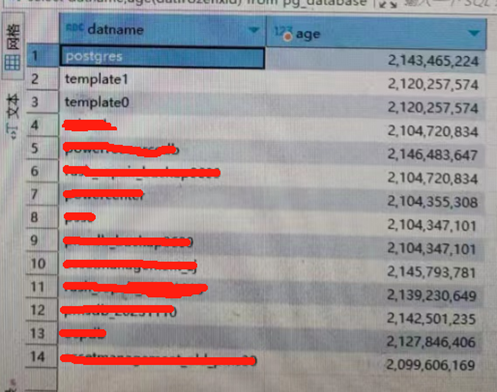
所有数据库年龄都已经达到最大值(21亿),这时需要对数据库进行freeze操作,才能降低年龄。可以通过对整库做freeze, 使用vacuumdb命令。
2.2 vacuumdb database
su – postgres
vacuumdb -p 5432 -F  -d  dbname
-p 端口
-F freeze 冻结
-d dbname
vacuumdb -p 5432 -F -d testdb
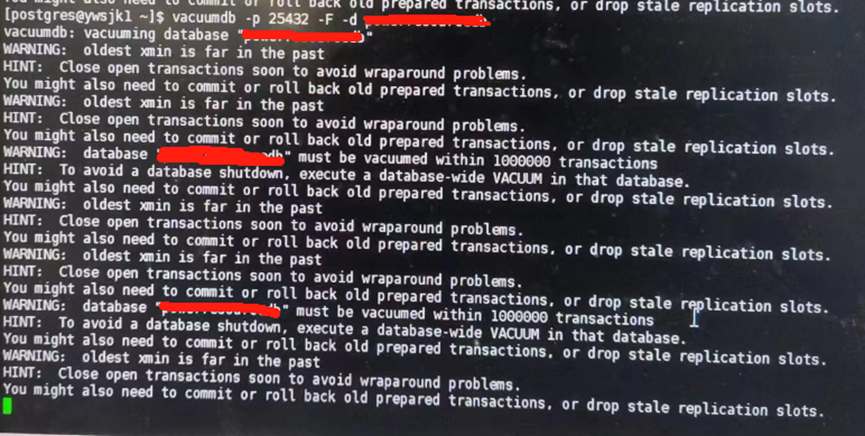
只需等待它结束即可,越大的数据库,需要等待的时间就越长。
2.3 可能会出现的报错
vacummdb:error:vacuuming of table ‘schema.table’in database ‘dbname’failed :ERROR: uncommitted xmin xxxx from before xid cutoff xxx needs to be frozen
解决方法:
停止数据库:
pg_ctl  stop

##进入单用户模式
postgres  --single  -D  /data/pgsql/data  dbname
backend>
backend>  vacuum  freeze  schema.table
完成后ctrl + d 退出
2.4 查询数据库年龄
所有年龄过大的数据库都做完vacuumdb后,再次查询年龄
select datname,age(datfrozenxid) from pg_database;
最后修改时间:2024-03-05 09:43:33
「喜欢这篇文章,您的关注和赞赏是给作者最好的鼓励」
关注作者
【版权声明】本文为墨天轮用户原创内容,转载时必须标注文章的来源(墨天轮),文章链接,文章作者等基本信息,否则作者和墨天轮有权追究责任。如果您发现墨天轮中有涉嫌抄袭或者侵权的内容,欢迎发送邮件至:contact@modb.pro进行举报,并提供相关证据,一经查实,墨天轮将立刻删除相关内容。
