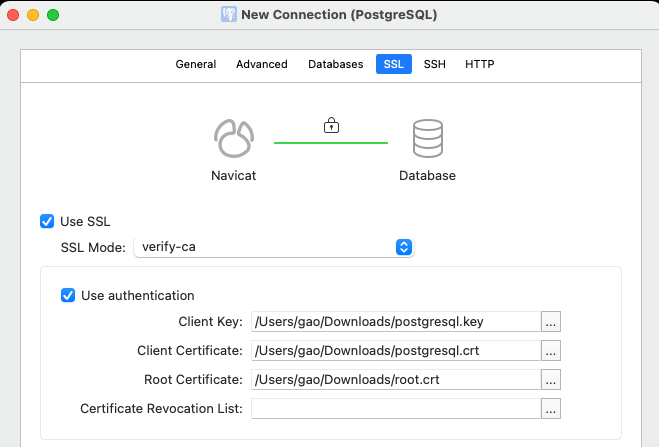
本文档分为两种配置,一个单向,一个双向
配之前检查
1、package包
需要在编译configure数据库时添加–with-openssl才能启用功能,其次系统需要有
yum -y install openssl openssl-devel两个包
2、查看当前数据库是否使用openssl编译
[postgres@pgdocker data]$ pg_config|grep CONFIGURE

CONFIGURE = '--prefix=/pgdb/home/pg14' '--with-wal-blocksize=16' '--with-pgport=5432' '--with-segsize=2' '--with-blocksize=8' '--enable-nls=en_US.UTF-8' '--with-openssl'

[postgres@pgdocker data]$

psql下

[postgres@pgdocker data]$ psql

psql (14.11)

Type "help" for help.

postgres=# show ssl_library ;

ssl_library

-------------

OpenSSL

(1 row)

postgres=# select version();

version

----------------------------------------------------------------------------------------------------------

PostgreSQL 14.11 on x86_64-pc-linux-gnu, compiled by gcc (GCC) 4.8.5 20150623 (Red Hat 4.8.5-44), 64-bit

(1 row)

postgres=#
默认情况下PostgreSQL 读取openssl的配置文件openssl.cnf, 在openssl version -d返回的目录中。
[postgres@pgdocker data]$ openssl version -d

OPENSSLDIR: "/etc/pki/tls"

[postgres@pgdocker data]$
一、配置单向SSL认证链接
首先要为服务器创建一个有效期为365天的简单自签名证书,创建服务端证书和私钥文件:
server.crt为服务端证书
server.key为服务端私钥文件
1、创建文件
[postgres@pgdocker ~]$ mkdir ~/openssl

[postgres@pgdocker ~]$ openssl req -new -x509 -days 365 -nodes -text -subj '/CN=postgres' -out ~/openssl/server.crt -keyout ~/openssl/server.key

Generating a 2048 bit RSA private key

.........+++

...........+++

writing new private key to '/home/postgres/openssl/server.key'

-----

[postgres@pgdocker ~]$ cd openssl/

[postgres@pgdocker openssl]$ ls

server.crt server.key

[postgres@pgdocker openssl]$ chmod 0600 server.key

[postgres@pgdocker openssl]$ ls -rtl

总用量 8

-rw-------. 1 postgres postgres 1704 2月 27 09:43 server.key

-rw-rw-r--. 1 postgres postgres 4058 2月 27 09:43 server.crt
2、修改postgreql.conf配置文件:
ssl: 支持SSL连接。默认是关闭的。这个参数只能在服务器启动时设置。SSL通信只能通过TCP/IP连接进行。
ssl_cert_file:指定包含SSL服务器证书的文件的名称。默认是server.crt,相对路径相对于数据目录$PGDATA。此参数只能在服务器启动时设置。
ssl_key_file:指定包含SSL服务器私钥的文件的名称。默认是server.key,相对路径相对于数据目录。此参数只能在服务器启动时设置。
要在SSL模式下启动,必须存在包含服务器证书和私钥的文件。默认情况下,这些文件将被命名为server.crt和server.key。但是可以使用配置参数ssl_cert_file和ssl_key_file指定其他名称和位置。
在linux系统中,server.key必须禁止其他用户的访问权限。我们需要通过chown命令将server.key的访问权限设置成600。
ssl = on

ssl_cert_file = '/home/postgres/openssl/server.crt'

ssl_key_file = '/home/postgres/openssl/server.key'
3、配置pg_hba.conf, 让客户端使用ssl连接数据库,添加
hostssl all all 0.0.0.0/0 md5
4、重启数据库
[postgres@pgdocker openssl]$ pg_ctl stop

waiting for server to shut down...2024-02-27 09:51:25.206 CST [13501] LOG: received fast shutdown request

.2024-02-27 09:51:25.207 CST [13501] LOG: aborting any active transactions

2024-02-27 09:51:25.208 CST [13501] LOG: background worker "logical replication launcher" (PID 13508) exited with exit code 1

2024-02-27 09:51:25.208 CST [13503] LOG: shutting down

2024-02-27 09:51:25.215 CST [13501] LOG: database system is shut down

done

server stopped

[postgres@pgdocker openssl]$ pg_ctl start

waiting for server to start....2024-02-27 09:51:28.517 CST [21593] LOG: starting PostgreSQL 14.11 on x86_64-pc-linux-gnu, compiled by gcc (GCC) 4.8.5 20150623 (Red Hat 4.8.5-44), 64-bit

2024-02-27 09:51:28.519 CST [21593] LOG: listening on IPv6 address "::1", port 5432

2024-02-27 09:51:28.520 CST [21593] LOG: listening on IPv4 address "127.0.0.1", port 5432

2024-02-27 09:51:28.521 CST [21593] LOG: listening on Unix socket "/tmp/.s.PGSQL.5432"

2024-02-27 09:51:28.524 CST [21594] LOG: database system was shut down at 2024-02-27 09:51:25 CST

2024-02-27 09:51:28.526 CST [21593] LOG: database system is ready to accept connections

done

server started
5、查看启用状态
安装sslinfo扩展
postgres=# create extension sslinfo;

2024-02-27 09:52:47.100 CST [21646] ERROR: could not open extension control file "/pgdb/home/pg14/share/postgresql/extension/sslinfo.control": 没有那个文件或目录

2024-02-27 09:52:47.100 CST [21646] STATEMENT: create extension sslinfo;

ERROR: could not open extension control file "/pgdb/home/pg14/share/postgresql/extension/sslinfo.control": 没有那个文件或目录

postgres=#
报错,需要手动安装,大概环节是进入安装包目录的的contrib下,然后make,make install
[postgres@pgdocker data]$ cd ~

[postgres@pgdocker ~]$ cd postgresql-14.11/

[postgres@pgdocker postgresql-14.11]$ cd contrib/

[postgres@pgdocker contrib]$ cd sslinfo/

[postgres@pgdocker sslinfo]$ ls

Makefile sslinfo--1.0--1.1.sql sslinfo--1.1--1.2.sql sslinfo--1.2.sql sslinfo.c sslinfo.control

[postgres@pgdocker sslinfo]$ pwd

/home/postgres/postgresql-14.11/contrib/sslinfo

[postgres@pgdocker sslinfo]$ make

make -C ../../src/backend generated-headers

make[1]: 进入目录“/home/postgres/postgresql-14.11/src/backend”

make -C catalog distprep generated-header-symlinks

make[2]: 进入目录“/home/postgres/postgresql-14.11/src/backend/catalog”

make[2]: 对“distprep”无需做任何事。

make[2]: 对“generated-header-symlinks”无需做任何事。

make[2]: 离开目录“/home/postgres/postgresql-14.11/src/backend/catalog”

make -C utils distprep generated-header-symlinks

make[2]: 进入目录“/home/postgres/postgresql-14.11/src/backend/utils”

make[2]: 对“distprep”无需做任何事。

make[2]: 对“generated-header-symlinks”无需做任何事。

make[2]: 离开目录“/home/postgres/postgresql-14.11/src/backend/utils”

make[1]: 离开目录“/home/postgres/postgresql-14.11/src/backend”

gcc -std=gnu99 -Wall -Wmissing-prototypes -Wpointer-arith -Wdeclaration-after-statement -Werror=vla -Wendif-labels -Wmissing-format-attribute -Wformat-security -fno-strict-aliasing -fwrapv -fexcess-precision=standard -O2 -fPIC -I. -I. -I../../src/include -D_GNU_SOURCE -c -o sslinfo.o sslinfo.c

gcc -std=gnu99 -Wall -Wmissing-prototypes -Wpointer-arith -Wdeclaration-after-statement -Werror=vla -Wendif-labels -Wmissing-format-attribute -Wformat-security -fno-strict-aliasing -fwrapv -fexcess-precision=standard -O2 -fPIC -shared -o sslinfo.so sslinfo.o -L../../src/port -L../../src/common -Wl,--as-needed -Wl,-rpath,'/pgdb/home/pg14/lib',--enable-new-dtags -lssl -lcrypto

[postgres@pgdocker sslinfo]$ make install

make -C ../../src/backend generated-headers

make[1]: 进入目录“/home/postgres/postgresql-14.11/src/backend”

make -C catalog distprep generated-header-symlinks

make[2]: 进入目录“/home/postgres/postgresql-14.11/src/backend/catalog”

make[2]: 对“distprep”无需做任何事。

make[2]: 对“generated-header-symlinks”无需做任何事。

make[2]: 离开目录“/home/postgres/postgresql-14.11/src/backend/catalog”

make -C utils distprep generated-header-symlinks

make[2]: 进入目录“/home/postgres/postgresql-14.11/src/backend/utils”

make[2]: 对“distprep”无需做任何事。

make[2]: 对“generated-header-symlinks”无需做任何事。

make[2]: 离开目录“/home/postgres/postgresql-14.11/src/backend/utils”

make[1]: 离开目录“/home/postgres/postgresql-14.11/src/backend”

/bin/mkdir -p '/pgdb/home/pg14/lib/postgresql'

/bin/mkdir -p '/pgdb/home/pg14/share/postgresql/extension'

/bin/mkdir -p '/pgdb/home/pg14/share/postgresql/extension'

/bin/install -c -m 755 sslinfo.so '/pgdb/home/pg14/lib/postgresql/sslinfo.so'

/bin/install -c -m 644 ./sslinfo.control '/pgdb/home/pg14/share/postgresql/extension/'

/bin/install -c -m 644 ./sslinfo--1.2.sql ./sslinfo--1.1--1.2.sql ./sslinfo--1.0--1.1.sql '/pgdb/home/pg14/share/postgresql/extension/'

[postgres@pgdocker sslinfo]$ psql

psql (14.11)

Type "help" for help.

postgres=# create extension sslinfo;

CREATE EXTENSION
6、客户端连接指定模式
比如使用require:
[postgres@pgdocker sslinfo]$ psql "dbname=postgres host=10.211.55.11 port=5432 user=postgres password=postgres sslmode=require"

Password for user postgres:

psql (14.11)

SSL connection (protocol: TLSv1.2, cipher: ECDHE-RSA-AES256-GCM-SHA384, bits: 256, compression: off)

Type "help" for help.

postgres=# select ssl_is_used();

ssl_is_used

-------------

t

(1 row)

postgres=#

postgres=# select ssl_version();

ssl_version

-------------

TLSv1.2

(1 row)
二、双向SSL连接
服务器端证书配置
服务器端需生成三个文件:
root.crt(根证书)、
server.crt(服务器证书)、
server.key(服务器私钥)
1、生成服务器私钥server.key
服务器私钥生成后,需移除密码,否则数据库重启时会出现异常。
cd $PGDATA

openssl genrsa -des3 -out server.key 2048

openssl rsa -in server.key -out server.key #去掉证书的密码保护

chmod 600 server.key
2、生成服务器证书server.crt
/CN=后面要写连接的数据库用户名,否则会报错,这个地方有可能,但是不确定,不过客户端生成的时候是用户名
openssl req -new -key server.key -days 3650 -out server.crt -x509 -subj '/C=CN/ST=Jilin/L=Changchun/O=abc.com/CN=postgres/emailAddress=test@test.com'
3、根证书root.crt
由于没有公证机构提供,只能使用自签名证书,因此可以将服务器证书作为根证书
cp server.crt root.crt
4、服务器端数据库配置
需要配置postgresql.conf和pg_hba.conf文件!
postgresql.conf
postgresql的SSL配置默认是关闭的,需更改配置文件进行开启
ssl=on

ssl_ca_file='root.crt'

ssl_key_file='server.key'

ssl_cert_file='server.crt'
**
pg_hba.conf
**
还需要更改服务器的pg_hba.conf文件禁止用户以非SSL连接数据库。
pg_hba.conf与ssl相关的配置有两个。
- hostssl: 此记录匹配使用TCP/IP进行的连接尝试,但仅在使用SSL加密进行连接时才匹配。要使用此选项,必须使用SSL支持构建服务器。此外,必须通过设置SSL配置参数在服务器启动时启用SSL。
- hostnossl:此记录类型具有与hostssl相反的行为;它只匹配不使用SSL的TCP/IP上的连接尝试。
使用使用host的话优先使用ssl认证,hostssl表示强制使用ssl, hostnossl 强制不使用ssl。
hostssl all all 0.0.0.0/0 cert
然后重启postgresql.
pg_ctl restart
这时候使用单向认证就会报错
[postgres@pgdocker data]$ psql "dbname=postgres host=10.211.55.11 port=5432 user=postgres password=postgres sslmode=require"

2024-02-27 11:11:52.944 CST [27157] FATAL: connection requires a valid client certificate

psql: error: connection to server at "10.211.55.11", port 5432 failed: FATAL: connection requires a valid client certificate
客户端配置SSL证书
开启客户端SSL连接也需要三个文件:
root.crt (trusted root certificate) :root.crt(根证书)
postgresql.crt (client certificate) :postgresql.crt(客户端证书)
postgresql.key (private key) :postgresql.key(客户端私钥)
1.生成postgresql.key
在数据库服务器的$PGDATA下继续生成
openssl genrsa -des3 -out postgresql.key 2048

openssl rsa -in postgresql.key -out postgresql.key
2.生成postgresql.crt
/CN=后面要写连接的数据库用户名,否则会报错
openssl req -new -key postgresql.key -out postgresql.csr -subj “/CN=postgres”
openssl x509 -req -days 3650 -in postgresql.csr -CA root.crt -CAkey server.key -out postgresql.crt -CAcreateserial
修改文件权限
chmod 600 postgresql.key
3.root.crt
root.crt用的还是数据库的root.crt
4.将文件分发给客户端
将postgresql.key ,postgresql.crt,root.crt传输到客户端服务器~/.postgresql/下,没有就新建
5.连接测试
客户端普通连接会报错
[postgres@pgdocker data]$ psql "host=10.211.55.11 dbname=postgres port=5432 user=postgres"

2024-02-27 14:26:39.205 CST [7979] FATAL: connection requires a valid client certificate

2024-02-27 14:26:39.207 CST [7980] FATAL: no pg_hba.conf entry for host "10.211.55.11", user "postgres", database "postgres", no encryption

psql: error: connection to server at "10.211.55.11", port 5432 failed: FATAL: connection requires a valid client certificate

connection to server at "10.211.55.11", port 5432 failed: FATAL: no pg_hba.conf entry for host "10.211.55.11", user "postgres", database "postgres", no encryption

[postgres@pgdocker data]$
不使用创建客户端证书使用的CN用户名,就不能连接数据库
[postgres@pgdocker .postgresql]$ psql "host=10.211.55.11 dbname=postgres port=5432 user=gao sslmode=verify-ca"

2024-02-27 14:49:23.158 CST [9629] LOG: provided user name (gao) and authenticated user name (postgres) do not match

2024-02-27 14:49:23.158 CST [9629] FATAL: certificate authentication failed for user "gao"

2024-02-27 14:49:23.158 CST [9629] DETAIL: Connection matched pg_hba.conf line 91: "hostssl all all 0.0.0.0/0 cert"

psql: error: connection to server at "10.211.55.11", port 5432 failed: FATAL: certificate authentication failed for user "gao"

[postgres@pgdocker .postgresql]$
双向验证可以登录成功
[postgres@pgdocker .postgresql]$ psql "host=10.211.55.11 dbname=postgres port=5432 user=postgres sslmode=verify-ca"

psql (14.11)

SSL connection (protocol: TLSv1.2, cipher: ECDHE-RSA-AES256-GCM-SHA384, bits: 256, compression: off)

Type "help" for help.

postgres=#

postgres=#
使用客户端工具进行普通连接报错
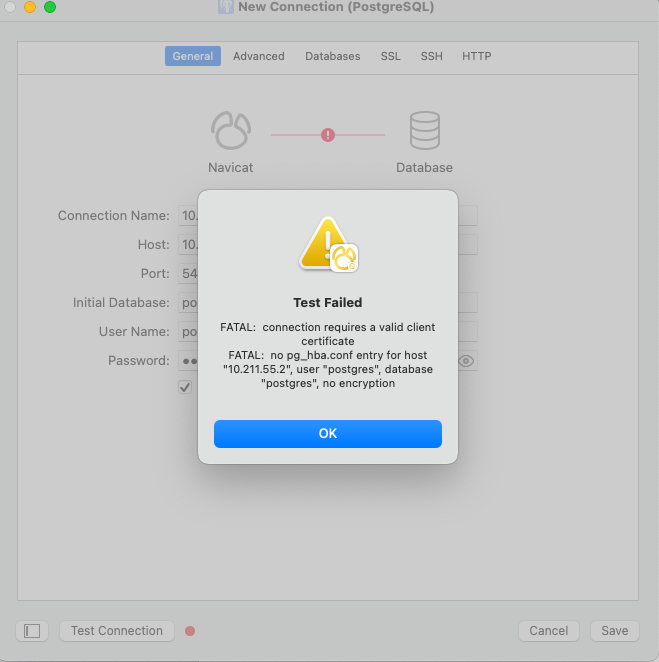
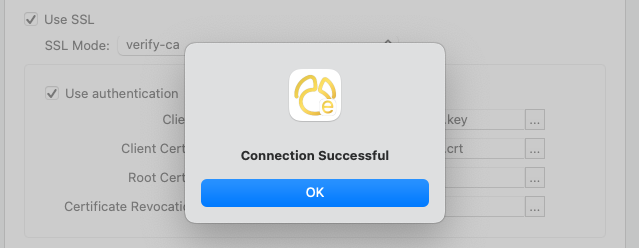
将postgresql.crt postgresql.key root.crt拷贝到本机后,使用SSL配置测试正常连接