这几年国内最火的话题无疑就是国产化了,作为数据库爱好者,那么自然是最关心数据库软件了。xc这几年,各行各业都在如火如荼地开展相关工作,一些进展比较快的用户已经上线了部分系统。
就现阶段而言,很多用户已经对国产分布式、集中式等数据库有了很多认识,因此在进行数据库选型和迁移改造的过程中,通常很关注每家数据库的兼容性评估、数据迁移工具等等。首先对于数据库的兼容性分析,实际上各个数据库厂商都在做,这里我给大家分享下我们的兼容性分析工具SQL Compatible Analysis,我们简称SCA。实际上这个工具的设计思路也是借鉴了Oracle,这里不多说,毕竟是数据库全球龙头。
本文算是一个小小的开头吧,后续将陆续推出围绕MogDB的一系列生态工具以及最佳实践文章。
大家在使用MogDB软件或相关工具如果遇到了问题,那么可以进我们的社区技术交流分享群!

言归正传!目前SCA兼容性分析工具,已经支持了不低于6种数据库到MogDB(openGauss)的分析,这里我进行简单介绍:
1、 支持的源端数据库类型:
Oracle, MySQL, DB2, PostgreSQL, Informix, SQL Server
当然对一些具体的版本号也有一定要求(后续有需求会进行支持扩充).
a、Oracle: 不低于 10.2
b、MySQL: 不低于 5.5
c、DB2: 不低于 11.5
d、PostgreSQL: 不低于 9
e、Informix: 不低于 14.10 (更低版本未做验证)
f、SQL Server: 不低于 10.0 (更低版本未做验证)
2、 操作系统和平台架构
目前SCA仅支持如下3种操作系统类型和平台架构,如果有其他需求,也可以反馈给我们,会进一步支持。
1)Linux x86_64
2)Linux arm64 (ARM 平台由于没有 DB2/Informix 客户端,故不支持 DB2/Informix 数据采集)
3)MacOS (MacOS 版本不支持 openGauss/MogDB 中的 SHA256 加密认证方式)
3、工具的使用说明
首先直接www.mogdb.io 官网下载即可,至于获取license,使用公网邮箱即可。
[omm@MogDBdb1 tmp]$ ./sca_linux_x86_64 --hIntroduction:SCA is a tool used to do SQL life-cycle inspection and simulationwhen migration from heterogeneous database to MogDB.Source databases supported as below:1. Oracle : SQL Inspection, Simulation2. DB2 : SQL Inspection3. MySQL : SQL Inspection4. PostgreSQL : SQL Inspection5. Informix : SQL Inspection6. SQL Server : SQL InspectionOptions:--[ Overall ]----help : Show help message-v, --version : Show SCA version-T, --type : Run type:: I = Init SCA repository: L = Apply for license: D = Delete repository data: ----------------[Analysis: Target required]---------------: OI = Oracle Inspection, this is default type: MI = MySQL Inspection: DI = DB2 Inspection: PI = PostgreSQL Inspection: II = Informix Inspection: SI = SQL Server Inspection: OS = Oracle Simulation, just like Oracle SPA: OIS = Oracle Inspection & Simulation: ------------[Collection: No need of target DB]------------: OC = Oracle Collection: MC = MySQL Collection: DC = DB2 Collection: PC = PostgreSQL Collection: IC = Informix Collection: SC = SQL Server Collection-d, --data : Unzipped data directory for analyzer, or directory for collection-D, --data-id : Use data with data id existed in the repository-w, --workers : Parallel workers for tasks, default: 8-x, --debug : Enable debug mode-l, --logfile : Output to both logfile (without progress-bar) and screen (with progress-bar)-L, --log-only : Output to only logfile (without progress-bar)-F, --force : Force mode in REPO Creation, drop old objects before create it-r, --report : Final report file location, default in data directory with name 'report'--report-lang : Report language, you can use this option to create multiple report: Built-in languages: zh_CN (default), en_US, ja_JP--license : License file, default is [./license.json]--sql-modified : Modified SQL list used in simulation--sql-config : SQL configuration file (for internal use)--sql-transformer : Regular rules for SQL transformation (for internal use): Format: [{"name": "xxx": "source": "xxx",: "target": "xxx",: "comment": "xxx"}, ...]--steps : Run given steps (with step id or name) in analysis tasks: Valid in type:: OI/MI/DI/PI/OS/OIS: Step valid in order:: 1.load : Load data from file to repository database: 2.object_inspect : Do object compatible analysis: 3.make_object : Create source objects in target database: 4.sql_inspect : Do SQL compatible analysis: 5.rollback_object : Rollback source objects created by make_object: 6.simulate : Do SQL performance analysis: 7.html_report : Genarate summary report in HTML format: 8.excel_report : Genarate detail report in Excel format: Option value for example:: --steps 'load' : Just load data to repository database: --steps 'sql_inspect-': Run steps after 'sql_inspect' (Step 4-7): --steps '-6' : Run steps before 'simulate' (Step 1-6): --steps '3-6' : Run steps from 'make_object' to 'simulate' (Step 3-6)--upgrade : Upgrade current binary SCA command--passwd_encrypt : DB password is encrypted--[ Repository Connection ]---H, --repo-host : Repository DB Server host address, default: 127.0.0.1-P, --repo-port : Repository DB server port, default: 5432-N, --repo-name : Repository database, default: sca_db-U, --repo-user : Repository user, default: sca_repo-E, --repo-password : Repository password, default: SCA@password--repo-schema : Repository schema, default: sca_repo--user : Administrator used to create repository DB and user, default: mogdb--password : Password for Administrator, default: mogdb--[ Source & Target Connection ]---h, --db-host : Source & Target DB Server host address, default same as -H-p, --db-port : Source & Target DB server port, default same as -P-n, --db-name : Source & Target database, default same as -N-u, --db-user : Source & Target user, default same as -U-e, --db-password : Source & Target password, default same as -E--target-type : Target database type in analysis tasks, default: MOGDB: Valid type: MOGDB, OPENGAUSS, POSTGRESQL--[ Collection Options ]---q, --sql-days : How many days for session sql data, default: 7-Q, --sql-interval : SQL collect interval in seconds, default: 600-s, --schema-include : Users/Schemas included in data collection, default: ''-S, --schema-exclude : Users/Schemas excluded in data collection: Default: <<depends on DB type>>-m, --enable-monitor : Starting background monitor process in SQL Collection: Valid values: 1/on/true/t = ENABLE, default: on: 0/off/false/f = DISABLE--slow-log : MySQL slow-log for client data collection--ignore-bind-plan: Ingore SQL binds and plans in Oracle data collection--callback : Using callback to get PID/progress--disable-rowid : Disable rowid rules and type convertor in SQL inspector--sql-csv : SQL file in csv format for SQL Inspection (@todo)Usage:0. Apply for license./sca_linux_x86_64 -T L1. Init repository (used for first running)./sca_linux_x86_64 -T i -H <host> -P <port> -N <repo-database> -U <repo-user> -E <repo-password> --user <super_user> --password <super_password>2. Oracle data collection# Notice: "-q 0.001 -Q 60" means gather Session SQL only once# "-m off" means do not monitor system status (CPU Idle and Disk Free)./sca_linux_x86_64 -T OC -s SCOTT -h <host> -p <port> -n '<target-db>' -u <oracle-user> -e <oracle-password> -q 0.001 -Q 60 -m off./sca_linux_x86_64 -T OC -s SCOTT -h <host> -p <port> -n '<target-db>' -u <oracle-user> -e <oracle-password>3. MySQL data collection using slow-log file./sca_linux_x86_64 -T MC -d <report-directory> --slow-log=<slow-log-file>4. Oracle SQL compatible analysis (Required: Repository, Target DB)Note: use [H/P/N/U/E] options to assign the repositoryuse [h/p/n/u/e] options to assign the target database./sca_linux_x86_64 -T OI -d <unzipped data directory> -n <target_db>5. Oracle SQL performance simulation (Required: Repository, Target DB)Note: use [H/P/N/U/E] options to assign the repositoryuse [h/p/n/u/e] options to assign the target database./sca_linux_x86_64 -T OS -d <unzipped data directory> -n <target_db>6. MySQL SQL compatible analysis (Required: Repository, Target DB)Not e: use [H/P/N/U/E] options to assign the repositoryuse [h/p/n/u/e] options to assign the target database./sca_linux_x86_64 -T MI -d <unzipped data directory> -h <host> -p <port> -n <target-db>
话不多说,直接上干货,给大家简单演示一把!
首先在MogDB端创建一个测试用户:
[omm@MogDBdb1 tmp]$ gsql -rgsql ((MogDB 5.0.5 build b77f1a82) compiled at 2023-12-08 03:11:47 commit 0 last mr 1804 )Non-SSL connection (SSL connection is recommended when requiring high-security)Type "help" for help.MogDB=# create user roger encrypted password 'Enmo1234';NOTICE: The encrypted password contains MD5 ciphertext, which is not secure.CREATE ROLEMogDB=# GRANT ALL PRIVILEGES TO roger;ALTER ROLEMogDB=# \q
接下来在MogDB端初始化一个SCA工具所使用的资料库,由于我这里sca工具和MogDB数据库在同一个环境,因此我就直接使用127.0.0.1这个地址了(如果不在同一个环境,请使用实际的IP地址);其中-N 所创建的资料DB名称,-U 表示资料库所户所有者名称,-E 表示密码。
[omm@MogDBdb1 tmp]$ ./sca_linux_x86_64 -T i -H 127.0.0.1 -P 26000 -N sca_db -U sca_repo -E 'ENMO@1234' --user roger --password Enmo12342024-03-12 04:13:04.693542 INFO [runMe.py:417] Get license file [license.json]2024-03-12 04:13:04.693642 INFO [runMe.py:462] Run steps from [1:load] to [8:excel_report]2024-03-12 04:13:04.715990 INFO [runMe.py:519] License verification succeed2024-03-12 04:13:04.716041 INFO [runMe.py:524] Begin init repository2024-03-12 04:13:04.832835 INFO [Repo.py:34] Create sca repo user2024-03-12 04:13:04.892212 INFO [Repo.py:44] Create sca repo database2024-03-12 04:13:05.742208 INFO [Repo.py:52] Switch to repository database2024-03-12 04:13:05.835805 INFO [Repo.py:63] Create sca repo schema2024-03-12 04:13:05.847651 INFO [Repo.py:68] Init objects in repository2024-03-12 04:13:05.851601 INFO [Repo.py:76] Init all repo objects2024-03-12 04:13:07.807832 INFO [Repo.py:93] Init successfully[omm@MogDBdb1 tmp]$
当我们完成资料库初始化之后,就可以使用sca工具来抓取目标端数据库的SQL代码了,在此之前你需要在目标端(我这里是Oracle 19c Rac)上创建一个用户,且该用户应该具备一定的权限。
[oracle@orclrac1 ~]$ sqlplus "/as sysdba"SQL*Plus: Release 19.0.0.0.0 - Production on Mon Mar 11 19:59:53 2024Version 19.3.0.0.0Copyright (c) 1982, 2019, Oracle. All rights reserved.Connected to:Oracle Database 19c Enterprise Edition Release 19.0.0.0.0 - ProductionVersion 19.3.0.0.0SQL> show pdbs;CON_ID CON_NAME OPEN MODE RESTRICTED---------- ------------------------------ ---------- ----------2 PDB$SEED READ ONLY NO3 ENMODB READ WRITE NOSQL> alter session set container=enmodb;Session altered.Elapsed: 00:00:00.04SQL> create user test_sca identified by "test_sca123" ;grant connect to test_sca;grant SELECT ANY DICTIONARY to test_sca;grant CREATE PROCEDURE to test_sca;grant EXECUTE ON DBMS_LOB to test_sca;grant SELECT ON GV_$SQL_PLAN to test_sca;User created.Elapsed: 00:00:00.61SQL>Grant succeeded.Elapsed: 00:00:00.05SQL>Grant succeeded.Elapsed: 00:00:00.04SQL>Grant succeeded.Elapsed: 00:00:00.01SQL>Grant succeeded.Elapsed: 00:00:00.13SQL>Grant succeeded.Elapsed: 00:00:00.08SQL>
准备工作就绪之后,我们就可以开始进行代码抓取了,如下操作记录所示:
[omm@MogDBdb1 tmp]$ ./sca_linux_x86_64 -T OC -s test_sca -h 172.20.22.127 -p1521 -n enmodb -u test_sca -e test_sca123 -q 0.001 -Q 60 -m off -d data2024-03-12 04:24:17.522386 INFO [runMe.py:417] Get license file [license.json]2024-03-12 04:24:17.522524 INFO [runMe.py:462] Run steps from [1:load] to [8:excel_report]2024-03-12 04:24:17.557395 INFO [runMe.py:519] License verification succeed2024-03-12 04:24:17.731580 INFO [OraCollector.py:59] Check DB privilege for [test_sca]2024-03-12 04:24:17.831800 INFO [OraCollector.py:167] Get DB information2024-03-12 04:24:17.838555 INFO [OraCollector.py:192] DB Info: [ENMODB (19.0.0.0)]2024-03-12 04:24:17.838668 INFO [OraCollector.py:193] DB Charset: [ZHS16GBK]2024-03-12 04:24:17.839003 INFO [OraCollector.py:233] Parse schema filter2024-03-12 04:24:17.846431 INFO [OraCollector.py:259] SCHEMA_NAME_LIST: ['TEST_SCA']2024-03-12 04:24:17.847076 INFO [OraCollector.py:362] Start collecting metadata information ...2024-03-12 04:24:17.847283 INFO [OraCollector.py:390] Start meta collection for [COLUMN_DEFINITION]2024-03-12 04:24:17.883868 INFO [OraCollector.py:412] Finish meta collection for [COLUMN_DEFINITION]2024-03-12 04:24:17.884367 INFO [OraCollector.py:390] Start meta collection for [PLSQL_DEFINITION]2024-03-12 04:24:17.936944 INFO [OraCollector.py:412] Finish meta collection for [PLSQL_DEFINITION]2024-03-12 04:24:17.937372 INFO [OraCollector.py:390] Start meta collection for [ORA_ASM_DISKGROUP]2024-03-12 04:24:18.080999 INFO [OraCollector.py:412] Finish meta collection for [ORA_ASM_DISKGROUP]2024-03-12 04:24:18.081463 INFO [OraCollector.py:390] Start meta collection for [ORA_ORA_DATABASE]2024-03-12 04:24:18.098660 INFO [OraCollector.py:412] Finish meta collection for [ORA_ORA_DATABASE]2024-03-12 04:24:18.099106 INFO [OraCollector.py:390] Start meta collection for [ORA_INSTANCE]2024-03-12 04:24:18.117538 INFO [OraCollector.py:412] Finish meta collection for [ORA_INSTANCE]2024-03-12 04:24:18.117988 INFO [OraCollector.py:390] Start meta collection for [ORA_PARAMETER]2024-03-12 04:24:18.212109 INFO [OraCollector.py:412] Finish meta collection for [ORA_PARAMETER]2024-03-12 04:24:18.212497 INFO [OraCollector.py:390] Start meta collection for [ORA_USERS]2024-03-12 04:24:18.227194 INFO [OraCollector.py:412] Finish meta collection for [ORA_USERS]2024-03-12 04:24:18.227557 INFO [OraCollector.py:390] Start meta collection for [ORA_SEGMENTS]2024-03-12 04:24:18.762603 INFO [OraCollector.py:412] Finish meta collection for [ORA_SEGMENTS]2024-03-12 04:24:18.762992 INFO [OraCollector.py:390] Start meta collection for [ORA_DATA_FILES]2024-03-12 04:24:18.802799 INFO [OraCollector.py:412] Finish meta collection for [ORA_DATA_FILES]2024-03-12 04:24:18.803157 INFO [OraCollector.py:390] Start meta collection for [ORA_HIST_SNAPSHOT]2024-03-12 04:24:18.824077 INFO [OraCollector.py:412] Finish meta collection for [ORA_HIST_SNAPSHOT]2024-03-12 04:24:18.824409 INFO [OraCollector.py:390] Start meta collection for [ORA_HIST_SYSSTAT]2024-03-12 04:24:18.839611 INFO [OraCollector.py:412] Finish meta collection for [ORA_HIST_SYSSTAT]2024-03-12 04:24:18.839877 INFO [OraCollector.py:390] Start meta collection for [ORA_HIST_TIME_MODEL]2024-03-12 04:24:18.850457 INFO [OraCollector.py:412] Finish meta collection for [ORA_HIST_TIME_MODEL]2024-03-12 04:24:18.850726 INFO [OraCollector.py:390] Start meta collection for [ORA_OBJECTS]2024-03-12 04:24:18.870447 INFO [OraCollector.py:412] Finish meta collection for [ORA_OBJECTS]2024-03-12 04:24:18.870772 INFO [OraCollector.py:390] Start meta collection for [ORA_LOBS]2024-03-12 04:24:18.902798 INFO [OraCollector.py:412] Finish meta collection for [ORA_LOBS]2024-03-12 04:24:18.903238 INFO [OraCollector.py:390] Start meta collection for [ORA_TABLES]2024-03-12 04:24:18.933401 INFO [OraCollector.py:412] Finish meta collection for [ORA_TABLES]2024-03-12 04:24:18.933740 INFO [OraCollector.py:390] Start meta collection for [ORA_TAB_COLS]2024-03-12 04:24:18.950905 INFO [OraCollector.py:412] Finish meta collection for [ORA_TAB_COLS]2024-03-12 04:24:18.951265 INFO [OraCollector.py:390] Start meta collection for [ORA_TAB_MODIFICATIONS]2024-03-12 04:24:18.993691 INFO [OraCollector.py:412] Finish meta collection for [ORA_TAB_MODIFICATIONS]2024-03-12 04:24:18.994029 INFO [OraCollector.py:390] Start meta collection for [ORA_PART_TABLES]2024-03-12 04:24:18.997605 INFO [OraCollector.py:412] Finish meta collection for [ORA_PART_TABLES]2024-03-12 04:24:18.997869 INFO [OraCollector.py:390] Start meta collection for [ORA_INDEXES]2024-03-12 04:24:19.016518 INFO [OraCollector.py:412] Finish meta collection for [ORA_INDEXES]2024-03-12 04:24:19.016801 INFO [OraCollector.py:390] Start meta collection for [ORA_IND_COLUMNS]2024-03-12 04:24:19.019598 INFO [OraCollector.py:412] Finish meta collection for [ORA_IND_COLUMNS]2024-03-12 04:24:19.019918 INFO [OraCollector.py:390] Start meta collection for [ORA_CONSTRAINTS]2024-03-12 04:24:19.043302 INFO [OraCollector.py:412] Finish meta collection for [ORA_CONSTRAINTS]2024-03-12 04:24:19.043625 INFO [OraCollector.py:390] Start meta collection for [ORA_SOURCE]2024-03-12 04:24:19.056187 INFO [OraCollector.py:412] Finish meta collection for [ORA_SOURCE]2024-03-12 04:24:19.056529 INFO [OraCollector.py:390] Start meta collection for [ORA_VIEWS]2024-03-12 04:24:19.084051 INFO [OraCollector.py:412] Finish meta collection for [ORA_VIEWS]2024-03-12 04:24:19.084574 INFO [OraCollector.py:390] Start meta collection for [ORA_MVIEWS]2024-03-12 04:24:19.088011 INFO [OraCollector.py:412] Finish meta collection for [ORA_MVIEWS]2024-03-12 04:24:19.088163 INFO [OraCollector.py:416] All metadata information collected2024-03-12 04:24:19.088333 INFO [MTKCollector.py:39] Search MTK program2024-03-12 04:24:19.088467 INFO [MTKCollector.py:47] Found mtk program in directory [/tmp/_MEIXo3uDG]2024-03-12 04:24:19.089010 INFO [MTKCollector.py:64] Prepare MTK config2024-03-12 04:24:19.090469 INFO [MTKCollector.py:221] Executing MTK (see logfile: data/mtk_terminal.err)2024-03-12 04:24:19.834048 INFO [MTKCollector.py:226] Parsing MTK result data2024-03-12 04:24:19.835126 WARNING [OraCollector.py:310] Cannot collect MTK data [[Errno 2] No such file or directory: '/tmp/_MEIXo3uDG/mtk_in_sca/report/data.js']2024-03-12 04:24:19.841896 INFO [OraCollector.py:320] Session query progress [1 of 1]2024-03-12 04:24:19.938891 INFO [OraCollector.py:430] Start collecting sql information ...2024-03-12 04:24:21.452495 INFO [OraCollector.py:527] Finish current SQL collection [All: 42, New: 36]2024-03-12 04:24:21.455113 INFO [OraCollector.py:351] SQL collection all completed2024-03-12 04:24:21.457109 INFO [runMe.py:680] +====================== [ Summary Information ] ======================+2024-03-12 04:24:21.457256 INFO [runMe.py:681] | Task Name File Name File Size |2024-03-12 04:24:21.457331 INFO [runMe.py:682] | ---------------------- --------------------------------- ---------- |2024-03-12 04:24:21.457411 INFO [runMe.py:684] | SCA_SESSION_SQL sca_sql_information.dat 164.73KB |2024-03-12 04:24:21.457461 INFO [runMe.py:684] | ORA_PARAMETER sca_ora_parameter.dat 46.75KB |2024-03-12 04:24:21.457503 INFO [runMe.py:684] | ORA_HIST_SNAPSHOT sca_ora_hist_snapshot.dat 43.78KB |2024-03-12 04:24:21.457545 INFO [runMe.py:684] | ORA_SOURCE sca_ora_source.dat 6.18KB |2024-03-12 04:24:21.457586 INFO [runMe.py:684] | ORA_USERS sca_ora_users.dat 3.75KB |2024-03-12 04:24:21.457674 INFO [runMe.py:684] | SCA_SESSION_SQL_PERF sca_sql_performance.dat 3.12KB |2024-03-12 04:24:21.457721 INFO [runMe.py:684] | ORA_DATA_FILES sca_ora_data_files.dat 1.67KB |2024-03-12 04:24:21.457763 INFO [runMe.py:684] | ORA_ORA_DATABASE sca_ora_database.dat 1.34KB |2024-03-12 04:24:21.457804 INFO [runMe.py:684] | ORA_ASM_DISKGROUP sca_ora_asm_diskgroup.dat 582B |2024-03-12 04:24:21.457865 INFO [runMe.py:684] | SCA_OS_NETWORK sca_os_network.dat 479B |2024-03-12 04:24:21.457933 INFO [runMe.py:684] | ORA_INSTANCE sca_ora_instance.dat 429B |2024-03-12 04:24:21.457978 INFO [runMe.py:684] | SCA_OS_FILE_SYSTEM sca_os_file_system.dat 321B |2024-03-12 04:24:21.458019 INFO [runMe.py:684] | PLSQL_DEFINITION sca_plsql_definition.dat 309B |2024-03-12 04:24:21.458060 INFO [runMe.py:684] | SCA_DATABASE sca_database.dat 298B |2024-03-12 04:24:21.458100 INFO [runMe.py:684] | SCA_OS_INFORMATION sca_os_information.dat 294B |2024-03-12 04:24:21.458141 INFO [runMe.py:684] | ORA_OBJECTS sca_ora_objects.dat 292B |2024-03-12 04:24:21.458182 INFO [runMe.py:684] | COLUMN_DEFINITION sca_column_definition.dat 70B |2024-03-12 04:24:21.458242 INFO [runMe.py:684] | ORA_SEGMENTS sca_ora_segments.dat 0B |2024-03-12 04:24:21.458296 INFO [runMe.py:684] | ORA_HIST_SYSSTAT sca_ora_hist_sysstat.dat 0B |2024-03-12 04:24:21.458342 INFO [runMe.py:684] | ORA_HIST_TIME_MODEL sca_ora_hist_time_model.dat 0B |2024-03-12 04:24:21.458383 INFO [runMe.py:684] | ORA_LOBS sca_ora_lobs.dat 0B |2024-03-12 04:24:21.458425 INFO [runMe.py:684] | ORA_TABLES sca_ora_tables.dat 0B |2024-03-12 04:24:21.458465 INFO [runMe.py:684] | ORA_TAB_COLS sca_ora_tab_cols.dat 0B |2024-03-12 04:24:21.458520 INFO [runMe.py:684] | ORA_TAB_MODIFICATIONS sca_ora_tab_modifications.dat 0B |2024-03-12 04:24:21.458565 INFO [runMe.py:684] | ORA_PART_TABLES sca_ora_part_tables.dat 0B |2024-03-12 04:24:21.458609 INFO [runMe.py:684] | ORA_INDEXES sca_ora_indexes.dat 0B |2024-03-12 04:24:21.458650 INFO [runMe.py:684] | ORA_IND_COLUMNS sca_ora_ind_columns.dat 0B |2024-03-12 04:24:21.458691 INFO [runMe.py:684] | ORA_CONSTRAINTS sca_ora_constraints.dat 0B |2024-03-12 04:24:21.458731 INFO [runMe.py:684] | ORA_VIEWS sca_ora_views.dat 0B |2024-03-12 04:24:21.458772 INFO [runMe.py:684] | ORA_MVIEWS sca_ora_mviews.dat 0B |2024-03-12 04:24:21.458813 INFO [runMe.py:685] +=====================================================================+>>> Final Result is:>>> ---------------------------------------------->>> data.zip[omm@MogDBdb1 tmp]$
这里需要注意的是,默认会抓最近1周的数据,其中-q 表示采集天数,-Q 表示间隔时间。我这里是为了演示,因此把时间缩短了,否则程序会跑很久。
数据采集完成之后我们接下来进入到数据分析过程,也是最重要的一步。
[omm@MogDBdb1 tmp]$ ./sca_linux_x86_64 -T OIS -H 127.0.0.1 -P 26000 -d ./data.zip -N sca_db -U sca_repo -E 'ENMO@1234'2024-03-12 04:31:37.780901 INFO [runMe.py:417] Get license file [license.json]2024-03-12 04:31:37.780991 INFO [runMe.py:462] Run steps from [1:load] to [8:excel_report]2024-03-12 04:31:37.802835 INFO [runMe.py:519] License verification succeed2024-03-12 04:31:37.936105 INFO [runMe.py:770] Load data from [./data]2024-03-12 04:31:37.936208 INFO [Loader.py:136] Begin to load data from directory [./data]2024-03-12 04:31:38.019935 INFO [Loader.py:163] Get current data id [1]2024-03-12 04:31:38.023733 INFO [Logger.py:142] Set task [File_Loader] [0 of 280897]2024-03-12 04:31:38.051348 INFO [Loader.py:177] Loader order [['sca_sql_information.dat', 'sca_ora_parameter.dat', 'sca_ora_hist_snapshot.dat', 'sca_ora_source.dat', 'sca_ora_users.dat', 'sca_sql_performance.dat', 'sca_ora_data_files.dat', 'sca_ora_database.dat', 'sca_ora_asm_diskgroup.dat', 'sca_os_network.dat', 'sca_ora_instance.dat', 'sca_os_file_system.dat', 'sca_plsql_definition.dat', 'sca_database.dat', 'sca_os_information.dat', 'sca_ora_objects.dat', 'sca_column_definition.dat']]2024-03-12 04:31:38.054560 INFO [Loader.py:178] Start loading with [8] workers2024-03-12 04:31:38.093068 INFO [Loader.py:27] Begin to load file [./data/sca_ora_users.dat] into table [sca_ora_users]2024-03-12 04:31:38.092369 INFO [Loader.py:27] Begin to load file [./data/sca_ora_parameter.dat] into table [sca_ora_parameter]......2024-03-12 04:31:48.064080 INFO [OraPotraitData.py:727] Generate JSON data for [Portrait constraint type]2024-03-12 04:31:48.068693 INFO [OraPotraitData.py:727] Generate JSON data for [Portrait constraint no pk/uk]2024-03-12 04:31:48.074069 INFO [OraPotraitData.py:727] Generate JSON data for [Portrait PLSQL rows]2024-03-12 04:31:48.080662 INFO [OraPotraitData.py:727] Generate JSON data for [Portrait PLSQL sql]2024-03-12 04:31:48.095335 INFO [OraPotraitData.py:727] Generate JSON data for [Portrait view summary]2024-03-12 04:31:48.101088 INFO [OraPotraitData.py:727] Generate JSON data for [Portrait mview detail]2024-03-12 04:31:48.104832 INFO [OraPotraitData.py:727] Generate JSON data for [Portrait SQL time]2024-03-12 04:31:48.114583 INFO [OraPotraitData.py:727] Generate JSON data for [Portrait SQL length]2024-03-12 04:31:48.121776 INFO [OraPotraitData.py:727] Generate JSON data for [Portrait SQL special]2024-03-12 04:31:48.195408 INFO [runMe.py:995] Make Excel report for language [LOCALIZATION_ZH_CN]2024-03-12 04:31:48.208666 INFO [ExcelReport.py:61] Make [Cover] page for Excel report2024-03-12 04:31:48.214661 INFO [ExcelReport.py:168] Make [Summary] page for Excel report2024-03-12 04:31:48.233739 INFO [ExcelReport.py:460] Make [Object Summary] page for Excel report2024-03-12 04:31:48.245709 INFO [ExcelReport.py:714] Make [Detail SQL] page for Excel report2024-03-12 04:31:48.265782 INFO [ExcelReport.py:772] Make [Detail Object] page for Excel report2024-03-12 04:31:48.277959 INFO [ExcelReport.py:837] Make [Rewrite SQL] page for Excel report2024-03-12 04:31:48.342654 INFO [runMe.py:1003]2024-03-12 04:31:48.342761 INFO [runMe.py:1004] >>>>>>>>>>>>>>>>>>>>>>>>>>>>>>>>>>>>>>>>>>>>>>>>>>>>>>>>>>>>2024-03-12 04:31:48.342805 INFO [runMe.py:1005] Summary:2024-03-12 04:31:48.342842 INFO [runMe.py:1006] Data ID: 12024-03-12 04:31:48.346347 INFO [runMe.py:1007] SQL Count: 352024-03-12 04:31:48.346444 INFO [runMe.py:1010] Report Directory: ./data/report_LOCALIZATION_ZH_CN2024-03-12 04:31:48.346490 INFO [runMe.py:1013]
上述命令执行的时候,需要注意的是,如果你所创建的资料库的用户、密码为非默认值,那么执行数据分析的过程中,需要加上-N、-U、-E 选项,否则会报错。
另外由于SCA具备兼容性和性能分析2大功能,因此你在使用-T选项时,可以使用OS或OIS。其中OIS表示同时进行 兼容性+性能分析;如果仅做性能分析,那么使用OS选项即可(这有点类似Oracle SPA的作用,是不是感觉蛮熟悉的)。
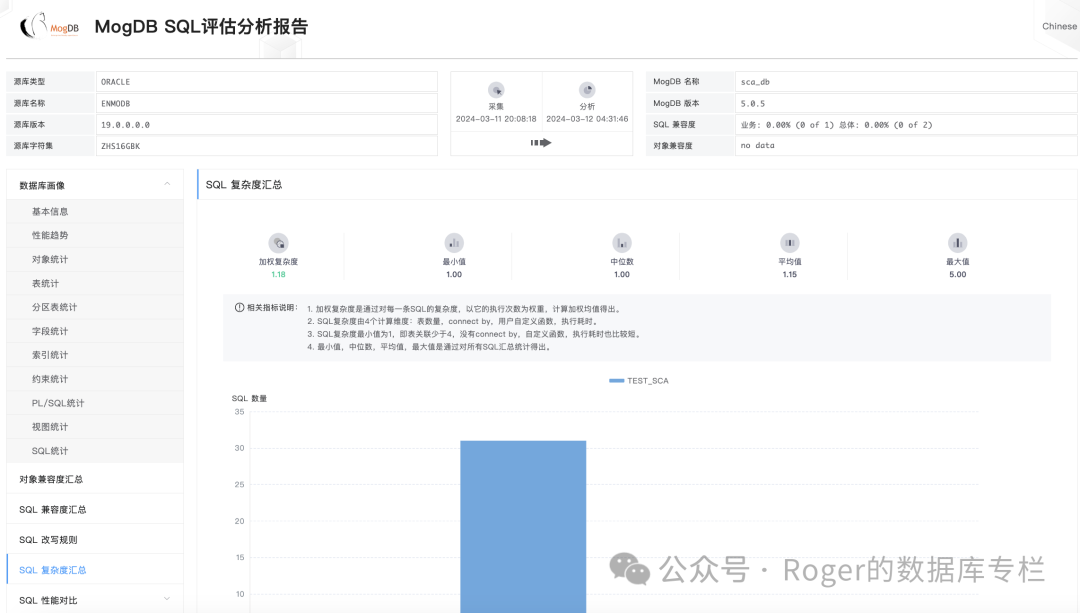
最后我们来看看产出的报告吧。
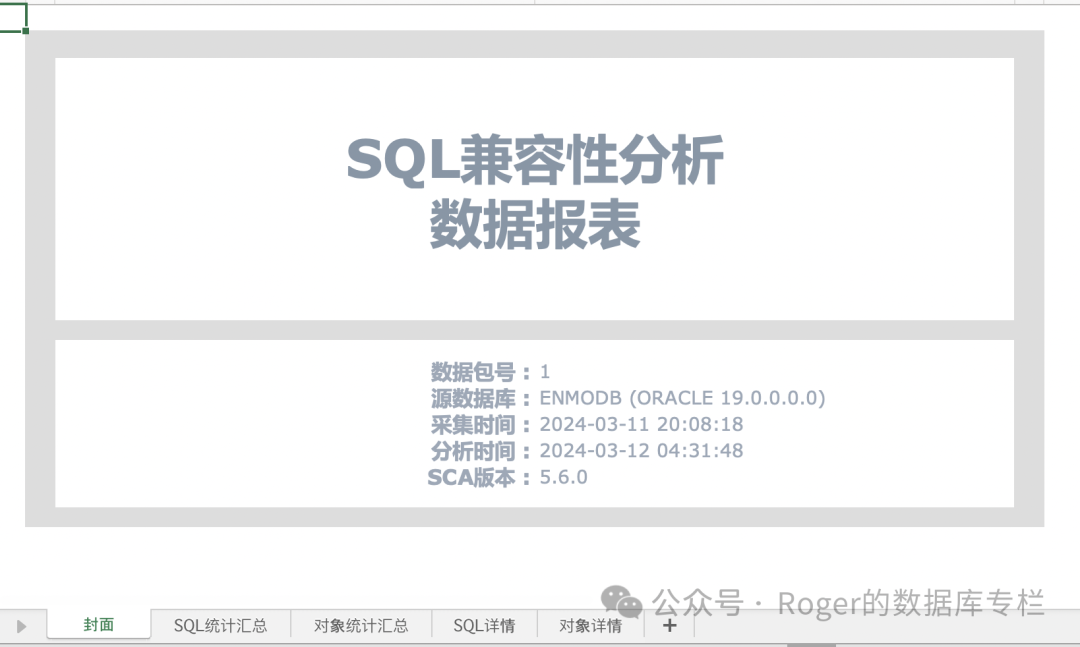
当然为了大家写报告或者给领导汇报,我们还提供了execl数据生成,将html数据生成到了execl表格中,你只打开欣赏即可。够贴心吗?
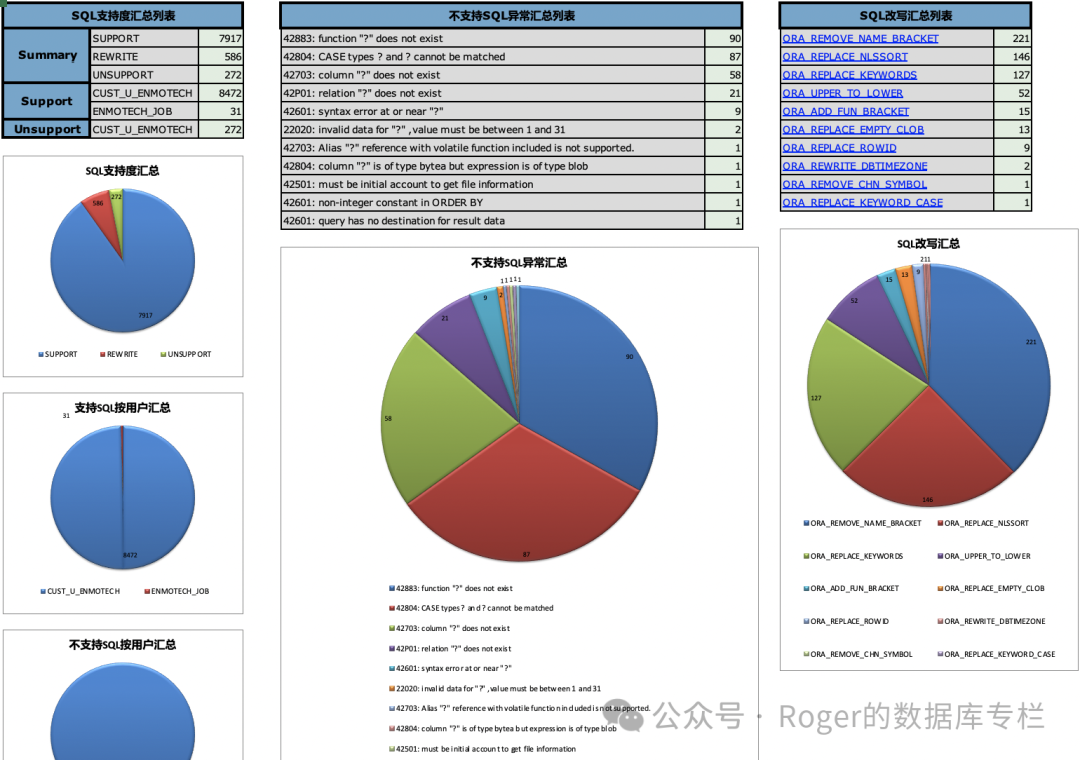
欢迎大家去MogDB官网下载(https://docs.mogdb.io/zh/sca/v5.1/release-notes)和体验,如果在使用过程中遇到任何问题,也欢迎大家给我们及时反馈(https://www.modb.pro/mogdb)。
说明:
更多详细的参考大家可以参考我们的官方文档:https://docs.mogdb.io/zh/sca/v5.1/overview