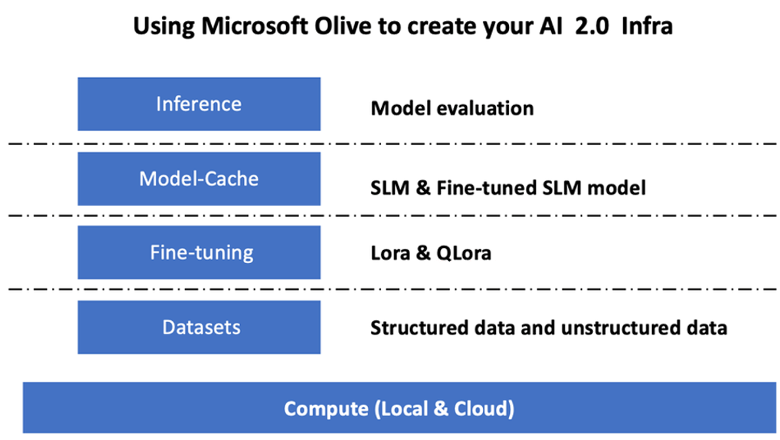
在人工智能 2.0 时代,每个企业都希望借助人工智能技术建立属于自己的行业模型。Azure OpenAI 服务提供了非常强大的模型可供企业选择,如 gpt-3.5-turbo-16k、gpt-4-turbo、gpt-4-turbo-32k、gpt-4-vision wait 等。如我们在基础篇中提到的,一些开源模型,比如:LLama、Mistral、Nemotron 和 Phi-2 等也深受企业喜爱。
对于一些特殊行业和传统企业来说,他们更希望根据自己的底层结构或应用,通过本地和云端相结合的方式完成,结合自身数据来训练自己的行业模型。借助Microsoft Olive,企业只需简单配置即可满足混合场景的需求,完成微调和模型参考工作。
01
小语言模型本质上是大语言模型的缩小版。与拥有数千亿甚至数万亿参数的大语言模型相比,小型语言模型的参数要少得多,通常在数百万到数十亿之间。
Hugging Face 上有许多优秀的 SLM,如 Microsoft Phi-2、Meta Llama-2、Mistral 7B、Google Gemma 等。这些 SLM 可用于微调。
02
Microsoft Olive 是一款非常易于使用的开源模型优化工具,可用于微调和参考。只需要简单的配置,结合使用的开源小型语言模型和相关运行环境 (AzureML 本地 GPU, CPU, DirectML) ,就可以通过自动优化的方式完成模型的微调或引用,从而找到最佳模型,部署到云端或者边缘设备上。这让企业可以在本地和云混合环境中构建自己的行业垂直模型。
#
配置 Microsoft Olive
Microsoft Olive 的安装非常简单,可以安装到 CPU、GPU、DirectML 和 Azure ML 上。
pip install olive-ai
如果希望结合 CPU 运行 ONNX 模型,可以使用:
pip install olive-ai[cpu]
如果希望结合 GPU 运行 ONNX 模型,可以使用:
pip install olive-ai[gpu]
如果希望安装到 Azure ML ,可以使用:
pip install git+https://github.com/microsoft/Olive#egg=olive-ai[azureml]
注意
1. Microsoft Olive 的最新版本是0.5.0
2. 需使用x86环境安装(建议使用WSL)
#
Microsoft Olive 的 Config 文件
安装完成后,您可以通过 Config 文件配置不同的针对模型的设定,这包括数据,算力,训练,部署,以及模型生成等。
1.数据
Microsoft Olive 支持本地数据和云数据的训练,并可在设置中进行配置。
本地数据源设定
可以简单地设置需要训练微调的数据集,通常是 json 格式,并结合数据模版进行适配,这需要结合模型的要求进行调整。
"data_configs": {"dataset-default_train": {"name": "dataset-default","type": "HuggingfaceContainer","params_config": {"data_name": "json","data_files":"dataset/dataset-classification.json","split": "train","component_kwargs": {"pre_process_data": {"dataset_type": "corpus","text_cols": ["phrase","tone"],"text_template": "### Text: {phrase}\n### The tone is:\n{tone}","corpus_strategy": "join","source_max_len": 1024,"pad_to_max_len": false,"use_attention_mask": false}}}}},
云端数据源设定
通过将 Azure AI Studio/Azure Machine Learning Service 的数据存储与云端的数据进行链接,您可以选择通过 Microsoft Fabric 和 Azure Data 向 Azure AI Studio/Azure Machine Learning Service 引入不同的数据源,作为对数据进行微调支持。
"data_configs": {"dataset_default_train": {"name": "dataset_default","type": "HuggingfaceContainer","params_config": {"data_name": "json","data_files": {"type": "azureml_datastore","config": {"azureml_client": {"subscription_id": "Your Azure Subscription ID","resource_group": "Your Azure AI Studio Azure Machine Learning Service Resource Group","workspace_name": "Your Azure AI Studio Azure Machine Learning Service Name"},"datastore_name": "Your Azure Datastore Name","relative_path": "Your Azure Datastore File such as JSON"}},"split": "train","component_kwargs": {"pre_process_data": {"dataset_type": "corpus","text_cols": ["phrase","tone"],"text_template": "### Text: {phrase}\n### The tone is:\n{tone}","corpus_strategy": "join","source_max_len": 1024,"pad_to_max_len": false,"use_attention_mask": false}}}}},
2.算力配置
如果您需要在本地,可以直接使用本地的数据资源 ,利用Azure AI Studio Azure Machine Learning Service 的资源,您需要配置好相关的 Azure 参数,以及算力名称等.
"systems": {"aml": {"type": "AzureML","config": {"accelerators": ["gpu"],"hf_token": true,"aml_compute": "Your Azure AI Studio Azure Machine Learning Service Compute Name","aml_docker_config": {"base_image": "Your Azure AI Studio Azure Machine Learning Service docker","conda_file_path": "conda.yaml"}}},"azure_arc": {"type": "AzureML","config": {"accelerators": ["gpu"],"aml_compute": "Your Azure AI Studio Azure Machine Learning Service Compute Name","aml_docker_config": {"base_image": "Your Azure AI Studio Azure Machine Learning Service docker","conda_file_path": "conda.yaml"}}}},
注意
由于是通过 Azure AI Studio Azure Machine Learning Service 上的容器运行,因此需要配置所需环境。这里,我们在 conda.yaml 的环境上进行配置。
name: project_environmentchannels:- defaultsdependencies:- python=3.8.13- pip=22.3.1- pip:- einops- accelerate- azure-keyvault-secrets- azure-identity- bitsandbytes- datasets- huggingface_hub- peft- scipy- sentencepiece- torch>=2.2.0- transformers- git+https://github.com/microsoft/Olive@jiapli/mlflow_loading_fix#egg=olive-ai[gpu]
3.模型选择
您可以使用 Hugging face 上的模型,也可以直接结合 Azure AI Studio Azure Machine Learning 的模型目录选择要使用的模型,这里我以 Microsoft Phi-2 为例。
如果本地有模型,可以使用如下方法:
"input_model":{"type": "PyTorchModel","config": {"hf_config": {"model_name": "model-cache/microsoft/phi-2","task": "text-generation","model_loading_args": {"trust_remote_code": true}}}},
如果您希望使用 Azure AI Studio Azure Machine Learning Service 的模型,可以使用下列方法:
"input_model":{"type": "PyTorchModel","config": {"model_script": "qlora_user_script.py","model_path": {"type": "azureml_registry_model","config": {"name": "microsoft-phi-2","registry_name": "azureml-msr","version": "11"}},"model_file_format": "PyTorch.MLflow","hf_config": {"model_name": "microsoft/phi-2","task": "text-generation","from_pretrained_args": {"trust_remote_code": true}}}},
注意
1. 我们需要与Azure AI Studio Azure Machine Learning Service 集成,因此在设置模型时,请参考版本号和相关命名。
2. Azure上的模型都需要设置成PyTorch.MLflow
3. 您需要有Hugging face 账号,绑定 key 到 Azure AI Studio Azure Machine Learning 的 Key value 中
4.算法
Microsoft Olive 很好地封装了 Lora 和 QLora 微调算法,您只需配置一些相关参数即可。这里我以 QLora 为例。
"qlora": {"type": "QLoRA","config": {"compute_dtype": "bfloat16","quant_type": "nf4","double_quant": true,"lora_r": 64,"lora_alpha": 64,"lora_dropout": 0.1,"train_data_config": "dataset_default_train","eval_dataset_size": 0.3,"training_args": {"seed": 0,"data_seed": 42,"per_device_train_batch_size": 1,"per_device_eval_batch_size": 1,"gradient_accumulation_steps": 4,"gradient_checkpointing": false,"learning_rate": 0.0001,"num_train_epochs":3,"max_steps": 1200,"logging_steps": 10,"evaluation_strategy": "steps","eval_steps": 187,"group_by_length": true,"adam_beta2": 0.999,"max_grad_norm": 0.3}}},
5.格式转换
Microsoft Olive 支持模型格式转换,尤其是ONNX。您可以配置模型转换格式,如果不配置,默认将以原始格式导出。
"convert": {"type": "OnnxConversion","config": {"use_dynamo_exporter": true,"target_opset": 18,"save_as_external_data": true,"all_tensors_to_one_file": true}},"transformers_optimization": {"type": "OrtTransformersOptimization","config": {"model_type": "phi","use_gpu": false,"keep_io_types": false,"num_heads": 32,"hidden_size": 2560,"opt_level": 0,"optimization_options": {"attention_op_type": "MultiHeadAttention"},"save_as_external_data": true,"all_tensors_to_one_file": true}}
这里需要指出,您可以根据自己的需要设定上述步骤,不⼀定完全按照上述五步配置。根据您的需求,您可以直接使用算法步骤,而无需进行微调。最后您需要配置相关引擎。
"engine": {"log_severity_level": 0,"host": "aml","target": "aml","search_strategy": false,"execution_providers": ["CUDAExecutionProvider"],"cache_dir": "../model-cache/models/phi2-finetuned/cache","output_dir" : "../model-cache/models/phi2-finetuned"}
#
运行您的 Microsoft Olive 脚本
在命令行,在 olive-config.json 的目录下执行:
python -m olive.workflows.run --config olive-config.json
03
借助 Microsoft Olive,您可以更好地基于企业需求构建自己的 AI 2.0 解决方案,特别在微调和模型引用的环节上。
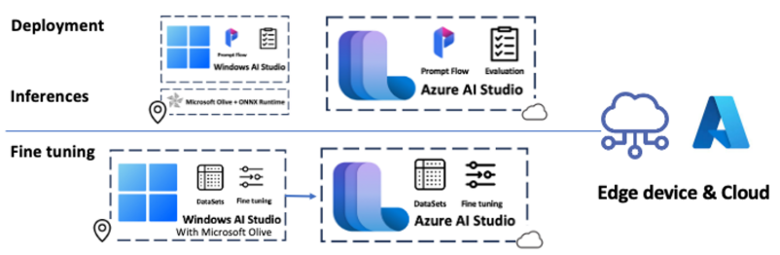
我们可以轻松地使用 Microsoft Olive 来配置微调部分,这对许多想要管理 SLM 模型管道的团队非常有帮助。如果我们单从 LLMsOps 的角度看, Microsoft Olive 是⼀个非常重要的环节 (本内容只着专注在介绍微调,模型格式的转换和评估将在后续内容中介绍)。
有些人可能会认为微调的效果并不明显,这取决于您的数据质量和应用场景。微调 SLM 需要更有针对性,与行业内的 LLM(如内容过滤、行业领域知识等)结合使用会更容易。微调 SLM 更像是一种辅助,而不是 LLM 的替代品。
04
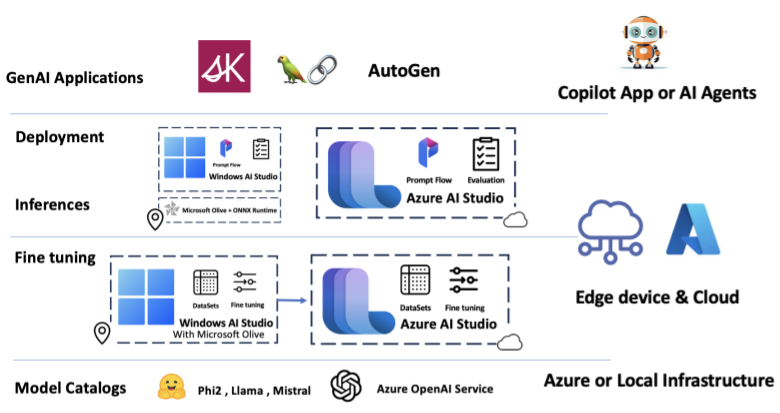
通过本篇内容,我们了解到如何利用 Microsoft Olive 结合云端和本地对 SLM 进行微调的方法,这将使企业可以更有效地分配资源,构建属于自己的垂直行业模型。
本系列之后的几篇,我会继续跟大家分享如何利用 Microsoft Olive 转换模型格式机型部署,以及如何验证微调 SLM 有效性的方法,希望大家持续关注,也希望大家在留言区中与我交流。
# 更多资源
⇲ 学习 Azure AI Studio 相关知识
https://learn.microsoft.com/zh-cn/azure/ai-studio/what-is-ai-studio?tabs=home
⇲ 了解 Azure AI Studio 上的模型目录
https://learn.microsoft.com/zh-cn/azure/ai-studio/how-to/model-catalog
⇲ 学习 Microsoft Olive 相关知识
https://microsoft.github.io/Olive/