



ORION是Oracle提供的IO测试工具,这个工具可以在不安装Oracle软件的情况下模拟Oracle的IO操作,从而可以预估部署数据库之后的系统性能。
Orion的下载地址为:
http://www.oracle.com/technology/software/tech/orion/index.html
下载需要一个OTN的免费帐号:
刚刚测试了一下手头的一个HP的MSA1000的存储,测试使用如下命令:
./orion -run simple -testname mytest -num_disks 10
以下是iops/mbps/latency的效果图:
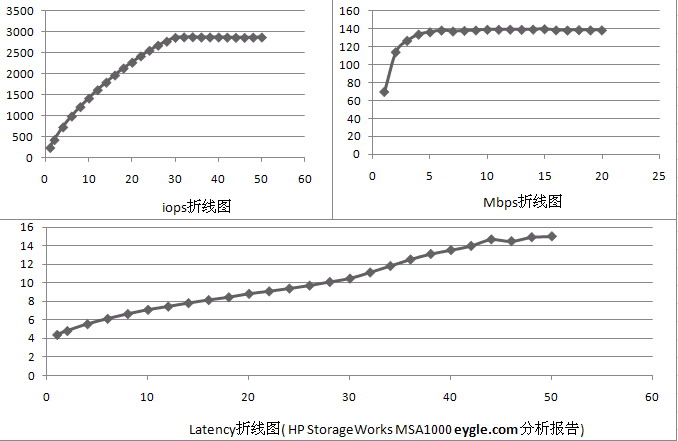
在当前存储配置下,IO最大吞吐量可以达到138M/s,iops稳定状态达到2800左右,而Latency在Load Level 30左右的时候达到10ms。
测试结果仅供参考。
-The End-
Orion的下载地址为:
http://www.oracle.com/technology/software/tech/orion/index.html
下载需要一个OTN的免费帐号:
ORION is the Oracle I/O Numbers Calibration Tool designed to simulate Oracle I/O workloads
- Without having to create and run an Oracle database
- Using the Oracle database's I/O libraries
- Using small I/Os to simulate OLTP workloads
- Using large I/Os to simulate data warehouses
ORION is useful for understanding the performance capabilities of a storage system, either to uncover performance issues or to size a new database installation. The Users Guide contains a Getting Started section, detailed usage documentation, and trouble-shooting tips. Please note that ORION is not supported by Oracle.
Download the files:orion_AIX64.gz (11,670,726 bytes) orion_solaris64_sparc.gz (898,929 bytes) orion_solaris_x8664.gz (655,975 bytes) orion_linux_em64t.gz (767,380 bytes) orion10.2_linux.gz (630,354 bytes) orion10.2_windows.msi (7,865,856 bytes) Users Guide

刚刚测试了一下手头的一个HP的MSA1000的存储,测试使用如下命令:
./orion -run simple -testname mytest -num_disks 10
以下是iops/mbps/latency的效果图:
在当前存储配置下,IO最大吞吐量可以达到138M/s,iops稳定状态达到2800左右,而Latency在Load Level 30左右的时候达到10ms。
测试结果仅供参考。
-The End-
「喜欢这篇文章,您的关注和赞赏是给作者最好的鼓励」
关注作者
【版权声明】本文为墨天轮用户原创内容,转载时必须标注文章的来源(墨天轮),文章链接,文章作者等基本信息,否则作者和墨天轮有权追究责任。如果您发现墨天轮中有涉嫌抄袭或者侵权的内容,欢迎发送邮件至:contact@modb.pro进行举报,并提供相关证据,一经查实,墨天轮将立刻删除相关内容。
