



结论
先上结论:
- pg的VM文件中存放all-visible和all-frozen;而openGauss由于是基于pg 9.2.4版本,仅记录了all-visible一个比特位
- IndexOnlyScan并非不回表,而是需要根据VM文件来判断该page中所有tuple是否可见,若page中的元组不是全部可见,则还需回表查询,也可根据explain analyze实际执行计划中的Heap Fetches来判断
- PostgreSQL13版本引入INSERT触发autovacuum机制,而openGauss对于insert-only表,可以手动vacuum来生成VM文件
- PostgreSQL高版本索引上会存储有关tuple是否为dead的字段。若某条tuple在索引中标记为dead的状态,则无需回表
- update的旧数据,当再次进行查询时,该旧数据行会被标记为dead,也不会查询旧行的记录
相关概念
1、VM文件
vm(visibility map),可见性映射文件。PostgreSQL在8.4版中引入了VM文件,用于减小清理的开销。
vm文件用于保存表数据文件page中所有tuple的可见性,vacuum可以跳过不包含dead tuple的page
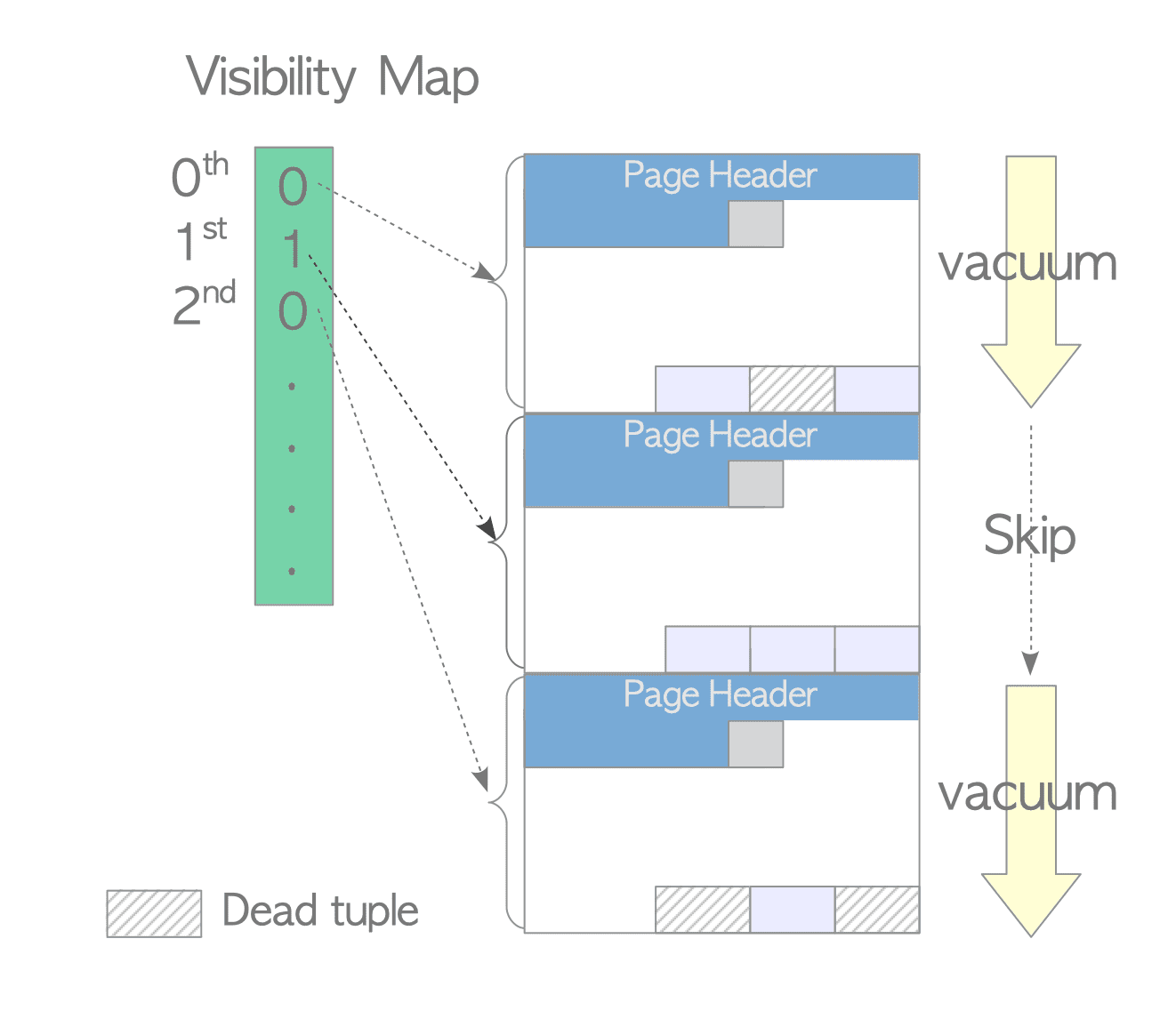
每个VM由一个或多个8 KB页面组成,文件以_vm为后缀
PostgreSQL9.6版本对VM文件做了改进,新的VM文件除了包含all-visible,添加设置all-frozen比特位表明页内所有的元组是否被冻结
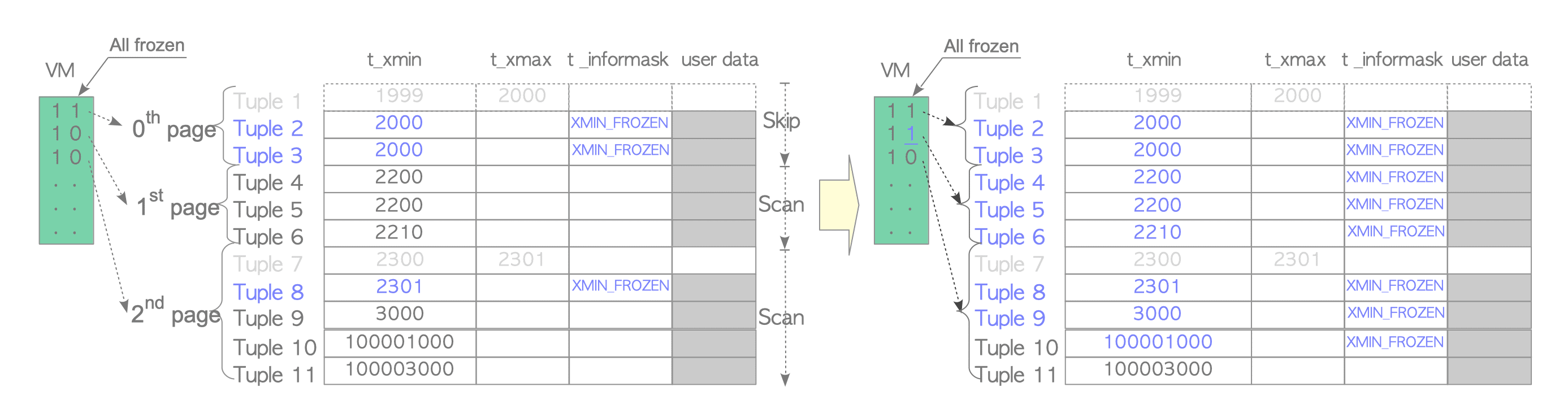
openGauss是基于PostgreSQL9.2.4研发的,VM文件中仅设置all-visible比特位
| 0 | 1 | |
|---|---|---|
| all-visible | 数据并不完全可见,即需要回表查看具体数据行是可见还是不可见 | page所有tuple是可见的,无需回表 |
| all-frozen(V9.6+) | 含有非冻结的tuple | 所有tuple均被冻结,eager mode下的vacuum可跳过该page |
2、IndexOnlyScan 仅索引扫描
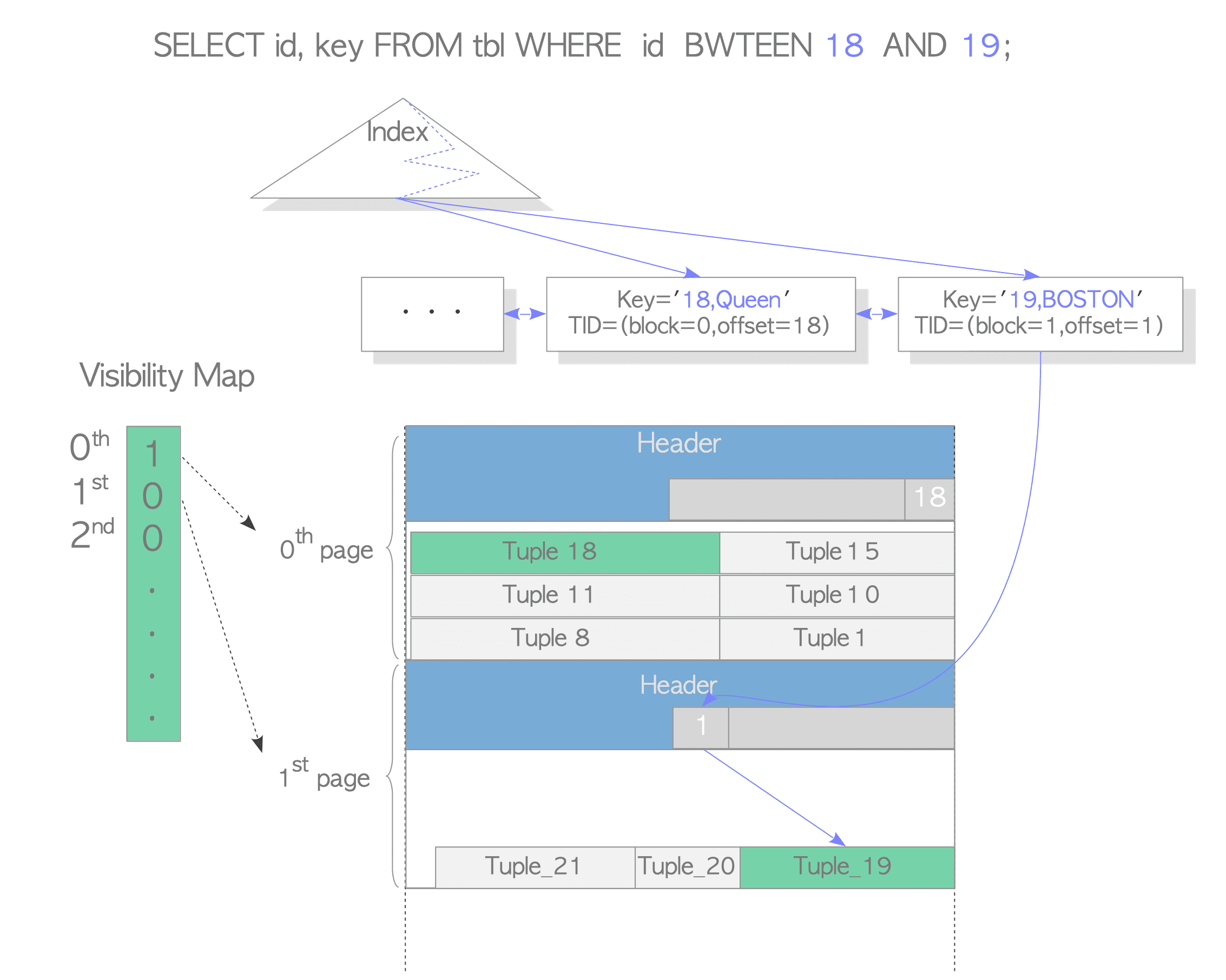
IndexOnlyScan 仅索引扫描,即查询时仅利用索引中存储的信息,而不需访问表数据文件。所以,如果要使用IndexOnlyScan则需保证SELECT语句的所有目标列都包含在索引键中。然而,由于索引中并不会保存可见性信息,所以在实际使用IndexOnlyScan的过程中,需要借助VM文件来检查tuple的可见性,如果page的所有元组是可见的即(all-visible=1),则只需访问索引中保存的相关信息;若page中的tuple并非完全可见,则还需回表查看具体数据行是可见还是不可见
详述
带着下述几个问题来探究:
1、通过什么方式能查看vm中记录的page的可见性呢?
2、indexonlyscan在什么情况下无需回表呢?
3、是否有相关的统计信息?
PostgreSQL
1、创建测试数据
create table ios_test_pg(a integer, b text, c boolean) with (autovacuum_enabled = off, fillfactor = 50);
insert into ios_test_pg(a,b,c)  select s.id, chr((32+random()*94)::integer), random() < 0.01 from generate_series(1,1000) as s(id) order by random();
create index on ios_test_pg(a) ;
create index on ios_test_pg(b) ;
maleah_db=# select pg_relation_filepath('ios_test_pg');
 pg_relation_filepath
----------------------
 base/16384/25943
(1 row)

maleah_db=# select oid,relname,reltuples,relpages,relallvisible from pg_class where relname = 'ios_test_pg' ;
  oid  |   relname   | reltuples | relpages | relallvisible
-------+-------------+-----------+----------+---------------
 25943 | ios_test_pg |      1000 |        9 |             0
(1 row)


maleah_db=# explain analyze select /*+ indexonlyscan(ios_test_pg ios_test_pg_a_idx)*/ count(*) from ios_test_pg ;
                                                                   QUERY PLAN

--------------------------------------------------------------------------------------------------------------------------------------
-----------
 Aggregate  (cost=73.78..73.79 rows=1 width=8) (actual time=0.814..0.816 rows=1 loops=1)
   ->  Index Only Scan using ios_test_pg_a_idx on ios_test_pg  (cost=0.28..71.28 rows=1000 width=0) (actual time=0.086..0.707 rows=100
0 loops=1)
         Heap Fetches: 1000
 Planning Time: 1.254 ms
 Execution Time: 1.526 ms
(5 rows)
指定走Indexonlyscan,Heap Fetches: 1000表示回表查询了1000条数据
2、vm文件在进行vacuum时会产生
值得注意的是,pg在13版本引入INSERT触发autovacuum机制,由autovacuum_vacuum_insert_scale_factor和autovacuum_vacuum_insert_threshold两个参数控制,当insert的数量到达一定的阈值,会触发autovacuum,产生vm文件。而openGauss数据库对于insert-only表,不会触发autovacuum,同样的也不会产生vm文件。对于某些SELECT查询,可能会走”错误“的执行计划导致SQL慢
maleah_db=# \! ls -l $PGDATA/base/16384/25943*
-rw-------. 1 postgres postgres 73728 Mar 14 15:49 /pg/data/pg16.2/data16200/base/16384/25943
-rw-------. 1 postgres postgres 24576 Mar 14 15:49 /pg/data/pg16.2/data16200/base/16384/25943_fsm
maleah_db=# vacuum ios_test_pg ;
VACUUM
maleah_db=# \! ls -l $PGDATA/base/16384/25943*
-rw-------. 1 postgres postgres 73728 Mar 14 15:49 /pg/data/pg16.2/data16200/base/16384/25943
-rw-------. 1 postgres postgres 24576 Mar 14 15:49 /pg/data/pg16.2/data16200/base/16384/25943_fsm
-rw-------. 1 postgres postgres  8192 Mar 14 15:50 /pg/data/pg16.2/data16200/base/16384/25943_vm
maleah_db=# select oid,relname,reltuples,relpages,relallvisible from pg_class where relname = 'ios_test_pg' ;
  oid  |   relname   | reltuples | relpages | relallvisible
-------+-------------+-----------+----------+---------------
 25943 | ios_test_pg |      1000 |        9 |             9
(1 row)
maleah_db=# explain analyze select /*+ indexonlyscan(ios_test_pg ios_test_pg_a_idx)*/ count(*) from ios_test_pg ;
                                                                   QUERY PLAN

--------------------------------------------------------------------------------------------------------------------------------------
-----------
 Aggregate  (cost=37.77..37.78 rows=1 width=8) (actual time=0.095..0.096 rows=1 loops=1)
   ->  Index Only Scan using ios_test_pg_a_idx on ios_test_pg  (cost=0.28..35.27 rows=1000 width=0) (actual time=0.012..0.061 rows=100
0 loops=1)
         Heap Fetches: 0
 Planning Time: 0.098 ms
 Execution Time: 0.120 ms
(5 rows)
表明执行vacuum后产生了VM文件,且page都是可见的,理论不会回表进行查询。而从执行计划的Heap Fetches: 0也可以验证这一猜想
3、查看vm文件
本文提供以下两种方式查看VM文件:
为了将系统缓存刷新到磁盘,可以执行sync,强制将内存中的文件缓冲内容写到磁盘
1)hexdump -C file_name + 进制转换
$ hexdump -C /pg/data/pg16.2/data16200/base/16384/25943_vm
00000000  00 00 00 00 c0 b5 1d 03  71 8a 00 00 18 00 00 20  |........q...... |
00000010  00 20 04 20 00 00 00 00  55 55 01 00 00 00 00 00  |. . ....UU......|
00000020  00 00 00 00 00 00 00 00  00 00 00 00 00 00 00 00  |................|
*
00002000
$ echo "obase=2; ibase=16; 55" | bc | awk '{printf "%08d\n", $0}'
01010101
$ echo "obase=2; ibase=16; 55" | bc | awk '{printf "%08d\n", $0}'
01010101
$ echo "obase=2; ibase=16; 01" | bc | awk '{printf "%08d\n", $0}'
00000001
2)pg_visibility 插件
maleah_db=# select * from pg_visibility_map('ios_test_pg');
 blkno | all_visible | all_frozen
-------+-------------+------------
     0 | t           | f
     1 | t           | f
     2 | t           | f
     3 | t           | f
     4 | t           | f
     5 | t           | f
     6 | t           | f
     7 | t           | f
     8 | t           | f
(9 rows)
这两种方式的结果是一样的,都表示所有的这9个页面都是可见的。
4、更新一条记录
(通过pageinspect扩展窥探索引和数据文件的内部结构)
maleah_db=# select ctid,a from ios_test_pg where a = 888 ;
  ctid  |  a
--------+-----
 (7,10) | 888
(1 row)
-- 数据文件
maleah_db=# select * from heap_page('ios_test_pg',7) where ctid='(7,10)';
  ctid  | state  |   xmin   | xmax  |                infomask                 | infomask2 | t_ctid
--------+--------+----------+-------+-----------------------------------------+-----------+--------
 (7,10) | normal | 1021 (c) | 0 (a) | XMAX_INVALID|XMIN_COMMITTED|HASVARWIDTH |           | (7,10)
(1 row)
-- 索引
maleah_db=# select * from bt_page_items('ios_test_pg_a_idx',4) where ctid = '(7,10)' ;
 itemoffset |  ctid  | itemlen | nulls | vars |          data           | dead |  htid  | tids
------------+--------+---------+-------+------+-------------------------+------+--------+------
        156 | (7,10) |      16 | f     | f    | 78 03 00 00 00 00 00 00 | f    | (7,10) |
(1 row)

-- 更新一行记录
maleah_db=# update ios_test_pg set b = 'test111' where a = 888 ;
UPDATE 1
maleah_db=# select ctid,a from ios_test_pg where a = 888 ;
  ctid   |  a
---------+-----
 (7,114) | 888
(1 row)

maleah_db=# select * from heap_page('ios_test_pg',7) where ctid in ('(7,10)','(7,114)') ;
  ctid   | state  |   xmin   | xmax  |                    infomask                     | infomask2 | t_ctid
---------+--------+----------+-------+-------------------------------------------------+-----------+---------
 (7,10)  | dead   |          |       |                                                 |           |
 (7,114) | normal | 1024 (c) | 0 (a) | UPDATED|XMAX_INVALID|XMIN_COMMITTED|HASVARWIDTH |           | (7,114)
(2 rows)

maleah_db=# select * from bt_page_items('ios_test_pg_a_idx',4) where ctid in ('(7,10)','(7,114)') ;
 itemoffset |  ctid   | itemlen | nulls | vars |          data           | dead |  htid   | tids
------------+---------+---------+-------+------+-------------------------+------+---------+------
        156 | (7,10)  |      16 | f     | f    | 78 03 00 00 00 00 00 00 | f    | (7,10)  |
        157 | (7,114) |      16 | f     | f    | 78 03 00 00 00 00 00 00 | f    | (7,114) |
(2 rows)
5、查看更新后的vm文件
maleah_db=# select * from pg_visibility_map('ios_test_pg');
 blkno | all_visible | all_frozen
-------+-------------+------------
     0 | t           | f
     1 | t           | f
     2 | t           | f
     3 | t           | f
     4 | t           | f
     5 | t           | f
     6 | t           | f
     7 | f           | f
     8 | t           | f
(9 rows)

$ hexdump -C /pg/data/pg16.2/data16200/base/16384/25943_vm
00000000  00 00 00 00 c0 b5 1d 03  a7 d5 00 00 18 00 00 20  |............... |
00000010  00 20 04 20 00 00 00 00  55 15 01 00 00 00 00 00  |. . ....U.......|
00000020  00 00 00 00 00 00 00 00  00 00 00 00 00 00 00 00  |................|
*
00002000
$ echo "obase=2; ibase=16; 55" | bc | awk '{printf "%08d\n", $0}'
01010101
$ echo "obase=2; ibase=16; 15" | bc | awk '{printf "%08d\n", $0}'
00010101
$ echo "obase=2; ibase=16; 01" | bc | awk '{printf "%08d\n", $0}'
00000001

maleah_db=# select oid,relname,reltuples,relpages,relallvisible from pg_class where relname = 'ios_test_pg' ;
  oid  |   relname   | reltuples | relpages | relallvisible
-------+-------------+-----------+----------+---------------
 25943 | ios_test_pg |      1000 |        9 |             9
(1 row)
VM文件已经更新,查看pg_class表中的relallvisible字段还没更新,此字段用于计算index only scan的代价,错误的统计信息可能会导致在选择执行计划时有问题。
6、那么表的可见性信息pg_class表的relallvisible字段在什么时间更新呢?
其实该字段会在analyze时会更新
maleah_db=# select oid,relname,reltuples,relpages,relallvisible from pg_class where relname = 'ios_test_pg' ;
  oid  |   relname   | reltuples | relpages | relallvisible
-------+-------------+-----------+----------+---------------
 25943 | ios_test_pg |      1000 |        9 |             9
(1 row)

maleah_db=# analyze verbose ios_test_pg ;
INFO:  analyzing "public.ios_test_pg"
INFO:  "ios_test_pg": scanned 9 of 9 pages, containing 1000 live rows and 1 dead rows; 1000 rows in sample, 1000 estimated total rows
ANALYZE
maleah_db=# select oid,relname,reltuples,relpages,relallvisible from pg_class where relname = 'ios_test_pg' ;
  oid  |   relname   | reltuples | relpages | relallvisible
-------+-------------+-----------+----------+---------------
 25943 | ios_test_pg |      1000 |        9 |             8
(1 row)
(加餐时间到!)
maleah_db=# select * from heap_page('ios_test_pg',7) where ctid in ('(7,10)','(7,114)') ;
  ctid   | state  |   xmin   | xmax  |                    infomask                     | infomask2 | t_ctid
---------+--------+----------+-------+-------------------------------------------------+-----------+---------
 (7,10)  | dead   |          |       |                                                 |           |
 (7,114) | normal | 1024 (c) | 0 (a) | UPDATED|XMAX_INVALID|XMIN_COMMITTED|HASVARWIDTH |           | (7,114)
(2 rows)

maleah_db=# select * from bt_page_items('ios_test_pg_a_idx',4) where ctid in ('(7,10)','(7,114)') ;
 itemoffset |  ctid   | itemlen | nulls | vars |          data           | dead |  htid   | tids
------------+---------+---------+-------+------+-------------------------+------+---------+------
        156 | (7,10)  |      16 | f     | f    | 78 03 00 00 00 00 00 00 | f    | (7,10)  |
        157 | (7,114) |      16 | f     | f    | 78 03 00 00 00 00 00 00 | f    | (7,114) |
(2 rows)

maleah_db=# explain analyze select /*+ indexonlyscan(ios_test_pg ios_test_pg_a_idx)*/ count(*) from ios_test_pg ;
                                                                   QUERY PLAN

--------------------------------------------------------------------------------------------------------------------------------------
-----------
 Aggregate  (cost=37.77..37.78 rows=1 width=8) (actual time=0.138..0.139 rows=1 loops=1)
   ->  Index Only Scan using ios_test_pg_a_idx on ios_test_pg  (cost=0.28..35.27 rows=1000 width=0) (actual time=0.020..0.104 rows=100
0 loops=1)
         Heap Fetches: 114
 Planning Time: 0.218 ms
 Execution Time: 0.168 ms
(5 rows)

maleah_db=# select * from heap_page('ios_test_pg',7) where ctid in ('(7,10)','(7,114)') ;
  ctid   | state  |   xmin   | xmax  |                    infomask                     | infomask2 | t_ctid
---------+--------+----------+-------+-------------------------------------------------+-----------+---------
 (7,10)  | dead   |          |       |                                                 |           |
 (7,114) | normal | 1024 (c) | 0 (a) | UPDATED|XMAX_INVALID|XMIN_COMMITTED|HASVARWIDTH |           | (7,114)
(2 rows)

maleah_db=# select * from bt_page_items('ios_test_pg_a_idx',4) where ctid in ('(7,10)','(7,114)') ;
 itemoffset |  ctid   | itemlen | nulls | vars |          data           | dead |  htid   | tids
------------+---------+---------+-------+------+-------------------------+------+---------+------
        156 | (7,10)  |      16 | f     | f    | 78 03 00 00 00 00 00 00 | t    | (7,10)  |
        157 | (7,114) |      16 | f     | f    | 78 03 00 00 00 00 00 00 | f    | (7,114) |
(2 rows)

maleah_db=# explain analyze select /*+ indexonlyscan(ios_test_pg ios_test_pg_a_idx)*/ count(*) from ios_test_pg ;
                                                                   QUERY PLAN

--------------------------------------------------------------------------------------------------------------------------------------
-----------
 Aggregate  (cost=37.77..37.78 rows=1 width=8) (actual time=0.304..0.305 rows=1 loops=1)
   ->  Index Only Scan using ios_test_pg_a_idx on ios_test_pg  (cost=0.28..35.27 rows=1000 width=0) (actual time=0.042..0.213 rows=100
0 loops=1)
         Heap Fetches: 113
 Planning Time: 0.235 ms
 Execution Time: 0.347 ms
(5 rows)
为什么执行两次,执行计划的 Heap Fetches会变化呢?且之后执行的Heap Fetches: 113会保持不变
不难发现,在执行一次语句后,(7,10)的元组已经在索引上被标记为dead的状态,所以无需回表即可知晓该元组是dead的。这也就是第一次执行Heap Fetches是114,第二次包括之后执行的是96的原因啦。至于为什么是113呢?因为表的数据文件7号page的all_visible=0,该页面存储了114条数据,有一条在索引中标记为dead,所以是剩下的113条需要回表查看
maleah_db=# select state,count(*) from heap_page('ios_test_pg',7) group by 1 ;
 state  | count
--------+-------
 dead   |     1
 normal |   113
(2 rows)
openGauss也是类似的步骤,以下步骤有所简化
openGauss
1、创建测试数据
create table ios_test_og(a integer, b text, c boolean) with (autovacuum_enabled = off, fillfactor = 50) ;
insert into ios_test_og(a,b,c)  select s.id, chr((32+random()*94)::integer), random() < 0.01 from generate_series(1,1000) as s(id) order by random();
create index on ios_test_og(a) ;
create index on ios_test_og(b) ;
maleah_db=# select pg_relation_filepath('ios_test_og');
 pg_relation_filepath
----------------------
 base/16399/16808
(1 row)


maleah_db=# explain analyze select /*+ indexonlyscan(ios_test_og ios_test_og_a_idx)*/ count(*) from ios_test_og ;
                                                                    QUERY PLAN

-------------------------------------------------------------------------------------------------------------------------------------
--------------
 Aggregate  (cost=73.75..73.76 rows=1 width=8) (actual time=13.354..13.354 rows=1 loops=1)
   ->  Index Only Scan using ios_test_og_a_idx on ios_test_og  (cost=0.00..71.25 rows=1000 width=0) (actual time=10.670..12.826 rows=
1000 loops=1)
         Heap Fetches: 1000
 Total runtime: 13.626 ms
(4 rows)
指定走Indexonlyscan,Heap Fetches: 1000表示回表查询了1000条数据
2、vm文件在进行vacuum时会产生
openGauss数据库对于insert-only表,不会触发autovacuum,同样的也不会产生vm文件。对于某些SELECT查询,可能会走”错误“的执行计划导致SQL慢
maleah_db=# \! ls -l $PGDATA/base/16399/16808*
-rw-------. 1 og5 dbgrp 73728 Mar 14 16:18 /gauss/og500/data5000/base/16399/16808
-rw-------. 1 og5 dbgrp 24576 Mar 14 16:18 /gauss/og500/data5000/base/16399/16808_fsm
maleah_db=# select oid,relname,reltuples,relpages,relallvisible from pg_class where relname = 'ios_test_og' ;
  oid  |   relname   | reltuples | relpages | relallvisible
-------+-------------+-----------+----------+---------------
 16808 | ios_test_og |      1000 |        9 |             0
(1 row)
maleah_db=# vacuum ios_test_og ;
VACUUM
maleah_db=# \! ls -l $PGDATA/base/16399/16808*
-rw-------. 1 og5 dbgrp 73728 Mar 14 16:18 /gauss/og500/data5000/base/16399/16808
-rw-------. 1 og5 dbgrp 24576 Mar 14 16:18 /gauss/og500/data5000/base/16399/16808_fsm
-rw-------. 1 og5 dbgrp  8192 Mar 15 16:48 /gauss/og500/data5000/base/16399/16808_vm
maleah_db=# select oid,relname,reltuples,relpages,relallvisible from pg_class where relname = 'ios_test_og' ;
  oid  |   relname   | reltuples | relpages | relallvisible
-------+-------------+-----------+----------+---------------
 16678 | ios_test_og |      1000 |        9 |             9
(1 row)
maleah_db=# explain analyze select /*+ indexonlyscan(ios_test_og ios_test_og_a_idx)*/ count(*) from ios_test_og ;
                                                                   QUERY PLAN

-------------------------------------------------------------------------------------------------------------------------------------
------------
 Aggregate  (cost=37.75..37.76 rows=1 width=8) (actual time=0.352..0.352 rows=1 loops=1)
   ->  Index Only Scan using ios_test_og_a_idx on ios_test_og  (cost=0.00..35.25 rows=1000 width=0) (actual time=0.027..0.206 rows=10
00 loops=1)
         Heap Fetches: 0
 Total runtime: 0.559 ms
(4 rows)
Heap Fetches: 0表明并未回表进行查询
3、查看vm文件
这里需要注意,openGauss表的VM文件仅包含一个all-visible比特位
hexdump -C file_name + 进制转换
maleah_db=# \! hexdump -C /gauss/og500/data5000/base/16399/16808_vm
00000000  00 00 00 00 00 e2 b4 03  1d 23 40 00 18 00 00 20  |.........#@.... |
00000010  00 20 05 20 00 00 00 00  ff 01 00 00 00 00 00 00  |. . ............|
00000020  00 00 00 00 00 00 00 00  00 00 00 00 00 00 00 00  |................|
*
00002000
maleah_db=# \! echo "obase=2; ibase=16; FF" | bc | awk '{printf "%08d\n", $0}'
11111111
maleah_db=# \! echo "obase=2; ibase=16; 01" | bc | awk '{printf "%08d\n", $0}'
00000001
4、更新一条记录
openGauss的索引没有对某一ctid是否dead的标记
maleah_db=# select ctid,a from ios_test_og where a = 888 ;
  ctid  |  a
--------+-----
 (5,46) | 888
(1 row)

maleah_db=# select * from bt_page_items('ios_test_og_a_idx',4) where ctid = '(5,46)' ;
 itemoffset |  ctid  | itemlen | nulls | vars |          data
------------+--------+---------+-------+------+-------------------------
        158 | (5,46) |      16 | f     | f    | 78 03 00 00 00 00 00 00
(1 row)

maleah_db=# select * from heap_page('ios_test_og',5) where ctid='(5,46)';
  ctid  | state  |   xmin    | xmax  |                infomask                 | infomask2 | t_ctid
--------+--------+-----------+-------+-----------------------------------------+-----------+--------
 (5,46) | normal | 15624 (c) | 0 (a) | XMAX_INVALID|XMIN_COMMITTED|HASVARWIDTH |           | (5,46)
(1 row)

maleah_db=# UPDATE ios_test_og SET b = 'test1' where a = 888 ;
UPDATE 1
5、查看更新后的vm文件
maleah_db=# \! hexdump -C /gauss/og500/data5000/base/16399/16808_vm
00000000  00 00 00 00 00 e2 b4 03  a4 c9 40 00 18 00 00 20  |..........@.... |
00000010  00 20 05 20 00 00 00 00  df 01 00 00 00 00 00 00  |. . ............|
00000020  00 00 00 00 00 00 00 00  00 00 00 00 00 00 00 00  |................|
*
00002000
maleah_db=# \! echo "obase=2; ibase=16; DF" | bc | awk '{printf "%08d\n", $0}'
11011111
maleah_db=# \! echo "obase=2; ibase=16; 01" | bc | awk '{printf "%08d\n", $0}'
00000001
6、表的可见性信息pg_class表的relallvisible字段在什么时间更新呢?
同样的在og里,执行analyze会更新pg_class表的relallvisible字段
maleah_db=# select oid,relname,reltuples,relpages,relallvisible from pg_class where relname = 'ios_test_og' ;
  oid  |   relname   | reltuples | relpages | relallvisible
-------+-------------+-----------+----------+---------------
 16808 | ios_test_og |      1000 |        9 |             9
(1 row)

maleah_db=# analyze verbose ios_test_og ;
INFO:  analyzing "public.ios_test_og"(db1 pid=14842)
INFO:  ANALYZE INFO : "ios_test_og": scanned 9 of 9 pages, containing 1000 live rows and 2 dead rows; 1000 rows in sample, 1000 estimated total rows(db1 pid=14842)
ANALYZE
maleah_db=# select oid,relname,reltuples,relpages,relallvisible from pg_class where relname = 'ios_test_og' ;
  oid  |   relname   | reltuples | relpages | relallvisible
-------+-------------+-----------+----------+---------------
 16808 | ios_test_og |      1000 |        9 |             8
(1 row)
(饭后甜点)
maleah_db=# select ctid,a from ios_test_og where a = 888 ;
  ctid   |  a
---------+-----
 (5,114) | 888
(1 row)

maleah_db=# select * from heap_page('ios_test_og',5) where ctid in ('(5,46)','(5,114)') ;
  ctid   | state  |   xmin    |   xmax    |                    infomask                     | infomask2 | t_ctid
---------+--------+-----------+-----------+-------------------------------------------------+-----------+---------
 (5,46)  | normal | 15624 (c) | 15984 (c) | XMAX_COMMITTED|XMIN_COMMITTED|HASVARWIDTH       |           |  (5,114)
 (5,114) | normal | 15984 (c) | 0 (a)     | UPDATED|XMAX_INVALID|XMIN_COMMITTED|HASVARWIDTH | HEAP_ONLY_TUPLE | (5,114)
(2 rows)


maleah_db=# select * from bt_page_items('ios_test_og_a_idx',4) where ctid in ('(5,46)','(5,114)') ;
 itemoffset |  ctid  | itemlen | nulls | vars |          data
------------+--------+---------+-------+------+-------------------------
        159 | (5,46) |      16 | f     | f    | 78 03 00 00 00 00 00 00
(1 row)
maleah_db=# explain analyze select /*+ indexonlyscan(ios_test_og ios_test_og_a_idx)*/ count(*) from ios_test_og ;
                                                                   QUERY PLAN

-------------------------------------------------------------------------------------------------------------------------------------
------------
 Aggregate  (cost=37.75..37.76 rows=1 width=8) (actual time=1.529..1.529 rows=1 loops=1)
   ->  Index Only Scan using ios_test_og_a_idx on ios_test_og  (cost=0.00..35.25 rows=1000 width=0) (actual time=0.052..1.043 rows=10
00 loops=1)
         Heap Fetches: 113
 Total runtime: 2.040 ms
(4 rows)

maleah_db=# select * from heap_page('ios_test_og',5) where ctid in ('(5,46)','(5,114)') ;
  ctid   | state  |   xmin    | xmax  |                    infomask                     |    infomask2    | t_ctid
---------+--------+-----------+-------+-------------------------------------------------+-----------------+---------
 (5,46)  | dead   |           |       |                                                 |                 |
 (5,114) | normal | 15984 (c) | 0 (a) | UPDATED|XMAX_INVALID|XMIN_COMMITTED|HASVARWIDTH | HEAP_ONLY_TUPLE | (5,114)
(2 rows)

maleah_db=# select * from bt_page_items('ios_test_og_a_idx',4) where ctid in ('(5,46)','(5,114)') ;
 itemoffset |  ctid  | itemlen | nulls | vars |          data
------------+--------+---------+-------+------+-------------------------
        159 | (5,46) |      16 | f     | f    | 78 03 00 00 00 00 00 00
(1 row)

maleah_db=# explain analyze select /*+ indexonlyscan(ios_test_og ios_test_og_a_idx)*/ count(*) from ios_test_og ;
                                                                   QUERY PLAN

-------------------------------------------------------------------------------------------------------------------------------------
------------
 Aggregate  (cost=37.75..37.76 rows=1 width=8) (actual time=1.462..1.462 rows=1 loops=1)
   ->  Index Only Scan using ios_test_og_a_idx on ios_test_og  (cost=0.00..35.25 rows=1000 width=0) (actual time=0.063..0.951 rows=10
00 loops=1)
         Heap Fetches: 112
 Total runtime: 2.017 ms
(4 rows)

maleah_db=# select * from bt_page_items('ios_test_og_a_idx',4) where ctid in ('(5,46)','(5,114)') ;
 itemoffset |  ctid  | itemlen | nulls | vars |          data
------------+--------+---------+-------+------+-------------------------
        159 | (5,46) |      16 | f     | f    | 78 03 00 00 00 00 00 00
(1 row)

maleah_db=# select * from heap_page('ios_test_og',5) where ctid in ('(5,46)','(5,114)') ;
  ctid   | state  |   xmin    | xmax  |                    infomask                     |    infomask2    | t_ctid
---------+--------+-----------+-------+-------------------------------------------------+-----------------+---------
 (5,46)  | dead   |           |       |                                                 |                 |
 (5,114) | normal | 15984 (c) | 0 (a) | UPDATED|XMAX_INVALID|XMIN_COMMITTED|HASVARWIDTH | HEAP_ONLY_TUPLE | (5,114)
(2 rows)
至于openGauss索引上没有记录字段是否为dead,为什么执行两次,执行计划的 Heap Fetches也会发生变化呢?且之后执行的Heap Fetches: 112会保持不变
不难发现,其实是因为(5,46)的元组已经在page上被标记为dead的状态
小结
接下来可以回答上面提出的几个问题:
1、通过什么方式能查看vm中记录的page的可见性呢?
可以通过Linux自带的一些解析文件的工具例如hexdump,也可利用插件,像本文中使用的pg_visibility等
2、indexonlyscan在什么情况下无需回表呢?
- 当VM文件中的page标记为1
- pg高版本索引中的数据行被标记为dead
- 数据页中的tuple被标记为dead
3、是否有相关的统计信息?
可以通过pg_class表的relallvisible字段来估计当前表的每个page的可见性信息。该字段会在analyze、vacuum时才会进行更新,可能会由于统计信息的不准确,导致某条SQL走了“错误”的执行计划,这种情况下需要注意
参考
https://github.com/digoal/blog/blob/master/201610/20161002_03.md
https://mp.weixin.qq.com/s/OVkIfuNUtrXbjYvJ2EI2Yw
以上仅为作者拙见,如文中有叙述不当者,欢迎各位指证
文中还有些细节,比如设置表的fillfactor为50;在字段b上添加索引等的原因,也请大家关注思考
下一篇准备聊下openGauss中的权限,以此来监督自己,笔耕不辍,敬请期待~
