



github 在 clone 源码时有两种协议可用,分别是 SSH 协议和 HTTPS 协议,SSH 协议会使用 22 端口,HTTPS 协议使用的是 443 端口。
例如:
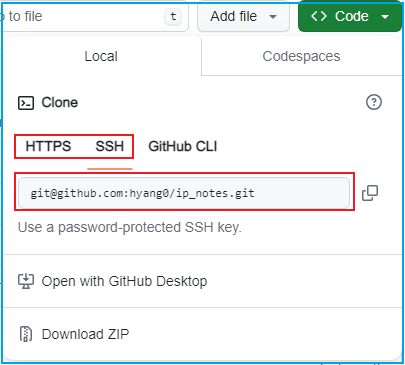
git@github.com:hyang0/ip_notes.git
如果 SSH 协议在使用中抽风,可以试试将 22 端口换成以下配置。可以在 ~/.ssh/config 中更换 SSH 端口:
Host github.comHostname ssh.github.comPort 443User git
这里使用 443 代替原 22 端口,在执行 git clone 、git push 时仍然可以使用 ssh 协议。git clone 项目时,使用的还是 ssh 协议:
git clone git@github.com:hyang0/ip_notes.git
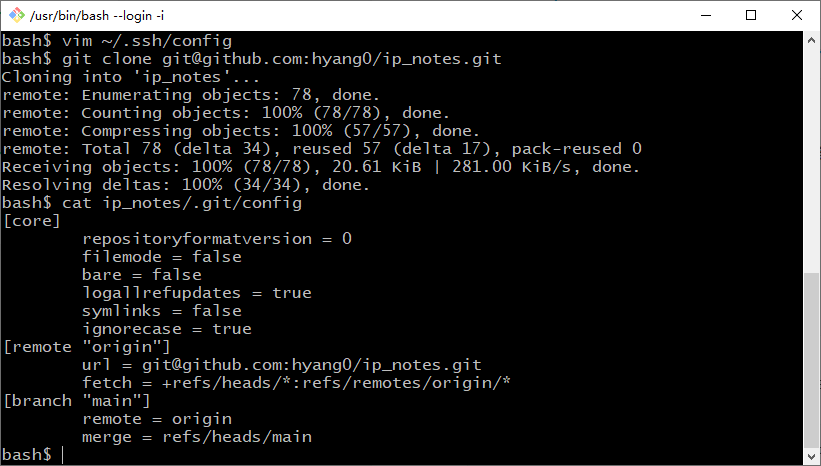
这种方式是没有使用代理的,使用的是原生 SSH 协议,如果需要使用代理,可以对 ~/.ssh/config 做如下改动:
Host github.comHostName github.comUser gitProxyCommand connect -S 127.0.0.1:1080 %h %p
类似的配置有:
Host github.comUser gitProxyCommand nc -v -x 127.0.0.1:1086 %h %p
Host github.comUser gitHostname ssh.github.comPreferredAuthentications publickeyIdentityFile ~/.ssh/id_rsaPort 22ProxyCommand connect -S 127.0.0.1:7890 %h %p
-S 表示使用socks5代理,如果是http代理则为-H。connect 工具是 windows 下的 git 自带的, 一般在 mingw64/bin/connect 下面。
$ which connect/mingw64/bin/connect$
如果不想使用 SSH 配置,也可以直接使用 HTTPS 协议。在 git-bash 下设置 http_proxy, https_proxy 即可:
# ~/.bashrcfunction proxy{export http_proxy=http://127.0.0.1:7890export https_proxy=http://127.0.0.1:7890}function unproxy{unset http_proxyunset https_proxy}
使用时执行 proxy ,取消时执行 unproxy
参考
https://gist.github.com/laispace/666dd7b27e9116faece6https://blog.csdn.net/omaidb/article/details/118104908
全文完。
如果转发本文,文末务必注明:“转自微信公众号:生有可恋”。
文章转载自生有可恋,如果涉嫌侵权,请发送邮件至:contact@modb.pro进行举报,并提供相关证据,一经查实,墨天轮将立刻删除相关内容。
