



现有主机IP
| 主机 | public ip | vip |
|---|---|---|
ora19ca | 192.168.238.160 | 192.168.238.162 |
ora19cb | 192.168.238.161 | 192.168.238.163 |
新加IP
| 主机 | 添加的IP |
|---|---|
| ora19ca | 192.168.110.30 10.11.11.30 10.8.8.44 |
| ora19cb | 192.168.110.31 10.11.11.31 10.8.8.45 |
rac集群默认监听public ip和vip
默认的监听状态
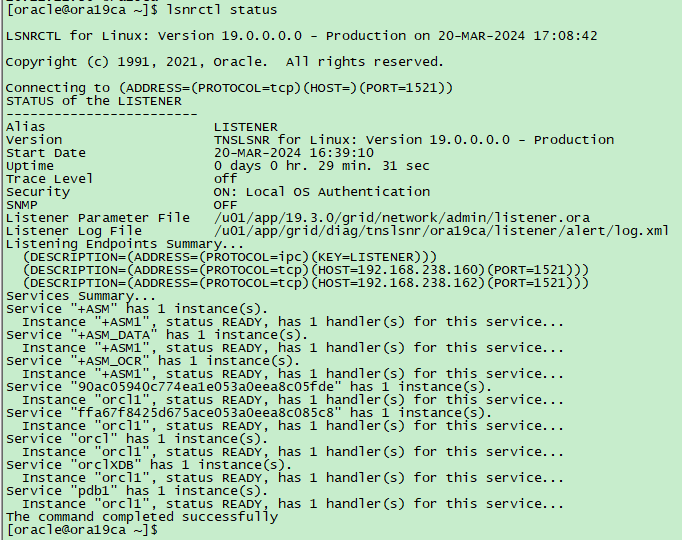
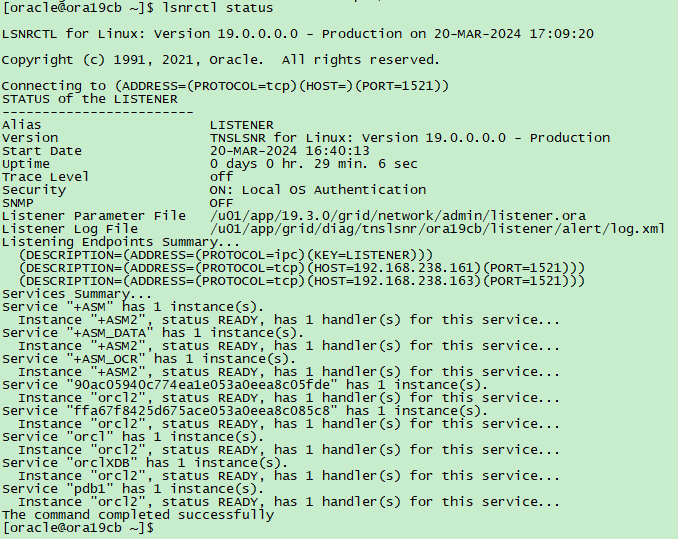
新添加网卡的ip监听,需要手工配置添加
在oracle用户下添加监听
在DB HOME里,用srvctl命令添加新的监听:
(1)将ORACLE_HOME 指向 DB HOME
(2)例如要增加的监听叫 LISTENER_DB,它使用端口是1523:
srvctl add listener -listener LISTENER_DB -p "TCP:1522" -o $ORACLE_HOME(3)启动新创建的监听
srvctl start listener -l LISTENER_DB添加完监听后 只监听的IP对应的1522端口,没注册服务
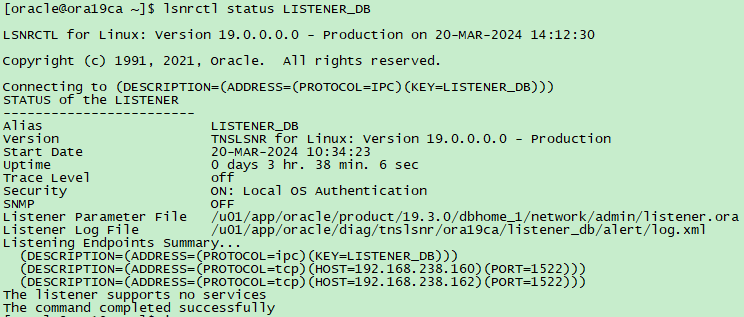
检查 local_listener

修改1节点LISTENER_DB 的监听文件
/u01/app/oracle/product/19.3.0/dbhome_1/network/admin/listener.ora
注释掉默认生成的 LISTENER_DB 这一行,添加如下所示第二行内容
#LISTENER_DB=(DESCRIPTION=(ADDRESS_LIST=(ADDRESS=(PROTOCOL=IPC)(KEY=LISTENER_DB))))             # line added by Agent
LISTENER_DB=(DESCRIPTION=(ADDRESS_LIST=(ADDRESS=(PROTOCOL=IPC)(KEY=LISTENER_DB))(ADDRESS = (PROTOCOL = TCP)(HOST = 192.168.110.30)(PORT = 1522)(IP=FIRST))(ADDRESS = (PROTOCOL = TCP)(HOST = 10.11.11.30)(PORT = 1522)(IP=FIRST))(ADDRESS = (PROTOCOL = TCP)(HOST = 10.8.8.44)(PORT = 1522)(IP=FIRST))))
ENABLE_GLOBAL_DYNAMIC_ENDPOINT_LISTENER_DB=ON           # line added by Agent
VALID_NODE_CHECKING_REGISTRATION_LISTENER_DB=SUBNET             # line added by Agent
修改1节点 local_listener
需要指定SID
登录oracle数据库
sqlplus / as sysdba
alter system set local_listener='(ADDRESS=(PROTOCOL=TCP)(HOST=192.168.238.162)(PORT=1521))','(ADDRESS=(PROTOCOL=TCP)(HOST=192.168.238.162)(PORT=1522))','(ADDRESS=(PROTOCOL=TCP)(HOST=192.168.110.30)(PORT=1522))','(ADDRESS=(PROTOCOL=TCP)(HOST=10.11.11.30)(PORT=1522))','(ADDRESS=(PROTOCOL=TCP)(HOST=10.8.8.44)(PORT=1522))' sid='orcl1';
17:18:50 SQL> show parameter local_listener

NAME                                 TYPE        VALUE
------------------------------------ ----------- --------------------------------------------------------------------------------------------------------------------------------
local_listener                       string      (ADDRESS=(PROTOCOL=TCP)(HOST=192.168.238.162)(PORT=1521)), (ADDRESS=(PROTOCOL=TCP)(HOST=192.168.238.162)(PORT=1522)), (ADDRESS=(
                                                 PROTOCOL=TCP)(HOST=192.168.110.30)(PORT=1522)), (ADDRESS=(PROTOCOL=TCP)(HOST=10.11.11.30)(PORT=1522)), (ADDRESS=(PROTOCOL=TCP)(H
                                                 OST=10.8.8.44)(PORT=1522))
修改2节点LISTENER_DB 的监听文件
/u01/app/oracle/product/19.3.0/dbhome_1/network/admin/listener.ora
注释掉默认生成的 LISTENER_DB 这一行,添加如下所示第二行内容
#LISTENER_DB=(DESCRIPTION=(ADDRESS_LIST=(ADDRESS=(PROTOCOL=IPC)(KEY=LISTENER_DB))))             # line added by Agent
LISTENER_DB=(DESCRIPTION=(ADDRESS_LIST=(ADDRESS=(PROTOCOL=IPC)(KEY=LISTENER_DB))(ADDRESS = (PROTOCOL = TCP)(HOST = 192.168.110.31)(PORT = 1522)(IP=FIRST))(ADDRESS = (PROTOCOL = TCP)(HOST = 10.11.11.31)(PORT = 1522)(IP=FIRST))(ADDRESS = (PROTOCOL = TCP)(HOST = 10.8.8.45)(PORT = 1522)(IP=FIRST))))
ENABLE_GLOBAL_DYNAMIC_ENDPOINT_LISTENER_DB=ON           # line added by Agent
VALID_NODE_CHECKING_REGISTRATION_LISTENER_DB=SUBNET             # line added by Agent
修改2节点的 local_listener
sqlplus / as sysdba
alter system set local_listener='(ADDRESS=(PROTOCOL=TCP)(HOST=192.168.238.163)(PORT=1521))','(ADDRESS=(PROTOCOL=TCP)(HOST=192.168.238.163)(PORT=1522))','(ADDRESS=(PROTOCOL=TCP)(HOST=192.168.110.31)(PORT=1522))','(ADDRESS=(PROTOCOL=TCP)(HOST=10.11.11.31)(PORT=1522))','(ADDRESS=(PROTOCOL=TCP)(HOST=10.8.8.45)(PORT=1522))' sid='orcl2';
17:19:56 SQL> show parameter local_listener

NAME                                 TYPE        VALUE
------------------------------------ ----------- --------------------------------------------------------------------------------------------------------------------------------
local_listener                       string      (ADDRESS=(PROTOCOL=TCP)(HOST=192.168.238.163)(PORT=1521)), (ADDRESS=(PROTOCOL=TCP)(HOST=192.168.238.163)(PORT=1522)), (ADDRESS=(
                                                 PROTOCOL=TCP)(HOST=192.168.110.31)(PORT=1522)), (ADDRESS=(PROTOCOL=TCP)(HOST=10.11.11.31)(PORT=1522)), (ADDRESS=(PROTOCOL=TCP)(H
                                                 OST=10.8.8.45)(PORT=1522))
重启监听
srvctl stop listener -l LISTENER_DB
srvctl start listener -l LISTENER_DB
[oracle@ora19ca ~]$ srvctl status listener -l LISTENER_DB
Listener LISTENER_DB is enabled
Listener LISTENER_DB is running on node(s): ora19ca,ora19cb
检查监听状态
[oracle@ora19ca ~]$ lsnrctl status LISTENER_DB

LSNRCTL for Linux: Version 19.0.0.0.0 - Production on 20-MAR-2024 17:22:11

Copyright (c) 1991, 2021, Oracle.  All rights reserved.

Connecting to (DESCRIPTION=(ADDRESS=(PROTOCOL=IPC)(KEY=LISTENER_DB)))
STATUS of the LISTENER
------------------------
Alias                     LISTENER_DB
Version                   TNSLSNR for Linux: Version 19.0.0.0.0 - Production
Start Date                20-MAR-2024 16:48:41
Uptime                    0 days 0 hr. 33 min. 29 sec
Trace Level               off
Security                  ON: Local OS Authentication
SNMP                      OFF
Listener Parameter File   /u01/app/oracle/product/19.3.0/dbhome_1/network/admin/listener.ora
Listener Log File         /u01/app/oracle/diag/tnslsnr/ora19ca/listener_db/alert/log.xml
Listening Endpoints Summary...
  (DESCRIPTION=(ADDRESS=(PROTOCOL=ipc)(KEY=LISTENER_DB)))
  (DESCRIPTION=(ADDRESS=(PROTOCOL=tcp)(HOST=192.168.110.30)(PORT=1522)))
  (DESCRIPTION=(ADDRESS=(PROTOCOL=tcp)(HOST=10.11.11.30)(PORT=1522)))
  (DESCRIPTION=(ADDRESS=(PROTOCOL=tcp)(HOST=10.8.8.44)(PORT=1522)))
  (DESCRIPTION=(ADDRESS=(PROTOCOL=tcp)(HOST=192.168.238.160)(PORT=1522)))
  (DESCRIPTION=(ADDRESS=(PROTOCOL=tcp)(HOST=192.168.238.162)(PORT=1522)))
Services Summary...
Service "90ac05940c774ea1e053a0eea8c05fde" has 1 instance(s).
  Instance "orcl1", status READY, has 1 handler(s) for this service...
Service "ffa67f8425d675ace053a0eea8c085c8" has 1 instance(s).
  Instance "orcl1", status READY, has 1 handler(s) for this service...
Service "orcl" has 1 instance(s).
  Instance "orcl1", status READY, has 1 handler(s) for this service...
Service "orclXDB" has 1 instance(s).
  Instance "orcl1", status READY, has 1 handler(s) for this service...
Service "pdb1" has 1 instance(s).
  Instance "orcl1", status READY, has 1 handler(s) for this service...
The command completed successfully
[oracle@ora19ca ~]$
[oracle@ora19cb ~]$ lsnrctl status LISTENER_DB
LSNRCTL for Linux: Version 19.0.0.0.0 - Production on 20-MAR-2024 17:22:32
Copyright (c) 1991, 2021, Oracle. All rights reserved.
Connecting to (DESCRIPTION=(ADDRESS=(PROTOCOL=IPC)(KEY=LISTENER_DB)))
STATUS of the LISTENER
------------------------
Alias LISTENER_DB
Version TNSLSNR for Linux: Version 19.0.0.0.0 - Production
Start Date 20-MAR-2024 16:48:41
Uptime 0 days 0 hr. 33 min. 50 sec
Trace Level off
Security ON: Local OS Authentication
SNMP OFF
Listener Parameter File /u01/app/oracle/product/19.3.0/dbhome_1/network/admin/listener.ora
Listener Log File /u01/app/oracle/diag/tnslsnr/ora19cb/listener_db/alert/log.xml
Listening Endpoints Summary...
(DESCRIPTION=(ADDRESS=(PROTOCOL=ipc)(KEY=LISTENER_DB)))
(DESCRIPTION=(ADDRESS=(PROTOCOL=tcp)(HOST=192.168.110.31)(PORT=1522)))
(DESCRIPTION=(ADDRESS=(PROTOCOL=tcp)(HOST=10.11.11.31)(PORT=1522)))
(DESCRIPTION=(ADDRESS=(PROTOCOL=tcp)(HOST=10.8.8.45)(PORT=1522)))
(DESCRIPTION=(ADDRESS=(PROTOCOL=tcp)(HOST=192.168.238.161)(PORT=1522)))
(DESCRIPTION=(ADDRESS=(PROTOCOL=tcp)(HOST=192.168.238.163)(PORT=1522)))
Services Summary...
Service "90ac05940c774ea1e053a0eea8c05fde" has 1 instance(s).
Instance "orcl2", status READY, has 1 handler(s) for this service...
Service "ffa67f8425d675ace053a0eea8c085c8" has 1 instance(s).
Instance "orcl2", status READY, has 1 handler(s) for this service...
Service "orcl" has 1 instance(s).
Instance "orcl2", status READY, has 1 handler(s) for this service...
Service "orclXDB" has 1 instance(s).
Instance "orcl2", status READY, has 1 handler(s) for this service...
Service "pdb1" has 1 instance(s).
Instance "orcl2", status READY, has 1 handler(s) for this service...
The command completed successfully
[oracle@ora19cb ~]$最后修改时间:2024-03-20 17:26:15
「喜欢这篇文章,您的关注和赞赏是给作者最好的鼓励」
关注作者
【版权声明】本文为墨天轮用户原创内容,转载时必须标注文章的来源(墨天轮),文章链接,文章作者等基本信息,否则作者和墨天轮有权追究责任。如果您发现墨天轮中有涉嫌抄袭或者侵权的内容,欢迎发送邮件至:contact@modb.pro进行举报,并提供相关证据,一经查实,墨天轮将立刻删除相关内容。
