



磐维数据库,简称"PanWeiDB"。是中国移动信息技术中心首个基于中国本土开源数据库打造的面向ICT基础设施的自研数据库产品。其产品内核能力基于华为openGauss开源软件,并进一步提升了系统稳定性。
本文将指导如何在禁用ping命令的场景安装部署磐维数据库。
1. 概述
在磐维安装部署常见问题解决指南(一)中我们谈到过网络连通性问题,即安装集群时,需要各节点主机的网络互通,在磐维数据库安装部署阶段安装脚本会通过ping命令来检查网络连通性,如果ping失败,直接中断安装操作,但是这种设计就是合理的吗?或者说,ping通与否是否就等同于网络连通与否?至少ping通一般可以断定网络是连通的,但是ping不通能说明网络是不通的吗?of cause not!
在生产的内网环境中,有些情况下需要禁用ping命令是出于安全考虑。禁用ping命令可以防止未经授权的用户或恶意用户利用ping命令进行网络扫描,从而获取网络拓扑和主机存活信息。这有助于增强网络的安全性,减少潜在的安全风险。这时候ping是不会返回任何数据的,因为在路由的过程中,某些关键路由器(如网关)不让也仅仅不让ICMP协议通行,但是ssh、scp、telnet(TCP/IP协议)等命令可以正常连接到目标端就可以证明网络连通,所以单纯的通过ping命令作为网络连通检查手段(必检项)我想大体不算完美的设计,下文会对该场景下的安装报错进行指导处理。
2. 安装实践
2.1 安装规划
IP信息:
| 主机 | ip | 备注 |
|---|---|---|
| zcore-l-paas-b1-a-1 | 10.230.93.181 | 主节点 |
| zcore-l-paas-b1-b-2 | 10.230.93.183 | 备1节点 |
| zcore-l-paas-b1-b-3 | 10.230.93.184 | 备2节点 |
系统版本
| BigCloud Euler 21.10(x86) |
|---|
安装路径:
| /database/panweidb |
|---|
安装用户:
| 用户 | 属组 |
|---|---|
| omm | dbgrp |
数据库版本:1.0
| PanWeiDB 1.0 |
|---|
保留端口:17700(保留17701-17710)
| dn | cm |
|---|---|
| [17700,17710] | [18800,18801] |
2.2 安装测试(禁ping)
1.优先使用ptk工具进行安装,步骤为:
- ptk checkos:检查主机环境,并生成一键修复脚本
- ptk install:一键安装
在执行安装时候,不出意料的报错:

2.尝试替换OM方式安装,步骤为:
- gs_preintall(root):预安装,同步检查主机环境,建立root、omm互信
- gs_install(omm):一键安装
在预安装阶段会提示建立root互信,这一步在没有提前手动建立互信的情况下需要选yes来自动建立互信,然后因为脚本自动建互信的过程中也会使用ping验证网络连通问题,故不出意外地报错退出:

3.因为这一步无法走下去,所以选择手动建互信(那么自动建互信那里的问题就可以选no,从而规避ping检测),root建互信脚本如下,执行脚本时要提前确认/etc/ssh/sshd_config下的PermitRootLogin参数为yes:
omm用户建立互信脚本:vi root_trust.sh ssh-keygen -t rsa cat /root/.ssh/id_rsa.pub >/root/.ssh/authorized_keys ssh $2 "ssh-keygen -t rsa;cat /root/.ssh/id_rsa.pub >/root/.ssh/authorized_keys;" ssh $3 "ssh-keygen -t rsa;cat /root/.ssh/id_rsa.pub >/root/.ssh/authorized_keys;" scp root@$2:/root/.ssh/authorized_keys /root/.ssh/authorized_1 scp root@$3:/root/.ssh/authorized_keys /root/.ssh/authorized_2 cat /root/.ssh/authorized_1>>/root/.ssh/authorized_keys cat /root/.ssh/authorized_2>>/root/.ssh/authorized_keys scp /root/.ssh/authorized_keys root@$2:/root/.ssh/authorized_keys scp /root/.ssh/authorized_keys root@$3:/root/.ssh/authorized_keys sh root_trust.sh 10.230.93.181 10.230.93.183 10.230.93.184
vi omm_trust.sh

ssh-keygen -t rsa
cat /home/omm/.ssh/id_rsa.pub >/home/omm/.ssh/authorized_keys
ssh $2 "ssh-keygen -t rsa;cat /home/omm/.ssh/id_rsa.pub >/home/omm/.ssh/authorized_keys;"
ssh $3 "ssh-keygen -t rsa;cat /home/omm/.ssh/id_rsa.pub >/home/omm/.ssh/authorized_keys;"
scp omm@$2:/home/omm/.ssh/authorized_keys /home/omm/.ssh/authorized_1
scp omm@$3:/home/omm/.ssh/authorized_keys /home/omm/.ssh/authorized_2
cat /home/omm/.ssh/authorized_1>>/home/omm/.ssh/authorized_keys
cat /home/omm/.ssh/authorized_2>>/home/omm/.ssh/authorized_keys
scp /home/omm/.ssh/authorized_keys  omm@$2:/home/omm/.ssh/authorized_keys
scp /home/omm/.ssh/authorized_keys  omm@$3:/home/omm/.ssh/authorized_keys

sh omm_trust.sh 10.230.93.181 10.230.93.183 10.230.93.184
4.再次执行预安装命令,又抛出新报错:
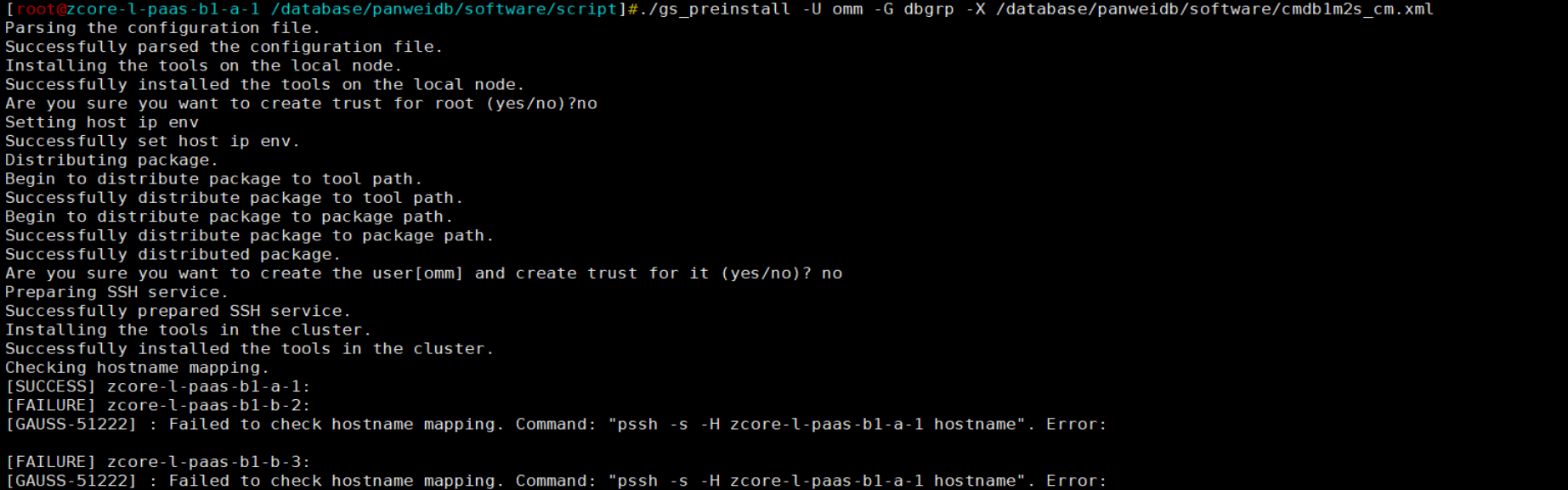
可以看到主节点是’SUCCESS’,只是备节点失败,然后到备节点手动测试该条命令:

可以看到pssh的-H参数后跟主机名和跟ip是不一样的反馈结果,然后我通过ssh工具测试了一下,发现了问题所在:

这是因为ssh配置了参数StrictHostKeyChecking=ask,每次执行ssh命令都会在访问一台新主机时会交互式提醒是否连接(注意:即使ip和主机名指向的是同一台主机但对于ssh来说是不完全等同的,第一次执行ssh ip并输入yes后再次执行同样命令不需要交互输入yes or no,但是ssh访问相同主机的主机名还是需要额外交互一下的),这项设置对脚本来说很不友好,故可以通过修改ssh的配置参数来规避这个问题,修改完需要重启sshd服务:
默认为:StrictHostKeyChecking ask
可改为:StrictHostKeyChecking no
5.第三次执行预安装命令,不出预料产生新的报错:
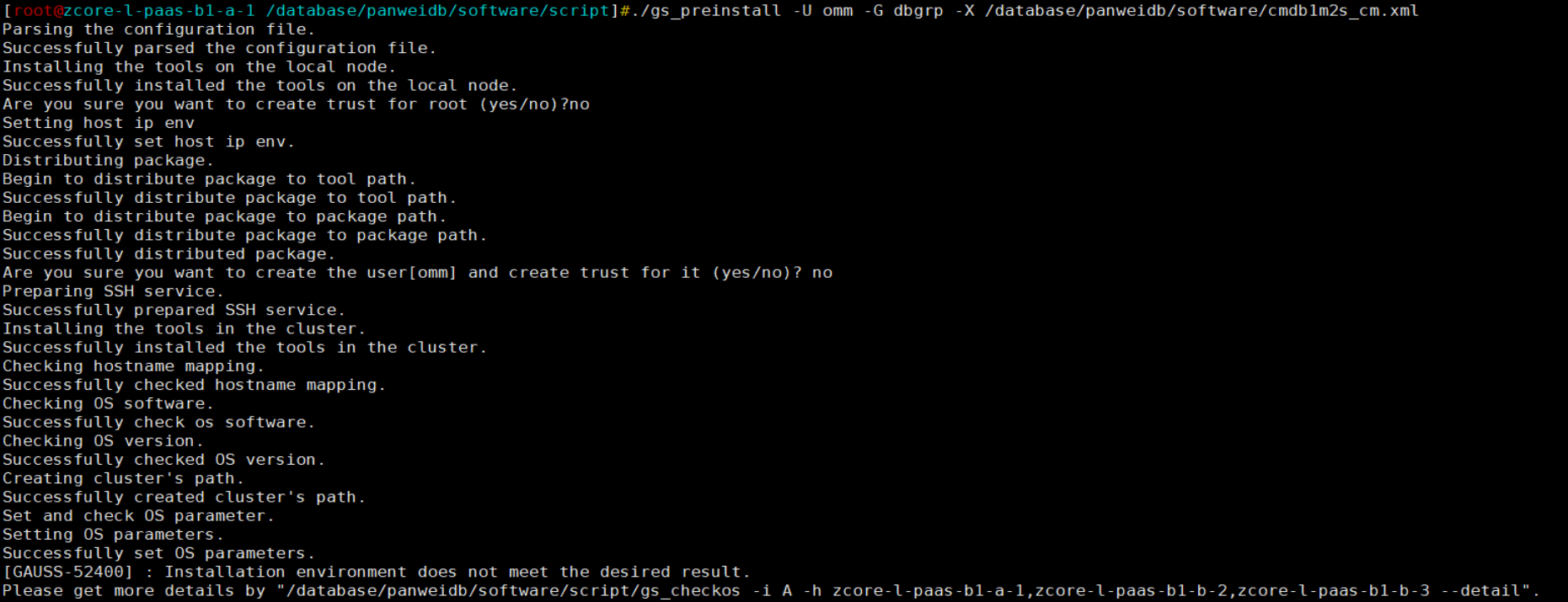
根据提示,执行gs_checkos命令:
[root@zcore-l-paas-b1-a-1 /database/panweidb/software/script]#./gs_checkos -i A -h zcore-l-paas-b1-a-1,zcore-l-paas-b1-b-2,zcore-l-paas-b1-b-3 --detail
Checking items:
    A1. [ OS version status ]                                   : Normal
        [zcore-l-paas-b1-b-2]
        bclinux_21.10_64bit
        [zcore-l-paas-b1-b-3]
        bclinux_21.10_64bit
        [zcore-l-paas-b1-a-1]
        bclinux_21.10_64bit

    A2. [ Kernel version status ]                               : Normal
        The names about all kernel versions are same. The value is "4.19.90-2107.6.0.0100.oe1.bclinux.x86_64".
    A3. [ Unicode status ]                                      : Normal
        The values of all unicode are same. The value is "LANG=en_US.UTF-8".
    A4. [ Time zone status ]                                    : Normal
        The informations about all timezones are same. The value is "+0800".
    A5. [ Swap memory status ]                                  : Normal
        The value about swap memory is correct.
    A6. [ System control parameters status ]                    : Normal
        All values about system control  parameters are correct.
    A7. [ File system configuration status ]                    : Normal
        Both soft nofile and hard nofile are correct.
    A8. [ Disk configuration status ]                           : Normal
        The value about XFS mount parameters is correct.
    A9. [ Pre-read block size status ]                          : Abnormal
        [zcore-l-paas-b1-a-1]
On device (/dev/sdm) 'blockdev readahead' RealValue '8192' ExpectedValue '16384'.
On device (/dev/sda) 'blockdev readahead' RealValue '8192' ExpectedValue '16384'.

        [zcore-l-paas-b1-b-2]
On device (/dev/sdm) 'blockdev readahead' RealValue '8192' ExpectedValue '16384'.
On device (/dev/sda) 'blockdev readahead' RealValue '8192' ExpectedValue '16384'.

        [zcore-l-paas-b1-b-3]
On device (/dev/sda) 'blockdev readahead' RealValue '8192' ExpectedValue '16384'.
On device (/dev/sdb) 'blockdev readahead' RealValue '8192' ExpectedValue '16384'.


    A10.[ IO scheduler status ]                                 : Normal
        The value of IO scheduler is correct.
    A11.[ Network card configuration status ]                   : Warning
        [zcore-l-paas-b1-b-2]
BondMode IEEE 802.3ad Dynamic link aggregation
        Warning reason: network 'enp176s0f0' 'mtu' RealValue '1450' ExpectedValue '8192'
        Warning reason: network 'enp176s0f0' 'rx' RealValue '512' ExpectValue '4096'.
        Warning reason: network 'enp176s0f0' 'tx' RealValue '512' ExpectValue '4096'.
        Warning reason: network 'enp59s0f1' 'mtu' RealValue '1450' ExpectedValue '8192'
        Warning reason: network 'enp59s0f1' 'rx' RealValue '512' ExpectValue '4096'.
        Warning reason: network 'enp59s0f1' 'tx' RealValue '512' ExpectValue '4096'.

        [zcore-l-paas-b1-b-3]
BondMode IEEE 802.3ad Dynamic link aggregation
        Warning reason: network 'enp176s0f0' 'mtu' RealValue '1450' ExpectedValue '8192'
        Warning reason: network 'enp176s0f0' 'rx' RealValue '512' ExpectValue '4096'.
        Warning reason: network 'enp176s0f0' 'tx' RealValue '512' ExpectValue '4096'.
        Warning reason: network 'enp59s0f1' 'mtu' RealValue '1450' ExpectedValue '8192'
        Warning reason: network 'enp59s0f1' 'rx' RealValue '512' ExpectValue '4096'.
        Warning reason: network 'enp59s0f1' 'tx' RealValue '512' ExpectValue '4096'.

        [zcore-l-paas-b1-a-1]
BondMode IEEE 802.3ad Dynamic link aggregation
        Warning reason: network 'enp176s0f0' 'mtu' RealValue '1450' ExpectedValue '8192'
        Warning reason: network 'enp176s0f0' 'rx' RealValue '512' ExpectValue '4096'.
        Warning reason: network 'enp176s0f0' 'tx' RealValue '512' ExpectValue '4096'.
        Warning reason: network 'enp59s0f1' 'mtu' RealValue '1450' ExpectedValue '8192'
        Warning reason: network 'enp59s0f1' 'rx' RealValue '512' ExpectValue '4096'.
        Warning reason: network 'enp59s0f1' 'tx' RealValue '512' ExpectValue '4096'.


    A12.[ Time consistency status ]                             : Warning
        [zcore-l-paas-b1-b-3]
        The NTPD not detected on machine and local time is "2024-03-20 10:56:59".
        [zcore-l-paas-b1-a-1]
        The NTPD not detected on machine and local time is "2024-03-20 10:56:59".
        [zcore-l-paas-b1-b-2]
        The NTPD not detected on machine and local time is "2024-03-20 10:56:59".

    A13.[ Firewall service status ]                             : Normal
        The firewall service is stopped.
    A14.[ THP service status ]                                  : Normal
        The THP service is stopped.
Total numbers:14. Abnormal numbers:1. Warning numbers:2.
Do checking operation finished. Result: Abnormal.
经过环境检测脚本判定,A9项不满足需求为’Abnormal’,且该项是可自动修复项(具体的可修复项详情参考工具手册),执行修复命令:

再次checkos:
[root@zcore-l-paas-b1-a-1 /database/panweidb/software/script]#./gs_checkos -i A -h zcore-l-paas-b1-a-1,zcore-l-paas-b1-b-2,zcore-l-paas-b1-b-3 --detail
Checking items:
    A1. [ OS version status ]                                   : Normal
        [zcore-l-paas-b1-a-1]
        bclinux_21.10_64bit
        [zcore-l-paas-b1-b-2]
        bclinux_21.10_64bit
        [zcore-l-paas-b1-b-3]
        bclinux_21.10_64bit

    A2. [ Kernel version status ]                               : Normal
        The names about all kernel versions are same. The value is "4.19.90-2107.6.0.0100.oe1.bclinux.x86_64".
    A3. [ Unicode status ]                                      : Normal
        The values of all unicode are same. The value is "LANG=en_US.UTF-8".
    A4. [ Time zone status ]                                    : Normal
        The informations about all timezones are same. The value is "+0800".
    A5. [ Swap memory status ]                                  : Normal
        The value about swap memory is correct.
    A6. [ System control parameters status ]                    : Normal
        All values about system control  parameters are correct.
    A7. [ File system configuration status ]                    : Normal
        Both soft nofile and hard nofile are correct.
    A8. [ Disk configuration status ]                           : Normal
        The value about XFS mount parameters is correct.
    A9. [ Pre-read block size status ]                          : Normal
        The value about Logical block size is correct.
    A10.[ IO scheduler status ]                                 : Normal
        The value of IO scheduler is correct.
    A11.[ Network card configuration status ]                   : Warning
        [zcore-l-paas-b1-a-1]
BondMode IEEE 802.3ad Dynamic link aggregation
        Warning reason: network 'enp176s0f0' 'mtu' RealValue '1450' ExpectedValue '8192'
        Warning reason: network 'enp59s0f1' 'mtu' RealValue '1450' ExpectedValue '8192'

        [zcore-l-paas-b1-b-3]
BondMode IEEE 802.3ad Dynamic link aggregation
        Warning reason: network 'enp176s0f0' 'mtu' RealValue '1450' ExpectedValue '8192'
        Warning reason: network 'enp59s0f1' 'mtu' RealValue '1450' ExpectedValue '8192'

        [zcore-l-paas-b1-b-2]
BondMode IEEE 802.3ad Dynamic link aggregation
        Warning reason: network 'enp176s0f0' 'mtu' RealValue '1450' ExpectedValue '8192'
        Warning reason: network 'enp59s0f1' 'mtu' RealValue '1450' ExpectedValue '8192'


    A12.[ Time consistency status ]                             : Warning
        [zcore-l-paas-b1-b-2]
        The NTPD not detected on machine and local time is "2024-03-20 11:00:32".
        [zcore-l-paas-b1-a-1]
        The NTPD not detected on machine and local time is "2024-03-20 11:00:32".
        [zcore-l-paas-b1-b-3]
        The NTPD not detected on machine and local time is "2024-03-20 11:00:32".

    A13.[ Firewall service status ]                             : Normal
        The firewall service is stopped.
    A14.[ THP service status ]                                  : Normal
        The THP service is stopped.
Total numbers:14. Abnormal numbers:0. Warning numbers:2.
6.解决完上述三个报错之后,gs_preinstall通过,日志如下:
[root@zcore-l-paas-b1-a-1 /database/panweidb/software/script]#./gs_preinstall -U omm -G dbgrp -X /database/panweidb/software/cmdb1m2s_cm.xml
Parsing the configuration file.
Successfully parsed the configuration file.
Installing the tools on the local node.
Successfully installed the tools on the local node.
Are you sure you want to create trust for root (yes/no)?no
Setting host ip env
Successfully set host ip env.
Distributing package.
Begin to distribute package to tool path.
Successfully distribute package to tool path.
Begin to distribute package to package path.
Successfully distribute package to package path.
Successfully distributed package.
Are you sure you want to create the user[omm] and create trust for it (yes/no)? no
Preparing SSH service.
Successfully prepared SSH service.
Installing the tools in the cluster.
Successfully installed the tools in the cluster.
Checking hostname mapping.
Successfully checked hostname mapping.
Checking OS software.
Successfully check os software.
Checking OS version.
Successfully checked OS version.
Creating cluster's path.
Successfully created cluster's path.
Set and check OS parameter.
Setting OS parameters.
Successfully set OS parameters.
Warning: Installation environment contains some warning messages.
Please get more details by "/database/panweidb/software/script/gs_checkos -i A -h zcore-l-paas-b1-a-1,zcore-l-paas-b1-b-2,zcore-l-paas-b1-b-3 --detail".
Set and check OS parameter completed.
Preparing CRON service.
Successfully prepared CRON service.
Setting user environmental variables.
Successfully set user environmental variables.
Setting the dynamic link library.
Successfully set the dynamic link library.
Setting Core file
Successfully set core path.
Setting pssh path
Successfully set pssh path.
Setting Cgroup.
Successfully set Cgroup.
Set ARM Optimization.
No need to set ARM Optimization.
Fixing server package owner.
Setting finish flag.
Successfully set finish flag.
Preinstallation succeeded.
7.随后使用omm用户执行安装命令,但是依旧无法顺利通过ping检测:
[omm@zcore-l-paas-b1-a-1 ~]$ gs_install -X /database/panweidb/cmdb1m2s_cm.xml --gsinit-parameter="--encoding=UTF8" --gsinit-parameter="--lc-collate=C" --gsinit-parameter="--lc-ctype=C" --gsinit-parameter="--dbcompatibility=PG"
Parsing the configuration file.
Check preinstall on every node.
Successfully checked preinstall on every node.
Creating the backup directory.
Successfully created the backup directory.
begin deploy..
Installing the cluster.
begin prepare Install Cluster..
Checking the installation environment on all nodes.
[FAILURE] zcore-l-paas-b1-a-1:
Checking old installation.
Successfully checked old installation.
Checking SHA256.
Successfully checked SHA256.
Checking kernel parameters.
Successfully checked kernel parameters.
Checking directory.
Database program installation path available size 5202330M.
Successfully checked directory.
Checking instance port and IP.
[GAUSS-50600] : The IP address cannot be pinged, which is caused by network faults. The IP is 10.230.93.181,10.230.93.181,10.230.93.181.
[FAILURE] zcore-l-paas-b1-b-3:
Checking old installation.
Successfully checked old installation.
Checking SHA256.
Successfully checked SHA256.
Checking kernel parameters.
Successfully checked kernel parameters.
Checking directory.
Database program installation path available size 5199257M.
Successfully checked directory.
Checking instance port and IP.
[GAUSS-50600] : The IP address cannot be pinged, which is caused by network faults. The IP is 10.230.93.184,10.230.93.184,10.230.93.184.
[FAILURE] zcore-l-paas-b1-b-2:
Checking old installation.
Successfully checked old installation.
Checking SHA256.
Successfully checked SHA256.
Checking kernel parameters.
Successfully checked kernel parameters.
Checking directory.
Database program installation path available size 5203386M.
Successfully checked directory.
Checking instance port and IP.
[GAUSS-50600] : The IP address cannot be pinged, which is caused by network faults. The IP is 10.230.93.183,10.230.93.183,10.230.93.183.
在已经确定网络连通的情况下(脚本不知道),ping不通不应该阻止安装,所以需要找到这段检测代码并手动注释掉,但OM工具脚本数量非常多,想要人工快速定位到ping命令检测函数具体在那个脚本文件里是一个非常大的工作量,这里就提供一个新颖的思路,使用python工具结合错误日志代码实现快速定位:
vi find_error.py

import os

# 指定要查询的文件夹路径
folder_path = '/database/panweidb/tool/script'

def is_binary_file(file_path):
    with open(file_path, 'rb') as f:
        try:
            # 读取文件内容
            content = f.read()
            # 判断文件内容中是否包含不可打印的字符
            if b'\x00' in content or any(byte < 8 for byte in content):
                return True  # 文件为二进制文件
            else:
                return False  # 文件为文本文件
        except Exception as e:
            print(f"Error reading file {file_path}: {e}")
            return False  # 读取文件出错,暂时将其视为非二进制文件

# 遍历文件夹及其子文件夹
for foldername, subfolders, filenames in os.walk(folder_path):
    for filename in filenames:
        file_path = os.path.join(foldername, filename)
        if not is_binary_file(file_path):
            try:
                with open(file_path, 'r', encoding='utf-8') as file:
                    for line in file:
                        if "50600" in line:
                            print(f"The string '50600' is found in file: {file_path}")
                            break  # 如果找到目标字符串,就跳出内层循环
            except Exception as e:
                print(f"Error reading file {file_path}: {e}")
        else:
            print(f"The file {file_path} is a binary file.")
执行脚本后过滤有效日志:
The string '50600' is found in file: /database/panweidb/tool/script/gspylib/common/ErrorCode.py
The string '50600' is found in file: /database/panweidb/tool/script/gspylib/component/BaseComponent.py
- ErrorCode.py:脚本存储全量高斯错误代码,一般用于抛出错误日志时同步抛出该代码信息,旨在帮助运维人员快速定位某一个大类的问题
- BaseComponent.py:脚本定义一些基础的检测函数,包括网络检测
定位到BaseComponent.py后注释相关函数功能,再次执行安装成功!
[omm@zcore-l-paas-b1-a-1 script]$ gs_install -X /database/panweidb/cmdb1m2s_cm.xml --gsinit-parameter="--encoding=UTF8" --gsinit-parameter="--lc-collate=C" --gsinit-parameter="--lc-ctype=C" --gsinit-parameter="--dbcompatibility=PG"
Parsing the configuration file.
Check preinstall on every node.
Successfully checked preinstall on every node.
Creating the backup directory.
Successfully created the backup directory.
begin deploy..
Installing the cluster.
begin prepare Install Cluster..
Checking the installation environment on all nodes.
begin install Cluster..
Installing applications on all nodes.
Successfully installed APP.
begin init Instance..
encrypt cipher and rand files for database.
Please enter password for database:
Please repeat for database:
begin to create CA cert files
The sslcert will be generated in /database/panweidb/app/share/sslcert/om
Create CA files for cm beginning.
Create CA files on directory [/database/panweidb/app_9a7e96bc/share/sslcert/cm]. file list: ['cacert.pem', 'server.key', 'server.crt', 'client.key', 'client.crt', 'server.key.cipher', 'server.key.rand', 'client.key.cipher', 'client.key.rand']
Cluster installation is completed.
Configuring.
Deleting instances from all nodes.
Successfully deleted instances from all nodes.
Checking node configuration on all nodes.
Initializing instances on all nodes.
Updating instance configuration on all nodes.
Check consistence of memCheck and coresCheck on database nodes.
Successful check consistence of memCheck and coresCheck on all nodes.
Configuring pg_hba on all nodes.
Configuration is completed.
Starting cluster.
======================================================================
Successfully started primary instance. Wait for standby instance.
======================================================================
.
Successfully started cluster.
======================================================================
cluster_state      : Normal
redistributing     : No
node_count         : 3
Datanode State
    primary           : 1
    standby           : 2
    secondary         : 0
    cascade_standby   : 0
    building          : 0
    abnormal          : 0
    down              : 0

Successfully installed application.
end deploy..
8.集群状态确认:
[omm@zcore-l-paas-b1-a-1 script]$ gs_om -t status --detail
[  CMServer State   ]

node                   node_ip         instance                             state
-----------------------------------------------------------------------------------
1  zcore-l-paas-b1-a-1 10.230.93.181   1    /database/panweidb/cm/cm_server Primary
2  zcore-l-paas-b1-b-3 10.230.93.184   2    /database/panweidb/cm/cm_server Standby
3  zcore-l-paas-b1-b-2 10.230.93.183   3    /database/panweidb/cm/cm_server Standby

[   Cluster State   ]

cluster_state   : Normal
redistributing  : No
balanced        : Yes
current_az      : AZ_ALL

[  Datanode State   ]

node                   node_ip         instance                     state
-------------------------------------------------------------------------------------
1  zcore-l-paas-b1-a-1 10.230.93.181   6001 /database/panweidb/data P Primary Normal
2  zcore-l-paas-b1-b-3 10.230.93.184   6002 /database/panweidb/data S Standby Normal
3  zcore-l-paas-b1-b-2 10.230.93.183   6003 /database/panweidb/data S Standby Normal
3. 总结
本文指导并解决了在禁ping场景下安装磐维数据库遇到的问题,通过合理的方式规避解决报错而不是遇到报错就直接放弃追踪问题本质原因,另外需要注意的是不要随意更改相关脚本文件!
