



将dlib包下载下来静态资源,将压缩包解压放在nginx目录下。访问http://geek.xrj.pub/docs即可
静态conf配置
http {
    include       mime.types;
    default_type  application/octet-stream;

    log_format  main  '$remote_addr - $remote_user [$time_local] "$request" '
                      '$status $body_bytes_sent "$http_referer" '
                      '"$http_user_agent" "$http_x_forwarded_for"';
    access_log  logs/access.log  main;
    sendfile        on;
    keepalive_timeout  65;
    gzip  on; #开启gzip压缩
    gzip_min_length 10; #指定小于10字节不压缩
    gzip_comp_level 2;  #压缩等级2
    gzip_types text/plain application/x-javascript text/css appication/xml text/javascript application/x-httpd-php image/jpeg image/gif image/png;  #指定压缩的文件类型
    server {
        listen       80;
        server_name  geek.xrj.pub;

        location / {
        	  #将dlib/目录作为访问端点
            alias   dlib/;
            #自动索引,将所有目录层级进行索引
            autoindex on;
            #限制请求的响应速率在1k/s
            set $limit_rate 1k;
        }

        error_page   500 502 503 504  /50x.html;
        location = /50x.html {
            root   html;
        }
}
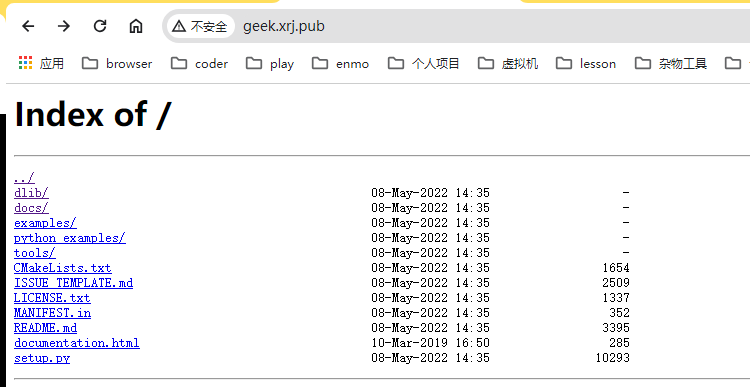
自动索引目录
autoindex配置开启后,在对应路径'/'下会将目录下的所有文件进行索引罗列,类似文件目录的效果,作为静态文件服务器时很好使用。
限制响应速率
$limit_rate变量是nginx内置变量,用于限制请求的响应速率。
set $limit_rate 1k;最后修改时间:2024-03-25 16:19:54
「喜欢这篇文章,您的关注和赞赏是给作者最好的鼓励」
关注作者
【版权声明】本文为墨天轮用户原创内容,转载时必须标注文章的来源(墨天轮),文章链接,文章作者等基本信息,否则作者和墨天轮有权追究责任。如果您发现墨天轮中有涉嫌抄袭或者侵权的内容,欢迎发送邮件至:contact@modb.pro进行举报,并提供相关证据,一经查实,墨天轮将立刻删除相关内容。
