



1.创建数据库语法
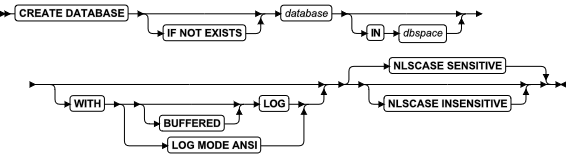
--图片来自官方手册《GBase 8s SQL 指南:语法》
gbase8s默认创建区分大小写的数据库
创建语法如下
create database gbasedb in datadbs01 with log;该语句在数据空间datadbs01中创建了一个带无缓冲日志记录的数据库gbasedb。
如果创建时不指定数据空间,则数据库创建在rootdbs数据文件中,不建议。
2.数据库日志模式
日志记录模式有四种
no log; 不记录日志
buffered log; 已缓冲的日志记录
log mode ansi; ANSI数据库
log; 未缓冲日志记录
举例
--创建无日志数据库
create database test_adb in datadbs01;
--创建带缓冲日志的数据库
create database test_bdb in datadbs01 with buffered log;
--创建不带缓冲日志的数据库(推荐)
create database test_cdb in datadbs01 with log;
--创建ANSI数据库
create database test_ddb in datadbs01 with log mode ansi ;
查看数据库日志模式
select trim(name) 数据库名,
decode(decode(is_logging + is_buff_log,0,0,1,3,2,2) + is_ansi , 0, '无日志',2,'缓存日志',3,'无缓存日志',4,'ansi数据库') 数据库模式
from sysmaster:sysdatabases where name like 'test__db';
返回结果
数据库名     |数据库模式     |
---------|----------|
test_adb |无日志       |
test_bdb |无缓存日志     |
test_cdb |缓存日志      |
test_ddb |ansi数据库   |
3.数据库区分大小写设置
创建区分大小写的数据库
NLSCASE SENSITIVE(区分大小写)
该参数为缺省值,默认创建的数据库都是区分大小写的
create database hrdb in datadbs01 with log nlscase sensitive;
--创建测试用例查看
create table tab1 (col1 char(10),col2 varchar(10),col3 nchar(10),col4 nvarchar(10));insert into tab1 values('aaa','AAA','naaa','NAAA'),('AAA','aaa','NAAA','naaa');--查看结果
> select * from tab1;
col1       col2       col3       col4
aaa        AAA        naaa       NAAA
AAA        aaa        NAAA       naaa
select * from tab1 where col1 = 'AAA';
select * from tab1 where col2 = 'aaa';
select * from tab1 where col3 = 'NAAA';
select * from tab1 where col4 = 'naaa';
> select * from tab1 where col1 = 'AAA';
col1       col2       col3       col4
AAA        aaa        NAAA       naaa
1 row(s) retrieved.
> select * from tab1 where col2 = 'aaa';
col1       col2       col3       col4
AAA        aaa        NAAA       naaa
1 row(s) retrieved.
> select * from tab1 where col3 = 'NAAA';
col1       col2       col3       col4
AAA        aaa        NAAA       naaa
1 row(s) retrieved.
> select * from tab1 where col4 = 'naaa';
col1       col2       col3       col4
AAA        aaa        NAAA       naaa
1 row(s) retrieved.
>
创建不区分大小写的数据库
NLSCASE INSENSITIVE(不区分大小写)
仅在NCHAR和NVARCHAR字段中不区分大小写
创建语法如下
create database madb in datadbs01 with log nlscase insensitive;
--创建测试用例查看
create table tab1 (col1 char(10),col2 varchar(10),col3 nchar(10),col4 nvarchar(10));
insert into tab1 values('aaa','AAA','naaa','NAAA'),('AAA','aaa','NAAA','naaa');
> select * from tab1;
col1       col2       col3       col4
aaa        AAA        naaa       NAAA
AAA        aaa        NAAA       naaa
--查看结果
select * from tab1 where col1 = 'AAA';
select * from tab1 where col2 = 'aaa';
select * from tab1 where col3 = 'NAAA';
select * from tab1 where col4 = 'naaa';
> select * from tab1 where col1 = 'AAA';
col1       col2       col3       col4
AAA        aaa        NAAA       naaa
1 row(s) retrieved.
Elapsed time: 0.003 sec
> select * from tab1 where col2 = 'aaa';
col1       col2       col3       col4
AAA        aaa        NAAA       naaa
1 row(s) retrieved.
Elapsed time: 0.003 sec
> select * from tab1 where col3 = 'NAAA';
col1       col2       col3       col4
aaa        AAA        naaa       NAAA
AAA        aaa        NAAA       naaa
2 row(s) retrieved.
Elapsed time: 0.003 sec
> select * from tab1 where col4 = 'naaa';
col1       col2       col3       col4
aaa        AAA        naaa       NAAA
AAA        aaa        NAAA       naaa
2 row(s) retrieved.
Elapsed time: 0.002 sec
>
从测试结果中可以看到,只有NCHAR和NVARCHAR字段可以在查询时不区分大小。
4.创建不同字符集数据库
字符集名称 编码 十六进制编码
8859-1 819 # 0x0333
utf8 57372 # 0xe01c
GB18030-2000 5488 # 0x1570
方法一,在GDS客户端连接工具中创建
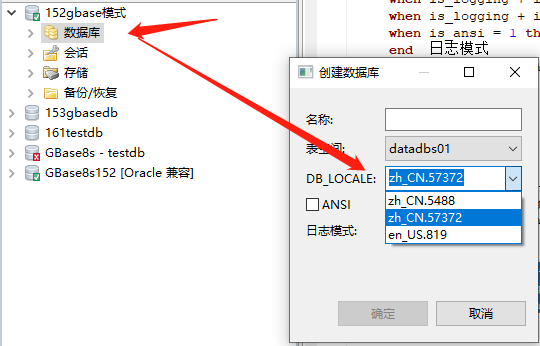
选中数据库,鼠标右键点击创建数据库,在DB_LOCALE中选择需要的数据库字符集,然后进行创建
方法二,在服务端创建
需要先设置好字符集环境变量,在进入dbaccess中进行创建
--UTF8
export DB_LOCALE=zh_CN.utf8
export CLIENT_LOCALE=zh_CN.utf8
--GB18030-2000
export DB_LOCALE=zh_CN.GB18030-2000
export CLIENT_LOCALE=zh_CN.GB18030-2000
--8859-1
export DB_LOCALE=en_US.8859-1
export CLIENT_LOCALE=en_US.8859-1
举例
分别创建三个不同字符集编码的数据库
[gbasedbt@gbase152 ~]$ export DB_LOCALE=zh_CN.utf8
[gbasedbt@gbase152 ~]$ export CLIENT_LOCALE=zh_CN.utf8
[gbasedbt@gbase152 ~]$ dbaccess - -
Your evaluation license will expire on 2025-01-01 00:00:00
> create database db01 in datadbs01 with log;
Database created.
[gbasedbt@gbase152 ~]$ export DB_LOCALE=zh_CN.GB18030-2000
[gbasedbt@gbase152 ~]$ export CLIENT_LOCALE=zh_CN.GB18030-2000
[gbasedbt@gbase152 ~]$ dbaccess - -
Your evaluation license will expire on 2025-01-01 00:00:00
> create database db02 in datadbs01 with log;
Database created.
[gbasedbt@gbase152 ~]$ export CLIENT_LOCALE=en_US.8859-1
[gbasedbt@gbase152 ~]$ export DB_LOCALE=en_US.8859-1
[gbasedbt@gbase152 ~]$ dbaccess - -
Your evaluation license will expire on 2025-01-01 00:00:00
> create database db03 in datadbs01 with log;
Database created.查看创建的数据库字符集
select trim(dbs_dbsname) dbname, dbs_collate from sysmaster:sysdbslocale where dbs_dbsname like 'db0_';
--返回结果
dbname |dbs_collate                      |
-------|---------------------------------|
db01   |zh_CN.57372                      |
db02   |zh_CN.5488                       |
db03   |en_US.819                        |
5.删除数据库
删除语句
drop database db01;
在删除该数据库前,需要断开所有连接到此数据库的会话,否则删除会报如下错误。
> drop database db01;
  425: Database is currently opened by another user.
  154: ISAM error: Lock Timeout Expired
Error in line 1
Near character position 17
>
查看数据库会话信息,找到连接到该数据库的会话,然后关闭会话后再次操作。
[gbasedbt@gbase152 ~]$ onstat -g sql
Your evaluation license will expire on 2025-01-01 00:00:00
On-Line -- Up 33 days 19:41:08 -- 4805664 Kbytes
Sess       SQL            Current            Iso Lock       SQL  ISAM F.E.
Id         Stmt type      Database           Lvl Mode       ERR  ERR  Vers  Explain
1533       -              db01               LC  Not Wait   0    0    9.24  Off
根据onstat -g sql 中查看的数据库的会话id:1533,找到该会话进行关闭或强制断开,在尝试删除数据库
onmode -z 1533 --强制断开连接
[gbasedbt@gbase152 ~]$ onmode -z 1533
[gbasedbt@gbase152 ~]$ onstat -g ses 1533
On-Line -- Up 1 days 19:48:46 -- 4805664 Kbytes
[gbasedbt@gbase152 ~]$ onstat -g sql
On-Line -- Up 1 days 19:48:50 -- 4805664 Kbytes
Sess       SQL            Current            Iso Lock       SQL  ISAM F.E.
Id         Stmt type      Database           Lvl Mode       ERR  ERR  Vers  Explain
1449       -              cssdb              LC  Wait 60    0    0    9.28  Off
1447       -              sysmaster          LC  Not Wait   0    0    9.28  Off
841        -              gbasedb            LC  Not Wait   0    0    9.28  Off
839        -              gbasedb            LC  Not Wait   0    0    9.28  Off
32                        sysadmin           DR  Wait 5     0    0    -     Off
31                        sysadmin           DR  Wait 5     0    0    -     Off
30                        sysadmin           DR  Wait 5     0    0    -     Off
29                        sysadmin           CR  Not Wait   0    0    -     Off

[gbasedbt@gbase152 ~]$ dbaccess  - -
Your evaluation license will expire on 2025-01-01 00:00:00
> drop database db01;
Database dropped.
Elapsed time: 0.018 sec
>
删除不同字符集的编码的数据库需要先设置成对应的字符集环境变量,否则会报如下错误
[gbasedbt@gbase152 ~]$ dbaccess - -
Your evaluation license will expire on 2025-01-01 00:00:00
> drop database db02;
23197: Database locale information mismatch.
Error in line 1
Near character position 17
>
设置对应的字符集环境变量
[gbasedbt@gbase152 ~]$ export DB_LOCALE=zh_CN.GB18030-2000
[gbasedbt@gbase152 ~]$ export CLIENT_LOCALE=zh_CN.GB18030-2000
[gbasedbt@gbase152 ~]$ dbaccess - -
Your evaluation license will expire on 2025-01-01 00:00:00
> drop database db02;
Database dropped.
Elapsed time: 0.008 sec
>
