



Table of Contents
主要内容(思维导图)
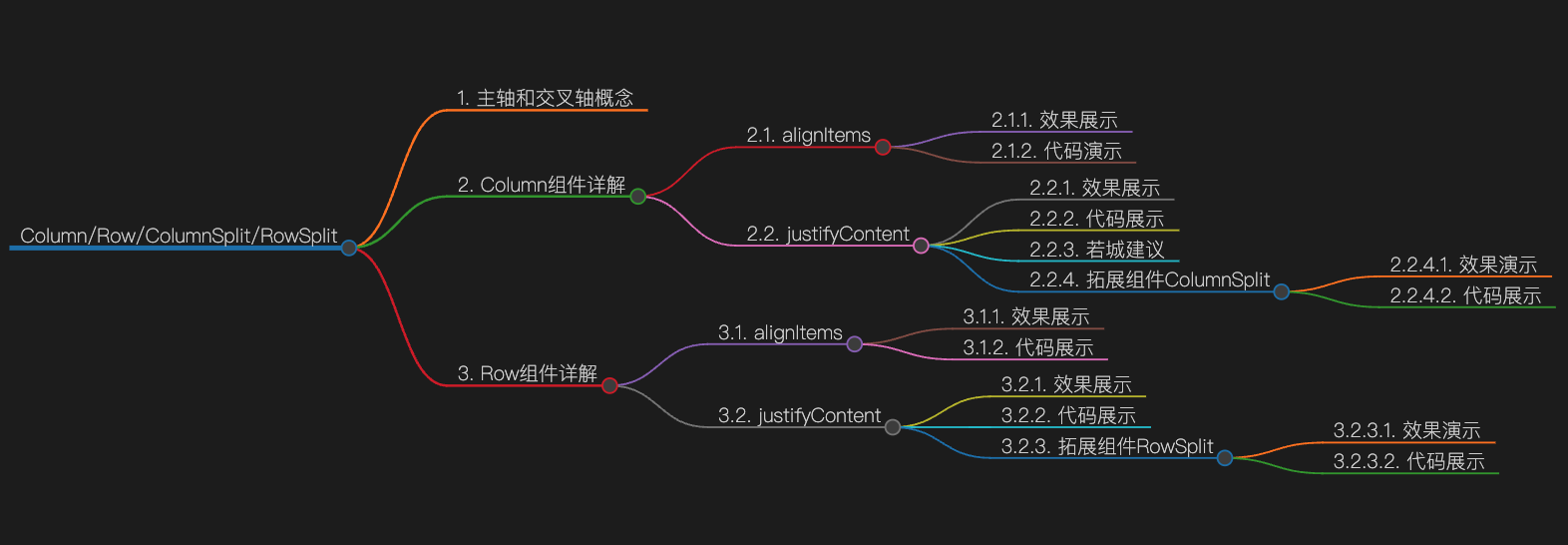
主轴和交叉轴概念
在布局容器中,默认存在两根轴,分别是主轴和交叉轴,这两个轴始终是相互垂直的。不同的容器中主轴的方向不一样的。
- 主轴:在Column容器中的子组件是按照从上到下的垂直方向布局的,其主轴的方向是垂直方向;在Row容器中的组件是按照从左到右的水平方向布局的,其主轴的方向是水平方向。
- 交叉轴:与主轴垂直相交的轴线,如果主轴是垂直方向,则交叉轴就是水平方向;如果主轴是水平方向,则交叉轴是垂直方向。
Column组件详解
沿垂直方向布局的容器
alignItems
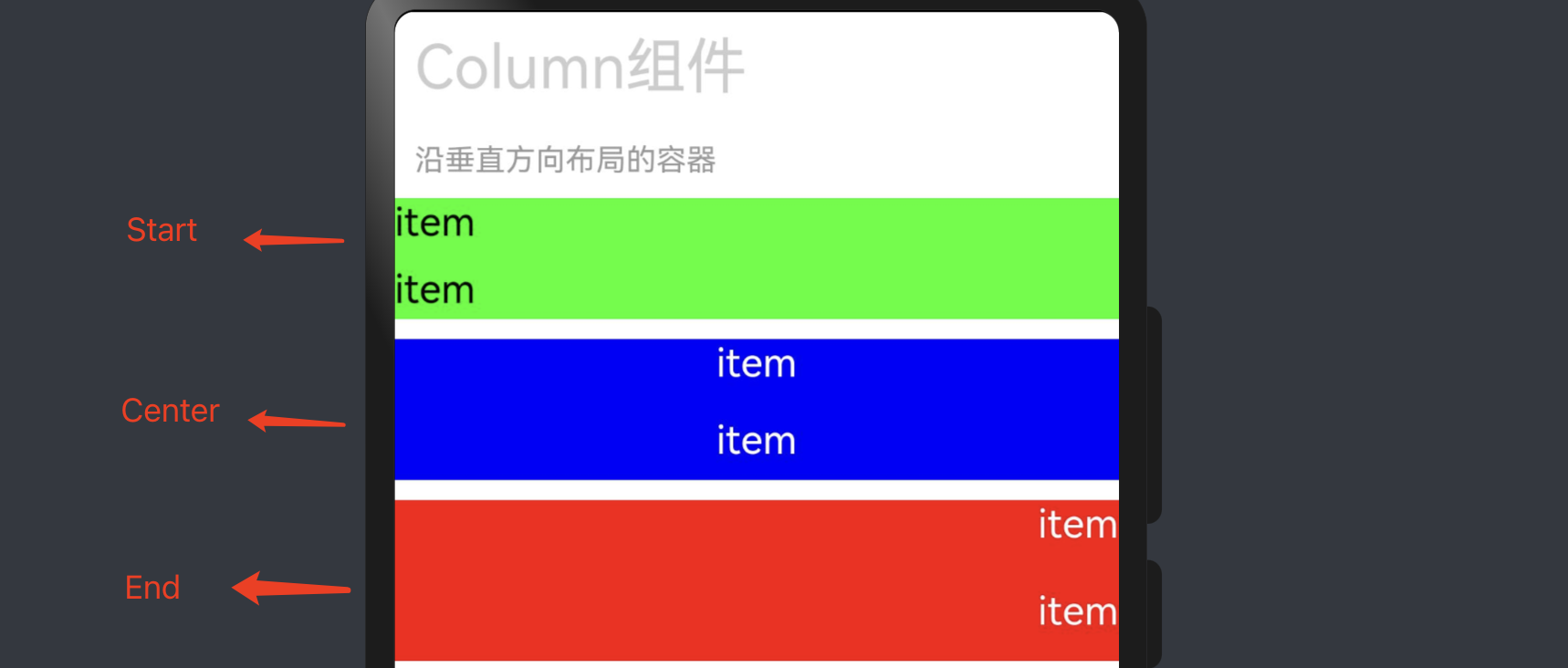
设置子组件在水平方向上的对齐格式。
默认值:HorizontalAlign.Center
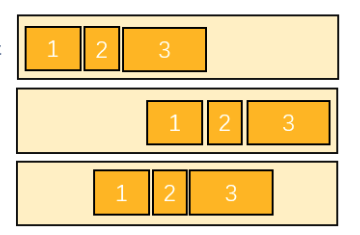
效果展示
| 名称 | 描述 |
|---|---|
| Start | 按照语言方向起始端对齐。 |
| Center | 居中对齐,默认对齐方式。 |
| End | 按照语言方向末端对齐。 |
代码演示
Column({space:10}) {
	Text('item').fontSize(20)
	Text('item').fontSize(20)
}.width('100%').height(60).margin({bottom:10}).backgroundColor('#0f0')
	.alignItems(HorizontalAlign.Start)

Column({space:15}) {
	Text('item').fontSize(20).fontColor('#fff')
	Text('item').fontSize(20).fontColor('#fff')
}.width('100%').height(70).margin({bottom:10}).backgroundColor('#00f')
	.alignItems(HorizontalAlign.Center)

Column({space:20}) {
	Text('item').fontSize(20).fontColor('#fff')
	Text('item').fontSize(20).fontColor('#fff')
}.width('100%').height(80).margin({bottom:10}).backgroundColor('#f00')
	.alignItems(HorizontalAlign.End)
justifyContent
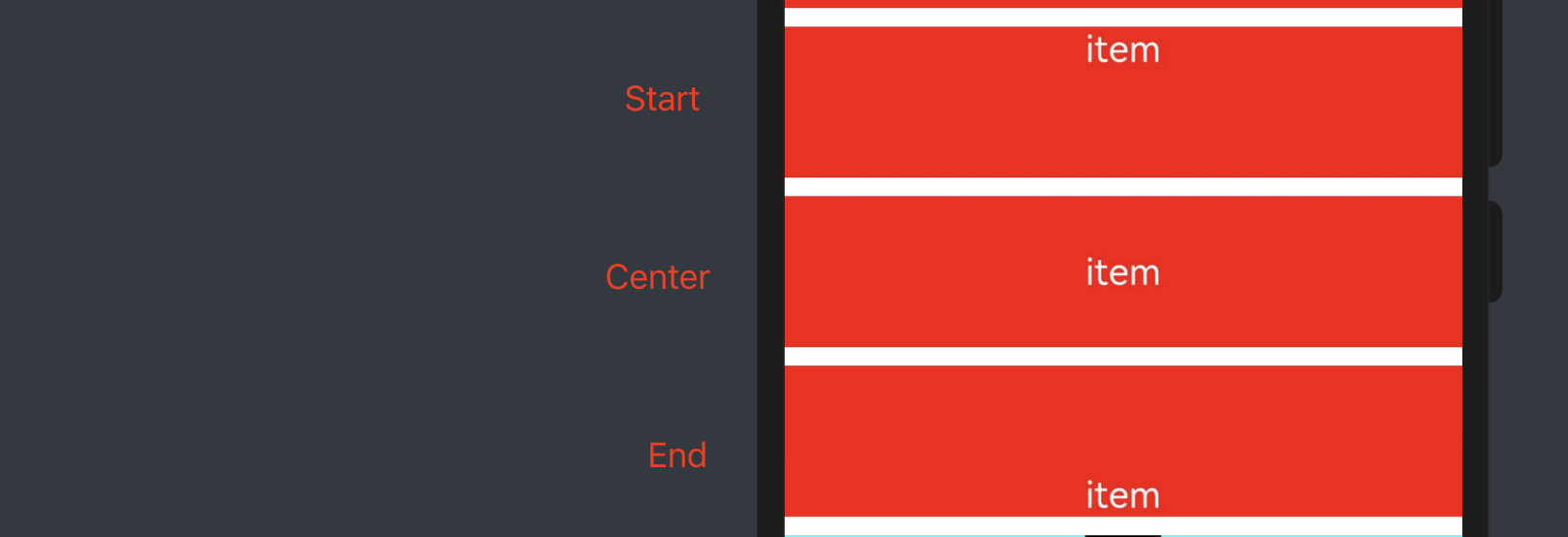
设置子组件在垂直方向上的对齐格式。
默认值:FlexAlign.Start
效果展示

| 名称 | 描述 |
|---|---|
| Start | 元素在主轴方向首端对齐,第一个元素与行首对齐,同时后续的元素与前一个对齐。 |
| Center | 元素在主轴方向中心对齐,第一个元素与行首的距离与最后一个元素与行尾距离相同。 |
| End | 元素在主轴方向尾部对齐,最后一个元素与行尾对齐,其他元素与后一个对齐。 |
| SpaceBetween | Flex主轴方向均匀分配弹性元素,相邻元素之间距离相同。第一个元素与行首对齐,最后一个元素与行尾对齐。 |
| SpaceAround | Flex主轴方向均匀分配弹性元素,相邻元素之间距离相同。第一个元素到行首的距离和最后一个元素到行尾的距离是相邻元素之间距离的一半。 |
| SpaceEvenly | Flex主轴方向均匀分配弹性元素,相邻元素之间的距离、第一个元素与行首的间距、最后一个元素到行尾的间距都完全一样。 |
代码展示
Column() {
	Text('item').fontSize(20).fontColor('#fff')
}.width('100%').height(80).margin({bottom:10}).backgroundColor('#f00')
	.justifyContent(FlexAlign.Start)

Column() {
	Text('item').fontSize(20).fontColor('#fff')
}.width('100%').height(80).margin({bottom:10}).backgroundColor('#f00')
	.justifyContent(FlexAlign.Center)

Column() {
	Text('item').fontSize(20).fontColor('#fff')
}.width('100%').height(80).margin({bottom:10}).backgroundColor('#f00')
	.justifyContent(FlexAlign.End)

Column() {
	Text('item').fontSize(20).backgroundColor('#000').fontColor('#fff')
	Text('item').fontSize(20).backgroundColor('#000').fontColor('#fff')
	Text('item').fontSize(20).backgroundColor('#000').fontColor('#fff')
}.width('100%').height(100).margin({bottom:10}).backgroundColor('#0ff')
	.justifyContent(FlexAlign.SpaceBetween)


Column() {
	Text('item').fontSize(20).backgroundColor('#000').fontColor('#fff')
	Text('item').fontSize(20).backgroundColor('#000').fontColor('#fff')
	Text('item').fontSize(20).backgroundColor('#000').fontColor('#fff')
}.width('100%').height(100).margin({bottom:10}).backgroundColor('#0ff')
	.justifyContent(FlexAlign.SpaceAround)

Column() {
	Text('item').fontSize(20).backgroundColor('#000').fontColor('#fff')
	Text('item').fontSize(20).backgroundColor('#000').fontColor('#fff')
	Text('item').fontSize(20).backgroundColor('#000').fontColor('#fff')
}.width('100%').height(100).margin({bottom:10}).backgroundColor('#0ff')
	.justifyContent(FlexAlign.SpaceEvenly)
若城建议
关于Column 的布局其实可以参考Flex 布局 , 在使用时合理的安排 justifyContent(主轴) 和 alignItems(交叉轴)的组合,会有不同的效果哦!!
拓展组件ColumnSplit
将子组件纵向布局,并在每个子组件之间插入一根横向的分割线。
效果演示
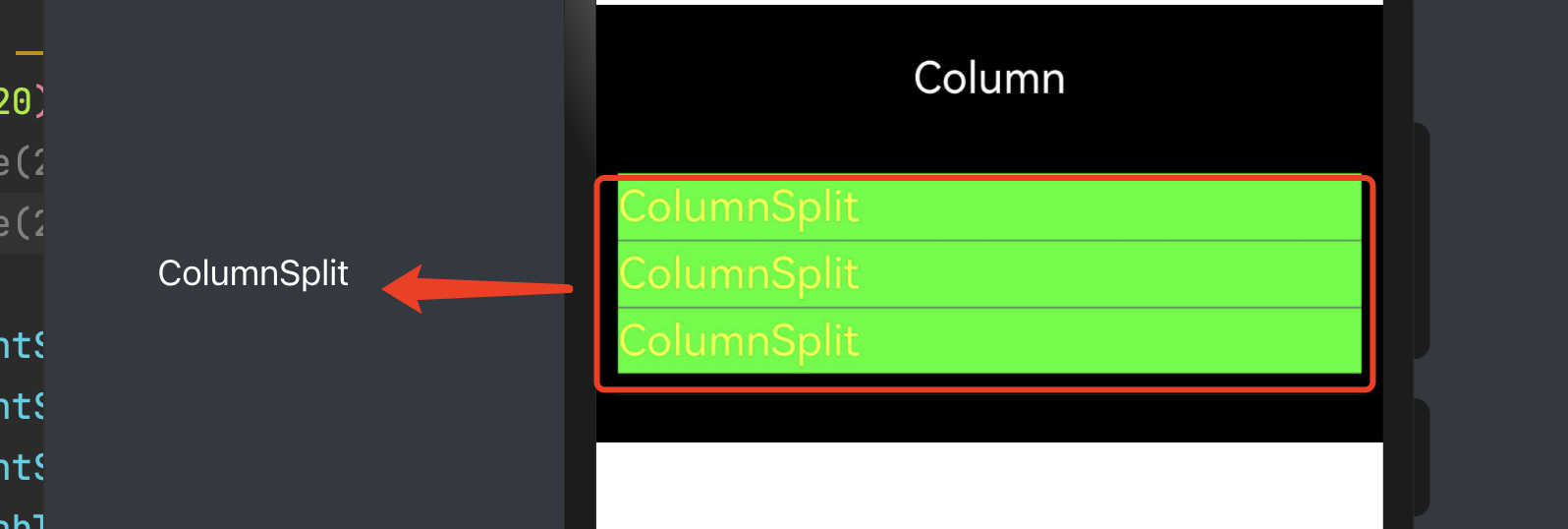
代码展示
Column() {
	Text('Column').fontSize(20).backgroundColor('#000').fontColor('#fff')
	//                Text('Column').fontSize(20).backgroundColor('#000').fontColor('#fff')
	//                Text('Column').fontSize(20).backgroundColor('#000').fontColor('#fff')
	ColumnSplit(){
		Text('ColumnSplit').fontSize(20).fontColor('#ff0').width('100%').height(30)
		Text('ColumnSplit').fontSize(20).fontColor('#ff0').width('100%').height(30)
		Text('ColumnSplit').fontSize(20).fontColor('#ff0').width('100%').height(30)
	}.borderWidth(10).resizeable(true).backgroundColor('#0f0')
}.width('100%').height(200).margin({bottom:10}).backgroundColor('#000')
	.justifyContent(FlexAlign.SpaceEvenly)
Row组件详解
沿水平方向布局容器。
alignItems
设置子组件在垂直方向上的对齐格式。
默认值:VerticalAlign.Center
效果展示
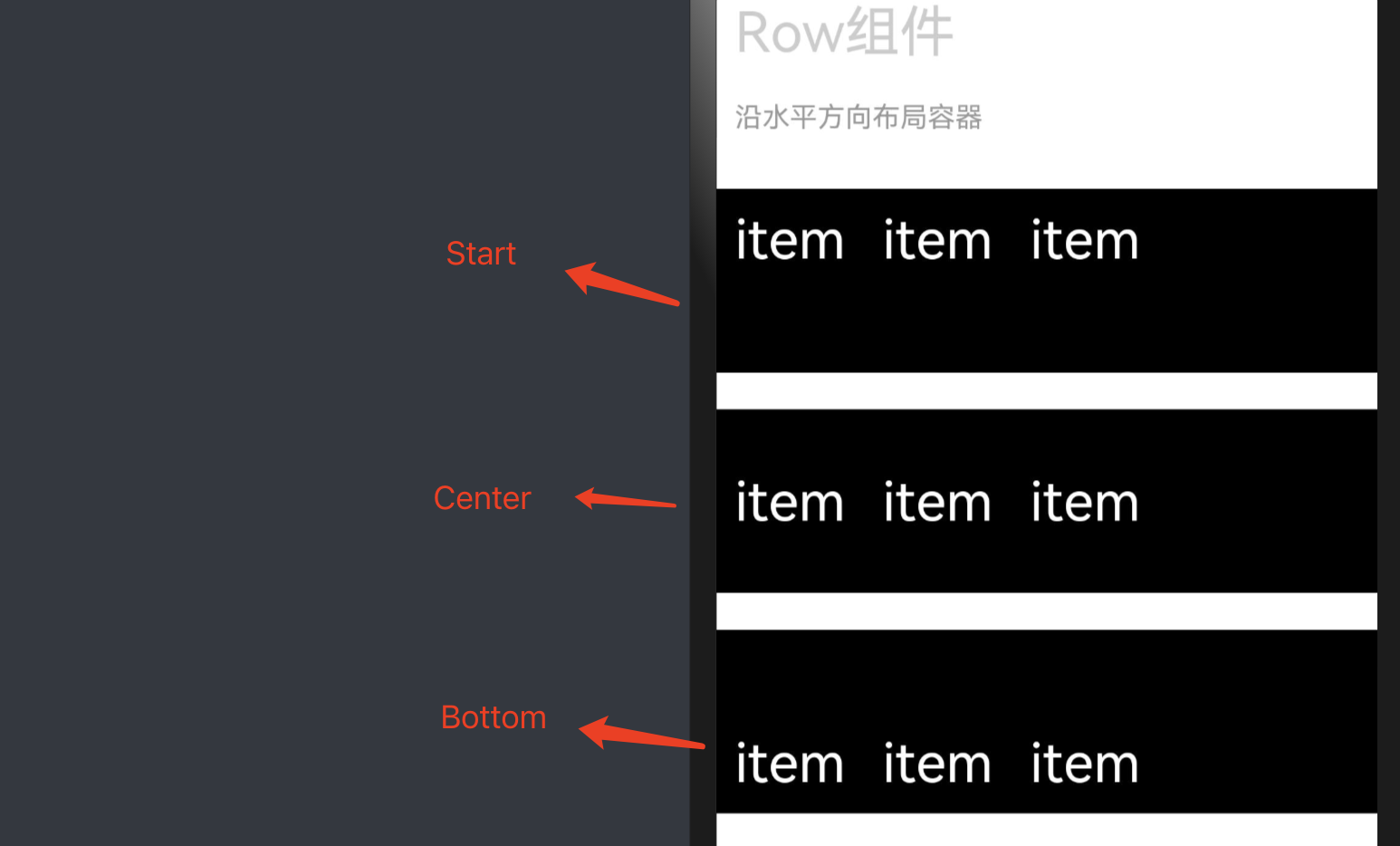
代码展示
Row(){
	Text('item').fontSize(30).fontColor('#fff').padding(10)
	Text('item').fontSize(30).fontColor('#fff').padding(10)
	Text('item').fontSize(30).fontColor('#fff').padding(10)
}.width('100%').height(100).backgroundColor('#000')
	.alignItems(VerticalAlign.Top)


Row(){
	Text('item').fontSize(30).fontColor('#fff').padding(10)
	Text('item').fontSize(30).fontColor('#fff').padding(10)
	Text('item').fontSize(30).fontColor('#fff').padding(10)
}.width('100%').height(100).backgroundColor('#000')
	.alignItems(VerticalAlign.Center)


Row(){
	Text('item').fontSize(30).fontColor('#fff').padding(10)
	Text('item').fontSize(30).fontColor('#fff').padding(10)
	Text('item').fontSize(30).fontColor('#fff').padding(10)
}.width('100%').height(100).backgroundColor('#000')
	.alignItems(VerticalAlign.Bottom)
justifyContent
设置子组件在水平方向上的对齐格式。
默认值:FlexAlign.Start
效果展示
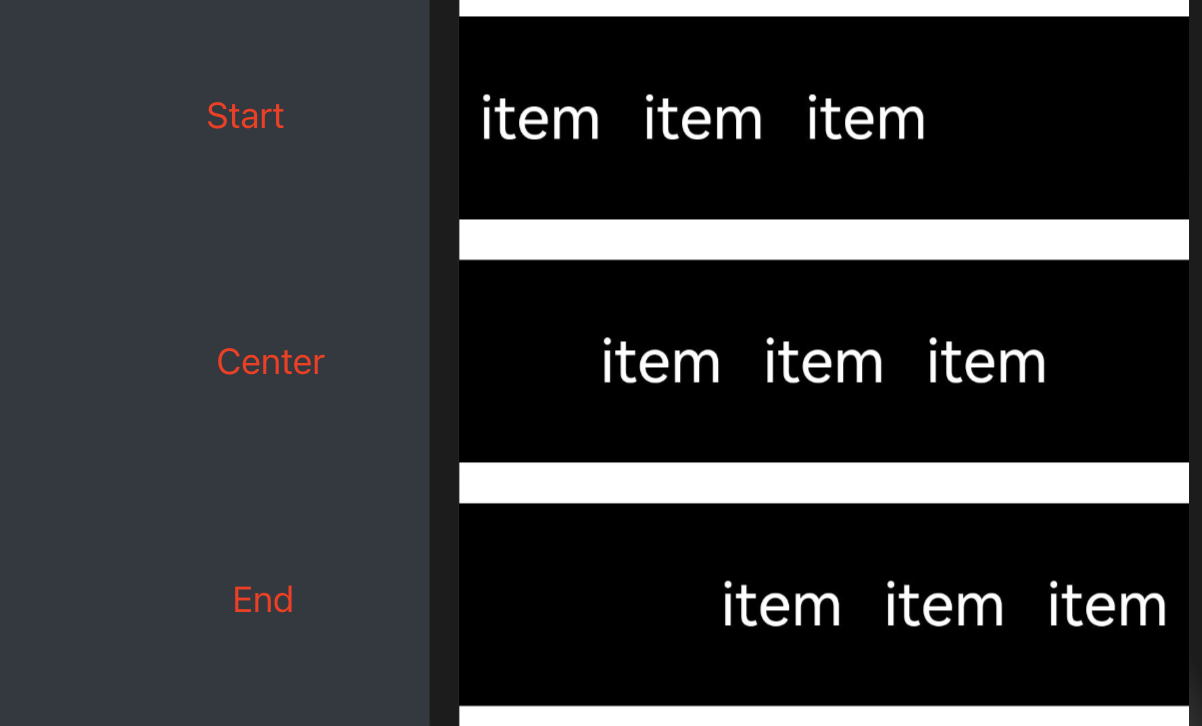
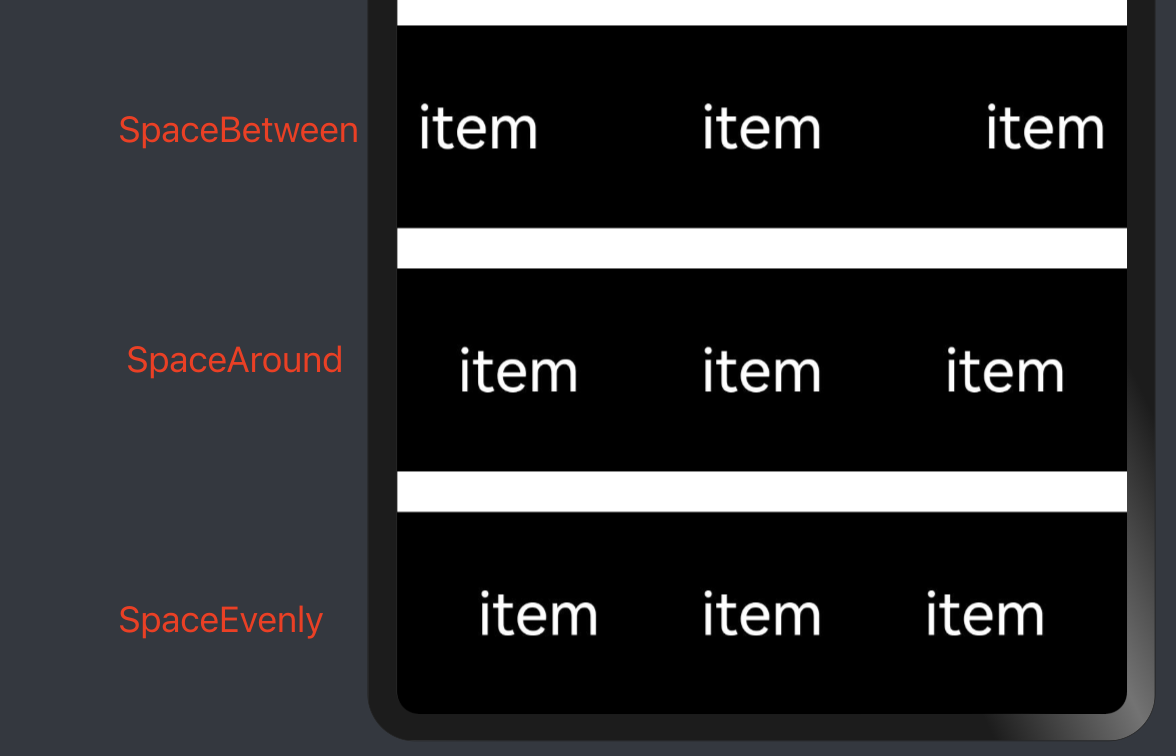
代码展示
Row(){
	Text('item').fontSize(30).fontColor('#fff').padding(10)
	Text('item').fontSize(30).fontColor('#fff').padding(10)
	Text('item').fontSize(30).fontColor('#fff').padding(10)
}.width('100%').height(100).backgroundColor('#000')
	.justifyContent(FlexAlign.Start)

Row(){
	Text('item').fontSize(30).fontColor('#fff').padding(10)
	Text('item').fontSize(30).fontColor('#fff').padding(10)
	Text('item').fontSize(30).fontColor('#fff').padding(10)
}.width('100%').height(100).backgroundColor('#000')
	.justifyContent(FlexAlign.Center)

Row(){
	Text('item').fontSize(30).fontColor('#fff').padding(10)
	Text('item').fontSize(30).fontColor('#fff').padding(10)
	Text('item').fontSize(30).fontColor('#fff').padding(10)
}.width('100%').height(100).backgroundColor('#000')
	.justifyContent(FlexAlign.End)

Row(){
	Text('item').fontSize(30).fontColor('#fff').padding(10)
	Text('item').fontSize(30).fontColor('#fff').padding(10)
	Text('item').fontSize(30).fontColor('#fff').padding(10)
}.width('100%').height(100).backgroundColor('#000')
	.justifyContent(FlexAlign.SpaceBetween)

Row(){
	Text('item').fontSize(30).fontColor('#fff').padding(10)
	Text('item').fontSize(30).fontColor('#fff').padding(10)
	Text('item').fontSize(30).fontColor('#fff').padding(10)
}.width('100%').height(100).backgroundColor('#000')
	.justifyContent(FlexAlign.SpaceAround)


Row(){
	Text('item').fontSize(30).fontColor('#fff').padding(10)
	Text('item').fontSize(30).fontColor('#fff').padding(10)
	Text('item').fontSize(30).fontColor('#fff').padding(10)
}.width('100%').height(100).backgroundColor('#000')
	.justifyContent(FlexAlign.SpaceEvenly)
拓展组件RowSplit
将子组件横向布局,并在每个子组件之间插入一根纵向的分割线。
效果演示
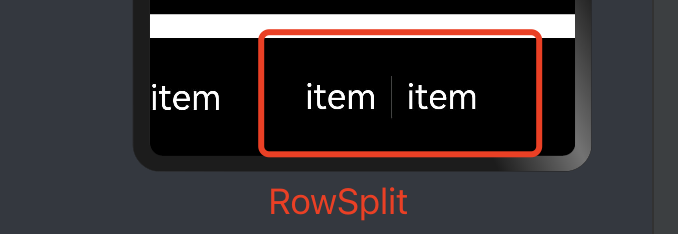
代码展示
Row(){
	Text('item').fontSize(30).fontColor('#fff')
	RowSplit(){
		Text('item').fontSize(30).fontColor('#fff').width('30%').textAlign(TextAlign.Center)
		Text('item').fontSize(30).fontColor('#fff').width('30%').textAlign(TextAlign.Center)
	}.width('80%').height(40).resizeable(true).borderWidth(2)
}.width('100%').height(100).backgroundColor('#000')
「喜欢这篇文章,您的关注和赞赏是给作者最好的鼓励」
关注作者
【版权声明】本文为墨天轮用户原创内容,转载时必须标注文章的来源(墨天轮),文章链接,文章作者等基本信息,否则作者和墨天轮有权追究责任。如果您发现墨天轮中有涉嫌抄袭或者侵权的内容,欢迎发送邮件至:contact@modb.pro进行举报,并提供相关证据,一经查实,墨天轮将立刻删除相关内容。
