



工程师的电脑权限既可以访问内网又可以访问外网,但有时需要模拟纯内网环境,此时需要找网管调整网络权限。

实际上我们可以在自己的电脑上模拟纯内网或纯外网,原理是通过防火墙禁用相关网段:
纯内网:
10.0.0.0/8172.16.0.0/12192.168.0.0/16
纯外网:
0.0.0.0-9.255.255.25511.0.0.0-172.15.255.255172.32.0.0-192.167.255.255192.169.0.0-255.255.255.255
在防火墙的出站策略设置两条策略:
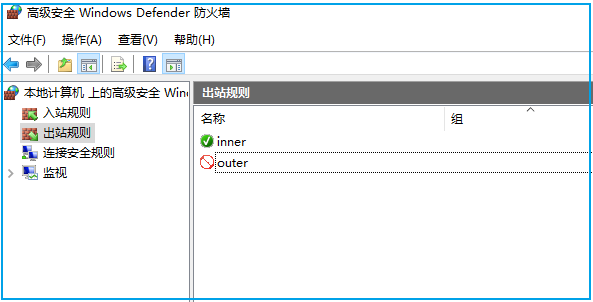
一条是纯内网策略,设置为允许;另一条是纯外网策略,设置为拒绝:
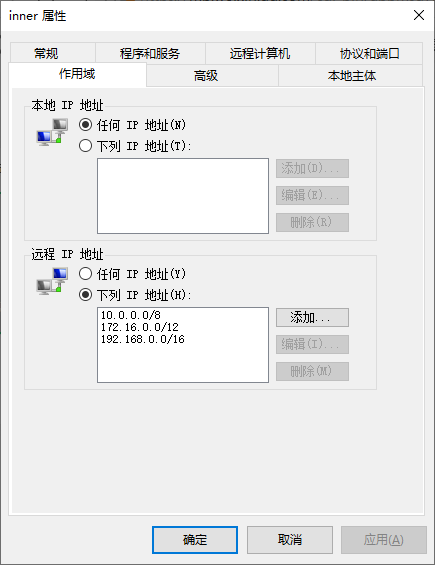
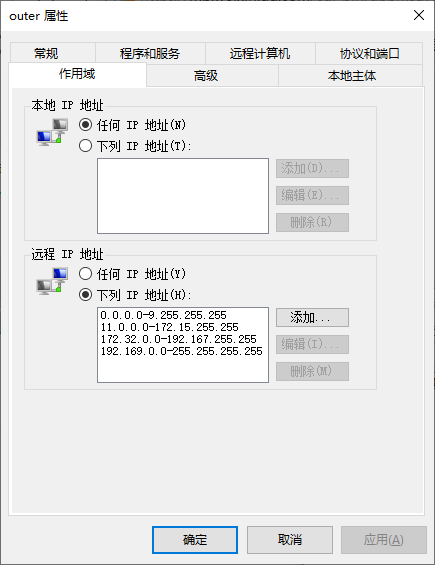
当需要模拟纯内网时,设置 inner 为允许,outer 为拒绝。
当需要模拟纯外网时,设置 outer 为允许,inner 为拒绝。
Windows 使用出入站来实现,Linux 使用 iptables + ipset 来实现:
创建 www ipset,用来存外网网段:
ipset create www hash:netipset add www 192.170.0.0/15ipset add www 176.0.0.0/4ipset add www 0.0.0.0/5ipset add www 64.0.0.0/2ipset add www 12.0.0.0/6ipset add www 192.172.0.0/14ipset add www 192.128.0.0/11ipset add www 193.0.0.0/8ipset add www 196.0.0.0/6ipset add www 192.169.0.0/16ipset add www 192.192.0.0/10ipset add www 208.0.0.0/4ipset add www 32.0.0.0/3ipset add www 200.0.0.0/5ipset add www 194.0.0.0/7ipset add www 192.160.0.0/13ipset add www 8.0.0.0/7ipset add www 172.64.0.0/10ipset add www 11.0.0.0/8ipset add www 192.176.0.0/12ipset add www 160.0.0.0/5ipset add www 173.0.0.0/8ipset add www 168.0.0.0/6ipset add www 174.0.0.0/7ipset add www 172.0.0.0/12ipset add www 172.128.0.0/9ipset add www 128.0.0.0/3ipset add www 192.0.0.0/9ipset add www 224.0.0.0/3ipset add www 172.32.0.0/11ipset add www 16.0.0.0/4
创建 iptables 策略来限制外网访问:
iptables -I INPUT -m set --match-set www src -j DROPiptables -I OUTPUT -m set --match-set www dst -j DROP
iptables 会引用 www ipset,创建时要按顺序先创建 ipset,再创建 iptables 策略。
更多 ipset 和 iptables 的例子参考:
全文完。
如果转发本文,文末务必注明:“转自微信公众号:生有可恋”。
文章转载自生有可恋,如果涉嫌侵权,请发送邮件至:contact@modb.pro进行举报,并提供相关证据,一经查实,墨天轮将立刻删除相关内容。
