



环境准备
vi /etc/hosts

192.168.0.211 node01
192.168.0.212 node02
192.168.0.213 node03
依赖包安装
在3个节点都执行
yum -y install jemalloc jemalloc-devel numactl
添加用户
在3个节点都执行
groupadd mysql
useradd -r -g mysql -s /bin/false mysql
目录
在3个节点都执行
mkdir -p /data/mysql/{data,binlog,relaylog,logs,tmp,conf}
chown -R mysql.mysql /data
软件下载
在3个节点都执行
MySQL:mysql-commercial-8.0.28-linux-glibc2.12-x86_64.tar.xz
MySQL Shell: mysq1-shell-commerciai-8.0.28-1.1.e17.x86_64.rpm
MySQL Router:mysql-router-commercial-8.0.28-linux-glibc2.12-x86_64.tar.xz
wget https://mirrors.aliyun.com/mysql/MySQL-8.0/mysql-8.0.28-linux-glibc2.12-x86_64.tar.xz
wget https://downloads.mysql.com/archives/get/p/43/file/mysql-shell-8.0.28-1.el7.x86_64.rpm
wget https://downloads.mysql.com/archives/get/p/41/file/mysql-router-community-8.0.28-1.el7.x86_64.rpm
安装mysql,mysqlsh,mysql router等
在3个节点都执行
tar -xvf mysql-8.0.28-linux-glibc2.12-x86_64.tar.xz -C /usr/local/
ln -s /usr/local/mysql-8.0.28-linux-glibc2.12-x86_64 /usr/local/mysql
chown -R mysql.mysql /usr/local/mysql
ln -s /usr/local/mysql-8.0.28-linux-glibc2.12-x86_64/support-files/mysql.server /etc/init.d/mysql
ln -s /usr/local/mysql-8.0.28-linux-glibc2.12-x86_64/support-files/mysql.server /etc/init.d/mysqld
ln -s /usr/local/mysql-8.0.28-linux-glibc2.12-x86_64/bin/mysqladmin /usr/bin/mysqladmin
cp -rf /usr/local/mysql-8.0.28-linux-glibc2.12-x86_64/bin/mysql* /usr/bin/

vi /etc/profile
PATH=/usr/local/mysql/bin:$PATH

# mysql shell install
rpm -ivh https://downloads.mysql.com/archives/get/p/43/file/mysql-shell-8.0.28-1.el7.x86_64.rpm
# mysql router install
rpm -ivh https://downloads.mysql.com/archives/get/p/41/file/mysql-router-community-8.0.28-1.el7.x86_64.rpm
mysql配置文件
在3个节点都执行,server_id修改成对应的值
vi /data/mysql/conf/my.cnf
#配置文件
[client]
socket    = /data/mysql/mysql.sock
[mysqld]
user    = mysql
port    = 3306
server_id = 211
basedir = /usr/local/mysql
datadir    = /data/mysql/data
socket    = /data/mysql/mysql.sock
pid-file = mysql.pid
character-set-server = UTF8MB4
skip_name_resolve = 1

default_time_zone = "+8:00"
#performance setttings
lock_wait_timeout = 3600
open_files_limit    = 65535
back_log = 1024
max_connections = 5000
max_connect_errors = 1000000
table_open_cache = 2048
table_definition_cache = 2048
#log settings
log_timestamps = SYSTEM
log_error = /data/mysql/logs/error.log
log_error_verbosity = 3

log_bin = /data/mysql/binlog/log_bin
binlog_format = ROW
sync_binlog = 1

gtid_mode = ON
enforce_gtid_consistency = TRUE
数据库初始化
在3个节点都执行
#数据库初始化:
/usr/local/mysql/bin/mysqld --defaults-file=/data/mysql/conf/my.cnf --initialize-insecure
#启动mysqld进程了
/usr/local/mysql/bin/mysqld --defaults-file=/data/mysql/conf/my.cnf &

#设置密码
/usr/local/mysql/bin/mysql -hlocalhost -uroot -S /data/mysql/mysql.sock -p

ALTER USER 'root'@'localhost' IDENTIFIED with mysql_native_password BY '123456';
create user 'root'@'%' IDENTIFIED with mysql_native_password by '123456';
GRANT all privileges on *.* to 'root'@'%' ;
 ln -s /data/mysql/mysql.sock /tmp/mysql.sock
mysql shell安装
创建mgr用户
在node01/node02/node03上执行
#只有本地登录才会有创建mgr用户选项(在node01,node02,node03上执行)
mysqlsh -S /data/mysql/mysql.sock root@localhost
dba.configureInstance();
1) Create remotely usable account for 'root' with same grants and password
2) Create a new admin account for InnoDB cluster with minimal required grants
3) Ignore and continue
4) Cancel

Please select an option [1]: 2
Please provide an account name (e.g: icroot@%) to have it created with the necessary
privileges or leave empty and press Enter to cancel.
Account Name: mgrusr
Password for new account: ******
Confirm password: ******

applierWorkerThreads will be set to the default value of 4.

NOTE: Some configuration options need to be fixed:
+----------------------------------------+---------------+----------------+----------------------------+
| Variable                               | Current Value | Required Value | Note                       |
+----------------------------------------+---------------+----------------+----------------------------+
| binlog_transaction_dependency_tracking | COMMIT_ORDER  | WRITESET       | Update the server variable |
+----------------------------------------+---------------+----------------+----------------------------+

Do you want to perform the required configuration changes? [y/n]: y

Cluster admin user 'mgrusr'@'%' created.
Configuring instance...
The instance 'node01:3306' was configured to be used in an InnoDB cluster.
创建MGR
在node01上执行
#创建用户后,退出重登录
mysqlsh --uri mgrusr@node01:3306
#创建MGR(node01上执行)
var c = dba.createCluster('mgrtest');
var c = dba.getCluster('mgrtest');
添加节点
#添加
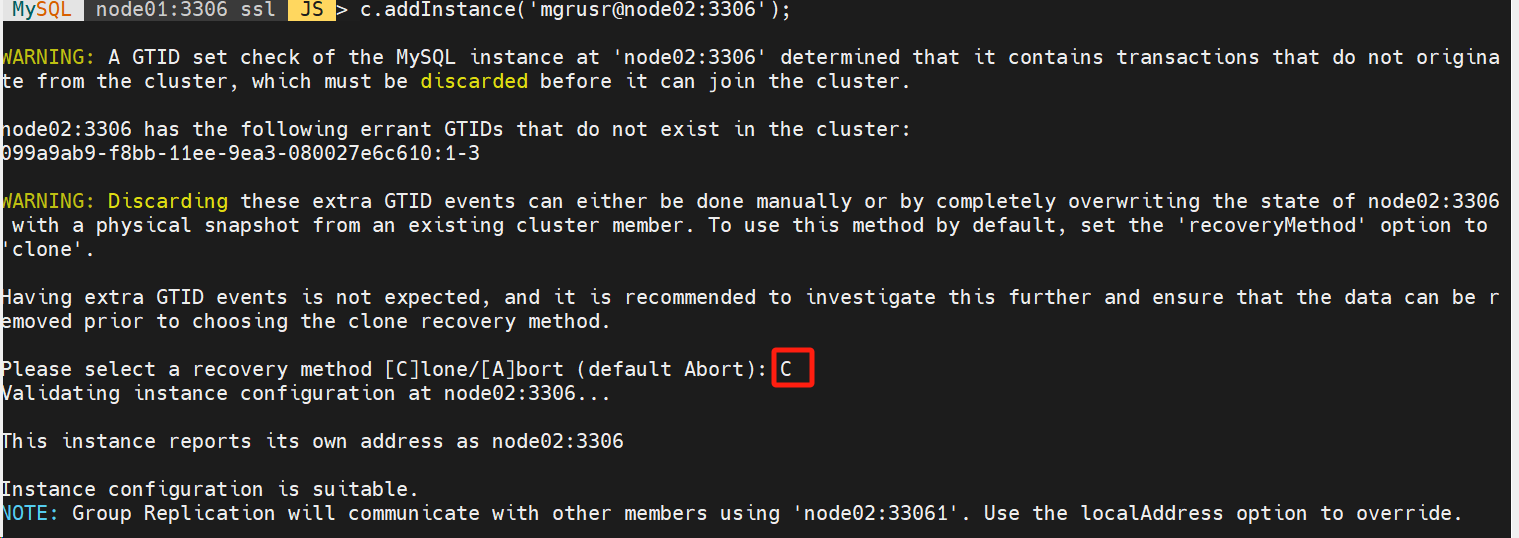
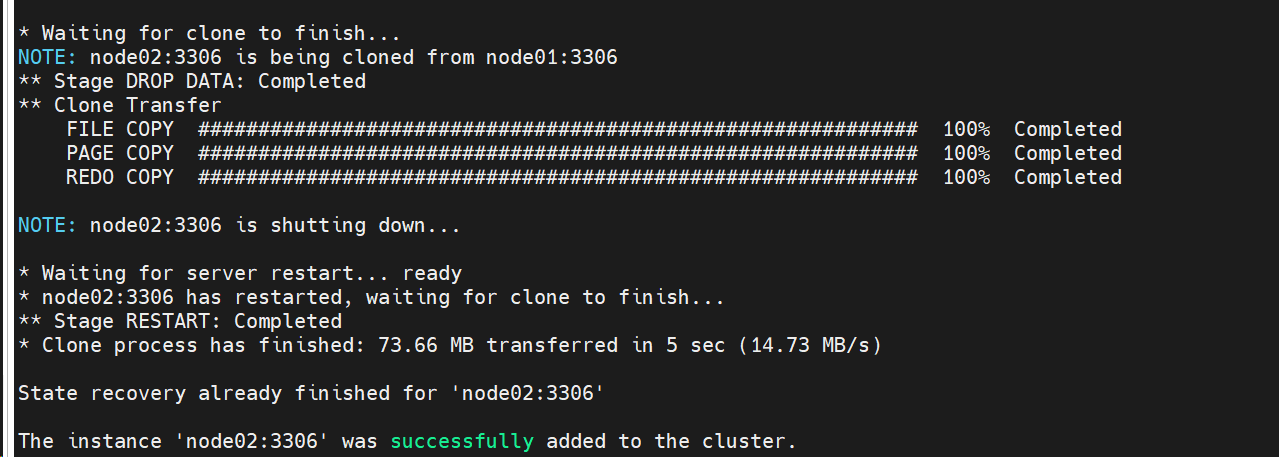
c.addInstance('mgrusr@node02:3306');


继续添加节点
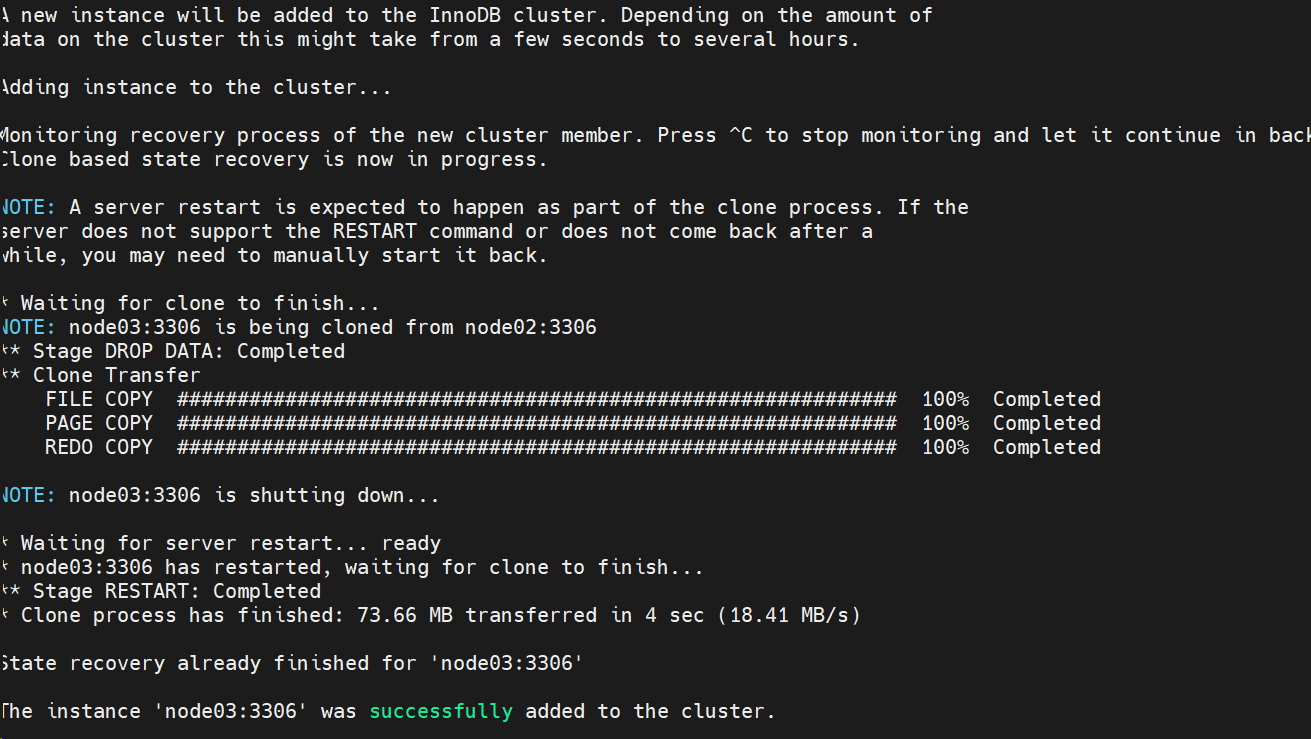
c.addInstance('mgrusr@node03:3306');

检查MGR状态
var c = dba.getCluster('mgrtest');
c.rescan();
c.describe();
c.status();
MySQL  node01:3306 ssl  JS > c.rescan();
Rescanning the cluster...

Result of the rescanning operation for the 'mgrtest' cluster:
{
    "name": "mgrtest",
    "newTopologyMode": null,
    "newlyDiscoveredInstances": [],
    "unavailableInstances": [],
    "updatedInstances": []
}

 MySQL  node01:3306 ssl  JS > c.describe();
{
    "clusterName": "mgrtest",
    "defaultReplicaSet": {
        "name": "default",
        "topology": [
            {
                "address": "node01:3306",
                "label": "node01:3306",
                "role": "HA"
            },
            {
                "address": "node02:3306",
                "label": "node02:3306",
                "role": "HA"
            },
            {
                "address": "node03:3306",
                "label": "node03:3306",
                "role": "HA"
            }
        ],
        "topologyMode": "Single-Primary"
    }
}
 MySQL  node01:3306 ssl  JS > c.status();
{
    "clusterName": "mgrtest",
    "defaultReplicaSet": {
        "name": "default",
        "primary": "node01:3306",
        "ssl": "REQUIRED",
        "status": "OK",
        "statusText": "Cluster is ONLINE and can tolerate up to ONE failure.",
        "topology": {
            "node01:3306": {
                "address": "node01:3306",
                "memberRole": "PRIMARY",
                "mode": "R/W",
                "readReplicas": {},
                "replicationLag": null,
                "role": "HA",
                "status": "ONLINE",
                "version": "8.0.28"
            },
            "node02:3306": {
                "address": "node02:3306",
                "memberRole": "SECONDARY",
                "mode": "R/O",
                "readReplicas": {},
                "replicationLag": null,
                "role": "HA",
                "status": "ONLINE",
                "version": "8.0.28"
            },
            "node03:3306": {
                "address": "node03:3306",
                "memberRole": "SECONDARY",
                "mode": "R/O",
                "readReplicas": {},
                "replicationLag": null,
                "role": "HA",
                "status": "ONLINE",
                "version": "8.0.28"
            }
        },
        "topologyMode": "Single-Primary"
    },
    "groupInformationSourceMember": "node01:3306"
}
切换SQL检查状态
\sql select * from performance_schema.replication_group_members;

+---------------------------+--------------------------------------+-------------+-------------+--------------+-------------+----------------+----------------------------+
| CHANNEL_NAME              | MEMBER_ID                            | MEMBER_HOST | MEMBER_PORT | MEMBER_STATE | MEMBER_ROLE | MEMBER_VERSION | MEMBER_COMMUNICATION_STACK |
+---------------------------+--------------------------------------+-------------+-------------+--------------+-------------+----------------+----------------------------+
| group_replication_applier | 07e68e0d-f8bb-11ee-9e27-080027e6c610 | node01      |        3306 | ONLINE       | PRIMARY     | 8.0.28         | XCom                       |
| group_replication_applier | 099a9ab9-f8bb-11ee-9ea3-080027e6c610 | node02      |        3306 | ONLINE       | SECONDARY   | 8.0.28         | XCom                       |
| group_replication_applier | 0ae4559e-f8bb-11ee-9cb9-080027e6c610 | node03      |        3306 | ONLINE       | SECONDARY   | 8.0.28         | XCom                       |
+---------------------------+--------------------------------------+-------------+-------------+--------------+-------------+----------------+----------------------------+
添加节点FAQ
检查/etc/hosts 正确
cat /etc/hosts
192.168.0.211 node01
192.168.0.212 node02
192.168.0.213 node03
确保server_id不重复,否则报错
Instance configuration is suitable.
ERROR: Cannot join instance 'node03:3306' to the cluster because it has the same server ID of a member of the cluster. Please change the server ID of the instance to add: all members must have a unique server ID.
Cluster.addInstance: The server_id '212' is already used by instance 'node02:3306'. (RuntimeError)
 MySQL  node01:3306 ssl  JS > c.addInstance('mgrusr@node03:3306');
「喜欢这篇文章,您的关注和赞赏是给作者最好的鼓励」
关注作者
【版权声明】本文为墨天轮用户原创内容,转载时必须标注文章的来源(墨天轮),文章链接,文章作者等基本信息,否则作者和墨天轮有权追究责任。如果您发现墨天轮中有涉嫌抄袭或者侵权的内容,欢迎发送邮件至:contact@modb.pro进行举报,并提供相关证据,一经查实,墨天轮将立刻删除相关内容。
