



OceanBase V4.X概述
OceanBase 数据库自 V4.0.0 开始提供统一的安装包 all-in-one package。可以通过这个统一的安装包一次性完成 OBD、OceanBase 数据库、ODP、OBAgent、Grafana、Prometheus 的安装,自 V4.1.0 起,all-in-one package 新增支持安装 OCP Express。可以根据实际需求选择部分或全部组件安装。
支持的部署架构
OceanBase 数据库提供了如下三种不同的架构实现快速部署 Oceanbase 数据,可以根据自身环境情况灵活选择。
- 架构一:部署 OceanBase 演示环境此架构适用于仅有一台机器时,快速搭建一个可用的 OceanBase 数据库环境。部署的 OceanBase 数据库环境具备数据库的基本功能,可以有效地帮助了解 OceanBase 数据库;但是该环境不具备任何分布式能力及高可用特性,不建议长期使用。
- 架构二:部署 OceanBase 集群环境此架构适用于需要深入了解 OceanBase 分布式数据库架构原理及功能特性的用户。部署的 OceanBase 集群具备数据库完整能力及分布式高可用的特性。该架构需要至少准备三台可用资源为 4vCPU、10 GB 内存、50 GB 磁盘的主机。
- 架构三:部署 OceanBase 容器环境(仅适用于社区版)此架构适用于希望通过容器实现部署、管理 OceanBase 数据库的用户。该架构未经过规模化的验证,建议谨慎使用。
软硬件环境要求
本文档采用:centos7.9 x86_64,内存8G 1核cpu进行测试部署。
项目 | 描述 |
系统 |
|
CPU | 最低要求 2 核,推荐 4 核及以上。实验1核也可以。 |
内存 | 最低要求 8 GB,推荐设置在 16 GB 至 1024 GB 范围内。低于8GB快速部署时会提示报错[ERROR] OBD-2000: (127.0.0.1) not enough memory |
磁盘类型 | 使用 SSD 存储。 |
磁盘存储空间 | 最低要求 19 GB。 |
文件系统 | EXT4 戓 XFS,当数据超过 16T 时,使用 XFS。 |
all-in-one 安装包 | all-in-one 安装包需选择 V4.1.0 及以上版本。 |
Docker | 使用 Docker 部署 OceanBase 数据库时需提前安装 Docker 并启动 Docker 服务。 |
环境说明
CentOS7.9 x86_64 内存:4G ,cpu:1核 硬盘:40G
安装前准备
关闭防火墙
systemctl status firewalld.service  # 查看状态
systemctl stop firewalld.service  # 停止 firewall
systemctl disable firewalld.service # 禁止 firewall 开机启动
关闭SELINUX
sed -i 's/SELINUX=enforcing/SELINUX=disabled/g' /etc/selinux/config
setenforce 0
配置系统参数
os_memory_total=$(awk '/MemTotal/{print $2}' /proc/meminfo)
pagesize=4096
min_free_kbytes = os_memory_total * 0.004
shmall = ($os_memory_total - 1) * 1024 / $pagesize"
shmmax = $os_memory_total * 1024 - 1"
cat >> /etc/sysctl.conf << "EOF"
# OceanbaseBegin
fs.aio-max-nr = 1048576 #可以拥有的异步IO请求数
fs.file-max = 6815744  ##允许文件句柄的最大数目
#单个共享内存段最大值,让数据库在一个共享段里面的可以容纳整个SGA
kernel.shmall = $shmall  #控制共享内存页数(kernel.shmall = shmmax/4096)
kernel.shmmax = $shmmax  #最大值:比物理内存小1字节 (kernel.shmmax = 物理内存*1024*1024*1024-1)
kernel.shmmni = 4096 #共享内存的最大数量
kernel.sem = 250 32000 100 128  #信号参数
net.ipv4.ip_local_port_range = 9000 65500 #IP V4的端口范围
net.core.rmem_default = 262144 #缓存区的缺省值
net.core.rmem_max = 4194304 #缓存区的最大值
net.core.wmem_default = 262144  #发送缓存区的缺省值
net.core.wmem_max = 1048576 #发送缓存区的最大值
vm.min_free_kbytes=$min_free_kbytes
net.ipv4.conf.$local_ifname.rp_filter = 1
vm.swappiness = 10 #当系统内存使用90%的时候开始使用交换页面
vm.vfs_cache_pressure=200 #默认是100,增大这个参数设置了虚拟内存回收directory和i-node缓冲的倾向,这个值越大。越容易回收。
kernel.panic_on_oops = 1  #当系统检测到oops时,重新启动系统,以便系统能够重新初始化恢复正常工作
kernel.randomize_va_space = 2
kernel.numa_balancing = 0
EOF
sysctl -p

#配置 RemoveIPC
sed -i 's/#RemoveIPC=no/RemoveIPC=no/' /etc/systemd/logind.conf
systemctl daemon-reload && systemctl restart systemd-logind

cat >> /etc/pam.d/login << "EOF"
# OceanbaseBegin
session required pam_limits.so
session required /lib64/security/pam_limits.so
EOF

#配置 limits.conf
cat  >> /etc/security/limits.conf << "EOF"
# OceanbaseBegin
* soft nofile 655350
* hard nofile 655350
* soft stack 10240
* hard stack 32768
* soft nproc 655350
* hard nproc 655350
* hard memlock unlimited
* soft memlock unlimited
EOF

--重启
reboot
关闭透明大页
从Red Hat Enterprise Linux 6、Oracle Linux 6、SUSE 11和Unbreakable Enterprise Kernel 2(UEK2)内核开始,Transparent HugePages在运行时默认启用。然而,透明的HugePages可能会导致内存分配延迟,因为内存是动态分配的。因此,甲骨文建议您在所有甲骨文数据库服务器上禁用透明HugePages,以避免性能问题。
//查看透明页是否启用,显示[always]表示Transparent HugePages是启用的
[root@localhost ~]# cat /sys/kernel/mm/transparent_hugepage/defrag
[always] madvise never
[root@localhost ~]# cat /sys/kernel/mm/transparent_hugepage/enabled
[always] madvise never

//禁用透明大页
[root@localhost ~]# vi /etc/rc.d/rc.local
echo never > /sys/kernel/mm/transparent_hugepage/defrag
echo never > /sys/kernel/mm/transparent_hugepage/enabled
[root@localhost ~]# chmod +x /etc/rc.d/rc.local
[root@localhost ~]# reboot

//透明页已关闭
[root@localhost ~]# cat /sys/kernel/mm/transparent_hugepage/defrag
always madvise [never]
[root@localhost ~]# cat /sys/kernel/mm/transparent_hugepage/enabled
always madvise [never]
关闭numa功能
默认系统没有自带numactl,需要安装numactl:
--安装numactl
yum install numactl -y

--检查OS是否开启NUMA  检查 numa 节点信息
[root@localhost ~]#  numactl --hardware
available: 1 nodes (0)   #available: 1 nodes (0)如果是2或多个nodes就说明numa没关掉
node 0 cpus: 0
node 0 size: 3931 MB
node 0 free: 3274 MB
node distances:
node   0
  0:  10
centos7为例
--修改 grub.conf
vi /etc/default/grub   增加numa=off
修改前
GRUB_TIMEOUT=5
GRUB_DISTRIBUTOR="$(sed 's, release .*$,,g' /etc/system-release)"
GRUB_DEFAULT=saved
GRUB_DISABLE_SUBMENU=true
GRUB_TERMINAL_OUTPUT="console"
GRUB_CMDLINE_LINUX="rd.lvm.lv=centos/root rd.lvm.lv=centos/swap rhgb quiet"
GRUB_DISABLE_RECOVERY="true"

修改后
GRUB_TIMEOUT=5
GRUB_DISTRIBUTOR="$(sed 's, release .*$,,g' /etc/system-release)"
GRUB_DEFAULT=saved
GRUB_DISABLE_SUBMENU=true
GRUB_TERMINAL_OUTPUT="console"
GRUB_CMDLINE_LINUX="rd.lvm.lv=centos/root rd.lvm.lv=centos/swap rhgb quiet numa=off"
GRUB_DISABLE_RECOVERY="true"

--重新生成 /boot/grub2/grub.cfg
[root@localhost ~]# grub2-mkconfig -o /boot/grub2/grub.cfg
Generating grub configuration file ...
Found linux image: /boot/vmlinuz-3.10.0-1160.el7.x86_64
Found initrd image: /boot/initramfs-3.10.0-1160.el7.x86_64.img
Found linux image: /boot/vmlinuz-0-rescue-21daec7bd052474aaffc0fbaf6c1bbb8
Found initrd image: /boot/initramfs-0-rescue-21daec7bd052474aaffc0fbaf6c1bbb8.img
done

--重启
[root@localhost ~]# reboot

--重启之后确认
[root@localhost ~]#  dmesg | grep -i numa
[    0.000000] Command line: BOOT_IMAGE=/vmlinuz-3.10.0-1160.el7.x86_64 root=/dev/mapper/centos-root ro rd.lvm.lv=centos/root rd.lvm.lv=centos/swap rhgb quiet numa=off
[    0.000000] NUMA turned off
[    0.000000] Kernel command line: BOOT_IMAGE=/vmlinuz-3.10.0-1160.el7.x86_64 root=/dev/mapper/centos-root ro rd.lvm.lv=centos/root rd.lvm.lv=centos/swap rhgb quiet numa=off

--再次确认
[root@localhost ~]# cat /proc/cmdline
BOOT_IMAGE=/vmlinuz-3.10.0-1160.el7.x86_64 root=/dev/mapper/centos-root ro rd.lvm.lv=centos/root rd.lvm.lv=centos/swap rhgb quiet numa=off
安装过程
下载并安装 all-in-one 安装包
本文档基于社区版安装。
- 下载 all-in-one 安装包,并将其上传到机器任一目录下。
- 企业版:请联系技术支持获取 all-in-one 安装包。
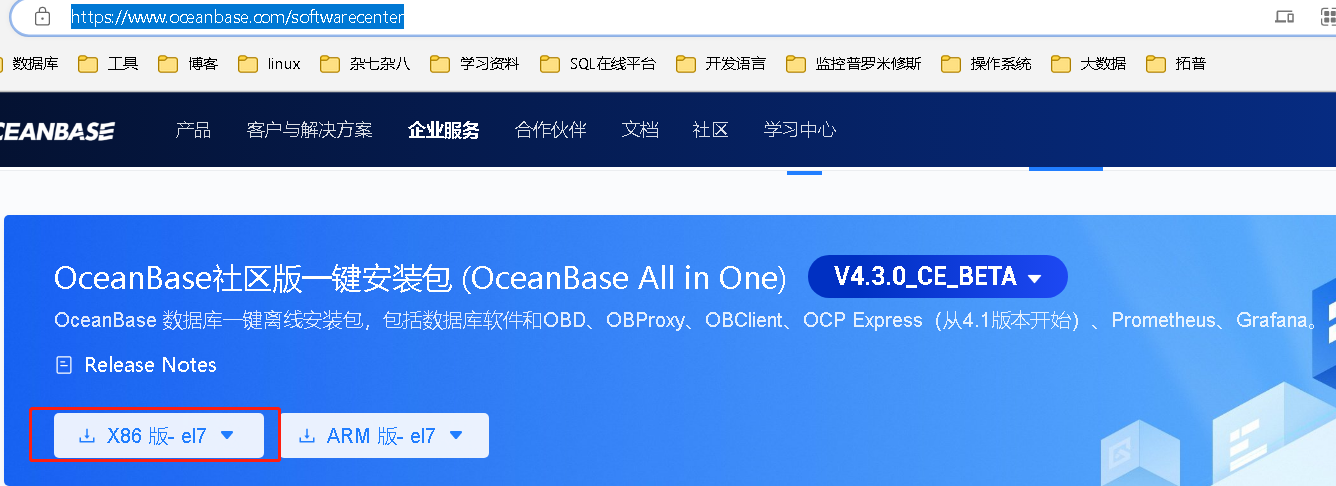
- 社区版:访问社区版官方下载地址https://www.oceanbase.com/softwarecenter下载 all-in-one 安装包,建议下载最新版本。注意操作系统的选择,操作系统版本要求7以上,7和8的安装介质不通用。
- 在安装包所在目录下执行如下命令解压安装包并安装。
--解压
cd /opt
tar -xzf oceanbase-all-in-one-*.tar.gz

--查看解压后的文件

[root@localhost oceanbase-all-in-one]# cd oceanbase-all-in-one && ls -l
total 12
drwxr-xr-x. 2 root root   58 Mar 29 11:45 bin
drwxr-xr-x. 3 root root   17 Mar 29 11:46 obclient
drwxr-xr-x. 4 root root   28 Mar 29 11:45 obd
-rw-r--r--. 1 root root  666 Mar 29 11:45 README.md
drwxr-xr-x. 2 root root 4096 Mar 29 11:46 rpms
-rw-r--r--. 1 root root   27 Mar 29 11:45 VERSION

--安装
[root@localhost opt]# cd oceanbase-all-in-one/bin/

[root@localhost bin]# ls -l
total 12
-rw-r--r--. 1 root root  238 Mar 29 11:45 env.sh
-rwxr-xr-x. 1 root root 2207 Mar 29 11:45 install.sh
-rwxr-xr-x. 1 root root  235 Mar 29 11:45 uninstall.sh

[root@localhost bin]# ./install.sh

[root@localhost bin]# source env.sh
安装详细过程:
[root@localhost bin]# ./install.sh
name: grafana
version: 7.5.17
release:1
arch: x86_64
md5: 1bf1f338d3a3445d8599dc6902e7aeed4de4e0d6
size: 177766248
add /opt/oceanbase-all-in-one/rpms/grafana-7.5.17-1.el7.x86_64.rpm to local mirror
name: obagent
version: 4.2.2
release:100000042024011120.el7
arch: x86_64
md5: 19739a07a12eab736aff86ecf357b1ae660b554e
size: 72919140
add /opt/oceanbase-all-in-one/rpms/obagent-4.2.2-100000042024011120.el7.x86_64.rpm to local mirror
name: ob-configserver
version: 1.0.0
release:2.el7
arch: x86_64
md5: feca6b9c76e26ac49464f34bfa0780b5a8d3f4a0
size: 24259515
add /opt/oceanbase-all-in-one/rpms/ob-configserver-1.0.0-2.el7.x86_64.rpm to local mirror
name: ob-deploy
version: 2.7.0
release:5.el7
arch: x86_64
md5: a0683dc9bd3499ff0d2c5678b4558e234abfa307
size: 154066376
add /opt/oceanbase-all-in-one/rpms/ob-deploy-2.7.0-5.el7.x86_64.rpm to local mirror
name: obproxy-ce
version: 4.2.3.0
release:3.el7
arch: x86_64
md5: 0490ebc04220def8d25cb9cac9ac61a4efa6d639
size: 688373235
add /opt/oceanbase-all-in-one/rpms/obproxy-ce-4.2.3.0-3.el7.x86_64.rpm to local mirror
name: oceanbase-ce
version: 4.3.0.1
release:100000242024032211.el7
arch: x86_64
md5: c4a03c83614f50c99ddb1c37dda858fa5d9b14b7
size: 559590536
add /opt/oceanbase-all-in-one/rpms/oceanbase-ce-4.3.0.1-100000242024032211.el7.x86_64.rpm to local mirror
name: oceanbase-ce-libs
version: 4.3.0.1
release:100000242024032211.el7
arch: x86_64
md5: ab78ddc22f64716358a8355fcf8087e65e7556ae
size: 468528
add /opt/oceanbase-all-in-one/rpms/oceanbase-ce-libs-4.3.0.1-100000242024032211.el7.x86_64.rpm to local mirror
name: oceanbase-diagnostic-tool
version: 1.6.2
release:12024031514.el7
arch: x86_64
md5: c55a383aabee94f8dabec51ad05ff9c7422daa5c
size: 35143564
add /opt/oceanbase-all-in-one/rpms/oceanbase-diagnostic-tool-1.6.2-12024031514.el7.x86_64.rpm to local mirror
name: ocp-express
version: 4.2.2
release:100000022024011120.el7
arch: x86_64
md5: 09ffcf156d1df9318a78af52656f499d2315e3f7
size: 78426196
add /opt/oceanbase-all-in-one/rpms/ocp-express-4.2.2-100000022024011120.el7.x86_64.rpm to local mirror
name: openjdk-jre
version: 1.8.0_322
release:b09.el7
arch: x86_64
md5: 051aa69c5abb8697d15c2f0dcb1392b3f815f7ed
size: 69766947
add /opt/oceanbase-all-in-one/rpms/openjdk-jre-1.8.0_322-b09.el7.x86_64.rpm to local mirror
name: prometheus
version: 2.37.1
release:10000102022110211.el7
arch: x86_64
md5: 58913c7606f05feb01bc1c6410346e5fc31cf263
size: 211224073
add /opt/oceanbase-all-in-one/rpms/prometheus-2.37.1-10000102022110211.el7.x86_64.rpm to local mirror
Trace ID: b9ac1740-f917-11ee-8ad8-000c29e13c26
If you want to view detailed obd logs, please run: obd display-trace b9ac1740-f917-11ee-8ad8-000c29e13c26
Disable remote ok
Trace ID: bc22a750-f917-11ee-a119-000c29e13c26
If you want to view detailed obd logs, please run: obd display-trace bc22a750-f917-11ee-a119-000c29e13c26

add auto set env logic to profile: /root/.bash_profile

#########################################################################################
 Install Finished
=========================================================================================
Setup Environment:              source ~/.oceanbase-all-in-one/bin/env.sh
Quick Start:                    obd demo
Use Web Service to install:     obd web
Use Web Service to upgrade:     obd web upgrade
More Details:                   obd -h
单机部署 OceanBase 数据库
本文档采用部署场景2进行部署。
部署场景1:企业版部署
执行以下命令,快速部署 OceanBase 数据库
[admin@test001 ~]$ obd demo -c oceanbase,obproxy,obagent,prometheus,grafana部署场景2:社区版部署
执行以下命令,快速部署 OceanBase 数据库。
[admin@test001 ~]$ obd demoobd demo 命令默认在当前用户家目录下以最小规格部署并启动 OceanBase 数据库及相关组件(包括 ODP、OBAgent、Grafana 和 Prometheus),固定部署名为 demo。如需更多定制化的部署形式,参见 快速部署命令。
也可以使用 OBD 命令管理该 OceanBase 数据库,详细命令介绍请参考 集群命令组。
说明
当安装 grafana 或 prometheus 时,会输出 grafana 或 prometheus 的访问地址。在阿里云或其他云环境下,可能出现因无法获取公网 IP 而输出内网地址的情况,此 IP 非公网地址,您需要使用正确的地址。
社区版部署详情如下:
[root@localhost bin]# obd demo
Package oceanbase-ce-4.3.0.1-100000242024032211.el7 is available.
Package grafana-7.5.17-1 is available.
Package obproxy-ce-4.2.3.0-3.el7 is available.
Package prometheus-2.37.1-10000102022110211.el7 is available.
Package obagent-4.2.2-100000042024011120.el7 is available.
install oceanbase-ce-4.3.0.1 for local ok
install grafana-7.5.17 for local ok
install obproxy-ce-4.2.3.0 for local ok
install prometheus-2.37.1 for local ok
install obagent-4.2.2 for local ok
Cluster param config check ok
Open ssh connection ok
Generate obagent configuration ok
Generate prometheus configuration ok
Generate obproxy configuration ok
Generate grafana configuration ok
Generate observer configuration ok
+--------------------------------------------------------------------------------------------+
|                                          Packages                                          |
+--------------+---------+------------------------+------------------------------------------+
| Repository   | Version | Release                | Md5                                      |
+--------------+---------+------------------------+------------------------------------------+
| oceanbase-ce | 4.3.0.1 | 100000242024032211.el7 | c4a03c83614f50c99ddb1c37dda858fa5d9b14b7 |
| grafana      | 7.5.17  | 1                      | 1bf1f338d3a3445d8599dc6902e7aeed4de4e0d6 |
| obproxy-ce   | 4.2.3.0 | 3.el7                  | 0490ebc04220def8d25cb9cac9ac61a4efa6d639 |
| prometheus   | 2.37.1  | 10000102022110211.el7  | 58913c7606f05feb01bc1c6410346e5fc31cf263 |
| obagent      | 4.2.2   | 100000042024011120.el7 | 19739a07a12eab736aff86ecf357b1ae660b554e |
+--------------+---------+------------------------+------------------------------------------+
Repository integrity check ok
Parameter check ok
Cluster status check ok
Initializes observer work home ok
Initializes grafana work home ok
Initializes obproxy work home ok
Initializes prometheus work home ok
Initializes obagent work home ok
Remote oceanbase-ce-4.3.0.1-100000242024032211.el7-c4a03c83614f50c99ddb1c37dda858fa5d9b14b7 repository install ok
Remote oceanbase-ce-4.3.0.1-100000242024032211.el7-c4a03c83614f50c99ddb1c37dda858fa5d9b14b7 repository lib check !!
Remote grafana-7.5.17-1-1bf1f338d3a3445d8599dc6902e7aeed4de4e0d6 repository install ok
Remote grafana-7.5.17-1-1bf1f338d3a3445d8599dc6902e7aeed4de4e0d6 repository lib check ok
Remote obproxy-ce-4.2.3.0-3.el7-0490ebc04220def8d25cb9cac9ac61a4efa6d639 repository install ok
Remote obproxy-ce-4.2.3.0-3.el7-0490ebc04220def8d25cb9cac9ac61a4efa6d639 repository lib check ok
Remote prometheus-2.37.1-10000102022110211.el7-58913c7606f05feb01bc1c6410346e5fc31cf263 repository install ok
Remote prometheus-2.37.1-10000102022110211.el7-58913c7606f05feb01bc1c6410346e5fc31cf263 repository lib check ok
Remote obagent-4.2.2-100000042024011120.el7-19739a07a12eab736aff86ecf357b1ae660b554e repository install ok
Remote obagent-4.2.2-100000042024011120.el7-19739a07a12eab736aff86ecf357b1ae660b554e repository lib check ok
Try to get lib-repository
Package oceanbase-ce-libs-4.3.0.1-100000242024032211.el7 is available.
install oceanbase-ce-libs-4.3.0.1 for local ok
Remote oceanbase-ce-libs-4.3.0.1-100000242024032211.el7-ab78ddc22f64716358a8355fcf8087e65e7556ae repository install ok
Remote oceanbase-ce-4.3.0.1-100000242024032211.el7-c4a03c83614f50c99ddb1c37dda858fa5d9b14b7 repository lib check ok
demo deployed
Get local repositories ok
Search plugins ok
Load cluster param plugin ok
Open ssh connection ok
Check before start observer ok
[WARN] OBD-1007: (127.0.0.1) The recommended number of open files is 655350 (Current value: 20000)
[WARN] OBD-1007: (127.0.0.1) The recommended number of max user processes is 655350 (Current value: 120000)
[WARN] OBD-1007: (127.0.0.1) The recommended number of core file size is unlimited (Current value: 0)
[WARN] OBD-1007: (127.0.0.1) The recommended number of stack size is unlimited (Current value: 10240)
[WARN] OBD-1017: (127.0.0.1) The value of the "vm.max_map_count" must be within [327600, 1310720] (Current value: 65530, Recommended value: 655360)
[WARN] OBD-1017: (127.0.0.1) The value of the "vm.min_free_kbytes" must be within [32768, 2097152] (Current value: 32619, Recommended value: 2097152)
[WARN] OBD-2000: (127.0.0.1) not enough memory. (Free: 3385M, Need: 6144M)
[WARN] OBD-1012: (127.0.0.1) clog and data use the same disk (/)

Check before start obproxy ok
Check before start obagent ok
Check before start prometheus ok
Check before start grafana ok
Start observer ok
observer program health check ok
Connect to observer 127.0.0.1:2881 ok
Initialize oceanbase-ce ok
Start obproxy ok
obproxy program health check ok
Connect to obproxy ok
Initialize obproxy-ce ok
Start obagent ok
obagent program health check ok
Connect to Obagent ok
Start promethues ok
prometheus program health check ok
Connect to Prometheus ok
Initialize prometheus ok
Start grafana ok
grafana program health check ok
Connect to grafana ok
Initialize grafana ok
Wait for observer init ok
+---------------------------------------------+
|                   observer                  |
+-----------+---------+------+-------+--------+
| ip        | version | port | zone  | status |
+-----------+---------+------+-------+--------+
| 127.0.0.1 | 4.3.0.1 | 2881 | zone1 | ACTIVE |
+-----------+---------+------+-------+--------+
obclient -h127.0.0.1 -P2881 -uroot -Doceanbase -A

+---------------------------------------------+
|                   obproxy                   |
+-----------+------+-----------------+--------+
| ip        | port | prometheus_port | status |
+-----------+------+-----------------+--------+
| 127.0.0.1 | 2883 | 2884            | active |
+-----------+------+-----------------+--------+
obclient -h127.0.0.1 -P2883 -uroot -Doceanbase -A

+--------------------------------------------------------------+
|                           obagent                            |
+-----------+--------------------+--------------------+--------+
| ip        | mgragent_http_port | monagent_http_port | status |
+-----------+--------------------+--------------------+--------+
| 127.0.0.1 | 8089               | 8088               | active |
+-----------+--------------------+--------------------+--------+
+--------------------------------------------------+
|                    prometheus                    |
+-----------------------+------+----------+--------+
| url                   | user | password | status |
+-----------------------+------+----------+--------+
| http://127.0.0.1:9090 |      |          | active |
+-----------------------+------+----------+--------+
+-----------------------------------------------------------------+
|                             grafana                             |
+-----------------------------------+-------+------------+--------+
| url                               | user  | password   | status |
+-----------------------------------+-------+------------+--------+
| http://127.0.0.1:3000/d/oceanbase | admin | d4GFiQ4uf7 | active |
+-----------------------------------+-------+------------+--------+
demo running
Trace ID: 8e1deca8-fb1e-11ee-a1cf-000c29e13c26
If you want to view detailed obd logs, please run: obd display-trace 8e1deca8-fb1e-11ee-a1cf-000c29e13c26
连接数据库
obd demo 命令成功执行后会输出通过 OBClient 连接 OceanBase 数据库的命令,示例如下。
连接数据库场景1:通过 2881 端口直连数据库
[root@localhost bin]# obclient -h127.0.0.1 -P2881 -uroot@sys -Doceanbase -A
Welcome to the OceanBase.  Commands end with ; or \g.
Your OceanBase connection id is 3221487766
Server version: OceanBase_CE 4.3.0.1 (r100000242024032211-0193a343bc60b4699ec47792c3fc4ce166a182f9) (Built Mar 22 2024 13:19:48)

Copyright (c) 2000, 2018, OceanBase and/or its affiliates. All rights reserved.

Type 'help;' or '\h' for help. Type '\c' to clear the current input statement.

obclient [oceanbase]>

参数说明:
-h	提供 OceanBase 数据库连接的 IP 或域名。
-P	提供 OceanBase 数据库连接端口,MySQL 模式默认是 3306。
-u	提供租户的连接账号,格式为 账号@租户 ID。
-p	提供账号密码。为了安全可以不提供,改为在后面提示符下输入,密码文本不可见。
-A	表示连接数据库时不获取全部表信息,以快速登录数据库。
-c	表示在 MySQL 运行环境中不要忽略注释。
-D	访问的数据库名,可以改为对应的业务数据库。
连接数据库场景2:通过 ODP 代理访问数据库
[root@localhost bin]# obclient -h127.0.0.1 -P2883 -uroot@sys -Doceanbase -A
Welcome to the OceanBase.  Commands end with ; or \g.
Your OceanBase connection id is 1609564162
Server version: OceanBase_CE 4.3.0.1 (r100000242024032211-0193a343bc60b4699ec47792c3fc4ce166a182f9) (Built Mar 22 2024 13:19:48)

Copyright (c) 2000, 2018, OceanBase and/or its affiliates. All rights reserved.

Type 'help;' or '\h' for help. Type '\c' to clear the current input statement.

obclient [oceanbase]>
使用 OBClient 客户端连接 OceanBase 集群的详细操作可参见 通过 OBClient 连接 OceanBase 租户。连接 OceanBase 数据库更多方法请参见 连接方式概述。
配置密码(可选)
配置密码方法1:修改配置文件重启集群
使用 obd demo 命令快速部署 OceanBase 数据库后,可参考如下步骤为 demo 集群配置密码。
修改配置文件
obd cluster edit-config demo执行上述命令打开配置文件后,在配置文件中 oceanbase-ce(社区版)/oceanbase(企业版) 组件下添加 root_password: xxxx,添加完成后保存退出。示例如下:
--修改配置文件
[root@localhost bin]# obd cluster edit-config demo

oceanbase-ce:
  servers:
    - 127.0.0.1
  global:
    home_path: /home/admin/oceanbase-ce
省略部分配置项
    log_disk_size: 13G
    root_password: oceanbase

--添加后保存
:wq!
重启集群
修改并保存配置文件后,OBD 会输出待执行的重启命令,直接复制执行即可,示例如下。
--保存后输出以下日志
[root@localhost bin]# obd cluster edit-config demo
Search param plugin and load ok
Search param plugin and load ok
Parameter check ok
Save deploy "demo" configuration
Use `obd cluster reload demo` to make changes take effect.
Trace ID: 14833ff4-fb20-11ee-bb98-000c29e13c26
If you want to view detailed obd logs, please run: obd display-trace 14833ff4-fb20-11ee-bb98-000c29e13c26


--重启集群
[root@localhost bin]# obd cluster reload demo
Get local repositories and plugins ok
Load cluster param plugin ok
Open ssh connection ok
Cluster status check ok
Connect to observer 127.0.0.1:2881 ok
Connect to obproxy ok
Connect to Obagent ok
Reload obagent ok
Connect to Prometheus ok
Reload prometheus ok
Connect to grafana ok
Reload Grafana ok
demo reload
Trace ID: b260cdb8-fb20-11ee-b573-000c29e13c26
If you want to view detailed obd logs, please run: obd display-trace b260cdb8-fb20-11ee-b573-000c29e13c26
从输出可以看出,修改配置文件中 root@sys 用户密码后,需执行 obd cluster reload demo 命令重启 demo 集群。
配置密码方法2:ALTER USER 命令修改用户密码
除了修改当前用户的口令之外,必须拥有 CREATE USER 的权限,才可以执行本命令。
ALTER USER root IDENTIFIED BY 'oceanbase';

示例:
obclient [oceanbase]> ALTER USER root IDENTIFIED BY 'oceanbase';
Query OK, 0 rows affected (0.026 sec)
注意事项
修改密码后登录需增加-p密码参数,不然提示如下报错:
[root@localhost bin]#  obclient -h127.0.0.1 -P2881 -uroot@sys -Doceanbase -A
ERROR 1045 (42000): Access denied for user 'root'@'xxx.xxx.xxx.xxx' (using password: NO)

--增加-p密码参数可登录成功
[root@localhost bin]#  obclient -h127.0.0.1 -P2881 -uroot@sys -Doceanbase -A -poceanbase
Welcome to the OceanBase.  Commands end with ; or \g.
Your OceanBase connection id is 3221488508
Server version: OceanBase_CE 4.3.0.1 (r100000242024032211-0193a343bc60b4699ec47792c3fc4ce166a182f9) (Built Mar 22 2024 13:19:48)

Copyright (c) 2000, 2018, OceanBase and/or its affiliates. All rights reserved.

Type 'help;' or '\h' for help. Type '\c' to clear the current input statement.
问题处理
单机快速部署报错[ERROR] OBD-1007&&[ERROR] OBD-2000
--问题描述
部署 OceanBase 数据库报错
[admin@test001 ~]$ obd demo
...
Check before start observer x
[WARN] OBD-1011: (127.0.0.1) The recommended value of fs.aio-max-nr is 1048576 (Current value: 65536)
[ERROR] OBD-1007: (127.0.0.1) The value of the ulimit parameter "open files" must not be less than 20000 (Current value: 1024), Please execute `echo -e "* soft nofile 20000\n* hard nofile 20000" >> /etc/security/limits.d/nofile.conf` as root in 127.0.0.1. if it dosen't work, please check whether UsePAM is yes in /etc/ssh/sshd_config.
[ERROR] OBD-1007: (127.0.0.1) The value of the ulimit parameter "max user processes" must not be less than 120000 (Current value: 15632), Please execute `echo -e "* soft nproc 120000\n* hard nproc 120000" >> /etc/security/limits.d/nproc.conf` as root in 127.0.0.1. if it dosen't work, please check whether UsePAM is yes in /etc/ssh/sshd_config.
[WARN] OBD-1007: (127.0.0.1) The recommended number of core file size is unlimited (Current value: 0)
[WARN] OBD-1007: (127.0.0.1) The recommended number of stack size is unlimited (Current value: 8192)
[WARN] OBD-1017: (127.0.0.1) The value of the "vm.max_map_count" must be within [327600, 1310720] (Current value: 65530, Recommended value: 655360)
[WARN] OBD-1017: (127.0.0.1) The value of the "fs.file-max" must be greater than 6573688 (Current value: 381971, Recommended value: 6573688)
[ERROR] OBD-2000: (127.0.0.1) not enough memory. (Free: 124M, Buff/Cache: 3365M, Need: 6144M), Please reduce the `memory_limit` or `memory_limit_percentage`
[WARN] OBD-1012: (127.0.0.1) clog and data use the same disk (/)
...

--解决办法
1、内存由4G扩容至8G
2、更改系统参数并重启服务器生效
#配置 limits.conf
cat  >> /etc/security/limits.conf << "EOF"
# OceanbaseBegin
* soft nofile 655350
* hard nofile 655350
* soft stack 10240
* hard stack 32768
* soft nproc 655350
* hard nproc 655350
* hard memlock unlimited
* soft memlock unlimited
EOF参考链接:https://www.oceanbase.com/docs/common-oceanbase-database-cn-1000000000217958
