



GBase 8s是南大通用自主研发、支持共享存储集群、两地三中心部署的、成熟稳定的百T金融级事务型国产数据库。GBase 8s适用于OLTP应用场景,包括金融、电信、政企、安全等行业的关键核心业务系统,在当前安全形势日益严峻的大背景下,GBase 8s已成为去IOE的主流国产数据库产品,能够在90%以上的场景中替代Oracle。
客户端独立安装的意义
当安装好GBase 8s后,系统自动安装了dbaccess命令行客户端工具,执行使用即可连接到8s数据库。在实际的生产环境中,操作人员不直接连接到服务器上,而是通过连接堡垒机上面的客户端工具,然后通过该客户端工具再连接到GBase 8s服务器上,这样比较安全。需要在相应的堡垒机上安装客户端工具即可,而不需要安装8s服务器了。
GBase 8s提供了csdk的安装包用于安装连接器和客户端用到的sdk,包括JAVA、ODBC等。
客户端独立安装包的获取
在gbase官网(www.gbase.cn)可以下载GBase 8s最新版
具体方法:官网–>服务与下载–>下载中心–>GBase 8s–> GGBase 8s V8.8,选择"安装包"下面的“GBase8sV8.8_TL_3.5.1_x86_64.7z”进行下载
GBase 8s最新试用版下载地址:
https://www.gbase.cn/download/gbase-8s-1?category=INSTALL_PACKAGE

本次安装选择 GBase8sV8.8_TL_3.5.1_x86_64.7z 安装包下载。
如果有其他国产化服务器,可以选择相应的平台系统的GBase 8s安装包进行下载。
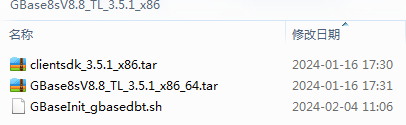
将 GBase8sV8.8_TL_3.5.1_x86_64.7z 下载并解压缩后,生成3个文件,其中 clientsdk_3.5.1_x86.tar 为客户端安装包。
安装客户端
本文使用的CentOS 7.9操作系统云环境
已经安装GBase 8s服务器IP:172.168.10.61
准备在 172.168.10.9 服务器上安装客户端,能访问172.168.10.61 的GBase 8s服务器。
如果无特别说明,以下操作都在 172.168.10.9 服务器上进行
1、创建gbasedbt用户
创建gbasedbt用户,密码建议大小写和数字混合,例如GBase123(如果已设置,则跳过)
[root@peixun-0058 ~]# groupadd gbasedbt
[root@peixun-0058 ~]# useradd -g gbasedbt -d /home/gbasedbt -s /bin/bash -m gbasedbt
[root@peixun-0058 ~]# passwd gbasedbt
Changing password for user gbasedbt.
New password:
BAD PASSWORD: The password contains the user name in some form
Retype new password:
passwd: all authentication tokens updated successfully.
2、创建安装目录
创建/opt/gbase8s/用于安装csdk (使用root账户进行操作)
[root@peixun-0058 ~]# mkdir -p /opt/gbase8s/
[root@peixun-0058 ~]# cd /opt/gbase8s/
3、将安装包上传并解压缩
将clientsdk_3.5.1_x86.tar文件上传到 /opt/gbase8s/ 目录下面,然后解压缩。
[root@peixun-0058 gbase8s]# ll
total 180840
-rw-r--r-- 1 root root 185180160 Apr 18 11:52 clientsdk_3.5.1_x86.tar
[root@peixun-0058 gbase8s]# tar xvf clientsdk_3.5.1_x86.tar
installclientsdk
doc/
doc/Glsapi_machine_notes_4.10.txt
doc/ESQLC_machine_notes_4.10.txt
doc/Odbc_machine_notes_4.10.txt
doc/Libcpp_machine_notes_4.10.txt
csdk.properties
.gbase.properties
[root@peixun-0058 gbase8s]# ll
total 361660
-rw-r--r-- 1 root root 185180160 Apr 18 11:52 clientsdk_3.5.1_x86.tar
-rw-r--r-- 1 root root      2792 Dec 14 18:15 csdk.properties
drwxr-xr-x 2 root root      4096 Dec 14 18:09 doc
-rwxr-xr-x 1 root root 185150730 Dec 14 18:15 installclientsdk
环境准备好了,可以进行安装操作了。
4、安装客户端
执行安装脚本为 installclientsdk,以控制台方式进行安装,根据屏幕提示语,直接多次回车,然后输入 Y,输入安装目录/opt/gbase8s,选择安装的组件处,直接回车不具体选择某一项(全部安装),直至安装完成。
[root@peixun-0058 gbase8s]# ./installclientsdk
Preparing to install...
Extracting the JRE from the installer archive...
Unpacking the JRE...
Extracting the installation resources from the installer archive...
Configuring the installer for this system's environment...

Launching installer...

===============================================================================
GBase ClientSDK                                  (created with InstallAnywhere)
-------------------------------------------------------------------------------

Preparing CONSOLE Mode Installation...


===============================================================================
Introduction
------------

The installer will guide you through the installation of GBase Client-SDK
4.10.FC4G1.

Copyright General Data Corporation 2014, 2022, All rights reserved.

It is strongly recommended that you quit all programs before continuing with
this installation.

Respond to each prompt to proceed to the next step in the installation.  If you
want to change something on a previous step, type 'back'.

You may cancel this installation at any time by typing 'quit'.


PRESS <ENTER> TO CONTINUE:


===============================================================================
License Agreement
-----------------

Installation and Use of GBase Client-SDK Requires Acceptance of the Following
License Agreement:

Thank you for choosing GBase product!


Please read carefully the following licencing agreement before installing any
product: TIANJIN GENERAL DATA TECHNOLOGY CO. LTD. LICENSE AGREEMENT


READ THE TERMS OF THIS AGREEMENT AND ANY PROVIDED SUPPLEMENTAL LICENSETERMS
(COLLECTIVELY "AGREEMENT") CAREFULLY BEFORE OPENING THE SOFTWAREMEDIA PACKAGE.
BY OPENING THE SOFTWARE MEDIA PACKAGE, YOU AGREE TO THE TERMS OF THIS
AGREEMENT.  IF YOU ARE ACCESSING THE SOFTWARE ELECTRONICALLY, INDICATE YOUR
ACCEPTANCE OF THESE  TERMS. IF YOU DO NOT AGREE TO ALL THESE TERMS, PROMPTLY
RETURN THE UNUSED  SOFTWARE TO YOUR PLACE OF PURCHASE FOR A REFUND.

1. LICENSE TO USE. GeneralData grants you a non-exclusive and non-transferable
license for  the internal use only of the accompanying software and
documentation and any error corrections  provided by GeneralData(collectively
"Software"), by the number of users and the class of  computer hardware for
which the corresponding fee has been paid.

2. RESTRICTIONS. Software is confidential and copyrighted. Title to Software

PRESS <ENTER> TO CONTINUE:

and all  associated intellectual property rights is retained by GeneralData
and/or its licensors. Except as  specifically authorized in any Supplemental
License Terms, you may not make copies of Software,  other than a single copy
of Software for archival purposes. Unless enforcement is prohibited by
applicable law, you may not modify, decompile, or reverse engineer Software.
You acknowledge  that Software is not designed, licensed or intended for use in
the design, construction, operation  or maintenance of any nuclear facility.
GeneralData disclaims any express or implied warranty  of fitness for such
uses. No right, title or interest in or to any trademark, service mark, logo or
trade name of GeneralData or its licensors is granted under this Agreement.

3. DISCLAIMER OF WARRANTY. Unless specified in this agreement, all express of
implied  conditions, representations and warranties, including any implied
warranty of merchantability,  fitness for aparticular purpose or
non-infringement are disclaimed, except to theextent that  these disclaimers
are held to be legally invalid.

4. LIMITATION OF LIABILITY. To the extent not prohibited by law, in no event
will GeneralData  or its licensors be liable for any lost revenue, profit or
data, or for special, indirect,  consequential, incidental orpunitive damages,
however caused regardless of the theory of liability,  arising out of or
related to the use of or inability to use software, even if GeneralData has

PRESS <ENTER> TO CONTINUE:

been  advised of the possibility of such damages. In no event will
GeneralData's libility to you, whether  incontract, tort(including negligence),
or otherwise, exceed the amount paid by you for Software  under this Agreement.
The foregoing limitations will apply even if the above stated warranty  fails
of itsessential purpose.

5. TERMINATION. This Agreement is effective until terminated. You may terminate
this  Agreement at any time by destroying all copies of Software. This
Agreement will terminate  immediately without noticefrom GeneralData if you
fail to comply with any provision of this  Agreement. Upon Termination, you
must destroy all copies of Software.


6. EXPORT REGULATIONS. All Software and technical data delivered under this
Agreement are  subject to US export control laws and may be subject to export
or import regulations in other  countries. You agree to comply strictly with
all such laws and regulations and acknowledge that  you have the responsibility
to obtain such licenses to export, re-export, or import as may be  required
after delivery to you.

7. CHINESE GOVERNMENT RESTRICTED. If Software is being acquired by or on behalf

PRESS <ENTER> TO CONTINUE:

of the  Chinese Government, then the Government's rights in Software and
accompanying documentation  will be only as set forth in this Agreement.

8. GOVERNING LAW. Any action related to this Agreement will be governed by
Chinese law:  "COPYRIGHT LAW OF THE PEOPLE'S REPUBLIC OF CHINA", "PATENT LAW OF
THE PEOPLE'S  REPUBLIC OF CHINA", "TRADEMARK LAW OF THE PEOPLE'S REPUBLIC OF
CHINA", "COMPUTER  SOFTWARE PROTECTION REGULATIONS OF THE PEOPLE'S REPUBLIC OF
CHINA". No choice of  law rules of any jurisdiction will apply."

9. SEVERABILITY. If any provision of this Agreement is held to be
unenforceable, this  Agreement will remain in effect with the provision
omitted, unless omission would frustrate the  intent of the parties, in which
case this Agreement will immediately terminate.

10. INTEGRATION. This Agreement is the entire agreement between you and
GeneralData  relating to its subject matter. It supersedes all prior or
contemporaneous oral or written  communications, proposals, representations and
warranties and prevails over any conflicting or  additional terms of any quote,
order, acknowledgment, or other communication between the  parties relating to
its subject matter during the term of this Agreement. No modification of this
Agreement will be binding, unless in writing and signed by an authorize
depresentative of each  party. When the translation document has the different

PRESS <ENTER> TO CONTINUE:

meaning or has the conflicting views with  Chinese original text conflict,
should take the laws and regulations promulgation unit as well as  the
GeneralData issue Chinese original text as the standard.


All trademarks and registered trademarks mentioned herein are the  property of
their respective owners.


DO YOU ACCEPT THE TERMS OF THIS LICENSE AGREEMENT? (Y/N): Y


===============================================================================
Installation Location
---------------------

Where Would You Like to Install GBase Client-SDK 4.10.FC4G1?

  Default Install Folder: /opt/GBASE/gbase

ENTER AN ABSOLUTE PATH, OR PRESS <ENTER> TO ACCEPT THE DEFAULT
      : /opt/gbase8s

INSTALL FOLDER IS: /opt/gbase8s

   IS THIS CORRECT? (Y/N): Y


===============================================================================
Installation Features
---------------------
下面出现安装选项,注意不要输入数字,直接回车,表示全部安装
===============================================================================
Choose Product Features
-----------------------

ENTER A COMMA_SEPARATED LIST OF NUMBERS REPRESENTING THE FEATURES YOU WOULD
LIKE TO SELECT, OR DESELECT. TO VIEW A FEATURE'S DESCRIPTION, ENTER
'?<NUMBER>'.  PRESS <RETURN> WHEN YOU ARE DONE:

    1- [X] GBase Client SDK
    2-  |-[X] GBase Object Interface for C++
    3-     |-[X] GBase Object Interface for C++ Demos
    4-  |-[X] GBase ESQL/C
    5-     |-[X] GBase ESQL/C Demos
    6-     |-[X] 7.2 Application Compatibility Module
    7-  |-[X] GBase LIBDMI for Client Applications
    8-  |-[X] GBase ODBC Driver
    9-     |-[X] GBase ODBC Driver Demos
   10-  |-[X] GBase Common Database Utilities
   11- [X] Global Language Support (GLS)
   12-  |-[X] West European and Americas
   13-  |-[X] Chinese

Please choose the Features to be installed by this installer.:   --不要输入数字,直接回车表示全部安装


===============================================================================
Installation Summary
--------------------

Type 'back' to go to the previous step or 'quit' to cancel the installation.
Please review the following before continuing:

Product Name:
    GBase Client-SDK

Install Folder:
    /opt/gbase8s

Product Features:
    GBase Client SDK,
    GBase Object Interface for C++,
    GBase Object Interface for C++ Demos,
    GBase ESQL/C,
    GBase ESQL/C Demos,
    7.2 Application Compatibility Module,
    GBase LIBDMI for Client Applications,
    GBase ODBC Driver,
    GBase ODBC Driver Demos,
    GBase Common Database Utilities,
    Global Language Support (GLS),
    West European and Americas,
    Chinese

Disk Space Information (for Installation Target):
    Required:  265,155,051 Bytes
    Available: 48,737,861,632 Bytes

PRESS <ENTER> TO CONTINUE:


===============================================================================
Installing...
-------------

 [==================|==================|==================|==================]
 [------------------|------------------|------------------|------------------]


===============================================================================
Installation Complete
---------------------

Congratulations. GBase Client-SDK 4.10.FC4G1 has been successfully installed
to:

/opt/gbase8s

GBase 8s V8.8


PRESS <ENTER> TO EXIT THE INSTALLER:
[root@peixun-0058 gbase8s]#
显示 successfully installed 表示安装成功了!
5、将 /opt/gbase8s 所有文件属主改为gbasedbt
[root@peixun-0058 gbase8s]# cd ..
[root@peixun-0058 opt]# chown -Rf gbasedbt:gbasedbt gbase8s
[root@peixun-0058 opt]# ll gbase8s/
total 361840
drwxr-xr-x 3 gbasedbt gbasedbt      4096 Apr 18 12:02 bin
-rw-r--r-- 1 gbasedbt gbasedbt 185180160 Apr 18 11:52 clientsdk_3.5.1_x86.tar
-rw-r--r-- 1 gbasedbt gbasedbt      2792 Dec 14 18:15 csdk.properties
drwxr-xr-x 5 gbasedbt gbasedbt      4096 Apr 18 12:01 demo
drwxr-xr-x 3 gbasedbt gbasedbt      4096 Apr 18 12:01 doc
drwxr-xr-x 2 gbasedbt gbasedbt      4096 Apr 18 12:02 etc
drwxrwxr-x 3 gbasedbt gbasedbt      4096 Apr 18 12:01 extend
-rwxr-xr-x 1 gbasedbt gbasedbt    110161 Apr 18 13:07 GBase_Client-SDK_Install_04_18_2024_12_01_55.log
-rwxr-xr-x 1 gbasedbt gbasedbt     27537 Apr 18 12:02 GBase_GLS_Install_04_18_2024_12_02_05.log
drwxr-xr-x 7 gbasedbt gbasedbt      4096 Apr 18 12:02 gls
drwxr-xr-x 6 gbasedbt gbasedbt      4096 Apr 18 12:01 incl
-rwxr-xr-x 1 gbasedbt gbasedbt 185150730 Dec 14 18:15 installclientsdk
drwxr-xr-x 6 gbasedbt gbasedbt      4096 Apr 18 12:02 lib
drwxr-xr-x 4 gbasedbt gbasedbt      4096 Apr 18 12:01 msg
drwxr-xr-x 3 gbasedbt gbasedbt      4096 Apr 18 12:01 release
drwxrwx--- 2 gbasedbt gbasedbt      4096 Apr 18 12:02 tmp
drwxrwxr-x 3 gbasedbt gbasedbt      4096 Apr 18 12:01 uninstall
6、切换账号gbasedbt,配置环境变量
[root@peixun-0058 gbase8s]# su - gbasedbt

# 设置环境变量
[gbasedbt@peixun-0058 ~]$  cd ~

[gbasedbt@peixun-0058 ~]$  vim .bash_profile
# .bash_profile

# Get the aliases and functions
if [ -f ~/.bashrc ]; then
        . ~/.bashrc
fi

# User specific environment and startup programs
# 增加下面这些内容
PATH=$PATH:$HOME/.local/bin:$HOME/bin
export PATH
export GBASEDBTDIR=/opt/gbase8s
export GBASEDBTSERVER=gbase01
export ONCONFIG=onconfig.$GBASEDBTSERVER
export PATH=$GBASEDBTDIR/bin:${PATH}
export GBASEDBTSQLHOSTS=/opt/gbase8s/etc/sqlhosts

export DB_LOCALE=zh_CN.utf8
export CLIENT_LOCALE=zh_CN.utf8
export GL_USEGLU=1
export DBDATE="Y4MD-"
export DBACCESS_SHOW_TIME=1
export LD_LIBRARY_PATH=${GBASEDBTDIR}/lib:${GBASEDBTDIR}/lib/esql:${GBASEDBTDIR}/lib/cli
export ODBCINI=/opt/gbase8s/etc/odbc.ini
环境变量文件保存之后要生效
[gbasedbt@peixun-0058 ~]$ source .bash_profile
7、设置本机的 sqlhost 文件
[gbasedbt@peixun-0058 ~]$ cd /opt/gbase8s/
[gbasedbt@peixun-0058 ~]$ cd etc
[gbasedbt@peixun-0058 ~]$ vim sqlhosts
# 输入下面这行设置,然后保存退出,注意一定写上8s服务器的IP地址172.168.10.61
I
[gbasedbt@peixun-0058 etc]$ cat sqlhosts
gbase01 onsoctcp 172.168.10.61 9088
8、需要在 8s 服务器端设置sqlhost 文件
在8s 服务器端172.168.10.61的sqlhost 文件里设置,增加一条信息,写上客户端的IP
[gbasedbt@peixun-0057 ~]$ cd /opt/gbase8s/
[gbasedbt@peixun-0057 gbase351]$ cd etc
[gbasedbt@peixun-0057 etc]$ vi sqlhosts
gbase01 onsoctcp 172.168.10.61 9088
gbase01 onsoctcp 172.168.10.9 9088
9、测试客户端连接8s
执行dbaccess菜单模式,点连接Connect,输入实例、用户名密码就能连成功了。
[gbasedbt@163 etc]$ dbaccess
然后选择“C/连接”,然后回车

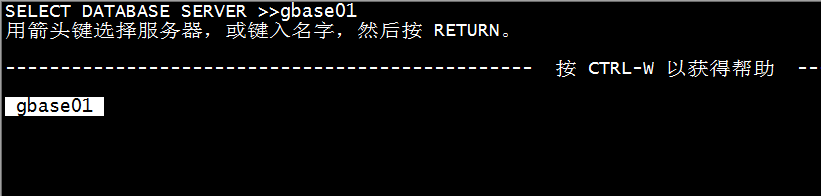
再次回车,就会显示出 gbase01实例名
需要输入 gbase01 实例名
回车之后,输入数据库账户 gbasedbt

回车后输入密码 GBase123

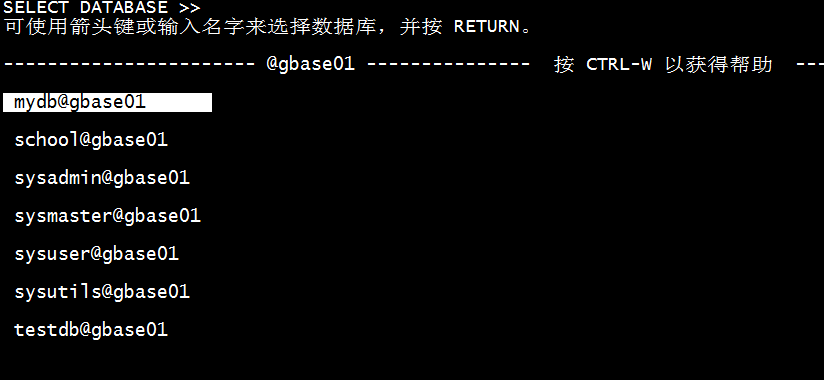
然后回车就显示出所有数据库名称了,表示dbaccess连接成功。
卸载GBase 8s的客户端工具
如果不再使用客户端工具了,需要使用root账户进行卸载,卸载命令为 uninstallclientsdk
[root@peixun-0058 ~]# cd /opt/gbase8s/

[root@peixun-0058 uninstall]# cd uninstall_clientsdk/
[root@peixun-0058 uninstall_clientsdk]# ll
总用量 7604
-rwxrwxr-x 1 root root   25113 3月  23 2021 ids_unlink.xsl
-rw-rw-r-- 1 root root 1008907 8月   6 00:52 InstallScript.iap_xml
-rwxr-xr-x 1 root root    8540 8月   6 00:54 installvariables.properties
-rw-rw-r-- 1 root root      29 8月   6 00:54 removablesList.txt
-rwxr-xr-x 1 root root   74206 8月   6 00:52 uninstallclientsdk
-rwxrwxr-x 1 root root    3416 8月   6 00:52 uninstallclientsdk.lax
-rw-rw-r-- 1 root root 6644522 8月   6 00:52 uninstaller.jar
[root@163 uninstall_clientsdk]# ./uninstallclientsdk
Graphical installers are not supported by the VM. The console mode will be used instead...

===============================================================================
GBase Client-SDK                                 (created with InstallAnywhere)
-------------------------------------------------------------------------------

Preparing CONSOLE Mode Uninstallation...


===============================================================================
Uninstall GBase Client-SDK 4.10.FC4G1
-------------------------------------

About to uninstall...

GBase Client-SDK 4.10.FC4G1

This will remove features installed by InstallAnywhere.  It will not remove
files and folders created after the installation.

PRESS <ENTER> TO CONTINUE:

===============================================================================
Uninstall Options
-----------------

ENTER THE NUMBER FOR YOUR CHOICE, OR PRESS <ENTER> TO ACCEPT THE DEFAULT:

  ->1- Completely remove all features and components.
    2- Choose specific features that were installed by InstallAnywhere.

Please choose one of the following options:: 1
===============================================================================
Uninstalling...
---------------
...

===============================================================================
Uninstall Complete
------------------

Some items could not be removed.

[root@peixun-0058 ..]# pwd
/opt/gbase8s/uninstall/uninstall_clientsdk/..
[root@peixun-0058 ..]# cd /opt
# 将安装目录内容全部删除
[root@peixun-0058]# rm -rf gbase8s
总结
本文详细介绍了如何独立安装8s客户端工具的全过程,希望对大家使用8s有所帮助。
