



硬盘的 S.M.A.R.T. 信息(Self-Monitoring Analysis and Reporting Technology,自我监测分析与报告技术)是一种用于监控硬盘健康状况的技术。它可以检测硬盘的潜在故障,以便用户及时备份数据并更换硬盘。
一般使用第三方工具检测硬盘 smart 信息,比如:
smartmontools
DiskGenius
hdtune
其中 smartmontools 是命令行工具,windows 、linux 都支持。DiskGenius 是国产工具,hdtune 是国外工具,它俩都有免费版。
先看下 DiskGenius 显示的 smart 信息:
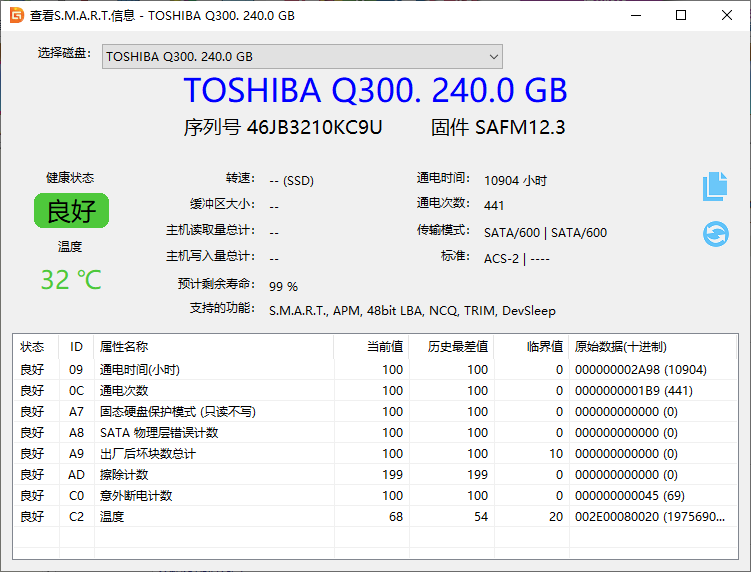
其中有用数据有:
------------------------------------TOSHIBA Q300. 240.0 GB------------------------------------序列号: 46JB3210KC9U通电时间: 10904 小时通电次数: 441温度: 32 ℃
使用 smartmontools 工具也可以获得类似的信息:
C:\> smartctl -a dev/sdasmartctl 7.4 2023-08-01 r5530 [x86_64-w64-mingw32-w10-22H2] (sf-7.4-1)Copyright (C) 2002-23, Bruce Allen, Christian Franke, www.smartmontools.org=== START OF INFORMATION SECTION ===Device Model: TOSHIBA Q300.Serial Number: 46JB3210KC9ULU WWN Device Id: 5 00080d c004475e1Firmware Version: SAFM12.3User Capacity: 240,057,409,536 bytes [240 GB]Sector Size: 512 bytes logical/physicalRotation Rate: Solid State DeviceForm Factor: 2.5 inchesTRIM Command: Available, deterministic, zeroedDevice is: Not in smartctl database 7.3/5528ATA Version is: ACS-2 (minor revision not indicated)SATA Version is: SATA 3.1, 6.0 Gb/s (current: 6.0 Gb/s)Local Time is: Tue Apr 23 17:10:59 2024SMART support is: Available - device has SMART capability.SMART support is: EnabledSMART Attributes Data Structure revision number: 16Vendor Specific SMART Attributes with Thresholds:ID# ATTRIBUTE_NAME FLAG VALUE WORST THRESH TYPE UPDATED WHEN_FAILED RAW_VALUE9 Power_On_Hours 0x0012 100 100 000 Old_age Always - 1090412 Power_Cycle_Count 0x0012 100 100 000 Old_age Always - 441167 Unknown_Attribute 0x0022 100 100 000 Old_age Always - 0168 Unknown_Attribute 0x0012 100 100 000 Old_age Always - 0169 Unknown_Attribute 0x0003 100 100 010 Pre-fail Always - 0173 Unknown_Attribute 0x0012 199 199 000 Old_age Always - 0192 Power-Off_Retract_Count 0x0012 100 100 000 Old_age Always - 69194 Temperature_Celsius 0x0023 068 054 020 Pre-fail Always - 32 (Min/Max 8/46)
smartmontools 获取地址:
https://www.smartmontools.org/
另外有一个 python 库对 smartmontools 的数据做了处理,可以单独获取指定值:
C:\> pip install pySMART
from pySMART import Device, DeviceList# 获取所有硬盘的列表devices = DeviceList()# 打印每个硬盘的SMART信息for device in devices:print("Device:", device.name)print("Model:", device.model)print("Serial:", device.serial)print("Size:", device.size_raw)print("SMART attributes:")for attribute in device.attributes:if attribute and attribute.name != 'Unknown_Attribute':print(" {}: {}".format(attribute.name, attribute.raw))
Python 脚本运行效果为:
d:\>python getSmart.pyDevice: sdaModel: TOSHIBA Q300.Serial: 46JB3210KC9USize: 240 GBSMART attributes:Power_On_Hours: 10904Power_Cycle_Count: 441Power-Off_Retract_Count: 69Temperature_Celsius: 31 (Min/Max 8/46)
硬盘 smart 信息里没有硬盘出厂日期, 硬盘出厂日期只能通过硬盘外部的贴纸获取,也可以基于序列号在硬盘品牌的官网查询。通过 smart 信息可以估算出硬盘的使用频率,比如通电时长、启停次数、异常断电次数。
全文完。
如果转发本文,文末务必注明:“转自微信公众号:生有可恋”。
文章转载自生有可恋,如果涉嫌侵权,请发送邮件至:contact@modb.pro进行举报,并提供相关证据,一经查实,墨天轮将立刻删除相关内容。
