



部署前准备:
1.确认备份存放位置
如本例中备份文件指定存放在/opt/scripts/postgres_back目录
2.确定postgres的bin目录位置(可以执行ps -ef|grep postgres|grep D查看postgres的bin所在目录),如下图:

3.确定备份使用的数据库账号密码
4.执行以下命令备份现有的root定时任务信息(如确定root没有其他定时任务可以不用执行)
[root@ETLDB103037 ~]# cat /var/spool/cron/root >> /opt/cron_root.old_back
开始部署:
1.下载附件中的pg_auto_backup_deploy.sh并上传至数据库备份服务器的任意目录,本例是/opt/scripts/postgres_back目录
2.使用root用户授权
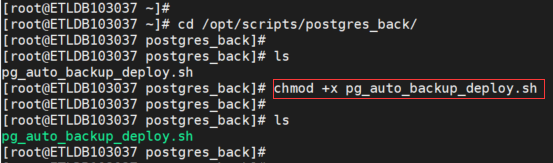
[root@ETLDB103037 postgres_back]# chmod +x pg_auto_backup_deploy.sh
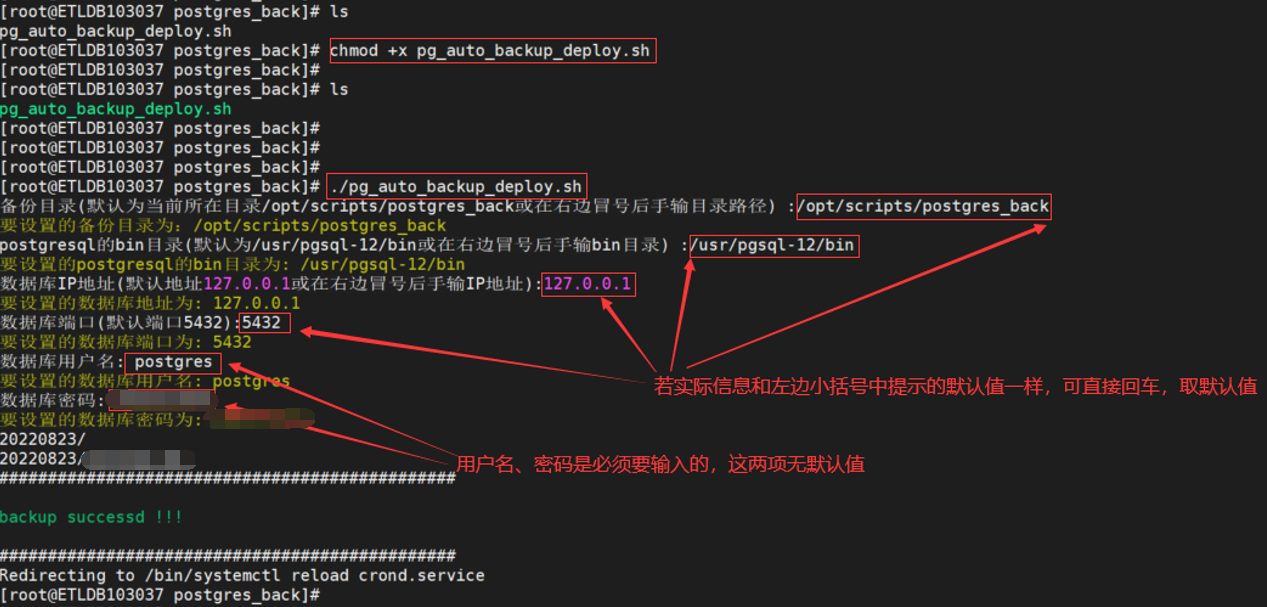
3.执行部署脚本
[root@ETLDB103037 postgres_back]# ./pg_auto_backup_deploy.sh
按照提示输入备份路径、postgresql的bin目录、备份IP地址、端口、数据库用户名和密码信息
4.等待首次备份完成,查看备份结果,检查备份目录下back_date目录内文件是否生成,检查定时任务是否已成功部署,如:
切换至备份目录可以看到备份文件

可以看到如下信息
00 02 * * * /opt/scripts/postgres_back/postgres_back.sh
5.要定期观察备份产生的情况,确保备份是完整可用的!
默认每天凌晨2点进行备份,保留最近的15天备份文件
示例:
执行过程需手工输入部分已标出
pg_auto_backup_deploy.sh 完整脚本参考如下:#!/bin/bash
# Name:pg_auto_backup_deploy
# Version:v1.0
# Author:binguo
# Date:2022-08-23
default_current_path=`pwd`
read -p "备份目录(默认为当前所在目录${default_current_path}或在右边冒号后手输目录路径) :" back_dir
test -z "$back_dir" && back_dir=${default_current_path}
echo -e "\033[33m要设置的备份目录为:$back_dir\033[0m"
default_one_pgbin=`ps -ef|grep postgres|grep D|grep bin|awk '{print $8}'|awk -F "/bin/" '{print $1"/bin"}'|head -1`
test -z "$default_one_pgbin" && default_one_pgbin=`ps -ef|grep postmaster|grep D|grep bin|awk '{print $8}'|awk -F "/bin/" '{print $1"/bin"}'|head -1`
read -p "postgresql的bin目录(默认为${default_one_pgbin}或在右边冒号后手输bin目录) :" postgres_bin
test -z "$postgres_bin" && postgres_bin=$default_one_pgbin
echo -e "\033[33m要设置的postgresql的bin目录为: $postgres_bin\033[0m"
read -p "数据库IP地址(默认地址127.0.0.1或在右边冒号后手输IP地址):" database_host
test -z "$database_host" && database_host=127.0.0.1
echo -e "\033[33m要设置的数据库地址为: $database_host\033[0m"
read -p "数据库端口(默认端口5432):" database_port
test -z "$database_port" && database_port=5432
echo -e "\033[33m要设置的数据库端口为: $database_port\033[0m"
read -p "数据库用户名: " username
if [ -z $username ]; then
echo -e "\033[31m要设置的数据库用户名不能为空,请重新运行pg_auto_backup_deploy.sh\033[0m"
exit 0
fi
echo -e "\033[33m要设置的数据库用户名: $username\033[0m"
read -p "数据库密码: " password
if [ -z $password ]; then
echo -e "\033[31m要设置的数据库密码不能为空,请重新运行pg_auto_backup_deploy.sh\033[0m"
exit 0
fi
echo -e "\033[33m要设置的数据库密码为: $password\033[0m"
export PGPASSWORD=${password}
echo "exit"|${postgres_bin}/psql -d postgres -U ${username} -p ${database_port} -h ${database_host} -t -c 'SELECT 1'|grep 1 > /dev/null
if [ $? -ne 0 ]; then
echo "export PGPASSWORD=${password}"
echo "${postgres_bin}/psql -d postgres -U ${username} -p ${database_port} -h ${database_host} -t -c 'SELECT 1'"
echo -e "\033[31m数据库连接测试失败,请确保以上输入的数据库连接信息有效后,再重新运行pg_auto_backup_deploy.sh\033[0m"
exit 1
fi
test ! -d "${back_dir}" && mkdir -p "${back_dir}"
test ! -d "${back_dir}/postgres_back.sh" && touch "${back_dir}/postgres_back.sh"
chmod +x ${back_dir}/postgres_back.sh
cat << EOF > $back_dir/postgres_back.sh
#!/bin/bash
####backup info
db_host=${database_host}
user=${username}
export PGPASSWORD=${password}
kport=${database_port}
keepdate=\`date +%Y%m%d --date="-7 day"\`
expirdate=\`date +%Y%m%d --date="-14 day"\`
####postgresql info
backdate=\`date +%Y%m%d\`
datadir="${back_dir}"
backdir="\${datadir}/\${backdate}"
psqldir="${postgres_bin}/psql"
dumpdir="${postgres_bin}/pg_dump"
errlog="\${datadir}/postgres_dump.log"
backlog="\${datadir}/back_info.log"
####check backup directory && backup all database
test ! -d "\${backdir}" && mkdir -p "\${backdir}"
echo "backup begintime: "\$(date +"%Y-%m-%d %H:%M:%S") >> \${backlog}
for db_list in \`\${psqldir} -d postgres -U \${user} -p \${kport} -h \${db_host} -t -c 'SELECT datname FROM pg_database'|egrep -v "datname|template0|template1|template2|postgres|test|^\$"\`
do
\${dumpdir} -h \${db_host} -U \${user} -p \${kport} -x -O \${db_list}| gzip > \${backdir}/\${db_list}.gz
done
####handle backupfile
cd \${datadir}
tar zcvf \${backdate}.tar.gz \${backdate}
rm -rf \${backdir}
####backup info
if [ -f "\${keepdate}.tar.gz" ];then
if [ \`du -k \${keepdate}.tar.gz |awk '{print \$1}'\` -gt 102400 ]
then
rm -rf \${expirdate}.tar.gz
echo \$(date +"%Y-%m-%d %H:%M:%S")" :\${keepdate}.tar.gz > 100M and del \${expirdate}.tar.gz" >> \${backlog}
else
echo \$(date +"%Y-%m-%d %H:%M:%S")" :\${keepdate}.tar.gz backup file size is less than 100M, please check if backup is successed!" > \${errlog}
fi
else
echo \$(date +"%Y-%m-%d %H:%M:%S")" : when check \${keepdate}.tar.gz size, it's not exists. if \${keepdate}.tar.gz > 100M then del \${expirdate}.tar.gz end" >> \${backlog}
fi
####send mail
#[ -s \${errlog} ] && /bin/mail -s "DB Backup Error on xx.xx.xx.xx" -a \${errlog} binguo2022a@163.com,binguo2022b@163.com < \${backinfo}
if [ -s \${errlog} ];then
echo 'back not compalete or error!'
else
echo "backup endtime: "\$(date +"%Y-%m-%d %H:%M:%S")" backup successd!" >> \${backlog}
echo "###############################################"
echo ""
echo -e "\033[32mbackup successd !!!\033[0m"
echo ""
echo "###############################################"
fi
if [ -f "\${errlog}" ];then
cat \${errlog} >> \${errlog}.old
rm -rf \${errlog}
fi
EOF
${back_dir}/postgres_back.sh
cat << EOF >> /var/spool/cron/root
00 02 * * * ${back_dir}/postgres_back.sh
EOF
/sbin/service crond reload
exit 0
