



1.gs_dump工具介绍
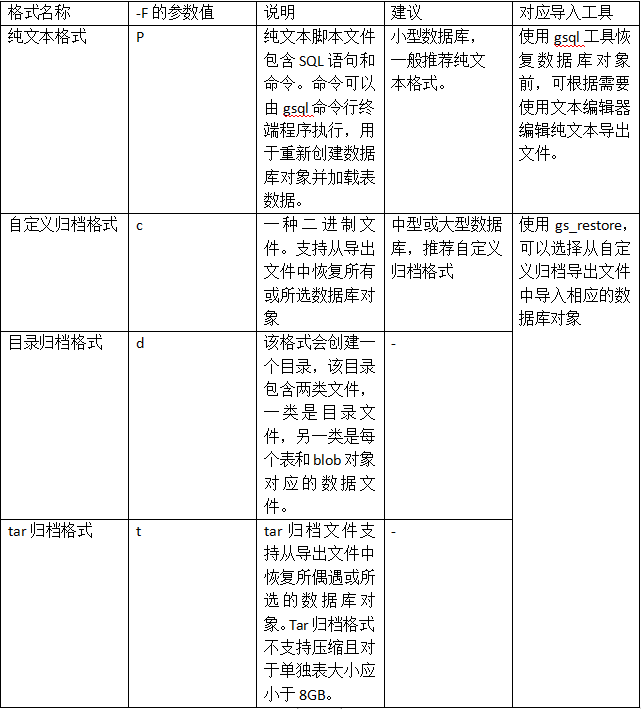
常用导出方式:
整库导出:gs_dump -p port_number database_name -f xxx.sql
指定schema导出:
gs_dump -h host_name -p port_number database_name -f xxx.sql -n schema_name
指定表导出:
gs_dump -h host_name -p port_number database_name -f xxx.sql -t schenma.table
测试示例
### 2.1创建s1.t1表

test=# \\dt s1.t1;

List of relations

Schema | Name | Type | Owner | Storage

\--------±-----±------±------±---------------------------------

s1 | t1 | table | omm | {orientation=row,compression=no}

(1 row)

test=# select \* from s1.t1;

id | name

\----±-----

1 | A

2 | B

3 | C

4 | D

(4 rows)
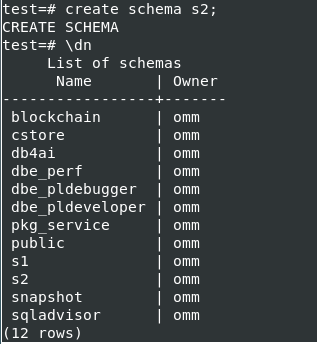
2.2 创建目标schema s2
导入的目标schema需先创建好
2.3执行导出操作
[omm@panwei1 ~]$ gs_dump -p 17700 test -f test.sql -t s1.t1
gs_dump[port=‘17700’][test][2024-04-24 15:36:56]: The total objects number is 401.
gs_dump[port=‘17700’][test][2024-04-24 15:36:56]: [100.00%] 401 objects have been dumped.
gs_dump[port=‘17700’][test][2024-04-24 15:36:56]: dump database test successfully
gs_dump[port=‘17700’][test][2024-04-24 15:36:56]: total time: 953 ms
[omm@panwei1 ~]$
查看导出的sql文件
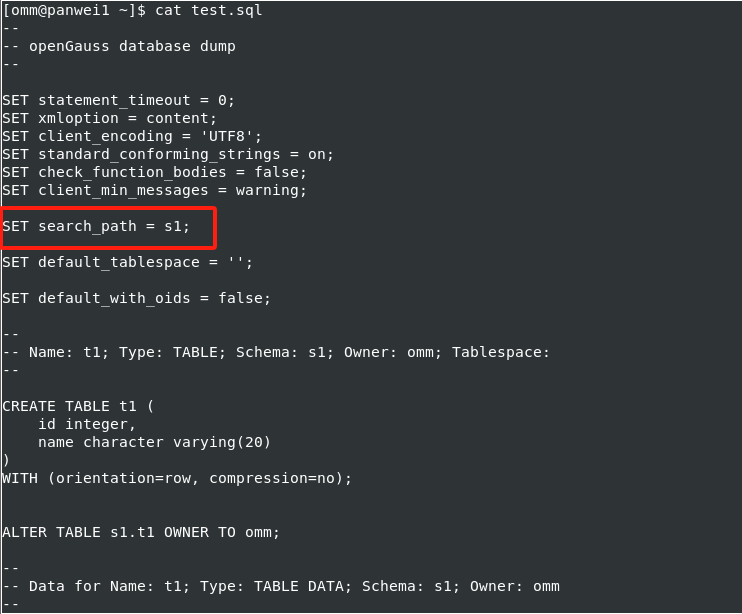
sql文件中会先设置好serch_path,将表导入到表所属的schema中。可以将search_path修改为需要替换的schema,即可将表导入到其他schema中。
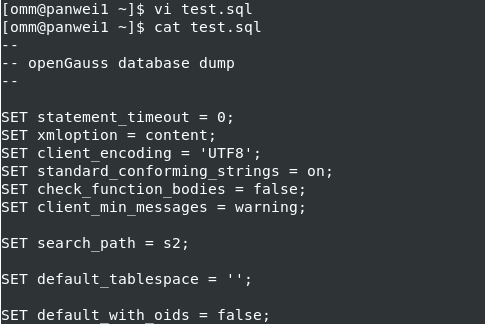
2.4执行导入操作
omm@panwei1 ~\]$ gsql -p 17700 -d test -f test.sql

SET

SET

SET

SET

SET

SET

SET

SET

SET

CREATE TABLE

ALTER TABLE

total time: 18 ms

test=# select \* from s2.t1;

id | name

\----±-----

1 | A

2 | B

3 | C

4 | D

(4 rows)

test=# \\dt s2.t1

List of relations

Schema | Name | Type | Owner | Storage

\--------±-----±------±------±---------------------------------

s2 | t1 | table | omm | {orientation=row,compression=no}

最后根据所需修改表的owner
「喜欢这篇文章,您的关注和赞赏是给作者最好的鼓励」
关注作者
【版权声明】本文为墨天轮用户原创内容,转载时必须标注文章的来源(墨天轮),文章链接,文章作者等基本信息,否则作者和墨天轮有权追究责任。如果您发现墨天轮中有涉嫌抄袭或者侵权的内容,欢迎发送邮件至:contact@modb.pro进行举报,并提供相关证据,一经查实,墨天轮将立刻删除相关内容。
