




ORPO 是一种新兴微调技术,它把传统的监督式微调和偏好调整阶段合二为一。这降低了训练所需的计算资源和时间。而且,经过验证,ORPO 在不同的模型规模和基准测试中都表现优异。
在本文中,我们将展示如何使用 ORPO 和 TRL 库对最新的 Llama 3 8B 模型进行微调。相关代码可以在 Google Colab 和 GitHub 上的 LLM 课程中找到。
在本文中,我们将使用 ORPO 和 TRL 库对新的 Llama 3 8B 模型进行微调。该代码可在 Google Colab 和 GitHub 上的 LLM 课程中找到。
⚖️ ORPO
为大型语言模型(LLMs)进行指令微调和偏好对齐是使其适用于特定任务的关键。传统上,这涉及到两个阶段:1/ 监督式微调(SFT)以适应目标领域,然后是 2/ 偏好对齐,比如通过人类反馈的强化学习(RLHF)或直接偏好优化(DPO),以提高生成首选响应而非拒绝响应的概率。
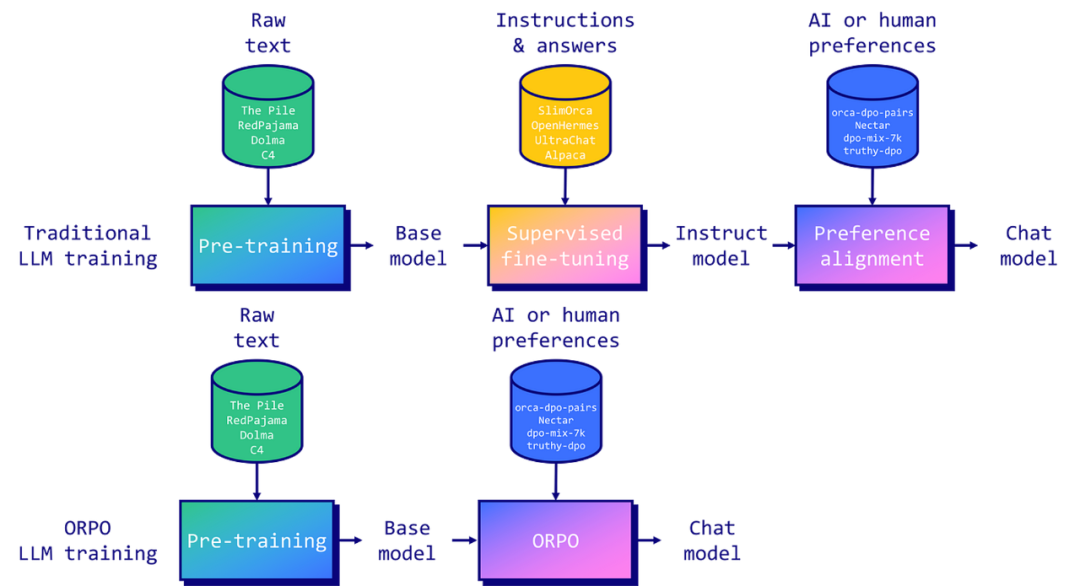
然而,研究人员发现这种方法有一个局限。虽然 SFT 有效地将模型适应到所需领域,但它同时也增加了生成不期望答案的概率。这就是为什么需要偏好对齐阶段,来增加首选和拒绝响应之间可能性的差距。
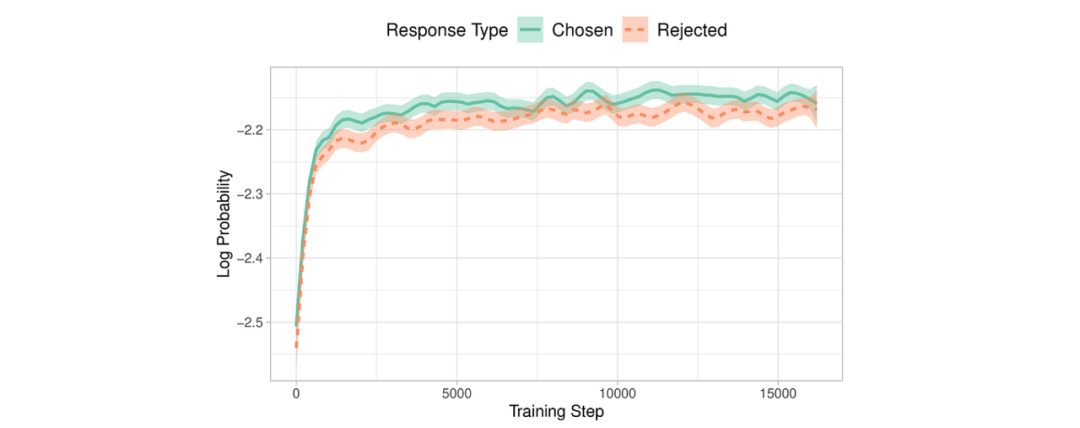
由 Hong 和 Lee(2024)引入的 ORPO,通过将指令微调和偏好对齐合并为一个单一的、整体的训练过程,提供了一个优雅的解决方案。ORPO 修改了标准语言模型目标,将负对数似然损失与赔率比(OR)项结合起来。这种 OR 损失对拒绝的响应给予轻微的惩罚,而对首选的响应给予重奖,使模型能够同时学习目标任务并与人类偏好对齐。

ORPO 已在主要微调库中实现,比如 TRL、Axolotl 和 LLaMA-Factory。
💻 使用 ORPO 微调 Llama 3
Llama 3 是 Meta 开发的最新一代大型语言模型。这些模型在庞大的数据集上训练,总计 15 万亿个 Token(相比之下,Llama 2 为 2T Token)。发布了两种模型规模:一个 700 亿参数模型和一个较小的 80 亿参数模型。700B 模型表现出色,在 MMLU 基准测试上得分为 82,在 HumanEval 基准测试上得分为 81.7。
Llama 3 模型还将上下文长度扩大到了 8192 个 Token(相比之下,Llama 2 是 4096 个 Token),甚至有可能通过 RoPE 技术扩展到 32k 个 Token。此外,这些模型采用了一个新的分词器,其词汇表大小为 128K 个 Token,减少了 15% 用于编码文本的 Token 数量。这也解释了参数量从 7B 增加到 8B 的原因。
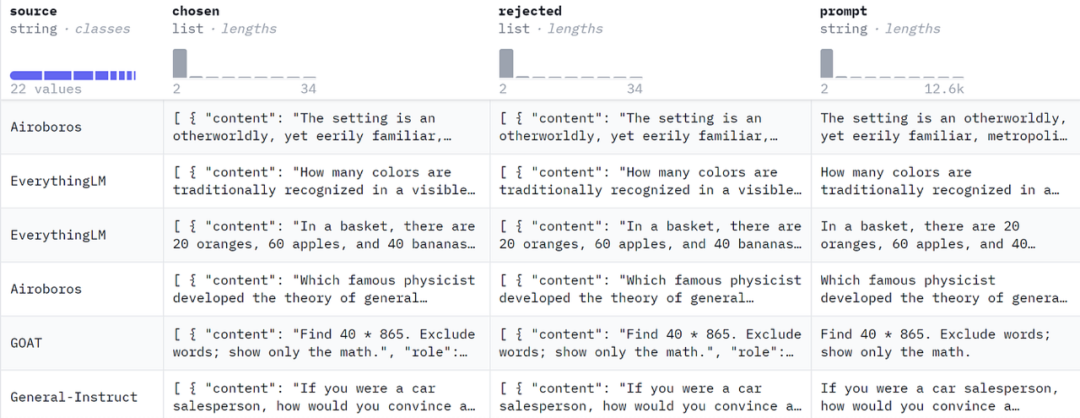
接下来,我们介绍了 ORPO 训练的样本格式,需要包括一个提示、一个首选答案和一个被拒绝的答案。我们使用了 mlabonne/orpo-dpo-mix-40k 数据集,它是几个高质量 DPO 数据集的组合。
argilla/distilabel-capybara-dpo-7k-binarized:高分选定答案 >=5(2882 个样本)
argilla/distilabel-intel-orca-dpo-pairs:高分选定答案 >=9,不在 GSM8K 中(2299 个样本)
argilla/ultrafeedback-binarized-preferences-cleaned:高分选定答案 >=5(22799 个样本)
argilla/distilabel-math-preference-dpo:高分选定答案 >=9(2181 个样本)
unalignment/toxic-dpo-v0.2(541 个样本)
M4-ai/prm_dpo_pairs_cleaned(7958 个样本)
jondurbin/truthy-dpo-v0.1(1016 个样本)
照常,我们从安装所需的库开始:
pip install -U transformers datasets accelerate peft trl bitsandbytes wandb
安装完毕后,我们可以导入必要的库并登录到 W&B(可选):
import gcimport osimport torchimport wandbfrom datasets import load_datasetfrom google.colab import userdatafrom peft import LoraConfig, PeftModel, prepare_model_for_kbit_trainingfrom transformers import (AutoModelForCausalLM,AutoTokenizer,BitsAndBytesConfig,TrainingArguments,pipeline,)from trl import ORPOConfig, ORPOTrainer, setup_chat_formatwb_token = userdata.get('wandb')wandb.login(key=wb_token)
如果您有最新的 GPU,您还应该能够使用 Flash Attention 库来代替默认的急切注意力实现,以实现更高效的注意力操作。
if torch.cuda.get_device_capability()[0] >= 8:!pip install -qqq flash-attnattn_implementation = "flash_attention_2"torch_dtype = torch.bfloat16else:attn_implementation = "eager"torch_dtype = torch.float16
在接下来的部分,我们将利用 bitsandbytes 加载 Llama 3 8B 模型,并采用 4 位精度。然后,我们使用 PEFT 设定 LoRA 配置以用于 QLoRA。我们还使用了方便的 setup_chat_format() 函数修改模型和分词器以支持 ChatML。它自动应用这个聊天模板,添加特殊 Token,并调整模型的嵌入层大小以匹配新的词汇量。
注意,你需要提交一个请求以访问 meta-llama/Meta-Llama-3-8B 并登录到你的 Hugging Face 账户。或者,你可以加载未受限制的模型副本,如 NousResearch/Meta-Llama-3-8B 。
# Modelbase_model = "meta-llama/Meta-Llama-3-8B"new_model = "OrpoLlama-3-8B"# QLoRA configbnb_config = BitsAndBytesConfig(load_in_4bit=True,bnb_4bit_quant_type="nf4",bnb_4bit_compute_dtype=torch_dtype,bnb_4bit_use_double_quant=True,)# LoRA configpeft_config = LoraConfig(r=16,lora_alpha=32,lora_dropout=0.05,bias="none",task_type="CAUSAL_LM",target_modules=['up_proj', 'down_proj', 'gate_proj', 'k_proj', 'q_proj', 'v_proj', 'o_proj'])# Load tokenizertokenizer = AutoTokenizer.from_pretrained(base_model)# Load modelmodel = AutoModelForCausalLM.from_pretrained(base_model,quantization_config=bnb_config,device_map="auto",attn_implementation=attn_implementation)model, tokenizer = setup_chat_format(model, tokenizer)model = prepare_model_for_kbit_training(model)
模型准备好训练后,我们可以开始处理数据集。我们加载 mlabonne/orpo-dpo-mix-40k 并使用 apply_chat_template() 函数将 "chosen" 和 "rejected" 列转换为 ChatML 格式。注意,我只使用了 1000 个样本,而不是整个数据集,因为运行整个数据集需要太长时间。
dataset_name = "mlabonne/orpo-dpo-mix-40k"dataset = load_dataset(dataset_name, split="all")dataset = dataset.shuffle(seed=42).select(range(1000))def format_chat_template(row):row["chosen"] = tokenizer.apply_chat_template(row["chosen"], tokenize=False)row["rejected"] = tokenizer.apply_chat_template(row["rejected"], tokenize=False)return rowdataset = dataset.map(format_chat_template,num_proc= os.cpu_count(),)dataset = dataset.train_test_split(test_size=0.01)
首先,我们需要设定一些超参数:
learning_rate:ORPO 与传统的 SFT 或甚至 DPO 相比使用了非常低的学习率。这个值为 8e-6,源自原始论文,大致相当于 SFT 的学习率为 1e-5,DPO 的学习率为 5e-6。我建议对于真正的微调,将其增加大约 1e-6。
beta:它是论文中的 $\lambda$ 参数,缺省值为 0.1。原始论文的附录通过消融研究展示了如何选择它。
其他参数,如最大长度和批大小设置为使用尽可能多的 VRAM(在这种配置下约为 20 GB)。理想情况下,我们将训练模型 3-5 个周期,但在这里我们将坚持使用 1 个周期。
最后,我们可以使用 ORPOTrainer 进行模型训练。
orpo_args = ORPOConfig(learning_rate=8e-6,beta=0.1,lr_scheduler_type="linear",max_length=1024,max_prompt_length=512,per_device_train_batch_size=2,per_device_eval_batch_size=2,gradient_accumulation_steps=4,optim="paged_adamw_8bit",num_train_epochs=1,evaluation_strategy="steps",eval_steps=0.2,logging_steps=1,warmup_steps=10,report_to="wandb",output_dir="./results/",)trainer = ORPOTrainer(model=model,args=orpo_args,train_dataset=dataset["train"],eval_dataset=dataset["test"],peft_config=peft_config,tokenizer=tokenizer,)trainer.train()trainer.save_model(new_model)
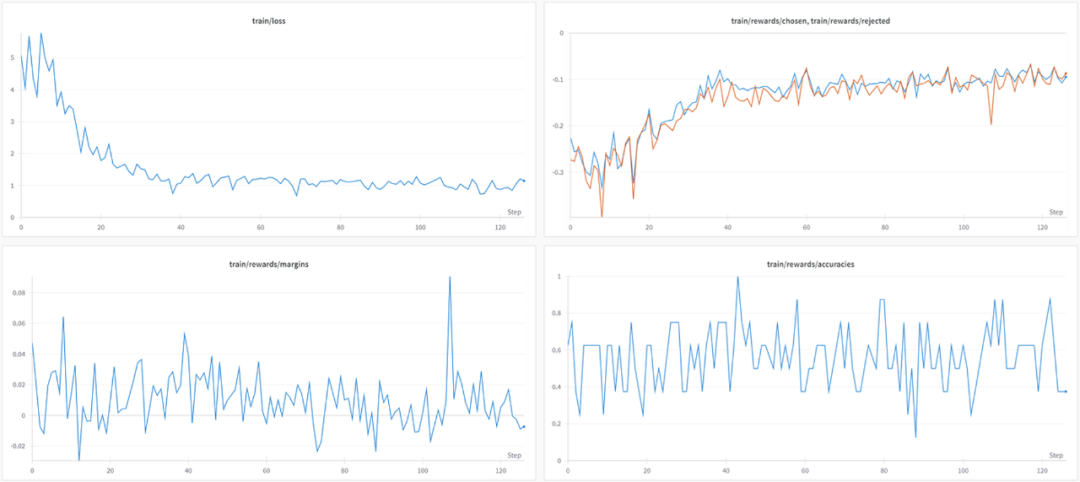
在 L4 GPU 上训练这 1000 个样本大约花费了 2 小时。以下是运行时 W&B 图表情况:
虽然损失在下降,但选择和拒绝答案之间的差异并不明显:平均差距和准确率仅略高于零和 0.5。
最后,我们将 QLoRA 适配器与基础模型合并,并将其推送到 Hugging Face Hub,完成了从头到尾的微调过程。
# Flush memorydel trainer, modelgc.collect()torch.cuda.empty_cache()# Reload tokenizer and modeltokenizer = AutoTokenizer.from_pretrained(base_model)model = AutoModelForCausalLM.from_pretrained(base_model,low_cpu_mem_usage=True,return_dict=True,torch_dtype=torch.float16,device_map="auto",)model, tokenizer = setup_chat_format(model, tokenizer)# Merge adapter with base modelmodel = PeftModel.from_pretrained(model, new_model)model = model.merge_and_unload()model.push_to_hub(new_model, use_temp_dir=False)tokenizer.push_to_hub(new_model, use_temp_dir=False)
我们完成了 Llama 3 的快速微调:mlabonne/OrpoLlama-3–8B。你可以使用这个 Hugging Face Space。尽管我们的训练时间有限,但在 Nous 的基准测试套件上的初步评估显示,我们的 ORPO 微调模型在所有基准测试上都提高了基础模型的性能。
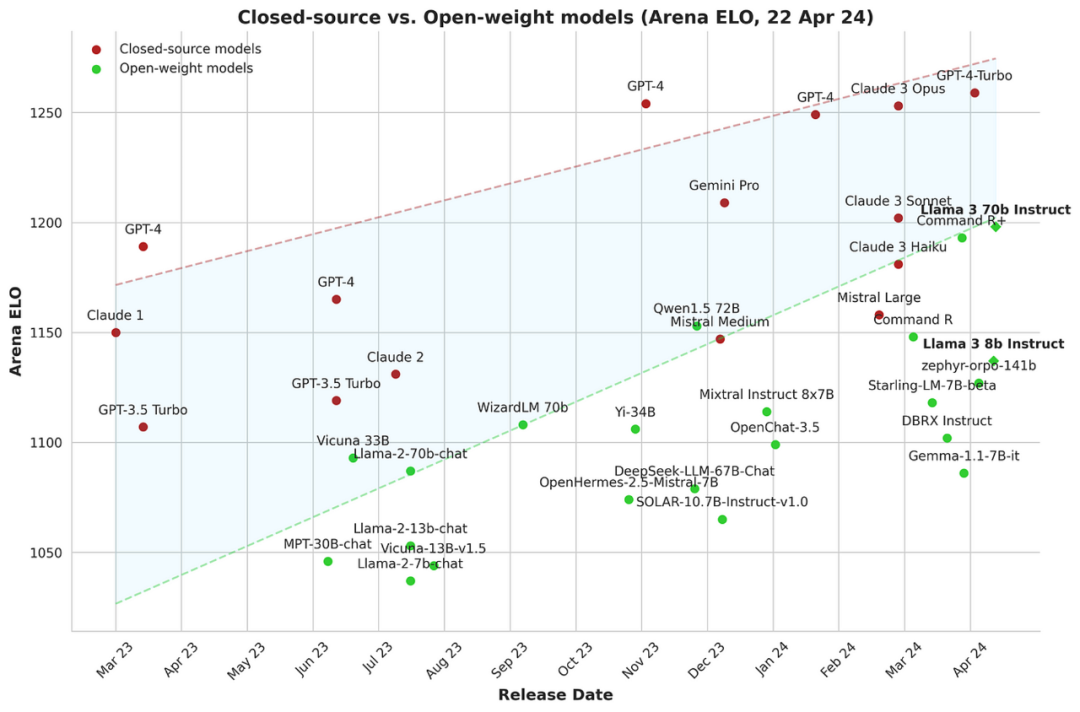
对于开源社区来说这是最值得鼓励的事,随着越来越多的高质量开放权重模型被发布,开源社区在缩小闭源模型与开放权重模型之间的差距方面取得了重要进展。微调技术,特别是像 ORPO 这样的新方法,是实现最佳性能的重要工具。
结论
在本文中,我们介绍了 ORPO 算法,并解释了它是如何将 SFT 和偏好对齐阶段统一为一个单一过程的。然后,我们使用 TRL 对 Llama 3 8B 模型进行了微调,使用了自定义偏好数据集。最终模型显示出鼓舞人心的结果,并突显了 ORPO 作为新的微调范式的潜力。
资源:
Google Colab:https://colab.research.google.com/drive/1eHNWg9gnaXErdAa8_mcvjMupbSS6rDvi?usp=sharing LLM 课程:https://github.com/mlabonne/llm-course J. Hong、N. Lee 和 J. Thorne,ORPO:没有参考模型的单片偏好优化:https://arxiv.org/abs/2403.07691 L. von Werra 等人,TRL:Transformer 强化学习。GitHub,2020 年。[在线]。可供应: https://github.com/huggingface/trl Axolotl:https://github.com/OpenAccess-AI-Collective/axolotl LLaMA-Factory:https://github.com/hiyouga/LLaMA-Factory Bartolome,A.,Martin,G.和Vila,D.(2023)。诺图斯。在 GitHub 存储库中。GitHub上。https://github.com/argilla-io/notus Meta 的 AI,介绍 Meta Llama 3:https://ai.meta.com/blog/meta-llama-3/ mlabonne/OrpoLlama-3–8B:https://huggingface.co/mlabonne/OrpoLlama-3-8B huggingface spaces:https://huggingface.co/spaces/mlabonne/OrpoLlama-3-8B argilla/distilabel-capybara-dpo-7k-binarized:https://huggingface.co/datasets/argilla/distilabel-capybara-dpo-7k-binarized argilla/distilabel-intel-orca-dpo-pairs:https://huggingface.co/datasets/argilla/distilabel-intel-orca-dpo-pairs argilla/ultrafeedback-binarized-preferences-cleaned:https://huggingface.co/datasets/argilla/ultrafeedback-binarized-preferences-cleaned argilla/distilabel-math-preference-dpo:https://huggingface.co/datasets/argilla/distilabel-math-preference-dpo unalignment/toxic-dpo-v0.2 :https://huggingface.co/datasets/unalignment/toxic-dpo-v0.2 M4-ai/prm_dpo_pairs_cleaned:https://huggingface.co/datasets/M4-ai/prm_dpo_pairs_cleaned jondurbin/truthy-dpo-v0.1 :https://huggingface.co/datasets/jondurbin/truthy-dpo-v0.1
