



引言
随着生成式人工智能的快速发展,向量数据库如 ChromaDB 在构建现实世界应用程序中的作用变得日益重要。本文将深入探讨 ChromaDB 的工作原理、功能以及如何在语义搜索应用程序中有效利用它。
介绍
生成式人工智能在过去一年中取得了长足的进步。自 DALL-E 2 图像生成模型推出以来,GPT-3.5、GPT-4 和开源模型等许多 AI 模型已成为 AI 社区内外的话题。随着人工智能应用和用例的兴起,各种工具和技术的流动越来越多,以促进此类人工智能应用,并允许人工智能开发人员构建现实世界的应用程序。
在这些工具中,今天我们将了解 ChromaDB 的工作原理和功能,ChromaDB 是一个开源矢量数据库,用于存储来自 GPT3.5、GPT-4 或任何其他操作系统模型等 AI 模型的嵌入。嵌入是任何 AI 应用程序管道的关键组成部分。由于计算机只处理向量,因此所有数据都必须以嵌入的形式进行矢量化,以便在应用程序中使用。因此,通过动手代码示例深入了解 ChromDB 的工作!
ChromaDB基础和安装库
ChromaDB 是一个开源矢量数据库,旨在存储矢量嵌入,以开发和构建大型语言模型应用程序。该数据库使存储 LLM 应用程序的知识、技能和事实变得更加简单。
ChromaDB 是一个开源矢量数据库,旨在存储矢量嵌入,以开发和构建大型语言模型应用程序。该数据库使存储 LLM 应用程序的知识、技能和事实变得更加简单。
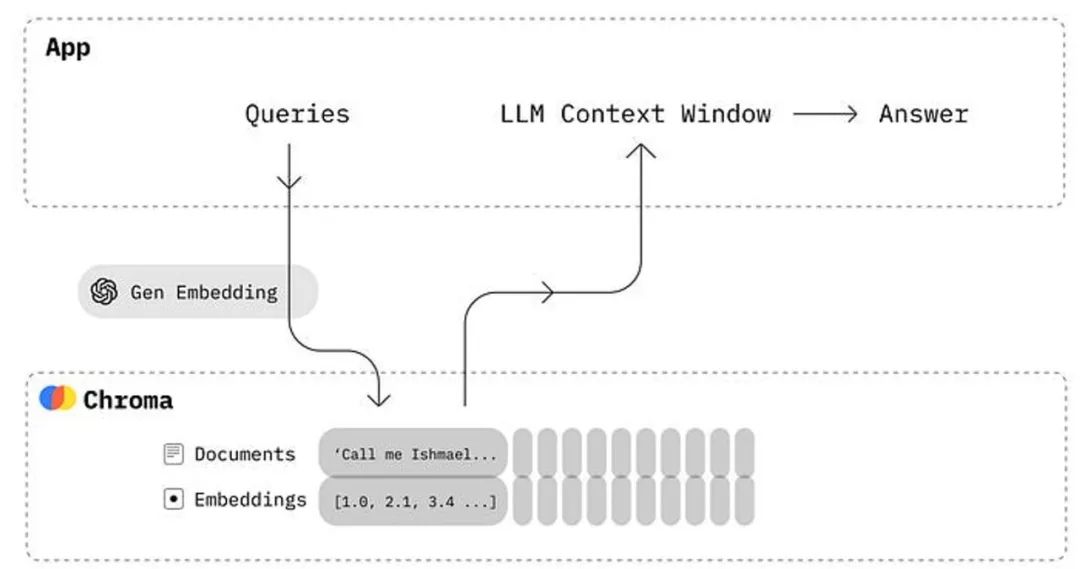
上图显示了chromaDB与任何LLM应用程序集成时的工作原理。ChromaDB为我们提供了一个执行以下功能的工具:
使用 ID 存储嵌入及其元数据。
嵌入文档和查询
搜索嵌入
ChromaDB使用起来非常简单,可以与任何LLM驱动的应用程序一起设置。它旨在提高开发人员的工作效率,使其成为开发人员友好的工具。
现在,让我们在 Python 和 Javascript 环境中安装 ChromaDB。它还可以在 Jupyter Notebook 中运行,允许数据科学家和机器学习工程师试验 LLM 模型。
Python 安装
pip install chromadb
Javascript 安装
npm install --save chromadb # yarn add chromadb
ChromaDB的功能和工作原理
我们可以使用 Jupyter Notebook 环境(如 Google Colab)进行演示。您可以在 Google Colab、Kaggle 或本地笔记本环境中执行以下动手练习。
创建 ChromaDB 集合
# import chromadb and create clientimport chromadbclient = chromadb.Client()collection = client.create_collection("my-collection")
在上面的代码中,我们实例化了客户端对象,以在存储库文件夹中创建“my-collection”集合。
该集合是存储嵌入、文档和任何其他元数据的位置,以便以后查询各种应用程序。
将文档添加到集合
# add the documents in the dbcollection.add(documents=["This is a document about cat", "This is a document about car", "This is a document about bike"],metadatas=[{"category": "animal"}, {"category": "vehicle"}, {"category": "vehicle"}],ids=["id1", "id2","id3"])
现在,我们添加了一些示例文档以及元数据和 ID,以结构化方式存储它们。
ChromaDB 将存储文本文档并自动处理标记化、矢量化和索引,无需任何额外命令。
查询集合数据库
# ask the querying to retrieve the data from DBresults = collection.query(query_texts=["vehicle"],n_results=1)------------------------------[Results]-------------------------------------{'ids': [['id2']],'embeddings': None,'documents': [['This is a document about car']],'metadatas': [[{'category': 'vehicle'}]],'distances': [[0.8069301247596741]]}
只需在集合数据库上调用“query()”函数,它将根据输入查询返回最相似的文本及其元数据和 ID。在我们的示例中,查询返回包含“车辆”元数据的类似文本。
带有示例文档的语义搜索应用程序
语义搜索是科技行业最流行的应用之一,被谷歌、百度等用于网络搜索。语言模型现在允许在个人级别或为嵌入大量数据的商业组织开发此类应用程序。
我们将使用带有一些示例文档的“pets”文件夹来解决 ChromaDB 中的语义搜索应用程序。我们在本地文件夹中有以下文件:

让我们从本地文件夹导入文件并将它们存储在“file_data”中。
# import files from the pets folder to store in VectorDBimport osdef read_files_from_folder(folder_path):file_data = []for file_name in os.listdir(folder_path):if file_name.endswith(".txt"):with open(os.path.join(folder_path, file_name), 'r') as file:content = file.read()file_data.append({"file_name": file_name, "content": content})return file_datafolder_path = "/content/pets"file_data = read_files_from_folder(folder_path)
上面的代码从“pets”文件夹中获取文件,并将它们附加到“file_data”中作为所有文件的列表。我们将使用这些文件作为嵌入存储在 ChromaDB 中,以便进行查询。
# get the data from file_data and create chromadb collectiondocuments = []metadatas = []ids = []for index, data in enumerate(file_data):documents.append(data['content'])metadatas.append({'source': data['file_name']})ids.append(str(index + 1))# create collection of pet filespet_collection = client.create_collection("pet_collection")# add files to the chromadb collectionpet_collection.add(documents=documents,metadatas=metadatas,ids=ids)
上面的代码从文件列表中获取文件和元数据,并将它们添加到名为“pet_collection”的 chromaDB 集合中。
在这里我们需要注意的是,默认情况下,chromadb 使用句子转换器中的“all-MiniLM-L6-v2”嵌入模型,该模型将文本文档转换为向量。现在,让我们查询集合以查看结果。
# query the database to get the answer from vectorized dataresults = pet_collection.query(query_texts=["What is the Nutrition needs of the pet animals?"],n_results=1)results
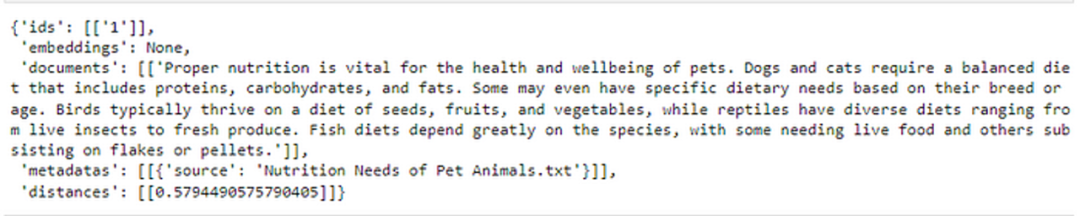
当我们查询集合时,它会自动从嵌入的文档中找到我们查询的最相似的文档,然后生成输出。我们还可以在输出中看到距离指标,该指标显示某个文档与我们的查询的接近程度。
使用不同的嵌入模型
到目前为止,我们已经使用默认的嵌入模型来矢量化输入文本,但 ChromaDB 也允许句子转换器库中的各种其他模型。我们将使用“paraphrase-MiniLM-L3-v2”模型为我们的语义搜索应用程序嵌入相同的文档。
注意:如果您还没有,请在执行以下代码之前安装sentence_transformers库)
# import the sentence transformersfrom sentence_transformers import SentenceTransformermodel = SentenceTransformer('paraphrase-MiniLM-L3-v2')documents = []embeddings = []metadatas = []ids = []for index, data in enumerate(file_data):documents.append(data['content'])embedding = model.encode(data['content']).tolist()embeddings.append(embedding)metadatas.append({'source': data['file_name']})ids.append(str(index + 1))# create the new chromaDB and use embeddings to add and query datapet_collection_emb = client.create_collection("pet_collection_emb")# add the pets files into the pet_collection_emb databasepet_collection_emb.add(documents=documents,embeddings=embeddings,metadatas=metadatas,ids=ids)
上面的代码使“paraphrase-MiniLM-L3-v2”模型对输入文件进行编码,同时添加到新集合中。
现在,我们可以再次查询数据库以获得最相似的结果。
# write text query and submit to the collectionquery = "What are the different kinds of pets people commonly own?"input_em = model.encode(query).tolist()results = pet_collection_emb.query(query_embeddings=[input_em],n_results=1)results

ChromaDB 中支持的嵌入
嵌入是为 AI 应用程序存储各种数据的原生方式。它们可以根据应用程序的要求表示文本、图像、音频和视频数据。
ChromaDB 支持来自不同嵌入提供商的许多 AI 模型,例如 OpenAI、Sentence transformers、Cohere 和 Google PaLM API。让我们在这里看看其中的一些。
句子转换器嵌入
# loading any model from sentence transformer librarysentence_transformer_ef = embedding_functions.SentenceTransformerEmbeddingFunction(model_name="all-MiniLM-L6-v2")
使用上面的代码,我们可以使用可用模型中的任何模型。您可以在此处找到型号列表
OpenAI 模型
ChromaDB 提供了一个包装器函数,用于 OpenAI 的任何嵌入模型 API for AI 应用程序
# function to call OpenAI embeddingsopenai_ef = embedding_functions.OpenAIEmbeddingFunction(api_key="YOUR_API_KEY",model_name="text-embedding-ada-002")
结论
总之,向量数据库是生成式人工智能应用的关键构建块。ChromaDB就是这样一种向量数据库,它越来越多地用于各种基于LLM的应用程序中。
资源
ChromaDB 官方文档:https://docs.trychroma.com/
Github 代码仓库:https://github.com/avikumart/LLM-GenAI-Transformers-Notebooks
