



在本文中,我们将了解如构建一个简单的聊天机器人,该机器人允许上传 CSV 文件,并根据上传的文件内容进行提问回答。
项目中,我们将使用 LangChain 框架,将上传的 CSV 文件数据连接起来,并使用 Streamlit 为聊天机器人创建用户界面。
与 ChatGPT 不同,ChatGPT 有上下文的限制(最多只能提供 4096 个token),我们的聊天机器人则能够处理 CSV 数据并通过使用嵌入和向量存储(vectorstore)管理大型数据库。
构建聊天机器人
接下来!我们将使用非常简单的 Python 语法在 CSV 数据上开发我们的聊天机器人。
提前准备:
OpenAI API 密钥
CSV 文件(考虑到 token 成本,准备少量的数据)
项目地址:https://github.com/mcks2000/Lucky-chatbot
安装依赖库:
pip install streamlit streamlit_chat langchain openai faiss-cpu tiktoken
导入聊天机器人所需的库:
import streamlit as stfrom streamlit_chat import messagefrom langchain.embeddings.openai import OpenAIEmbeddingsfrom langchain.chat_models import ChatOpenAIfrom langchain.chains import ConversationalRetrievalChainfrom langchain.document_loaders.csv_loader import CSVLoaderfrom langchain.vectorstores import FAISSimport tempfile
OpenAI API密钥
user_api_key = st.sidebar.text_input(label="#### Your OpenAI API key ",placeholder="Paste your openAI API key, sk-",type="password")uploaded_file = st.sidebar.file_uploader("upload", type="csv")
加载CSV文件:
if uploaded_file:# 使用tempfile因为CSVLoader只接受文件路径with tempfile.NamedTemporaryFile(delete=False) as tmp_file:tmp_file.write(uploaded_file.getvalue())tmp_file_path = tmp_file.nameloader = CSVLoader(file_path=tmp_file_path, encoding="utf-8", csv_args={'delimiter': ','})data = loader.load()
数据拆分
LangChain 的 CSVLoader 函数允许将 CSV 文件拆分多行,每行为唯一的行。
通过打印数据的内容,我们可以看到:
st.write(data)
0:"Document(page_content='venue_name: McGinnis Sisters\\nvenue_type: Market\\nvenue_address: 4311 Northern Pike, Monroeville, PA\\nwebsite: <http://www.mcginnis-sisters.com/\\nmenu_url:> \\nmenu_text: \\nphone: 412-858-7000\\nemail: \\nalcohol: \\nlunch: True', metadata={'source': 'C:\\\\Users\\\\UTILIS~1\\\\AppData\\\\Local\\\\Temp\\\\tmp6_24nxby', 'row': 0})"1:"Document(page_content='venue_name: Holy Cross (Reilly Center)\\nvenue_type: Church\\nvenue_address: 7100 West Ridge Road, Fairview PA\\nwebsite: \\nmenu_url: \\nmenu_text: Fried pollack, fried shrimp, or combo. Adult $10, Child $5. Includes baked potato, homemade coleslaw, roll, butter, dessert, and beverage. Mac and cheese $5.\\nphone: 814-474-2605\\nemail: \\nalcohol: \\nlunch: ', metadata={'source': 'C:\\\\Users\\\\UTILIS~1\\\\AppData\\\\Local\\\\Temp\\\\tmp6_24nxby', 'row': 1})"
数据 Embeddings
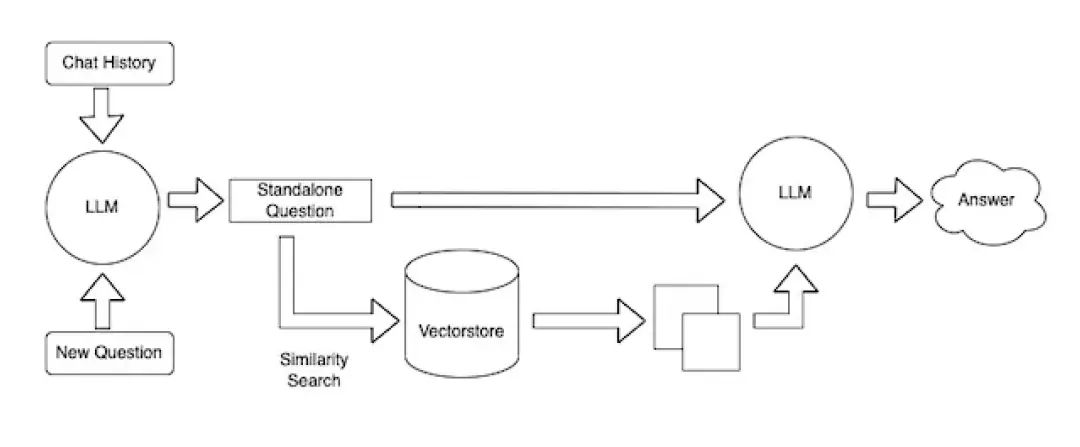
我们将数据提供给向量存储(FAISS),该向量存储使用 OpenAIEmbeddings 将文件转换为向量。
Embeddings 允许用户 CSVLoader 切割部分的数据转换为向量,然后根据给定文件每行的内容表示索引。
在实际操作中,当用户进行查询时,会先在向量存储中执行搜索,然后将最佳匹配索引返回给 LLM,LLM 将重新构造找到的索引的内容,最后向用户提供格式化的响应。
embeddings = OpenAIEmbeddings()vectorstore = FAISS.from_documents(data, embeddings)
模型设置
通过提供所需的聊天模型 gpt-3.5-turbo(或 gpt-4)和 FAISS vectorstore,将
ConversationalRetrievalChain 添加到我们的聊天机器人中。
chain = ConversationalRetrievalChain.from_llm(llm=ChatOpenAI(temperature=0.0, model_name='gpt-3.5-turbo'),retriever=vectorstore.as_retriever())
聊天记录设置
ConversationalRetrievalChain 函数允许用户提供问题和对话历史,以生成聊天机器人的响应。
st.session_state['history'] 允许用户将聊天记录存储在 Streamlit 站点上
def conversational_chat(query):result = chain({"question": query, "chat_history": st.session_state['history']})st.session_state['history'].append((query, result["answer"]))return result["answer"]
初始化
通过创建st.session_state['history'] 和在聊天中显示的第一条消息来初始化聊天机器人会话。
['generated'] 对应于聊天机器人的响应。
['past'] 对应于用户提供的消息。
response_container 有助于通过将用户的问题区域放在聊天消息下方来改善UI。
if 'history' not in st.session_state:st.session_state['history'] = []if 'generated' not in st.session_state:st.session_state['generated'] = ["Hello ! Ask me anything about " + uploaded_file.name + " "]if 'past' not in st.session_state:st.session_state['past'] = ["Hey ! "]# 用于聊天历史的容器response_container = st.container()# 用于用户文本输入的容器container = st.container()
用户输入设置
让用户输入并将其问题发送到 conversational_chat 函数,其中用户的问题作为参数。
with container:with st.form(key='my_form', clear_on_submit=True):user_input = st.text_input("Query:", placeholder="Talk about your csv data here (:", key='input')submit_button = st.form_submit_button(label='Send')if submit_button and user_input:output = conversational_chat(user_input)st.session_state['past'].append(user_input)st.session_state['generated'].append(output)
聊天记录的显示设置
允许使用 streamlit_chat 模块在 Streamlit 站点上显示用户和聊天机器人的聊天记录。
if st.session_state['generated']:with response_container:for i in range(len(st.session_state['generated'])):message(st.session_state["past"][i], is_user=True, key=str(i) + '_user', avatar_style="big-smile")message(st.session_state["generated"][i], key=str(i), avatar_style="thumbs")
启动脚本:
streamlit run name_of_your_chatbot.py #用您的文件名运行
最后
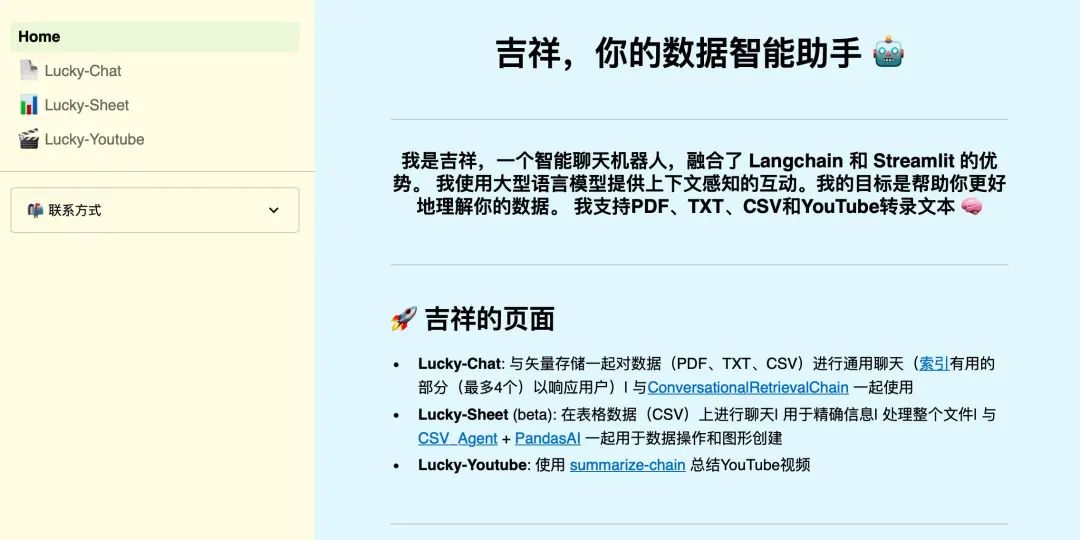
现在,您拥有了一个使用 LangChain、OpenAI 和 Streamlit 构建的聊天机器人,它能够根据您的CSV文件回答您的问题!
以上是全部内容,项目的源码已经放在文末链接,可随时下载使用。
希望这篇文章能帮助您!
参考链接
Github:https://github.com/mcks2000/Lucky-chatbot
Langchain:https://github.com/langchain-ai/langchain
向量存储:https://python.langchain.com/docs/integrations/vectorstores/faiss
OpenAI Embeddings:https://platform.openai.com/docs/guides/embeddings/what-are-embeddings
FAISS 向量数据库:https://github.com/facebookresearch/faiss
streamlit-chat:https://pypi.org/project/streamlit-chat/
欢迎添加 二师兄 的个人微信 沟通交流(请勿重复添加)

请用个人微信添加
