
作者 | 徐sir
来源 |公众号 徐sir的IT之路
如需转载请私信联系我,除了墨天轮、CSDN、PGFANS和微信公众号以外都不是我的号
如果觉得我写的对你有帮助,麻烦动动小手,点下:转发、关注、在看,帮我多增加点人气
写这个测试的主要原因是前一阵群里大佬们一直在讨论如何在REDHAT8.0上安装ORACLE 11G,我还好奇了,现在一般不是都用7.9来跑11G么
沟通一下才了解redhat 7快要停保了,正规的企业为了避免以后的问题,都考虑迁移到新版本的系统上。
关于红帽7的生命周期,又查询了一下,发现还能挺几年,但是这个额外的维保得花钱购买。
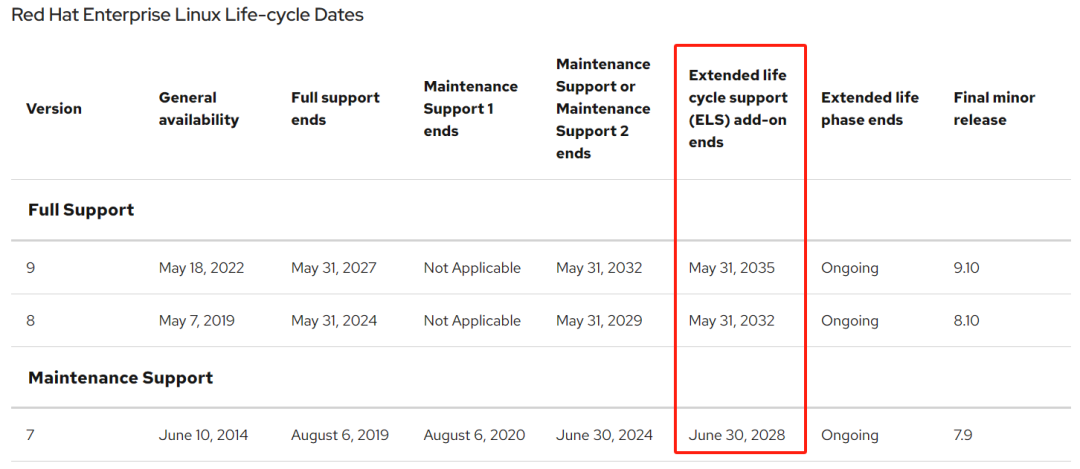
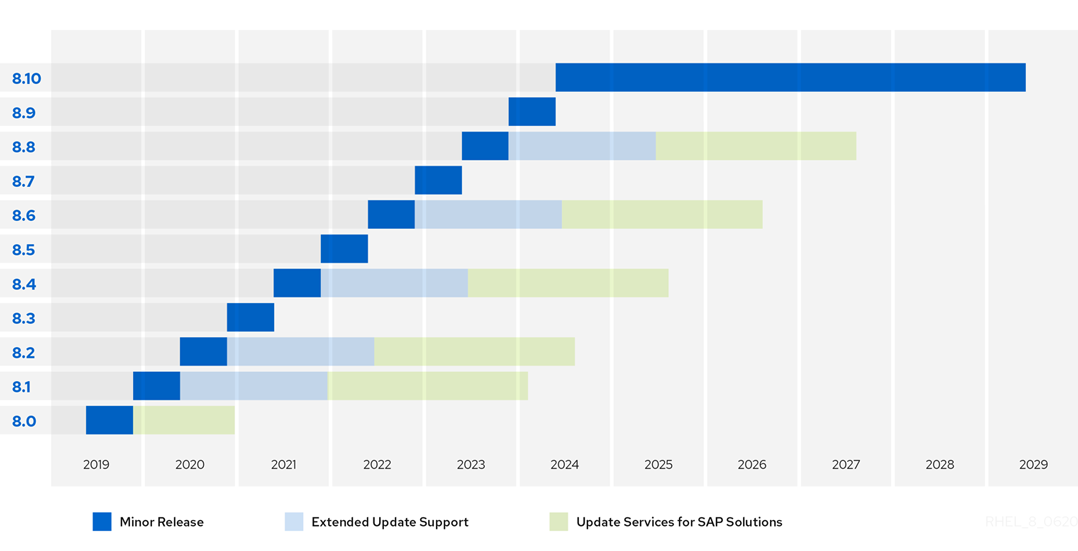
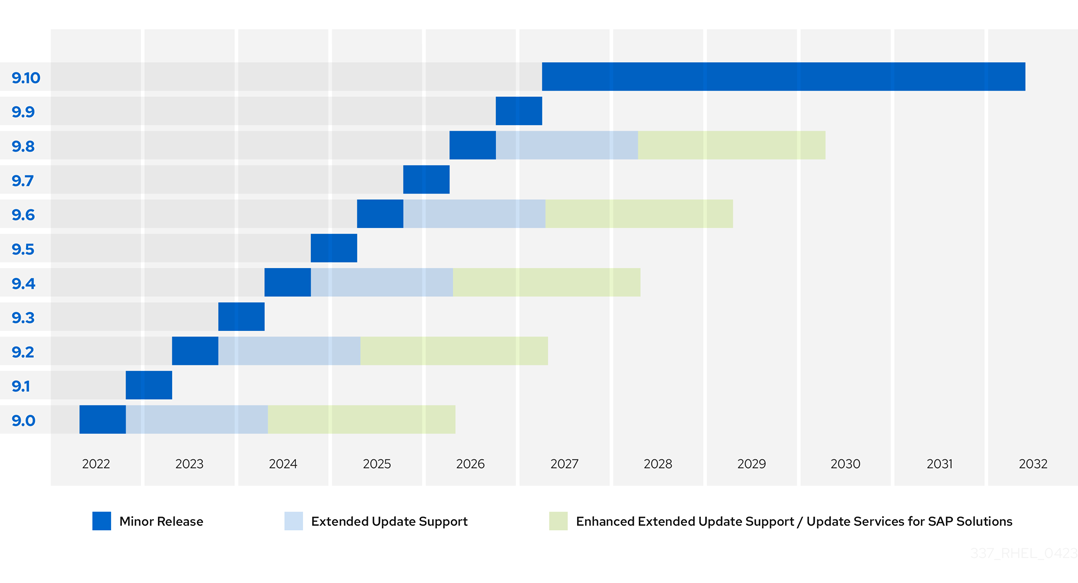
我这目前所处的客户环境还比较落后,大部分都切到国产化了,都是一些小应用,那咱也得学啊!
于的查阅了相关的官方文档、BLOG确认11G确实是支持在linux8.0上运行。
汇总了这么一篇,写的有问题欢迎大家一起指正。
1、关于操作系统认证版本
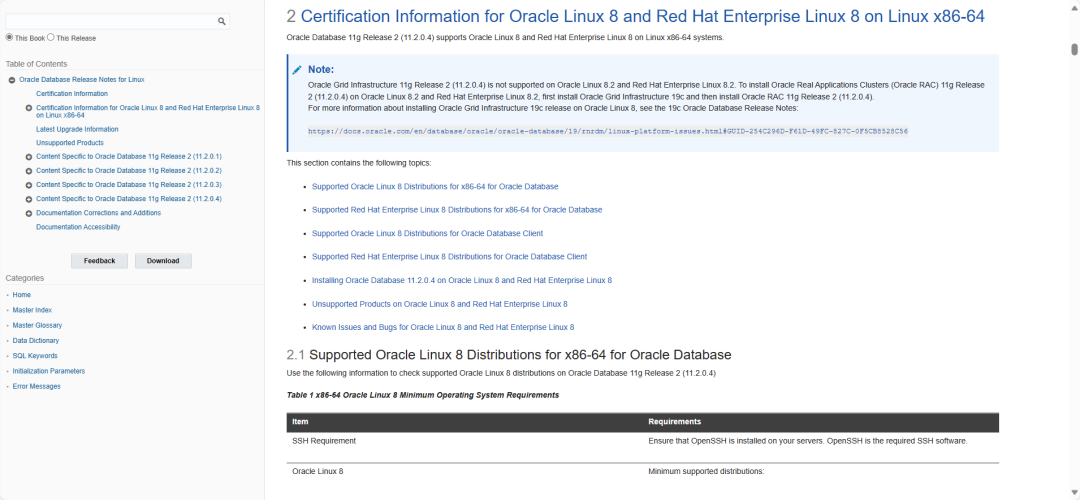
目前在MOS上查证,oracle database 11.2.0.4己经通过oracle linux8的认证
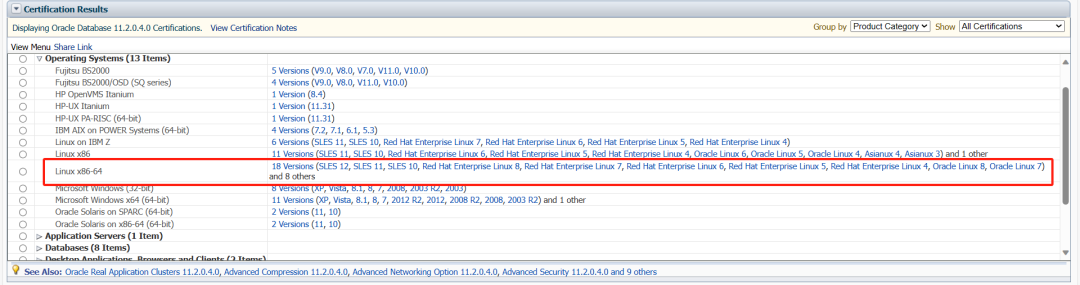
同样11GR2的官方文档也进行了相应的更新,增了关于OEL8以及RHEL8的说明,支持11.2.0.4数据库,但是8.2以后的系统不支持11.2.0.4的GI,如果想要实现高可用,需要安装19C的GI
2、硬件要求
内存要求是最小1G,建议2G或以上
SWAP要求如下配置
RAM | Swap Space |
Between 1 GB and 2 GB | 1.5 times the size of the RAM |
Between 2 GB and 16 GB | Equal to the size of the RAM |
More than 16 GB | 16 GB |
关于存储空间遵从11GR2官方手册的要求
至少要有1G以上的/tmp空间
至少4.4G的空间用来安装database软件
至少1.7G的空间还创建数据库
文件系统可以是EXT2/EXT3/EXT4/XFS等(see Note:236826.1 for further information)
3、关于Linux8.0安装Oracle的内核支持
Kernel requirements
The following kernels are supported:
Oracle Linux 8.2 with the Unbreakable Enterprise Kernel 6: 5.4.17-2136.302.7.2.1.el8_5.x86_64 or later
Oracle Linux 8.2 with the Red Hat Compatible Kernel: 4.18.0-348.12.2.el8_5.x86_64 or later
Red Hat Enterprise Linux 8.2: 4.18.0-348.12.2.el8_5.x86_64 or later
Runlevel : 3 or 5
4、安装oracle
4.1、LINUX系统安装
我这里使用了oracle linux 8.9
系统安装的时候,选择最小安装,勾选了一些常用的工具和开发包。
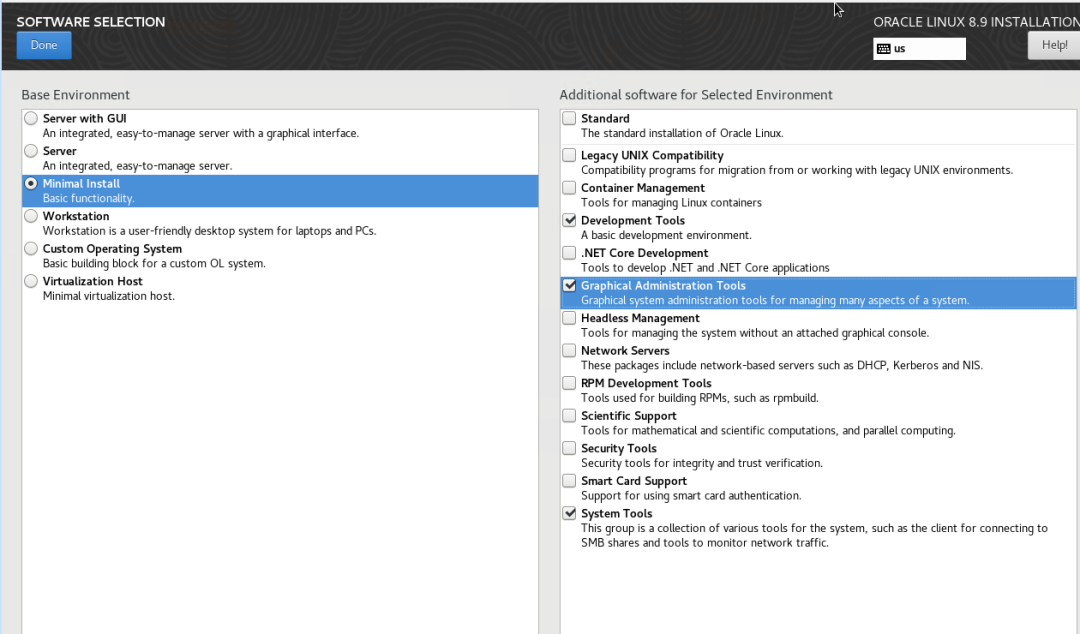
安装完,查看当前系统版本
[root@oracle ~]# uname -a
Linux oracle 5.15.0-200.131.27.el8uek.x86_64 #2 SMP Wed Oct 4 22:19:10 PDT 2023 x86_64 x86_64 x86_64 GNU/Linux
[root@oracle ~]# cat etc/oracle-release
Oracle Linux Server release 8.9
4.2、配置主机名
hostnamectl set-hostname oracle
echo "192.168.56.200 oracle" >>/etc/hosts
4.3、创建用户、参数配置
#create user
/usr/sbin/groupadd oinstall
/usr/sbin/groupadd dba
/usr/sbin/groupadd oper
/usr/sbin/useradd -g oinstall -G dba,oper oracle
echo "oracle" | passwd --stdin oracle

#change system parameter
cp etc/sysctl.conf etc/sysctl.conf.bak
echo "#oracle" >> /etc/sysctl.conf
echo "kernel.shmmni = 4096" >> /etc/sysctl.conf
echo "fs.aio-max-nr = 1048576" >> /etc/sysctl.conf
echo "fs.file-max = 6815744" >> /etc/sysctl.conf
echo "kernel.sem = 250 32000 100 128" >> /etc/sysctl.conf
echo "net.ipv4.ip_local_port_range = 9000 65500" >> /etc/sysctl.conf
echo "net.core.rmem_default = 262144" >> /etc/sysctl.conf
echo "net.core.rmem_max = 4194304" >> /etc/sysctl.conf
echo "net.core.wmem_default = 262144" >> /etc/sysctl.conf
echo "net.core.wmem_max = 1048586" >> /etc/sysctl.conf
echo "vm.swappiness = 10" >> /etc/sysctl.conf
echo "kernel.shmmax= $(free|grep Mem |awk '{print int($2*1024*0.85)}')" >> /etc/sysctl.conf
echo "kernel.shmall = $(free|grep Mem |awk '{print int(($2*1024*0.85)/4096)}')" >> /etc/sysctl.conf
echo "vm.nr_hugepages = $(free -m|grep Mem |awk '{print int(($2*0.8*0.8)/2)}')" >> /etc/sysctl.conf
free -m
sysctl -p
echo "#oracle" >> /etc/security/limits.conf
echo "oracle soft nproc 2047" >> /etc/security/limits.conf
echo "oracle hard nproc 16384" >> /etc/security/limits.conf
echo "oracle soft nofile 1024" >> /etc/security/limits.conf
echo "oracle hard nofile 65536" >> /etc/security/limits.conf
echo "* soft memlock $(free |grep Mem|awk '{print int($2*0.90*1024)}')" >> /etc/security/limits.conf
echo "* hard memlock $(free |grep Mem|awk '{print int($2*0.90*1024)}')" >> /etc/security/limits.conf
#add oracle profile
cat >> /etc/profile <<EOF
if [ \$USER = "oracle" ]; then
    if [ \$SHELL = "/bin/ksh" ]; then
       ulimit -u 16384
       ulimit -n 65536
    else
       ulimit -u 16384 -n 65536
    fi
fi
EOF
4.4、禁用Transparent HugePages
cd etc/default/cp grub grub.bak
修改grub文件内容
GRUB_CMDLINE_LINUX="crashkernel=auto resume=/dev/mapper/ol-swap rd.lvm.lv=ol/root rd.lvm.lv=ol/swap rhgb quiet"
改为
GRUB_CMDLINE_LINUX="crashkernel=auto resume=/dev/mapper/ol-swap rd.lvm.lv=ol/root rd.lvm.lv=ol/swap rhgb quiet transparent_hugepage=never"
此处有差异
On BIOS-based machines(安装系统时使用传统 BIOS的改法):
grub2-mkconfig -o boot/grub2/grub.cfg
On UEFI-based machines(安装系统时使用UEFI-BIOS时的改法):
grub2-mkconfig -o/boot/efi/EFI/redhat/grub.cfg
生成之后,重启服务器再检查
以下为输出
[root@oracle ~]# cat sys/kernel/mm/transparent_hugepage/enabled
[always] madvise never
[root@oracle ~]# cd etc/default/
[root@oracle default]# cp grub grub.bak
[root@oracle default]# cat etc/default/grub
GRUB_TIMEOUT=5
GRUB_DISTRIBUTOR="$(sed 's, release .*$,,g' etc/system-release)"
GRUB_DEFAULT=saved
GRUB_DISABLE_SUBMENU=true
GRUB_TERMINAL_OUTPUT="console"
GRUB_CMDLINE_LINUX="crashkernel=auto resume=/dev/mapper/ol-swap rd.lvm.lv=ol/root rd.lvm.lv=ol/swap rhgb quiet"
GRUB_DISABLE_RECOVERY="true"
GRUB_ENABLE_BLSCFG=true
[root@oracle default]# vi etc/default/grub
[root@oracle default]# cat etc/default/grub
GRUB_TIMEOUT=5
GRUB_DISTRIBUTOR="$(sed 's, release .*$,,g' etc/system-release)"
GRUB_DEFAULT=saved
GRUB_DISABLE_SUBMENU=true
GRUB_TERMINAL_OUTPUT="console"
GRUB_CMDLINE_LINUX="crashkernel=auto resume=/dev/mapper/ol-swap rd.lvm.lv=ol/root rd.lvm.lv=ol/swap rhgb quiet transparent_hugepage=never"
GRUB_DISABLE_RECOVERY="true"
GRUB_ENABLE_BLSCFG=true
[root@oracle default]# df -h
Filesystem           Size  Used Avail Use% Mounted on
devtmpfs             1.8G     0  1.8G   0% dev
tmpfs                1.8G     0  1.8G   0% dev/shm
tmpfs                1.8G  8.5M  1.8G   1% run
tmpfs                1.8G     0  1.8G   0% sys/fs/cgroup
/dev/mapper/ol-root   69G  9.8G   56G  15%
/dev/sda1            974M  247M  660M  28% boot
/dev/mapper/ol-u01   113G  6.5G  107G   6% u01
tmpfs                362M     0  362M   0% run/user/0
/dev/sr0              13G   13G     0 100% mnt

[root@oracle default]#  grub2-mkconfig -o boot/grub2/grub.cfg
Generating grub configuration file ...
done
[root@oracle default]#reboot
--重连后再确认
[root@oracle ~]# cat sys/kernel/mm/transparent_hugepage/enabled
always madvise [never]
4.5、创建目录,上传软件
mkdir /soft
chmod -R 777 soft/--上传软件包到/soft目录下--包括OPATCH:p6880880_112000_Linux-x86-64--补丁包:p33477185_112040_Linux-x86-64、p33991024_11204220118_Generic--DB安装包:p13390677_112040_Linux-x86-64_1of7、p13390677_112040_Linux-x86-64_2of7
mkdir -p u01
chow -R oracle:oinstall u01
4.6、关闭SELINUX和防火墙
sed -i "s/SELINUX=enforcing/SELINUX=disabled/g" etc/selinux/config
setenforce 0
systemctl disable firewalld && systemctl stop firewalld
4.7、配置YUM源
挂载系统安装介质ISO
mount /dev/cdrom mnt
rm -rf etc/yum.repos.d/*.repo
cat >/etc/yum.repos.d/local.repo<<EOF
[AppStream]
name=AppStream
baseurl=file:///mnt/AppStream
enabled=1
gpgcheck=0
[BaseOS]
name=BaseOS
baseurl=file:///mnt/BaseOS
enabled=1
gpgcheck=0
EOF
dnf makecache
4.8、安装软件包
dnf install bc binutils compat-openssl10 elfutils-libelf glibc glibc-devel ksh libaio libaio-devel libXrender libX11 libXau libXi libXtst libgcc libnsl libstdc++ libxcb libibverbs make policycoreutils policycoreutils-python-utils smartmontools sysstat -y
4.9、配置用户环境变量
cat >> /home/oracle/.bash_profile <<EOF
export TMP=/tmp
export LANG=en_US
export TMPDIR=$TMP
export ORACLE_UNQNAME=oracle
export ORACLE_SID=orcl
export ORACLE_BASE=/u01/app/oracle
export ORACLE_HOME=/u01/app/oracle/product/11.2.0/dbhome_1
export ORACLE_TERM=xterm
export NLS_DATE_FORMAT="yyyy-mm-dd HH24:MI:SS"
export NLS_LANG=AMERICAN_AMERICA.ZHS16GBK
export PATH=\$PATH:\$ORACLE_HOME/bin:\$ORACLE_HOME/OPatch
export THREADS_FLAG=native
umask=022
EOF
4.10、解压DB软件
su - oracle
cd soft
unzip p13390677_112040_Linux-x86-64_1of7.zip
unzip p13390677_112040_Linux-x86-64_2of7.zip
4.11、创建静默安装文件
cat >> soft/db_install.rsp <<EOF
#软件版本信息
oracle.install.responseFileVersion=/oracle/install/rspfmt_dbinstall_response_schema_v11_2_0
#安装选项-仅安装数据库软件
oracle.install.option=INSTALL_DB_SWONLY
#主机名称
ORACLE_HOSTNAME=oracle
#oracle用户用于安装软件的组名
UNIX_GROUP_NAME=oinstall
#oracle产品清单目录
INVENTORY_LOCATION=/u01/app/oraInventory
#oracle运行语言环境,英文和简体中文
SELECTED_LANGUAGES=en,zh_CN
#oracle安装目录
ORACLE_HOME=/u01/app/oracle/product/11.2.0/dbhome_1
#oracle基础目录
ORACLE_BASE=/u01/app/oracle
#安装版本类型:企业版
oracle.install.db.InstallEdition=EE
#不手动指定企业安装组件
oracle.install.db.EEOptionsSelection=false
#当EEOptionsSelection=false时,该参数不用填写
oracle.install.db.optionalComponents=
#指定拥有DBA组
oracle.install.db.DBA_GROUP=dba
#指定oper用户组
oracle.install.db.OPER_GROUP=oper
#不配置安全更新
DECLINE_SECURITY_UPDATES=true
#跳过更新
oracle.installer.autoupdates.option=SKIP_UPDATES
EOF
4.12、创建oraInst.loc文件
以下以root用户执行
cat >> etc/oraInst.loc <<EOF
inventory_loc=/u01/oracle/oraInventory
inst_group=oinstall
EOF
chown oracle:oinstall etc/oraInst.loc
chmod 664 etc/oraInst.loc
4.13、开始安装
采用静默安装
su - oracle
cd /soft/database
./runInstaller -silent -noconfig -ignorePrereq -responseFile soft/db_install.rsp
以下显示过程
[oracle@oracle database]$ ./runInstaller -silent -noconfig -ignorePrereq -responseFile soft/db_install.rsp
Starting Oracle Universal Installer...

Checking Temp space: must be greater than 120 MB.   Actual 57825 MB    Passed
Checking swap space: must be greater than 150 MB.   Actual 16379 MB    Passed
Preparing to launch Oracle Universal Installer from tmp/OraInstall2024-01-05_08-08-56PM. Please wait ...[oracle@oracle database]$
[oracle@oracle database]$
[oracle@oracle database]$ You can find the log of this install session at:
 u01/oracle/oraInventory/logs/installActions2024-01-05_08-08-56PM.log
The installation of Oracle Database 11g was successful.
Please check '/u01/oracle/oraInventory/logs/silentInstall2024-01-05_08-08-56PM.log' for more details.

As a root user, execute the following script(s):
        1. u01/app/oracle/product/11.2.0/dbhome_1/root.sh


Successfully Setup Software.
之所以不选择图形安装,是因为这个安装过程中会报好多错误需要你手动点,这可能会劝退很多小伙伴
其实看了官方文档,多数是己知BUG,安装的过程中只能忽略,安装完再打补丁修复
我举几个例子:
Bug 33830284
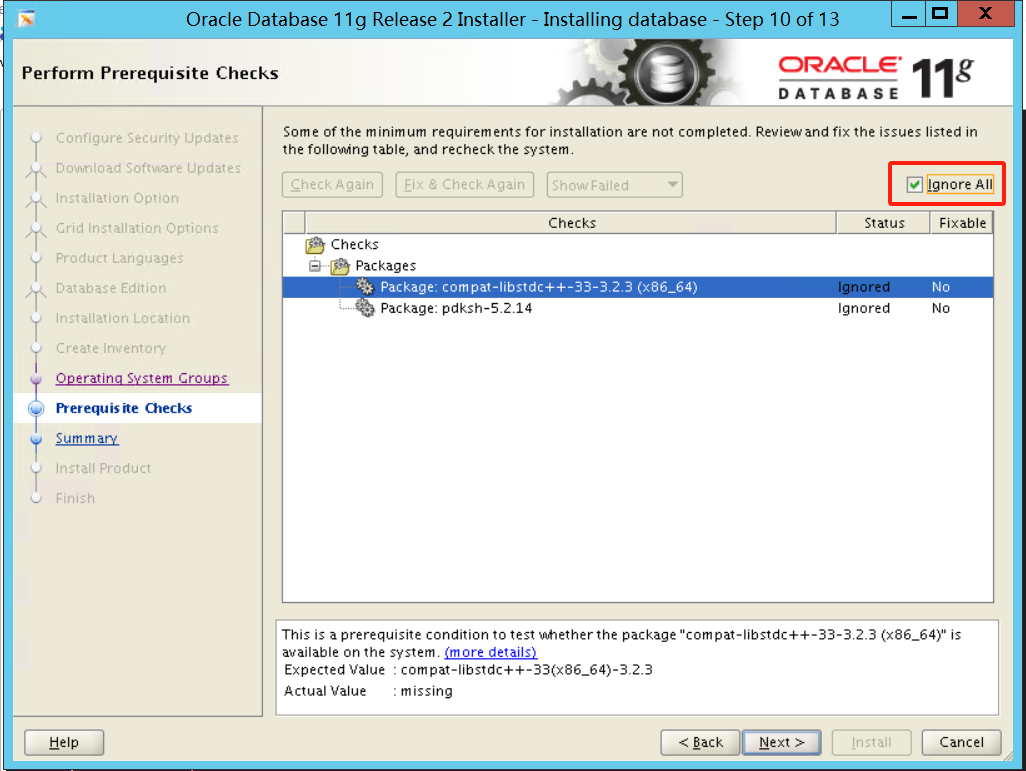
When you install Oracle Database on Oracle Linux 8.2, the Cluster Verification Utility (CVU) reports compat-libstdc++-33-3.2.3, and pdksh-5.2.14 missing errors.
Workaround:
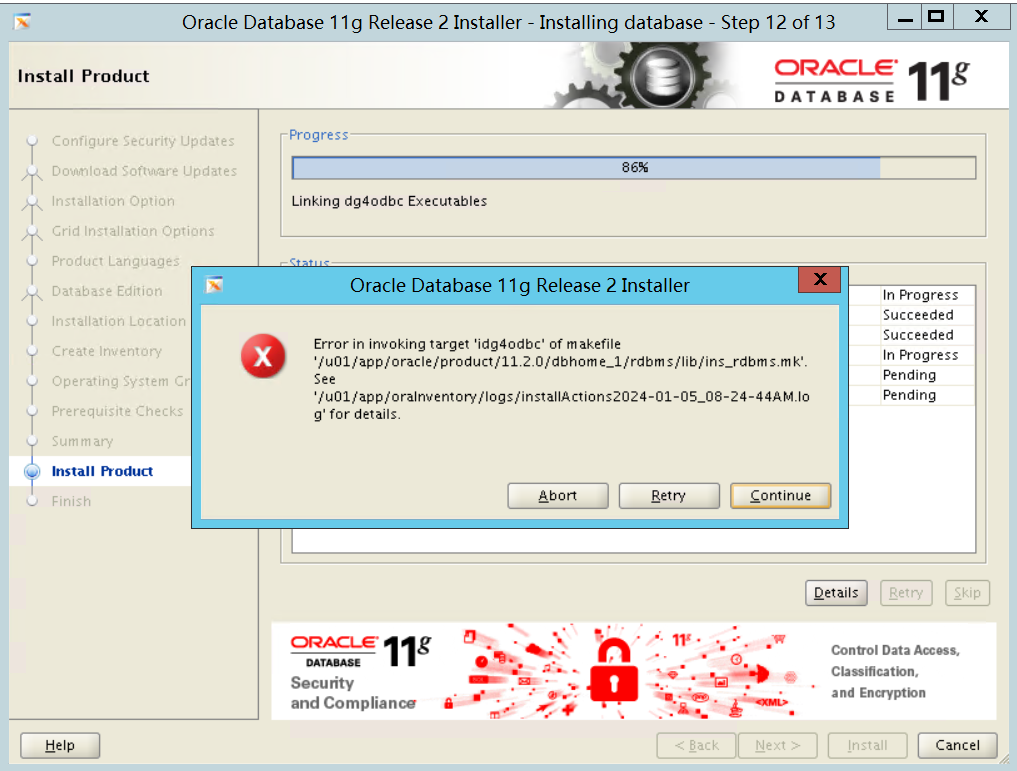
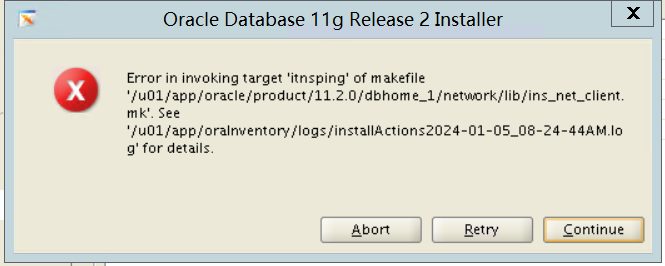
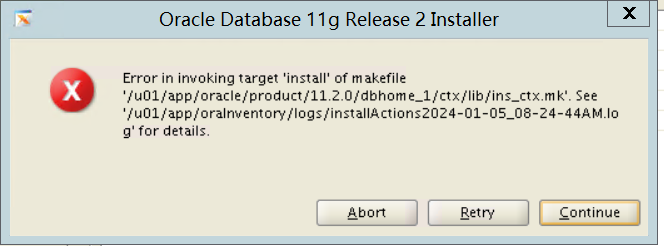
In the Perform Prerequisites Checks screen, for the above errors, select Ignore All, and click Install to continue with the installation.
Ignore any linking errors during the installation. <<<-------------MOS上建议直接忽略接下来的所有错误
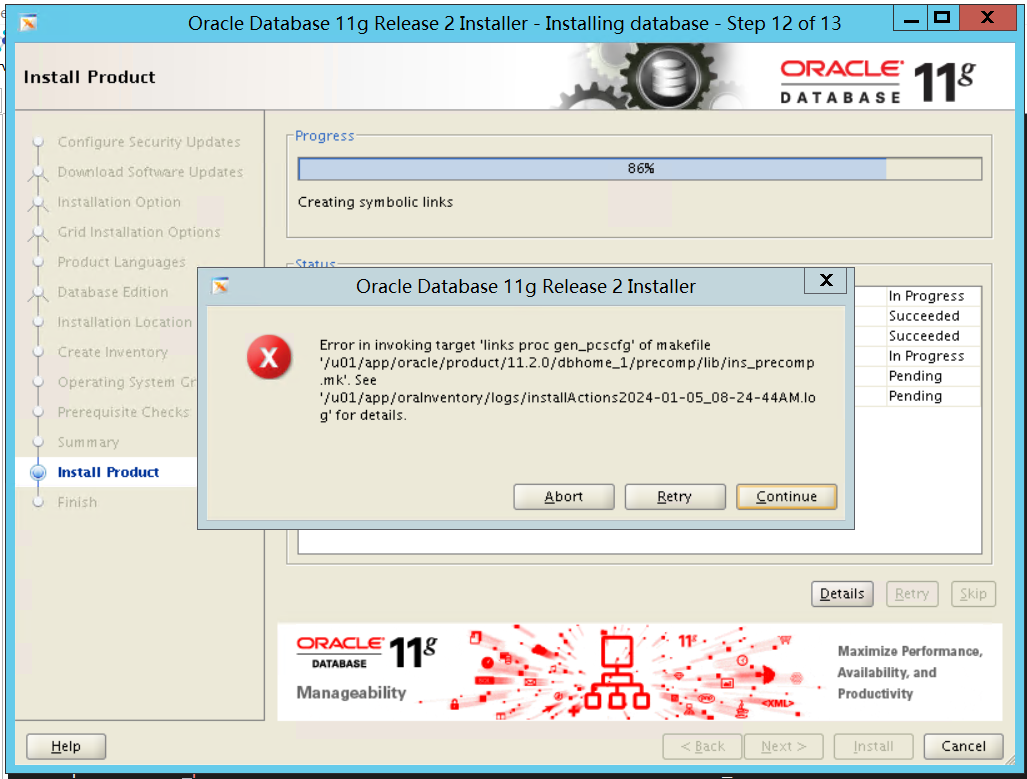
Bug 19375887
Backup and edit the $ORACLE_HOME/sysman/lib/ins_emagent.mk file.
In the ins_emagent.mk file, change $(MK_EMAGENT_NMECTL) to $(MK_EMAGENT_NMECTL) -lnnz11.
In the installer, click Retry to complete the installation.
测试没用,还是直接continue
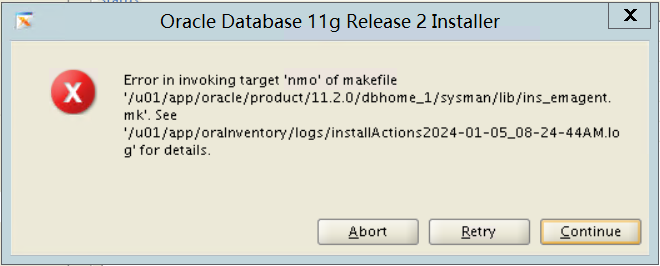
后续还有好几个ins的失败,选择全部continue
4.14、解压opatch安装补丁
这一章节都是使用oracle执行
先替换opatch,然后安装补丁33477185
su - oracle
cd $ORACLE_HOME
mv OPatch/ OPatch.old
cd /soft
unzip p6880880_112000_Linux-x86-64.zip
unzip p33477185_112040_Linux-x86-64.zip
mv OPatch/ $ORACLE_HOME/
opatch version
cd /soft/33477185
opatch apply
以下为输出,结果太长截图部分
[oracle@oracle 33477185]$ opatch apply
Oracle Interim Patch Installer version 11.2.0.3.41
Copyright (c) 2024, Oracle Corporation.  All rights reserved.


Oracle Home       : u01/app/oracle/product/11.2.0/dbhome_1
Central Inventory : u01/app/oraInventory
   from           : u01/app/oracle/product/11.2.0/dbhome_1/oraInst.loc
OPatch version    : 11.2.0.3.41
OUI version       : 11.2.0.4.0
Log file location : u01/app/oracle/product/11.2.0/dbhome_1/cfgtoollogs/opatch/opatch2024-01-05_09-34-17AM_1.log

Verifying environment and performing prerequisite checks...
OPatch continues with these patches:   17478514  18031668  18522509  19121551  19769489  20299013  20760982  21352635  21948347  22502456  23054359  24006111  24732075  25869727  26609445  26392168  26925576  27338049  27734982  28204707  28729262  29141056  29497421  29913194  30298532  30670774  31103343  31537677  31983472  32328626  32758711  33128584  33477185

Do you want to proceed? [y|n]
y
User Responded with: Y
All checks passed.

Please shutdown Oracle instances running out of this ORACLE_HOME on the local system.
(Oracle Home = '/u01/app/oracle/product/11.2.0/dbhome_1')


Is the local system ready for patching? [y|n]
y
User Responded with: Y
Backing up files...
##中间截取了,这是最后面
The following make actions have failed :

Re-link fails on target "iamdu".
Re-link fails on target "ikfod".
Re-link fails on target "irenamedg".
Re-link fails on target "ikfed".
Re-link fails on target "ioracle".
Re-link fails on target "e2eme".
Re-link fails on target "irman".
Re-link fails on target "proc".
Re-link fails on target "jox_refresh_knlopt ioracle".
Re-link fails on target "iemtgtctl".
Re-link fails on target "ikgmgr".
Re-link fails on target "patchset_opt_all jox_refresh_knlopt ioracle".
Re-link fails on target "iimp".
Re-link fails on target "iexp".
Re-link fails on target "ldapaddmt".
Re-link fails on target "ldapadd".
Re-link fails on target "ldapmodify".
Re-link fails on target "ldapmodifymt".
Re-link fails on target "idgmgrl".
Re-link fails on target "ilsnrctl".
Re-link fails on target "itnslsnr".
Re-link fails on target "nmosudo".
Re-link fails on target "emdctl".
Re-link fails on target "agent".
Re-link fails on target "iplshprof".
Re-link fails on target "idg4pwd".
Re-link fails on target "isetasmgid".


Do you want to proceed? [y|n]
y
User Responded with: Y
Composite patch 33477185 successfully applied.
OPatch Session completed with warnings.
Log file location: u01/app/oracle/product/11.2.0/dbhome_1/cfgtoollogs/opatch/opatch2024-01-05_20-35-55PM_1.log

OPatch completed with warnings.
再安装补丁33991024
cd /soft
unzip p33991024_11204220118_Generic.zip
cd 33991024/
opatch apply
以下为输出
[oracle@oracle 33991024]$ opatch apply
Oracle Interim Patch Installer version 11.2.0.3.41
Copyright (c) 2024, Oracle Corporation.  All rights reserved.


Oracle Home       : /u01/app/oracle/product/11.2.0/dbhome_1
Central Inventory : /u01/app/oraInventory
   from           : /u01/app/oracle/product/11.2.0/dbhome_1/oraInst.loc
OPatch version    : 11.2.0.3.41
OUI version       : 11.2.0.4.0
Log file location : /u01/app/oracle/product/11.2.0/dbhome_1/cfgtoollogs/opatch/opatch2024-01-05_09-45-11AM_1.log

Verifying environment and performing prerequisite checks...
OPatch continues with these patches:   33991024

Do you want to proceed? [y|n]
y
User Responded with: Y
All checks passed.

Please shutdown Oracle instances running out of this ORACLE_HOME on the local system.
(Oracle Home = '/u01/app/oracle/product/11.2.0/dbhome_1')


Is the local system ready for patching? [y|n]
y
User Responded with: Y
Backing up files...
Applying interim patch '33991024' to OH '/u01/app/oracle/product/11.2.0/dbhome_1'

Patching component oracle.rdbms.rsf, 11.2.0.4.0...

Patching component oracle.buildtools.rsf, 11.2.0.4.0...

Patching component oracle.has.db, 11.2.0.4.0...
Patch 33991024 successfully applied.
Log file location: /u01/app/oracle/product/11.2.0/dbhome_1/cfgtoollogs/opatch/opatch2024-01-05_09-45-11AM_1.log

OPatch succeeded.
最后,按补丁要求relink
[oracle@oracle 33991024]$ $ORACLE_HOME/bin/relink all
writing relink log to: /u01/app/oracle/product/11.2.0/dbhome_1/install/relink.log
[oracle@oracle 33991024]$ opatch lspatches
33991024;11204CERT ON OL8: LINKING ERRORS DURING 11204 FOR DB INSTALL ON OL8.2
33477185;Database Patch Set Update : 11.2.0.4.220118 (33477185)

OPatch succeeded.
之后就可以正常使用,netca DBCA创建数据库即可
安装完之后,官方文档还有几句
ADDITIONAL NOTES
1. Oracle Real Applications Cluster (Oracle RAC) 11g Release 2 (11.2.0.4) on 19c Oracle Automatic Storage Management Cluster File System (Oracle ACFS) is not supported on Oracle Linux 8 and Red Hat Enterprise Linux 8.
2. Oracle Database 11g Release 2 (11.2.0.4) on Oracle Linux 8 and Red Hat Enterprise Linux 8 does not support Oracle Enterprise Manager Database Control.
3. For late-breaking updates and best practices about preupgrade, postupgrade, compatibility, and interoperability discussions, refer to Note 785351.1 on My Oracle Support
另外有小伙伴试了打最新的补丁是不行的,要严格按照我这个文档里的补丁来打

参考
MOS:Release Schedule of Current Database Releases (Doc ID 742060.1)
MOS:Requirements for Installing Oracle Database/Client 11.2.0.4 on OL8 or RHEL8 64-bit (x86-64) (Doc ID 2988626.1)
MOS:11.2:Oracle database software installation failed with "Error in invoking target 'links proc gen_pcscfg' of makefile .. ins_precomp.mk" on RHEL 8 (Doc ID 2915371.1)
官方文档:
https://docs.oracle.com/cd/E11882_01/relnotes.112/e23558/toc.htm#CHDIFAIB
董大威的安装文档:
https://www.modb.pro/db/1719017198252531712#font_size31_508

数据库安装搭建
搭建记录:duplicate搭建oracle rac到单实例搭建物理DG_V7
如何正确在windows server core(无图形界面)安装Oracle 19c(ASM版本)
如何正确在windows server core(无图形界面)安装Oracle 19c
实战RAC迁移系列(包括RAC TO RAC DATAGUARD搭建、切换、ASM在线迁移)
实战RAC迁移项目第2篇:RAC-RAC主备切换/IP更换/DG恢复
数据库优化实战系列:
Oracle故障处理系列:
如何正确的在AIX 7.x系统中开启LargePage for Oracle
记一次INS-06006典型问题|安装Oracle 19c rac遇到的ssh互信不通过
实战:记一次DG跨平台迁移win_to_linux遇到的问题12
处理11g grid集群安装10g database软件,无法DBCA创建集群实例问题
记一次ORA-07445[nttaddr2bnd()+2158]问题处理
windows下oracle12C创建第2个实例后,第1个实例无法启动??
系统集成类案例
真实案例-esxi7.0u1以上版本vCLS 虚拟机无法打开电源
读Oracle SPARC服务器系列
传统IT领域的强者-Oracle小型机-第1篇:服务器简单介绍
传统IT领域的强者-Oracle小型机-第2篇:SP规划配置与系统安装
公众号:徐sir的IT之路
墨天轮:https://www.modb.pro/u/3605