前 言
2024 年开始学 PG,作为一个传统行业的 DBA 来说,学 PG 也说了四五年了,但都没有付诸行动,那么从今天开始,系统的学一学,倒逼自己输出学习。那么今天第一篇文章则从安装部署开始吧,后面在学习介绍体系结构、索引及统计信息和执行计划、高可用等。
PostgreSQL 是一个基于 POSTGRES 的对象关系数据库管理系统(ORDBMS),版本4.2,由加州大学伯克利分校计算机科学系开发。POSTGRES 开创了许多概念,这些概念在很久以后才在某些商业数据库系统中出现。PostgreSQL 最初设想于 1986 年,当时被叫做 Berkley Postgres Project。该项目一直到 1994 年都处于演进和修改中,直到开发人员 Andrew Yu 和 Jolly Chen 在 Postgres 中添加了一个 SQL(StructuredQuery Language,结构化查询语言)翻译程序,该版本叫做Postgres95,在开放源代码社区发放。1996 年,再次对 Postgres95 做了较大的改动,并将其作为 PostgresSQL6.0 版发布。一般 Linux 系统自带了 PostgreSQL,但比较旧,不太好用,工欲善其事,必先利其器,那么我们来安装一个生产中使用比较多,比较合适的版本吧。
一、 软件包下载
进入 PostgreSQL 官网 https://www.postgresql.org/
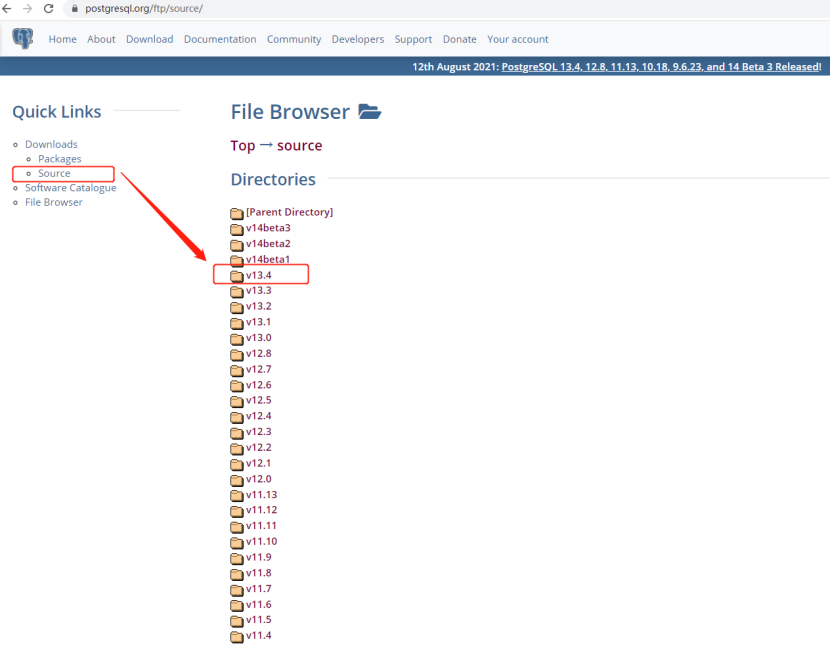
点击 Download 然后选择相对应的安装方式,我这里选择源码安装,点击 Source 选择相应的版本2024年2月8日,最新的PostgreSQL 16.2, 15.6, 14.11, 13.14, and 12.18 发布了! 可能很多公司部署9.x到 14.x 版本的都有涉及,但大多数公司都会选择使用源码编译安装,因为可以定制化一些比如端口、软件安装目录等、我这里是部署的比较早的,选择的是 21 年 8 月份发布的 13.4 版本,https://www.postgresql.org/ftp/source/
如下图所示。
当点击版本时会出现两种格式 .bz2 和 .gz 格式,一般会选择 压缩后较小的 .bz2 格式,注意观察,文件下两行有 .md5 和 .sha256 格式的文件,此文件记录了使用对应加密算法加密第一行文件的完整的加密算法值,当下载完文件后用于比对下载文件的完整性。
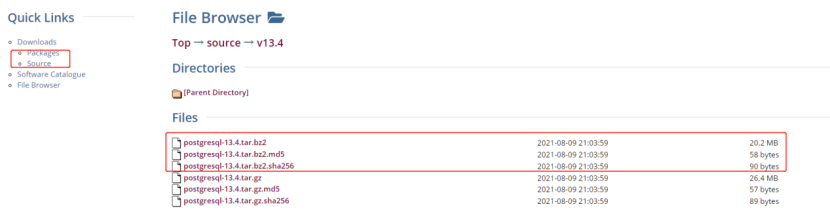
点击第二个文件查看其中的 MD5 加密值如下:
7bda65a37c46b8b2c1933d9d1cd677f2  postgresql-13.4.tar.bz2

ea93e10390245f1ce461a54eb5f99a48d8cabd3a08ce4d652ec2169a357bc0cd  postgresql-13.4.tar.bz2

https://www.postgresql.org/ftp/source/v13.4/
下载完之后,由于服务器一般都属于内网环境,无法上网,则通过 SFTP 上传至服务器 /home/soft 目录,然后检验 MD5 值,保证软件下载过程中没有损坏,可正常使用,下面是检验出来的 MD5 值与上图下载中的一致,说明软件可正常使用。
[root@jiekexu-test soft]# md5sum postgresql-13.4.tar.bz2
7bda65a37c46b8b2c1933d9d1cd677f2  postgresql-13.4.tar.bz2
[root@jiekexu-test soft]# sha256sum postgresql-13.4.tar.bz2
ea93e10390245f1ce461a54eb5f99a48d8cabd3a08ce4d652ec2169a357bc0cd  postgresql-13.4.tar.bz2
[root@jiekexu-test soft]# ll postgresql-13.4.tar.bz2
-rw-r--r-- 1 root root 21157443 Sep 16 14:24 postgresql-13.4.tar.bz2
二、 操作系统相关配置
[root@localhost ~]# cat /etc/redhat-release
Red Hat Enterprise Linux Server release 7.7 (Maipo)
[root@localhost ~]#
[root@localhost ~]# uname -a
Linux jiekexu-test 3.10.0-1062.el7.x86_64 #1 SMP Thu Jul 18 20:25:13 UTC 2019 x86_64 x86_64 x86_64 GNU/Linux
0、创建普通用户
groupadd postgres
useradd -g postgres postgres
echo "postgres" |passwd --stdin postgres
密码:postgres
1、内核参数设置
cp /etc/sysctl.conf /etc/sysctl.conf_`date +"%Y%m%d_%H%M%S"`
cat >> /etc/sysctl.conf << "EOF"
############################for postgresql###########
kernel.shmall =4294967296
kernel.shmmax=135497418752
kernel.shmmni =4096
kernel.sem = 50100 64128000 50100 1280
fs.file-max =7672460
fs.aio-max-nr =1048576
net.ipv4.ip_local_port_range= 9000 65000
net.core.rmem_default= 262144
net.core.rmem_max= 4194304
net.core.wmem_default= 262144
net.core.wmem_max= 4194304
net.ipv4.tcp_max_syn_backlog= 4096
net.core.netdev_max_backlog= 10000
net.ipv4.tcp_timestamps= 0
net.ipv4.tcp_tw_recycle=1
net.ipv4.tcp_timestamps=1
net.ipv4.tcp_keepalive_time= 72
net.ipv4.tcp_keepalive_probes= 9
net.ipv4.tcp_keepalive_intvl= 7
vm.zone_reclaim_mode=0
vm.dirty_background_bytes= 40960000
vm.dirty_ratio =80
vm.dirty_expire_centisecs= 6000
vm.dirty_writeback_centisecs= 50
vm.swappiness=0
vm.overcommit_memory= 0
vm.overcommit_ratio= 90
EOF
使用命令 sysctl -p 使其生效.
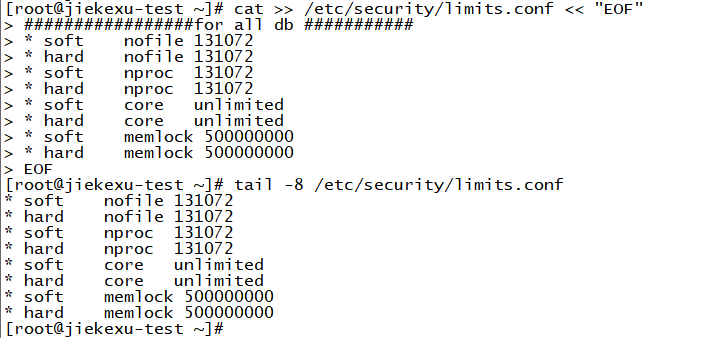
2、操作系统的限制
这些在安装 Oracle 和 MySQL 已经说过,这里就不再说明。
cat >> /etc/security/limits.conf << "EOF"
#################for all db ###########
* soft    nofile 131072
* hard    nofile 131072
* soft    nproc  131072
* hard    nproc  131072
* soft    core   unlimited
* hard    core   unlimited
* soft    memlock 500000000
* hard    memlock 500000000
EOF
3、limits.d 目录
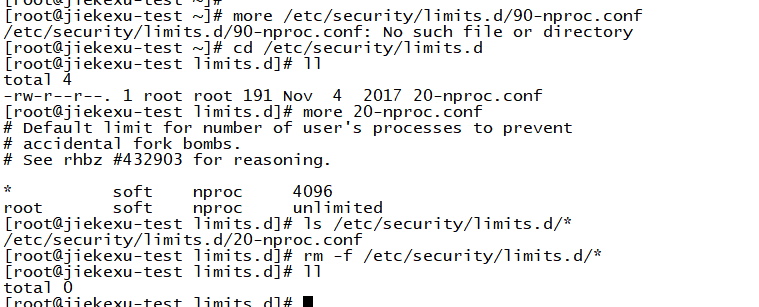
此目录下的文件也是文件限制,上文已经设置了,这里如果还存在的话,则以此文件限制为准,故删除,注意重命名应该生效。
more /etc/security/limits.d/20-nproc.conf
# Default limit for number of user's processes to prevent
# accidental fork bombs.
# See rhbz #432903 for reasoning.

*          soft    nproc     4096
root       soft    nproc     unlimited
系统其它普通用户最多进程默认是 1024 个,而 root 用户是 unlimited (不受限制).
ls /etc/security/limits.d/*
rm -f /etc/security/limits.d/*
4、关闭 selinux 和 防火墙
cp /etc/selinux/config /etc/selinux/config_`date +"%Y%m%d_%H%M%S"`&& sed -i 's/SELINUX\=enforcing/SELINUX\=disabled/g' /etc/selinux/config

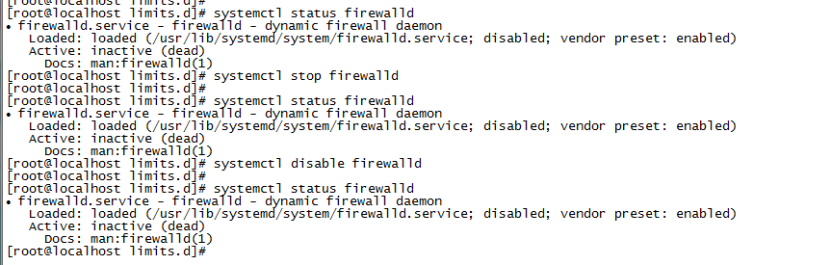
systemctl stop firewalld.service或者systemctl stop firewalld
systemctl disable firewalld.service或者systemctl disable firewalld
systemctl status firewalld
需要关闭 SELINUX 和操作系统防火墙 iptables
设置 selinux 为 disable 并重启操作系统;用 systemctl status firewalld 命令关闭防火墙。

用以下命令检查防火墙
查看防火墙状态。
systemctl status firewalld
临时关闭防火墙命令。重启电脑后,防火墙自动起来。
systemctl stop firewalld
永久关闭防火墙命令。重启后,防火墙不会自动启动。
systemctl disable firewalld
打开防火墙命令。
systemctl enable firewalld
5、配置 yum 本地源,安装以下依赖包
配置 yum 源,这里不再说了,前面专门有一篇讲到过。
挂载光盘
mount /dev/sr0 /mnt/dvd
配置 yum 源
cd /etc/yum.repos.d/

cat >> /etc/yum.repos.d/redhat.repo << "EOF"
[rhel7]
name=jiekexu repo
baseurl=file:///mnt/dvd/
gpgcheck=0
EOF
--测试 yum 源
yum repolist

yum -y install coreutils glib2 lrzsz mpstat dstatsysstat e4fsprogs xfsprogs ntp readline-devel zlib-devel openssl-develpam-devel libxml2-devel libxslt-devel python-devel tcl-devel gcc makesmartmontools flex bison perl-devel perl-Ext Utils* openldap-devel jadetex openjade bzip2
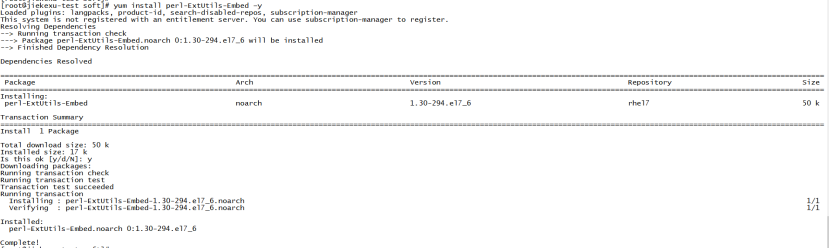
这里最好安装 perl 语言包,不然后面编译会报错
# yum install perl-ExtUtils-Embed ¨C
检查安装包
[root@jiekexu-test yum.repos.d]# rpm -q --queryformat "%{NAME}-%{VERSION}-%{RELEASE} (%{ARCH})\n"  coreutils glib2 lrzsz mpstat dstatsysstat e4fsprogs xfsprogs ntp readline-devel zlib-devel openssl-develpam-devel libxml2-devel libxslt-devel python-devel tcl-devel gcc makesmartmontools flex bison perl-devel perl-Ext Utils* openldap-devel jadetex openjade bzip2 | grep 'not installed' |column -t
package  mpstat                  is  not  installed
package  dstatsysstat            is  not  installed
package  e4fsprogs               is  not  installed
package  openssl-develpam-devel  is  not  installed
package  makesmartmontools       is  not  installed
package  perl-Ext                is  not  installed
package  Utils*                  is  not  installed
package  jadetex                 is  not  installed
6、建立数据目录并上传、解压安装包
su - postgres
mkdir pgdata
tar xvf /home/soft/postgresql-13.4.tar.bz2  -C /home/postgres/
做一个软链接方便以后管理与升级
[postgres@jiekexu-test ~]$ ll
total 0
drwxrwxr-x 2 postgres postgres   6 Sep 16 18:05 pgdata
drwxrwxr-x 6 postgres postgres 314 Aug 10 05:03 postgresql-13.4
[postgres@jiekexu-test ~]$ ln -s postgresql-13.4 postgres
[postgres@jiekexu-test ~]$ ll
total 0
drwxrwxr-x 2 postgres postgres   6 Sep 16 18:05 pgdata
lrwxrwxrwx 1 postgres postgres  15 Sep 16 18:05 postgres -> postgresql-13.4
drwxrwxr-x 6 postgres postgres 314 Aug 10 05:03 postgresql-13.4
7、编译安装
使用如下命令进行编译
cd postgres
./configure --prefix=/home/postgres/postgres  --with-perl  --with-python
–with-pgport=15432 可以编译时修改默认端口5432
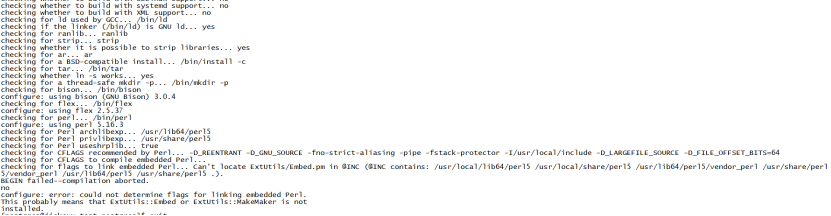
因为没有安装 perl 故执行会报如下错误:
[postgres@jiekexu-test ~]$ cd postgres
[postgres@jiekexu-test postgres]$ ll
total 740
-rw-r--r--  1 postgres postgres    490 Aug 10 04:49 aclocal.m4
drwxrwxr-x  2 postgres postgres   4096 Aug 10 05:02 config
-rwxr-xr-x  1 postgres postgres 569031 Aug 10 04:49 configure
-rw-r--r--  1 postgres postgres  82710 Aug 10 04:49 configure.in
drwxrwxr-x 57 postgres postgres   4096 Aug 10 05:02 contrib
-rw-r--r--  1 postgres postgres   1192 Aug 10 04:49 COPYRIGHT
drwxrwxr-x  3 postgres postgres     87 Aug 10 05:02 doc
-rw-r--r--  1 postgres postgres   4259 Aug 10 04:49 GNUmakefile.in
-rw-r--r--  1 postgres postgres    277 Aug 10 04:49 HISTORY
-rw-r--r--  1 postgres postgres  63750 Aug 10 05:03 INSTALL
-rw-r--r--  1 postgres postgres   1665 Aug 10 04:49 Makefile
-rw-r--r--  1 postgres postgres   1213 Aug 10 04:49 README
drwxrwxr-x 16 postgres postgres    328 Aug 10 05:03 src
[postgres@jiekexu-test postgres]$ ./configure --prefix=/home/postgres/postgres  --with-perl  --with-python

checking build system type... x86_64-pc-linux-gnu
checking host system type... x86_64-pc-linux-gnu
checking which template to use... linux
checking whether NLS is wanted... no
checking for default port number... 5432
checking for block size... 8kB
checking for segment size... 1GB
checking for WAL block size... 8kB
checking for gcc... gcc
checking whether the C compiler works... yes
checking for C compiler default output file name... a.out
checking for suffix of executables...
checking whether we are cross compiling... no
checking for suffix of object files... o
checking whether we are using the GNU C compiler... yes
checking whether gcc accepts -g... yes
checking for gcc option to accept ISO C89... none needed
checking for g++... no
checking for c++... no
checking whether we are using the GNU C++ compiler... no
checking whether g++ accepts -g... no
checking for gawk... gawk
checking whether gcc supports -Wdeclaration-after-statement, for CFLAGS... yes
checking whether gcc supports -Wendif-labels, for CFLAGS... yes
checking whether g++ supports -Wendif-labels, for CXXFLAGS... no
checking whether gcc supports -Wmissing-format-attribute, for CFLAGS... yes
checking whether g++ supports -Wmissing-format-attribute, for CXXFLAGS... no
checking whether gcc supports -Wformat-security, for CFLAGS... yes
checking whether g++ supports -Wformat-security, for CXXFLAGS... no
checking whether gcc supports -fno-strict-aliasing, for CFLAGS... yes
checking whether g++ supports -fno-strict-aliasing, for CXXFLAGS... no
checking whether gcc supports -fwrapv, for CFLAGS... yes
checking whether g++ supports -fwrapv, for CXXFLAGS... no
checking whether gcc supports -fexcess-precision=standard, for CFLAGS... yes
checking whether g++ supports -fexcess-precision=standard, for CXXFLAGS... no
checking whether gcc supports -funroll-loops, for CFLAGS_VECTOR... yes
checking whether gcc supports -ftree-vectorize, for CFLAGS_VECTOR... yes
checking whether gcc supports -Wunused-command-line-argument, for NOT_THE_CFLAGS... no
checking whether gcc supports -Wformat-truncation, for NOT_THE_CFLAGS... no
checking whether gcc supports -Wstringop-truncation, for NOT_THE_CFLAGS... no
checking whether the C compiler still works... yes
checking how to run the C preprocessor... gcc -E
checking allow thread-safe client libraries... yes
checking whether to build with ICU support... no
checking whether to build with Tcl... no
checking whether to build Perl modules... yes
checking whether to build Python modules... yes
checking whether to build with GSSAPI support... no
checking whether to build with PAM support... no
checking whether to build with BSD Authentication support... no
checking whether to build with LDAP support... no
checking whether to build with Bonjour support... no
checking whether to build with OpenSSL support... no
checking whether to build with SELinux support... no
checking whether to build with systemd support... no
checking for grep that handles long lines and -e... /bin/grep
checking for egrep... /bin/grep -E
checking for ld used by GCC... /bin/ld
checking if the linker (/bin/ld) is GNU ld... yes
checking for ranlib... ranlib
checking for strip... strip
checking whether it is possible to strip libraries... yes
checking for ar... ar
checking for a BSD-compatible install... /bin/install -c
checking for tar... /bin/tar
checking whether ln -s works... yes
checking for a thread-safe mkdir -p... /bin/mkdir -p
checking for bison... /bin/bison
configure: using bison (GNU Bison) 3.0.4
checking for flex... /bin/flex
configure: using flex 2.5.37
checking for perl... /bin/perl
configure: using perl 5.16.3
checking for Perl archlibexp... /usr/lib64/perl5
checking for Perl privlibexp... /usr/share/perl5
checking for Perl useshrplib... true
checking for CFLAGS recommended by Perl... -D_REENTRANT -D_GNU_SOURCE -fno-strict-aliasing -pipe -fstack-protector -I/usr/local/include -D_LARGEFILE_SOURCE -D_FILE_OFFSET_BITS=64
checking for CFLAGS to compile embedded Perl...
checking for flags to link embedded Perl... Can't locate ExtUtils/Embed.pm in @INC (@INC contains: /usr/local/lib64/perl5 /usr/local/share/perl5 /usr/lib64/perl5/vendor_perl /usr/share/perl5/vendor_perl /usr/lib64/perl5 /usr/share/perl5 .).
BEGIN failed--compilation aborted.
no
configure: error: could not determine flags for linking embedded Perl.
This probably means that ExtUtils::Embed or ExtUtils::MakeMaker is not
installed.
–安装 perl
yum install perl-ExtUtils-Embed –y
安装后继续编译
[postgres@jiekexu-test postgres]$ ./configure --prefix=/home/postgresql/postgresql--with-perl --with-python
编译过程中的部分日志
checking for __get_cpuid... yes
checking for __cpuid... no
checking for _mm_crc32_u8 and _mm_crc32_u32 with CFLAGS=... no
checking for _mm_crc32_u8 and _mm_crc32_u32 with CFLAGS=-msse4.2... yes
checking for __crc32cb, __crc32ch, __crc32cw, and __crc32cd with CFLAGS=... no
checking for __crc32cb, __crc32ch, __crc32cw, and __crc32cd with CFLAGS=-march=armv8-a+crc... no
checking which CRC-32C implementation to use... SSE 4.2 with runtime check
checking for library containing sem_init... -lpthread
checking which semaphore API to use... unnamed POSIX
checking for /dev/urandom... yes
checking which random number source to use... /dev/urandom
checking Python.h usability... yes
checking Python.h presence... yes
checking for Python.h... yes
checking for xmllint... /bin/xmllint
checking for xsltproc... /bin/xsltproc
checking for fop... no
checking for dbtoepub... no
checking thread safety of required library functions... yes
checking whether gcc -std=gnu99 supports -Wl,--as-needed... yes
configure: using compiler=gcc (GCC) 4.8.5 20150623 (Red Hat 4.8.5-39)
configure: using CFLAGS=-Wall -Wmissing-prototypes -Wpointer-arith -Wdeclaration-after-statement -Werror=vla -Wendif-labels -Wmissing-format-attribute -Wformat-security -fno-strict-aliasing -fwrapv -fexcess-precision=standard -O2
configure: using CPPFLAGS= -D_GNU_SOURCE
configure: using LDFLAGS=  -Wl,--as-needed
configure: creating ./config.status
config.status: creating GNUmakefile
config.status: creating src/Makefile.global
config.status: creating src/include/pg_config.h
config.status: creating src/include/pg_config_ext.h
config.status: creating src/interfaces/ecpg/include/ecpg_config.h
config.status: linking src/backend/port/tas/dummy.s to src/backend/port/tas.s
config.status: linking src/backend/port/posix_sema.c to src/backend/port/pg_sema.c
config.status: linking src/backend/port/sysv_shmem.c to src/backend/port/pg_shmem.c
config.status: linking src/include/port/linux.h to src/include/pg_config_os.h
config.status: linking src/makefiles/Makefile.linux to src/Makefile.port
编译
使用 gmake 或者 gmake world
$ gmake world
当看到最后几行显示为:
gmake[2]: Leaving directory `/home/postgres/postgresql-13.4/contrib/ltree_plpython'
gmake[1]: Leaving directory `/home/postgres/postgresql-13.4/contrib'
说明已经编译成功
**安装 **
使用 gmake install 或者 gmake install-world 进行安装
$ gmake install-world //包含扩展包和文档
当看到最后几行显示为:
/bin/install -c -m 644 ./ltree_plpythonu--1.0.sql ./ltree_plpython2u--1.0.sql ./ltree_plpython3u--1.0.sql  '/home/postgres/postgres/share/extension/'
make[2]: Leaving directory `/home/postgres/postgresql-13.4/contrib/ltree_plpython'
make[1]: Leaving directory `/home/postgres/postgresql-13.4/contrib'
说明已经安装成功
查看版本
$ /home/postgres/postgres/bin/postgres --version
postgres (PostgreSQL) 13.4
8、环境变量配置
编辑 postgres 家目录下的 .bashrc文件,添加如下所示内容,注意这里不推荐使用 .bash_profile 文件或者 .profile 文件,因为有时候在图形化界面中打开终端,这两个文件不生效。如果此配置文件对所有用户生效,则需要配置 /etc/profile 文件。
[postgres@jiekexu-test ~]$ vi .bashrc
#export PS1="$USER@`/bin/hostname -s`->"
export PGPORT=5432
export PGDATA=/home/postgres/pgdata
export PGHOME=/home/postgres/postgres
export LD_LIBRARY_PATH=$PGHOME/lib:/lib64:/usr/lib64:/usr/local/lib64:/lib:/usr/lib:/usr/local/lib:$LD_LIBRARY_PATH
export PATH=$PGHOME/bin:$PATH:.
export DATE=`date +"%Y%m%d%H%M"`
export MANPATH=$PGHOME/share/man:$MANPATH
export PGHOST=$PGDATA
export PGUSER=postgres
export PGDATABASE=postgres
alias rm='rm -i'
alias ll='ls -lh'
使其生效,退出重新登陆或者 source 。
. .bashrc
9、创建数据库簇(即初始化数据库)
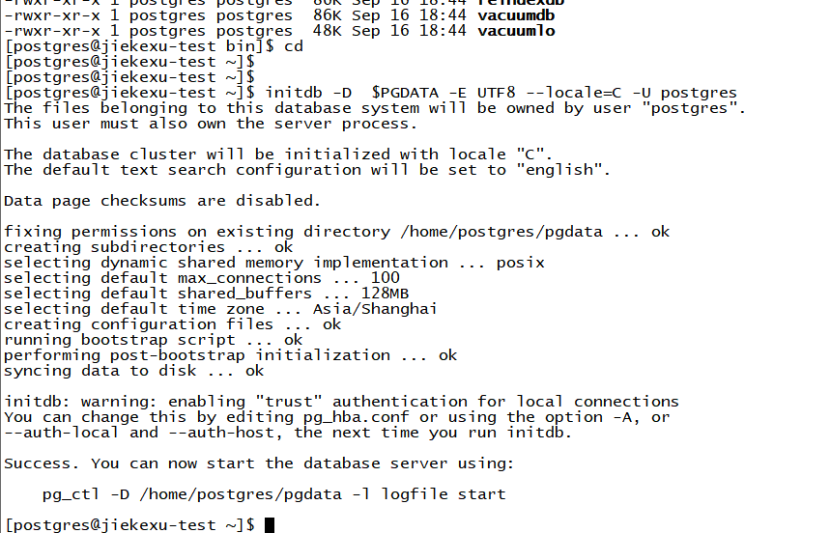
initdb -D $PGDATA -E UTF8 --locale=C -U postgres
[postgres@jiekexu-test ~]$ initdb -D  $PGDATA -E UTF8 --locale=C -U postgres
The files belonging to this database system will be owned by user "postgres".
This user must also own the server process.

The database cluster will be initialized with locale "C".
The default text search configuration will be set to "english".

Data page checksums are disabled.

fixing permissions on existing directory /home/postgres/pgdata ... ok
creating subdirectories ... ok
selecting dynamic shared memory implementation ... posix
selecting default max_connections ... 100
selecting default shared_buffers ... 128MB
selecting default time zone ... Asia/Shanghai
creating configuration files ... ok
running bootstrap script ... ok
performing post-bootstrap initialization ... ok
syncing data to disk ... ok

initdb: warning: enabling "trust" authentication for local connections
You can change this by editing pg_hba.conf or using the option -A, or
--auth-local and --auth-host, the next time you run initdb.

Success. You can now start the database server using:

pg_ctl -D /home/postgres/pgdata -l logfile start
10、contrib 工具安装
contrib 下面有一些比较常用的工具,我们也可以选择安装一下,基本上直接编译、安装即可。
cd /home/postgres/postgres/contrib
gmake
gmake install
gmake[1]: Leaving directory `/home/postgres/postgresql-13.4/contrib/hstore_plpython'
gmake -C jsonb_plpython install
gmake[1]: Entering directory `/home/postgres/postgresql-13.4/contrib/jsonb_plpython'
/bin/mkdir -p '/home/postgres/postgres/lib'
/bin/mkdir -p '/home/postgres/postgres/share/extension'
/bin/mkdir -p '/home/postgres/postgres/share/extension'
/bin/install -c -m 755  jsonb_plpython2.so '/home/postgres/postgres/lib/jsonb_plpython2.so'
/bin/install -c -m 644 ./jsonb_plpythonu.control ./jsonb_plpython2u.control ./jsonb_plpython3u.control '/home/postgres/postgres/share/extension/'
/bin/install -c -m 644 ./jsonb_plpythonu--1.0.sql ./jsonb_plpython2u--1.0.sql ./jsonb_plpython3u--1.0.sql  '/home/postgres/postgres/share/extension/'
gmake[1]: Leaving directory `/home/postgres/postgresql-13.4/contrib/jsonb_plpython'
gmake -C ltree_plpython install
gmake[1]: Entering directory `/home/postgres/postgresql-13.4/contrib/ltree_plpython'
/bin/mkdir -p '/home/postgres/postgres/lib'
/bin/mkdir -p '/home/postgres/postgres/share/extension'
/bin/mkdir -p '/home/postgres/postgres/share/extension'
/bin/install -c -m 755  ltree_plpython2.so '/home/postgres/postgres/lib/ltree_plpython2.so'
/bin/install -c -m 644 ./ltree_plpythonu.control ./ltree_plpython2u.control ./ltree_plpython3u.control '/home/postgres/postgres/share/extension/'
/bin/install -c -m 644 ./ltree_plpythonu--1.0.sql ./ltree_plpython2u--1.0.sql ./ltree_plpython3u--1.0.sql  '/home/postgres/postgres/share/extension/'
gmake[1]: Leaving directory `/home/postgres/postgresql-13.4/contrib/ltree_plpython'
[postgres@jiekexu-test contrib]$
11、数据库配置文件相关
在数据目录下编辑两个配置文件 postgresql.conf 和 pg_hba.conf
(1)配置文件
cd $PGDATA

vi postgresql.conf

listen_addresses = '0.0.0.0'
port = 5432
max_connections = 2000
unix_socket_directories = '/home/postgres/pgdata'
tcp_keepalives_idle = 60
tcp_keepalives_interval = 10
tcp_keepalives_count = 10
shared_buffers = 512MB
dynamic_shared_memory_type = posix
vacuum_cost_delay = 0
bgwriter_delay = 10ms
bgwriter_lru_maxpages = 1000
bgwriter_lru_multiplier = 10.0
bgwriter_flush_after = 0
old_snapshot_threshold = -1
backend_flush_after = 0
wal_level=logical
archive_mode=always
archive_command='cp %p /home/postgres/archive/%f'
min_wal_size=128MB
max_wal_size=1GB
##wal_keep_segments=128
max_wal_senders=10
hot_standby=on
log_filename='pg_log_%u.log'
log_file_mode=0600
log_truncate_on_rotation=on
log_rotation_age=1d
log_min_messages=warning
log_min_duration_statement=30s
synchronous_commit = off
full_page_writes = on
wal_buffers = 16MB
wal_writer_delay = 10ms
wal_writer_flush_after = 0
checkpoint_timeout = 30min
checkpoint_completion_target = 0.05
checkpoint_flush_after = 0
random_page_cost = 1.3
log_directory='pg_log'
log_destination = 'csvlog'
logging_collector = on
log_truncate_on_rotation = on
log_checkpoints = on
log_connections = on
log_disconnections = on
log_error_verbosity = verbose
log_duration=on
log_lock_waits=on
log_statement='mod'
autovacuum = on
log_autovacuum_min_duration = 0
autovacuum_naptime = 20s
autovacuum_vacuum_scale_factor = 0.05
autovacuum_freeze_max_age = 1500000000
autovacuum_multixact_freeze_max_age = 1600000000
autovacuum_vacuum_cost_delay = 0
vacuum_freeze_table_age = 1400000000
vacuum_multixact_freeze_table_age = 1500000000
datestyle = 'iso, mdy'
timezone = 'PRC'
lc_messages = 'C'
lc_monetary = 'C'
lc_numeric = 'C'
lc_time = 'C'
default_text_search_config = 'pg_catalog.english'
shared_preload_libraries='pg_stat_statements'
(2)配置 pg_hba.conf
数据库防火墙文件名字 pg_hba.conf,将以下内容追加到文件末尾,表示允许网络用户使用用户密码连接到你的 postgresql 数据库.
host all all 0.0.0.0/0 md5
(3)数据库启动并查看相关状态、进程
[postgres@jiekexu-test pgdata]$ pg_ctl -D /home/postgres/pgdata start &
[1] 65200
[postgres@jiekexu-test pgdata]$ waiting for server to start....2021-09-16 19:08:20.179 CST [65202] LOG:  00000: redirecting log output to logging collector process
2021-09-16 19:08:20.179 CST [65202] HINT:  Future log output will appear in directory "pg_log".
2021-09-16 19:08:20.179 CST [65202] LOCATION:  SysLogger_Start, syslogger.c:674
 done
server started

[1]+  Done                    pg_ctl -D /home/postgres/pgdata start
[postgres@jiekexu-test pgdata]$
[postgres@jiekexu-test pgdata]$ pg_ctl status
pg_ctl: server is running (PID: 65202)
/home/postgres/postgresql-13.4/bin/postgres "-D" "/home/postgres/pgdata"
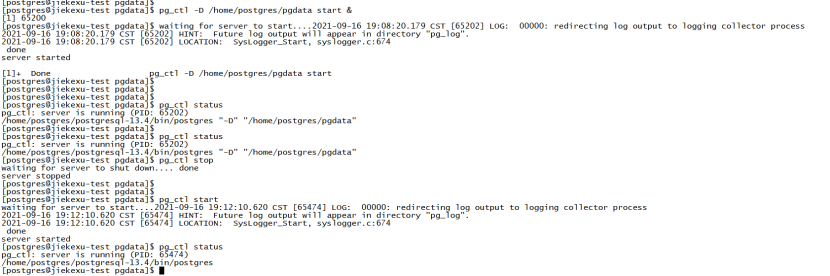
[postgres@jiekexu-test pgdata]$ pg_ctl stop
waiting for server to shut down.... done
server stopped
[postgres@jiekexu-test pgdata]$
[postgres@jiekexu-test pgdata]$
[postgres@jiekexu-test pgdata]$ pg_ctl start
waiting for server to start....2021-09-16 19:12:10.620 CST [65474] LOG:  00000: redirecting log output to logging collector process
2021-09-16 19:12:10.620 CST [65474] HINT:  Future log output will appear in directory "pg_log".
2021-09-16 19:12:10.620 CST [65474] LOCATION:  SysLogger_Start, syslogger.c:674
 done
server started
[postgres@jiekexu-test pgdata]$ pg_ctl status
pg_ctl: server is running (PID: 65474)
/home/postgres/postgresql-13.4/bin/postgres
[postgres@jiekexu-test pgdata]$
[postgres@jiekexu-test pgdata]$ ps -ef | grep 65474
postgres  65474      1  0 19:12 ?        00:00:00 /home/postgres/postgresql-13.4/bin/postgres
postgres  65475  65474  0 19:12 ?        00:00:00 postgres: logger
postgres  65477  65474  0 19:12 ?        00:00:00 postgres: checkpointer
postgres  65478  65474  0 19:12 ?        00:00:00 postgres: background writer
postgres  65479  65474  0 19:12 ?        00:00:00 postgres: walwriter
postgres  65480  65474  0 19:12 ?        00:00:00 postgres: autovacuum launcher
postgres  65481  65474  0 19:12 ?        00:00:00 postgres: archiver
postgres  65482  65474  0 19:12 ?        00:00:00 postgres: stats collector
postgres  65483  65474  0 19:12 ?        00:00:00 postgres: logical replication launcher
postgres  65566  57127  0 19:13 pts/4    00:00:00 grep --color=auto 65474
相应的停止命令则为:pg_ctl stop [-m SHUTDOWN-MODE]
注意:-m 参数时指定数据库停止方式,有 smart、fast、immediate,一般这三个都会简写成“-ms”,”-mf”,”-mi”。smart 则是等所有的连接终止后,关闭数据库。如果数据库一直有连接则无法关闭。fast 则是快速关闭数据库,断开客户端连接,让已有的事务回滚,然后正常关闭数据库,这相当于 oracle数据库的 shutdown immediate模式。而 immediate 则是立即关闭数据库,相当于数据库进程立即停止,直接退出,下次启动数据库需要恢复,这则是相当于 Oracle 数据库关闭时的 shutdown abort 模式,慎用。
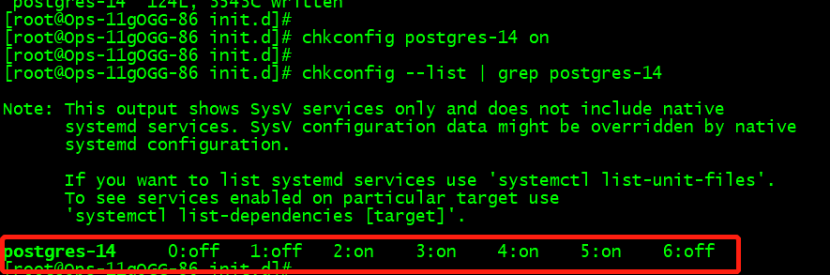
12、设置开机自启动
root 用户配置开机启动
# cp /home/postgres/contrib/start-scripts/linux
/etc/init.d/postgres-13
# chmod +x /etc/init.d/postgres-13

# vi /etc/init.d/postgres-13
--修改如下两处
prefix=/home/postgres/postgres
PGDATA="/home/postgres/pgdata"

# chkconfig postgres-13 on
# chkconfig --list | grep postgres
那么,今天安装部署这一块就说这么多,如果你想要安装高版本的 PG,方法几乎一样,只是高版本的需要依赖 python3,网络上关于 PG14、15、16 版本的安装也都有了,参考他们的安装几乎也没有太大问题。后面接下来打算学习介绍 PG 数据库基础操作及数据类型示例,敬请期待吧。
全文完,希望可以帮到正在阅读的你,如果觉得有帮助,可以分享给你身边的朋友,同事,你关心谁就分享给谁,一起学习共同进步~~~
❤️ 欢迎关注我的公众号【JiekeXu DBA之路】,一起学习新知识!
————————————————————————————
公众号:JiekeXu DBA之路
墨天轮:https://www.modb.pro/u/4347
CSDN :https://blog.csdn.net/JiekeXu
ITPUB:https://blog.itpub.net/69968215
腾讯云:https://cloud.tencent.com/developer/user/5645107
————————————————————————————