




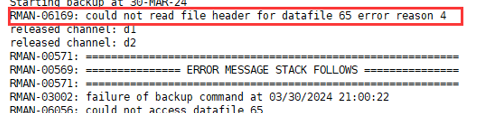
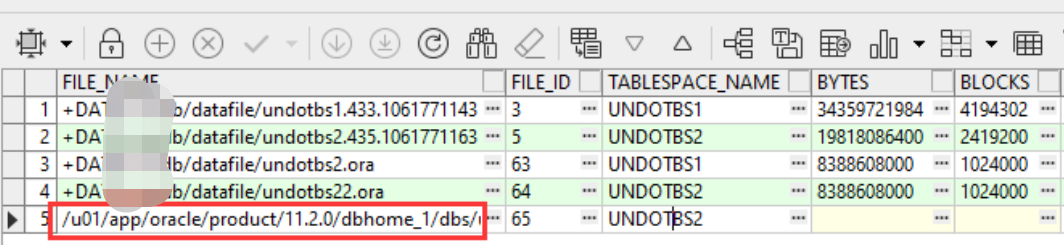
6169, 3, "could not read file header for datafile %(1)s error reason %(2)s"// *Cause: The specified data file could not be accessed. The reason codes are:// 1 - file name is MISSINGxx in the control file// 2 - file is offline// 3 - file is not verified// 4 - DBWR could not find the file// 5 - unable to open file// 6 - I/O error during read// 7 - file header is corrupt// 8 - file is not a data file// 9 - file does not belong to this database// 10 - file number is incorrect// 12 - wrong file version// 15 - control file is not current
set linesize 1000col name for a70select TS#,file#,name,status from v$datafile order by 1;col tablespace_name for a20col file_name for a60select tablespace_name,file_id,file_name,status,online_statusfrom dba_data_files order by 1;
set linesize 1000col name for a20col value for a20select name,value from v$parameterwhere name in ('undo_management','undo_tablespace');NAME VALUE-------------------- --------------------undo_management AUTOundo_tablespace UNDOTBS2set linesize 1000col tablespace_name for a20select TABLESPACE_NAME, CONTENTS,EXTENT_MANAGEMENT, ALLOCATION_TYPE,SEGMENT_SPACE_MANAGEMENTfrom dba_tablespaces where contents='UNDO';TABLESPACE_NAME CONTENTS EXTENT_MAN ALLOCATIO SEGMEN-------------------- --------- ---------- --------- ------UNDOTBS1 UNDO LOCAL SYSTEM MANUALUNDOTBS2 UNDO LOCAL SYSTEM MANUAL

show parameter undo_tablespaceNAME TYPE VALUE------------------------------------ ----------- ------------------------------undo_tablespace string UNDOTBS2col file_name for a60set linesize 100select tablespace_name,file_name from dba_data_files where tablespace_name='UNDOTBS2';
CREATE SMALLFILE UNDO TABLESPACE "UNDOTBS02" DATAFILE '+DATA' SIZE 200M AUTOEXTEND ON;alter system set undo_tablespace='UNDOTBS02' SCOPE=both sid='yzdw2';
--检查回滚段状态select tablespace_name,segment_id,segment_name,file_id,block_id,status,instance_numfrom dba_rollback_segs where tablespace_name='UNDOTBS2' and status = 'ONLINE';TABLESPACE_NAME SEGMENT_ID SEGMENT_NAME FILE_ID BLOCK_ID STATUS INSTANCE_NUM------------------------------ ---------- ------------------------------ ---------- ---------- ---------------- ----------------------------------------UNDOTBS2 12 _SYSSMU12_3316011814$ 6 144 ONLINEUNDOTBS2 14 _SYSSMU14_3105766383$ 6 176 ONLINE--调整undo_tablespace参数后,活动会话会切换到新的undo表空间。--alert日志文件会出现相关的提示信息[6114] Successfully onlined Undo Tablespace 2.[6114] **** active transactions found in undo Tablespace 5 - moved to Pending Switch-Out state.[6114] active transactions found/affinity dissolution incompletein undo tablespace 5 during switch-out.
select s.SID, s.serial#,s.machine,s.program,s.sql_id,s.status,substr(s.username, 1, 10) username, g.tablespace_name,g.segment_namefrom v$transaction, dba_rollback_segs g, v$session s where saddr = ses_addr and xidusn = segment_id;

alter system kill session '829,31003' immediate;
drop tablespace UNDOTBS2 including contents and datafiles;
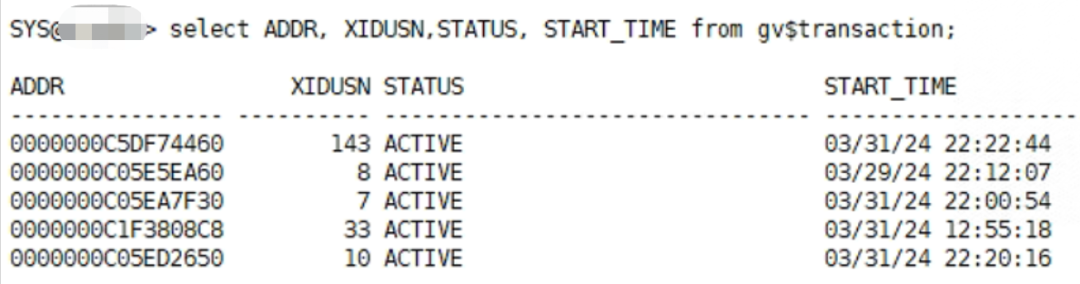
--删除命令SQL> drop tablespace UNDOTBS2 including contents;drop tablespace UNDOTBS2 including contents*ERROR at line 1:ORA-30013: undo tablespace 'UNDOTBS2' is currently in use--alert日志信息Sat Mar 30 23:30:08 2024drop tablespace UNDOTBS2 including contentsORA-30013 signalled during: drop tablespace UNDOTBS2 including contents...Sat Mar 30 23:30:15 2024[26385] **** active transactions found in undo Tablespace 5 - moved to Pending Switch-Out state.Sat Mar 30 23:32:50 2024[26385] **** active transactions found in undo Tablespace 5 - moved to Pending Switch-Out state.
--活动事务信息select ADDR, XIDUSN,STATUS, START_TIME from v$transaction;--PENDING OFFLINE状态的会话信息set linesize 1000col name for a30col username for a15col machine for a20col osuser for a10SELECT a.usn, a.name, b.status, c.tablespace_name, d.addr, e.sid, e.serial#, e.username, e.program, e.machine, e.osuserFROM v$rollname a, v$rollstat b, dba_rollback_segs c, v$transaction d, v$session eWHERE a.usn=b.usn AND a.name=c.segment_name AND a.usn=d.xidusn AND d.addr=e.taddr AND b.status='PENDING OFFLINE';--基于上面查出来的sid,serial#信息,清理掉相关的会话ALTER SYSTEM KILL SESSION '<sid#>, <serial#>' immediate;--最后再执行表空间删除命令(如果这些步骤还不能解决问题,可以查看推荐二的解决方案)drop tablespace UNDOTBS2 including contents and datafiles;
--切换日志文件SQL> alter system switch logfile;--查看数据文件信息select tablespace_name,file_name,file_id,bytes/(1024*1024*1024)g,autoextensiblefrom dba_data_files where tablespace_name like '%UNDO%';--将数据文件离线SQL> alter database datafile 6 offline;
--查看数据文件信息是否处于RECOVER状态。SQL> select file_name, file_id,online_status from dba_data_files where file_id=6;--ASMCMD复制文件,使用ASMCMD将数据文件从文件系统复制到磁盘组。ASMCMD> cp/u01/app/oracle/product/12.1.0/dbhome_1/dbs/SYSAUX02.DBF +YWZD/YWZD/SYSAUX02.dbfCopying/u01/app/oracle/product/12.1.0/dbhome_1/dbs/SYSAUX02.DBF->+YWZD/YWZD/SYSAUX02.dbfASMCMD> ls –ltASMCMD> pwd
--rename数据文件;数据文件复制之后,通过rename进行数据文件重命名SQL> alter database rename file '/u01/app/oracle/product/12.1.0/dbhome_1/dbs/SYSAUX02.DBF'to '+YWZD/YWZD/SYSAUX02.dbf';--恢复数据文件:对数据文件进行recover恢复12c版本SQL> alter database recover datafile 6;11g版本RMAN> recover datafile 6;--将数据文件设置为在线SQL> alter database datafile 6 online;--验证数据文件路径SQL> select file_name, file_id,online_status from dba_data_files where file_id=6;FILE_NAME FILE_ID ONLINE_STATUS---------------- ------- ------------------+YWZD/YWZD/SYSAUX02.dbf 6 ONLINE
--在集群环境下,多节点实例共享数据文件。如果数据文件存放在文件系统,会导致其中一个节点无法访问数据文件。--假如:数据文件创建在节点1的文件系统,节点2访问数据文件报错。SQL> select file_name from dba_data_files;select file_name from dba_data_files*ERROR at line 1:ORA-01157: cannot identify/lock data file 6- see DBWR trace fileORA-01110: data file 6:'/u01/app/oracle/product/12.1.0/dbhome_1/dbs/D:appOracleoradatahbgmsSYSAUX02.DBF'--官方建议:$oerr ora 0115701157, 00000, "cannot identify/lock data file %s - see DBWR trace file"// *Cause: The background process was either unable to find one of the data// files or failed to lock it because the file was already in use.// The database will prohibit access to this file but other files will// be unaffected. However the first instance to open the database will// need to access all online data files. Accompanying error from the// operating system describes why the file could not be identified.// *Action: Have operating system make file available to database. Then either// open the database or do ALTER SYSTEM CHECK DATAFILES.
--查看当前数据文件路径和状态col file_name for a70set linesize 200select file_id,file_name,status from dba_data_filesorder by file_id;--将数据文件调整至指定的路径目录,然后运行上面的SQL验证文件路径与状态alter database move datafile '/u01/app/oracle/oradata/ywzd/system01.dbf'to '/u01/app/oracle/oradata/system01.dbf';
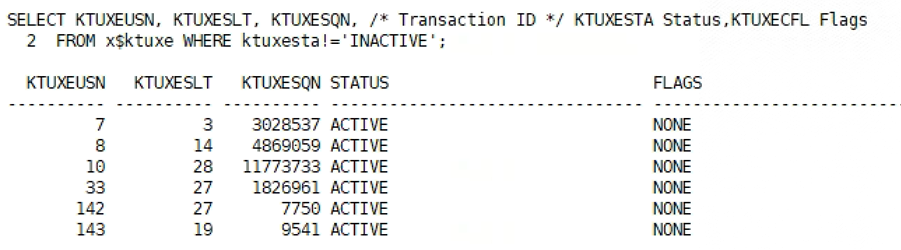
--问题依旧存在SQL> drop tablespace undotbs2 including contents and datafiles;drop tablespace undotbs2 including contents and datafiles*ERROR at line 1:ORA-30013: undo tablespace 'UNDOTBS2' is currently in use--进一步收集分布式事务信息Select segment_name,status,tablespace_name from dba_rollback_segs where status not in ('ONLINE','OFFLINE') ;select KTUXEUSN, KTUXESLT, KTUXESQN, KTUXESTA, KTUXECFL, KTUXESIZ from x$ktuxe where KTUXESTA='ACTIVE' and KTUXECFL='DEAD';SELECT LOCAL_TRAN_ID,GLOBAL_TRAN_ID,STATE,MIXED,COMMIT# FROM DBA_2PC_PENDING;--local_tran_id is a trio combination of USN , Slot , SeqSELECT LOCAL_TRAN_ID,IN_OUT,DATABASE,INTERFACE FROM dba_2pc_neighbors;
declarev_txn VARCHAR2(22);CURSOR trans_cursor isSELECT LOCAL_TRAN_ID FROM DBA_2PC_PENDING WHERE STATE='forced rollback';beginopen trans_cursor ;LOOPfetch trans_cursor into v_txn;EXIT WHEN trans_cursor%NOTFOUND ;Commit;DBMS_TRANSACTION.PURGE_LOST_DB_ENTRY(v_txn) ;END LOOP;COMMIT;end;/
--通过V$TYPE_SIZE视图可以找到Oracle的自解释信息select * from v$type_size where component='KTU';COMPONEN TYPE DESCRIPTION TYPE_SIZE-------- -------- -------------------------------- ----------KTU KTUBH UNDO HEADER 16KTU KTUXE UNDO TRANSACTION ENTRY 40KTU KTUXC UNDO TRANSACTION CONTROL 104--表中的KTUXECFL代表了事务的Flag标记,通过这个标记可以找到那些Dead事务select distinct KTUXECFL,count(*) from x$ktuxe group by KTUXECFL;KTUXECFL COUNT(*)------------------------ ----------NONE 778--KTUXESIZ用来记录事务使用的回滚段块数,可以通过观察这个字段来评估恢复进度:select ADDR,KTUXEUSN,KTUXESLT,KTUXESQN,KTUXESIZ from x$ktuxewhere KTUXECFL ='DEAD';
SQL > alter database recover datafile 65;alter database recover datafile 65*ERROR at line 1:ORA-00279: change 12597056539218 generated at 03/30/2024 21:09:53 needed for thread 2ORA-00289: suggestion : +FRA/urpdb/archivelog/2024_03_30/thread_2_seq_146434.1195.1165007427ORA-00280: change 12597056539218 for thread 2 is in sequence #146434

RMAN-06169: could not read file header for datafile XX error reason 5 (Doc ID 2868000.1) Backup Fails RMAN-06169: could not read file header for datafile % error reason % (Doc ID 2991317.1) Troubleshooting ORA-30013 Error (Doc ID 1578717.1) Unable to Drop Undo Tablespace ORA-30013 (Doc ID 835944.1) Undo Tablespace Moved To Pending Switch-Out State (Doc ID 341372.1) How to Shrink the datafile of Undo Tablespace (Doc ID 268870.1) Managing Rollback/Undo Segments in AUM (Automatic Undo Management) (Doc ID 135090.1) Unable to Drop Undo Tablespace ORA-30013 (Doc ID 835944.1) How to clear huge number of In-doubt transactions in PREPARED state (Doc ID 2489254.1) https://blog.csdn.net/Hehuyi_In/article/details/107866180


文章转载自数据库运维之道,如果涉嫌侵权,请发送邮件至:contact@modb.pro进行举报,并提供相关证据,一经查实,墨天轮将立刻删除相关内容。
