
查看版本:opatch lsinventory查看日志状态:set linesize 1000col member for a70select * from v$log;select * from v$logfile;select a.member, a.group#, b.statusfrom v$logfile a ,v$log b where a.group#=b.group# and b.status='CURRENT' ;

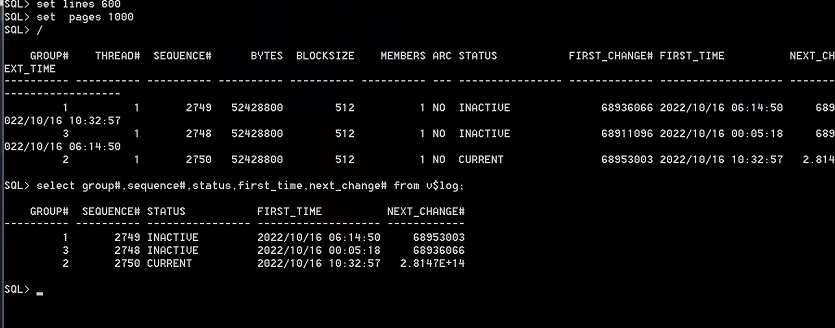
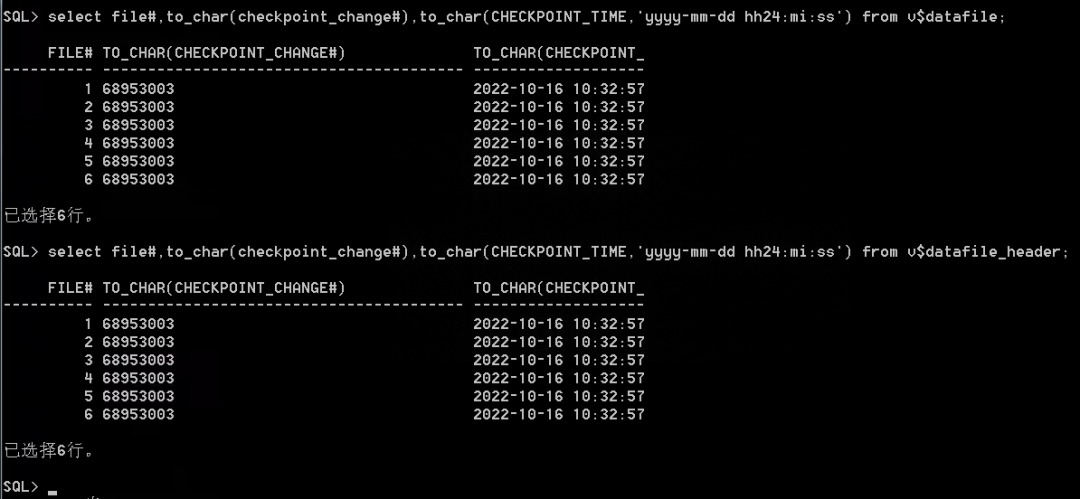
2、查看当前在线重做日志信息。当前日志文件序号为2750。查看数据文件scn与控制文件scn号是一致的,值为68953003。
select file#,to_char(checkpoint_change#),to_char(CHECKPOINT_TIME,'yyyy-mm-dd hh24:mi:ss')from v$datafile;select file#,to_char(checkpoint_change#),to_char(CHECKPOINT_TIME,'yyyy-mm-dd hh24:mi:ss')from v$datafile_header;
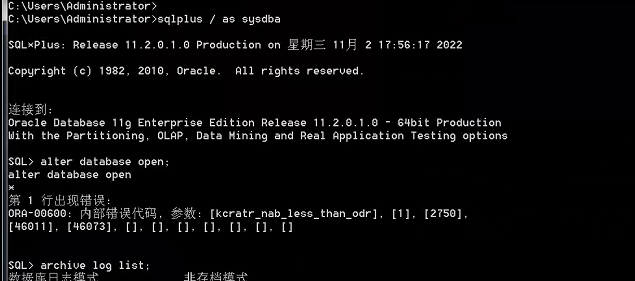
3、查看数据库alert日志,开库进行数据库一致性校验还原时,出现ORA-00600[kcratr_nab_less_than_odr]错误。
alter database openBeginning crash recovery of 1 threadsparallel recovery started with 3 processesStarted redo scanCompleted redo scanread 958 KB redo, 401 data blocks need recoveryErrors in file d:\app\administrator\diag\rdbms\orcl\orcl\trace\orcl_ora_5212.trc (incident=128562):ORA-00600: ??????, ??: [kcratr_nab_less_than_odr], [1], [2750], [46011], [46073], [], [], [], [], [], [], []Incident details in: d:\app\administrator\diag\rdbms\orcl\orcl\incident\incdir_128562\orcl_ora_5212_i128562.trcAborting crash recovery due to error 600Errors in file d:\app\administrator\diag\rdbms\orcl\orcl\trace\orcl_ora_5212.trc:ORA-00600: ??????, ??: [kcratr_nab_less_than_odr], [1], [2750], [46011], [46073], [], [], [], [], [], [], []Errors in file d:\app\administrator\diag\rdbms\orcl\orcl\trace\orcl_ora_5212.trc:ORA-00600: ??????, ??: [kcratr_nab_less_than_odr], [1], [2750], [46011], [46073], [], [], [], [], [], [], []ORA-600 signalled during: alter database open...Trace dumping is performing id=[cdmp_20221102185258]Wed Nov 02 18:53:55 2022Sweep [inc][128562]: completedSweep [inc2][128562]: completedWed Nov 02 19:04:31 2022Shutting down instance (immediate)Shutting down instance: further logons disabledStopping background process MMNLStopping background process MMON
4、进一步查看Incident details的跟踪文件。通过alert和trace中的信息可以知道,数据库恢复块数据是从日志序号2750的块号为44095开始到46073,但是实际只能恢复rba到46011,从而导致数据库无法正常open。
ending at redo block 46011 but should not have ended before redo block 46073
Successfully allocated 3 recovery slavesUsing 45 overflow buffers per recovery slaveThread 1 checkpoint: logseq 2750, block 2, scn 68953003cache-low rba: logseq 2750, block 44095on-disk rba: logseq 2750, block 46073, scn 68970890start recovery at logseq 2750, block 44095, scn 0。。。。WARNING! Crash recovery of thread 1 seq 2750 isending at redo block 46011 but should not have ended beforeredo block 46073Incident 128562 created, dump file: d:\app\administrator\diag\rdbms\orcl\orcl\incident\incdir_128562\orcl_ora_5212_i128562.trcORA-00600: ??????, ??: [kcratr_nab_less_than_odr], [1], [2750], [46011], [46073], [], [], [], [], [], [], []ORA-00600: ??????, ??: [kcratr_nab_less_than_odr], [1], [2750], [46011], [46073], [], [], [], [], [], [], []ORA-00600: ??????, ??: [kcratr_nab_less_than_odr], [1], [2750], [46011], [46073], [], [], [], [], [], [], []

1、由于服务器异常断电,内存中的缓存数据未及时写联机日志文件,下次启动数据库时,需要做实例级恢复并校验数据块的一致性。根据ORA-600参数值,查阅MOS官方文档,找到对应的解决方案。
2、根据官方文档,查阅跟踪文件,调用堆栈记录与1296264.1文档里描述一致。
========= Dump for incident 128562 (ORA 600 [kcratr_nab_less_than_odr]) ========*** 2022-11-02 18:52:57.721dbkedDefDump(): Starting incident default dumps (flags=0x2, level=3, mask=0x0)----- Current SQL Statement for this session (sql_id=a01hp0psv0rrh) -----alter database open----- Call Stack Trace -----ksedst1 <- ksedst <- dbkedDefDump <- ksedmp <- dbgexPhaseII <- dbgexProcessError<- dbgePostErrorKGE <- kgeasnmierr <- kcratr_odr_check <- kcratr <- kctrec<- kcvcrv <- kcfopd <- adbdrv <- opiexe <- opiosq0 <- kpoal8 <- opiodr <- ttcpip<- opitsk <- opiino <- opiodr <- opidrv <- sou2o <- opimai_real <- ssthrdmain<- main<- start
3、根据官方知识库可以确认原因:由于断电导致控制文件出现逻辑损坏。
There was a power failure causing logical corruption in controlfileThis Problem is caused by Storage Problem of the Database Files.The Subsystem (eg. SAN) crashed while the Database was open.The Database then crashed because the Database Files were not accessible anymore.This caused a lost Write into the Online RedoLogs and/or causing logical corruptionin controlfile so Instance Recovery is not possible and raising the ORA-600.
4、官方提出两种解决方法:
(1)通过恢复取消命令,手动输入当前状态重做日志进行恢复。由于数据库大小不到10G,我直接将数据关闭,并进行系统级冷备。如果数据库的数据文件较大,可考虑对控制文件及重做文件及system.dbf文件进行备份。
启动至mount状态:startup mount ;
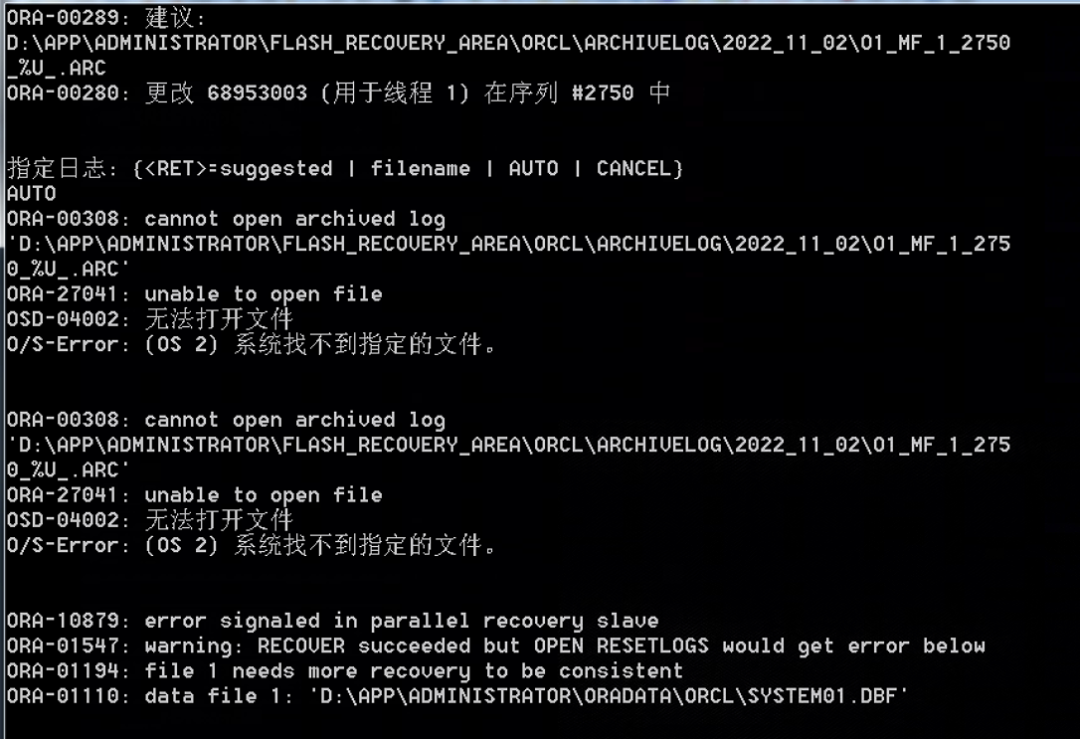
执行恢复命令:recover database using backup controlfile until cancel ;
从下面截图来看,数据库自动寻找归档日志,但是归档日志实际上是没打开的。所以找不到归档文件。
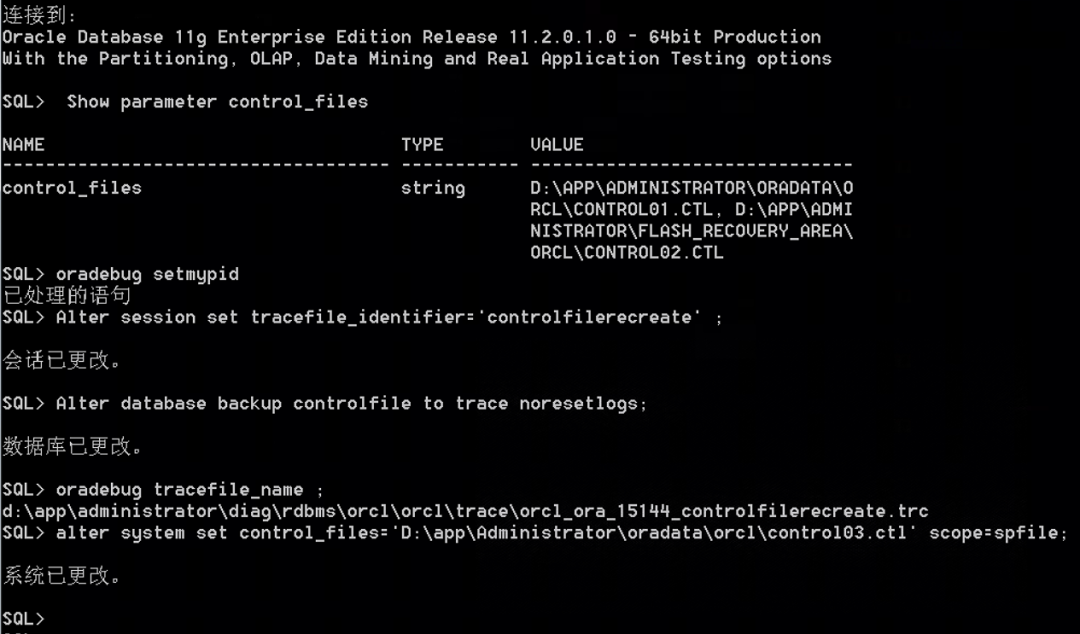
(2)采用oradebug命令生成控制文件创建脚本。执行控制文件重建及开库操作后,数据库最终恢复到46011数据块,并正常打开数据库。
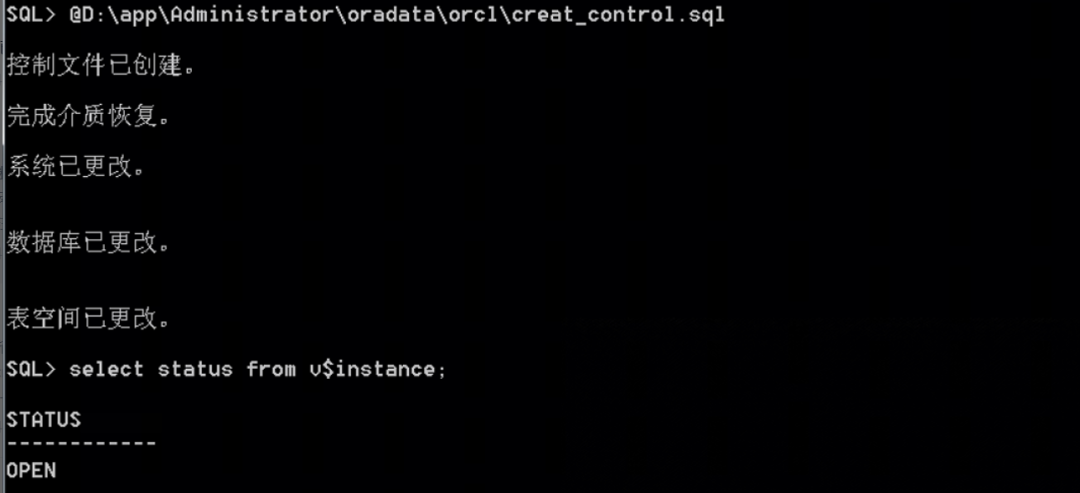
ALTER DATABASE RECOVER DATABASEMedia Recovery Startstarted logmerger processParallel Media Recovery started with 4 slavesWed Nov 02 19:21:52 2022Recovery of Online Redo Log: Thread 1 Group 2 Seq 2750 Reading mem 0Mem# 0: D:\APP\ADMINISTRATOR\ORADATA\ORCL\REDO02.LOGCompleted: ALTER DATABASE RECOVER DATABASEWed Nov 02 19:22:02 2022Archived Log entry 1 added for thread 1 sequence 2748 ID 0x5df22786 dest 1:Archived Log entry 2 added for thread 1 sequence 2749 ID 0x5df22786 dest 1:ALTER DATABASE OPENBeginning crash recovery of 1 threadsparallel recovery started with 3 processesStarted redo scanCompleted redo scanread 23004 KB redo, 0 data blocks need recoveryStarted redo application atThread 1: logseq 2750, block 2, scn 68953003Recovery of Online Redo Log: Thread 1 Group 2 Seq 2750 Reading mem 0Mem# 0: D:\APP\ADMINISTRATOR\ORADATA\ORCL\REDO02.LOGCompleted redo application of 0.00MBCompleted crash recovery atThread 1: logseq 2750, block 46011, scn 68990864---->最终恢复点。0 data blocks read, 0 data blocks written, 23004 redo k-bytes readWed Nov 02 19:22:05 2022LGWR: STARTING ARCH PROCESSES
5、建议重建控制文件后,备份文件信息要注册回控制文件。
命令:RMAN> CATALOG START WITH '/home/oracle/ywzd';
6、最后对数据库进行一次RMAN全备。

故障场景一:客户机房非正常断电,待恢复供电后,数据库无法正常启动,alert告警日志出现ORA-00338 ORA-00312错误,即线程1的日志 2比控制文件更新。
Wed Mar 20 10:24:03 2024ALTER DATABASE MOUNTSuccessful mount of redo thread 1, with mount id 387518083Database mounted in Exclusive ModeLost write protection disabledCompleted: ALIER DATABASE MOUNTWed Mar 20 10:24:07 2024ALTER DATABASE OPEN;Errors in file opt/oracle/diag/rdbms/ywzd/ywzd/trace/ywzd_ora_30995.tra:ORA-00338: log 2 of thread 1 is more recent than control fileORA-00312: online log 2 thread 1: 'redo.log'USER(ospid: 30995):terminating the inatance due to error 338Instance terminated by USER,pid=30995The ORA-00338 normally indicates an incorrect control file may be used:00338, 00000, "log %s of thread %s is more recent than control file"// *Cause: The control file change sequence number in the log file is// greater than the number in the control file. This implies that// the wrong control file is being used. Note that repeatedly causing// this error can make it stop happening without correcting the real// problem. Every attempt to open the database will advance the// control file change sequence number until it is great enough.// *Action: Use the current control file or do backup control file recovery to// make the control file current. Be sure to follow all restrictions// on doing a backup control file recovery.
故障场景二:数据库无法正常启动,alert告警日志出现ORA-01207错误,即数据文件1比控制文件scn时间更新。
SYS> alter database open;alter database open*ERROR at line 1:ORA-01122: database file 1 failed verification checkORA-01110: data file 1: '/u01/app/oracle/oradata/ywzd/system.dbf'ORA-01207: file is more recent than control file - old control file
技术细节一:在恢复过程中,Cache-Low RBA和On-Disk RBA主导了恢复过程,Oracle的恢复从上一次成功的写出开始,也就是以Cache-Low RBA为起点,恢复至日志的最后成功记录,也就是以On-Disk RBA为终点。如果想了解具体的原理细节,可以学习下盖老师的两篇文章。
技术细节二:Oracle 的控制文件记录了当前数据库的结构信息,包含数据文件及日志文件的信息以及相关的状态、归档信息等。控制文件是一个二进制文件,一个控制文件只属于一个数据库。当数据库的物理结构发生改变时,Oracle会自动更新控制文件。当增加、重命名、删除一个数据文件或者一个重做日志文件时,Oracle 服务器进程会立即更新控制文件以反映数据库结构的变化。用户不能手工编辑控制文件,控制文件的修改由 Oracle 自动完成。
数据库的启动和正常运行都离不开控制文件(数据库在 mount 阶段读取控制文件,open 阶段一直使用),一定要备份控制文件,控制文件损坏将导致整个数据库损坏,数据库正常工作至少需要一个控制文件,生产库至少需要两个控制文件(多个控制文件之间是镜像关系),控制文件的位置和数量由初始化参数(control_files)决定。启动数据库时,Oracle 从初始化参数文件中获取控制文件的名字及位置,并打开控制文件,然后从控制文件中读取数据文件和重做日志文件的信息,最后打开数据库。数据库运行时,会更改控制文件。
重建控制步骤
方法一:SQL> oradebug setmypidSQL> alter session set tracefile_identifier='controlfilerecreate' ;SQL> alter database backup controlfile to trace noresetlogs;SQL> oradebug tracefile_name ; 脚本位置和名称SQL> shutdown immediate备份当前控制文件,非常重要。SQL> startup nomountSQL> @控制文件脚本.sql 创建控制文件SQL> alter database open;方法二:重建控制文件方法2SQL> ALTER DATABASE BACKUP CONTROLFILE TO TRACE AS 'd:\controlfilerecreate.txt';

Alter database open fails with ORA-00600 kcratr_nab_less_than_odr (文档 ID 1296264.1) ORA-00338, ORA-00312 Errors Reported In Alert Log (Doc ID 1377160.1) How to Recreate a Controlfile (Doc ID 735106.1)

可以加我的微信,交个朋友或讨论数据库解决方案,请备注”姓名单位“,谢谢!