




点击蓝字,关注我

Ansible 是一个自动化平台,用于 IT 自动化,如配置管理、应用部署、任务自动化等。Ansible 使用 SSH 来连接到远程机器,并执行预定义的任务。Ansible 的主要特点是其简单性、易用性和强大的功能集。
以下是 Ansible 的一些关键特性和优点:
无需代理:Ansible 不需要在远程机器上安装任何代理或守护进程。它使用 SSH 来连接和执行任务。
易于阅读和编写:Ansible 的配置文件(通常称为 Playbooks)使用 YAML 格式,这使得它们既易于人类阅读又易于编写。
幂等性:Ansible 的任务设计为幂等的,这意味着多次运行同一个任务将产生相同的结果。
模块丰富:Ansible 有大量的内置模块,可用于各种任务,如文件操作、包管理、系统服务等。此外,用户还可以编写自定义模块。
可扩展性:Ansible 可以与多种工具和平台集成,如 Docker、Kubernetes、AWS 等。
社区支持:Ansible 有一个活跃的社区,提供了大量的文档、示例和插件。
Ansible 的主要组件包括:
Inventory:定义了要管理的主机和组。
Modules:用于执行特定任务的代码片段。
Playbooks:定义了如何应用模块到一组主机上的任务列表。
Ad-hoc Commands:一次性执行的简单命令。
使用 Ansible,您可以自动化常见的 IT 任务,如部署应用程序、配置服务器、管理网络设备等,从而提高效率并减少错误。
Zabbix是一个基于WEB界面的提供分布式系统监视以及网络监视功能的企业级的开源解决方案。它由Zabbix server与可选组件Zabbix agent两部分构成。Zabbix server可以通过SNMP、Zabbix agent、ping、端口监视等方法提供对远程服务器/网络状态的监视和数据收集等功能。它能在多种操作系统平台上运行,如Linux、Solaris、HP-UX、AIX、Free BSD、Open BSD、OS X等。
Zabbix的主要功能包括:
实时监控:能够监控网络设备、服务器和应用程序的性能指标,提供实时监控和警报功能,帮助管理员及时发现并解决问题。
数据收集和分析:可以收集、存储和分析大量的监控数据,提供图表和报告,帮助管理员了解系统的运行状况并进行性能分析。
此外,Zabbix还具有以下特点:
自动发现服务器和网络设备。
分布式的监控体系和集中式的web管理。
支持主动监控和被动监控模式。
高效的agent支持多种操作系统和环境。
无agent监控等多种监控方法。
安全的用户认证模式和灵活的用户权限设置。
基于web的管理方法。
支持自由的自定义事件和邮件发送。
高水平的业务视图监控资源。
支持日志审计。
总的来说,Zabbix的主要功能是提供全面的网络监控和管理解决方案,帮助管理员及时发现和解决问题,提高系统的稳定性和可靠性。如需更多关于Zabbix的信息,建议访问Zabbix官方网站或相关技术社区。
[root@localhost deploy-zabbix5.0]# tree.├── ansible│ ├── ansible-2.9.27-1.el7.noarch.rpm│ ├── libyaml-0.1.4-11.el7_0.x86_64.rpm│ ├── python2-cryptography-1.7.2-2.el7.x86_64.rpm│ ├── python2-httplib2-0.18.1-3.el7.noarch.rpm│ ├── python2-jmespath-0.9.4-2.el7.noarch.rpm│ ├── python2-pyasn1-0.1.9-7.el7.noarch.rpm│ ├── python-babel-0.9.6-8.el7.noarch.rpm│ ├── python-backports-1.0-8.el7.x86_64.rpm│ ├── python-backports-ssl_match_hostname-3.5.0.1-1.el7.noarch.rpm│ ├── python-cffi-1.6.0-5.el7.x86_64.rpm│ ├── python-enum34-1.0.4-1.el7.noarch.rpm│ ├── python-idna-2.4-1.el7.noarch.rpm│ ├── python-ipaddress-1.0.16-2.el7.noarch.rpm│ ├── python-jinja2-2.7.2-4.el7.noarch.rpm│ ├── python-markupsafe-0.11-10.el7.x86_64.rpm│ ├── python-paramiko-2.1.1-9.el7.noarch.rpm│ ├── python-ply-3.4-11.el7.noarch.rpm│ ├── python-pycparser-2.14-1.el7.noarch.rpm│ ├── python-setuptools-0.9.8-7.el7.noarch.rpm│ ├── python-six-1.9.0-2.el7.noarch.rpm│ ├── PyYAML-3.10-11.el7.x86_64.rpm│ └── sshpass-1.06-2.el7.x86_64.rpm├── conf│ ├── ansible.cfg│ ├── hosts│ ├── install_zabbix_agent.yml│ ├── remove_zabbix-agent.yml│ ├── simkai.ttf│ ├── update_agent_yml_ip.sh│ ├── zabbix-agent-5.0.33-1.el7.x86_64.rpm│ ├── zabbix_agentd.conf│ ├── zabbix_agentd.conf.j2│ ├── zabbix_server.conf│ └── zabbix.sql├── deploy.sh├── down│ └── zabbix-agent-5.0.33-windows-amd64-openssl.msi├── http│ ├── apr-1.4.8-7.el7.x86_64.rpm│ ├── apr-util-1.5.2-6.el7.x86_64.rpm│ ├── httpd-2.4.6-98.el7.centos.7.x86_64.rpm│ ├── httpd-tools-2.4.6-98.el7.centos.7.x86_64.rpm│ └── mailcap-2.1.41-2.el7.noarch.rpm├── mariadb│ ├── boost-program-options-1.53.0-28.el7.x86_64.rpm│ ├── galera-4-26.4.14-1.el7.centos.x86_64.rpm│ ├── libpmem-1.5.1-2.1.el7.x86_64.rpm│ ├── lsof-4.87-6.el7.x86_64.rpm│ ├── MariaDB-client-10.11.2-1.el7.centos.x86_64.rpm│ ├── MariaDB-common-10.11.2-1.el7.centos.x86_64.rpm│ ├── MariaDB-compat-10.11.2-1.el7.centos.x86_64.rpm│ ├── MariaDB-server-10.11.2-1.el7.centos.x86_64.rpm│ ├── pcre2-10.23-2.el7.x86_64.rpm│ ├── perl-5.16.3-299.el7_9.x86_64.rpm│ ├── perl-Carp-1.26-244.el7.noarch.rpm│ ├── perl-Compress-Raw-Bzip2-2.061-3.el7.x86_64.rpm│ ├── perl-Compress-Raw-Zlib-2.061-4.el7.x86_64.rpm│ ├── perl-constant-1.27-2.el7.noarch.rpm│ ├── perl-Data-Dumper-2.145-3.el7.x86_64.rpm│ ├── perl-DBI-1.627-4.el7.x86_64.rpm│ ├── perl-Encode-2.51-7.el7.x86_64.rpm│ ├── perl-Exporter-5.68-3.el7.noarch.rpm│ ├── perl-File-Path-2.09-2.el7.noarch.rpm│ ├── perl-File-Temp-0.23.01-3.el7.noarch.rpm│ ├── perl-Filter-1.49-3.el7.x86_64.rpm│ ├── perl-Getopt-Long-2.40-3.el7.noarch.rpm│ ├── perl-HTTP-Tiny-0.033-3.el7.noarch.rpm│ ├── perl-IO-Compress-2.061-2.el7.noarch.rpm│ ├── perl-libs-5.16.3-299.el7_9.x86_64.rpm│ ├── perl-macros-5.16.3-299.el7_9.x86_64.rpm│ ├── perl-Net-Daemon-0.48-5.el7.noarch.rpm│ ├── perl-parent-0.225-244.el7.noarch.rpm│ ├── perl-PathTools-3.40-5.el7.x86_64.rpm│ ├── perl-PlRPC-0.2020-14.el7.noarch.rpm│ ├── perl-Pod-Escapes-1.04-299.el7_9.noarch.rpm│ ├── perl-podlators-2.5.1-3.el7.noarch.rpm│ ├── perl-Pod-Perldoc-3.20-4.el7.noarch.rpm│ ├── perl-Pod-Simple-3.28-4.el7.noarch.rpm│ ├── perl-Pod-Usage-1.63-3.el7.noarch.rpm│ ├── perl-Scalar-List-Utils-1.27-248.el7.x86_64.rpm│ ├── perl-Socket-2.010-5.el7.x86_64.rpm│ ├── perl-Storable-2.45-3.el7.x86_64.rpm│ ├── perl-Text-ParseWords-3.29-4.el7.noarch.rpm│ ├── perl-threads-1.87-4.el7.x86_64.rpm│ ├── perl-threads-shared-1.43-6.el7.x86_64.rpm│ ├── perl-Time-HiRes-1.9725-3.el7.x86_64.rpm│ ├── perl-Time-Local-1.2300-2.el7.noarch.rpm│ ├── pv-1.4.6-1.el7.x86_64.rpm│ ├── rsync-3.1.2-12.el7_9.x86_64.rpm│ └── socat-1.7.3.2-2.el7.x86_64.rpm├── tools│ ├── curl-7.29.0-59.el7_9.1.x86_64.rpm│ ├── gpm-libs-1.20.7-6.el7.x86_64.rpm│ ├── libcurl-7.29.0-59.el7_9.1.x86_64.rpm│ ├── lrzsz-0.12.20-36.el7.x86_64.rpm│ ├── perl-5.16.3-299.el7_9.x86_64.rpm│ ├── perl-Carp-1.26-244.el7.noarch.rpm│ ├── perl-constant-1.27-2.el7.noarch.rpm│ ├── perl-Encode-2.51-7.el7.x86_64.rpm│ ├── perl-Exporter-5.68-3.el7.noarch.rpm│ ├── perl-File-Path-2.09-2.el7.noarch.rpm│ ├── perl-File-Temp-0.23.01-3.el7.noarch.rpm│ ├── perl-Filter-1.49-3.el7.x86_64.rpm│ ├── perl-Getopt-Long-2.40-3.el7.noarch.rpm│ ├── perl-HTTP-Tiny-0.033-3.el7.noarch.rpm│ ├── perl-libs-5.16.3-299.el7_9.x86_64.rpm│ ├── perl-macros-5.16.3-299.el7_9.x86_64.rpm│ ├── perl-parent-0.225-244.el7.noarch.rpm│ ├── perl-PathTools-3.40-5.el7.x86_64.rpm│ ├── perl-Pod-Escapes-1.04-299.el7_9.noarch.rpm│ ├── perl-podlators-2.5.1-3.el7.noarch.rpm│ ├── perl-Pod-Perldoc-3.20-4.el7.noarch.rpm│ ├── perl-Pod-Simple-3.28-4.el7.noarch.rpm│ ├── perl-Pod-Usage-1.63-3.el7.noarch.rpm│ ├── perl-Scalar-List-Utils-1.27-248.el7.x86_64.rpm│ ├── perl-Socket-2.010-5.el7.x86_64.rpm│ ├── perl-Storable-2.45-3.el7.x86_64.rpm│ ├── perl-Text-ParseWords-3.29-4.el7.noarch.rpm│ ├── perl-threads-1.87-4.el7.x86_64.rpm│ ├── perl-threads-shared-1.43-6.el7.x86_64.rpm│ ├── perl-Time-HiRes-1.9725-3.el7.x86_64.rpm│ ├── perl-Time-Local-1.2300-2.el7.noarch.rpm│ ├── tree-1.6.0-10.el7.x86_64.rpm│ ├── vim-common-7.4.629-8.el7_9.x86_64.rpm│ ├── vim-enhanced-7.4.629-8.el7_9.x86_64.rpm│ ├── vim-filesystem-7.4.629-8.el7_9.x86_64.rpm│ └── wget-1.14-18.el7_6.1.x86_64.rpm└── zabbix├── apr-1.4.8-7.el7.x86_64.rpm├── apr-util-1.5.2-6.el7.x86_64.rpm├── audit-libs-python-2.8.5-4.el7.x86_64.rpm├── checkpolicy-2.5-8.el7.x86_64.rpm├── dejavu-fonts-common-2.33-6.el7.noarch.rpm├── dejavu-sans-fonts-2.33-6.el7.noarch.rpm├── fontpackages-filesystem-1.44-8.el7.noarch.rpm├── fping-3.16-1.el7.x86_64.rpm├── httpd-2.4.6-98.el7.centos.7.x86_64.rpm├── httpd-tools-2.4.6-98.el7.centos.7.x86_64.rpm├── libcgroup-0.41-21.el7.x86_64.rpm├── libevent-2.0.21-4.el7.x86_64.rpm├── libjpeg-turbo-1.2.90-8.el7.x86_64.rpm├── libsemanage-python-2.5-14.el7.x86_64.rpm├── libtool-ltdl-2.4.2-22.el7_3.x86_64.rpm├── libwebp-0.3.0-10.el7_9.x86_64.rpm├── libX11-1.6.7-4.el7_9.x86_64.rpm├── libX11-common-1.6.7-4.el7_9.noarch.rpm├── libXau-1.0.8-2.1.el7.x86_64.rpm├── libxcb-1.13-1.el7.x86_64.rpm├── libXpm-3.5.12-2.el7_9.x86_64.rpm├── libxslt-1.1.28-6.el7.x86_64.rpm├── mailcap-2.1.41-2.el7.noarch.rpm├── net-snmp-libs-5.7.2-49.el7_9.2.x86_64.rpm├── OpenIPMI-2.0.27-1.el7.x86_64.rpm├── OpenIPMI-libs-2.0.27-1.el7.x86_64.rpm├── OpenIPMI-modalias-2.0.27-1.el7.x86_64.rpm├── policycoreutils-python-2.5-34.el7.x86_64.rpm├── python-IPy-0.75-6.el7.noarch.rpm├── rh-php72-1-2.el7.x86_64.rpm├── rh-php72-php-bcmath-7.2.24-1.el7.x86_64.rpm├── rh-php72-php-cli-7.2.24-1.el7.x86_64.rpm├── rh-php72-php-common-7.2.24-1.el7.x86_64.rpm├── rh-php72-php-fpm-7.2.24-1.el7.x86_64.rpm├── rh-php72-php-gd-7.2.24-1.el7.x86_64.rpm├── rh-php72-php-json-7.2.24-1.el7.x86_64.rpm├── rh-php72-php-ldap-7.2.24-1.el7.x86_64.rpm├── rh-php72-php-mbstring-7.2.24-1.el7.x86_64.rpm├── rh-php72-php-mysqlnd-7.2.24-1.el7.x86_64.rpm├── rh-php72-php-pdo-7.2.24-1.el7.x86_64.rpm├── rh-php72-php-pear-1.10.5-1.el7.noarch.rpm├── rh-php72-php-process-7.2.24-1.el7.x86_64.rpm├── rh-php72-php-xml-7.2.24-1.el7.x86_64.rpm├── rh-php72-php-zip-7.2.24-1.el7.x86_64.rpm├── rh-php72-runtime-1-2.el7.x86_64.rpm├── scl-utils-20130529-19.el7.x86_64.rpm├── setools-libs-3.3.8-4.el7.x86_64.rpm├── unixODBC-2.3.1-14.el7.x86_64.rpm├── zabbix-agent-5.0.33-1.el7.x86_64.rpm├── zabbix-apache-conf-scl-5.0.33-1.el7.noarch.rpm├── zabbix-get-5.0.33-1.el7.x86_64.rpm├── zabbix-server-mysql-5.0.33-1.el7.x86_64.rpm├── zabbix-web-5.0.33-1.el7.noarch.rpm├── zabbix-web-deps-scl-5.0.33-1.el7.noarch.rpm└── zabbix-web-mysql-scl-5.0.33-1.el7.noarch.rpm7 directories, 177 files
#!/bin/bash#********************************************************************#Author: Linux技术宅#Date: 2023-04-23#FileName:Delopy zabbix5.0 for offline script#URL: www.linuxjsz.top#Copyright (C): 2023 All rights reserved#********************************************************************DIR=`pwd`##color#black="\033[30m"#white="\033[37m"red="\033[31m"green="\033[32m"yellow="\033[33m"blue="\033[34m"purple="\033[35m"cyan="\033[36m"normal="\033[0m"# 关闭防火墙并禁用开机启动systemctl disable firewalld --now &> dev/nullsystemctl status firewalld | grep dead &> dev/nullif [ $? -eq 0 ];then echo -e "${blue}----------------防火墙 关闭完成.---------------${normal}"else echo -e "${red}----------------防火墙 关闭失败.---------------${normal}"fi# 关闭seLinuxsed -i 's/=enforcing/=disabled/g' etc/selinux/configsetenforce 0 &> dev/nullecho -e "${purple}---------------SeLinux 关闭完成.---------------${normal}"install_ansible() {cd $DIR/ansiblerpm -ivh *.rpm --force --nodeps &> dev/nullcp -r $DIR/conf etc/ansible/mv etc/ansible/hosts etc/ansible/conf/hosts.bakmv etc/ansible/ansible.cfg etc/ansible/conf/ansible.cfg.bakcp etc/ansible/conf/hosts etc/ansible/cp etc/ansible/conf/ansible.cfg etc/ansible/cp etc/ansible/conf/*.yml etc/ansible/ansible --version &> dev/nullif [ $? -eq 0 ];then echo -e "${cyan}---------------Ansible 安装完成.---------------${normal}"else echo -e "${red}---------------Ansible 安装失败.---------------${normal}"fi}install_ansibleinstall_http() {cd $DIR/httprpm -ivh *.rpm --force --nodeps &> dev/nullcp -r $DIR/down var/www/html/systemctl enable httpd --now &> dev/nullsystemctl status httpd | grep running &> dev/nullif [ $? -eq 0 ];then echo -e "${blue}----------------httpd 启动成功.----------------${normal}"else echo -e "${red}----------------httpd 启动失败.----------------${normal}"fi}install_httpinstall_tools() {cd $DIR/toolsrpm -ivh *.rpm --force --nodeps &> dev/nullecho -e "${green}-------------other tools 安装完成.-------------${normal}"}install_toolsinstall_mariadb() {cd $DIR/mariadbrpm -ivh *.rpm --force --nodeps &> dev/null# mariadb启动并配置开机启动systemctl enable mariadb --now &> dev/nullsystemctl status mariadb | grep running &> dev/nullif [ $? -eq 0 ];then echo -e "${purple}---------------Mariadb 启动成功.---------------${normal}"else echo -e "${red}---------------Mariadb 启动失败.---------------${normal}"fi# 更新mariadb‘s root passwdmysql -uroot -popenstack -e "alter user 'root'@'localhost' IDENTIFIED BY 'openstack';"# 授权root访问权限:任何IP外部访问mysql -uroot -popenstack -e "GRANT ALL PRIVILEGES ON *.* TO 'root'@'%' IDENTIFIED BY 'openstack' WITH GRANT OPTION;"# 创建zabbix数据库用户mysql -uroot -popenstack -e "create user zabbix@localhost identified by 'zabbix';"# 创建zabbix数据库mysql -uroot -popenstack -e "create database zabbix character set utf8 collate utf8_bin;"# 更新zabbix数据库访问权限mysql -uroot -popenstack -e "grant all privileges on zabbix.* to zabbix@localhost;"# 配置全局log_bin_trust_function_creatorsmysql -uroot -popenstack -e "set global log_bin_trust_function_creators = 0;"# 导入初始化数据到zabbix数据库#zcat usr/share/doc/zabbix-server-mysql*/create.sql.gz | mysql -uzabbix -pzabbix zabbixmysql -uzabbix -pzabbix zabbix < etc/ansible/conf/zabbix.sql}install_mariadbinstall_zabbix() {cd $DIR/zabbixrpm -ivh *.rpm --force --nodeps &> /dev/null# mariadb启动并配置开机启动systemctl enable zabbix-server zabbix-agent rh-php72-php-fpm --now &> /dev/nullsystemctl status rh-php72-php-fpm | grep running &> /dev/nullif [ $? -eq 0 ];then echo -e "${green}-----------rh-php72-php-fpm 启动成功.----------${normal}"else echo -e "${red}-----------rh-php72-php-fpm 启动失败.----------${normal}"fisystemctl status zabbix-agent | grep running &> /dev/nullif [ $? -eq 0 ];then echo -e "${cyan}------------zabbix-agent 启动成功.-------------${normal}"else echo -e "${red}------------zabbix-agent 启动失败.-------------${normal}"fisystemctl status zabbix-server | grep running &> /dev/nullif [ $? -eq 0 ];then echo -e "${yellow}------------zabbix-server 启动成功.------------${normal}"else echo -e "${red}------------zabbix-server 启动失败.------------${normal}"fi# 配置zabbix页面时区echo "php_value[date.timezone] = Asia/Shanghai" >> /etc/opt/rh/rh-php72/php-fpm.d/zabbix.conf# 备份原来zabbix相关配置文件mv /etc/zabbix/zabbix_agentd.conf /etc/zabbix/zabbix_agentd.conf.bakmv /etc/zabbix/zabbix_server.conf /etc/zabbix/zabbix_server.conf.bakmkdir /etc/zabbix/alertscripts && mkdir /etc/zabbix/externalscriptsmv /etc/ansible/conf/zabbix*.conf /etc/zabbix/# 配置页面字体乱码mv /etc/alternatives/zabbix-web-font /etc/alternatives/zabbix-web-font.bakmv /etc/ansible/conf/simkai.ttf /usr/share/fonts/dejavu/ln -s /usr/share/fonts/dejavu/simkai.ttf /etc/alternatives/zabbix-web-font}install_zabbixrestart_service() {# 重启服务:zabbix-server zabbix-agent httpd rh-php72-php-fpmsystemctl restart zabbix-server zabbix-agent httpd rh-php72-php-fpm}restart_service
#!/bin/bash#********************************************************************#Author: Linux技术宅#Date: 2023-04-23#FileName:update_yml_ip.sh#URL: www.linuxjsz.top#Copyright (C): 2023 All rights reserved#********************************************************************#colorred="\033[31m"green="\033[32m"yellow="\033[33m"normal="\033[0m"repo_ip=$1#if [ ! -n "$repo_ip" ]; then#echo "请输入Yum源的ip地址"#exit#fiif [ -z "$2" ];then IP=`ifconfig|grep -Po '(?<=inet )[\d.]+'|head -1`else IP=$2fiif [ -z "$1" ];then Repo_IP=`echo $IP |awk -F'.' '{print $1"."$2"."$3".254"}'`else Repo_IP=$1fiecho -e "${red}Repo's IP${normal}: $Repo_IP"Raw_repo_ip=`grep echo /etc/ansible/install_zabbix_agent.yml|awk '{print $8}'|sed 's/\"//'`echo -e "${yellow}Raw Repo's IP${normal}: $Raw_repo_ip"sed -ri "s/$Raw_repo_ip www/$Repo_IP www/g" /etc/ansible/install_zabbix_agent.ymlUpdated_repo_ip=`grep echo /etc/ansible/install_zabbix_agent.yml|awk '{print $8}'|sed 's/\"//'`echo -e "${green}Updated Repo's IP${normal}: $Updated_repo_ip"echo -e ""echo -e "${red}Current IP${normal}: $IP"Raw_zabbix_server_ip=`grep zabbix_server_ip /etc/ansible/install_zabbix_agent.yml | awk '{print $2}'`echo -e "${yellow}Raw Zabbix Server IP${normal}: $Raw_zabbix_server_ip"sed -ri "s/: $Raw_zabbix_server_ip/: $IP/g" /etc/ansible/install_zabbix_agent.ymlUpdated_zabbix_server_ip=`grep zabbix_server_ip /etc/ansible/install_zabbix_agent.yml | awk '{print $2}'`echo -e "${green}Updated Zabbix Server IP${normal}: $Updated_zabbix_server_ip"
---- name: install zabbix-agent confhosts: allvars:zabbix_server_ip: 10.14.115.254zabbix_agent_ip: "{{ ansible_default_ipv4.address }}"gather_facts: trueignore_errors: yestasks:- name: copy zabbix-agent rpmcopy: src=/etc/ansible/conf/zabbix-agent-5.0.33-1.el7.x86_64.rpm dest=/usr/local/src/ owner=root group=root mode=0644- name: rpm -ivh zabbix-agentshell: rpm -ivh /usr/local/src/zabbix-agent-5.0.33-1.el7.x86_64.rpm- name: yum install zabbix-agentyum: name=zabbix-agent state=present- name: Copy zabbix-agent configuration filetemplate: src=/etc/ansible/conf/zabbix_agentd.conf.j2 dest=/etc/zabbix/zabbix_agentd.conf- name: copy port_discovery.shcopy: src=/etc/zabbix/alertscripts/port_discovery.sh dest=/etc/zabbix/zabbix_agentd.d/ owner=root group=root mode=0755- name: +x port_discovery.shshell: chmod +x /etc/zabbix/zabbix_agentd.d/port_discovery.sh- name: Start zabbix-agentservice: name=zabbix-agent state=started enabled=true- name: add repo's dns to hostsshell: sed -i '/centos-repo/'d /etc/hosts && echo "10.14.115.249 www.centos-repo.cecgw.cn" >> /etc/hosts- name: sync Yum reposhell: curl http://www.centos-repo.cecgw.cn/scripts/mkrepo.sh|bash
---- name: install zabbix-agent confhosts: alltasks:- name: stop zabbix-agentshell: systemctl disable zabbix-agent --now- name: remove zabbix-agentshell: rpm -e zabbix-agent- name: del zabbix-agent rpmshell: rm -f /usr/local/src/zabbix-agent-5.0.33-1.el7.x86_64.rpm- name: del zabbix-agent configuration fileshell: rm -rf /etc/zabbix- name: sync Yum reposhell: curl http://www.centos-repo.cecgw.cn/scripts/remkrepo.sh|bash
PidFile=/var/run/zabbix/zabbix_agentd.pidLogFile=/var/log/zabbix/zabbix_agentd.logLogFileSize=0Server={{ zabbix_server_ip }}ServerActive={{ zabbix_server_ip }}Hostname={{ zabbix_agent_ip }}Timeout=30UnsafeUserParameters=1HostMetadataItem=system.unameInclude=/etc/zabbix/zabbix_agentd.d/*.confUserParameter=check_port,/etc/zabbix/zabbix_agentd.d/port_discovery.sh
LogFile=/var/log/zabbix/zabbix_agent.logPidFile=/var/run/zabbix/zabbix_agentd.pidServer=127.0.0.1ServerActive=127.0.0.1Hostname=127.0.0.1Timeout=30UnsafeUserParameters=1HostMetadataItem=system.unameUserParameter=check_port,/etc/zabbix/alertscripts/port_discovery.sh
LogFile=/var/log/zabbix/zabbix_server.logLogFileSize=0PidFile=/var/run/zabbix/zabbix_server.pidDBSocket=/var/lib/mysql/mysql.sockDBHost=localhostDBName=zabbixDBUser=zabbixDBPassword=zabbixStartPollers=10StartTrappers=10StartPingers=10StartDiscoverers=10MaxHousekeeperDelete=5000CacheSize=256MStartDBSyncers=40HistoryCacheSize=128MTrendCacheSize=128MTimeout=30AlertScriptsPath=/etc/zabbix/alertscriptsExternalScripts=/etc/zabbix/externalscriptsFpingLocation=/usr/sbin/fpingLogSlowQueries=1000
#!/bin/bash#因为netstat -p需要管理员权限,脚本是zabbix用户调用的,所以去掉了,但是效果是一样的portarray=(`netstat -tnl|awk {'print $4'}|awk -F':' '{if ($NF~/^[0-9]*$/) print $NF}'|sort|uniq|grep -v 22|grep -v 111|grep -v 25|grep -v 601*|grep -v 100*|grep -v 59*`)length=${#portarray[@]}printf "{\n"printf '\t'"\"data\":["for ((i=0;i<$length;i++))doprintf '\n\t\t{'printf "\"{#TCP_PORT}\":\"${portarray[$i]}\"}"if [ $i -lt $[$length-1] ];thenprintf ','fidoneprintf "\n\t]\n"printf "}\n"
在包根目录。
---- name: update agent confhosts: alltasks:- name: copy port_discovery.shcopy: src=/etc/zabbix/alertscripts/port_discover.sh dest=/etc/zabbix/zabbix_agentd.d/ owner=root group=root mode=0755- name: echo configshell: echo "UserParameter=check_port,/etc/zabbix/zabbix_agentd.d/port_discover.sh" >> /etc/zabbix/zabbix_agentd.conf- name: Restart zabbix-agentshell: systemctl restart zabbix-agent
更新yum repo IP,zabbix-server IP
cd /etc/ansible./conf/update_agent_yml_ip.sh $1 $2# $1 内网yum环境IP,不填写,默认为同网段.254# $2 zabbix-server IP, 不填写,默认为当前IP
修改/etc/ansible/hosts文件,填写IP
vim /etc/ansible/hosts
执行安装
ansible-playbook /etc/ansible/install_zabbix_agent.yml
下载安装包
# 浏览器打开如下地址# 修改为zabbix-server IPhttp://zabbix-server/down/zabbix-agent-5.0.33-windows-amd64-openssl.msi
执行安装程序
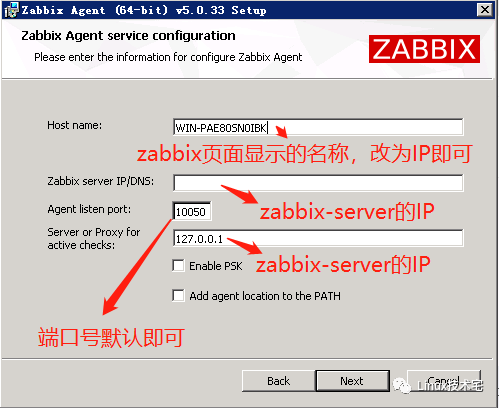
安装完成后,修改zabbix_agentd.conf文件,默认安装路径:C:\Program Files\Zabbix Agent
# 修改或添加如下参数,默认未启用# HostMetadataItem=HostMetadataItem=system.uname
打开任务管理器→服务→重启zabbix-agent服务即可
请在公众号回复”zabbix5.0“获取。

分享、在看与点赞
只要你点,我们就是胖友
