




点击上方:Linux技术宅,关注我!!!

在zabbix 5.0版本开始用户菜单更改为左侧栏显示,找到并点击 User Settings,Language 修改语言为 Chinese (zh_CN) 即可。
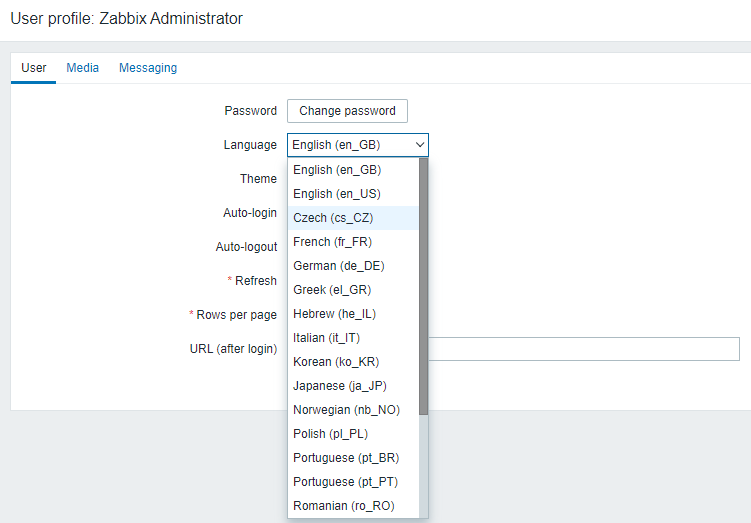
PS:一般在部署后初始配置时,未找到 Chinese (zh_CN) 这一项,修改如下:
编辑配置文件
vim usr/share/zabbix/include/locales.inc.php
修改中文显示属性配置为true。
44 function getLocales() {45 return [50 'zh_CN' => ['name' => _('Chinese (zh_CN)'), 'display' => true],
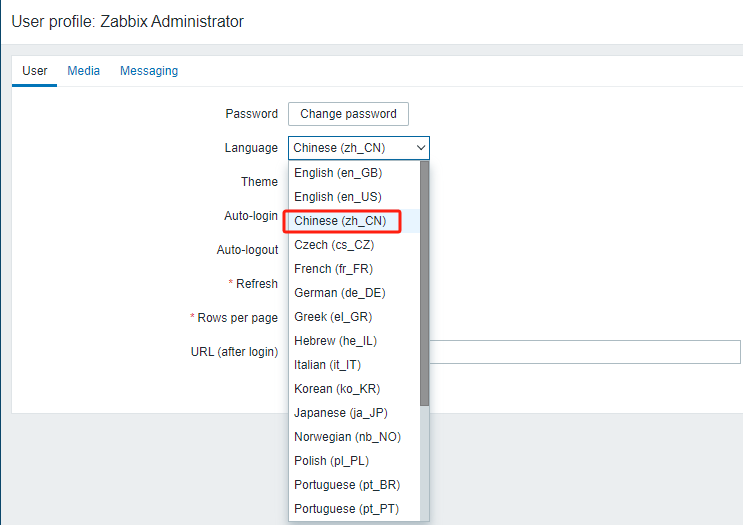
编辑完成后保存,刷新Web页面,下拉列表中选择即可。
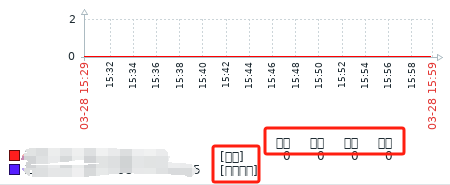
乱码如下显示:
上传中文字体文件:simkai.ttf
下载链接:https://www.alipan.com/s/b2dYZrYZCxg
上传到/usr/share/fonts/dejavu/
[root@deploy ~]# ll usr/share/fonts/dejavu/total 16800-rw-r--r-- 1 root root 611212 Feb 27 2011 DejaVuSans-BoldOblique.ttf-rw-r--r-- 1 root root 672300 Feb 27 2011 DejaVuSans-Bold.ttf-rw-r--r-- 1 root root 580168 Feb 27 2011 DejaVuSansCondensed-BoldOblique.ttf-rw-r--r-- 1 root root 631992 Feb 27 2011 DejaVuSansCondensed-Bold.ttf-rw-r--r-- 1 root root 576004 Feb 27 2011 DejaVuSansCondensed-Oblique.ttf-rw-r--r-- 1 root root 643852 Feb 27 2011 DejaVuSansCondensed.ttf-rw-r--r-- 1 root root 345204 Feb 27 2011 DejaVuSans-ExtraLight.ttf-rw-r--r-- 1 root root 611556 Feb 27 2011 DejaVuSans-Oblique.ttf-rw-r--r-- 1 root root 720012 Feb 27 2011 DejaVuSans.ttf-rw-r--r-- 1 root root 11785184 Apr 24 2023 simkai.ttf
查看默认配置及文件软链接。
[root@deploy ~]# grep graphfont usr/share/zabbix/include/defines.inc.phpdefine('ZBX_GRAPH_FONT_NAME', 'graphfont'); // font file namedefine('ZBX_FONT_NAME', 'graphfont');[root@deploy ~]# ll usr/share/zabbix/assets/fonts/graphfont.ttflrwxrwxrwx 1 root root 33 Apr 24 2023 /usr/share/zabbix/assets/fonts/graphfont.ttf -> /etc/alternatives/zabbix-web-font[root@deploy ~]# ll /etc/alternatives/zabbix-web-fontlrwxrwxrwx 1 root root 38 Apr 24 2023 /etc/alternatives/zabbix-web-font -> /usr/share/fonts/dejavu/DejaVuSans.ttf
修改原字体文件软链接。
[root@deploy ~]# mv /etc/alternatives/zabbix-web-font{,.bak}[root@deploy ~]# ll /etc/alternatives/zabbix-web-font*lrwxrwxrwx 1 root root 38 Apr 24 2023 /etc/alternatives/zabbix-web-font.bak -> /usr/share/fonts/dejavu/DejaVuSans.ttf
创建新字体文件软链接。
[root@deploy ~]# ln -s /usr/share/fonts/dejavu/simkai.ttf /etc/alternatives/zabbix-web-font
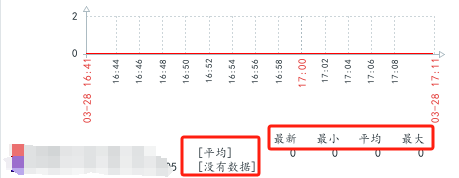
返回页面查看效果,如下:

分享、在看与点赞
只要你点,我们就是胖友
文章转载自Linux技术宅,如果涉嫌侵权,请发送邮件至:contact@modb.pro进行举报,并提供相关证据,一经查实,墨天轮将立刻删除相关内容。
