
作者 | 徐sir 11g ocm、Oracle ACE-A、PGCM
中国OCMU成员、中国ACDU成员、墨天轮2023年十大优秀作者、青学会著名成员
如需转载请私信联系我,除了墨天轮、CSDN、PGFANS和微信公众号以外都不是我的号
如果觉得我写的对你有帮助,麻烦动动小手,点下:转发、关注、在看,帮我多增加点人气
个人水平有限,有意见或者发现文章有误请留言、私信我,喷子轻喷
Oracle刚刚发布了最新的Oracle database 23ai版本测试安装包,有兴趣的小伙伴可以安装体验一下。
关于安装的介质可以去如下地址下载:
Oracle linux 8.9系统安装ISO
https://yum.oracle.com/oracle-linux-isos.html
Oracle database 23ai RPM安装包
https://www.oracle.com/database/free/get-started/
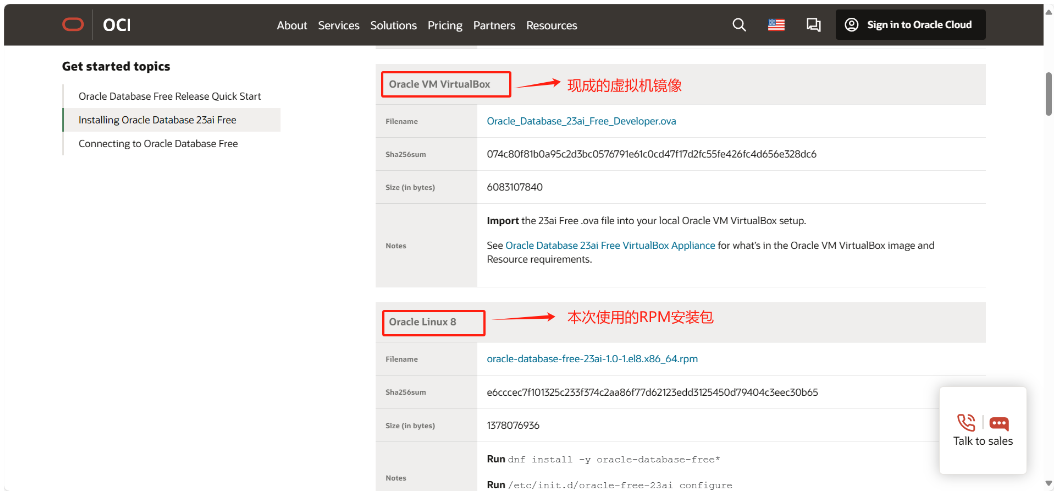
整个安装过程非常丝滑,大家跟着我来安装一下
1、安装最低要求
| Requirement | Value |
|---|---|
| Operating system | See Oracle Database Installation Guide for Linux for the list of supported Linux distributions and the minimum operating system requirements for each x86-64 Linux platform. |
| Network protocol | The following protocols are supported:IPCUDPTCP/IPTCP/IP with SSL |
| RAM | 1 GB RAM minimum. 2 GB RAM recommended. |
| Disk space | 10 GB minimum. |
2、Linux8.0系统要求
这里引用一下官方文档,基本上你最小化安装系统就行。
| Item | Requirements |
|---|---|
| SSH Requirement | Ensure that OpenSSH is installed on your servers. OpenSSH is the required SSH software. |
| Oracle Linux 8 | Minimum supported versions:Oracle Linux 8.6 with the Unbreakable Enterprise Kernel 6: 5.4.17-2136.312.3.4.el8uek.x86_64 or laterOracle Linux 8.6 with the Red Hat Compatible Kernel: 4.18.0-372.26.1.0.1.el8_6.x86_64 or laterNote: Oracle recommends that you update Oracle Linux to the latest available version and release level. |
| Packages for Oracle Linux 8 | Subscribe to the Oracle Linux 8 channel on the Unbreakable Linux Network, or configure a yum repository from the Oracle Linux yum server website, and then install the Oracle Database Preinstallation RPM, oracle-database-preinstall-23ai. The Oracle Database Preinstallation RPM, oracle-database-preinstall-23ai, automatically installs all required packages listed in the table below, their dependencies for Oracle Grid Infrastructure and Oracle Database installations, and also performs other system configuration. If you install the Oracle Database Preinstallation RPM, oracle-database-preinstall-23ai, then you do not have to install these packages, as the Oracle Database Preinstallation RPM automatically installs them. bc binutils compat-openssl10 elfutils-libelf fontconfig glibc glibc-devel ksh libaio libXrender libX11 libXau libXi libXtst libgcc libnsl libstdc++ libxcb libibverbs libasan liblsan librdmacm make policycoreutils policycoreutils-python-utils smartmontools sysstat |
| Optional Packages for Oracle Linux 8 | Based on your requirement, install the latest released versions of the following packages: ipmiutil (for Intelligent Platform Management Interface) libnsl2 (for Oracle Database Client only) libnsl2-devel (for Oracle Database Client only) net-tools (for Oracle RAC and Oracle Clusterware) nfs-utils (for Oracle ACFS) |
3、准备基础环境
第1步,到Oracle的yum地址,下载preinstall安装包,下载地址如下:
https://yum.oracle.com/repo/OracleLinux/OL8/appstream/x86_64/
下载安装包oracle-database-preinstall-23ai-1.0-2.el8.x86_64.rpm
第2点,配置好YUM源
mount /dev/cdrom /mnt
rm -rf /etc/yum.repos.d/*.repo
cat >/etc/yum.repos.d/local.repo<<EOF
[AppStream]
name=AppStream
baseurl=file:///mnt/AppStream
enabled=1
gpgcheck=0
[BaseOS]
name=BaseOS
baseurl=file:///mnt/BaseOS
enabled=1
gpgcheck=0
EOF
dnf makecache
第3点,安装preinstal rpm
[root@OEL8 ~]# dnf -y install oracle-database-preinstall-23ai-1.0-2.el8.x86_64.rpm
Last metadata expiration check: 0:10:52 ago on Fri 03 May 2024 06:10:49 PM EDT.
Dependencies resolved.
===========================================================================================================================================================================
Package Architecture Version Repository Size
===========================================================================================================================================================================
Installing:
oracle-database-preinstall-23ai x86_64 1.0-2.el8 @commandline 30 k
Installing dependencies:
bc x86_64 1.07.1-5.el8 BaseOS 129 k
bind-libs x86_64 32:9.11.36-11.el8_9 AppStream 175 k
bind-libs-lite x86_64 32:9.11.36-11.el8_9 AppStream 1.2 M
bind-license noarch 32:9.11.36-11.el8_9 AppStream 103 k
bind-utils x86_64 32:9.11.36-11.el8_9 AppStream 452 k
checkpolicy x86_64 2.9-1.el8 BaseOS 346 k
compat-openssl10 x86_64 1:1.0.2o-4.el8_6 AppStream 1.1 M
fstrm x86_64 0.6.1-3.el8 AppStream 29 k
gssproxy x86_64 0.8.0-21.el8 BaseOS 119 k
ksh x86_64 20120801-259.0.1.el8 AppStream 923 k
libXtst x86_64 1.2.3-7.el8 AppStream 22 k
libXv x86_64 1.0.11-7.el8 AppStream 20 k
libXxf86dga x86_64 1.1.5-1.el8 AppStream 26 k
libdmx x86_64 1.1.4-3.el8 AppStream 22 k
libev x86_64 4.24-6.el8 AppStream 52 k
libmaxminddb x86_64 1.2.0-10.el8 AppStream 33 k
libverto-libev x86_64 0.3.2-2.el8 AppStream 16 k
lm_sensors-libs x86_64 3.4.0-23.20180522git70f7e08.el8 BaseOS 59 k
net-tools x86_64 2.0-0.52.20160912git.el8 BaseOS 322 k
nfs-utils x86_64 1:2.3.3-59.el8 BaseOS 515 k
policycoreutils-python-utils noarch 2.9-24.0.1.el8 BaseOS 254 k
protobuf-c x86_64 1.3.0-8.el8 AppStream 37 k
python3-audit x86_64 3.0.7-5.el8 BaseOS 86 k
python3-bind noarch 32:9.11.36-11.el8_9 AppStream 150 k
python3-libsemanage x86_64 2.9-9.el8 BaseOS 128 k
python3-policycoreutils noarch 2.9-24.0.1.el8 BaseOS 2.3 M
python3-pyyaml x86_64 3.12-12.el8 BaseOS 193 k
python3-setools x86_64 4.3.0-5.el8 BaseOS 626 k
quota x86_64 1:4.04-14.el8 BaseOS 214 k
quota-nls noarch 1:4.04-14.el8 BaseOS 95 k
rpcbind x86_64 1.2.5-10.el8 BaseOS 70 k
smartmontools x86_64 1:7.1-2.el8 BaseOS 553 k
sysstat x86_64 11.7.3-11.0.1.el8 AppStream 427 k
xorg-x11-utils x86_64 7.5-28.el8 AppStream 136 k
xorg-x11-xauth x86_64 1:1.0.9-12.el8 AppStream 39 k
Installing weak dependencies:
geolite2-city noarch 20180605-1.el8 AppStream 19 M
geolite2-country noarch 20180605-1.el8 AppStream 1.0 M
Transaction Summary
===========================================================================================================================================================================
Install 38 Packages
Total size: 31 M
Installed size: 88 M
Downloading Packages:
Running transaction check
Transaction check succeeded.
Running transaction test
Transaction test succeeded.
Running transaction
Preparing : 1/1
Installing : protobuf-c-1.3.0-8.el8.x86_64 1/38
Installing : fstrm-0.6.1-3.el8.x86_64 2/38
Installing : bind-license-32:9.11.36-11.el8_9.noarch 3/38
Installing : python3-bind-32:9.11.36-11.el8_9.noarch 4/38
Running scriptlet: smartmontools-1:7.1-2.el8.x86_64 5/38
Installing : smartmontools-1:7.1-2.el8.x86_64 5/38
Running scriptlet: smartmontools-1:7.1-2.el8.x86_64 5/38
Running scriptlet: rpcbind-1.2.5-10.el8.x86_64 6/38
Installing : rpcbind-1.2.5-10.el8.x86_64 6/38
Running scriptlet: rpcbind-1.2.5-10.el8.x86_64 6/38
Installing : quota-nls-1:4.04-14.el8.noarch 7/38
Installing : quota-1:4.04-14.el8.x86_64 8/38
Installing : python3-setools-4.3.0-5.el8.x86_64 9/38
Installing : python3-pyyaml-3.12-12.el8.x86_64 10/38
Installing : python3-libsemanage-2.9-9.el8.x86_64 11/38
Installing : python3-audit-3.0.7-5.el8.x86_64 12/38
Installing : net-tools-2.0-0.52.20160912git.el8.x86_64 13/38
Running scriptlet: net-tools-2.0-0.52.20160912git.el8.x86_64 13/38
Installing : lm_sensors-libs-3.4.0-23.20180522git70f7e08.el8.x86_64 14/38
Running scriptlet: lm_sensors-libs-3.4.0-23.20180522git70f7e08.el8.x86_64 14/38
Installing : sysstat-11.7.3-11.0.1.el8.x86_64 15/38
Running scriptlet: sysstat-11.7.3-11.0.1.el8.x86_64 15/38
Installing : checkpolicy-2.9-1.el8.x86_64 16/38
Installing : python3-policycoreutils-2.9-24.0.1.el8.noarch 17/38
Installing : policycoreutils-python-utils-2.9-24.0.1.el8.noarch 18/38
Installing : bc-1.07.1-5.el8.x86_64 19/38
Running scriptlet: bc-1.07.1-5.el8.x86_64 19/38
Installing : xorg-x11-xauth-1:1.0.9-12.el8.x86_64 20/38
Installing : libev-4.24-6.el8.x86_64 21/38
Installing : libverto-libev-0.3.2-2.el8.x86_64 22/38
Installing : gssproxy-0.8.0-21.el8.x86_64 23/38
Running scriptlet: gssproxy-0.8.0-21.el8.x86_64 23/38
Running scriptlet: nfs-utils-1:2.3.3-59.el8.x86_64 24/38
Installing : nfs-utils-1:2.3.3-59.el8.x86_64 24/38
Running scriptlet: nfs-utils-1:2.3.3-59.el8.x86_64 24/38
Installing : libdmx-1.1.4-3.el8.x86_64 25/38
Installing : libXxf86dga-1.1.5-1.el8.x86_64 26/38
Installing : libXv-1.0.11-7.el8.x86_64 27/38
Installing : libXtst-1.2.3-7.el8.x86_64 28/38
Installing : xorg-x11-utils-7.5-28.el8.x86_64 29/38
Installing : ksh-20120801-259.0.1.el8.x86_64 30/38
Running scriptlet: ksh-20120801-259.0.1.el8.x86_64 30/38
Installing : geolite2-country-20180605-1.el8.noarch 31/38
Installing : geolite2-city-20180605-1.el8.noarch 32/38
Installing : libmaxminddb-1.2.0-10.el8.x86_64 33/38
Running scriptlet: libmaxminddb-1.2.0-10.el8.x86_64 33/38
Installing : bind-libs-lite-32:9.11.36-11.el8_9.x86_64 34/38
Installing : bind-libs-32:9.11.36-11.el8_9.x86_64 35/38
Installing : bind-utils-32:9.11.36-11.el8_9.x86_64 36/38
Installing : compat-openssl10-1:1.0.2o-4.el8_6.x86_64 37/38
Running scriptlet: compat-openssl10-1:1.0.2o-4.el8_6.x86_64 37/38
Installing : oracle-database-preinstall-23ai-1.0-2.el8.x86_64 38/38
Running scriptlet: oracle-database-preinstall-23ai-1.0-2.el8.x86_64 38/38
Verifying : bind-libs-32:9.11.36-11.el8_9.x86_64 1/38
Verifying : bind-libs-lite-32:9.11.36-11.el8_9.x86_64 2/38
Verifying : bind-license-32:9.11.36-11.el8_9.noarch 3/38
Verifying : bind-utils-32:9.11.36-11.el8_9.x86_64 4/38
Verifying : compat-openssl10-1:1.0.2o-4.el8_6.x86_64 5/38
Verifying : fstrm-0.6.1-3.el8.x86_64 6/38
Verifying : geolite2-city-20180605-1.el8.noarch 7/38
Verifying : geolite2-country-20180605-1.el8.noarch 8/38
Verifying : ksh-20120801-259.0.1.el8.x86_64 9/38
Verifying : libXtst-1.2.3-7.el8.x86_64 10/38
Verifying : libXv-1.0.11-7.el8.x86_64 11/38
Verifying : libXxf86dga-1.1.5-1.el8.x86_64 12/38
Verifying : libdmx-1.1.4-3.el8.x86_64 13/38
Verifying : libev-4.24-6.el8.x86_64 14/38
Verifying : libmaxminddb-1.2.0-10.el8.x86_64 15/38
Verifying : libverto-libev-0.3.2-2.el8.x86_64 16/38
Verifying : protobuf-c-1.3.0-8.el8.x86_64 17/38
Verifying : python3-bind-32:9.11.36-11.el8_9.noarch 18/38
Verifying : sysstat-11.7.3-11.0.1.el8.x86_64 19/38
Verifying : xorg-x11-utils-7.5-28.el8.x86_64 20/38
Verifying : xorg-x11-xauth-1:1.0.9-12.el8.x86_64 21/38
Verifying : bc-1.07.1-5.el8.x86_64 22/38
Verifying : checkpolicy-2.9-1.el8.x86_64 23/38
Verifying : gssproxy-0.8.0-21.el8.x86_64 24/38
Verifying : lm_sensors-libs-3.4.0-23.20180522git70f7e08.el8.x86_64 25/38
Verifying : net-tools-2.0-0.52.20160912git.el8.x86_64 26/38
Verifying : nfs-utils-1:2.3.3-59.el8.x86_64 27/38
Verifying : policycoreutils-python-utils-2.9-24.0.1.el8.noarch 28/38
Verifying : python3-audit-3.0.7-5.el8.x86_64 29/38
Verifying : python3-libsemanage-2.9-9.el8.x86_64 30/38
Verifying : python3-policycoreutils-2.9-24.0.1.el8.noarch 31/38
Verifying : python3-pyyaml-3.12-12.el8.x86_64 32/38
Verifying : python3-setools-4.3.0-5.el8.x86_64 33/38
Verifying : quota-1:4.04-14.el8.x86_64 34/38
Verifying : quota-nls-1:4.04-14.el8.noarch 35/38
Verifying : rpcbind-1.2.5-10.el8.x86_64 36/38
Verifying : smartmontools-1:7.1-2.el8.x86_64 37/38
Verifying : oracle-database-preinstall-23ai-1.0-2.el8.x86_64 38/38
Installed:
bc-1.07.1-5.el8.x86_64 bind-libs-32:9.11.36-11.el8_9.x86_64 bind-libs-lite-32:9.11.36-11.el8_9.x86_64
bind-license-32:9.11.36-11.el8_9.noarch bind-utils-32:9.11.36-11.el8_9.x86_64 checkpolicy-2.9-1.el8.x86_64
compat-openssl10-1:1.0.2o-4.el8_6.x86_64 fstrm-0.6.1-3.el8.x86_64 geolite2-city-20180605-1.el8.noarch
geolite2-country-20180605-1.el8.noarch gssproxy-0.8.0-21.el8.x86_64 ksh-20120801-259.0.1.el8.x86_64
libXtst-1.2.3-7.el8.x86_64 libXv-1.0.11-7.el8.x86_64 libXxf86dga-1.1.5-1.el8.x86_64
libdmx-1.1.4-3.el8.x86_64 libev-4.24-6.el8.x86_64 libmaxminddb-1.2.0-10.el8.x86_64
libverto-libev-0.3.2-2.el8.x86_64 lm_sensors-libs-3.4.0-23.20180522git70f7e08.el8.x86_64 net-tools-2.0-0.52.20160912git.el8.x86_64
nfs-utils-1:2.3.3-59.el8.x86_64 oracle-database-preinstall-23ai-1.0-2.el8.x86_64 policycoreutils-python-utils-2.9-24.0.1.el8.noarch
protobuf-c-1.3.0-8.el8.x86_64 python3-audit-3.0.7-5.el8.x86_64 python3-bind-32:9.11.36-11.el8_9.noarch
python3-libsemanage-2.9-9.el8.x86_64 python3-policycoreutils-2.9-24.0.1.el8.noarch python3-pyyaml-3.12-12.el8.x86_64
python3-setools-4.3.0-5.el8.x86_64 quota-1:4.04-14.el8.x86_64 quota-nls-1:4.04-14.el8.noarch
rpcbind-1.2.5-10.el8.x86_64 smartmontools-1:7.1-2.el8.x86_64 sysstat-11.7.3-11.0.1.el8.x86_64
xorg-x11-utils-7.5-28.el8.x86_64 xorg-x11-xauth-1:1.0.9-12.el8.x86_64
Complete!
4、安装并配置数据库
这里提前说明一下,安装RPM包会默认安装到/OPT目录下。
上传安装包 oracle-database-free-23ai-1.0-1.el8.x86_64.rpm到操作系统,使用root用户直接执行安装即可,下面是执行步骤。
[root@OEL8 ~]# dnf -y install oracle-database-free-23ai-1.0-1.el8.x86_64.rpm
Last metadata expiration check: 0:12:13 ago on Fri 03 May 2024 06:10:49 PM EDT.
Dependencies resolved.
===========================================================================================================================================================================
 Package                                               Architecture                       Version                           Repository                                Size
===========================================================================================================================================================================
Installing:
 oracle-database-free-23ai                             x86_64                             1.0-1                             @commandline                             1.3 G

Transaction Summary
===========================================================================================================================================================================
Install  1 Package

Total size: 1.3 G
Installed size: 3.6 G
Downloading Packages:
Running transaction check
Transaction check succeeded.
Running transaction test
Transaction test succeeded.
Running transaction
  Preparing        :                                                                                                                                                   1/1
  Running scriptlet: oracle-database-free-23ai-1.0-1.x86_64                                                                                                            1/1
  Installing       : oracle-database-free-23ai-1.0-1.x86_64                                                                                                            1/1
  Running scriptlet: oracle-database-free-23ai-1.0-1.x86_64                                                                                                            1/1
[INFO] Executing post installation scripts...
[INFO] Oracle home installed successfully and ready to be configured.
To configure Oracle Database Free, optionally modify the parameters in '/etc/sysconfig/oracle-free-23ai.conf' and then run '/etc/init.d/oracle-free-23ai configure' as root.

  Verifying        : oracle-database-free-23ai-1.0-1.x86_64                                                                                                            1/1

Installed:
  oracle-database-free-23ai-1.0-1.x86_64

Complete!
安装完成后执行配置脚本,创建数据库
/etc/init.d/oracle-free-23ai configure
这里会提示你输入密码,密码不支持特殊字符,但是支持_
[root@OEL8 ~]# /etc/init.d/oracle-free-23ai configure
Specify a password to be used for database accounts. Oracle recommends that the password entered should be at least 8 characters in length, contain at least 1 uppercase character, 1 lower case character and 1 digit [0-9]. Note that the same password will be used for SYS, SYSTEM and PDBADMIN accounts:
Confirm the password:
Configuring Oracle Listener.
Listener configuration succeeded.
Configuring Oracle Database FREE.
Enter SYS user password:
***********
Enter SYSTEM user password:
**********
Enter PDBADMIN User Password:
***********
Prepare for db operation
7% complete
Copying database files
29% complete
Creating and starting Oracle instance
30% complete
33% complete
36% complete
39% complete
43% complete
Completing Database Creation
47% complete
49% complete
50% complete
Creating Pluggable Databases
54% complete
71% complete
Executing Post Configuration Actions
93% complete
Running Custom Scripts
100% complete
Database creation complete. For details check the logfiles at:
 /opt/oracle/cfgtoollogs/dbca/FREE.
Database Information:
Global Database Name:FREE
System Identifier(SID):FREE
Look at the log file "/opt/oracle/cfgtoollogs/dbca/FREE/FREE.log" for further details.

Connect to Oracle Database using one of the connect strings:
     Pluggable database: OEL8.9/FREEPDB1
     Multitenant container database: OEL8.9
具体文件路径
| File Name and Location | Purpose |
|---|---|
/opt/oracle | Oracle base. This is the root of the Oracle Database Free directory tree. |
/opt/oracle/product/23ai/dbhomeFree | Oracle home. This home is where the Oracle Database Free is installed. It contains the directories of the Oracle Database Free executables and network files. |
/opt/oracle/oradata/FREE | Database files. |
/opt/oracle/diagsubdirectories | Diagnostic logs. The database alert log is /opt/oracle/diag/rdbms/free/FREE/trace/alert_FREE.log |
/opt/oracle/cfgtoollogs/dbca/FREE | Database creation logs. The FREE.logfile contains the results of the database creation script execution. |
/etc/sysconfig/oracle-free-23ai.conf | Configuration default parameters. |
/etc/init.d/oracle-free-23ai | Configuration and services script. |
登录数据库
[oracle@OEL8 ~]$ ps -ef|grep smon
oracle     30722       1  0 18:30 ?        00:00:00 db_smon_FREE
oracle     31126   31097  0 18:34 pts/0    00:00:00 grep --color=auto smon
[oracle@OEL8 ~]$ export ORACLE_SID=FREE
[oracle@OEL8 ~]$ export ORACLE_HOME=/opt/oracle/product/23ai/dbhomeFree
[oracle@OEL8 ~]$ export PATH=$PATH:$ORACLE_HOME/bin
[oracle@OEL8 ~]$ sqlplus / as sysdba

SQL*Plus: Release 23.0.0.0.0 - Production on Fri May 3 18:34:49 2024
Version 23.4.0.24.05

Copyright (c) 1982, 2024, Oracle.  All rights reserved.


Connected to:
Oracle Database 23ai Free Release 23.0.0.0.0 - Develop, Learn, and Run for Free
Version 23.4.0.24.05

SQL> show pdbs;

    CON_ID CON_NAME     OPEN MODE  RESTRICTED
---------- ------------------------------ ---------- ----------
  2 PDB$SEED     READ ONLY  NO
  3 FREEPDB1     READ WRITE NO
SQL>
5、启动&停止数据库
启动数据库
[root@OEL8 ~]# /etc/init.d/oracle-free-23ai start
Starting Oracle Net Listener.
Oracle Net Listener started.
Starting Oracle Database instance FREE.
Oracle Database instance FREE started.
停止数据库
[root@OEL8 ~]# /etc/init.d/oracle-free-23ai stop
Shutting down Oracle Database instance FREE.
Oracle Database instance FREE shut down.
Stopping Oracle Net Listener.
Oracle Net Listener stopped.
剩下的大家就慢慢玩吧!
历史文章回顾
数据库安装搭建
实战:如何在LINUX8.0上安装Oracle 11.2.0.4(文内有快速配置安装脚本)
搭建记录:duplicate搭建oracle rac到单实例搭建物理DG_V7
如何正确在windows server core(无图形界面)安装Oracle 19c(ASM版本)
如何正确在windows server core(无图形界面)安装Oracle 19c
实战RAC迁移系列
实战RAC迁移项目第2篇:RAC-RAC主备切换/IP更换/DG恢复
假期加班实战:Solaris系统下Oracle 12.2 在线扩容ASM磁盘组操作记录
数据库优化实战系列
Oracle故障处理系列
如何正确的在AIX 7.x系统中开启LargePage for Oracle
记一次INS-06006典型问题|安装Oracle 19c rac遇到的ssh互信不通过
实战:记一次DG跨平台迁移win_to_linux遇到的问题12
处理11g grid集群安装10g database软件,无法DBCA创建集群实例问题
记一次ORA-07445[nttaddr2bnd()+2158]问题处理
windows下oracle12C创建第2个实例后,第1个实例无法启动??
EXPDP遇到ORA-39171 ORA-1691报错处理办法
系统集成类案例
真实案例-esxi7.0u1以上版本vCLS 虚拟机无法打开电源
如何不停机完成Linux操作系统克隆,也适用于P2V&V2V
安装ESXI 7.0的系统盘小于120G,安装后无本地datastore存储的处理办法
Oracle SPARC服务器系列
传统IT领域的强者-Oracle小型机-第1篇:服务器简单介绍
传统IT领域的强者-Oracle小型机-第2篇:SP规划配置与系统安装
墨天轮:https://www.modb.pro/u/3605