



Windows 下的 git-bash 可以模拟大部分 linux 命令,基本上可以将 git-bash 当成一个简版的 linux 子系统使用。配合 alias 和 function 可以进行许多系统改进。
比如显示当前文件绝对路径:
lsw 显示文件绝对路径lsww 显示文件 windows 路径sedw 将带盘符的 linux 路径替换成 windows 路径
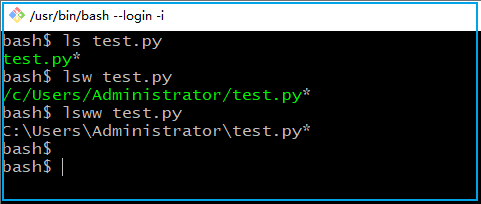
bash$ type lswlsw is a functionlsw (){for i in $@;dols -F --color=auto --show-control-chars `pwd`/$i;done}bash$ type lswwlsww is a functionlsww (){for i in $@;dols -F --color=auto --show-control-chars `pwd`/$i | sedw;done}bash$ type sedwsedw is a functionsedw (){sed -e 's#^.##' -e 's#^.#\U&:#' -e 's#/#\\#g' $*}
第一个 bash 函数 lsw 比较好理解,使用了 `pwd` 来获取当前目录路径。函数 sedw 不好理解,它使用了 sed 的多重编辑功能。第一段是删除第一个字符,第二段是将盘符改为大写并加上冒号,第三段是将斜杠替换为反斜杠。
简单的命令包装使用 alias,复杂的命令特别是含单引号双引号的,使用函数会比较方便。
在 git-bash 下调用 windows 下的命令会出现乱码。可以使用 iconv 工具进行编码转换。当使用 \ipconfig 时调用的是原生命令,不会调用 alias
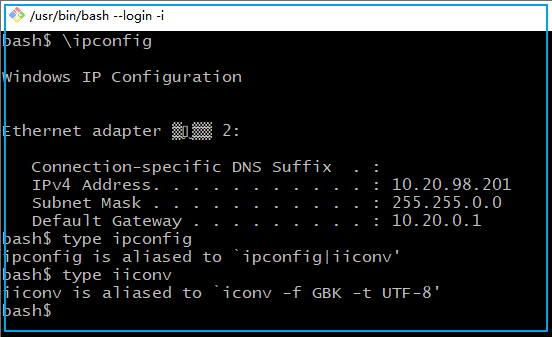
bash$ \ipconfigWindows IP ConfigurationEthernet adapter ▒▒̫▒▒ 2:Connection-specific DNS Suffix . :IPv4 Address. . . . . . . . . . . : 10.20.98.201Subnet Mask . . . . . . . . . . . : 255.255.0.0Default Gateway . . . . . . . . . : 10.20.0.1bash$ type ipconfigipconfig is aliased to `ipconfig|iiconv'bash$ type iiconviiconv is aliased to `iconv -f GBK -t UTF-8'
在git-bash下打开 windows 的文件浏览器,可以使用 windows explorer 命令。反之 git-bash 下访问 windows 路径可以使用双引号将路径扩起来然后 cd 进去。这样就能快速在 windows 和 linu 之间切换了。
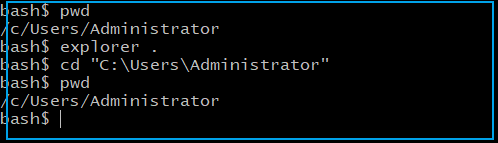
在 git-bash 下想启动一个新的 git-bash 窗口,可以这样包装一下:
$ alias gshalias gsh='/c/bin/git_shell.sh&'$ cat c/bin/git_shell.sh#!/bin/bashexec "C:\Program Files\Git\git-bash.exe"
执行 alias 可以输出所有的 git-bash 下的命令别名,使用 declear -f 可以输出 git-bash 下所有的函数。
$ declear -fpwdw (){pwd | sed -e 's#^.\(.\)#\1#' -e 's#^.#\U&:#' -e 's#/#\\#g'}sedw (){sed -e 's#^.##' -e 's#^.#\U&:#' -e 's#/#\\#g' $*}upenv (){source ~/.bashrc}proxy (){export http_proxy=http://127.0.0.1:7890;export https_proxy=http://127.0.0.1:7890}unproxy (){unset http_proxy;unset https_proxy}ls_path (){echo $PATH | sed 's/:/\n/g'}
文章转载自生有可恋,如果涉嫌侵权,请发送邮件至:contact@modb.pro进行举报,并提供相关证据,一经查实,墨天轮将立刻删除相关内容。
