



大家好,今天和大家分享一则利用 PGbackrest 远程搭建standby 数据库实例。
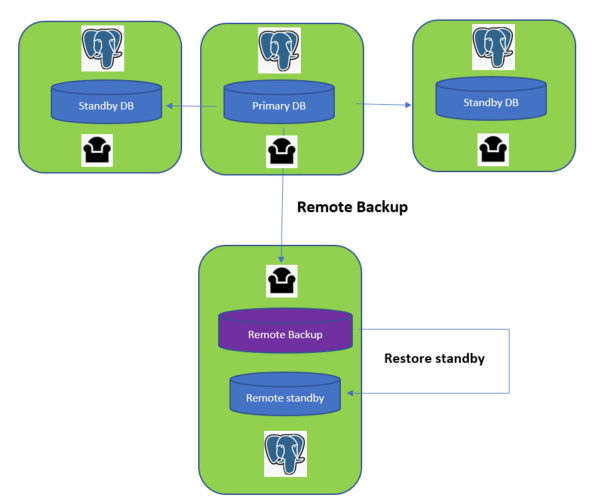
简单的说一下背景: 目前状况是 primary data center 上有3节点PG实例为一主2从(1 primary + 2 standby), 每个实例大小在10TB左右,
现在需要异地DC(大致半个中国的距离吧,网速巨大的瓶颈)搭建一个standby 实例。
基于我们以往数据库安装的ansible 脚本来说,如果数据库很小的话, 我们采用的standby 创建方式是 repmgr 的 clone standby 的方式。
- name: "build DR standby database -- create dr standby databases"
  shell: "{{PG_HOME}}/bin/repmgr -h {{PG_VIP}} -U repmgr -p {{PORT}}   -d {{REPMGR_DB}} -f {{PG_BASE_DIR}}/{{PG_REPMGR_DIR}}/repmgr.conf standby clone -W"
  environment:
      PGPASSWORD: "{{REPMGR_PASSWORD}}"
  when: location == 'dr'
  tags: install_dr
但是这次我们数据库的大小属于中大型大致10个TB左右,而且网络是跨DC的专线比较拉跨(每秒几兆的速度),而repmgr的复制方式是基于PG的内置build-in的
pgbackbackup的命令的包装,是不支持并行 parallel.
正好我们的备份命令是基于pgbackrest, 这个备份工具是支持并行的,我们需要尝试一下通过pgbackrest 来实现远程数据库stanby的搭建。
架构如图:
我们再去PGbackrest的官网上看看对搭建standby的支持: https://pgbackrest.org/user-guide-rhel.html#replication/hot-standby
我们可以看到pgbackrest 提供了 --type=standby 的restore 方式
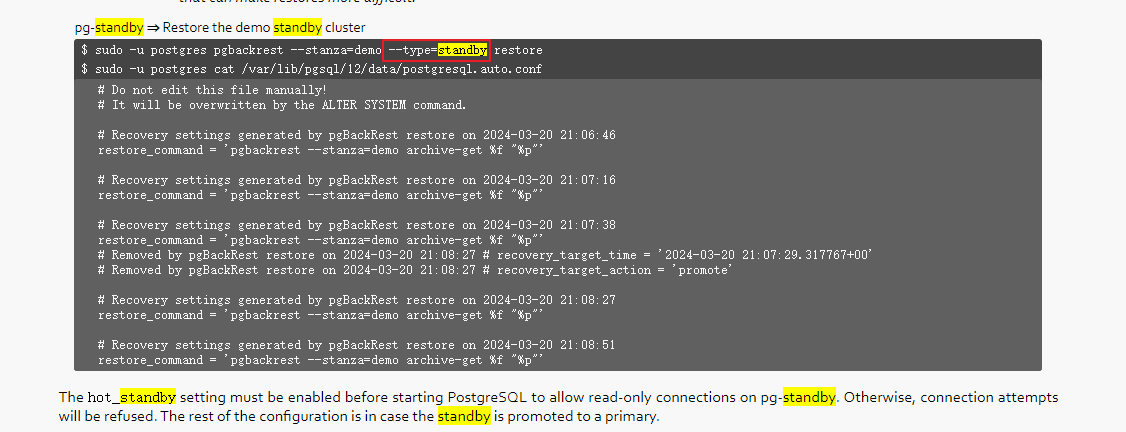
有了方法论的支持,我们下面实际的来操作一下(由于10TB的数据是生产数据库的信息,这里采用一个测试环境)
主库信息:10.25.15.85
postgres=# select * from pg_stat_replication;
  pid  | usesysid | usename | application_name | client_addr  | client_hostname | client_port |         backend_start         | backend_xmin |   state   | sent_lsn  | write_lsn | flush_lsn
| replay_lsn |    write_lag    |    flush_lag    |   replay_lag    | sync_priority | sync_state |          reply_time
-------+----------+---------+------------------+--------------+-----------------+-------------+-------------------------------+--------------+-----------+-----------+-----------+-----------
+------------+-----------------+-----------------+-----------------+---------------+------------+-------------------------------

  2931 |    16384 | repmgr  | pgdr84           | 10.25.15.84  |                 |       46660 | 2024-04-26 16:45:43.505828+08 |              | streaming | 0/E70F770 | 0/E70F770 | 0/E70F770
| 0/E70F770  | 00:00:00.0002   | 00:00:00.000955 | 00:00:00.001    |             1 | quorum     | 2024-04-29 15:30:07.199944+08
  8426 |    16384 | repmgr  | pgdr83           | 10.25.15.83  |                 |       51030 | 2024-04-26 16:54:11.405751+08 |              | streaming | 0/E70F770 | 0/E70F770 | 0/E70F770
| 0/E70F770  | 00:00:00.000105 | 00:00:00.000754 | 00:00:00.000817 |             1 | quorum     | 2024-04-29 15:30:07.199763+08
(3 rows)
现在做一个远程的备份: 备份到171上
需要配置171的pgbackrest 文件设置:(类似于添加远程仓库信息:pg1-host=whdrcsrv404.cn.nonprod, 还原的时候需要把这行去掉 )
whdrcsrv404.cn.nonprod 这台机器是我们pgbackrest的仓库机器,同时也是remote standby的机器
[prod6600]
pg1-host=whdrcsrv404.cn.nonprod
pg1-path=/data/prod6600/data
pg1-port=6600
pg1-socket-path=/tmp
主库85上配置pgbackrest.conf 文件设置
原先的本地备份仓库的路径 #repo1-path=/backup 一定要注释掉
repo1-host=ljzdccapp007.cn.infra 修改为我们备份的远程仓库server, 同时也是我们未来standby database节点的server
repo1-host=ljzdccapp007.cn.infra
#repo1-path=/backup


[prod6600]
pg1-path=/data/prod6600/data
pg1-port=6600
pg1-socket-path=/tmp
主库85修改参数 archive_command
postgres=# alter system set archive_command = 'pgbackrest  --stanza=prod6600  archive-push %p';
ALTER SYSTEM
postgres=# select pg_reload_conf();
pg_reload_conf
----------------
t
(1 row)
在主库85和从库(备份仓库)171上分别执行命令:
pgbackrest --stanza=prod6600  --log-level-console=info stanza-create
pgbackrest --stanza=prod6600 --log-level-console=info check
我们在从库(备份仓库)171 执行远程备份命令:
nohup /usr/bin/pgbackrest --stanza=prod6600 --log-level-console=debug backup --type=full > backup_full.log &
备份过程中我们可以看见是多进程在并行备份的
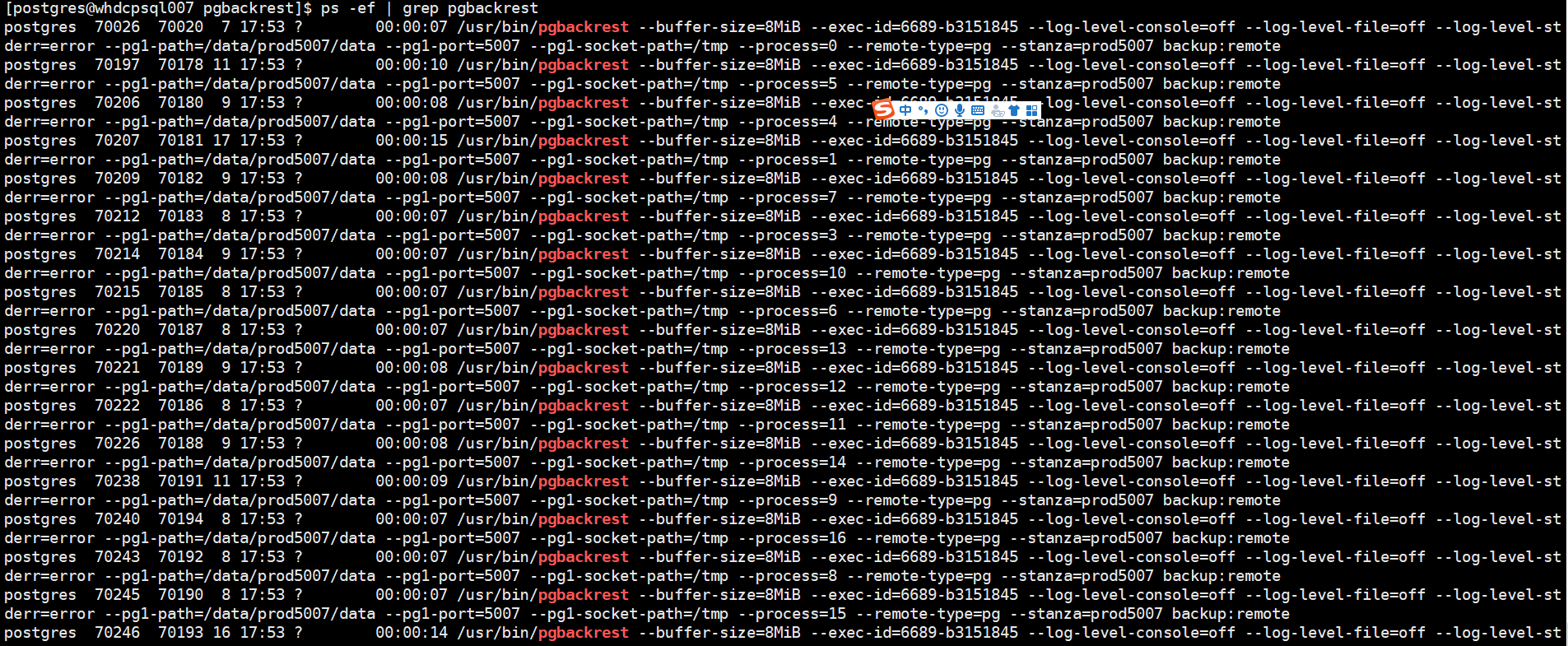
是因为我们在备份中设置了参数:
# parallelize backup
process-max=4
备份完成后,由于我们设置了压缩参数: compress-type=lz4
全备份集的大小下降到了 3+TB左右 (database size: 10584.7GB => backup size: 3581.3GB)
10TB的数据在16个平行之下,大致需要 2024-05-01 21:05:47+08 - 2024-04-30 08:56:19+08 = 37个小时左右
PROD [postgres@tjdcpsql003 ~]# pgbackrest --stanza=prod5007 info
stanza: prod5007
    status: ok
    cipher: none

    db (current)
        wal archive min/max (16): 0000000E0000331C00000069/0000000E0000331C0000007D

        full backup: 20240429-104355F
            timestamp start/stop: 2024-04-30 08:56:19+08 / 2024-05-01 21:05:47+08
            wal start/stop: 0000000E0000331C00000070 / 0000000E0000331C00000073
            database size: 10584.7GB, database backup size: 10584.7GB
            repo1: backup set size: 3581.3GB, backup size: 3581.3GB
备份完成后, 我们可以去还原standby 数据库了,
16个并行恢复还原大致需要 : restore command end: completed successfully (5550929ms) 大致1.6个小时
pgbackrest --stanza=prod6600 --type=standby restore

2024-05-03 23:55:11.277 P00  DEBUG:     storage/storage::storageMove: => void
2024-05-03 23:55:11.277 P00 DETAIL: sync path '/data/prod5007/data/global'
2024-05-03 23:55:11.277 P00  DEBUG:     storage/storage::storagePathSync: (this: {type: posix, path: /data/prod5007/data, write: true}, pathExp: {"global"})
2024-05-03 23:55:11.278 P00  DEBUG:     storage/storage::storagePathSync: => void
2024-05-03 23:55:11.278 P00   INFO: restore size = 10584.7GB, file total = 43390
2024-05-03 23:55:11.281 P00  DEBUG:     command/restore/restore::cmdRestore: => void
2024-05-03 23:55:11.281 P00  DEBUG:     command/exit::exitSafe: (result: 0, error: false, signalType: 0)
2024-05-03 23:55:11.282 P00   INFO: restore command end: completed successfully (5550929ms)
2024-05-03 23:55:11.282 P00  DEBUG:     command/exit::exitSafe: => 0
2024-05-03 23:55:11.282 P00  DEBUG:     main::main: => 0
如果恢复报错的话:ERROR: [072]: restore command must be run on the PostgreSQL host
注释掉: #pg1-host=whdrcsrv404.cn.nonprod (因为只能在本地还原)
[prod6600]
#pg1-host=whdrcsrv404.cn.nonprod
pg1-path=/data/prod6600/data
pg1-port=6600
pg1-socket-path=/tmp
我们查看这个还原的数据库的 postgresql.auto.conf
我们可以看到pgbackrest 自动添加了restore_command :
#Recovery settings generated by pgBackRest restore on 2024-04-29 17:00:26
restore_command = ‘pgbackrest --stanza=prod6600 archive-get %f “%p”’
INFRA [postgres@ljzdccapp007 data]# view postgresql.auto.conf


# Do not edit this file manually!
# It will be overwritten by the ALTER SYSTEM command.
synchronous_standby_names = 'ANY 1 (pgdr83,pgdr84)'
primary_conninfo = 'user=repmgr connect_timeout=2 host=10.25.15.83 port=6600 application_name=pgdr85'
wal_retrieve_retry_interval = '5000'
archive_command = 'pgbackrest  --stanza=prod6600  archive-push %p'


# Recovery settings generated by pgBackRest restore on 2024-04-29 17:00:26
restore_command = 'pgbackrest --stanza=prod6600 archive-get %f "%p"'
我们需要做一些修改:
删除同步参数: synchronous_standby_names = 'ANY 1 (pgdr83,pgdr84)'

primary_conninfo = 'user=repmgr connect_timeout=2 host=10.25.15.83 port=6600 application_name=pgdr85'
修改为:  application_name=pg171
我们启动数据库:
/opt/pgsql-16/bin/pg_ctl start -D /data/prod6600/data
查看数据库日志:
2024-04-29 17:06:15.418 P00   INFO: archive-get command begin 2.50: [000000040000000000000011, pg_wal/RECOVERYXLOG] --archive-async --buffer-size=8MiB --exec-id=86762-42ef2b44 --log-level-console=info --pg1-path=/data/prod6600/data --process-max=2 --repo1-cipher-type=none --repo1-path=/data/backup --spool-path=/var/spool/pgbackrest --stanza=prod6600
2024-04-29 17:06:15.520 P00   INFO: unable to find 000000040000000000000011 in the archive asynchronously
2024-04-29 17:06:15.520 P00   INFO: archive-get command end: completed successfully (103ms)
2024-04-29 17:06:15.524 CST [86754] LOG:  consistent recovery state reached at 0/10002428
2024-04-29 17:06:15.524 CST [86746] LOG:  database system is ready to accept read-only connections
2024-04-29 17:06:15.532 P00   INFO: archive-get command begin 2.50: [000000040000000000000011, pg_wal/RECOVERYXLOG] --archive-async --buffer-size=8MiB --exec-id=86765-f637e471 --log-level-console=info --pg1-path=/data/prod6600/data --process-max=2 --repo1-cipher-type=none --repo1-path=/data/backup --spool-path=/var/spool/pgbackrest --stanza=prod6600
2024-04-29 17:06:15.634 P00   INFO: unable to find 000000040000000000000011 in the archive asynchronously
2024-04-29 17:06:15.635 P00   INFO: archive-get command end: completed successfully (104ms)
2024-04-29 17:06:15.735 CST [86768] LOG:  fetching timeline history file for timeline 4 from primary server
2024-04-29 17:06:15.783 CST [86768] LOG:  started streaming WAL from primary at 0/11000000 on timeline 4
为了数据库将来的主从切换,我们注释掉: vi postgresql.auto.conf
#restore_command = 'pgbackrest --stanza=prod6600 archive-get %f "%p"
重启数据库:
/opt/pgsql-16/bin/pg_ctl restart -D /data/prod6600/data
最后观察主从状态:
postgres=# select * from pg_stat_replication;
  pid  | usesysid | usename | application_name | client_addr  | client_hostname | client_port |         backend_start         | backend_xmin |   state   |  sent_lsn  | write_lsn  | flush_ls
n  | replay_lsn |    write_lag    |    flush_lag    |   replay_lag    | sync_priority | sync_state |          reply_time
-------+----------+---------+------------------+--------------+-----------------+-------------+-------------------------------+--------------+-----------+------------+------------+---------
---+------------+-----------------+-----------------+-----------------+---------------+------------+-------------------------------
14915 |    16384 | repmgr  | pref170          | 10.67.38.170 |                 |       44162 | 2024-04-26 17:03:03.832707+08 |              | streaming | 0/110C1350 | 0/110C1350 | 0/110C13
50 | 0/110C1350 | 00:00:00.040213 | 00:00:00.04075  | 00:00:00.040803 |             0 | async      | 2024-04-29 17:12:53.94536+08
16562 |    16384 | repmgr  | pg171            | 10.67.38.171 |                 |       48006 | 2024-04-29 17:12:16.922485+08 |              | streaming | 0/110C1350 | 0/110C1350 | 0/110C13
50 | 0/110C1350 | 00:00:00.040164 | 00:00:00.040611 | 00:00:00.040667 |             0 | async      | 2024-04-29 17:12:53.945272+08
  2931 |    16384 | repmgr  | pgdr84           | 10.25.15.84  |                 |       46660 | 2024-04-26 16:45:43.505828+08 |              | streaming | 0/110C1350 | 0/110C1350 | 0/110C13
50 | 0/110C1350 | 00:00:00.000154 | 00:00:00.001009 | 00:00:00.001129 |             1 | quorum     | 2024-04-29 17:12:53.915553+08
  8426 |    16384 | repmgr  | pgdr83           | 10.25.15.83  |                 |       51030 | 2024-04-26 16:54:11.405751+08 |              | streaming | 0/110C1350 | 0/110C1350 | 0/110C13
50 | 0/110C1350 | 00:00:00.000168 | 00:00:00.0007   | 00:00:00.000784 |             1 | quorum     | 2024-04-29 17:12:53.915222+08
(4 rows)
最后我们总结一下:
1)异地DC采取pgbackrest 创建standby原因有2点:
a) 支持parallel, 支持压缩
b) 如果备份中的网络断了,pgbackrest支持断点续传的功能,大大的节省了重做的时间
2)如果异地DC之间网络不稳定,pgbackrest 会报错: Backup command end: terminated on signal [SIGHUP]
解决方式如下: https://github.com/pgbackrest/pgbackrest/issues/2342 (亲自提了一个issue,作者的回复速度很快,给作者大大 点赞! )
3)对于异地DC网络总大小是900MB带宽,开启16个进程压缩备份10TB的数据 大致需要37个小时,备份压缩后总大小为 3TB, 本地还原数据库的时间为1.5个小时。
Have a fun 😃 !
