



在上一篇《深度干货 | 如何兼顾性能与可靠性?一文解析YashanDB主备高可用技术》中,我们深入探讨了YashanDB高可用的架构设计原理和关键技术,本文将聚焦于实践操作,快速体验YashanDB的主备高可用能力。
作者介绍

朱国旭
YashanDB 高可用技术专家
前提条件
获取YashanDB的安装包
准备三台服务器(有条件的可以准备四台服务器,OM部署到单独的服务器)
开启SSH服务
创建yashan用户及用户组
创建HOME目录和DATA目录
检查YashanDB所需端口是否被占用
准备测试工具:benchmarksql-5.0
时钟同步,确保测试结果的正确性
测试环境

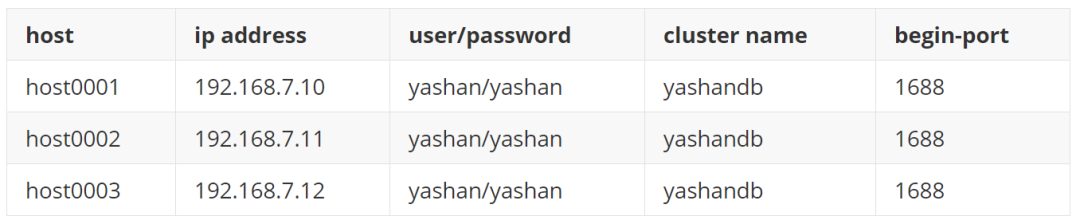
创建用户yashan
# useradd -d /home/yashan -m yashan# passwd yashan
创建安装目录
# cd# mkdir yashan_data# mkdir yashan_home# chmod -R 770 data/yashan/yashan_data# chmod -R 770 data/yashan/yashan_hom
下载安装包并解压
1.生成安装配置文件:hosts.toml和yashandb.toml
[yashan@ob1 install]$ yasboot package se gen --cluster yashandb -u yashan -p yashan --ip 192.168.7.10,192.168.7.11 --port 22 --install-path data1/yashan/yasdb_home --data-path data1/yashan/yasdb_data --begin-port 1688 --node 2hostid | group | node_type | node_name | listen_addr | replication_addr | data_path-------------------------------------------------------------------------------------------------------------host0001 | dbg1 | db | 1-1 | 192.168.7.10:1688 | 192.168.7.10:1689 | data1/yashan/yasdb_data----------+-------+-----------+-----------+-------------------+-------------------+--------------------------host0002 | dbg1 | db | 1-2 | 192.168.7.11:1688 | 192.168.7.11:1689 | data1/yashan/yasdb_data----------+-------+-----------+-----------+-------------------+-------------------+--------------------------Generate config success
[group.config]REDO_FILE_NUM = 10REDO_FILE_SIZE = "10G"REDO_FILE_PATH = '/data2/yashan/redo'[group.node.config]ARCHIVE_LOCAL_DEST = '/home/yashan/archive'
[yashan@ob1 install]$ yasboot package install -t hosts.toml -i yashandb-personal-23.1.1.100-linux-x86_64.tar.gzchecking install package...install version: yashandb 23.1.1.100host0001 100% [====================================================================] 3shost0002 100% [====================================================================] 3supdate host to yasom...
4.部署集群
[yashan@ob1 install]$ yasboot cluster deploy -t yashandb.tomltype | uuid | name | hostid | index | status | return_code | progress | cost------------------------------------------------------------------------------------------------------------task | e3205df3e98645ed | DeployYasdbCluster | - | yashandb | SUCCESS | 0 | 100 | 174------+------------------+--------------------+--------+----------+---------+-------------+----------+------task completed, status: SUCCESS
5.设置sys用户密码:设置为yashandb_123
[yashan@ob1 install]$ yasboot cluster password set --new-password yashandb_123 --cluster yashandbtype | uuid | name | hostid | index | status | return_code | progress | cost----------------------------------------------------------------------------------------------------------task | 4e11fb328e1695ac | YasdbPasswordSet | - | yashandb | SUCCESS | 0 | 100 | 3------+------------------+------------------+--------+----------+---------+-------------+----------+------task completed, status: SUCCESS
6.安装后检查
检查整个集群的状态:
[yashan@ob1 install]$ yasboot cluster status --cluster yashandb --detailhostid | node_type | nodeid | pid | instance_status | database_status | database_role | listen_address | data_path-------------------------------------------------------------------------------------------------------------------------------------------------host0001 | db | 1-1:1 | 69010 | open | normal | primary | 192.168.7.10:1688 | data1/yashan/yasdb_data/db-1-1----------+-----------+--------+-------+-----------------+-----------------+---------------+-------------------+---------------------------------host0002 | db | 1-2:2 | 86135 | open | normal | standby | 192.168.7.11:1688 | data1/yashan/yasdb_data/db-1-2----------+-----------+--------+-------+-----------------+-----------------+---------------+-------------------+---------------------------------
检查主备的链接状态:
SQL> select DEST_ID, CONNECTION, PEER_ADDR, STATUS, DATABASE_MODE from v$archive_dest_status;DEST_ID CONNECTION PEER_ADDR STATUS DATABASE_MODE------- ----------------- ---------------------------------------------------------------- ----------------- -----------------1 CONNECTED 192.168.7.11:1689 NORMAL OPEN1 row fetched.
SQL> EXEC DBMS_PARAM.OPTIMIZE(NULL, NULL, 90, 90);PL/SQL Succeed.
查看参数推荐报告
SQL> SELECT DBMS_PARAM.SHOW_RECOMMEND() FROM DUAL;DBMS_PARAM.SHOW_RECO----------------------------------------------------------------********** Recommended Settings For HEAP Table ***********+--------------------------------+-------------+-------------+---------+| name | current | recommend | restart |+--------------------------------+-------------+-------------+---------+| DATA_BUFFER_SIZE | 64M | 272785M | True || VM_BUFFER_SIZE | 32M | 34823M | True || WORK_AREA_STACK_SIZE | 1024K | 2M | True || WORK_AREA_POOL_SIZE | 16M | 128M | True || WORK_AREA_HEAP_SIZE | 512K | 512K | True || SHARE_POOL_SIZE | 256M | 34823M | True || LARGE_POOL_SIZE | 128M | 2048M | True || MAX_PARALLEL_WORKERS | 32 | 372 | True || SCOL_DATA_BUFFER_SIZE | 128M | 128M | True || SCOL_DATA_PRELOADERS | 2 | 2 | True || COLUMNAR_WORK_AREA_HEAP_SIZE | 64M | 32M | True || COLUMNAR_VM_BUFFER_SIZE | 2G | 128M | True || COLUMNAR_BULK_SIZE | 1024 | 1024 | True || COMPRESSION | LZ4 | LZ4 | True || PQ_POOL_SIZE | 128M | 128M | True || MAX_SESSIONS | 1024 | 1024 | True || MAX_WORKERS | 0 | 0 | True || TAB_QUEUE_WINDOW_SIZE | 4 | 4 | True || BLOOM_FILTER_FACTOR | .3 | .3 | True || DEGREE_OF_PARALLEL | 1 | 1 | True || MMS_DATA_LOADERS | 4 | 8 | True || CHECKPOINT_INTERVAL | 100000 | 256M | False || CHECKPOINT_TIMEOUT | 300 | 60 | False || REDOFILE_IO_MODE | DSYNC | DSYNC | True || DATAFILE_IO_MODE | DEFAULT | DEFAULT | True || COMMIT_LOGGING | IMMEDIATE | IMMEDIATE | False || RECOVERY_PARALLELISM | 16 | 64 | True || REDO_BUFFER_SIZE | 64M | 64M | True |+--------------------------------+-------------+-------------+---------+| total memory | 346760M |+--------------------------------+-------------+-------------+---------+Note: You can execute 'DBMS_PARAM.APPLY_RECOMMEND()' to apply the recommend parameters.After applying the parameters, you need to restart the database.1 row fetched.
将参数写入配置文件
SQL> EXEC DBMS_PARAM.APPLY_RECOMMEND();PL/SQL Succeed.
配置参数是实例级别,需要每个节点都执行该操作。
[yashan@ob1 install]$ yasboot election config set -k FailoverThreshold -v 5 --cluster yashandbgroup 1 execute Succeed[yashan@ob1 install]$ yasboot election enable on -c yashandbgroup 1 execute Succeed[yashan@ob1 install]$ yasboot election config show --cluster yashandbgroup 1Protection Mode: MAXIMUM PROTECTIONMembers:[1-1:1] - Primary database[1-2:2] - Physical standby databaseTransport Lag: 0 secondsApply Lag: 0 secondsApply Rate: 2.73 MByte/sProperties:FailoverThreshold = 5FailoverAutoReinstate = falseZeroDataLossMode = trueAutomatic Failover: Enabled in Zero Data Loss Mode
测试方案
主机创建一张表:create table ha_test(time_col timestamp),往该表插入一条数据。 获取本地时间戳,用本地时间戳update该表的数据,并提交。持续执行该操作。 在备机上查询该表的数据,通过执行查询该表的时间戳与查询到表中的数据的时间戳做差值,这个时间差就是主备同步的延迟。(表中只有一条数据,所以执行update和select操作的时间可以忽略不计)
测试步骤
首先准备TPC-C压力测试(如何使用TPC-C压力测试可以参考YashanDB的官网,有详细的介绍)。 TPC-C配置为300仓128并发,在该配置下可以达到百万级别tpmC的压力测试,在这种压力业务场景下执行测试验证。 分别在主机和备机上执行测试脚本(总共做100次测试)。 根据脚本统计的数据,计算主备业务的时间差。
#!/bin/bash#主机执行update业务操作# 修改100次for ((i=1; i<=100; i++))do# 获取当前时间并格式化为数据库可接受的格式current_time=$(date +'%Y-%m-%d %H:%M:%S.%3N')echo "Current time is: $current_time"# 修改表ha_test的数据yasql ha_test/123@192.168.7.10:1688 -c "UPDATE ha_test SET time_col='$current_time';"sleep 0.1done
#!/bin/bash# 备机执行查询操作while truedo# 获取当前时间current_time=$(date +'%Y-%m-%d %H:%M:%S.%3N')echo "Current time is: $current_time"#查询表ha_test的时间列数据yasql ha_test/123@192.168.7.11:1688 -c "select time_col from ha_test;"done
测试结果
测试时的redo刷盘速度(查询V$REDOSTAT获知):235MB/s 备机查询延迟的平均值:8ms
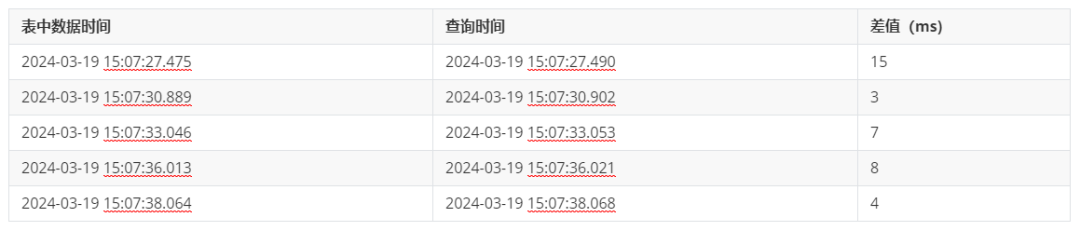
(点击查看视频教程)
测试步骤
继续构造压力测试场景(使用TPC-C的压力测试),执行10分钟左右的压力业务。 检测主机业务的中断时间和新主机成功执行业务的时间。 分别在主机和备机上执行检测脚本。 kill主机进程,使主机的业务中断。
#!/bin/bash# 无限循环while truedo# 获取当前时间并格式化为数据库可接受的格式current_time=$(date +'%Y-%m-%d %H:%M:%S.%3N')# 打印当前时间echo "Current time is: $current_time"# 执行写操作yasql ha_test/123@192.168.7.10:1688 -c "UPDATE ha_test SET time_col='$current_time';"done
测试结果
执行测试前集群的状态:
[yashan@ob1 install]$ yasboot cluster status --cluster yashandb --detailhostid | node_type | nodeid | pid | instance_status | database_status | database_role | listen_address | data_path-------------------------------------------------------------------------------------------------------------------------------------------------host0001 | db | 1-1:1 | 69010 | open | normal | primary | 192.168.7.10:1688 | data1/yashan/yasdb_data/db-1-1----------+-----------+--------+-------+-----------------+-----------------+---------------+-------------------+---------------------------------host0002 | db | 1-2:2 | 86135 | open | normal | standby | 192.168.7.11:1688 | data1/yashan/yasdb_data/db-1-2----------+-----------+--------+-------+-----------------+-----------------+---------------+-------------------+---------------------------------
[yashan@ob1 sync_test]$ yasboot cluster status --cluster yashandb --detailhostid | node_type | nodeid | pid | instance_status | database_status | database_role | listen_address | data_path-------------------------------------------------------------------------------------------------------------------------------------------------host0001 | db | 1-1:1 | off | - | - | - | 192.168.7.10:1688 | data1/yashan/yasdb_data/db-1-1----------+-----------+--------+-------+-----------------+-----------------+---------------+-------------------+---------------------------------host0002 | db | 1-2:2 | 86135 | open | normal | primary | 192.168.7.11:1688 | data1/yashan/yasdb_data/db-1-2----------+-----------+--------+-------+-----------------+-----------------+---------------+-------------------+---------------------------------
Current time is: 2024-03-19 15:45:38.464SQL> UPDATE ha_test SET time_col='2024-03-19 15:45:38.464';1 row affected.Current time is: 2024-03-19 15:45:38.476SQL> UPDATE ha_test SET time_col='2024-03-19 15:45:38.476';YAS-00406 connection is closed
Current time is: 2024-03-19 15:45:46.204SQL> UPDATE ha_test SET time_col='2024-03-19 15:45:46.204';YAS-06010 the database is not in readwrite modeCurrent time is: 2024-03-19 15:45:46.211SQL> UPDATE ha_test SET time_col='2024-03-19 15:45:46.211';1 row affected.
测试总结
心跳间隔配置:1s 检查超时时间配置:5s 当前的redo刷盘速度:237MB/s 业务中断时间:7.745s 故障转移时间:小于3s
[yashan@ob1 yasdb_home]$ yasboot election enable off -c yashandbgroup 1 execute Succeed[yashan@ob1 yasdb_home]$ yasboot election config show --cluster yashandbgroup 1Protection Mode: MAXIMUM PROTECTIONMembers:[1-2:2] - Primary database[1-1:1] - Physical standby databaseTransport Lag: 0 secondsApply Lag: 0 secondsApply Rate: 391.00 MByte/sProperties:FailoverThreshold = 5FailoverAutoReinstate = falseZeroDataLossMode = trueAutomatic Failover: DISABLED[yashan@ob1 yasdb_home]$ yasboot cluster status --cluster yashandb --detailhostid | node_type | nodeid | pid | instance_status | database_status | database_role | listen_address | data_path-------------------------------------------------------------------------------------------------------------------------------------------------host0001 | db | 1-1:1 | 14818 | open | normal | primary | 192.168.7.10:1688 | data1/yashan/yasdb_data/db-1-1----------+-----------+--------+-------+-----------------+-----------------+---------------+-------------------+---------------------------------host0002 | db | 1-2:2 | 86135 | open | normal | standby | 192.168.7.11:1688 | data1/yashan/yasdb_data/db-1-2----------+-----------+--------+-------+-----------------+-----------------+---------------+-------------------+---------------------------------
[yashan@ob1 install]$ yasboot config node gen -c yashandb -u yashan -p yashan --ip 192.168.7.12 --port 22 --data-path data1/yashan/yasdb_data --install-path data1/yashan/yasdb_home -g 1 --node 1hostid | group | node_type | node_name | listen_addr | replication_addr | data_path-------------------------------------------------------------------------------------------------------------host0003 | dbg1 | db | 1-3 | 192.168.7.12:1688 | 192.168.7.12:1689 | data1/yashan/yasdb_data----------+-------+-----------+-----------+-------------------+-------------------+--------------------------Generate config success
[yashan@ob1 install]$ yasboot host add -c yashandb -i yashandb-personal-23.1.1.100-linux-x86_64.tar.gz -t hosts_add.tomltype | uuid | name | hostid | index | status | return_code | progress | cost-------------------------------------------------------------------------------------------------task | 63112e698b5689a0 | HostAdd | - | yashandb | SUCCESS | 0 | 100 | 8------+------------------+---------+--------+----------+---------+-------------+----------+------task completed, status: SUCCESS
4.增加备机:任务显示成功并不代表着扩容任务成功,因为仍有后台任务在完成数据的同步等操作
[yashan@ob1 install]$ yasboot node add -c yashandb -t yashandb_add.tomltype | uuid | name | hostid | index | status | return_code | progress | cost-------------------------------------------------------------------------------------------------task | 4618495ddc9c012c | NodeAdd | - | yashandb | SUCCESS | 0 | 100 | 10------+------------------+---------+--------+----------+---------+-------------+----------+------task completed, status: SUCCESS
[yashan@ob1 install]$ yasboot task list -c yashandb --search type=NodeAdduuid | name | type | index | hostid | status | ret_code | progress | created_at | cost-------------------------------------------------------------------------------------------------------------------------------------------------ecff3c2c4b452ce1 | AddDBAlterHA | NodeAdd | yashandb | - | SUCCESS | 0 | 100 | 2024-03-19 16:04:36 | 1------------------+-----------------------------+---------+--------------+----------+---------+----------+----------+---------------------+------8d8146ab5fff3423 | BuildDatabaseToMultiAddress | NodeAdd | yashandb.1-1 | host0001 | SUCCESS | 0 | 100 | 2024-03-19 16:04:36 | 760------------------+-----------------------------+---------+--------------+----------+---------+----------+----------+---------------------+------4618495ddc9c012c | NodeAdd | NodeAdd | yashandb | - | SUCCESS | 0 | 100 | 2024-03-19 16:04:36 | 10------------------+-----------------------------+---------+--------------+----------+---------+----------+----------+---------------------+------
[yashan@ob1 install]$ yasboot cluster status --cluster yashandb --detailhostid | node_type | nodeid | pid | instance_status | database_status | database_role | listen_address | data_path-------------------------------------------------------------------------------------------------------------------------------------------------host0001 | db | 1-1:1 | 14818 | open | normal | primary | 192.168.7.10:1688 | data1/yashan/yasdb_data/db-1-1----------+-----------+--------+-------+-----------------+-----------------+---------------+-------------------+---------------------------------host0002 | db | 1-2:2 | 86135 | open | normal | standby | 192.168.7.11:1688 | data1/yashan/yasdb_data/db-1-2----------+-----------+--------+-------+-----------------+-----------------+---------------+-------------------+---------------------------------host0003 | db | 1-3:3 | 14944 | open | normal | standby | 192.168.7.12:1688 | data1/yashan/yasdb_data/db-1-3----------+-----------+--------+-------+-----------------+-----------------+---------------+-------------------+---------------------------------
主备连接状态检查
SQL> select DEST_ID, CONNECTION, PEER_ADDR, STATUS, DATABASE_MODE from v$archive_dest_status;DEST_ID CONNECTION PEER_ADDR STATUS DATABASE_MODE------- ----------------- ---------------------------------------------------------------- ----------------- -----------------1 CONNECTED 192.168.7.11:1689 NORMAL OPEN2 CONNECTED 192.168.7.12:1689 NORMAL OPEN2 rows fetched.
[yashan@ob1 install]$ yasboot cluster config set -c yashandb -k HA_ELECTION_ENABLED -v truetype | uuid | name | hostid | index | status | return_code | progress | cost--------------------------------------------------------------------------------------------------------------task | cc2a1364200f86e8 | YasdbConfigSetParent | - | yashandb | SUCCESS | 0 | 100 | 1------+------------------+----------------------+--------+----------+---------+-------------+----------+------task completed, status: SUCCESS
测试步骤
测试结果
[yashan@ob1 install]$ yasboot cluster status --cluster yashandb --detailhostid | node_type | nodeid | pid | instance_status | database_status | database_role | listen_address | data_path-------------------------------------------------------------------------------------------------------------------------------------------------host0001 | db | 1-1:1 | 14818 | open | normal | primary | 192.168.7.10:1688 | /data1/yashan/yasdb_data/db-1-1----------+-----------+--------+-------+-----------------+-----------------+---------------+-------------------+---------------------------------host0002 | db | 1-2:2 | 86135 | open | normal | standby | 192.168.7.11:1688 | /data1/yashan/yasdb_data/db-1-2----------+-----------+--------+-------+-----------------+-----------------+---------------+-------------------+---------------------------------host0003 | db | 1-3:3 | 14944 | open | normal | standby | 192.168.7.12:1688 | /data1/yashan/yasdb_data/db-1-3----------+-----------+--------+-------+-----------------+-----------------+---------------+-------------------+---------------------------------
[yashan@ob1 install]$ yasboot cluster status --cluster yashandb --detailhostid | node_type | nodeid | pid | instance_status | database_status | database_role | listen_address | data_path-------------------------------------------------------------------------------------------------------------------------------------------------host0001 | db | 1-1:1 | off | - | - | - | 192.168.7.10:1688 | /data1/yashan/yasdb_data/db-1-1----------+-----------+--------+-------+-----------------+-----------------+---------------+-------------------+---------------------------------host0002 | db | 1-2:2 | 86135 | open | normal | primary | 192.168.7.11:1688 | /data1/yashan/yasdb_data/db-1-2----------+-----------+--------+-------+-----------------+-----------------+---------------+-------------------+---------------------------------host0003 | db | 1-3:3 | 14944 | open | normal | standby | 192.168.7.12:1688 | /data1/yashan/yasdb_data/db-1-3----------+-----------+--------+-------+-----------------+-----------------+---------------+-------------------+---------------------------------
Current time is: 2024-03-19 16:31:45.309SQL> UPDATE ha_test SET time_col='2024-03-19 16:31:45.309';1 row affected.Current time is: 2024-03-19 16:31:45.322SQL> UPDATE ha_test SET time_col='2024-03-19 16:31:45.322';YAS-00406 connection is closed
Current time is: 2024-03-19 16:31:53.250SQL> UPDATE ha_test SET time_col='2024-03-19 16:31:53.250';YAS-06010 the database is not in readwrite modeCurrent time is: 2024-03-19 16:31:53.257SQL> UPDATE ha_test SET time_col='2024-03-19 16:31:53.257';1 row affected.
测试总结
心跳间隔配置:1s 检查超时时间配置:5s 当前的redo刷盘速度:237MB/s 业务中断时间:7.935s 故障转移时间:小于3s



文章转载自YashanDB,如果涉嫌侵权,请发送邮件至:contact@modb.pro进行举报,并提供相关证据,一经查实,墨天轮将立刻删除相关内容。
