




背景介绍
SELECT product_id, purchase_dateFROM purchasesWHERE product_id IN (1, 2, 3, ..., 100000); -- 假设有10万个产品ID
MySQL优化
GaussDB(for MySQL)
的Big IN优化
column IN (const1, const2, ....)
column IN (SELECT ... FROM temporary_table)
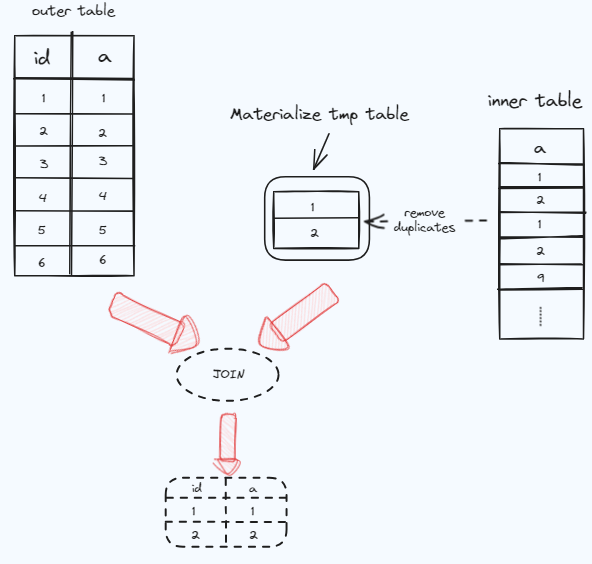
Materialization-scan :表示从物化表到外表,会对物化表进行全表扫描。 Materialization-lookup :表示从外表到物化表,在物化表中查找数据时候可以使用主建进行查找。
执行子查询,走索引auto_distinct_key,同时会对结果进行去重; 将上一步的结果保存在临时表template1里; 从临时表中取一行数据,到外表中查找满足联接条件的行; 重复步骤3,直到遍历临时表结束。
先执行子查询; 将上一步得到的结果保存到临时表中; 从外表中取出一行数据,到物化临时表中去查找满足联接条件的行,走物化表的主键,每次扫描1行; 重复3,直到遍历整个外表。
使用方法
create table t1(id int, a int, key idx1(a));
select * from t1 where a in (1,2,3,4,5);
> set rds_in_predicate_conversion_threshold = 0;> set range_optimizer_max_mem_size=1;> explain select * from t1 where a in (1,2,3,4,5);结果如下:+----+-------------+-------+------------+------+---------------+------+---------+------+------+----------+-------------+| id | select_type | table | partitions | type | possible_keys | key | key_len | ref | rows | filtered | Extra |+----+-------------+-------+------------+------+---------------+------+---------+------+------+----------+-------------+| 1 | SIMPLE | t3 | NULL | ALL | key1 | NULL | NULL | NULL | 3 | 50.00 | Using where |+----+-------------+-------+------------+------+---------------+------+---------+------+------+----------+-------------+1 row in set, 2 warnings (0.00 sec)show warnings;+---------+------+---------------------------------------------------------------------------------------------------------------------------+| Level | Code | Message |+---------+------+---------------------------------------------------------------------------------------------------------------------------+| Warning | 3170 | Memory capacity of 1 bytes for 'range_optimizer_max_mem_size' exceeded. Range optimization was not done for this query. || Note | 1003 | * select#1 */ select `test`.`t3`.`id` AS `id`,`test`.`t3`.`a` AS `a` from `test`.`t3` where (`test`.`t3`.`a` in (3,4,5)) |+---------+------+---------------------------------------------------------------------------------------------------------------------------+2 rows in set (0.00 sec)
> set rds_in_predicate_conversion_threshold = 3;> explain format=tree select * from t1 where a in (1,2,3,4,5);+----------------------------------------------------------------------------------------------------------------------------------------------------------------------------------------------------------------------------------------------------------------+| EXPLAIN |+----------------------------------------------------------------------------------------------------------------------------------------------------------------------------------------------------------------------------------------------------------------+| -> Nested loop inner join (cost=0.70 rows=1)-> Filter: (t1.a is not null) (cost=0.35 rows=1)-> Table scan on t1 (cost=0.35 rows=1)-> Single-row index lookup on <in_predicate_2> using <auto_distinct_key> (a=t1.a) (cost=0.35 rows=1)|+----------------------------------------------------------------------------------------------------------------------------------------------------------------------------------------------------------------------------------------------------------------+1 row in set (0.00 sec)
使用限制
SELECT INSERT ... SELECT REPLACE ... SELECT 支持视图 PREPARED STMT
不支持无法使用索引的场景 只支持常量IN LIST(包括NOW(), ? 等不涉及表查询的语句) 不支持STORED PROCEDURE/FUNCTION/TRIGGER 不支持NOT IN
典型场景测试对比
CREATE TABLE `sbtest1` (`id` int NOT NULL AUTO_INCREMENT,`k` int NOT NULL DEFAULT '0',`c` char(120) NOT NULL DEFAULT '',`pad` char(60) NOT NULL DEFAULT '',PRIMARY KEY (`id`),KEY `k_1` (`k`)) ENGINE=InnoDB;表的数据量为1000w。> select count(*) from sbtest1;+----------+| count(*) |+----------+| 10000000 |+----------+
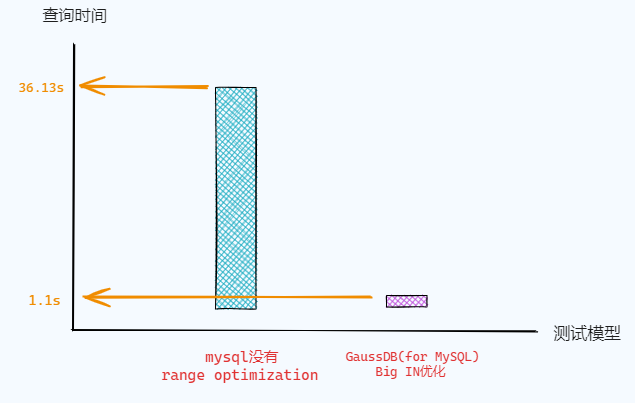
select count(*) from sbtest1 where k in (2708275,5580784,7626186,8747250,228703,4589267,5938459,6982345,2665948,4830545,4929382,8723757,354179,1903875,5111120,5471341,7098051,3113388,2584956,6550102,2842606,2744112,7077924,4580644,5515358,1787655,6391388,6044316,2658197,5628504,413887,6058866,3321587,1430333,445303,7373496,9133196,6760595,4735642,4756387,9845147,9362192,7271805,4351748,6625915,3813276,4236692,8308973,4407131,9481423,3301846,432577,810938,3830320,6120078,6765157,6456566,6649509,1123840,2906490,9965014,3725748, ... );
性能对比如下图所示:

云数据库新用户
扫码领取免费试用


 戳“阅读原文”,了解更多
文章转载自GaussDB数据库,如果涉嫌侵权,请发送邮件至:contact@modb.pro进行举报,并提供相关证据,一经查实,墨天轮将立刻删除相关内容。
