



一、南大通用 GBase 8s数据库简介
GBase 8s 是一款支持共享存储集群、两地三中心部署的、成熟稳定的、具有百TB数据支撑能力的国产事务型安全数据库。适用于金电信等行业核心交易系统和对信息安全性有较高要求的信息系统,能够在80%以上场景中替换 Oracle 及 OracIe RAC 集群。
二、GBase 8s 数据库架构
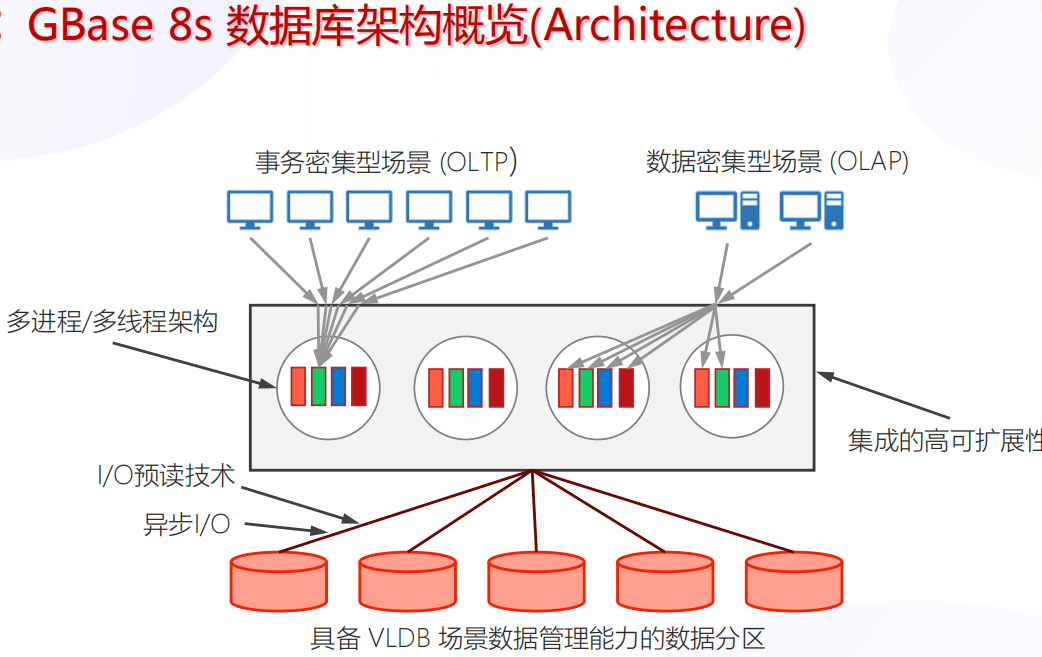
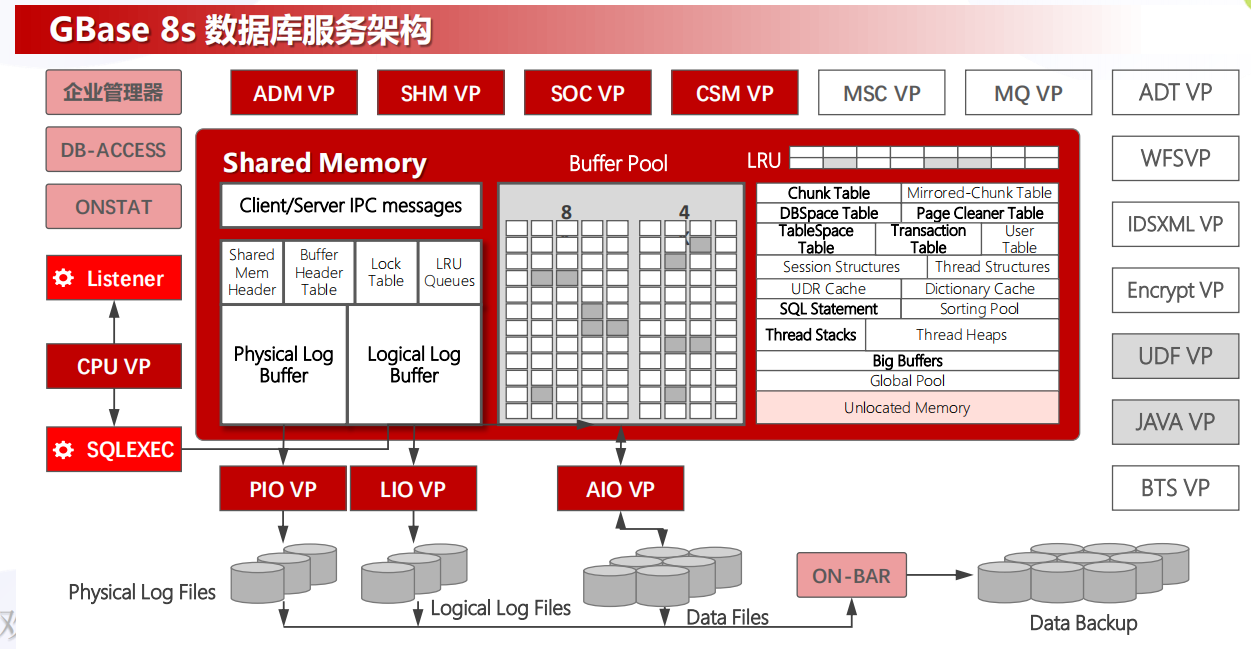
三、GBase8s 安装
1、环境说明
| 主机名 | ip地址 | OS版本 | 内存、CPU |
|---|---|---|---|
| node1 | 192.168.100.10 | Centos7 | 4G 、 1个双核 |
2、安装准备
2.1 下载GBase8s安装介质
下载地址:https://www.gbase.cn/download/gbase-8s-1?category=INSTALL_PACKAGE
软件名称:GBase8sV8.8_TL_3.5.1_x86_64.7z
软件上传位置:/opt
2.2 系统要求
2.2.1 硬件要求

2.2.2 系统要求
GBase 8s 产品支持多种处理器平台,除国际主流的 x86_64 处理器(包括 Intel 和 AMD)
外,全面支持飞腾、鲲鹏、龙芯、兆芯、海光、申威等国产处理器。
GBase 8s 产品可以运行于多款操作系统,包括:RHEL和CentOS等Linux操作系统、统信UOS、麒麟、欧拉等国产操作系统。
2.3 设置各节点软硬件环境
2.3.1 创建 gbasedbt 组和用户
[root@node1 ~]# groupadd gbasedbt
[root@node1 ~]# useradd -g gbasedbt gbasedbt
--修改密码
[root@node1 ~]# passwd gbasedbt
2.3.2 创建GBase 8s数据库安装目录
[root@node1 /]# mkdir -p /apps
[root@node1 /]# chown gbasedbt:gbasedbt /apps
2.3.3 安装包上传并解压
--安装7z文件解压工具
[root@node1 /]# yum -y install p7zip
--安装包上传到/opt目录
[root@node1 /]# cd /opt
--解压8s安装包
[root@node1 opt]# 7za x GBase8sV8.8_TL_3.5.1_x86_64.7z
[root@node1 opt]# ls
clientsdk_3.5.1_x86_64.tar  containerd  GBase8sV8.8_TL_3.5.1_x86_64.7z  GBase8sV8.8_TL_3.5.1_x86_64.tar  GBaseInit_gbasedbt.sh
[root@node1 opt]# tar -xvf GBase8sV8.8_TL_3.5.1_x86_64.tar
ids_install
onsecurity
doc/
doc/ids_machine_notes_12.10.txt
doc/ids_unix_relnotes_12.10.html
ids.properties
.gbase.properties
3、开始安装
3.1 安装GBase 8s软件及其所有功能部件
3.1.1 root用户执行安装脚本 ids_install
[root@node1 opt]# cd /opt
[root@node1 opt]# sh ids_install
Preparing to install...
Extracting the JRE from the installer archive...
Unpacking the JRE...
Extracting the installation resources from the installer archive...
Configuring the installer for this system's environment...

Launching installer...

===============================================================================
GBase Software Bundle                            (created with InstallAnywhere)
-------------------------------------------------------------------------------

Preparing CONSOLE Mode Installation...
===============================================================================
Getting Started
---------------

This application  will guide you through the installation of GBase Software
Bundle.
Copyright General Data Corporation 2014, 2024. All rights reserved.

1. Release Notes
The Release Notes can be found in /opt/doc/ids_unix_relnotes_12.10.html.
2. Launch Information Center
Access the GBase Information Center at http://www.gbase.cn.
To Begin Installation, respond to each prompt to proceed to the next step in
the installation.
If you want to change something on a previous step, type 'back'.
You may cancel this installation at any time by typing 'quit'.


PRESS <ENTER> TO CONTINUE:
--下面是License条款
===============================================================================
License Agreement
-----------------

Installation and Use of GBase Software Bundle Requires Acceptance of the
Following License Agreement:

Thank you for choosing GBase product!

Please read carefully the following licencing agreement before installing any
product: TIANJIN GENERAL DATA TECHNOLOGY CO. LTD. LICENSE AGREEMENT
<略>
All trademarks and registered trademarks mentioned herein are the  property of
their respective owners.

DO YOU ACCEPT THE TERMS OF THIS LICENSE AGREEMENT? (Y/N): Y
3.1.2 指定安装路径
===============================================================================
Installation Location
---------------------

Choose location for software installation.

  Default Install Folder: /opt/GBASE/gbase

ENTER AN ABSOLUTE PATH, OR PRESS <ENTER> TO ACCEPT THE DEFAULT
      : /apps

INSTALL FOLDER IS: /apps
   IS THIS CORRECT? (Y/N): Y
3.1.3 选择安装类型
===============================================================================

Installation or Distribution
----------------------------

Select the installation type.

Typical: Install the database server with all features and a database server
that
is configured with default values. Includes:
** Client Software Development Kit (CSDK)
** Java Database Connectivity (JDBC)
Minimum disk space required: 700-800MB

Custom: Install the database server with specific features and software that
you need.
Optionally install a configured database server instance.
Minimum disk space required: 75 MB (without a server instance)

  ->1- Typical installation
    2- Custom installation
    3- Extract the product files (-DLEGACY option)
    4- Create a RPM package for redistribution

ENTER THE NUMBER FOR YOUR CHOICE, OR PRESS <ENTER> TO ACCEPT THE DEFAULT:: 1
3.1.4 创建实例
此处选择不创建实例,后面用脚本创建。
===============================================================================
Server Instance Creation
------------------------

Create a server instance?

  ->1- Yes - create an instance
    2- No - do not create an instance

ENTER THE NUMBER FOR YOUR CHOICE, OR PRESS <ENTER> TO ACCEPT THE DEFAULT:: 2
3.1.5 安装summary
===============================================================================
Installation Summary
--------------------

Please review the following before continuing:

Product Name:
    GBase Software Bundle

Install Folder:
    /apps

Product Features:
    GBase database server,
    Base Server,
    Extensions and tools,
    J/Foundation,
    Database extensions,
    Conversion and reversion support,
    XML publishing,
    Demonstration database scripts,
    Enterprise Replication,
    Data loading utilities,
    onunload and onload utilities,
    dbload utility,
    Backup and Restore,
    archecker utility,
    ON-Bar utility,
    Interface to Tivoli Storage Manager,
    Administrative utilities,
    Performance monitoring utilities,
    Miscellaneous monitoring utilities,
    Auditing utilities,
    Database import and export utilities,
    JSON Client Support,
    Global Language Support (GLS),
    Chinese

Disk Space Information (for Installation Target):
    Required:  578,872,959 Bytes
    Available: 321,931,476,992 Bytes

PRESS <ENTER> TO CONTINUE:
3.1.6 安装完成
===============================================================================
Ready To Install
----------------

InstallAnywhere is now ready to install GBase Software Bundle onto your system
at the following location:

   /apps

PRESS <ENTER> TO INSTALL:

===============================================================================
Installing...
-------------

 [==================|==================|==================|==================]
 [------------------|------------------|------------------|------------------]

===============================================================================
Installation Complete
---------------------

Congratulations! GBase Software Bundle installation is complete.

Product install status:
GBase: Successful
GBase Connect: Successful

GBase 8s V8.8


For more information about using GBase products, see the GBase Information
Center at http://www.gbase.cn.

PRESS <ENTER> TO EXIT THE INSTALLER:
3.2 使用脚本自动创建和初始化实例
使用 gbasedbt 用户执行 GBaseInit_gbasedbt.sh 脚本,自动创建并初始化实例。
--root用户
[root@node1 opt]# cp /opt/GBaseInit_gbasedbt.sh /apps
[root@node1 opt]# chown gbasedbt:gbasedbt /apps/GBaseInit_gbasedbt.sh
--切换到gbasedbt用户
[root@node1 opt]# su - gbasedbt
[gbasedbt@node1 ~]$ cd /apps
[gbasedbt@node1 opt]$ sh GBaseInit_gbasedbt.sh

Initializing Program...OK
ENTER THE INSTANCE INFORMATION or PRESS <ENTER> TO ACCEPT THE DEFAULT.
--创建实例名称,默认为 gbaseserver
ENTER GBASE INSTANCE NAME (GBASEDBTSERVER) [Default:gbaseserver]:
--选择安装目录,默认为/apps
SEARCHING FOR GBASE INSTALL FOLDER, PLEASE WAIT FOR SECONDS...
GBASE INSTALL FOLDER LIST:
 1) /apps
CHOOSE GBASE INSTALL FOLDER(GBASEDBTDIR) [Default:/apps]:
--选择本机ip地址
CHOOSE SERVICE IP ADDRESS FROM THE LIST:
 1) 192.168.100.10
 2) 192.168.31.149
 3) 127.0.0.1
 4) 192.168.122.1
ENTER THE NUMBER FOR YOUR CHOICE [Default:192.168.100.10]:
--指定数据库端口号
SPECIFY THE PORT NUMBER FOR GBASE [Default:9088]:
--初始化类型,自定义
INITIALIZE TYPE:
 1) TYPICAL -- Initialize the instance with all features configured with default values.
 2) CUSTOM  -- Initialize the instance with specific features that you need.
ENTER THE NUMBER FOR YOUR CHOICE [Default:1]: 2
--选择字符集
GBASE CHARACTER SET LIST:
 1) en_US.8859-1
 2) zh_CN.GB18030-2000
 3) zh_CN.utf8
ENTER THE NUMBER FOR YOUR CHOICE [Default:1]: 2
--输入数据库空间存储路径
ENTER THE DATA SPACE PATH [Default:/apps/gbaseserver_dbs]:
--设置逻辑日志空间大小
ENTER THE LOGICAL LOG DBSPACE SIZE(MB) [Default:10000]:
--设置物理日志空间大小
ENTER THE PHYSICAL LOG DBSPACE SIZE(MB) [Default:10000]:
--设置智能大对象空间大小
ENTER THE SMART LOB DBSPACE SIZE(MB) [Default:2030]:
--设置临时数据空间大小
ENTER THE TEMPORARY DBSPACE SIZE(MB) [Default:2030]:

ENTER "Y" TO START DATABASE ADVANCED SETTINGS, OR ENTER "N" TO ACCEPT DEFAULT VALUES: [Default:N]: Y

ENTER THE NUMBER OF DATA DBSPACES [Default:1]:

ENTER THE NUMBER OF TEMP DBSPACES [Default:1]:

Enter "Y" TO ENABLE ENVIRONMENT GL_USEGLU, OR ENTER "N" TO DISABLE: [Default:N]:

INSTANCE SUMMARY:
  Instance name:               gbaseserver
  GBase install directory:     /apps
  IP address & port:           192.168.100.10:9088
  Character set:               zh_CN.GB18030-2000
  Logical log space size:      10000 MB
  Physical log space size:     10000 MB
  Smart LOB space size:        2030 MB
  Temp DBSpace size:           2030 MB
  Data path:                   /apps/gbaseserver_dbs
  Data path free size:         306473 MB
  The number of data DBSpace:  1
  The number of temp DBSpace:  1
  Environment GL_USEGLU:       0

Enter "Y" to Start database initializing, or Enter "N" to Edit Again: Y

Touching Chunks...OK
Create sqlhosts File:  /apps/etc/sqlhosts.gbaseserver ...OK
Setting Parameters in /apps/etc/onconfig.gbaseserver :
ROOTPATH.ROOTSIZE.DBSERVERNAME.FULL_DISK_INIT.SBSPACENAME.SYSSBSPACENAME.DBSPACETEMP.LOGFILES.MULTIPROCESSOR.VPCLASS.NETTYPE.CLEANERS.DEF_TABLE_LOCKMODE.DIRECT_IO.LOCKS.TAPEDEV.LTAPEDEV.CKPTINTVL.DS_MAX_QUERIES.DS_TOTAL_MEMORY.DS_NONPDQ_QUERY_MEM.PHYSBUFF.LOGBUFF.AUTO_TUNE.MSGPATH.SERVERNUM.ALLOW_NEWLINE.TEMPTAB_NOLOG.DUMPSHMEM.USEOSTIME.STACKSIZE.ON_RECVRY_THREADS.OFF_RECVRY_THREADS.USELASTCOMMITTED.SHMVIRTSIZE.SHMADD.GBASEDBTCONTIME.BUFFERPOOL2K.BUFFERPOOL16K...AUTO_CKPTS.OK
Initializing Root DBSpace & Share Memory...OK
Creating system database.......OK
Creating logical log Dbspace...OK
Creating physical log Dbspace...OK
Creating smart LOB Dbspace...OK
Creating temp Dbspace.1...OK
Creating data Dbspace.1...OK
Setting dbscheduler...OK
Moving physical log...OK
Adding 40 logical logs: 1.2.3.4.5.6.7.8.9.10.11.12.13.14.15.16.17.18.19.20.21.22.23.24.25.26.27.28.29.30.31.32.33.34.35.36.37.38.39.40...OK
Setting data chunks extendable...OK
Cleaning logical logs in rootdbs...Your evaluation license will expire on 2025-05-10 00:00:00
.Your evaluation license will expire on 2025-05-10 00:00:00
.Your evaluation license will expire on 2025-05-10 00:00:00
.Your evaluation license will expire on 2025-05-10 00:00:00
...OK
Database restarting.......Your evaluation license will expire on 2025-05-10 00:00:00
OK
Creating database: gbasedb...OK

Now you can use this URL to connect to gbasedb:
jdbc:gbasedbt-sqli://192.168.100.10:9088/gbasedb:GBASEDBTSERVER=gbaseserver;DB_LOCALE=zh_CN.GB18030-2000;CLIENT_LOCALE=zh_CN.GB18030-2000;NEWCODESET=GB18030,GB18030-2000,5488;

Version:
Your evaluation license will expire on 2025-05-10 00:00:00
On-Line -- Up 00:00:14 -- 2173036 Kbytes
Build Number:           3.5.1_3_6a4e30

GBase Initializing Finished!

Initialize log file : ./InitGBaseDB_202405102231.log

Press <ENTER> to Exit and Logout...
四、使用gbase 8s数据库
1、停止数据库
以 gbasedbt 用户身份登录后,输入 onmode -ky,可停止数据库服务
[gbasedbt@node1 ~]$  onmode -ky
Your evaluation license will expire on 2025-05-10 00:00:00
2、启动数据库
以 gbasedbt 用户身份登录后,输入 oninit -vy,可启动数据库服务
[gbasedbt@node1 ~]$ oninit -vy
Your evaluation license will expire on 2025-05-10 00:00:00
Reading configuration file '/apps/etc/onconfig.gbaseserver'...succeeded
Creating /GBASEDBTTMP/.infxdirs...succeeded
Allocating and attaching to shared memory...succeeded
Creating resident pool 76314 kbytes...succeeded
Creating infos file "/apps/etc/.infos.gbaseserver"...succeeded
Linking conf file "/apps/etc/.conf.gbaseserver"...succeeded
Initializing rhead structure...rhlock_t 65536 (2048K)... rlock_t (66406K)... Writing to infos file...succeeded
Initialization of Encryption...succeeded
Initializing ASF...succeeded
Initializing Dictionary Cache and SPL Routine Cache...succeeded
Bringing up ADM VP...succeeded
Creating VP classes...succeeded
Forking main_loop thread...succeeded
Initializing DR structures...succeeded
Forking 1 'soctcp' listener threads...succeeded
Starting tracing...succeeded
Initializing 32 flushers...succeeded
Initializing SDS Server network connections...succeeded
Initializing log/checkpoint information...succeeded
Initializing dbspaces...succeeded
Opening primary chunks...succeeded
Validating chunks...succeeded
Initialize Async Log Flusher...succeeded
Starting B-tree Scanner...succeeded
Init ReadAhead Daemon...succeeded
Init DB Util Daemon...succeeded
Initializing DBSPACETEMP list...succeeded
Init Auto Tuning Daemon...succeeded
Checking database partition index...succeeded
Initializing dataskip structure...succeeded
Checking for temporary tables to drop...succeeded
Updating Global Row Counter...succeeded
Forking onmode_mon thread...succeeded
Creating periodic thread...succeeded
Creating periodic thread...succeeded
Starting scheduling system...succeeded
Verbose output complete: mode = 5
3、检查数据库服务进程
[gbasedbt@node1 ~]$ ps -ef|grep oninit
gbasedbt  10470      1  1 23:21 ?        00:00:01 oninit -vy
root      10481  10470  0 23:21 ?        00:00:00 oninit -vy
root      10482  10481  0 23:21 ?        00:00:00 oninit -vy
root      10484  10481  0 23:21 ?        00:00:00 oninit -vy
root      10486  10481  0 23:21 ?        00:00:00 oninit -vy
root      10488  10481  0 23:21 ?        00:00:00 oninit -vy
root      10490  10481  0 23:21 ?        00:00:00 oninit -vy
gbasedbt  10491  10481  0 23:21 ?        00:00:00 oninit -vy
root      10493  10481  0 23:21 ?        00:00:00 oninit -vy
root      10495  10481  0 23:21 ?        00:00:00 oninit -vy
root      10496  10481  0 23:21 ?        00:00:00 oninit -vy
root      10497  10481  0 23:21 ?        00:00:00 oninit -vy
root      10498  10481  0 23:21 ?        00:00:00 oninit -vy
root      10499  10481  0 23:21 ?        00:00:00 oninit -vy
gbasedbt  10627  10251  0 23:24 pts/1    00:00:00 grep --color=auto oninit
4、登录数据库
以 gbasedbt 用户身份登录,输入 dbaccess - - 命令进入数据库命令行模式。
[gbasedbt@node1 ~]$ dbaccess - -
Your evaluation license will expire on 2025-05-10 00:00:00
>
5、创建数据库
[gbasedbt@node1 ~]$ dbaccess - -
Your evaluation license will expire on 2025-05-10 00:00:00
> create database testdb;

Database created.

>
五、GBase8s 卸载
需要先停止数据库服务,root用户进入安装目录下的 uninstall/uninstall_ids,执行该目录下的 uninstallids 命令进行卸载。
卸载程序开始后,选择 2 并回车,删除所有相关联的数据库文件,示例如下:
[root@node1 ~]# cd /apps/uninstall/uninstall_ids/
[root@node1 uninstall_ids]# ./uninstallids
[root@node1 uninstall_ids]#  ./uninstallids
===============================================================================
GBase Software Bundle                            (created with InstallAnywhere)
-------------------------------------------------------------------------------

Preparing CONSOLE Mode Uninstallation...


===============================================================================
Uninstall GBase Software Bundle
-------------------------------

About to uninstall GBase Software Bundle.

In this uninstall process, all GBase Software Bundle products in /apps will be
uninstalled.
It is recommended that you first shutdown all database server instances related
to this installation prior to uninstalling the product.

PRESS <ENTER> TO CONTINUE:


===============================================================================
Server Uninstall Options
------------------------

Server action:

Important: Choosing to remove all databases will remove all database chunks,
environment files, registry entries, and message log files for all database
server instances associated with this installation.

  ->1- Retains all databases, but removes all server binaries
    2- Removes server binaries and all databases associated with them

ENTER THE NUMBER FOR YOUR CHOICE, OR PRESS <ENTER> TO ACCEPT THE DEFAULT:: 2


===============================================================================
Uninstalling...
---------------


...*
*
*************************
*************************
*************************
************************
...*
*
*************************
*************************
*************************
************************
...*
*
*************************
*************************
*************************
************************
...*
*
*************************
*************************
*************************
************************
...*
*
*************************
*************************
*************************
************************
...*
*
*************************
*************************
*************************
*************************


===============================================================================
Uninstall Complete
------------------

Uninstall is complete for GBase Software Bundle.

Product uninstall status:
GBase: Successful
六、总结
安装过程还是挺容易的~~~
最后修改时间:2024-05-11 00:04:50
「喜欢这篇文章,您的关注和赞赏是给作者最好的鼓励」
关注作者
【版权声明】本文为墨天轮用户原创内容,转载时必须标注文章的来源(墨天轮),文章链接,文章作者等基本信息,否则作者和墨天轮有权追究责任。如果您发现墨天轮中有涉嫌抄袭或者侵权的内容,欢迎发送邮件至:contact@modb.pro进行举报,并提供相关证据,一经查实,墨天轮将立刻删除相关内容。
